
Tattoo booking software for artists and studios
Tattoo scheduling software for consults and sessions: clients book from one link and can prepay the full session price through Stripe, while each artist keeps their own calendar.
Plans
- FreeUp to 150 bookings a month, not a trial
- $0/mo
- Business ProPer business: unlimited bookings, 50 SMS a month
- $29.99/mo
- Unlimited staff and locations on both plans
- 30-day money-back guarantee on Business Pro
- 24/7 support
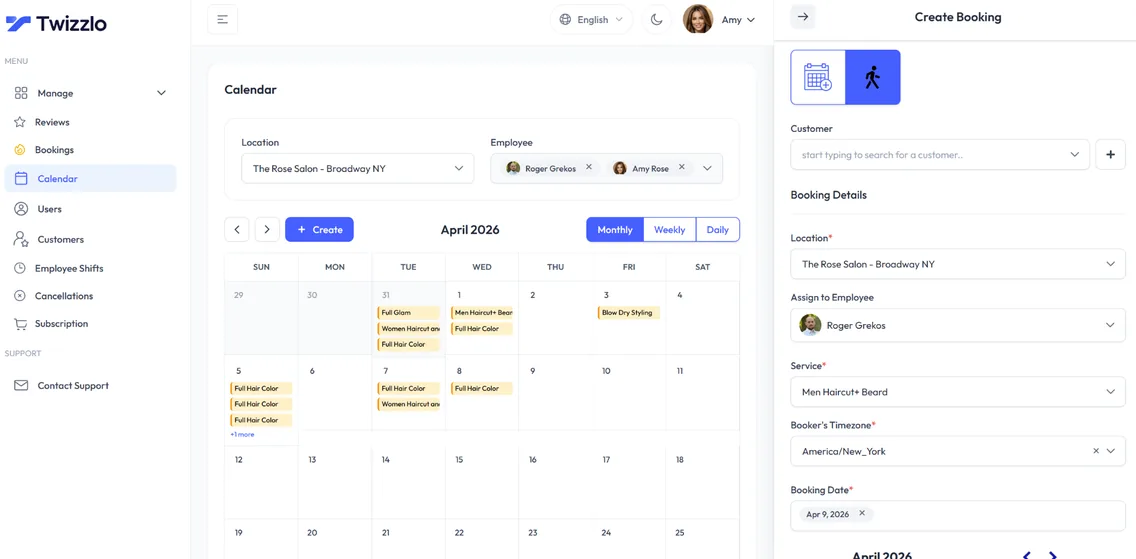
Twizzlo is tattoo booking software for studios and independent artists: consults and sessions booked from one link, a calendar for every artist, and prepaid bookings that take the full session price through Stripe. Buffer time between sessions gives artists room to clean down and set up, and confirmations and reminders go out by email, and by SMS on Business Pro. Clients book and reschedule themselves from any phone, so your DMs go back to talking about the art.
Twizzlo books the appointment and takes payment up front when you want it; keep consent and design sign-off in your own process. Pricing is per business, not per artist or per location, so a guest artist or a second studio never raises the price.
Sound familiar?
Running a tattoo studio shouldn't feel like a full-time admin job.
Ghosted consults wasting hours
Deposits chased over Venmo
Reschedule texts every night
On this page11 sections
Tattoo booking software for consults, sessions and touch-ups
Most studios book three kinds of appointments: a short consult to talk through the idea, the tattoo session itself, and a touch-up once the piece has healed. Good tattoo booking software treats each one differently. In Twizzlo you add each as its own service with its own length, price and buffer time, and clients pick the one they need from your booking link.
Split sessions by length so the calendar stays honest. A two-hour session, a half day and a full day can be separate services, each blocking the right amount of an artist's time, and real-time availability only offers start times with room for the whole session. A touch-up can be a short service of its own, so it is booked for the time it really takes.
For independent artists, Twizzlo works as tattoo artist booking software on its own: one link for consults and sessions, bookings that come in while you are tattooing, and evenings kept for drawing instead of answering DMs. In a studio, it is booking software for tattoo artists working side by side, with one calendar per artist, covered next.
Tattoo scheduling software with a calendar per artist
Tattoo scheduling software should follow the artists, not the other way round. In Twizzlo every artist gets a staff profile, an individual schedule and their own calendar view. You assign the services each artist does, so a client booking a fine-line session only sees the artists who do fine line.
Set working hours, time off and blackout dates per artist, and plan shifts across one or several locations with Employee Shifts. A guest artist gets a profile and a shift for the dates they are in the chair.
Your front desk can be a non-bookable staff member with Twizzlo access, and role-based access decides what each person can see and change. That is how tattoo studio booking software should work: each artist runs their own book and the owner sees the whole studio. Working a single chair? The same calendar works as tattoo artist scheduling software for one.
What Twizzlo costs a tattoo studio: Free or $29.99 a month
Twizzlo has two plans, both priced per business, not per artist or per location. Free is $0 a month for up to 150 bookings, with email reminders and no SMS. It is a free plan, not a trial. Business Pro is $29.99 a month per business for unlimited bookings and 50 SMS a month, then $0.03 each, with a 30-day money-back guarantee. Both plans include unlimited artists, locations and client profiles, and Business Pro includes every Twizzlo feature with no paid add-ons.
Online payments carry your Stripe processing rate plus a 1.5% Twizzlo platform fee. Per-seat pricing adds up as a studio grows: Booksy, for example, lists $29.99 a month plus tax with one team member, then $20 a month for each additional member (read on Sep 17, 2026), which is $89.99 plus tax for four artists. On Business Pro, a fifth artist or a guest artist does not change the $29.99.
Comparing prices across tools? See tattoo booking software pricing, or read the full plans and payment charges.
Tattoo appointment scheduling software that protects long sessions
A no-show on a six-hour back piece costs an artist a day in the chair. Tattoo appointment scheduling software should make that less likely before the day, not after.
Payment up front is where tattoo appointment booking software earns its place. Turn on prepaid bookings for the services you choose, and the client pays the full session price online through Stripe when they book, so a session is only held once it is paid. If a client does not show, your studio decides whether to keep or refund that payment. Consults and touch-ups can be booked without paying up front.
Buffer times keep a gap after each session for cleanup and setup. Custom booking rules, cancellation handling and no-show fees back the policy you write, and confirmations and reminders go out by email, and by SMS on Business Pro.
Plans change, and good tattoo appointment software lets them change without a gap in the book: clients reschedule themselves from the booking link, and the old time goes back on your booking page for someone else. For policy wording and how studios set amounts, read the guide to tattoo deposits.
A tattoo scheduling app clients open from Instagram or any phone
Most tattoo clients find you on Instagram and want to book from their phone. Twizzlo works like a tattoo scheduling app without the download: your booking page runs in any phone browser, so clients tap the link, pick a service and an artist, see open times and book, 24/7.
Put the link in your Instagram bio, on your Google Business Profile and on your website. If you run more than one studio, each location gets its own booking link. Confirmations go out when a client books and reminders follow before the session.
Artists open the same calendar in their phone browser to check the day ahead, and clients reschedule from the link instead of sending another DM.
Walk-ins and flash days on the same calendar
Walk-ins are part of shop life, especially on flash days. With walk-in bookings, the front desk adds a walk-in to an artist's calendar and that time comes off the booking page at once, so an online client cannot book the same slot.
For a flash day, create short flash services with their own duration and price and assign them to the artists working the event. Real-time availability shows who is free, and next-hour insights help the desk see what is coming up.
That is what tattoo shop software should do on a busy Saturday: booked sessions and walk-ins on one calendar per artist. The same setup works as tattoo shop appointment software for studios that are booked out weeks ahead.
Tattoo software that remembers every client
Returning clients expect you to remember their last piece and how they like to work. Client records are the part of the software tattoo studios use every day, and in Twizzlo they sit on one profile that every artist with access can read before the session.
Search and filter the client list, or add a client by hand when someone calls or walks in.
- Client history and visit log: every past session and touch-up in one place
- Notes and preferences: placement, style and the details you want to remember
- Allergies noted on the profile, visible to the artist before the session
- Total spend per client, appointments and tips included
- Repeat client tracking, so you can see who keeps coming back
Payments, tips and studio insights
Tattoo business software should make getting paid simple. Clients pay online at booking through Stripe and can add a tip at checkout, and payments go to the studio's Stripe account. When a client pays in the studio, staff record it as a manual payment, so every client's total spend stays complete.
Revenue and booking insights show how the studio is doing by day, week or month, and staff utilization shows which artists have room in their book. Commission splits are not a Twizzlo feature, so keep artist pay in your own process.
Guides to compare tattoo studio tools
Choosing between tools? Our guide on how to choose tattoo booking software compares studio options on artist approval, deposits, reminders and monthly cost.
For subscription prices by studio size, read tattoo studio scheduling software. For the wider question of tattoo studio software that runs the whole shop, see tattoo shop management software, and for the steps from request to confirmed session, see cloud-based tattoo booking system.
Already on Square? Square Appointments for tattoo artists covers what fits and what does not, and Twizzlo vs Square Appointments puts the plans side by side.
Set up tattoo booking in six steps
- 1
Build your service menu
Add consults, sessions by length and touch-ups, each with a price, a duration and buffer time.
- 2
Add your artists
Create a profile for each artist, give them Twizzlo access and assign the services they do.
- 3
Set hours, shifts and time off
Enter working hours, shifts, time off and blackout dates for each artist and location.
- 4
Choose what needs prepayment
Turn on prepaid bookings (the full session price at booking) for the services you choose, such as long sessions, and write down your cancellation and no-show terms, including when you keep or refund a payment.
- 5
Connect Stripe
Connect Stripe to take prepaid bookings and tips online. Online payments carry Stripe processing plus a 1.5% Twizzlo platform fee.
- 6
Test and share your link
Make a test booking, then add the link to your Instagram bio, Google Business Profile and website.
Built specifically for tattoo studios
24/7 online booking
Clients book appointments any time from your booking link, with real-time availability on any device.
Per-staff calendars
A calendar per staff member with real-time availability, buffer times, time off and blackout dates. Drag an appointment to reschedule it.
SMS & email reminders
Automated confirmations and reminders by email, plus SMS on Business Pro.
Client CRM
Every visit, note, preference, allergy and total spend saved to a searchable profile.
Prepaid bookings & tips
Collect online payments and tips at the time of booking through Stripe. Protect long slots with prepaid bookings: the client pays the full service price when they book.
Staff & shift management
Bookable and non-bookable staff, per-staff schedules, multi-location shifts, role-based access and assigned services, with unlimited staff.
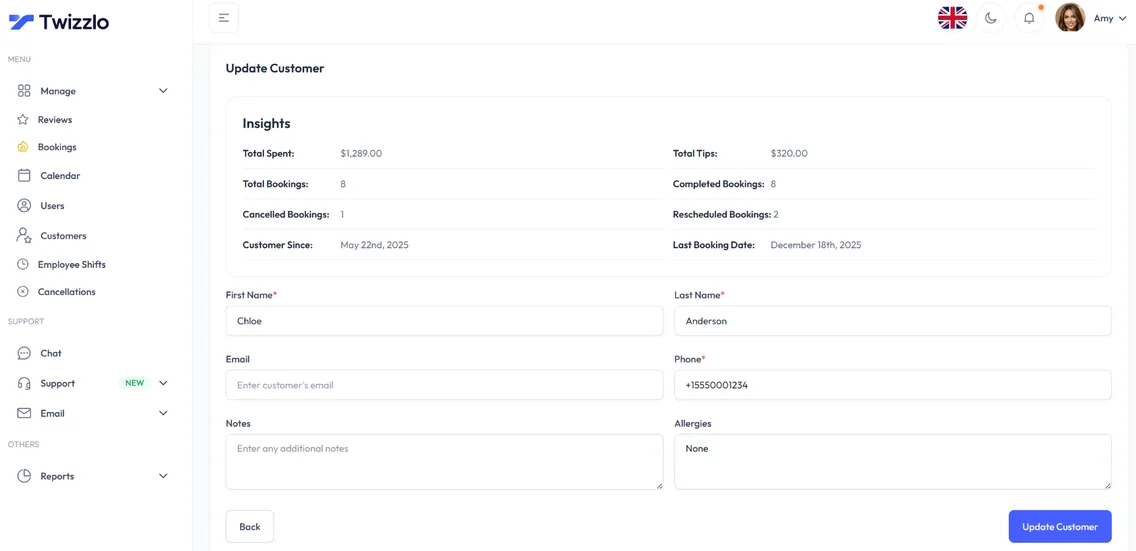
Know every client before they walk in
Total spend, bookings, last visit, allergies, notes and preferences sit on one client profile, so your team can prepare before every appointment.
- Visit and spend history
- Notes, allergies and preferences
- Contact details on file
- Client search and filtering
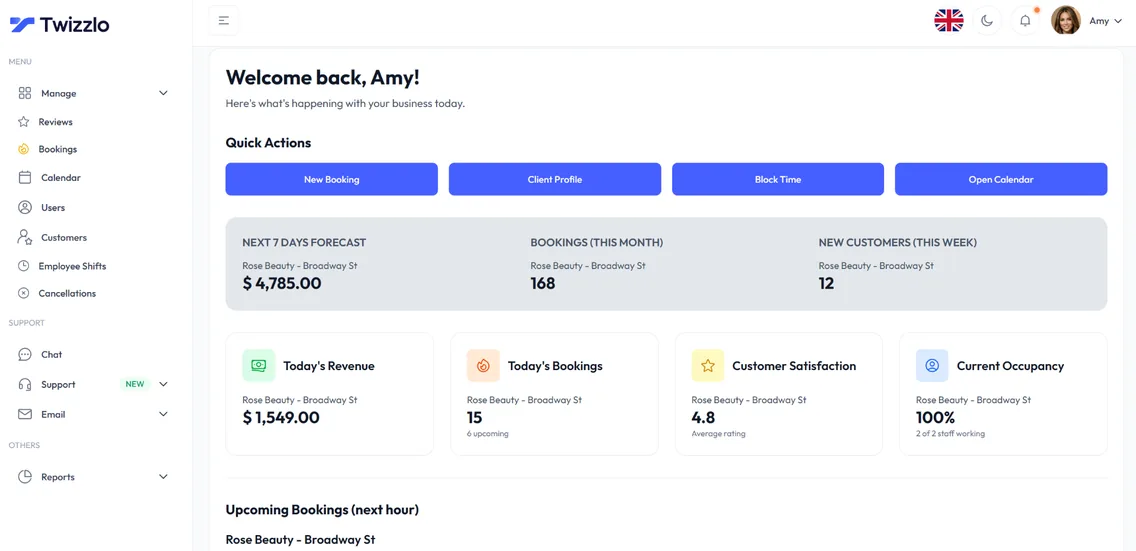
See what's working before the day starts
Bookings, revenue, next-hour insights and staff utilization are on the dashboard the moment you log in.
Compare Twizzlo with other booking tools
Side-by-side comparisons of pricing, fees and features.
Tattoo booking software FAQ
How do I choose tattoo booking software that actually fits a studio?
Check four things: a booking link clients can use 24/7, a calendar for each artist, buffer time between sessions, and payment up front on the services you choose. Twizzlo covers all four: its prepaid bookings take the full session price when the client books.
Can artists collect their own payouts?
Payments go to the studio's Stripe account. Commission splits are not a Twizzlo feature, so keep artist pay in your own process.
Does Twizzlo work as a tattoo studio management platform?
It covers the booking side of studio management: online booking, client records, artist calendars and shifts, online payments and tips through Stripe, and insights on bookings and revenue. Inventory and payroll are not Twizzlo features, and consent paperwork stays in your own process.
What does Twizzlo cost for a tattoo studio?
Free is $0 a month for up to 150 bookings, with no SMS. Business Pro is $29.99 a month per business for unlimited bookings and 50 SMS a month, then $0.03 each, with a 30-day money-back guarantee. Staff, locations and client records are unlimited on both plans. Online payments carry Stripe processing plus a 1.5% Twizzlo platform fee.
Do reminders and prepaid bookings stop no-shows?
They make no-shows less likely, but no tool makes every client show up. Reminders go out by email, and by SMS on Business Pro (50 a month included, then $0.03 each). Prepaid bookings hold a session only once the client has paid the full session price through Stripe, and if the client does not show, you decide whether to keep or refund it. No-show fees are supported for the policy you set.
Can I run more than one studio location?
Yes. Locations are unlimited on both Free and Business Pro, each with its own booking link and calendar views. The 150 per month limit on Free counts bookings, not staff or locations.
Can clients book a tattoo consultation online?
Yes. Add the consult as its own service with its own length, and clients book it from your link in any phone browser, 24/7. Payment up front is optional: turn on prepaid bookings for consults only if you want them paid when booked.
Does Twizzlo work as a tattoo scheduling app for artists?
Yes, as a web app. Each artist opens their own calendar in any phone browser, and clients book from your link with nothing to download.
Can a tattoo shop take walk-ins and booked sessions on one calendar?
Yes. Walk-in bookings go on the same calendar as online bookings, and the walk-in's time comes off the booking page right away, so online clients only see times that are still open.
What is the best tattoo studio software for a small shop?
The best fit is the tool that matches how your shop books. Check for a calendar per artist, payment up front on long sessions, reminders, and whether you pay per studio or per artist. In Twizzlo, prepaid bookings take the full session price at booking, and both plans include unlimited artists and locations: Free for up to 150 bookings a month, or Business Pro at $29.99 a month per business. For a side-by-side of studio tools, see the tattoo booking software comparison.
Guides for tattoo studios
Choosing between tools? Compare tattoo booking tools covers how studios evaluate request approval and direct booking. Setting your own terms? Write a tattoo deposit policy walks through what a written policy needs. For studio paperwork you can copy the tattoo consent template and adapt it to your local requirements.
Best Tattoo Booking Software: A Studio Comparison
Compare tattoo booking software by workflow, billing unit and who pays booking fees, with a five-artist studio priced from the vendors' own published prices.
GuideCloud-Based Tattoo Booking System: What to Check and How to Set It Up
Plan the steps from an appointment request to artist availability, payment terms and booking confirmation.
GuideTattoo Shop Management Software: What Actually Runs a Studio
Tattoo shop management software for a studio or parlor: what it runs beyond scheduling, how artist pay and paperwork fit, and each vendor's published costs.
GuideDigital Scheduling for Tattoo Artists: Flat Rate Software
Set up booking as a solo or guest-spot artist: a link per city, blocked travel dates and a flash day timetable.
GuideTattoo Deposits: 2026 Online Setup Guide
What a tattoo deposit means, what six studios publish on amounts and refunds, a policy draft to copy, and four ways to collect online.
TemplateTattoo Consent Form Template: Copy and Customize
Copy this tattoo consent form template with visit, design and signature fields, then use the checklist to confirm what your tattoo consent form needs locally.
Start taking tattoo bookings online
Start with the Free plan, then choose Business Pro if you need unlimited bookings and SMS. Review the current plan limits and payment charges before choosing.
- Free plan, not a trial
- 30-day money-back guarantee on Business Pro
- 24/7 support