
Personal trainer scheduling software for 1:1 training sessions
Clients pick a slot, pay through Stripe and reschedule from your link, with no text-message back-and-forth. Personal training scheduling software for solo trainers and small teams.
Plans
- FreeUp to 150 bookings a month, not a trial
- $0/mo
- Business ProPer business: unlimited bookings, 50 SMS a month
- $29.99/mo
- Unlimited staff and locations on both plans
- 30-day money-back guarantee on Business Pro
- 24/7 support
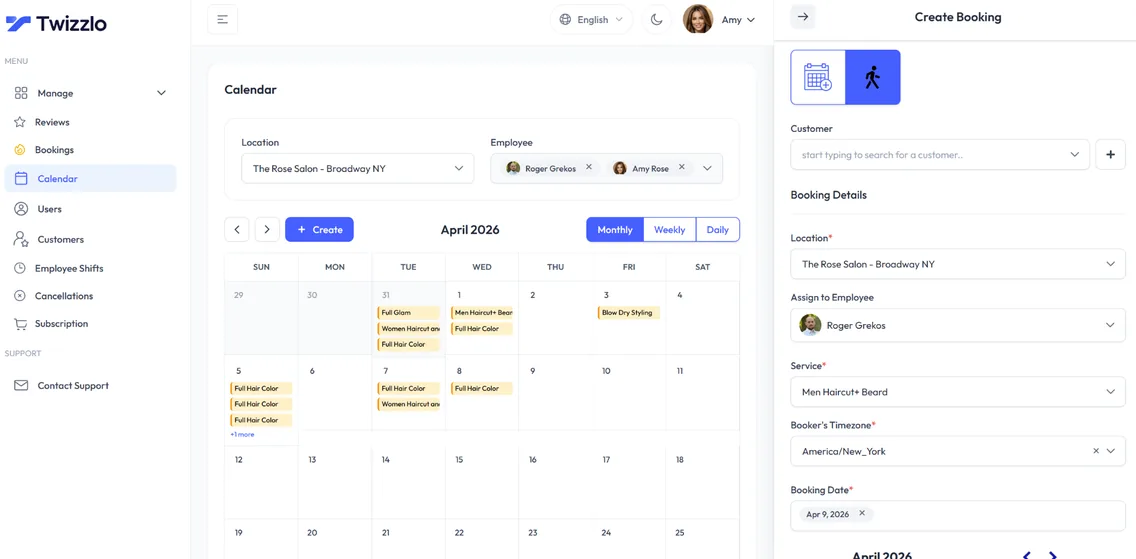
Twizzlo is personal trainer scheduling software for coaches who want to stop being their own admin. Clients book a 1:1 session from your public link, pay online through Stripe when you turn on prepaid bookings, and reschedule themselves from the same link.
As a personal trainer app and personal training booking software, Twizzlo also keeps a client profile with notes and visit history, gives each trainer their own calendar, and sends confirmations and reminders by email, and by SMS on Business Pro. Staff and clients are unlimited on both plans, with no per-seat fees.
Sound familiar?
Running a training business shouldn't feel like a full-time admin job.
Reschedules over a dozen messages
No-shows on peak-hour slots
Client history scattered across apps
On this page10 sections
Personal training booking software built for 1:1 sessions
Personal training is sold one session at a time, so the calendar is the business. Personal training software comes in two kinds: apps that deliver workout programs, and booking software that fills and protects your calendar. Twizzlo is the second kind, built for 1:1 sessions.
Personal training booking software has to show clients your real open times, stop two clients from booking the same hour, and leave you a few minutes between sessions. That is the first job of any software personal trainers put in front of their clients.
In Twizzlo each session type is its own service with a price and a duration, such as a 30-minute check-in, a 60-minute session or a 90-minute first assessment. Buffer times add a gap after each session for notes and a reset. Real-time availability means the booking page only offers times that are actually free, on every device.
Time-off and blackout dates keep holidays, days off and your own training time off the booking page, so clients never book an hour you meant to keep.
Personal trainer business software pricing: Free or $29.99 a month
Personal trainer business software should not cost more every time you add a trainer or a location. Twizzlo Free is $0 a month and free forever, not a trial. It covers the booking page, calendars, client profiles, staff scheduling, insights and online payments with tips for up to 150 bookings a month, with email reminders and no SMS. A trainer building a client list can start free and upgrade only when bookings or SMS reminders call for it.
Business Pro is $29.99 a month per business for unlimited bookings and 50 SMS a month, then $0.03 each, with a 30-day money-back guarantee. Online payments on either plan carry Stripe processing plus a 1.5% Twizzlo platform fee. See plans and payment charges. If you are weighing a larger studio suite, Twizzlo vs Mindbody sets the two side by side.
What personal trainer scheduling software costs, solo and team
The table prices two setups, a solo trainer and a team of three trainers at one location, using the plan prices each vendor publishes on its own pricing page, read on the date shown. It covers general schedulers as well as booking tools built for service businesses. Some options cost less at this size: for three trainers, Setmore Pro billed annually is $15 a month, and several tools have a $0 plan within their limits. Twizzlo's case is one price for unlimited trainers, with 50 SMS a month included on Business Pro.
Monthly subscription for a solo trainer and a three-trainer team, US prices before tax
Twizzlo Free
- Solo trainer
- $0, up to 150 bookings a month, no SMS
- Team of 3 trainers
- $0, same limits, staff unlimited
- Online or card payment charges
- Stripe processing plus a 1.5% Twizzlo platform fee
Twizzlo Business Pro
- Solo trainer
- $29.99, unlimited bookings, 50 SMS a month then $0.03 each
- Team of 3 trainers
- $29.99, staff unlimited
- Online or card payment charges
- Stripe processing plus a 1.5% Twizzlo platform fee
Acuity Scheduling (Sep 16, 2026)
- Solo trainer
- Starter $20/mo (1 calendar, email reminders). SMS reminders start on Standard at $34/mo
- Team of 3 trainers
- Standard $34/mo (up to 6 calendars)
- Online or card payment charges
- Payment provider charges are separate from the subscription
Calendly (Jul 13, 2026)
- Solo trainer
- Free: 1 event type, 1 calendar. Standard: $10 a seat billed annually, $12 monthly
- Team of 3 trainers
- Standard: $30 billed annually, $36 monthly
- Online or card payment charges
- No built-in processing; Stripe or PayPal integration fees apply
Setmore (Sep 8, 2026)
- Solo trainer
- $0 on Free; SMS reminders and deposits need Pro at $12/mo
- Team of 3 trainers
- $0 on Free (up to 4 users); Pro $36 monthly or $15 billed annually
- Online or card payment charges
- Stripe at 2.9% + 30¢ in the US, per Setmore
Square Appointments (Sep 17, 2026)
- Solo trainer
- $0 on Free; $49 on Plus, which adds cancellation policy and no-show fees
- Team of 3 trainers
- Same prices, per location; staff calendars unlimited
- Online or card payment charges
- Online: 3.3% + 30¢ on Free, 2.9% + 30¢ on Plus
Vagaro (Sep 8, 2026)
- Solo trainer
- $23.99 (marked limited time)
- Team of 3 trainers
- $43.99 ($10/mo per extra calendar)
- Online or card payment charges
- Under $4,000 a month processed: 2.6% + $0.10 swipe or dip, 3.5% + $0.19 keyed in
Prices are from each vendor's own pricing page on the date shown and can change, so check before you buy. Twizzlo's 1.5% platform fee applies to online payments, on top of your Stripe rate. Full breakdowns: Twizzlo vs Acuity Scheduling, Twizzlo vs Calendly, Twizzlo vs Setmore and every comparison.
A personal training scheduling app clients can use from any phone
Clients book between meetings or right after a session, on their phone. Twizzlo's booking page opens in any phone browser, so clients have nothing to download. They pick a session, choose a trainer if you have more than one, see open times and book in a few taps.
Confirmations and reminders go out by email, and by SMS on Business Pro. When plans change, clients reschedule themselves from the booking link instead of texting you late at night. Cancellation handling and custom booking rules support the policy you set.
Twizzlo is web-based, so it works as your personal trainer scheduling app as well: open the calendar in a phone or tablet browser, see who is next and read a client's notes before they arrive.
A personal training appointment scheduler with prepaid sessions
A missed 6 a.m. session is an hour you cannot sell again. Turn on prepaid bookings for any session type: the client pays the full session price online through Stripe when they book, so the slot is only held once it is paid. No-show fees are supported, so your policy can put a price on a missed session, and when a client misses a prepaid session, you decide whether to keep or refund the payment.
Clients can add a tip when they pay online, and you can record manual payments for sessions paid another way, so each client's total spend stays accurate. For policy wording, see how to set a no-show charge, and for the terms you agree with a client before the first session, the coaching contract template.
Client notes and session history on every profile
Each client profile keeps what you need before a session, and any trainer with access sees it before the client arrives:
- Notes and preferences: goals, preferred session times, the program you are running and last session's numbers
- Visit history, so you can see every past session before the next one
- Total spend per client, including tips
- Contact details, with client search and filtering to find anyone in a few keystrokes
- Repeat client tracking and new customer tracking, to see whether first-time clients come back for a second session
Personal trainer scheduling software for a team of trainers
Personal trainer scheduling gets harder with every trainer you add. Personal training scheduling software for a team has to keep every trainer's hours, sessions and time off apart. In Twizzlo each trainer gets a staff profile, an individual schedule and a calendar view of their own. Assign each session type to the trainers who offer it, set shifts and time off, and use role-based access to decide what each trainer can see and change.
Staff availability and utilization in the insights show who is fully booked and who has room, and the booking page only offers a client the trainers who deliver that session and are free at that time.
Adding a trainer never changes the Business Pro price. Neither does a second location, and each location gets its own booking link.
Fitness trainer software for in-home, outdoor and studio sessions
Many trainers do not work in one room. You might coach at a private studio in the morning, in a client's home at lunch and outdoors in the evening. Fitness trainer software has to keep those sessions apart and leave you time to travel between them.
In Twizzlo, set up each place you train as a location with its own working hours and its own booking link, so clients book the sessions and times that place offers. Buffer times add travel time after an in-home or outdoor session, and locations are unlimited on both plans.
If you also coach online, multiple time zones keep each booking at the right local time for the client, and you run the session itself in the video tool you already use. Every session is booked as a 1:1 appointment.
Because Twizzlo is web-based, it also works as personal trainer computer software: open the calendar on a laptop or desktop at the studio, or in any phone or tablet browser on the road, with nothing to install. Other 1:1 trades use the same setup, from dog trainer booking software to tutoring scheduling software.
Set up personal training booking in six steps
- 1
List your session types
Add each session length, first assessments and any other services, each with a price, a duration and buffer time.
- 2
Set your hours
Enter the hours you train clients, plus time off and blackout dates for holidays and your own training.
- 3
Add trainers
On a team, create a profile for each trainer, give them Twizzlo access and assign the sessions they offer.
- 4
Turn on prepaid sessions
Require payment at booking for peak hours or for every session, and write down your cancellation and no-show terms.
- 5
Connect Stripe
Connect Stripe to take online payments and tips at booking. Online payments carry Stripe processing plus a 1.5% Twizzlo platform fee.
- 6
Share your booking link
Make a test booking, then add the link to your Instagram bio, your website and the first message you send new clients.
Built specifically for personal trainers
24/7 online booking
Clients book appointments any time from your booking link, with real-time availability on any device.
Per-staff calendars
A calendar per staff member with real-time availability, buffer times, time off and blackout dates. Drag an appointment to reschedule it.
SMS & email reminders
Automated confirmations and reminders by email, plus SMS on Business Pro.
Client CRM
Every visit, note, preference, allergy and total spend saved to a searchable profile.
Prepaid bookings & tips
Collect online payments and tips at the time of booking through Stripe. Protect long slots with prepaid bookings: the client pays the full service price when they book.
Staff & shift management
Bookable and non-bookable staff, per-staff schedules, multi-location shifts, role-based access and assigned services, with unlimited staff.
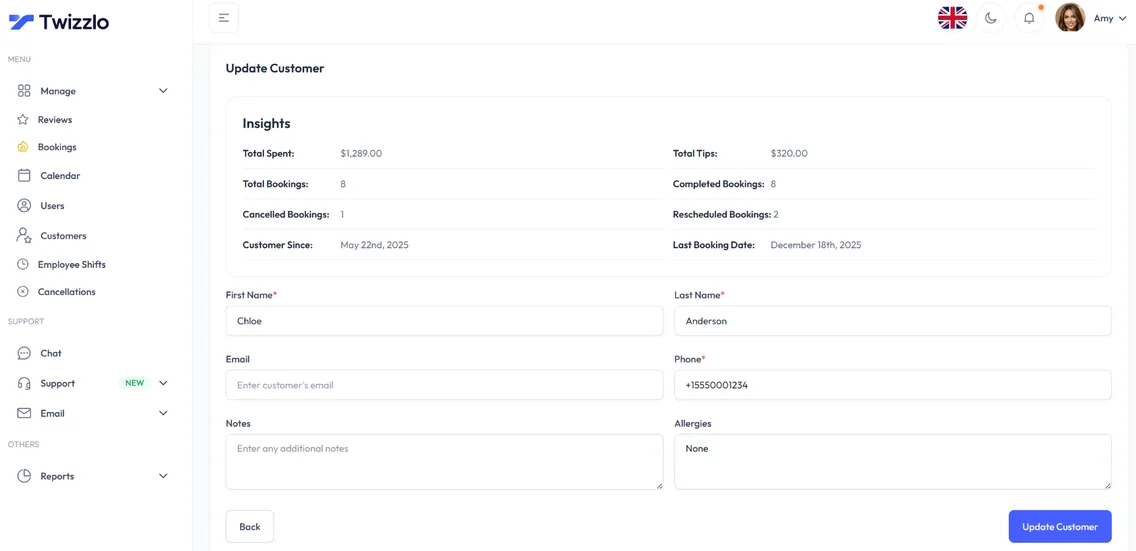
Know every client before they walk in
Total spend, bookings, last visit, notes and preferences sit on one client profile, so you know a client's goals and last session before they arrive.
- Visit and spend history
- Notes and preferences
- Contact details on file
- Client search and filtering
See what's working before the day starts
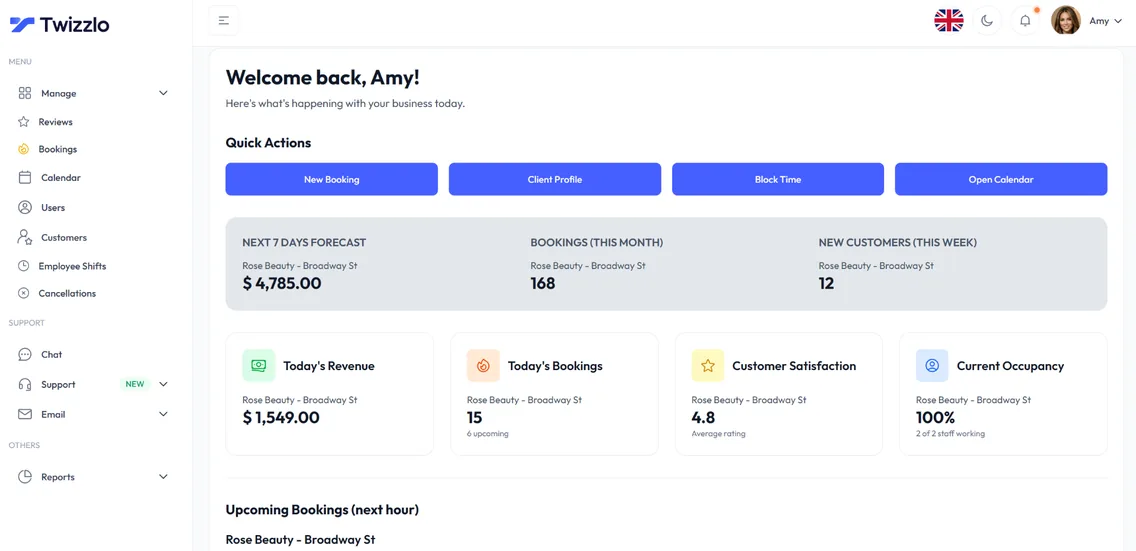
Bookings, revenue, next-hour insights and trainer utilization are on the dashboard the moment you log in.
“Clients book their own slots and prepay. I just show up to coach.”
Compare Twizzlo with other booking tools
Side-by-side comparisons of pricing, fees and features.
Personal trainer scheduling software FAQ
Can Twizzlo handle multiple trainers on one calendar?
Yes. Each trainer gets their own calendar with their own hours, services, and time off. Unlimited staff on every plan, with role-based access.
How is Twizzlo different from larger training business suites?
Twizzlo covers the booking side of 1:1 training: online booking, prepaid sessions, Stripe payments and tips, reminders, client profiles and insights, priced per business instead of per trainer. It suits solo trainers and small teams who sell individual sessions.
Can clients prepay their sessions?
Yes. Turn on prepaid bookings for any service and the slot is only held once payment is taken through Stripe.
Is Twizzlo really free?
Yes. Free is $0 a month, free forever and not a trial. It covers up to 150 bookings a month with unlimited staff, locations and client records, real-time insights, email confirmations and reminders, and online payments and tips through Stripe. It does not include SMS reminders, which require Business Pro. There is no plan fee; online payments you take carry your Stripe processing rate plus a 1.5% Twizzlo platform fee.
What does setup involve?
Add your services with prices and durations, set your hours, add staff if you have a team, connect Stripe if you want online payments, then share your booking link.
Do clients need to download an app to book a training session?
No. Twizzlo is web-based, so clients book from your link in any phone or computer browser. You and your trainers open the same calendar in a browser too.
Can clients reschedule a training session themselves?
Yes. Clients reschedule from the booking link, and the booking page only offers times that are still open, so your calendar stays accurate without a round of messages.
Can I charge for missed training sessions?
Yes. No-show fees are supported under the policy you set. With prepaid bookings, the client pays the full session price through Stripe when they book, and if they miss the session, you decide whether to keep or refund it. Put your policy in writing and share it with clients before their first session.
What does personal trainer scheduling software cost for a team of three?
$0 on Twizzlo Free for up to 150 bookings a month without SMS, or $29.99 a month on Business Pro for unlimited bookings and 50 SMS a month. Either way it is the same price as for a solo trainer, because trainers are unlimited on both plans. Online payments carry Stripe processing plus a 1.5% Twizzlo platform fee. The cost table on this page shows what other vendors publish for the same team.
What is the best way to schedule personal training appointments online?
Use one booking link as your personal training appointment scheduler: it should show real-time availability, take payment when the client books and let clients reschedule themselves. In Twizzlo, add each session type with a price and a duration, set your hours, turn on prepaid bookings where you want them, then share the link. Clients book from any phone browser and get confirmations and reminders by email, and by SMS on Business Pro.
Can a personal trainer take payment when a client books?
Yes. Connect Stripe and clients pay online when they book, with the option to add a tip. With prepaid bookings turned on, the session is only held once payment goes through, and you can record manual payments for sessions paid another way. Twizzlo does not send invoices. Online payments carry Stripe processing plus a 1.5% Twizzlo platform fee.
Guides for personal trainers
Coaching Contract Template: Free Coaching Agreement to Copy
A free coaching contract template to copy: a 20-clause coaching agreement with fill-in notes and clause changes for group and business coaching.
GuideNo Show Charge: A Guide to Protecting Your Business
How to set a no-show charge: size the fee from your own costs, adapt sample policy clauses and announcement templates, and waive fees by a written rule.
GuideAppointment Reminders Software That Cuts No-Shows
What appointment reminders software should do, when to send reminders by booking lead time, and how to count the texts your plan must cover each month.
Start booking training sessions online
Start with the Free plan, then choose Business Pro if you need unlimited bookings and SMS. Review the current plan limits and payment charges before choosing.
- Free plan, not a trial
- 30-day money-back guarantee on Business Pro
- 24/7 support