
Cloud-Based Tattoo Booking System: What to Check and How to Set It Up

In short
A cloud-based tattoo booking system is booking software you open in a web browser, with each artist's calendar, client bookings and payments stored online, so the whole studio works from one live schedule. Set it up in the order a client books: services, artist calendars, request review, payment at booking, reminders, then one public booking link.
- Before you choose, test six things in a free trial: the booking link, artist calendars, session lengths, request review, payment at booking and reminders.
- Set the system up in the order a client moves, from first request to confirmed session, and point every booking channel at one link.
- Keep consent forms and deposit policy wording in their own reviewed process; the booking system holds the appointment and its payment record.
In this article7 sections
This guide is for tattoo studios moving bookings out of Instagram DMs, text threads and paper and into one tattoo booking system that works online. It covers what a cloud-based system is, the features to test before you pick one, and the order to set it up in, from a client's first request to a confirmed session.
If you are choosing tattoo booking software for a multi-artist studio, run the feature checklist during your free trials and follow the setup steps once you decide. Both work with any product. Deposit policy, prices by team size and vendor comparisons each have their own guide, linked where they come up.
What is a tattoo booking system?
A tattoo booking system is software that takes appointment requests, holds each artist's calendar, takes payment at the booking step and sends reminders, with each client's bookings kept in one record. Clients use it to request a consult or book a session from a link. The studio uses it to decide which requests to accept, when each artist works and what a client pays before a chair is held.
Whether a product calls itself a booking app, a scheduler or a tattoo appointment booking system, the job is the same: fill each artist's calendar with work the studio has agreed to take and the client has committed to.
What separates it from a generic calendar
A generic calendar holds time slots. Tattoo work needs four things a plain calendar does not handle:
- Artist-specific hours and session lengths. Each artist sets working days, time off and how long each kind of session runs.
- Request details before approval. Placement, size and reference images arrive with the request, so the artist can decide before anything is booked.
- Payment inside the booking step. The client pays while booking, and the payment stays attached to that appointment.
- Records attached to the booking. Past sessions, notes and payments sit on the client's record instead of in a message thread.
That makes a booking system closer to a client relationship management workflow for service businesses than to a diary: it tracks people, payments and next steps, not only dates. It is also one part of the tattoo studio software that runs a whole shop, from artist pay to paperwork. This guide covers the booking part.
What is a cloud-based tattoo booking system?
A cloud-based tattoo booking system runs in a web browser and keeps the calendar, client records and payments on the vendor's servers, so artists and the front desk see the same live schedule from any device without installing software.
The U.S. National Institute of Standards and Technology calls this model software as a service. In its definition, the customer uses the provider's applications, which run on a cloud infrastructure and can be reached from different devices, for example through a web browser. The customer does not manage the servers, operating systems or storage underneath. The source is NIST Special Publication 800-145, The NIST Definition of Cloud Computing, published in September 2011 and read September 27, 2026.
For a studio, the differences come down to access, upkeep and what happens offline, as Table 1 shows.
Table 1. How cloud-based tattoo booking systems differ from installed booking software. General differences; products vary.
| Question | Cloud-based system | Installed software |
|---|---|---|
| Where the software runs | The vendor's servers, opened in a web browser | A computer in the studio |
| Where records are kept | With the vendor, behind each person's login | On that computer or a server the studio runs |
| Who can see the schedule | Anyone with a login: an artist at the station, the front desk, the owner at home | Usually only people at that computer, unless remote access is set up |
| How updates arrive | The vendor updates the software; nothing is installed at the studio | Someone at the studio installs each update |
| If the internet drops | The schedule is out of reach until the connection returns; a phone on mobile data can serve as a backup | The schedule still opens on that computer; online features wait |
| Backups | Run by the vendor; ask how to export your data if you leave | Run and tested by the studio |
| Public booking page | Usually included, as a link clients open on their phone | Not always offered |
| How it is usually paid for | A monthly or yearly subscription | Often a one-time license, sometimes with a yearly support fee |
Many cloud-based tattoo booking systems also give clients a public booking page, so one link can replace the DM thread as the way to book. The useful comparison is what the system does once it is online.
Features to check before you choose a system
The features of tattoo booking software that matter most are the ones that protect an artist's time: one booking link, separate artist calendars, sessions of the right length, a review step, payment at booking and reminders. Test each one in a free trial before you commit.
A sales demo shows a product at its best; a trial with your own services, two artists and a test client shows whether it fits the way your studio books. Run each test in Table 2 once as a client on your phone and once as staff.
Table 2. Feature checklist: what to test in a free trial of a tattoo booking system. No vendor is named; the same tests apply to any product.
| Feature | Why it matters for tattoo work | How to test it |
|---|---|---|
| One public booking link | Clients come from Instagram, your website and Google; one link keeps every request in one place | Book a consult on your own phone as a client, starting from the link you would post |
| A calendar per artist | Artists keep different days, hours, time off and guest days | Give two test artists different hours and check the booking page offers only times each can work |
| Services by session length | Sleeve consults shouldn't book like flash pieces: consults, flash, full days and touch-ups each need their own length and buffer time | Try to book a long session into a short gap and check that the system refuses it |
| Request details before booking | The artist needs placement, size and reference images before saying yes | Send a test request with a reference image and find where the artist sees it |
| Review or direct booking | Custom work needs an artist's yes; flash and touch-ups can often book straight away | Set one service to need approval and one to book directly, then book both as a client |
| Payment at booking | Money taken at the booking step is what holds the chair | In the processor's test mode, pay for a test booking, check the slot confirms only after payment, then refund it |
| Email and text reminders | Sessions booked weeks ahead need reminders, and texts can cost extra | Book a test session for tomorrow, note when each reminder arrives and on which channel, and find the included texts and the price of each extra one |
| Staff access by role | Artists, the front desk and the owner need different views | Invite a test artist and check what they can and cannot see |
| Walk-ins on the same calendar | A walk-in has to block the artist's time so nobody books over it online | Add a walk-in and check that the slot disappears from the booking page |
| Reports | Bookings, cancellations and artist utilization show where the week's time goes | Open the reports after your test bookings and check that they appear |
| How the price grows | Vendors charge by the artist, the location or the account, and texts and card fees can come on top | Price the plan for your current team and for next year's; our tattoo booking software pricing table compares vendors at 1, 5 and 10 artists |
Where consent forms fit
Some booking tools include form features, and some studios keep consent paperwork elsewhere. Wherever the form lives, use wording a local professional has reviewed, and match each signed form to its appointment so staff can find it at check-in. The booking record answers when the client is booked and what was paid; the consent record answers what the client agreed to. Start from our tattoo consent form template and have it checked for your location.
How to set up a tattoo booking system, step by step
Set up the system along the path a client takes through it, from the first request through review and payment to reminders and the session, and test each step before you share the link.
Table 3 shows, stage by stage, what you configure in the software and what stays in the studio's own process.
Table 3. From request to confirmed session: what the booking system holds and what stays in your own process.
| Step | What the client does | What you set up in the booking system | What stays in your own process |
|---|---|---|---|
| 1. Request | Picks a service and an artist, and adds placement, size and references | Services by length, the request questions, which artist offers which service | Design talk and the quote |
| 2. Review | Waits for an answer | An approval step for custom work; direct booking for the rest | The artist's call on style fit |
| 3. Payment at booking | Pays while booking | The amount due per service, with the payment processor connected | The written deposit or refund policy |
| 4. Confirmation and reminders | Gets a confirmation, then reminders | Reminder timing and channel | The cancellation and rescheduling terms the reminder points to |
| 5. Session | Arrives for the session | Calendar blocks, buffer time and walk-ins | The signed consent form, in the studio's reviewed process |
| 6. Afterwards | Books a touch-up or the next session | A touch-up service and the client record | Aftercare information |
1. Choose one booking path
Pick one way to book and point every other channel at it. List how requests arrive today, from Instagram and Facebook messages to texts, calls, email and walk-ins, then decide which single path turns a request into a booking. The answer should be one link. Keep posting work on social media, but answer booking questions with the link instead of settling dates in a thread.
Practical rule: Never let discovery channels become your operating system.
If artists keep booking privately in DMs, the calendar stops being the record everyone trusts.
2. Build services and artist calendars
Enter the work you sell before you open any dates. Set up consults, flash, sessions grouped by length and touch-ups as separate services, each with its own duration plus buffer time for setup and cleanup. Add each artist's working days, hours, time off and guest days, and give the front desk and managers logins that match their role. Publish only hours an artist will actually work. Solo and guest-spot artists need a lighter setup, covered in our guide to digital scheduling for tattoo artists.
3. Decide which requests need review
Decide which services book straight away and which need an artist's approval first. Custom pieces, cover-ups and large work usually go through review; flash and touch-ups often book directly. For reviewed services, ask for placement, approximate size, reference images and a preferred artist, and keep the form short enough to finish on a phone. Agree how fast artists answer and who covers when an artist is away, so no request waits days for a reply.
4. Decide what the client pays at booking
Choose, service by service, what a client pays when booking. Some studios take a deposit that counts toward the final price; others take the full price up front. A tattoo deposit booking system is a booking tool that collects a deposit when the client books. Put the amount, the refund terms and the wording in a written policy before payments go live; our guide to tattoo deposits covers those choices. Then connect the payment processor, run a test payment and read how payment processing works for appointment businesses, so card fees and payout timing hold no surprises.
5. Plan reminders, with an example
Set when reminders go out and on which channel, then automate reminders so nobody has to remember them. For sessions booked weeks ahead, one reminder a few days before and another the day before give a client time to reschedule instead of missing the slot. Email reminders are often part of a plan; text reminders may come from a monthly allowance or cost a fee per message.
Example: a studio with 120 booked sessions a month that sends two text reminders per session sends 240 texts a month. Check how many texts a plan includes and what each extra text costs before you fix the reminder schedule.
6. Test, then launch one link everywhere
Before anyone outside the studio sees the link, run test bookings through the whole path: an approval, a direct booking, a payment, a reminder, a reschedule and a refunded cancellation. Fix what breaks, then switch every channel on the same day: the Instagram bio, the website, pinned posts, message auto-replies and your Google Business Profile. Google's Business Profile Help says a business can add links that help customers book an appointment; its article Manage your local business links gives the steps (read September 27, 2026).
7. Move clients over and train the team
Bring over the clients who will book again, not every contact you have ever had. Move active clients and useful history, standardize names, phone numbers and emails, and leave duplicates and stale notes behind; ask the vendor how client data gets into its system first. Then give the team one written rule set: every booking goes through the system, and nobody books by DM. Our guide to user onboarding best practices for service software helps with training. Studios leaving Fresha can start with our list of Fresha alternatives.
Twizzlo for tattoo studios: booking features and plans
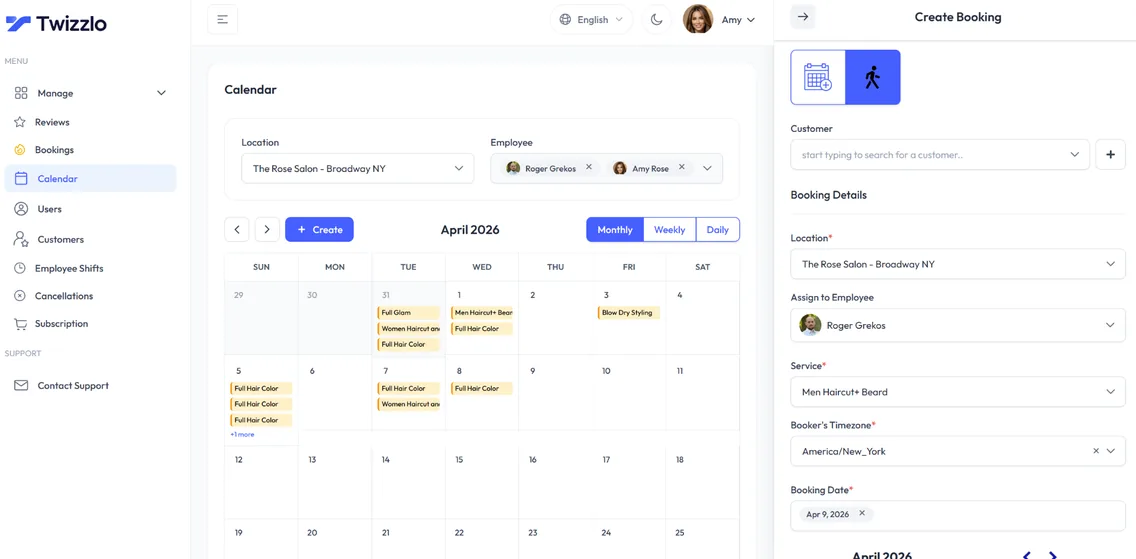
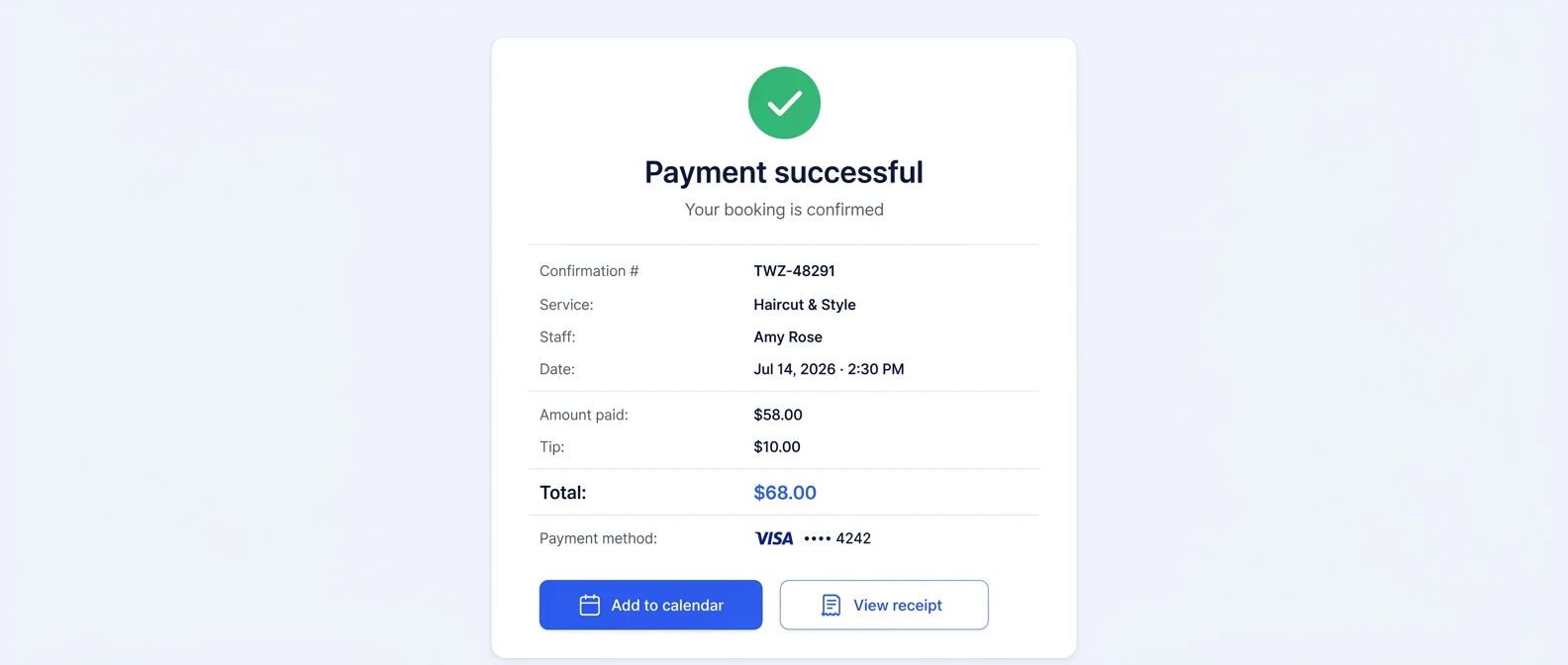
Twizzlo is web-based online booking and appointment scheduling software for appointment-based service businesses, with a public booking page, email and SMS reminders, client records, staff schedules and shifts, and Stripe payments and tips.
For a tattoo studio, the Twizzlo features that match the steps in this guide are a 24/7 online booking page, individual artist schedules, role-based staff access, buffer times, walk-in bookings and prepaid bookings. With a prepaid booking, the client pays the full service price at booking; if the client does not show, the studio decides whether to keep or refund it. The full list is on our booking and reminder features page.
Twizzlo has two plans. Free is $0 a month for up to 150 bookings with no SMS; it is free forever, not a trial. Business Pro is $29.99 a month per business: unlimited bookings, 50 SMS a month included, then $0.03 per extra SMS, and a 30-day money-back guarantee. Staff and locations are unlimited on both plans. Online payments carry your Stripe processing rate plus a 1.5% Twizzlo platform fee.
Example, continued: on Business Pro, 190 of the studio's 240 texts a month fall outside the 50 included, which adds $5.70 at $0.03 each to the $29.99 subscription, for $35.69 a month before payment fees. On Free, its 120 bookings a month fit under the 150-booking cap, with reminders by email only.
Signed consent forms stay in your studio's own reviewed process. For the studio setup in Twizzlo, see our tattoo appointment scheduling software page, or compare Free plan and Business Pro pricing.
Frequently asked questions
Can a tattoo booking system handle walk-ins and appointments together
Yes, if you set rules for capacity instead of letting the day run on instinct. Hold booked sessions in protected calendar blocks. Route walk-ins into open gaps, standby slots, or a separate queue. That keeps spontaneous demand profitable without letting it disrupt higher-value custom work.
Is cloud-based software secure enough for studio records
Usually, yes, when the studio controls access. What the studio can fix is its own habits: shared passwords and client details spread across DMs and personal phones. Give each person their own login with role-based access, and take cards through a processor that meets card-industry security standards. For example, Stripe's security documentation, read September 27, 2026, says a PCI-certified auditor certified Stripe to PCI Service Provider Level 1.
How much should a studio expect to pay for booking software
It depends on how the vendor bills: per artist, per location or per account, plus text messages and card processing. Price each candidate at today's team size and at the size you expect next year, and count the setup time for moving clients over. A lower subscription can cost more if reminders or payments sit in a higher tier.
Why not just use a generic scheduler
A generic scheduler books time slots. A tattoo studio also needs sessions of very different lengths, a calendar per artist, a review step for custom work and payment at the booking step. Without those, staff rebuild them by hand in messages and spreadsheets, and the calendar stops matching what was agreed.
Do small studios really need dedicated booking software
Often, yes. With one or two artists, a no-show or a double booking takes a bigger share of the week, and the owner is usually the one answering messages. A free plan or a free trial is a low-risk way to test whether one booking link and automatic reminders save time.
What matters more, online booking or deposit enforcement
They do different jobs, and a studio usually needs both. Online booking brings requests in at any hour; taking money at the booking step, whether a deposit or the full price, is what holds the artist's time. Decide the amount and the refund terms in a written policy before you switch payment on.
How do you set up a tattoo booking system for the first time
Choose one booking path, build your services by session length, set each artist's hours, decide which requests need review and what clients pay at booking, then set reminders. Make test bookings before you put the link in your Instagram bio, website and Google Business Profile.
What is the difference between a tattoo booking app and shop management software
A booking app covers the booking side: availability, requests, payment at booking, reminders and each client's booking record. Tattoo shop management software adds the operating layer around it, such as artist pay, consent paperwork and booth rent. A studio that wants one system for both jobs should compare that second category. This comparison of the best tattoo booking software for studios shows how the options stack up.
Can clients still book through Instagram DMs
Keep Instagram for discovery, not booking. Post your work there, then send every serious inquiry to your booking link, where the request details, reference images and payment status stay on one record instead of a buried thread. Pin the link in your bio and add it to your message auto-reply, so every new inquiry gets the same answer.
What is the difference between cloud-based and installed tattoo studio software
Cloud-based software runs in a web browser and stores records with the vendor, so staff can sign in from any device and see the same schedule. Installed software lives on one studio computer, which keeps data on site but ties the schedule to that machine. For a studio with more than one artist or location, a shared cloud calendar is what stops two people booking the same chair.
What features does a tattoo booking system need?
The core features of tattoo booking software are a public booking link, one calendar for each artist, services by session length with buffer time, a review step for custom requests, payment at booking and automatic reminders. Role-based staff access and walk-in handling matter once a studio has more than one artist.
Is a tattoo scheduling system the same as a tattoo booking system?
In practice, yes: both names describe software that lets clients request or book time with an artist and keeps each artist's calendar. Compare products by what they do, not by the label, because two tools with the same label can differ on payment at booking or on a review step.
Sources and methodology
- NIST Special Publication 800-145: The NIST Definition of Cloud Computing (September 2011) (opens in a new tab)Read . Supports: what cloud-based (software as a service) means: the cloud-based section and Table 1
- Stripe: Security at Stripe (opens in a new tab)Read . Supports: Stripe's PCI Service Provider Level 1 certification (the FAQ on security)
- Google Business Profile Help: Manage your local business links (opens in a new tab)Read . Supports: adding a booking link to a Business Profile (setup step 6)
- Twizzlo pricing page (opens in a new tab)Read . Supports: Twizzlo plan prices, SMS allowance, money-back guarantee and online payment fees
From our editorial policy
- To report an error, email support@twizzlo.com with the subject line "Correction: [page URL]". Tell us what is wrong and, if you can, link a source.
Update history
- : Rewrote the guide around choosing and setting up a cloud-based tattoo booking system: added a cloud-based vs installed table, a feature checklist, a setup map, two FAQs and two product screenshots; removed unsourced statistics, illustrations and a third-party video.
Start free, upgrade when you grow
Flat-rate booking software. No per-seat, per-chair or per-location fees.
- Free plan up to 150 bookings a month, not a trial
- Business Pro is $29.99 a month per business for unlimited bookings, with a 30-day money-back guarantee
- 24/7 support by email