
Tattoo Consent Form Template: Copy and Customize

In short
A tattoo consent form is a client's signed agreement to one specific tattoo after the studio explains the risks and aftercare. Copy this tattoo consent form template, fill in the visit, artist and wording fields, and have a local professional review it before a client signs. There is nothing to download.
- The template covers visit details, locally approved risk and consent wording, signatures and an optional photo choice.
- Record the jurisdiction, reviewer and review date before the form goes into use.
- Store each signed form with its appointment under a custodian, access and retention procedure you can maintain.
In this article10 sections
What is a tattoo consent form?
A tattoo consent form is the signed record that a client agreed to a specific design and placement after the studio supplied the risk, screening and aftercare information approved for its location. It sits with the appointment, and it stays separate from the booking and payment policy and from any permission to use photos.
In practice, a usable tattoo consent form does four jobs:
- Identifies the visit. Studio, artist, client, appointment date, and the design version and placement.
- Carries the approved wording. The procedure risks, eligibility checks and consent text your jurisdiction requires, reviewed locally rather than copied from a generic list.
- Records the decision. Client and artist signatures, the date and the form version.
- Keeps optional choices separate. Photo permission is its own yes or no, and it does not affect the decision to receive the tattoo.
The booking itself, with its date, artist and any prepaid amount, lives in your tattoo booking software; the signed consent form is a separate record matched to that appointment.
What it does not do is guarantee protection from a claim. The template below is a starting draft: fill it in, then have it reviewed for your location before a client signs it.
What to include before local review
Record the studio and artist, client contact details, appointment, agreed design and placement, the locally required eligibility checks, consent wording, signatures and version date. Keep the booking and payment policy and any optional photo permission clearly identified. Collect only information needed for the approved process. A generic checklist of diagnoses is not a substitute for a locally approved screening form.
Copy-and-paste tattoo consent form template
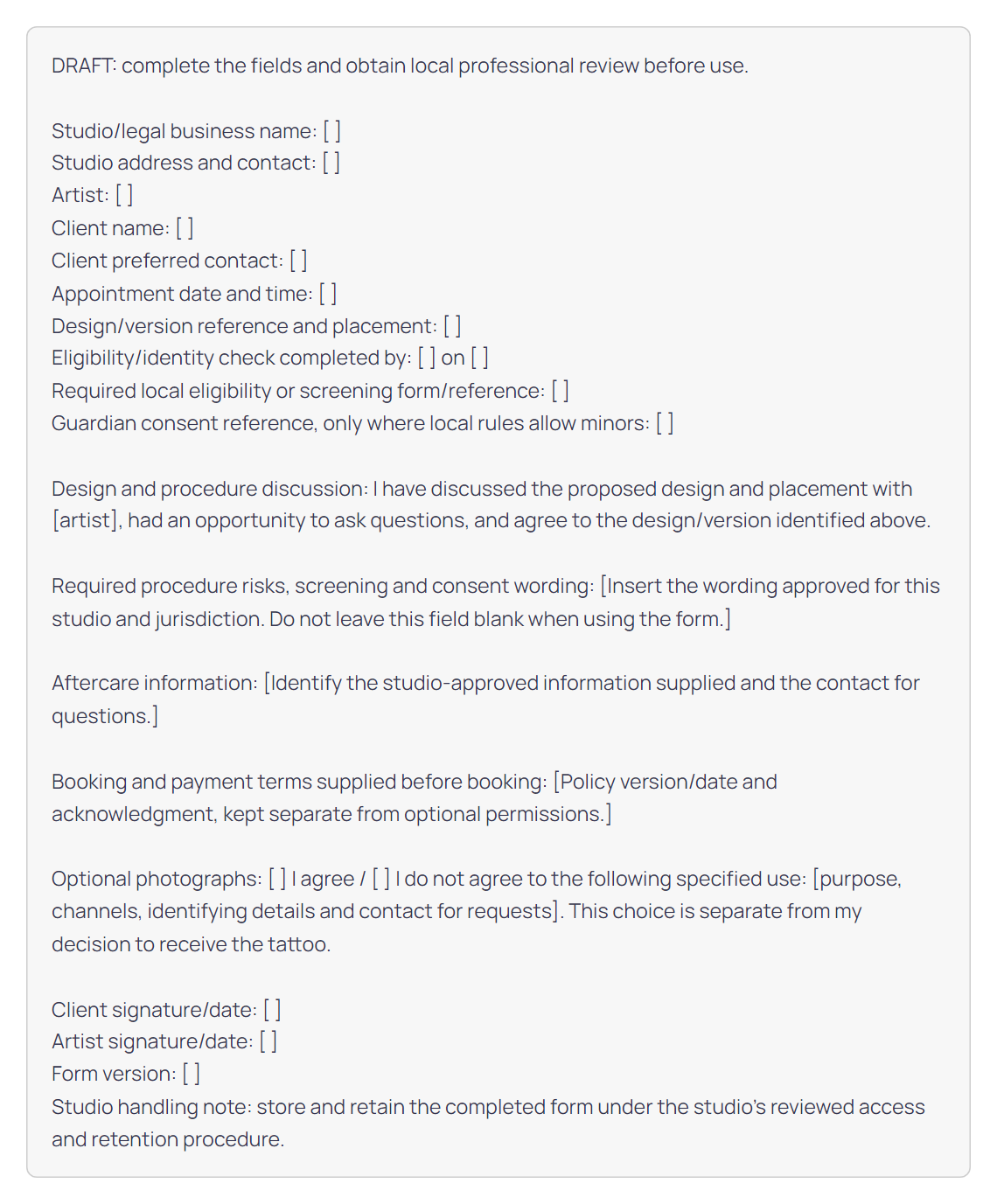
Copy the text below into your own studio document. It is plain text on purpose: there is no file to download and no interactive form.
Table 1 shows what to enter in each field of this template, with a worked example.
| Template field | What to enter | Example |
|---|---|---|
| Studio name, address and contact | Legal business name, studio address and the contact clients use | Registered name, street address, front desk email |
| Artist | The artist doing the tattoo, named as on any required license | Name as printed on the artist’s license |
| Client name and contact | Full name and one contact for aftercare questions | Name as on photo ID; mobile number |
| Appointment date and time | The booked session this form covers | October 14, 1 p.m. |
| Design version and placement | Approved design or stencil version and body location | Rose, version 3, left forearm |
| Eligibility and identity check | Who checked ID and eligibility, and when | Front desk, October 14, 12:45 p.m. |
| Local eligibility form | Name and version of any form your regulator requires; do not copy its questions | Regulator’s form name and version, filed with this record |
| Guardian consent reference | Only where minors are allowed: the guardian form your regulator requires | Guardian form, notarized where required, filed with this record |
| Consent and risk wording | The full wording your reviewer approved; never leave it blank | Approved wording, version 3, pasted in full |
| Aftercare information | The aftercare information given and who answers questions | Aftercare sheet, version 4; questions go to the artist |
| Booking and payment terms | The policy version and date accepted at booking | Booking policy, version 2, dated September 1 |
| Optional photographs | Yes or no, the exact use, the channels and a contact for requests | Yes: healed photo on studio social accounts, face not shown |
| Signatures and form version | Client and artist signatures, dates and the form version | Both signed October 14; form version 3 |
Review the draft for your location
Before using the draft, record the jurisdiction, regulator or source, reviewer and review date. Ask the reviewer to confirm eligibility, any guardian requirements, mandatory screening and consent wording, identity checks, privacy and access rules, and retention. Add those requirements to the identified fields. Do not publish a universal minimum age, fixed retention period or a claim that a waiver makes every procedure legally protected.
Settle each item in Table 2 with your reviewer before the first client signs; the last column shows where the answer goes.
| Item | Question to settle | Where it goes on the template |
|---|---|---|
| Jurisdiction and regulator | Which state and local rules apply, and which agency licenses the studio? | Form version line |
| Eligibility and minimum age | Who may be tattooed where you work, and from what age? | Eligibility and identity check line |
| Guardian process | If minors are allowed, what proof, presence and guardian form are required? | Guardian consent reference line |
| Identity check | Which ID is accepted, and who checks it? | Eligibility and identity check line |
| Consent and risk wording | What wording must the client read and sign? | Risks, screening and consent wording field |
| Regulator’s own form | Must the client complete a regulator form? Reference it by name; do not copy it. | Local eligibility or screening form line |
| Aftercare information | What aftercare information must the studio give? | Aftercare information field |
| Photo permission | What must the photo wording say about use, channels and requests? | Optional photographs field |
| Privacy, access and retention | Who may see signed forms, and how long are they kept? | Studio handling note |
| Form version and review date | Who reviewed the form, when, and when is the next review? | Form version line |
Why one rule does not fit every state
Texas and Florida show how far state rules can differ. Texas allows a tattoo for anyone 17 or younger only to cover an existing offensive tattoo, while Florida allows 16- and 17-year-olds to be tattooed with a parent or legal guardian present.
| State | Who under 18 may get a tattoo | What the studio must see |
|---|---|---|
| Texas Source: Texas health department FAQ | No one 17 or younger, except to cover an existing tattoo with obscene, gang-related, drug-related or other offensive language or symbols that a parent or legal guardian decides should be covered | The parent or legal guardian, physically present during the tattoo, with evidence that they are the parent or legal guardian |
| Florida Source: Florida health department FAQ | 16- and 17-year-olds, accompanied by a parent or legal guardian | Government-issued photo ID from the minor and from the parent or guardian (plus a copy of the minor’s birth certificate if the minor’s ID shows no birth date), a written notarized consent form from the parent or guardian, and proof that they are the minor’s parent or legal guardian |
Where minors are allowed, use the guardian form your regulator requires and record it on the template’s guardian line. Check county and city rules as well before relying on either example.
Choose a storage process you can actually maintain
Paper and digital records both need a defined process. Assign a custodian, limit access, connect each form to the right appointment, check legibility and completeness, and document backup and disposal. A digital tool is useful only if it supports the required consent and record-handling process; “digital” alone does not establish compliance.
Keep booking and consent steps distinct
A booking record reserves an artist’s time, and a consent record shows what the client agreed to; keep them as two records that point to the same appointment.
| Question | Booking record | Consent record |
|---|---|---|
| What it is for | Reserves the artist’s time | Records what the client agreed to |
| When it is made | At booking | At or before the session, after the approved information is shared |
| What it holds | Date, time, artist, client contact, accepted booking policy, any prepaid amount | Design, placement, approved wording, signatures, form version, photo choice |
| Where it lives | Your booking software | Your studio’s approved form process, on paper or in a form tool |
| How they connect | The appointment date and time | The same date and time, written on the form |
Once the appointment is booked, handle the consent form in this order:
- Send the reviewed form or preparation instructions using the studio’s approved channel.
- Match the completed record to the appointment.
- Have the artist review required answers and unresolved questions before the procedure.
- Record the final approved design and signatures.
- Store the form under the reviewed procedure.
Keep the signed consent form in your studio’s approved form process, and use Twizzlo for the booking side: the online booking page, a calendar per artist, reminders and prepaid bookings.
Put the reviewed process into use
Keep the current form version, reviewer and workflow with the studio’s operating documents. For booking-policy language, use the tattoo deposit guide; for choosing a calendar, use the tattoo booking comparison. To map the appointment steps, use the tattoo booking system guide. For the software that runs the rest of the studio, see our tattoo shop management software guide.
Twizzlo plans for tattoo studios
Twizzlo is web-based online booking and appointment scheduling software with two plans, and both cover the booking side of a tattoo appointment: the online booking page, a calendar per artist, reminders and prepaid bookings, where the client pays the full service price at booking.
- Free costs $0 a month for up to 150 bookings, without SMS. It is free forever, not a trial.
- Business Pro costs $29.99 a month per business for unlimited bookings, with 50 SMS a month included and $0.03 for each extra SMS. It comes with a 30-day money-back guarantee.
Both plans include unlimited staff and locations and 24/7 support by email. Online payments carry your Stripe processing rate plus a 1.5% Twizzlo platform fee.
Compare both plans on the pricing page.
Frequently asked questions
Is this a downloadable tattoo consent form?
No. This page provides a copy-and-paste draft. Complete it in your studio’s document system and obtain the required local review before using it.
Does a signed template guarantee legal protection?
No. The draft does not establish local compliance or prevent a claim. Required wording, screening, eligibility checks and record handling depend on the studio’s jurisdiction and approved process.
Can I put photo permission in the same document?
You can include a clearly separate optional choice identifying the proposed use. Have that wording reviewed with the rest of the form; do not treat agreement to a tattoo as permission for promotional photos.
Do I need a tattoo consent form generator?
No. The template on this page is plain text with bracketed fields, so any word processor, shared document or form tool can hold it. Copy it, fill in the studio, artist, client and wording fields, and have the finished version reviewed where you work. Nothing on this page creates, signs or stores forms.
Is a tattoo consent form the same as a tattoo waiver form?
No. A tattoo consent form records what the client agreed to after being informed. A waiver, or release, limits or releases the studio’s liability, and courts may refuse to enforce one that is overly broad, not clearly disclosed or aimed at waiving liability for gross negligence, according to Cornell Law School’s Legal Information Institute (read September 26, 2026). This template has no release wording; a local professional can draft it.
Can a studio use this form for a client under 18?
Only where local rules allow it. According to each state’s health department website (read September 26, 2026), Texas allows anyone 17 or younger to be tattooed only to cover an existing offensive tattoo, when a parent or legal guardian approves and is present, and Florida allows 16- and 17-year-olds with a parent or guardian present and a notarized consent form. Record any required guardian form on the template’s guardian line.
Sources and methodology
- Texas Department of State Health Services: Frequently Asked Questions about Getting a Tattoo or Body Piercing (opens in a new tab)Read . Supports: the Texas rule for clients 17 and younger (Table 3 and the FAQ on clients under 18)
- Florida Department of Health: Tattoo License Frequently Asked Questions (opens in a new tab)Read . Supports: the Florida rule for 16- and 17-year-olds (Table 3 and the FAQ on clients under 18)
- Cornell Law School Legal Information Institute: exculpatory clause (Wex) (opens in a new tab)Read . Supports: what a waiver or release does and when courts may refuse to enforce one (the FAQ on waivers)
- Twizzlo pricing page (opens in a new tab)Read . Supports: Twizzlo plan prices, SMS allowance and online payment fees
From our editorial policy
- Our templates, such as consent forms, contracts and confirmation messages, are text to copy and adapt to your business. They are not legal advice. Have a qualified local professional review anything you rely on.
- To report an error, email support@twizzlo.com with the subject line "Correction: [page URL]". Tell us what is wrong and, if you can, link a source.
Update history
- : Added a field guide, a review checklist, a two-state example for clients under 18 with official sources, three FAQs and an image of the template. Rewrote the Twizzlo plans section under a new heading.
Start free, upgrade when you grow
Flat-rate booking software. No per-seat, per-chair or per-location fees.
- Free plan up to 150 bookings a month, not a trial
- Business Pro is $29.99 a month per business for unlimited bookings, with a 30-day money-back guarantee
- 24/7 support by email