
What App Do Tattoo Artists Use? The Eight Apps That Two or More Lists Name

In short
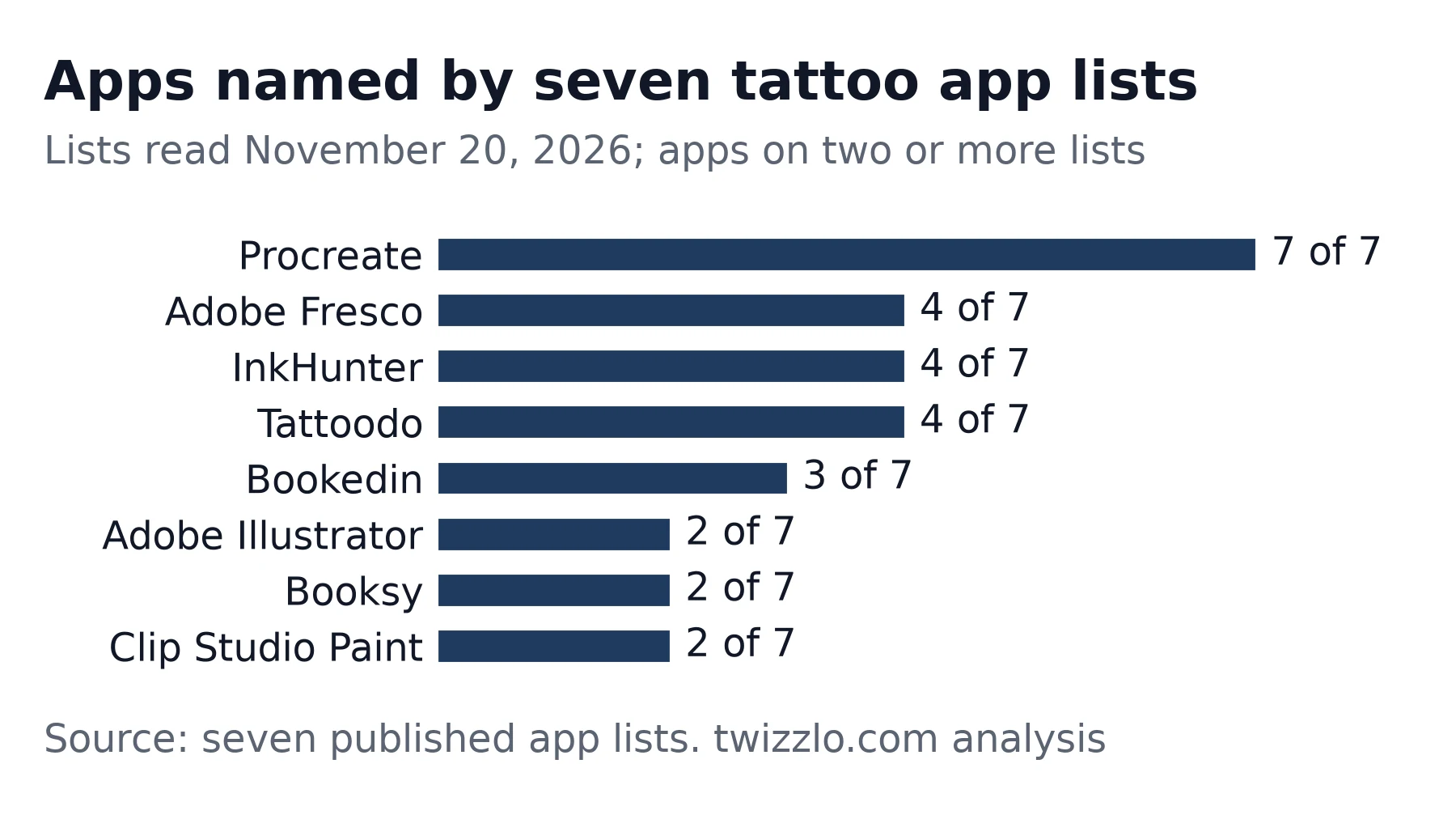
Going by seven app lists read on November 20, 2026, Procreate is the app named most often for tattoo artists: all seven name it, and its U.S. App Store listing showed $12.99, paid once. Adobe Fresco, InkHunter and Tattoodo are on four lists each. Fresco and InkHunter are free to download.
- The seven app lists we read name 46 different apps in 66 entries; 38 of those apps appear on one list alone.
- Four of the seven lists come from software makers that name their own product, so read the counts with care.
- No stand-alone stencil app is on the seven lists; three of them describe preparing stencil line work inside a drawing app.
In this article10 sections
What app do tattoo artists use? This guide answers from seven published app lists and from each app's own store listing or maker's page.
To choose the apps, we counted names. On November 20, 2026, we read the seven app lists that opened for us among the pages ranking for this question: Jotform, Vocal Media, Bookedin, GlossGenius, Inked Magazine (2024), Applestan and Painful Pleasures (2019). Three more ranked pages would not open that day: a udn.com blog post, an inkmat.ch post and Android Authority's list. We did not score Yohann's article, which is about one app, or the app store pages, app directory listings and one app maker's home page in the results.
An app counts once for a list when the list gives it a numbered entry or a heading of its own; names in running text or an FAQ answer do not count. This guide covers the eight apps on two or more lists. The 38 named once get no section, and the two booking apps among the eight are named, not priced. For each priced app we read its maker's page or its U.S. App Store listing the same day. Nothing here was tested hands-on. Twizzlo, which publishes this guide, stays out of the comparison tables and has its own section.
Booking is one of the four jobs these apps cover. For that job, our tattoo booking software page shows how a client books from a link that runs in any phone browser.
What app do tattoo artists use?
Procreate is the app named most often for tattoo artists on the seven app lists we read on November 20, 2026: every one of them names it.
Seven more apps are on two to four lists; Table 1 has each count. We counted 66 entries on the seven lists and 46 different apps for tattoo artists, so most names turn up once.
| App | Lists that name it, of seven | Job | Runs on, per the page read | Listed price | Page read |
|---|---|---|---|---|---|
| Procreate | 7 | Drawing and design | iPad (iPadOS 16.3 or later) | $12.99, one payment; no subscription and no in-app purchases shown | U.S. App Store listing and Procreate's site |
| Adobe Fresco | 4 | Drawing and design | iPhone and iPad | Free to download; in-app Adobe bundles from $7.99 to $149.99 | U.S. App Store listing |
| InkHunter | 4 | Preview on skin | iPhone and iPad | Free to download; in-app Premium purchases from $6.99 to $59.99 | U.S. App Store listing |
| Tattoodo | 4 | Getting found by clients | iPhone and iPad | Free to join, by application; in-app Artist Pro Subscription $29.99 and Studio Pro Subscription $79.99, billing period not stated | Tattoodo's site and U.S. App Store listing |
| Bookedin | 3 | Booking and payments | Not covered in this guide | Not priced in this guide | Pricing page read, not shown; see the booking section |
| Adobe Illustrator | 2 | Drawing and design | Not confirmed: Adobe's pages returned an access error | Not priced, for the same reason | None readable: Adobe's pages returned an access error |
| Booksy | 2 | Booking and payments | Not covered in this guide | Not priced in this guide | Pricing page read, not shown; see the booking section |
| Clip Studio Paint | 2 | Drawing and design | Windows, macOS, iPad, iPhone and Android | PRO: US$63.00 for a Windows or macOS Perpetual License; iPad plans from $4.89 a month | Clip Studio Paint's purchase page and U.S. App Store listing |
Table 1. The eight apps that two or more of seven app lists name, with facts from each priced app's U.S. App Store listing or its maker's page, read November 20, 2026. Prices are as listed, before tax and before any sale or first-plan offer. Bookedin's count of three includes its own list, and Inked Magazine's entry for it carries a Bookedin discount offer.
The other 38 apps are each on one list, so they get no section here. They include photo editors (Snapseed, Lightroom, VSCO), file storage (Google Drive, Dropbox), bookkeeping (QuickBooks), pose reference (Magic Poser, Handy) and more drawing apps (Adobe Photoshop, Krita, Sketchbook, Affinity Designer).
Jotform and Tattoo Studio Pro are among them, both on Jotform's own list.
What do tattoo artists use to draw?
Procreate leads the drawing apps on the seven lists read November 20, 2026, and three others are on two to four of them: Adobe Fresco, Clip Studio Paint and Adobe Illustrator.
The lists treat stencil preparation as a job for these drawing apps. Vocal Media's list, Bookedin's and GlossGenius's each describe preparing line work in a drawing app before it becomes a stencil, and none of the seven lists gives a stand-alone stencil app an entry. Wondering what to draw first? Our guide to tattoo flash sheets covers sheet sizes, design counts and studio flash prices.
Adobe Illustrator is on two of the seven lists, Jotform's and Vocal Media's, and both describe it as vector software whose artwork scales to any size without losing quality. We could not read its price or devices: Adobe's own pages returned an access error to our reader that day.
Procreate
Procreate costs $12.99 on its U.S. App Store listing, read November 20, 2026, and the listing shows no in-app purchases. Procreate's own page adds: "No subscriptions. Exclusively from the App Store."
The app runs on iPad, and the listing requires iPadOS 16.3 or later. Three of the lists point to its layers, selection tools and custom brushes, and two note that artists prepare a design in it before making a stencil.
Procreate suits an artist who draws on an iPad and wants to pay once.
Adobe Fresco
Adobe Fresco is free to download on its U.S. App Store listing, read November 20, 2026, which calls it "a free, professional drawing and painting app" built for iPad and iPhone.
The listing describes raster brushes and "sharp, non-pixelating vector brushes" in the same app. It also shows in-app purchases: Adobe bundles from $7.99 to $149.99, the cheapest named Photoshop on iPad with Fresco. Adobe's own product page returned an access error to our reader, so every Fresco fact here comes from the store listing.
Adobe Fresco suits an artist who wants a free drawing app with raster and vector brushes on an iPhone or iPad.
Clip Studio Paint
Clip Studio Paint PRO costs US$63.00 as a Perpetual License for Windows or macOS on its purchase page, read November 20, 2026. The page showed a sale price of US$29.50 that day and listed the sale as ending November 26.
A Perpetual License is paid once for version 5.0, and the page sells an Update Pass separately for later feature updates. The same page lists a one-year plan for a single device at US$26.99 in its default view, or US$13.49 in the same sale, listed as ending November 26. Its device options are iPad and Android, Windows and macOS, and iPhone and Android.
On an iPad, the U.S. App Store listing is free to download and states that an in-app purchase is required to save the canvas and export files. The PRO Monthly Single-Device Plan is $4.89 there, and the PRO Annual Single-Device Plan is $28.90. The listing also offers a free 30-day trial and "Up to 3 months free with your first plan".
Clip Studio Paint suits an artist who draws on Windows, a Mac or Android as well as on an iPad.
What does a drawing app cost in its first two years?
On an iPad, Adobe Fresco costs $0, Procreate $12.99 and Clip Studio Paint PRO $28.90 to $58.68 in the first year, on prices listed November 20, 2026, before any first-plan offer. Over two years the same three total $0, $12.99 and $57.80 to $117.36.
| Option | How it is billed | Year one | Two years |
|---|---|---|---|
| Adobe Fresco | Free download; in-app purchases are optional | $0 | $0 |
| Procreate | One payment | $12.99 | $12.99 |
| Clip Studio Paint PRO, annual plan | PRO Annual Single-Device Plan, $28.90 a year | $28.90 | $57.80 |
| Clip Studio Paint PRO, monthly plan | PRO Monthly Single-Device Plan, $4.89 a month | $58.68 | $117.36 |
Table 2. First-year and two-year cost of four ways to run a drawing app on an iPad, from U.S. App Store listings read November 20, 2026. Our arithmetic at listed prices, before tax; optional in-app purchases and the iPad itself are not included, and the two-year column assumes prices do not change. The Clip Studio Paint rows use its PRO single-device plans. Its listing also offers a free 30-day trial and "Up to 3 months free with your first plan"; the table counts neither, so a first-time subscriber's first year can cost less.
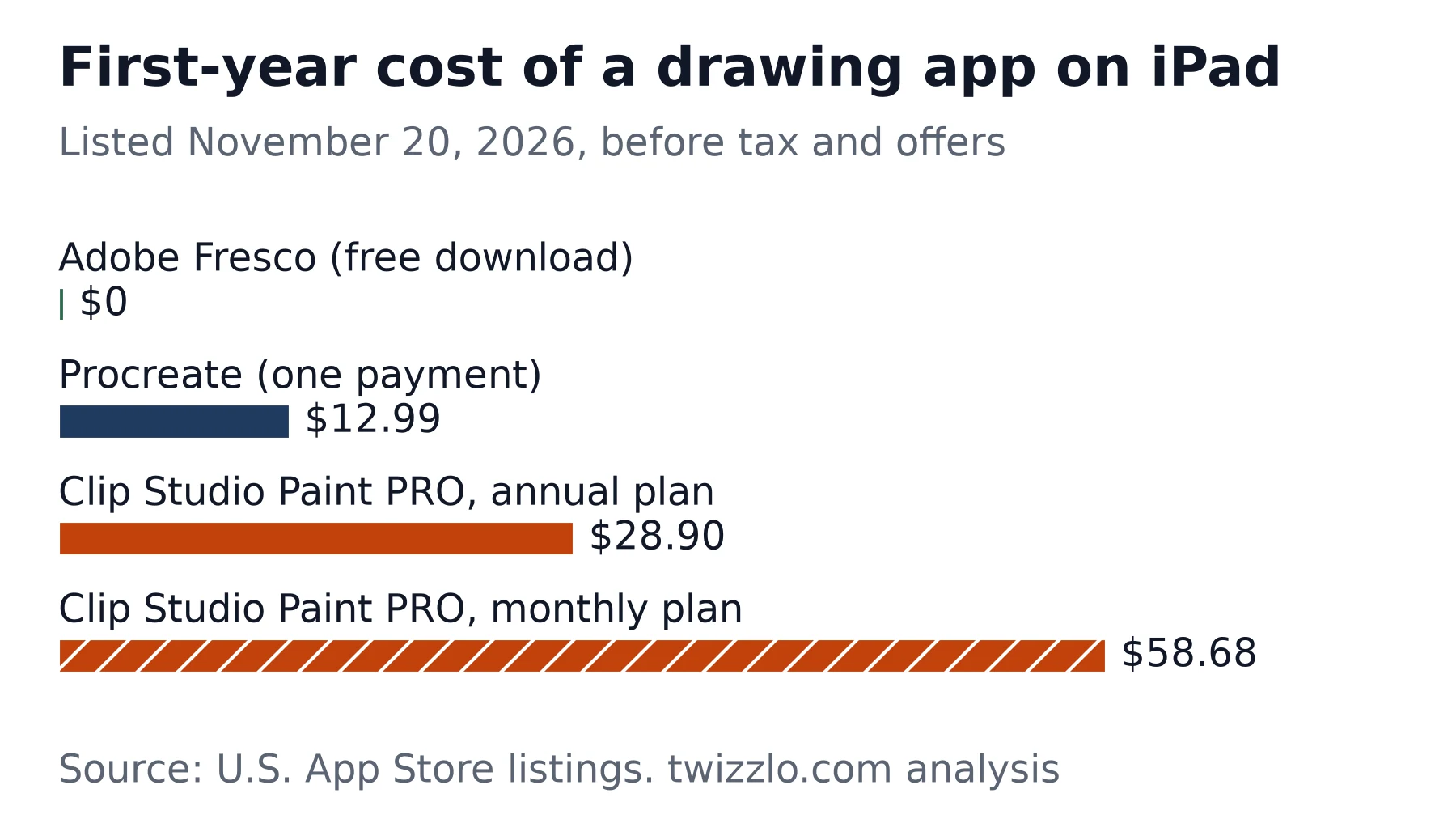
Worked arithmetic: 12 x $4.89 = $58.68 for a year of monthly payments, against $28.90 for the annual plan. At listed prices the annual plan saves $29.78, or 51%. Over two years it totals $57.80, which is $44.81 more than Procreate's single payment.
Clip Studio Paint's own page listed its one-year single-device plan at US$26.99 in its default view that day, below the App Store's $28.90.
The comparison changes for an artist who draws on a computer. Procreate's listing covers iPad alone, while Clip Studio Paint's one-time license covers Windows and macOS.
Which app shows a client the tattoo on their skin?
InkHunter is the augmented reality (AR) app the lists name for showing a client a design on their own skin: four of the seven include it, on lists read November 20, 2026. Its U.S. App Store listing, read the same day, shows a free download for iPhone and iPad, with in-app Premium purchases from $6.99 to $59.99.
The listing states that the app "projects any tattoo design on any part of your body so you can see how it will look". A user can try on their own design, choose one from the app's gallery or search the web.
One list calls the preview a visual selling tool for artists, and another adds that it does not replace a stencil. The InkHunter site we tried did not load that day, so these facts come from the store listing.
InkHunter suits an artist who wants a client to see how a design will look on their body before the session.
Which app helps clients find a tattoo artist?
Tattoodo is the app the lists name most often for getting found by clients: four of the seven include it, on lists read November 20, 2026. Tattoodo's home page, read the same day, tells artists it is "Free to join".
The U.S. App Store listing for its client app is free to download. It describes clients browsing verified artists by location, style and budget, then messaging and booking one.
That listing shows two in-app purchases, an Artist Pro Subscription at $29.99 and a Studio Pro Subscription at $79.99, and does not state the billing period.
A listing is not automatic. Tattoodo's site has artists apply, and it describes each listed artist as "hand-picked and verified". The site adds that a client who pays a deposit also pays a small flat booking fee, and two of the lists report a commission on bookings that come through Tattoodo's search or marketplace.
A profile in someone else's app works beside your own pages. Our tattoo artist website guide covers what a studio's own site should tell clients before they book.
Tattoodo suits an artist who wants a profile where clients already browse artists by location, style and budget.
What do tattoo artists use for booking and payments?
For booking and payments, the lists name Bookedin on three of seven and Booksy on two, on lists read November 20, 2026. This guide names those apps but does not price or rank them.
Read those counts with care. Four of the seven lists come from software makers that give their own product an entry: Jotform, Bookedin, GlossGenius and Applestan. Bookedin's three are its own list, Jotform's and Inked Magazine's, and Inked Magazine's entry carries a Bookedin discount offer. Square's payment app and Square Appointments are on one list each.
A booking app's cost depends on team size, text messages and card fees, which one line in a table cannot show. Our guide on how to choose tattoo booking software compares booking tools on approval steps, deposits, reminders and monthly cost. Our booking software comparisons set several of them beside Twizzlo.
Which app fits which tattoo artist?
An artist with an iPad can cover drawing and previews for $12.99 or less, on prices listed November 20, 2026: Procreate or Adobe Fresco for drawing, plus InkHunter's free download.
| Artist | Cheapest listed option that fits | Listed price | Read date |
|---|---|---|---|
| Draws on an iPad and wants the app all seven lists name | Procreate | $12.99, one payment | November 20, 2026 |
| Draws on an iPhone or iPad and wants to pay nothing | Adobe Fresco | Free to download; in-app purchases are optional | November 20, 2026 |
| Draws on Windows, a Mac or Android | Clip Studio Paint PRO, one-year plan for a single device | US$26.99 in the page's default view, before any sale or first-plan offer; check your device's option | November 20, 2026 |
| Wants a client to preview a design on their skin | InkHunter | Free to download; Premium purchases from $6.99 | November 20, 2026 |
| Wants a profile where clients browse artists | Tattoodo | Free to join, by application; paid subscriptions from $29.99, billing period not stated | November 20, 2026 |
Table 3. Which app fits which artist, from the five priced apps in Table 1 and the devices and jobs each page lists, read November 20, 2026. Each row names the lowest listed price among the priced apps that fit; booking apps are outside this table.
Where Twizzlo fits
Twizzlo is web-based online booking and appointment scheduling software for appointment-based service businesses; for a tattoo artist it covers the booking job, and clients open the booking page in any phone browser.
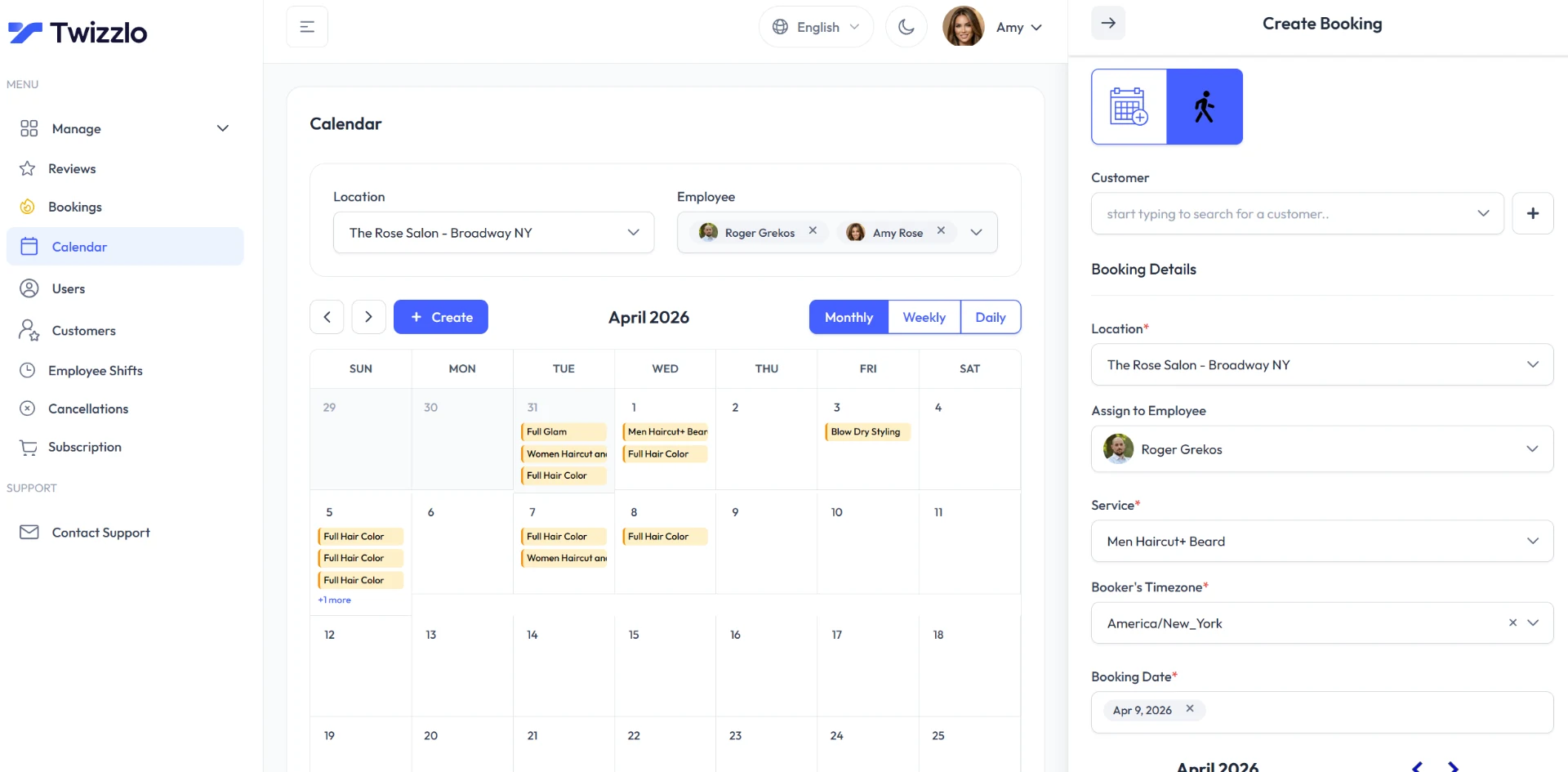
Twizzlo's /features/ page does not list a drawing, stencil or portfolio tool, so the design apps in this guide stay in your kit.
Worked example (hypothetical): a solo artist books 60 sessions and 30 consults in a month, 90 bookings in all (60 + 30 = 90). That is 60 under the Free plan's limit of 150 bookings a month, so Free covers it at $0. Free sends email reminders, not texts.
The same artist moves to Business Pro, at $29.99 a month per business, to send text reminders. One text per booking, our assumption, means 90 texts: 50 are included and the other 40 cost $0.03 each, $1.20 in all, so the month comes to $31.19. Staff and locations are unlimited on both plans.
Online card payments cost the artist their Stripe processing rate plus Twizzlo's 1.5% platform fee, on either plan. On a $200 session that the client pays in full at booking, the platform fee is $3.00. The Twizzlo pricing page has the current plan details.
To take bookings from one link while you draw, start on the Free plan.
Frequently asked questions
What app do most tattoo artists use to draw?
Procreate is the one the lists name most. Each of the seven app lists we read on November 20, 2026, names it, and no other drawing app is on more than four. Its U.S. App Store listing showed a price of $12.99 that day.
Is Procreate a subscription?
No. Procreate's own page, read November 20, 2026, states "No subscriptions", and its U.S. App Store listing showed a single price of $12.99 with no in-app purchases.
Is there a free app for tattoo design?
Yes. On its U.S. App Store listing, read November 20, 2026, Adobe Fresco was free to download for iPhone and iPad, with optional in-app purchases from $7.99. Clip Studio Paint was free to download too, but its listing states that saving and exporting on an iPad need a paid plan.
What app turns a picture into a tattoo stencil?
None of the seven lists we read on November 20, 2026, gives a stand-alone stencil app an entry. Three describe preparing clean line work for a stencil inside a drawing app such as Procreate, Clip Studio Paint or Adobe Fresco, and one of them notes that InkHunter's preview does not replace a stencil.
Do you need an iPad to use these apps?
No, though Procreate needs one. On pages read November 20, 2026, Procreate's listing covered iPad alone and Adobe Fresco's covered iPhone and iPad. Clip Studio Paint offered options for Windows, macOS, iPad, iPhone and Android.
Sources and methodology
Prices read
- Procreate, U.S. App Store listing (Apple) (opens in a new tab)Read . Supports: Procreate: $12.99, no in-app purchases shown, iPad, iPadOS 16.3 or later (Tables 1, 2 and 3, Figure 2)
- Procreate for iPad (Savage Interactive) (opens in a new tab)Read . Supports: Procreate: 'No subscriptions. Exclusively from the App Store.'
- Adobe Fresco, U.S. App Store listing (Apple) (opens in a new tab)Read . Supports: Adobe Fresco: free to download, iPhone and iPad, raster and vector brushes, in-app purchases from $7.99 to $149.99 (Tables 1, 2 and 3, Figure 2)
- Clip Studio Paint, pricing and plans (Celsys) (opens in a new tab)Read . Supports: Clip Studio Paint PRO: Perpetual License US$63.00 (sale US$29.50, listed as ending November 26), Update Pass, one-year single-device plan US$26.99 in the default view, device options (Tables 1 and 3)
- Clip Studio Paint, U.S. App Store listing (Apple) (opens in a new tab)Read . Supports: Clip Studio Paint on iPad: free download, in-app purchase required to save and export, PRO Monthly Single-Device Plan $4.89, PRO Annual Single-Device Plan $28.90, free 30-day trial and first-plan offer (Tables 1 and 2, Figure 2)
- INKHUNTER, U.S. App Store listing (Apple) (opens in a new tab)Read . Supports: InkHunter: augmented reality preview, free download, iPhone and iPad, in-app Premium purchases from $6.99 to $59.99 (Tables 1 and 3)
- Tattoodo home page (opens in a new tab)Read . Supports: Tattoodo: free to join, artists apply and are verified, a flat booking fee for clients who pay a deposit (Tables 1 and 3)
- Tattoodo: Book Tattoo Artists, U.S. App Store listing (Apple) (opens in a new tab)Read . Supports: Tattoodo client app: free download, browsing verified artists, Artist Pro Subscription $29.99 and Studio Pro Subscription $79.99 in-app, billing period not stated (Tables 1 and 3)
- Jotform blog, '7 best apps for tattoo artists in 2026' (named without a link)Read . Supports: One of the seven lists in the tally; Adobe Illustrator and Tattoodo descriptions (Table 1, Figure 1)
- Vocal Media, '12 Best Apps to Draw Tattoo Designs in 2026' (named without a link)Read . Supports: One of the seven lists in the tally; stencil preparation in drawing apps (Table 1, Figure 1)
- Bookedin blog, '12 Must-Have Apps for Tattoo Artists' (named without a link)Read . Supports: One of the seven lists in the tally; stencil and Square descriptions (Table 1, Figure 1)
- GlossGenius blog, '6 Best Design & Business Apps for Tattoo Artists' (named without a link)Read . Supports: One of the seven lists in the tally; InkHunter, stencils and Tattoodo (Table 1, Figure 1)
- Inked Magazine, 'Art on the Go: The Best Tattoo Apps for Artists' (named without a link)Read . Supports: One of the seven lists in the tally, dated 2024; its Bookedin entry carries a discount offer (Table 1, Figure 1)
- Applestan blog, '7 Best Tattoo Design Apps for iPhone (2026)' (named without a link)Read . Supports: One of the seven lists in the tally (Table 1, Figure 1)
- Painful Pleasures blog, 'The Top 10 Smartphone & iPad Apps for Tattoo Artists in 2019' (named without a link)Read . Supports: One of the seven lists in the tally, dated 2019 (Table 1, Figure 1)
- Yohann journal, 'Procreate for Tattoo Artists' (named without a link)Read . Supports: A ranked article about one app, read and not scored in the tally
From our editorial policy
- Twizzlo sells online booking and appointment scheduling software, the same category we write about. Twizzlo appears in our comparisons and roundups, and we have a commercial interest in you choosing it.
- We do not publish invented quotes, studies, statistics, customer stories or product tests, and we do not imply hands-on use of a product when the research came from the vendor's public documentation.
- To report an error, email support@twizzlo.com with the subject line "Correction: [page URL]". Tell us what is wrong and, if you can, link a source.
Start free, upgrade when you grow
Flat-rate booking software. No per-seat, per-chair or per-location fees.
- Free plan up to 150 bookings a month, not a trial
- Business Pro is $29.99 a month per business for unlimited bookings, with a 30-day money-back guarantee
- 24/7 support by email