
Digital Scheduling for Tattoo Artists: Flat Rate Software

In short
Digital scheduling for tattoo artists means clients book, prepay and get reminders through one link instead of your DMs. Solo and guest-spot artists should set it up around where they will be: one booking link for each studio or city, travel dates and days off blocked ahead, and short flash slots kept apart from custom sessions.
- Send every booking request to one link and keep DMs for design questions.
- Before a guest spot, give that city its own hours and time zone, block the same days at home and post that city's link.
- Check the billing unit before choosing a tool: per artist, per location, per user or per business decides what a second city adds.
In this article13 sections

If you book your own clients, requests probably reach you through Instagram DMs, texts and phone calls. That works until two clients are promised the same Saturday, or a guest spot fills in one thread while your home chair sits empty in another. Digital scheduling for tattoo artists fixes that only when the setup follows where you work and what you book.
This guide is for solo, resident and guest-spot artists who book their own clients. If you run a multi-artist shop with a front desk, our page on tattoo booking software covers studio setups; the guest-spot and flash day sections still apply.
What Is Digital Scheduling for Tattoo Artists
Digital scheduling for tattoo artists is a booking system that connects services, artist availability, deposits, reminders, client records, and team access in one operational workflow. For an artist who books alone or travels, it also has to know three things a studio calendar can take for granted: which city you are working in, which days you are away, and which slots are flash, walk-in or custom work. With those set, a client can book the right session in the right place without messaging you first.
Your Digital Scheduling Checklist for Leaving DMs Behind
Leaving DMs behind means every booking request ends at one link and every confirmed session lives on one calendar. Before you post the link, list where requests arrive today, decide which ones still need a conversation, and set your services so clients can book without asking you first.
Online scheduling for tattoo artists starts with that single link; the work is in what sits behind it.
Audit where requests arrive
- List every channel: DMs, texts, calls, email, walk-ins and any website form.
- Decide who confirms what: note which requests you still confirm by hand, such as custom pieces that need a consultation.
- Find duplicate records: reference images, notes and payments often sit in different apps.
- Mark the failure points: missed callbacks, unclear payment terms, double-booked days and time off nobody wrote down.
Practical rule: if the same slot can be booked from two places, you have a collision risk, not a schedule.
Set the booking page up before you post it
- Create service categories first. Separate consultations, flash, custom sessions and touch-ups, each with its own length.
- Publish the hours you really work, not an ideal week.
- Set payment and cancellation terms before the link goes public. Whether you take a deposit or the full price, clients should see the terms before they book.
- Announce one booking path everywhere: your bio, story highlights, website and email signature.
For the first few weeks, answer every DM booking request with the link, regulars included.
Handle phone bookings on the same calendar
A phone call does not need a second system. Put the booking on your calendar while the client is still on the line, so the slot leaves your booking page before anyone else takes it, and text the link for anything that can wait, such as a second session.
A reply you can paste into DMs
Example: a DM reply. Replace the parts in brackets.
Thanks for reaching out. You can book a consultation or a flash slot here: [your booking link]. For a custom piece, send me the placement and rough size, and I will reply with a consultation time.
To map every step from first message to finished session in a studio, see our tattoo booking system guide.
Set Session Lengths and Buffers Before Clients Book
Set each service’s length and the buffer after it before any client books, because a booking page can offer only the times your settings allow. Keep consultations, flash, custom sessions and touch-ups as separate services with their own lengths.
Configure services like a production schedule
A calendar that protects your tattooing time usually includes:
- Consultation blocks: kept apart from tattoo time, so design talks do not take your best tattooing hours.
- Session-specific lengths: a short flash piece and a long custom session should never share one default length.
- Only the services you actually offer: if you share a studio with other artists, your booking page shows only your own services.
- Buffers: cleanup, stencil prep and station reset belong in the schedule, not in your memory.
When a tool cannot hold a separate length for each service, you end up fixing the gaps by hand: shortening one session in a text thread, stretching another, and finishing the week either overbooked or idle between clients. Good tattoo calendar scheduling puts those rules into the service settings once, so every booking follows them.
How to Schedule Tattoo Guest Spots and Travel Dates
To schedule a tattoo guest spot, treat the guest city as its own bookable location for the dates you are there: its own booking link and working hours, the right time zone, and the same dates blocked at your home studio.
Example: a five-day guest spot in another city
You tattoo Tuesday to Saturday at your home studio. A host studio in a city one time zone west offers you five days, three weeks from now. Set it up in seven steps:
- Add the guest city as its own location, with working hours on the five guest days only.
- Set that location’s time zone, then open its booking page as a client would and check that the times match the host studio’s local time before you post it.
- Block the same five days at home as time off, so home clients cannot book them.
- Announce the guest spot with the guest city’s own link, and keep your home link in your bio.
- Decide which guest sessions are paid at booking. A missed slot is hard to refill in a city you are only visiting.
- Add a longer buffer on the first guest day for setting up at an unfamiliar station.
- Remove that location’s hours after the last guest day, so the link stops offering times.
Before you post the link, agree with the host studio whether clients book through your link or through the studio’s own calendar, so the same hours are never sold twice.
In Twizzlo, each location has its own booking link and working hours, time-off and blackout dates block days on the calendar, and multiple time zones are supported. The same seven steps work in other tools that give each location its own booking link, hours and time zone.
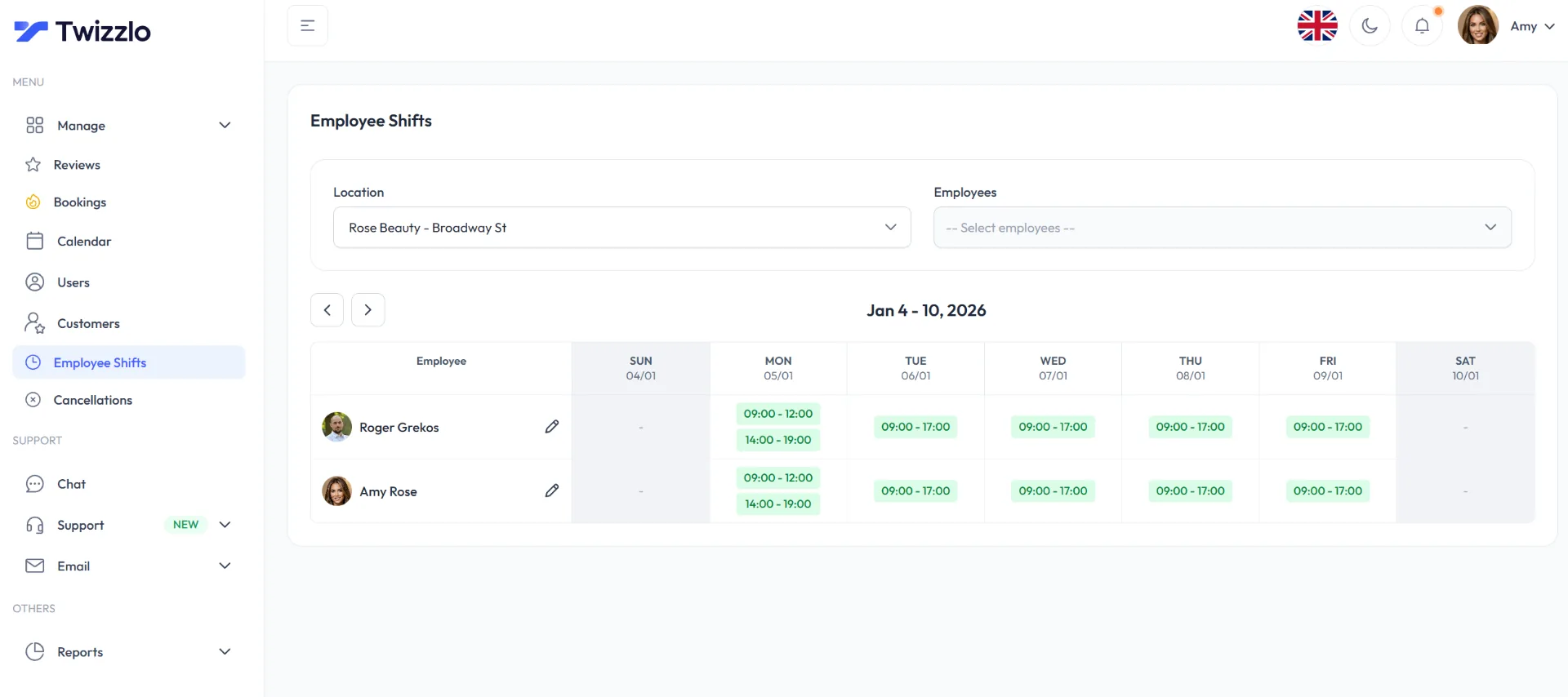
Travel without a guest spot, such as a convention weekend or a holiday, needs only step 3: block the days at home before you open the next month’s calendar.
How to Build a Tattoo Flash Day Timetable
A tattoo flash day runs best as a timetable of short, equal flash slots with a buffer after each, with some slots opened for online booking and some held back for walk-ins.
Table 1. Example flash day timetable. An eight-hour day (10 a.m. to 6 p.m.) with 45-minute flash slots and a 15-minute buffer after each holds eight slots, because eight 60-minute slots fill 480 minutes.
| Time | What happens | Booked how |
|---|---|---|
| 10 to 10:45 a.m. | Flash slot 1, then a 15-minute buffer to clean and reset | Online |
| 11 to 11:45 a.m. | Flash slot 2, then buffer | Online |
| Noon to 12:45 p.m. | Flash slot 3, then buffer | Online |
| 1 to 1:45 p.m. | Flash slot 4, then buffer | Online |
| 2 to 2:45 p.m. | Flash slot 5, then buffer | Online |
| 3 to 3:45 p.m. | Flash slot 6, then buffer | Online |
| 4 to 4:45 p.m. | Flash slot 7, then buffer | Held for walk-ins |
| 5 to 5:45 p.m. | Flash slot 8, then a last buffer until 6 p.m. | Held for walk-ins |
Set up the flash service with its own length and price before you post the link. Hold the walk-in slots back from online booking, enter each walk-in on the calendar as the client arrives, and close online booking once the online slots fill. For a lunch break, give up one slot: the day then holds seven.
An artist who runs many multi-artist flash events may prefer a tool built for them. On its own blog (read September 27, 2026), Venue Ink describes an Events feature “built for flash days, conventions, and group pop-ups,” where invited artists share one event link and clients book and pay through one page.
How Do Guest Artists Avoid Double Bookings at a Host Studio?
Guest artists avoid double bookings when the host studio and the guest agree on one calendar of record for the guest’s chair and on who confirms each booking. Two calendars for one chair is where conflicts start.
One shared calendar isn’t enough
Putting a guest on the host’s calendar does not settle who books the chair. Conflicts come from four places:
- The guest’s schedule sits off-platform: the guest books through a personal link while the desk sells the same chair.
- The guest blocks time informally: the desk does not see the block and books over it.
- The desk promises a time before the guest agrees: the client hears “you’re booked” before the guest approves the design or the slot.
- Consultations and sessions overlap: design talks eat into tattoo time.
If the guest books through a personal link, the host blocks that chair on the studio calendar for the guest dates.
The permission model has to match the studio model
A workable split gives the guest control of their own availability, while the host’s desk books only inside the windows the guest publishes:
- The guest blocks their own design and consultation time.
- The desk books only published session windows.
- Payment status is visible to both sides.
- Reschedules go through one record, not side messages.
Host studios choosing tools for residents and guests can compare tattoo shop scheduling software in our studio guide.
How Prepayment and Reminders Protect a Solo Artist’s Week
Prepayment and reminders protect a solo artist’s week because a missed session is time you cannot hand to a colleague. Decide which services are paid at booking, publish the cancellation terms before the first client books, and send reminders early enough that a client can still reschedule.
Tie payment to the booked slot
A payment protects your time only when it is tied to a confirmed booking and to terms the client accepted. Money sent by transfer after a DM proves that it arrived, not which session it holds or what happens if the client cancels.
Many artists take a deposit. For how much to ask and how to word the policy, see our guide to tattoo deposits.
Then run the same routine for every booking:
- Get agreement to your terms at booking: a ticked checkbox is easier to point to than a message thread.
- Send a first reminder early enough to reschedule, so a client can move without leaving you an empty day.
- Send a second reminder the day before: date, time, address and your cancellation terms.
- Keep a short list of clients who can come in at short notice, so a late cancellation becomes a filled chair.
- Enforce your terms the same way every time: an exception for one client becomes the rule for the next.
A Twizzlo prepaid booking takes the full service price when the client books; if the client does not show, you decide whether to keep or refund it, and no-show fees are applied at your discretion.
What doesn’t work
Three habits that leave bookings loose, and what each leads to.
| Habit | What happens |
|---|---|
| Payment taken by manual transfer | Payment arrives, but the booking record stays loose |
| Reminder sent only once | Client forgets, delays or stops replying |
| Policy explained only in chat | Terms are hard to enforce consistently |
What Digital Scheduling Costs a Solo or Guest Artist
What digital scheduling costs a solo or guest artist depends more on the billing unit than on the entry price: per artist, per location, per user, per calendar or per business. Plans for one artist on six vendors’ own pricing pages, read September 25, 2026, ranged from $0 to $65 a month.
For one artist at one studio, a $0 plan can be enough: Square Appointments Free and Venue Ink Solo both list $0 a month, though Venue Ink’s clients pay its card fee by default.
Table 2. Plans for one artist, and what a second city adds. Monthly list prices from each vendor’s own pricing page, read September 25, 2026 (Twizzlo: our pricing page), before payment processing.
| Tool | Plans and monthly list price | Billing unit | What a second city or studio adds | Source |
|---|---|---|---|---|
| Porter | Artist Essentials $35; Artist Pro $65 (30-day free trial) | Per artist account | Artist plans: not part of our read; Studio Pro is $250 a month for one location | Porter pricing page |
| Venue Ink | Solo $0; Solo Pro $50, “Billed monthly in USD” | Per artist | For a host: Studio Pro, $150 a month, covers “Up to 5 residents or guests per month (+$35/mo per active artist)” | Venue Ink pricing page |
| Square Appointments | Free $0; Plus $49, each per location | Per location | Another $0 on Free; another $49 a month on Plus | Square Appointments pricing page |
| Setmore | Free $0, up to 4 users; Pro $12 per user, billed monthly | Per user | Not part of our read | Setmore pricing page |
| Bookedin | Free $0, up to 50 bookings a month; Plus $24 for 1 calendar, billed monthly (no currency code printed) | Per account, by number of calendars | Multi-location: “Let’s talk,” no price | Bookedin pricing page |
| DaySmart Body Art | Basic $29, includes 1 user | Plan with included users | Not part of our read | DaySmart Body Art pricing page |
| Twizzlo | Free $0 for up to 150 bookings, no SMS; Business Pro $29.99 per business | Per business | Nothing: unlimited locations on both plans | Our pricing page |
Card fees come on top. Venue Ink’s free plans take “10% to process deposits and payments by card (charged to clients by default)” and Solo Pro 5%, per its pricing page, read September 25, 2026; its own example is a $50 deposit that costs the client $55. Square Appointments lists online rates of 3.3% plus 30 cents on Free and 2.9% plus 30 cents on Plus (pricing page, same date). On Twizzlo, online payments carry your Stripe processing rate plus a 1.5% Twizzlo platform fee.
Table 3. Which billing unit fits how you work, with examples from Table 2 (read September 25, 2026).
| How you work | Look for | Check before you pay |
|---|---|---|
| Alone at one studio | A free or per-artist plan | Booking caps, such as 50 a month on Bookedin Free, and who pays card fees |
| Guest spots in other cities | Per-artist or per-business pricing | Whether a second location is billed, as on Square Appointments Plus ($49 a month each) |
| Hosting guest artists | Unlimited staff, or pricing per business | Per-guest fees, such as the “+$35/mo per active artist” on Venue Ink Studio Pro |
Per-business pricing is the model our flat rate booking software guide explains across industries.
Where Consent Forms Fit When You Book Online
A booking link reserves time; it does not replace the signed consent form. Keep consent in the approved form process of the studio where you tattoo, and at a guest spot use the host studio’s form, because the rules differ from state to state.
Our tattoo consent form template shows the fields and a two-state example of how the rules differ. Before a guest spot, ask the host which form clients sign and where the signed copy is kept.
Artists who want consent forms inside their booking tool can look at vendors that list them. Porter’s pricing page lists “Automated liability waivers & consent forms” on Artist Pro (read September 25, 2026).
What to Review After Each Month or Guest Spot
Review your bookings once a month and after every guest spot: where bookings came from, which services filled, how many clients missed or moved sessions, and how each location did.
What to check each month
- No-shows and late moves: whether your terms and reminders are working.
- Most-booked services: including which flash sizes sell, so you can plan the next flash day.
- Bookings per location or guest city: whether a guest spot is worth repeating.
- Peak days and times: where to add hours and where to take a day off.
- Reschedule patterns: repeated moves often point to a policy or timing problem.
A sales reports software view makes those patterns easier to spot.
Use the data to change operations
Reviewed on a schedule, these numbers tell you what to change: drop a service that never fills, move your hours toward your busiest days, go back to a guest city that booked out, and tighten your terms where clients keep missing sessions.
Frequently Asked Questions
How should a tattoo studio handle variable-length appointments?
Don’t force every service into a fixed slot. Build separate session types for consultations, shorter pieces, and larger custom work, then assign durations by artist. That keeps the calendar realistic and avoids the common problem where a long project blocks too little time or a short appointment wastes premium hours.
Should the front desk control artist calendars?
The front desk should control booking execution, not total calendar authority. Artists need ownership of availability, blocked time, and project structure. Reception should book inside approved windows. When both sides can freely override the schedule, studios end up in the front-desk versus artist conflict that causes preventable errors.
What is the best way to handle waitlists?
Keep the waitlist simple and immediate. Track client flexibility, preferred artist, service type, and how much notice they can accept. When a slot opens, contact the best-fit client first instead of blasting everyone. A waitlist works only if staff can match openings quickly to people who can take them.
How do you schedule guest artists without disrupting the main studio calendar?
Set guest artist availability as a separate calendar or clearly isolated block structure before public booking opens. Keep their consultations, session windows, and blackout periods distinct from resident artists. If staff have to remember guest rules manually, they’ll eventually book over them or leave capacity unused.
When should a studio stop using DMs for booking?
Move booking out of DMs as soon as you miss a message, confirm the same slot twice or take your first guest spot. DMs still work for first contact and design questions, but a booking link keeps the date, service, payment and terms in one record that you and the client can both see.
How often should booking rules be reviewed?
Review them monthly at first, then quarterly once operations stabilize. Look for repeat friction around reschedules, artist availability, deposit disputes, and consent completion. Booking rules shouldn’t stay fixed out of habit. They should reflect what the studio has learned from actual scheduling behavior.
How do you choose a tattoo scheduling app?
Start with tattoo-specific workflow support: variable session lengths, artist-by-artist calendars, deposits tied to confirmed bookings, and permission controls that separate front-desk booking from artist availability. Then check the pricing model, because per-staff fees and feature tiers raise the bill as the team grows. A shortlist of the best tattoo booking software helps with the first cut, but the real test is whether the app can run your service menu, deposit policy, and reminder sequence without manual workarounds.
How much does tattoo scheduling software cost?
For one artist, plans on six vendors’ own pricing pages, read September 25, 2026, ran from $0 a month (Venue Ink Solo, where clients pay a 10% card fee by default, and Square Appointments Free, per location) to $65 a month (Porter Artist Pro). The billing unit decides what a guest city or a second studio adds: per location, per user or per artist.
How should a studio schedule tattoo consultations?
Treat consultations as their own service category with dedicated blocks, kept separate from tattoo production time so design conversations don’t eat prime billable hours. Let artists block their own design and consult windows, keep consult durations shorter than session slots, and route the client from consultation to deposit to confirmed session inside one system. That keeps the pipeline visible and stops consults from quietly overbooking the calendar.
How do tattoo guest spots work for bookings?
For bookings, a guest spot works like a short second location: a host studio offers you a chair for set dates, and you open booking only for those dates. Give the guest city its own link and hours, block the same days at home, and agree with the host whose calendar clients book through.
How many flash tattoos fit in one flash day?
It depends on slot length and cleanup time. For example, a 10 a.m. to 6 p.m. day with 45-minute flash slots and a 15-minute buffer after each holds eight slots; opening six online and holding two for walk-ins leaves room for people who arrive without booking.
Should a solo tattoo artist still take bookings by phone?
Yes, if your clients call. Enter each phone booking on your calendar while you are still on the call, so the time is no longer offered on your booking page, and send your link for anything that can wait, such as a reschedule. One calendar for every channel is what prevents double bookings.
Twizzlo Free and Business Pro for Artists Who Travel
Twizzlo is web-based online booking and appointment scheduling software for appointment-based service businesses, with a public booking page, email and SMS reminders, client records, staff schedules and shifts, and Stripe payments and tips.
The Free plan is $0 a month for up to 150 bookings, with no SMS, and it is free forever, not a trial. Business Pro is $29.99 a month per business for unlimited bookings; it includes 50 SMS a month, then $0.03 each, and a 30-day money-back guarantee.
For an artist who travels, the billing unit is the point: both plans include unlimited staff and locations, so a guest city or a second studio does not change the price, and the Free limit counts bookings, not locations. Online payments carry your Stripe processing rate plus a 1.5% Twizzlo platform fee. Compare both plans on the pricing page.
Sources and methodology
Prices read
- Porter pricing page (opens in a new tab)Read . Supports: Artist Essentials and Artist Pro prices, the Studio Pro price and the Artist Pro consent forms line
- Venue Ink pricing page (opens in a new tab)Read . Supports: Solo, Solo Pro and Studio Pro prices, the card fees charged to clients and the $50 deposit example
- Square Appointments pricing page (opens in a new tab)Read . Supports: Free and Plus prices per location and the online card rates
- Setmore pricing page (opens in a new tab)Read . Supports: Free and Pro prices per user
- Bookedin pricing page (opens in a new tab)Read . Supports: the Free booking limit, the Plus price for one calendar and the multi-location line
- DaySmart Body Art pricing page (opens in a new tab)Read . Supports: the Basic price and its included user
- Venue Ink blog post on tattoo scheduling software (opens in a new tab)Read . Supports: Venue Ink's own description of its Events feature for flash days
- Twizzlo pricing page (opens in a new tab)Read . Supports: Twizzlo plan prices, the SMS allowance, unlimited staff and locations and the online payment fee
- Twizzlo features page (opens in a new tab)Read . Supports: booking links and working hours per location, time zones, blackout dates, prepaid bookings and the Employee Shifts screen
From our editorial policy
- Twizzlo sells online booking and appointment scheduling software, the same category we write about. Twizzlo appears in our comparisons and roundups, and we have a commercial interest in you choosing it.
- We do not publish invented quotes, studies, statistics, customer stories or product tests, and we do not imply hands-on use of a product when the research came from the vendor's public documentation.
- To report an error, email support@twizzlo.com with the subject line "Correction: [page URL]". Tell us what is wrong and, if you can, link a source.
Update history
- : Refocused the guide on artists who book themselves, added guest-spot and flash day setups, a dated plan table and three FAQs, and removed figures we could not source.
Start free, upgrade when you grow
Flat-rate booking software. No per-seat, per-chair or per-location fees.
- Free plan up to 150 bookings a month, not a trial
- Business Pro is $29.99 a month per business for unlimited bookings, with a 30-day money-back guarantee
- 24/7 support by email