
Cleaning service scheduling software for residential cleaning teams
Cleaning business scheduling software for standard and deep cleans: clients book online, prepay when you ask and get reminders before you arrive, with access notes and every cleaner included.
Plans
- FreeUp to 150 bookings a month, not a trial
- $0/mo
- Business ProPer business: unlimited bookings, 50 SMS a month
- $29.99/mo
- Unlimited staff and locations on both plans
- 30-day money-back guarantee on Business Pro
- 24/7 support
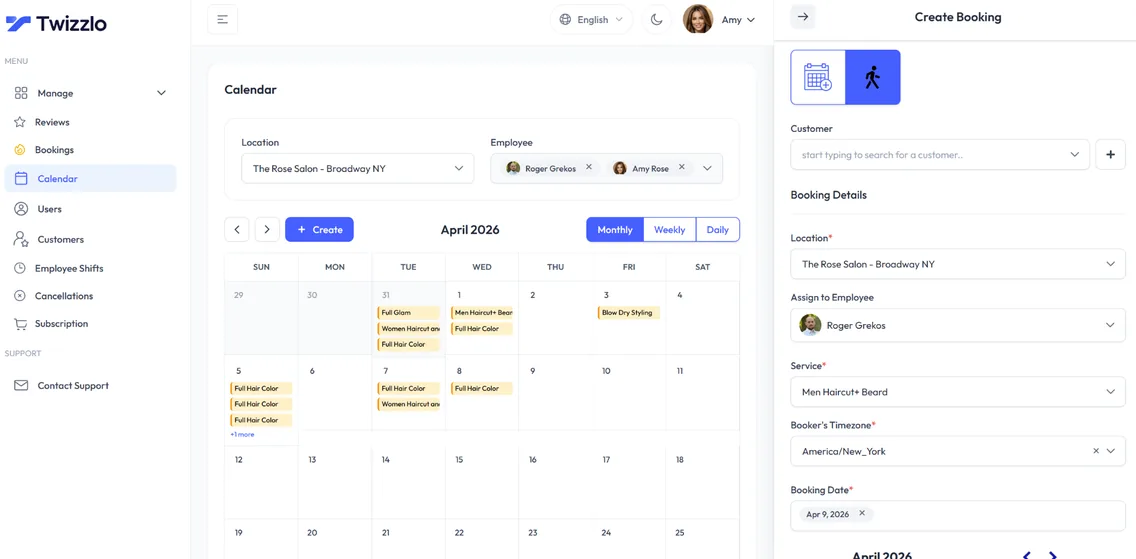
Twizzlo is cleaning business scheduling software for residential cleaning teams: clients book a standard or deep clean online, each cleaner has a calendar, and access notes sit on the client profile. As cleaning service scheduling software priced per business, it includes every cleaner and location on both plans.
Clients get reminders by email, and by SMS on Business Pro, and you can ask for prepayment on deep and move-out cleans through Stripe. Twizzlo books each clean as its own appointment. Route planning is not a Twizzlo feature, and recurring bookings, quotes and dispatch are not on the features list, so if your crews rely on them, email sales@twizzlo.com before you switch.
Sound familiar?
Running a cleaning business shouldn't feel like a full-time admin job.
Bookings juggled over text
Unclear schedules on the day of the visit
Late cancellations on long deep cleans
On this page11 sections
Cleaning business scheduling software for standard, deep and move-out cleans
A residential cleaning business sells a handful of services again and again: a standard clean, a deep clean, a move-out clean. Each one has its own price and length, and each one needs the right cleaner at the right home at the right time. Cleaning business scheduling software holds that together, so clients book without a round of texts and your team knows where to be.
In Twizzlo every clean is a service with its own price and duration. Add separate services for smaller and larger homes when the time differs, assign each service to the cleaners who do it, and add buffer time for the drive between homes. Real-time availability means clients only see times a cleaner can actually take. Carpet cleaners can set up room counts the same way, as our guide to carpet cleaning scheduling software shows with a worked example.
That is what most owners want from residential cleaning software or house cleaning software: a booking page, a calendar per cleaner, client notes and a way to take payment up front. If you are comparing cleaning company software for a small team, check those four things first, then what adding a cleaner does to the price. Our guide to the best scheduling app for cleaning business owners shows what each app bills for and whether its free option is a plan or a trial.
Cleaning service scheduling software with a calendar per cleaner
Most of the value of cleaning business scheduling software sits in the calendar. Every cleaner gets a staff profile, an individual schedule and a calendar view of their own. Set each person's shifts, add time off and blackout dates, and the booking page only offers the hours that person actually works.
Buffer times keep a gap after each visit for the drive to the next home, so a long clean across town does not run straight into the next booking. Assign services to staff so a move-out clean only goes to the cleaners you trust with it.
Software for scheduling cleaning services also has to keep the owner in charge. Role-based access controls what each cleaner can see and change, and bookable and non-bookable staff types let you give an office manager Twizzlo access without putting them on the booking page.
Free cleaning business software: what the Free plan covers
Twizzlo Free is $0 a month and free forever, not a trial. It covers the booking page, a calendar per cleaner, client profiles, staff scheduling, insights and online payments with tips for up to 150 bookings a month, with email reminders and no SMS. A solo cleaner or a small team can start free and upgrade to Business Pro only when bookings or SMS reminders call for it.
Does Free cover every cleaner on the team? Yes. Free includes unlimited cleaners and locations, so adding a cleaner never changes the price.
The cost table below compares Free and Business Pro side by side. See plans and payment charges.
What booking software costs for a four-cleaner team
The table prices a solo cleaner and a team of four cleaners at one location, using the plan prices general booking tools publish on their own pricing pages, read on the date shown. Tools built around dispatch, routes and quoting are covered in the guides at the end of this page.
Monthly subscription for a solo cleaner and a four-cleaner team, US prices before tax
Twizzlo Free
- Solo cleaner
- $0, up to 150 bookings a month, no SMS
- Team of four cleaners
- $0, same limits, staff unlimited
- Online or card payment charges
- Stripe processing plus a 1.5% Twizzlo platform fee
Twizzlo Business Pro
- Solo cleaner
- $29.99, unlimited bookings, 50 SMS a month then $0.03 each
- Team of four cleaners
- $29.99, staff unlimited
- Online or card payment charges
- Stripe processing plus a 1.5% Twizzlo platform fee
Square Appointments (Sep 17, 2026)
- Solo cleaner
- $0 on Free; $49 on Plus, which adds cancellation policy and no-show fees
- Team of four cleaners
- Same prices, per location; staff calendars unlimited
- Online or card payment charges
- Online: 3.3% + 30¢ on Free, 2.9% + 30¢ on Plus
Setmore (Sep 8, 2026)
- Solo cleaner
- $0 on Free; SMS reminders and deposits need Pro at $12/mo
- Team of four cleaners
- $0 on Free (up to 4 users); Pro $48 monthly or $20 billed annually
- Online or card payment charges
- Stripe at 2.9% + 30¢ in the US, per Setmore
Acuity Scheduling (Sep 16, 2026)
- Solo cleaner
- Starter $20/mo (1 calendar, email reminders). SMS reminders start on Standard at $34/mo
- Team of four cleaners
- Standard $34/mo (up to 6 calendars)
- Online or card payment charges
- Payment provider charges are separate from the subscription
Vagaro (Sep 8, 2026)
- Solo cleaner
- $23.99 (marked limited time)
- Team of four cleaners
- $53.99 ($10/mo per extra calendar)
- Online or card payment charges
- Under $4,000 a month processed: 2.6% + $0.10 swipe or dip, 3.5% + $0.19 keyed in
Prices are from each vendor's own pricing page on the date shown and can change, so check before you buy. For four cleaners, Square Appointments Free and Setmore Free also cost $0, and Setmore Pro billed annually ($20 a month) costs less than Twizzlo Business Pro, so compare what each plan includes, such as booking limits, SMS reminders and payment at booking. Twizzlo's 1.5% platform fee applies to online payments, on top of your Stripe rate. Full breakdowns: Twizzlo vs Square Appointments, Twizzlo vs Setmore, Twizzlo vs Acuity Scheduling, Twizzlo vs Vagaro and every comparison.
Online booking for home cleaning clients, with nothing to download
Cleaning clients often book in the evening or on weekends, when you are not answering the phone. Twizzlo's 24/7 booking page opens from your link in any phone or computer browser, so there is nothing to download. Clients pick a clean and a time that is still open and book it themselves.
That is the point of cleaning business software with online booking: the booking lands on the right cleaner's calendar with the service, the length and the client's details attached. Confirmations and reminders go out by email, and by SMS on Business Pro, and clients can reschedule themselves from the booking link instead of texting you.
Share the link on your Google Business Profile, your website and your social profiles, and send it to regular clients so they can book their next clean without a call.
Prepaid bookings for deep cleans and move-out cleans
A deep clean or a move-out clean can fill most of a cleaner's day. When a client cancels the night before, or is not home to let the team in, that day is hard to fill again. Turn on prepaid bookings for those services: the client pays the full service price online through Stripe when they book, so the slot is only held once it is paid.
Cancellation handling, custom booking rules and no-show fees support the policy you set, and if a client skips a prepaid clean, you decide whether to keep or refund the payment. Clients can add a tip for the team when they pay online. Staff can record manual payments for anything paid another way. For policy wording, see how to set a no-show charge.
Client notes for access instructions, pets and preferences
Every client has a profile with contact details, notes, preferences, visit history and total spend. Use the notes for what the team needs at the door: the entry instructions, where to park, the dog that stays in the yard, and the products the client prefers. Record any allergies in the household, so nobody brings the wrong product.
A cleaner with Twizzlo access can open the profile before the visit and see the last clean, the notes and the service booked, so a new cleaner can take over a regular client without a handover call. Keep the notes to what the visit needs, and leave out anything sensitive the team does not need to do the job.
- Contact details, visit history and total spend on every client profile
- Notes and preferences for access, parking and pets
- Allergies recorded where cleaning products matter
- Client search and filtering, plus repeat client tracking
Cleaning business management software: staff, shifts and insights
Once you run more than one cleaner, booking is only half the job. Cleaning business management software should also show who is working, who is free and how the week is going, and Twizzlo keeps that on one dashboard.
For cleaning staff management software, the basics are shifts, time off and control over who sees what. Multi-location staff shifts and schedules cover the weekly schedule, availability and time-off management keep the booking page accurate, and staff performance visibility and utilization show who is fully booked and who has room.
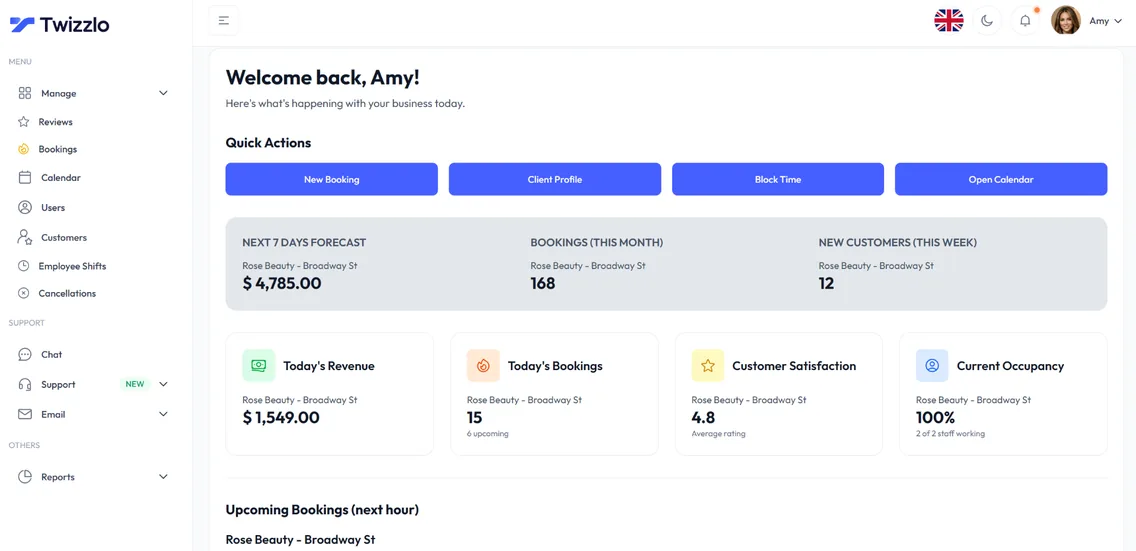
If you are weighing cleaning company management software or any other software for cleaning business owners, compare the reports as well as the calendar. Twizzlo's insights show booking volume, revenue, next-hour insights and forecasts, with daily, weekly and monthly views and new customer tracking.
- Individual schedules and multi-location staff shifts
- Availability and time-off management
- Role-based access and permissions
- Staff performance visibility and utilization
- Booking volume, revenue insights and forecasts
Maid service business software for one location or several
A maid service that grows into a second town usually wants separate booking links and hours without a second subscription. In Twizzlo, locations are unlimited on both plans. Each location gets its own booking link and working hours, and cleaners can work shifts across locations.
The owner sees every location in centralized insights, from bookings to revenue, and Business Pro stays $29.99 a month for the whole business however many locations or cleaners you add. That makes Twizzlo maid service business software you can start with one team and keep as you grow.
Set up cleaning bookings in six steps
- 1
Add your cleans as services
Add standard, deep and move-out cleans as services, each with a price, a duration and a buffer for travel between homes.
- 2
Add your cleaners
Create a profile for each cleaner, choose who is bookable online, and assign the cleans each person does.
- 3
Set hours, shifts and time off
Enter your working hours, each cleaner's shifts, and any time off or blackout dates, so the booking page only offers real openings.
- 4
Choose what needs prepayment
Turn on prepaid bookings for deep and move-out cleans, and write down your cancellation and no-show terms.
- 5
Connect Stripe
Connect Stripe to take online payments and tips at booking. Online payments carry Stripe processing plus a 1.5% Twizzlo platform fee.
- 6
Test and share your link
Make a test booking, then add the link to your Google Business Profile, website and social profiles, and send it to your regular clients.
Tools for cleaning appointments
24/7 online booking
Clients book appointments any time from your booking link, with real-time availability on any device.
Per-staff calendars
A calendar per staff member with real-time availability, buffer times, time off and blackout dates. Drag an appointment to reschedule it.
SMS & email reminders
Automated confirmations and reminders by email, plus SMS on Business Pro.
Client CRM
Every visit, note, preference, allergy and total spend saved to a searchable profile.
Prepaid bookings & tips
Collect online payments and tips at the time of booking through Stripe. Protect long slots with prepaid bookings: the client pays the full service price when they book.
Staff & shift management
Bookable and non-bookable staff, per-staff schedules, multi-location shifts, role-based access and assigned services, with unlimited staff.
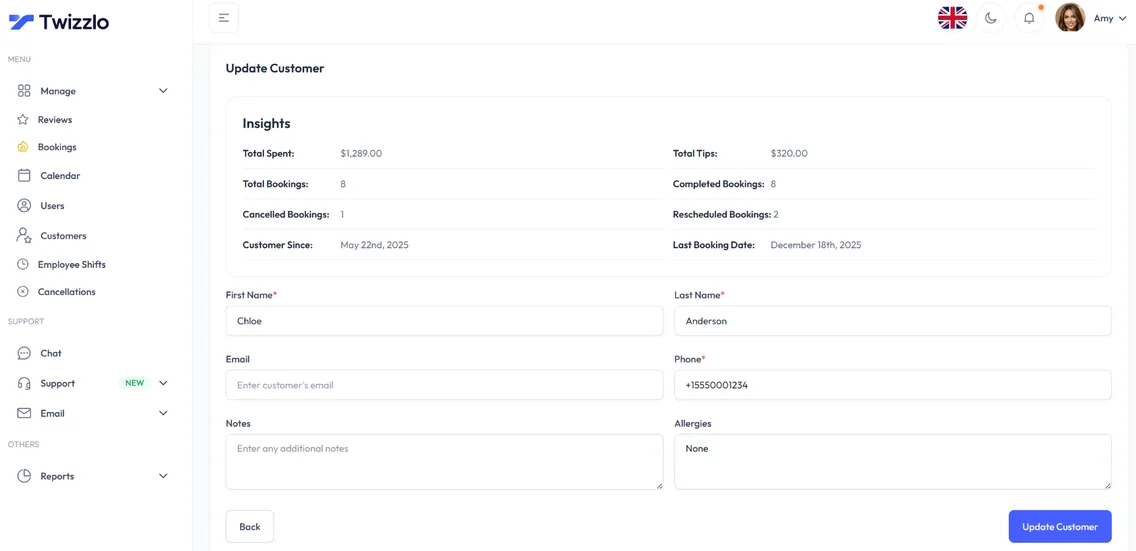
Know the visit before you arrive
The booked service, contact details, access notes and visit history sit on one client profile, so every cleaner knows how to get in and what the client asked for last time.
- Booked service and visit history
- Contact details on file
- Access notes and preferences
- Client search and filtering
See what's working before the day starts
Bookings, revenue, next-hour insights and cleaner utilization are on the dashboard the moment you log in.
Compare Twizzlo with Square Appointments, Setmore and Vagaro
Side-by-side comparisons of pricing, fees and features.
Cleaning service scheduling software FAQ
How does Twizzlo compare to ZenMaid or other cleaning company software?
Compared with ZenMaid, Twizzlo is booking software for cleaning businesses that sell visits as appointments. Clients book a standard or deep clean online, each cleaner has a calendar with shifts and time off, access notes sit on the client profile, and deep cleans can be prepaid through Stripe, with tips. Twizzlo does not plan routes, and recurring bookings, quotes and dispatch are not on its features list, so if your team depends on them, email sales@twizzlo.com before you switch. Every cleaner is included on both plans: Free is $0 for up to 150 bookings a month, and Business Pro is $29.99 a month per business. For ZenMaid's published plans next to other cleaning tools, see our cleaning service software guide.
Can clients prepay for a deep clean?
Yes. Turn on prepaid bookings for deep cleans, move-out cleans or any other service, and the slot is only held once the client has paid online through Stripe. Online payments carry Stripe processing plus a 1.5% Twizzlo platform fee, and clients can add a tip when they pay.
Does Twizzlo support multiple locations?
Yes. Unlimited locations on every plan, with a per-location booking link, centralized dashboard, multi-location staff shifts, and centralized insights across every branch.
Is Twizzlo really free?
Yes. Free is $0 a month, free forever and not a trial. It covers up to 150 bookings a month with unlimited staff, locations and client records, real-time insights, email confirmations and reminders, and online payments and tips through Stripe. It does not include SMS reminders, which require Business Pro. There is no plan fee; online payments you take carry your Stripe processing rate plus a 1.5% Twizzlo platform fee.
How long does setup take?
There is nothing to install, and how long setup takes depends on how many services and staff you add. It is one short checklist: add your services with prices and durations, set your hours, add staff if you have a team, connect Stripe if you want online payments, then share your booking link.
What should cleaning business scheduling software include?
Online booking with real-time availability, a calendar per cleaner, client profiles with access notes, prepaid bookings for bigger jobs, reminders and online payments. Twizzlo covers each one: clients book 24/7 from your link, every cleaner has a schedule with shifts and time off, access notes and visit history sit on the client profile, deep cleans can be prepaid through Stripe, and reminders go out by email, and by SMS on Business Pro.
Is there free cleaning business software for a small team?
Yes. Twizzlo Free is $0 a month for up to 150 bookings a month, free forever and not a trial, with unlimited cleaners and locations, online booking, client profiles, insights and online payments. It does not include SMS reminders, which require Business Pro.
Can cleaning clients book online without calling?
Yes. Clients open your booking link in any phone or computer browser, pick a clean and a time that is still open, and book without calling or downloading an app. They can reschedule themselves from the same link, and reminders go out by email, and by SMS on Business Pro.
Guides for cleaning businesses
Comparing tools? Our guide to the best scheduling app for cleaning business owners compares tools built around cleaning appointments. If your crews need dispatch, routes or job quoting, our guide to cleaning service software covers tools built for that. To put your scope and cancellation terms in writing, adapt our cleaning service contract template.
Best Scheduling App for Cleaning Business
Ten cleaning scheduling apps compared by what they bill for, from one flat price to per job. Three have ongoing free plans; most others offer a free trial.
GuideCleaning Service Software: What Seven Tools Cost at 1, 3 and 8 Cleaners
Compare cleaning software by scheduling, dispatch and invoicing requirements before choosing a system.
TemplateCleaning Service Contract Template: Free Agreement to Copy
A cleaning service contract template to adapt to your own scope, schedule and cancellation terms.
Start taking cleaning bookings online
Start with the Free plan, then choose Business Pro if you need unlimited bookings and SMS. Review the current plan limits and payment charges before choosing.
- Free plan, not a trial
- 30-day money-back guarantee on Business Pro
- 24/7 support