
Photographer booking software for portrait, family and brand shoots
Photographer booking software clients open in any phone browser: they pick a session, pay at booking through Stripe and get reminders, and your booking page doubles as your photography booking site.
Plans
- FreeUp to 150 bookings a month, not a trial
- $0/mo
- Business ProPer business: unlimited bookings, 50 SMS a month
- $29.99/mo
- Unlimited staff and locations on both plans
- 30-day money-back guarantee on Business Pro
- 24/7 support
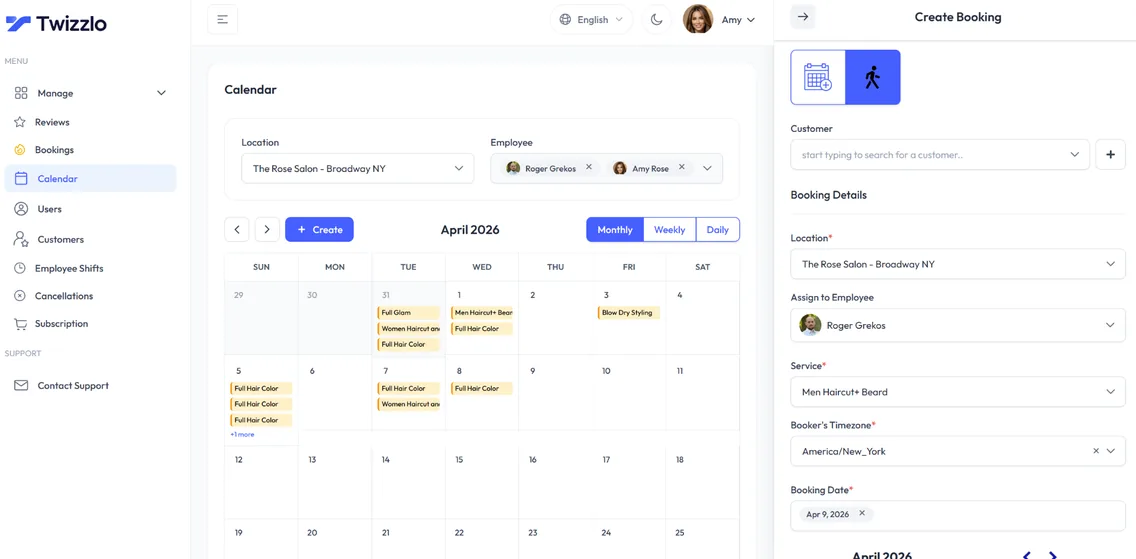
Twizzlo is photographer booking software for portrait, family, headshot and brand shooters tired of stitching Calendly and Venmo together. Publish your session types online, such as minis, headshots, family sessions and brand shoots, and let clients book with real-time availability and prepay in one flow.
As a lightweight photographer CRM, Twizzlo keeps every client's contact details, notes, session history and total spend on one profile. Prepaid bookings hold a session only once the client has paid through Stripe, and confirmations and reminders go out by email, and by SMS on Business Pro.
Sound familiar?
Running a photography business shouldn't feel like a full-time admin job.
Long email threads before every session
Deposits chased over Venmo
Session details lost between emails
On this page10 sections
Online booking for photographers, from inquiry to booked session
Many photography inquiries start the same way: a message asking what you charge and whether you are free on a Saturday. Several emails later, the date may be gone. Online booking for photographers replaces that back-and-forth with one link that shows your session types, prices and open times.
For portrait photography, that link turns the booking funnel into steps the client finishes alone: pick a session, pick a time, pay if you ask for it, and get a confirmation by email.
In Twizzlo each session type is its own service with a price and a duration: a 20-minute mini, a 45-minute headshot, a 90-minute family session or a longer brand shoot. Buffer times after each one leave room to travel, reset the set or back up your cards. Real-time availability means a client can only pick a time that is still free.
Time-off and blackout dates keep editing days, holidays and dates you have already committed elsewhere off the booking page. Session types, real-time availability and blocked dates are the basics to check in any booking software for photographers, and Twizzlo's photography booking software includes all three on the Free plan, up to 150 bookings a month.
Photographer booking software pricing: Free or $29.99 a month
Twizzlo Free is $0 a month and free forever, not a trial. It covers the booking page, calendars, client profiles, insights and online payments with tips for up to 150 bookings a month, with email reminders and no SMS. A solo photographer can start free and upgrade only when bookings or SMS reminders call for it.
Business Pro is $29.99 a month per business for unlimited bookings and 50 SMS a month, then $0.03 each, with a 30-day money-back guarantee.
On both plans, staff and locations are unlimited, and online payments carry your Stripe processing rate plus a 1.5% Twizzlo platform fee. Still comparing? Read our photography booking app comparison, or see plans and payment charges.
What photographer booking software costs, solo and studio
The table prices a solo photographer and a studio with three photographers at one location, using the plan prices each vendor publishes on its own pricing page, read on the date shown. Studio management suites that add contracts, invoices or galleries are covered in photography studio management software prices.
Monthly subscription for a solo photographer and a three-photographer studio, US prices before tax
Twizzlo Free
- Solo photographer
- $0, up to 150 bookings a month, no SMS
- Studio, 3 photographers
- $0, same limits, staff unlimited
- Online or card payment charges
- Stripe processing plus a 1.5% Twizzlo platform fee
Twizzlo Business Pro
- Solo photographer
- $29.99, unlimited bookings, 50 SMS a month then $0.03 each
- Studio, 3 photographers
- $29.99, staff unlimited
- Online or card payment charges
- Stripe processing plus a 1.5% Twizzlo platform fee
Acuity Scheduling (Sep 16, 2026)
- Solo photographer
- Starter $20/mo (1 calendar, email reminders). SMS reminders start on Standard at $34/mo
- Studio, 3 photographers
- Standard $34/mo (up to 6 calendars)
- Online or card payment charges
- Payment provider charges are separate from the subscription
Calendly (Jul 13, 2026)
- Solo photographer
- Free: 1 event type, 1 calendar. Standard: $10 a seat billed annually, $12 monthly
- Studio, 3 photographers
- Standard: $30 billed annually, $36 monthly
- Online or card payment charges
- No built-in processing; Stripe or PayPal integration fees apply
Setmore (Sep 8, 2026)
- Solo photographer
- $0 on Free; SMS reminders and deposits need Pro at $12/mo
- Studio, 3 photographers
- $0 on Free (up to 4 users); Pro $36 monthly or $15 billed annually
- Online or card payment charges
- Stripe at 2.9% + 30¢ in the US, per Setmore
Square Appointments (Sep 17, 2026)
- Solo photographer
- $0 on Free; $49 on Plus, which adds cancellation policy and no-show fees
- Studio, 3 photographers
- Same prices, per location; staff calendars unlimited
- Online or card payment charges
- Online: 3.3% + 30¢ on Free, 2.9% + 30¢ on Plus
Prices are from each vendor's own pricing page on the date shown and can change, so check before you buy. Full breakdowns: Twizzlo vs Acuity Scheduling, Twizzlo vs Calendly, Twizzlo vs Square Appointments and every comparison.
Photography booking with payment at the moment of booking
Chasing a deposit over a payment app after the date is agreed leaves the session unprotected until the money arrives. A photography booking system that takes payment at booking closes that gap: turn on prepaid bookings for any session type, and the client pays the full session price online through Stripe when they book, so the session is only held once it is paid.
Cancellation handling, custom booking rules and no-show fees support the policy you set, and if a client does not show, you decide whether to keep or refund the payment. Clients can add a tip when they pay online, and you can record manual payments for anything paid another way, so each client's total spend stays accurate. For policy wording, see how to set a no-show charge.
A photography booking app that works in any phone browser
Clients often find a photographer on Instagram and book on their phone. Twizzlo works as a photography booking app that opens in any phone browser, so there is nothing for clients to download. They choose a session, see open dates and times, pay if you require it and get a confirmation by email.
It works as a photographer booking app on your side too: the same calendar opens in your phone's browser between shoots, so you can check the day, see new bookings and block off a date from anywhere. For a booking app for photographers, that is the whole job: one link for clients, one calendar for you, nothing to install on either side.
Reminders go out by email, and by SMS on Business Pro. If plans change, clients reschedule themselves from the booking link, and the booking page only offers times that are still open. Put the link in your Instagram bio, on your website's contact page and on your Google Business Profile, so every inquiry has a next step.
Shooting in more than one city or booking clients in another region? Twizzlo supports multiple time zones.
Photography scheduling for a second shooter or a small studio
When a studio adds an associate photographer or a second shooter, the calendar becomes a staffing job, and session scheduling software has to know who shoots what. Each photographer gets a staff profile, an individual schedule and a calendar view. Assign session types to the photographers who shoot them, set shifts and time off, and use role-based access to decide who can see client details.
Staff availability and utilization in the insights show who is booked and who has room, so the same photographer appointment software works for one shooter or a team of three. Adding a photographer or a second studio location does not change the Business Pro price, and each location gets its own booking link.
A photographer CRM that remembers every client
Every client profile holds the details that make the next shoot easier. Record the location a family liked, the background a company uses for its headshots or the look a brand client wants, and it is there the next time they book.
Repeat client tracking shows who comes back each year for family portraits or a fresh headshot, and new customer tracking shows how many first-time clients your booking link brings in.
Search and filter your client list to find a returning family or brand client, with their visit history and total spend (including tips and the manual payments you record) on the same profile.
A booking site for photographers, without building a website
Many photographers want a photography booking site, not another website project. Your Twizzlo booking page covers the booking part: it lists your session types with prices and durations, shows real-time availability, keeps blackout dates off the calendar and takes payment at booking through Stripe when you turn on prepaid bookings.
Use it as the booking website for photographers who already show their portfolio somewhere else: put the link in your Instagram bio, your email signature, your replies to inquiries and the contact page of your current site. A studio with more than one location gets a booking link per location, and the page works in any phone or computer browser.
It does not build a portfolio site, deliver galleries or send contracts, so keep those in the tools you use now and let the booking page handle sessions, payments and reminders.
Set up photography booking in six steps
- 1
List your session types
Add minis, headshots, family sessions and brand shoots, each with a price, a duration and buffer time for travel or setup.
- 2
Block your editing days
Enter the days and hours you shoot, then add time off and blackout dates for editing, holidays and booked events.
- 3
Require payment up front
Turn on prepaid bookings for the sessions you want paid at booking, and write down your cancellation and rescheduling terms.
- 4
Connect Stripe
Connect Stripe to take online payments and tips at booking. Online payments carry Stripe processing plus a 1.5% Twizzlo platform fee.
- 5
Add associates
In a studio, create a profile for each photographer, give them Twizzlo access and assign the sessions they shoot.
- 6
Share your booking link
Make a test booking, then add the link to your Instagram bio, your website's contact page and your replies to inquiries.
Tools for photography sessions
24/7 online booking
Clients book appointments any time from your booking link, with real-time availability on any device.
Per-staff calendars
A calendar per staff member with real-time availability, buffer times, time off and blackout dates. Drag an appointment to reschedule it.
SMS & email reminders
Automated confirmations and reminders by email, plus SMS on Business Pro.
Client CRM
Every session, note, preference and total spend saved to a searchable client profile.
Prepaid bookings & tips
Collect online payments and tips at the time of booking through Stripe. Protect long slots with prepaid bookings: the client pays the full service price when they book.
Staff & shift management
Bookable and non-bookable staff, per-staff schedules, multi-location shifts, role-based access and assigned services, with unlimited staff.
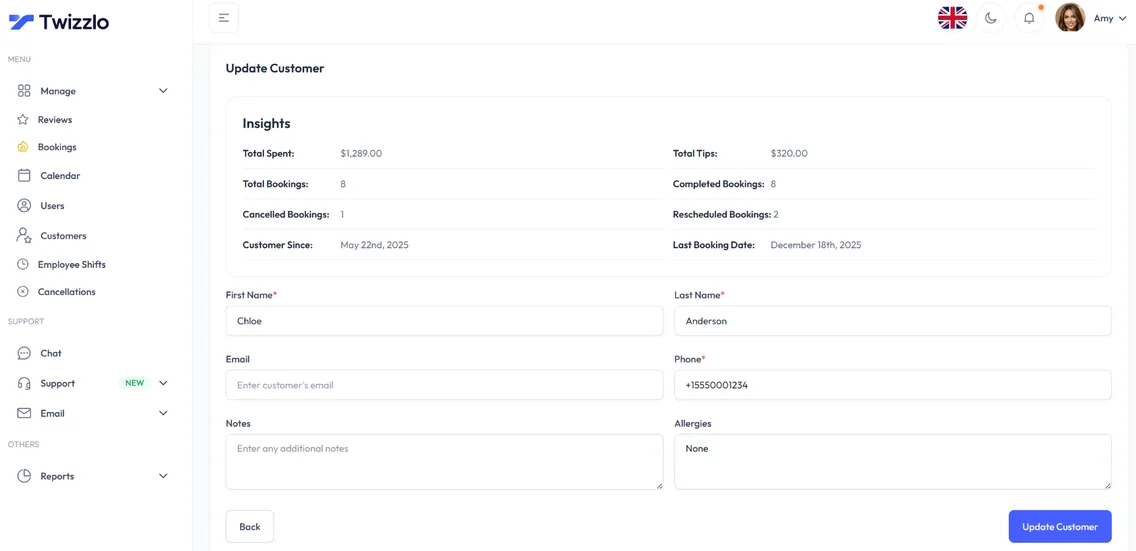
Know every client before the shoot
Contact details, session history, total spend, notes and preferences sit on one client profile, so a returning family or brand client never has to repeat themselves.
- Visit and spend history
- Notes and preferences
- Contact details on file
- Client search and filtering
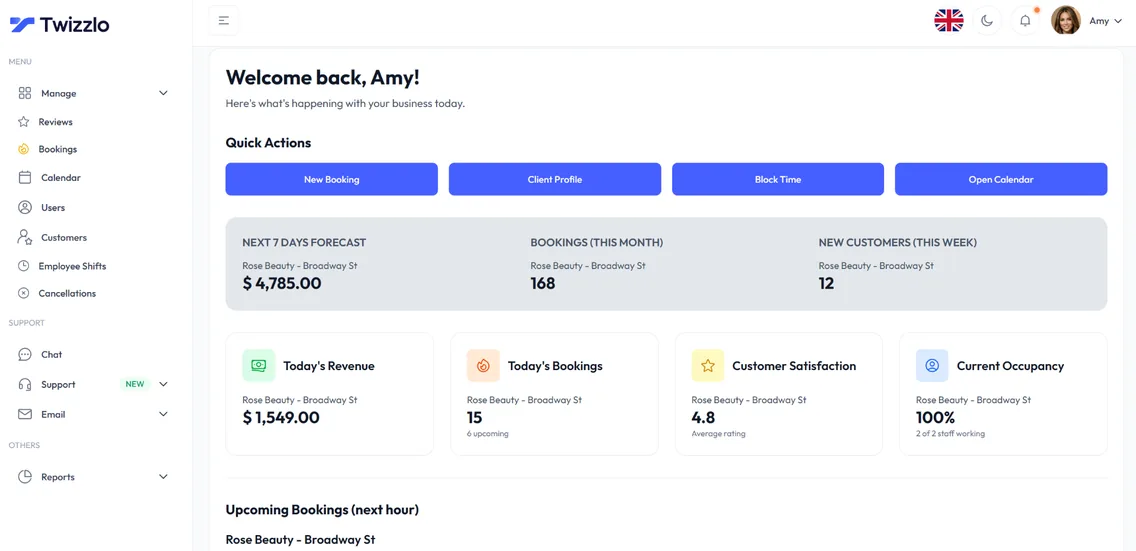
See what's working before the day starts
Bookings, revenue, new customers and staff utilization are on the dashboard the moment you log in.
“Inquiry → prepay → session, all from my booking link. No more email tag.”
Compare Twizzlo with other booking tools
Side-by-side comparisons of pricing, fees and features.
Photographer booking software FAQ
Is Twizzlo a good session-booking alternative for photographers?
For solo and duo photographers who mainly need session booking, prepaid bookings and client records, yes. Twizzlo handles booking and payments; if you also deliver galleries, keep a dedicated gallery tool for that part.
Can I collect a deposit at booking?
Not as a partial deposit. Twizzlo takes payment at booking with prepaid bookings: turn them on for any session type and the client pays the full session price through Stripe when they book, so the booking is only confirmed once that payment is captured. If a client does not show, you decide whether to keep or refund it.
Can clients reschedule themselves?
Yes. Clients reschedule from the booking link, and the booking page only offers times that are still open, so there is no email tag.
Is Twizzlo really free?
Yes. Free is $0 a month, free forever and not a trial. It covers up to 150 bookings a month with unlimited staff, locations and client records, real-time insights, email confirmations and reminders, and online payments and tips through Stripe. It does not include SMS reminders, which require Business Pro. There is no plan fee; online payments you take carry your Stripe processing rate plus a 1.5% Twizzlo platform fee.
What does setup involve?
Add your services with prices and durations, set your hours, add staff if you have a team, connect Stripe if you want online payments, then share your booking link.
How should a photographer take bookings online?
Send every inquiry to one booking link that shows your session types, prices and open times, and take payment when the client books. Twizzlo does this on Free for up to 150 bookings a month, or on Business Pro at $29.99 a month for unlimited bookings.
Do clients need an app to book a photo session?
No. The booking page runs in any phone or computer browser, 24/7, with nothing to download.
Can I block off editing days and holidays?
Yes. Time-off and blackout dates remove those days from the booking page, so clients only see the dates you actually shoot.
What does photographer booking software cost for a three-photographer studio?
$0 on Twizzlo Free for up to 150 bookings a month without SMS, or $29.99 a month on Business Pro for unlimited bookings and 50 SMS a month. Photographers are unlimited on both plans, so adding a second or third shooter never raises the price. Online payments carry Stripe processing plus a 1.5% Twizzlo platform fee. The cost table on this page shows what other vendors publish for the same studio.
What is session scheduling software for photographers?
Session scheduling software lets a client book a photo session without an email thread: they pick a session type, see your open dates and times, confirm the booking and, if you ask for it, pay at the same time. In Twizzlo each session type (a mini, a headshot, a family session, a brand shoot) has its own price, duration and buffer time, prepaid bookings take payment through Stripe at booking, and a studio can assign session types to each photographer, including a second shooter.
Can my booking page work as my photography booking site?
Yes. Your booking page lists your session types with prices and durations, shows real-time availability, keeps blackout dates off the calendar and takes payment at booking through Stripe when you turn on prepaid bookings. Share one link in your Instagram bio, email signature and website. Galleries, contracts and your portfolio stay in the tools you use now.
Guides for photographers
Best Photography Booking Software in 2026: Prices and Reminder Costs Compared
Best photography booking software and scheduling apps compared on first-party 2026 prices, plus the real cost of the plan that sends a text reminder.
GuidePhotography Studio Management Software: What 8 Vendors Charge
Eight photography studio management software vendors priced on their own pages: the unit each meters and which plans leave online booking out.
GuideNo Show Charge: A Guide to Protecting Your Business
How to set a no-show charge: size the fee from your own costs, adapt sample policy clauses and announcement templates, and waive fees by a written rule.
GuideAppointment Reminders Software That Cuts No-Shows
What appointment reminders software should do, when to send reminders by booking lead time, and how to count the texts your plan must cover each month.
Start booking photo sessions online
Start with the Free plan, then choose Business Pro if you need unlimited bookings and SMS. Review the current plan limits and payment charges before choosing.
- Free plan, not a trial
- 30-day money-back guarantee on Business Pro
- 24/7 support