
Nail salon booking software for techs, walk-ins and long sets
Nail salon online booking from your website, Instagram or Google, a calendar for every tech, prepaid acrylic and gel sets, and allergies saved on every client profile.
Plans
- FreeUp to 150 bookings a month, not a trial
- $0/mo
- Business ProPer business: unlimited bookings, 50 SMS a month
- $29.99/mo
- Unlimited staff and locations on both plans
- 30-day money-back guarantee on Business Pro
- 24/7 support
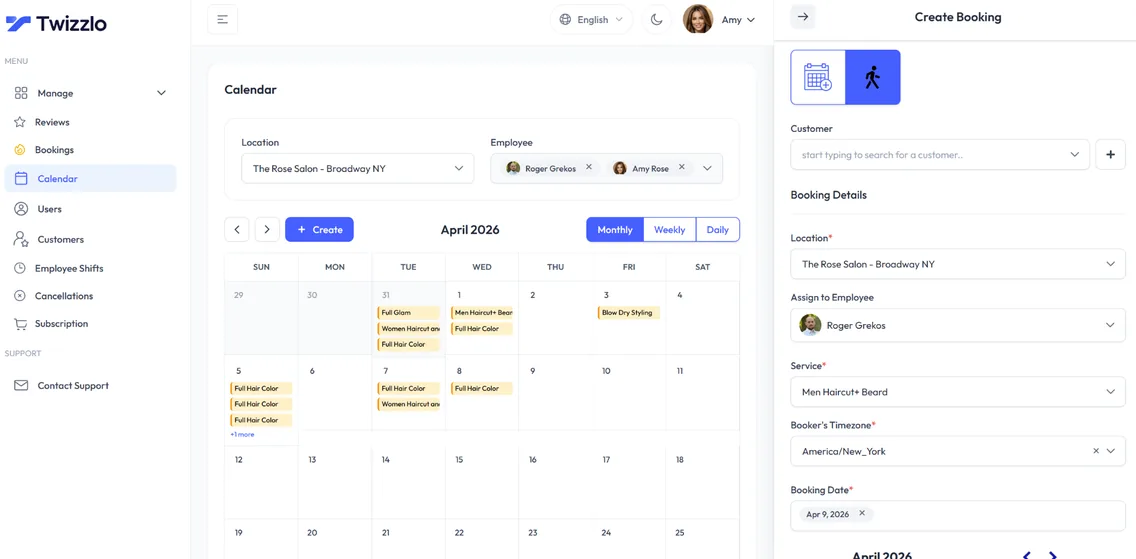
Twizzlo is nail salon booking software that treats a nail set like the multi-hour appointment it actually is. Clients pick their tech, choose their service, and lock in a prepaid booking before they arrive. Techs open their day already knowing exactly what's coming. Owners comparing nail salon scheduling software usually care about two things: no double-bookings and service times that match the real length of each set. Both are built in: real-time availability, a set duration for every service and buffer times between clients.
As a modern salon booking system, Twizzlo also handles tips at checkout through Stripe, walk-in bookings alongside pre-booked appointments, and a full client CRM with notes, preferences and total spend. No per-tech seat fees.
Sound familiar?
Running a nail salon shouldn't feel like a full-time admin job.
Constant DMs for prices and times
Walk-ins overwhelming the schedule
No-shows on long acrylic sets
On this page10 sections
Nail salon scheduling software that fits long sets and quick fills
A nail salon's day mixes 30-minute polish changes with two-hour full sets. Nail salon scheduling software has to handle both without leaving gaps or stacking two clients on one tech.
In Twizzlo every service has its own price and duration, services are assigned to the techs who do them, and buffer times give each tech a moment to clean the station between clients. Real-time availability keeps two clients from booking the same tech at the same time. Pedicures work the same way, so you do not need separate pedicure appointment software: give each pedicure service its own duration and the tech's calendar holds exactly that much time.
Weighing several tools? See what seven nail salon management software vendors charge, from first-party prices read in September 2026.
Free nail salon booking software: what the Free plan covers
Twizzlo Free is $0 a month and free forever, not a trial. It covers the booking page, tech calendars, the client CRM, staff scheduling, insights and online payments with tips for up to 150 bookings a month, with email reminders and no SMS. It suits a solo tech or a salon that is just opening: start free and upgrade only when you need to.
Looking for a free nail booking website? Your Twizzlo booking page already is one: your services, prices, techs and open times on a single link you can share anywhere, on the Free plan.
Free nail salon booking software has two limits to plan around: it stops at 150 bookings a month and sends no SMS. When your salon books more than that, or you want SMS reminders, Business Pro removes the cap and adds SMS at one flat price per salon. See plans and payment charges.
What nail salon booking software costs for a five-tech salon
The table prices a single-location nail salon with five bookable techs, using the plan prices each vendor publishes on its own pricing page, read on the date shown. It covers the subscription and the payment charges, the two costs you pay every month.
Monthly cost for a nail salon with five techs, one location, US prices before tax
Twizzlo Free
- How the plan is priced
- $0 per business: up to 150 bookings a month, staff unlimited, no SMS
- Monthly subscription, 5 techs
- $0
- Online or card payment charges
- Stripe processing plus a 1.5% Twizzlo platform fee
Twizzlo Business Pro
- How the plan is priced
- $29.99/mo flat per business: unlimited bookings and staff, 50 SMS a month
- Monthly subscription, 5 techs
- $29.99
- Online or card payment charges
- Stripe processing plus a 1.5% Twizzlo platform fee
Booksy (Sep 17, 2026)
- How the plan is priced
- $29.99/mo + tax with one team member, then $20/mo per additional member
- Monthly subscription, 5 techs
- $109.99 + tax
- Online or card payment charges
- 2.69% + $0.30 for mobile payments or keyed entry. Optional Boost: 30% of a qualifying new client's first visit
Vagaro (Sep 8, 2026)
- How the plan is priced
- $23.99/mo base with one calendar (marked limited time), plus $10/mo per extra calendar up to seven
- Monthly subscription, 5 techs
- $63.99
- Online or card payment charges
- Under $4,000 a month processed: 2.6% + $0.10 swipe or dip, 3.5% + $0.19 keyed in
GlossGenius (Sep 8, 2026)
- How the plan is priced
- Per business by tier. Standard has no staff management; Gold covers teams of fewer than 10
- Monthly subscription, 5 techs
- Gold: $48 billed annually, $56 monthly
- Online or card payment charges
- Flat 2.6% on every plan
Fresha (Jul 13, 2026)
- How the plan is priced
- Team plan: $14.95/mo per team member
- Monthly subscription, 5 techs
- $74.75
- Online or card payment charges
- Processing varies by region. 20% (minimum $6) on new clients who find you through the Fresha marketplace
Square Appointments (Sep 17, 2026)
- How the plan is priced
- Per location: Free $0, Plus $49/mo, Premium $149/mo. Staff calendars unlimited. Cancellation policy and no-show fees start on Plus
- Monthly subscription, 5 techs
- $0 on Free, $49 on Plus
- Online or card payment charges
- Online: 3.3% + 30¢ on Free, 2.9% + 30¢ on Plus. In person: 2.6% + 15¢ on Free
Setmore (Sep 8, 2026)
- How the plan is priced
- Per user: Free for up to 4 users; Pro $12 per user a month, or $5 billed annually
- Monthly subscription, 5 techs
- Pro: $60 monthly or $25 billed annually
- Online or card payment charges
- Stripe at 2.9% + 30¢ in the US, per Setmore
Prices are from each vendor's own pricing page on the date shown and can change, so check before you buy. Twizzlo's 1.5% platform fee applies to online payments, on top of your Stripe rate. Full breakdowns: Twizzlo vs GlossGenius, Twizzlo vs Vagaro and every comparison.
Nail salon online booking clients can use from any phone
Most nail clients book from their phone, often straight from an Instagram post. Twizzlo's nail salon online booking page runs in the browser, so there is no app to download. Clients pick a service and a tech, see open times and book in a few taps.
It is not nail salon computer software tied to one front-desk PC either. The same online appointments software runs on the desk computer, a tech's phone and the owner's tablet, all in the browser.
Confirmations and reminders go out by email, and by SMS on Business Pro. Clients can reschedule themselves from the booking link, which cuts down the "can I move to Thursday?" messages.
A booking system for nail salons that also takes walk-ins
Walk-ins are part of nail salon life, and a nail salon booking system has to handle the clients who never booked. Twizzlo supports walk-in bookings, so the front desk adds a walk-in to a tech's calendar and that time comes off the online booking page at once. Online clients and walk-ins share one calendar, so nobody gets double-booked.
Next-hour insights and staff availability show who has room right now, which helps the desk place a walk-in without guessing.
Nail bar inside a full-service hair salon? See how Twizzlo works as salon scheduling software.
Nail salon appointment software that protects long sets
A no-show on a two-hour set of extensions is an afternoon of lost income, so nail salon appointment software has to protect the long bookings first. Turn on prepaid bookings for full sets and other long services: the client pays the full service price through Stripe when they book, so the slot is only held once it is paid. Cancellation handling, custom booking rules and no-show fees support the policy you set, and if a client does not show, you decide whether to keep or refund the payment.
Clients can add a tip when they pay online, and staff can record manual payments for anything paid at the salon.
Allergies, shapes and shades on every client profile
Record the shape, length and shade a regular likes, or a reaction to a product, and any tech can see it before the appointment. Every client profile holds:
- Allergies, noted where every tech will see them
- Notes and preferences, such as shape, length and shade
- Visit history, so the next tech knows what was done last time
- Total spend, including tips
- Contact details
Nail salon booking app or marketplace: what new clients cost
Nail salons and techs often compare booking apps that double as marketplaces. A marketplace can send new clients, but it usually charges for them. Fresha charges 20% (minimum $6) on new clients who find you through its marketplace (read Jul 13, 2026), and Booksy's optional Boost charges 30% of a qualifying new client's first visit (read Sep 17, 2026). Independent techs can compare what each app charges per new client in our guide to the best booking app for nail techs.
Twizzlo is not a marketplace. It works as a nail salon scheduling app in any browser for the clients you bring in through Instagram, Google and referrals: you get your own booking page and link, and you keep the relationship. For a tech with a following, that can be the cheaper route. See Twizzlo vs Fresha and Twizzlo vs Booksy for the full fee breakdowns.
For the wider field, our nail salon software guide prices eight platforms as you add technicians. Pricing a counter setup as well? Our nail salon POS guide compares Square and Clover costs, card rates included.
Set up nail salon booking in six steps
- 1
Build your service menu
Add manicures, pedicures, gel, acrylic full sets and fills as services, each with a price, a duration and buffer time.
- 2
Add your techs
Create a profile for each tech, give them Twizzlo access and assign the services they do.
- 3
Set hours and shifts
Enter the salon's working hours, each tech's schedule and shifts, and any time off or blackout dates.
- 4
Protect long services
Turn on prepaid bookings for full sets and extensions, and write down your cancellation terms.
- 5
Connect Stripe
Connect Stripe to take online payments and tips at booking. Online payments carry Stripe processing plus a 1.5% Twizzlo platform fee.
- 6
Share your booking link
Make a test booking, then add the link to your Instagram bio, Google Business Profile and website. Add walk-ins to the calendar as they arrive.
Built specifically for nail salons
24/7 online booking
Clients book appointments any time from your booking link, with real-time availability on any device.
Per-staff calendars
A calendar per staff member with real-time availability, buffer times, time off and blackout dates. Drag an appointment to reschedule it.
SMS & email reminders
Automated confirmations and reminders by email, plus SMS on Business Pro.
Client CRM
Every visit, note, preference, allergy and total spend saved to a searchable profile.
Prepaid bookings & tips
Collect online payments and tips at the time of booking through Stripe. Protect long slots with prepaid bookings: the client pays the full service price when they book.
Staff & shift management
Bookable and non-bookable staff, per-staff schedules, multi-location shifts, role-based access and assigned services, with unlimited staff.
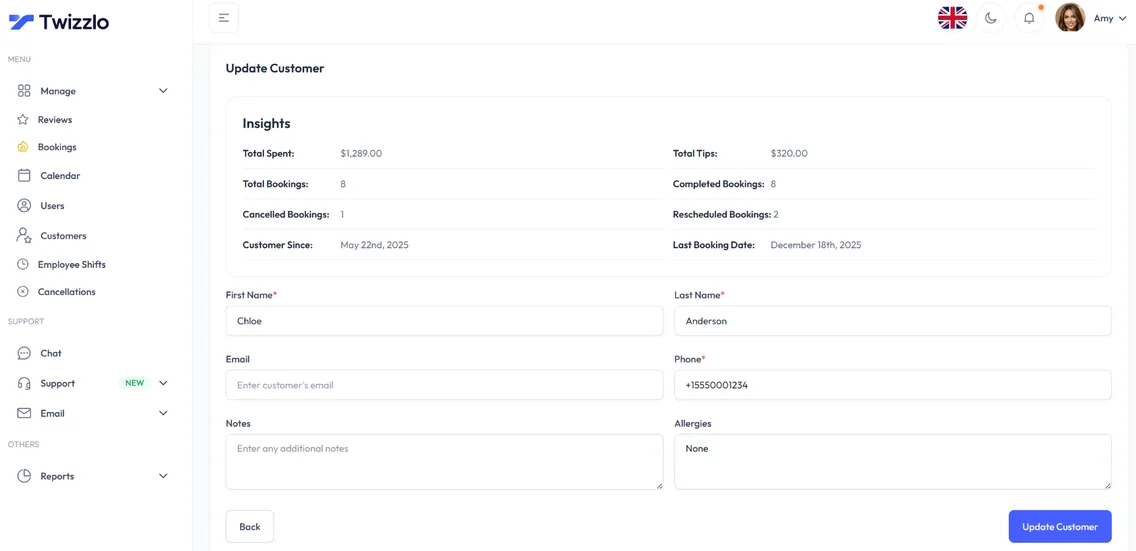
Know every client before they walk in
Total spend, bookings, last visit, allergies, notes and preferences sit on one client profile, so every tech knows a regular's shape, length and shade before they sit down.
- Visit and spend history
- Notes, allergies and preferences
- Contact details on file
- Client search and filtering
See what's working before the day starts
Bookings, revenue, next-hour insights and staff utilization are on the dashboard the moment you log in.
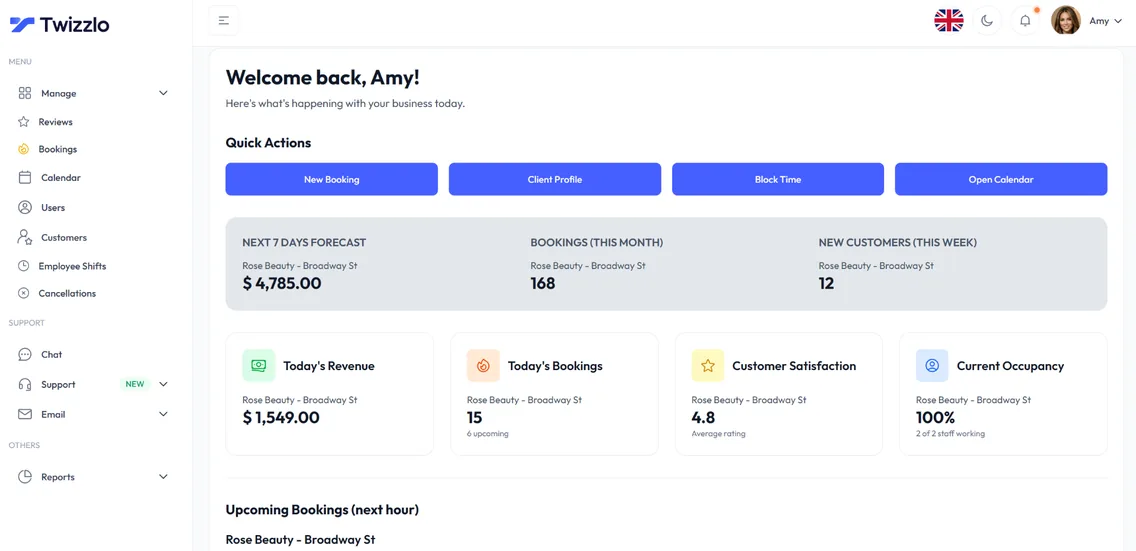
“Techs open the day knowing exactly what's booked. No more schedule chaos.”
Compare Twizzlo with Booksy, Vagaro and GlossGenius
Side-by-side comparisons of pricing, fees and features.
Nail salon booking software FAQ
How does Twizzlo compare to nail salon software like GlossGenius or Vagaro?
Twizzlo covers the calendar, client CRM, online booking, prepaid bookings, tips and Stripe checkout for a nail salon, priced per salon. Unlike Vagaro, which adds $10/mo per extra calendar (read Sep 8, 2026), Twizzlo has no per-tech seat fees: Free covers up to 150 bookings a month, and Business Pro is $29.99 a month with unlimited techs. GlossGenius also prices per business, by tier (read Sep 8, 2026), so compare its tiers with your team size in the cost table on this page.
Do you handle walk-ins and same-day bookings?
Yes. Walk-in bookings are supported and the online booking page always shows next-available slots by tech in real time.
Can I protect long slots against no-shows?
Yes. Turn on prepaid bookings for any service so the slot is only held once the client has paid the full service price. If a client still does not show, you decide whether to keep or refund the payment. Cancellation handling and custom booking rules let you apply the same terms to every booking.
Is Twizzlo really free?
Yes. Free is $0 a month, free forever and not a trial. It covers up to 150 bookings a month with unlimited staff, locations and client records, real-time insights, email confirmations and reminders, and online payments and tips through Stripe. It does not include SMS reminders, which require Business Pro. There is no plan fee; online payments you take carry your Stripe processing rate plus a 1.5% Twizzlo platform fee.
How long does setup take?
There is nothing to install, and how long setup takes depends on how many services and staff you add. It is one short checklist: add your services with prices and durations, set your hours, add staff if you have a team, connect Stripe if you want online payments, then share your booking link.
What is the best booking system for a nail salon with walk-ins?
Look for one calendar that holds both online bookings and walk-ins, a schedule per tech, and prepaid bookings for long sets. Twizzlo does all three and prices by salon, not by tech: Free up to 150 bookings a month, or $29.99 a month on Business Pro.
Do nail clients need an app to book?
No. Clients book from your link in any phone browser, with nothing to download.
Can I record allergies and preferences for each client?
Yes. Every client profile holds notes, preferences and allergies alongside visit history and total spend, so each tech can check before the appointment.
Is Twizzlo a marketplace like Fresha or Booksy?
No. Twizzlo gives you your own booking page and link and charges no marketplace commission on new clients. Online payments carry Stripe processing plus a 1.5% Twizzlo platform fee.
What does Twizzlo cost for a five-tech nail salon?
$0 on Twizzlo Free for up to 150 bookings a month without SMS, or $29.99 a month on Business Pro for unlimited bookings and 50 SMS a month. Techs are unlimited on both plans, so five techs cost the same as one. The cost table on this page shows what other vendors publish for the same five-tech salon.
Do I need a booking plugin for my nail salon website?
No. Point your website's Book Now button and your Instagram bio at your Twizzlo booking link, and clients book from there in any browser. Nothing gets installed on your site, and the same link goes in your Google Business Profile and your text replies.
Can nail clients book appointments online at any hour?
Yes. Your nail salon online booking page is open 24/7 and shows each tech's open times in real time. Clients get an email confirmation (and SMS reminders on Business Pro), can pay for prepaid bookings through Stripe when you turn them on, and can reschedule themselves from the same link.
Guides for nail salon owners
Best Nail Salon Software in 2026: What Each Plan Really Costs
Best nail salon software for 2026: 8 platforms compared on how they bill, with monthly prices for 1, 3, 6 and 10 technicians read on each vendor's own site.
GuideNail Salon Management Software: What 7 Vendors Really Charge
Nail salon management software runs $0 to $220 a month for a 10-person salon at one location, priced from each of 7 vendors' own sites.
GuideNail Salon POS Systems in 2026: What They Cost and What You Actually Need
Nail salon POS systems in 2026: Square and Clover prices read from their own pages, card processing at your sales volume, and when booking software is enough.
Start taking nail appointments online
Start with the Free plan, then choose Business Pro if you need unlimited bookings and SMS. Review the current plan limits and payment charges before choosing.
- Free plan, not a trial
- 30-day money-back guarantee on Business Pro
- 24/7 support