
Salon scheduling software your stylists will actually use
Hair salon software for color, cuts and blowouts: every stylist's calendar and shifts in one place, online booking clients use without calling, and prepaid long services.
Plans
- FreeUp to 150 bookings a month, not a trial
- $0/mo
- Business ProPer business: unlimited bookings, 50 SMS a month
- $29.99/mo
- Unlimited staff and locations on both plans
- 30-day money-back guarantee on Business Pro
- 24/7 support
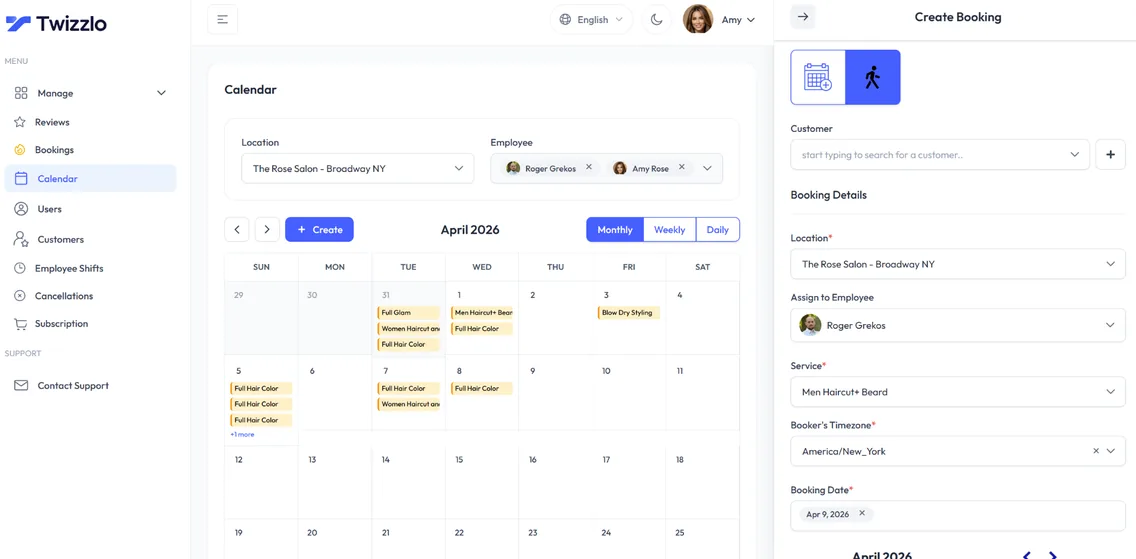
Twizzlo is salon scheduling software that a working stylist can operate on a busy Saturday without opening a manual. Book color, cut, blowout and keratin services from a single online booking page. Every stylist gets their own calendar. Every client gets a searchable profile with allergies, preferences, spend history and every past visit. Because it runs in the browser, the same salon software works at the front desk and on a stylist's phone.
As a salon management software platform, Twizzlo handles online booking, staff scheduling, prepaid bookings, tips and real-time insights from one dashboard. Owners evaluating hair salon scheduling software specifically usually want two things Twizzlo covers by default: accurate per-stylist durations for color and keratin, and prepaid bookings that hold long slots. No per-stylist seat fees. Free up to 150 bookings a month, or $29.99/mo per salon for unlimited on Business Pro.
Sound familiar?
Running a hair salon shouldn't feel like a full-time admin job.
Phone tag for color appointments
Stylists overbooked, others empty
Lost client notes
On this page10 sections
Hair salon software for color, cuts and long services
Hair salon software has to handle a day that mixes 30-minute trims with color services that run for hours. In Twizzlo every service carries its own price and duration, services are assigned to the stylists who perform them, and buffer times between appointments leave room for cleanup and a quick consultation.
Prepaid bookings protect the long color and keratin slots. Each client profile keeps notes (such as a color formula), preferences, allergies and visit history, so the next appointment starts where the last one ended.
With durations, buffers and stylist assignments built into every booking, Twizzlo also works as hair salon calendar software for the whole team: one calendar per stylist, and every stylist's day in one place.
Salon booking software clients use without calling
Salon booking software earns its place when routine bookings stop coming through the phone. Twizzlo gives clients a 24/7 booking page where they choose a service and a stylist, see real-time availability and book. It runs in any phone browser, with nothing to download.
Confirmations and reminders go out by email, and by SMS on Business Pro. Clients can reschedule themselves from the booking link, and walk-in bookings sit on the same calendar as online ones. If you are still shortlisting tools, compare 12 salon booking options.
Booking software for salons should also shorten the path from inquiry to appointment: put the link in your Instagram bio, on your website and on your Google Business Profile, so a client who finds you can book in the same minute.
What salon scheduling software costs for a six-stylist salon
The table prices a single-location salon with six bookable stylists, using the plan prices each vendor publishes on its own pricing page, read on the date shown. It covers the subscription and the payment charges, the two costs you pay every month.
Monthly cost for a hair salon with six stylists, one location, US prices before tax
Twizzlo Free
- How the plan is priced
- $0 per business: up to 150 bookings a month, staff unlimited, no SMS
- Monthly subscription, 6 stylists
- $0
- Online or card payment charges
- Stripe processing plus a 1.5% Twizzlo platform fee
Twizzlo Business Pro
- How the plan is priced
- $29.99/mo flat per business: unlimited bookings and staff, 50 SMS a month then $0.03 each
- Monthly subscription, 6 stylists
- $29.99
- Online or card payment charges
- Stripe processing plus a 1.5% Twizzlo platform fee
Booksy (Sep 17, 2026)
- How the plan is priced
- $29.99/mo + tax with one team member, then $20/mo per additional member
- Monthly subscription, 6 stylists
- $129.99 + tax
- Online or card payment charges
- 2.69% + $0.30 for mobile payments or keyed entry. Optional Boost: 30% of a qualifying new client's first visit
Vagaro (Sep 8, 2026)
- How the plan is priced
- $23.99/mo base with one calendar (marked limited time), plus $10/mo per extra calendar up to seven
- Monthly subscription, 6 stylists
- $73.99
- Online or card payment charges
- Under $4,000 a month processed: 2.6% + $0.10 swipe or dip, 3.5% + $0.19 keyed in
GlossGenius (Sep 8, 2026)
- How the plan is priced
- Per business by tier. Standard has no staff management; Gold covers teams of fewer than 10
- Monthly subscription, 6 stylists
- Gold: $48 billed annually, $56 monthly
- Online or card payment charges
- Flat 2.6% on every plan
Fresha (Jul 13, 2026)
- How the plan is priced
- Team plan: $14.95/mo per team member
- Monthly subscription, 6 stylists
- $89.70
- Online or card payment charges
- Processing varies by region. 20% (minimum $6) on new clients who find you through the Fresha marketplace
Square Appointments (Sep 17, 2026)
- How the plan is priced
- Per location: Free $0, Plus $49/mo, Premium $149/mo. Staff calendars unlimited
- Monthly subscription, 6 stylists
- $0, $49 or $149 by tier
- Online or card payment charges
- Online: 3.3% + 30¢ on Free, 2.9% + 30¢ on Plus and Premium
Setmore (Sep 8, 2026)
- How the plan is priced
- Per user: Free for up to 4 users; Pro $12 per user a month, or $5 billed annually
- Monthly subscription, 6 stylists
- Pro: $72 monthly or $30 billed annually
- Online or card payment charges
- Stripe at 2.9% + 30¢ in the US, per Setmore
Prices are from each vendor's own pricing page on the date shown and can change, so check before you buy. Full breakdowns: Twizzlo vs Booksy, Twizzlo vs GlossGenius, Twizzlo vs Fresha and every comparison.
A salon scheduling app for stylists on the floor
Stylists rarely sit at a desk. Twizzlo works as a salon scheduling app in the browser on a phone or tablet: each stylist can have their own Twizzlo access and a calendar view of their day, and role-based access controls what they can see and change.
Owners get the other side: individual schedules, multi-location staff shifts, time off and blackout dates, plus insights on bookings, revenue, staff utilization and forecasts. Stylists who rent a suite or a chair can compare salon suite CRM costs or read the booth rental contract guide.
Whether your team calls it the book, the salon scheduler or the calendar, it is one live schedule: when a stylist adds a walk-in on the floor, that time comes off the booking page right away. When you shortlist salon scheduling systems, test this first: can a stylist check and update their own day from a phone, and can you limit what they see?
Choosing salon management software without per-stylist fees
Many salon platforms price by stylist or by calendar, so the bill grows with every hire. Twizzlo prices by salon: Free is $0 for up to 150 bookings a month without SMS, and Business Pro is $29.99 a month for unlimited bookings with 50 SMS a month, then $0.03 each. Staff and locations are unlimited on both plans, and Business Pro carries a 30-day money-back guarantee. Start free and upgrade when the salon needs unlimited bookings or SMS.
For a wider view, see the features salon owners look for, salon POS software costs and the best scheduling app for hair stylists.
Salon appointment software with reminders that cut no-shows
A client who forgets a two-hour color appointment costs more than a missed trim, and that chair is hard to fill at short notice. Salon appointment software should make forgetting harder and skipping costly. In Twizzlo, confirmations and reminders go out by email on both plans, and by SMS on Business Pro (50 a month included, then $0.03 each).
Hair salon appointment software earns its keep on the long services. Turn on prepaid bookings for color, balayage and keratin, and the client pays the full service price online through Stripe when they book, so the slot is held only once it is paid. If a client does not show, you decide whether to keep or refund the payment. Cancellation handling, custom booking rules and no-show fees support the policy you set, and a client whose plans change can pick a new time from the booking link without calling the salon.
Before you choose salon appointment scheduling software, check two things: what text reminders cost, and whether prepaid bookings are on the plan you can afford. On Twizzlo, prepaid bookings work on both plans and SMS comes with Business Pro at $29.99 a month per salon. For the policy side, read how to reduce no-shows in a salon.
Salon staff scheduling: shifts, rosters and time off
A salon schedule rarely stays the same for a month: a stylist moves to four days, an assistant starts, someone takes a vacation. Salon staff rostering software keeps the staff roster in the same place as the bookings, so the booking page only offers a stylist when they are working.
Staff are unlimited on both plans, so a longer roster never raises the price, and assistants or front-desk staff can get Twizzlo access as non-bookable staff to manage the book without appearing on it. The roster side of Twizzlo includes:
- Employee Shifts: multi-location staff shifts and schedules, so a stylist who works at two of your salons has one roster
- Individual schedules, with a calendar view for each stylist
- Availability and time-off management: vacations, training days and blackout dates come off the booking page
- Role-based access: decide what each stylist, assistant or receptionist can see and change
- Staff utilization in the insights, so you can see who is fully booked and who has room
Beauty salon software for every service on your menu
Plenty of hair salons also book nails, makeup or treatments, and beauty salon software should keep that whole menu in one account rather than one tool per service. In Twizzlo every service carries its own price, duration and buffer time, and you assign each service to the staff who perform it, so clients book the right person for the job.
As beauty salon management software, the rest is shared across the team: each staff member has a calendar, the insights show bookings and revenue across every service, and client profiles with notes, preferences, allergies and total spend work as a salon CRM without a second tool.
If nails are a large part of the business, see nail salon booking software for walk-ins, long sets and a calendar per tech. A shop built around fades and walk-ins may be better served by barbershop booking software. Opening a new salon or adding services? The salon business plan template covers pricing the service menu.
Set up salon scheduling in six steps
- 1
Build your service menu
Add cuts, color, balayage, blowouts and treatments, each with a price, a duration and buffer time.
- 2
Add your stylists
Create a profile for each stylist, give them Twizzlo access and assign the services they perform.
- 3
Set hours and shifts
Enter the salon's working hours, each stylist's schedule and shifts, and any time off or blackout dates.
- 4
Protect long services
Turn on prepaid bookings for color, balayage and keratin, and write down your cancellation terms.
- 5
Connect Stripe
Connect Stripe to take online payments and tips at booking. Online payments carry Stripe processing plus a 1.5% Twizzlo platform fee.
- 6
Share your booking link
Make a test booking, then add the link to your website, Instagram and Google Business Profile.
Tools for salon appointments
24/7 online booking
Clients book appointments any time from your booking link, with real-time availability on any device.
Per-staff calendars
A calendar per staff member with real-time availability, buffer times, time off and blackout dates. Drag an appointment to reschedule it.
SMS & email reminders
Automated confirmations and reminders by email, plus SMS on Business Pro.
Client CRM
Every visit, note, preference, allergy and total spend saved to a searchable profile.
Prepaid bookings & tips
Collect online payments and tips at the time of booking through Stripe. Protect long slots with prepaid bookings: the client pays the full service price when they book.
Staff & shift management
Bookable and non-bookable staff, per-staff schedules, multi-location shifts, role-based access and assigned services, with unlimited staff.
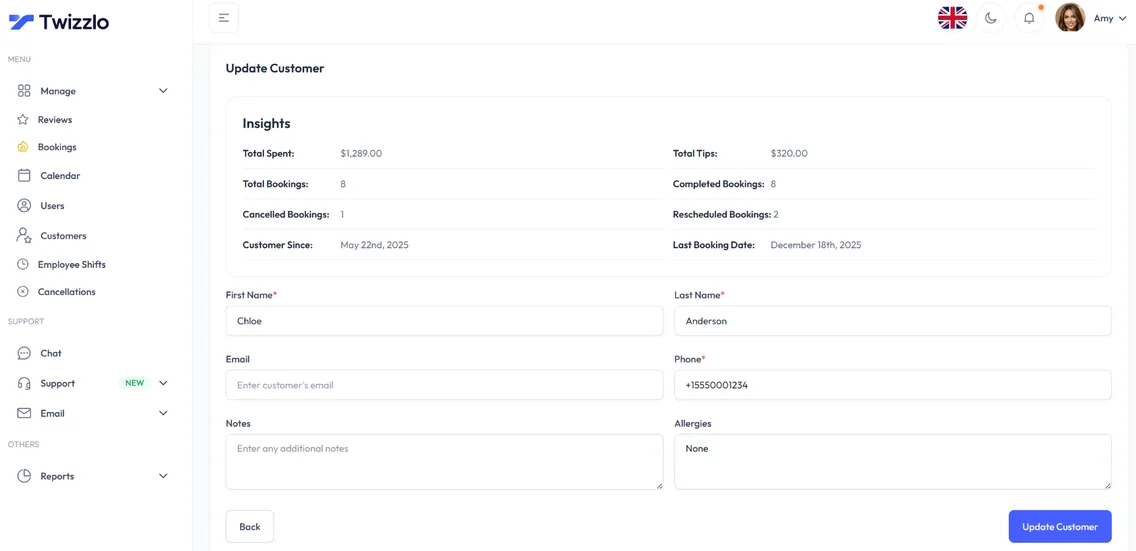
Know every client before they walk in
Total spend, bookings, last visit, allergies, notes and preferences sit on one client profile, so your team can prepare before every appointment.
- Visit and spend history
- Notes, allergies and preferences
- Contact details on file
- Client search and filtering
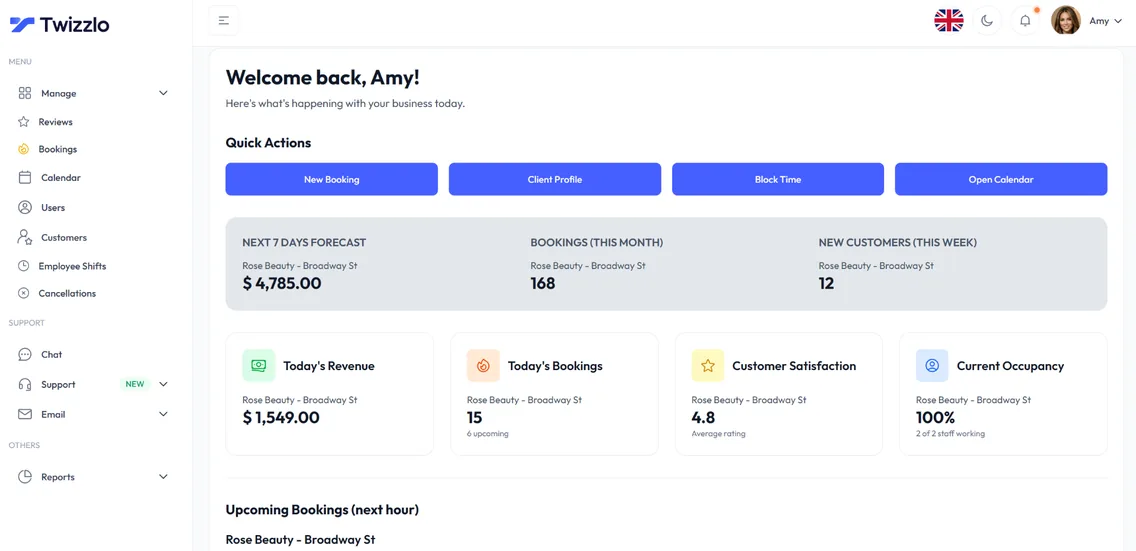
See what's working before the day starts
Bookings, revenue, next-hour insights and staff utilization are on the dashboard the moment you log in.
“We finally see every stylist's day on one screen. Color clients prepay their booking. Life-changing.”
Compare Twizzlo with other booking tools
Side-by-side comparisons of pricing, fees and features.
Salon scheduling software FAQ
What is the best salon scheduling software for a small salon?
For salons under six chairs, the best salon scheduling software is one that starts free, includes online booking, reminders and Stripe payments in the base tier, and doesn't lock features behind seat fees. Twizzlo covers all four on the Free plan, and Business Pro ($29.99/mo per salon) adds unlimited bookings and 50 SMS a month included (then $0.03 each). To compare 12 options side by side, see our guide to the best salon software.
How does Twizzlo compare to other salon appointment software?
Most salon appointment software charges per stylist or gates deposits, tips and reminders behind an upgrade. Twizzlo puts online booking, per-stylist calendars, prepaid bookings (the client pays the full service price at booking), tips and reminders on both plans, with SMS on Business Pro: Free up to 150 bookings/mo, or $29.99/mo per salon for unlimited bookings on Business Pro.
Can I use Twizzlo as a Rosy Salon Software or GlossGenius alternative?
Yes, for the booking side of the salon, whether you are moving from Rosy Salon Software or GlossGenius. Twizzlo covers the calendar, client CRM, online booking, prepaid bookings, tips and reminders in one account, with SMS on Business Pro. Stylists are unlimited on both plans: Free is $0 for up to 150 bookings a month, and Business Pro is a flat $29.99 a month per salon for unlimited bookings. For GlossGenius plan prices with the date they were read, see Twizzlo vs GlossGenius.
Does Twizzlo support multiple locations?
Yes. Unlimited locations on every plan, with a per-location booking link, centralized dashboard, multi-location staff shifts, and centralized insights across every branch.
Is Twizzlo really free?
Yes. Free is $0 a month, free forever and not a trial. It covers up to 150 bookings a month with unlimited staff, locations and client records, real-time insights, email confirmations and reminders, and online payments and tips through Stripe. It does not include SMS reminders, which require Business Pro. There is no plan fee; online payments you take carry your Stripe processing rate plus a 1.5% Twizzlo platform fee.
How long does setup take?
There is nothing to install, and how long setup takes depends on how many services and staff you add. It is one short checklist: add your services with prices and durations, set your hours, add staff if you have a team, connect Stripe if you want online payments, then share your booking link.
Is there hair salon software with a free plan?
Yes. Twizzlo is hair salon software with a Free plan that is $0 a month, free forever and not a trial. Every stylist is included, so the whole salon pays no plan fee while it stays within 150 bookings a month: each stylist gets a calendar, each client gets a profile, and you can take online payments and tips and send email confirmations and reminders. SMS reminders require Business Pro.
Can stylists check their schedule on their phone?
Yes. Twizzlo is web-based, so each stylist with Twizzlo access can open their calendar in a phone or tablet browser. Role-based access controls what they can see and change.
Does Twizzlo handle walk-ins at a hair salon?
Yes. Walk-in bookings are supported and sit on the same calendar as online bookings, so the booking page only offers times that are still open.
What does salon scheduling software cost for six stylists?
$0 on Twizzlo Free for up to 150 bookings a month without SMS, or $29.99 a month on Business Pro for unlimited bookings and 50 SMS a month. Stylists are unlimited on both plans, so six stylists cost the same as one. Online payments carry Stripe processing plus a 1.5% Twizzlo platform fee. The cost table on this page shows what other vendors publish for the same salon.
Can I schedule salon staff shifts and rosters in Twizzlo?
Yes. Employee Shifts covers multi-location staff shifts and schedules, so you set each stylist's shifts and working hours in one place, and time off and blackout dates come off the booking page. Each stylist has a calendar view, and role-based access controls what they can see and change.
Can clients book hair salon appointments online from their phone?
Yes. With Twizzlo as your hair salon appointment scheduling software, clients open your booking link in any phone browser, pick a service and a stylist, see real-time availability and book, with nothing to download. They can reschedule themselves from the same link, and confirmations and reminders go out by email, and by SMS on Business Pro.
Guides for salon owners
The 12 Best Salon Booking Software Options for 2026
Best salon software for 2026: 12 platforms compared on how they bill, with monthly prices for 1 to 10 stylists read on each vendor's own site.
Guide8 Expert Marketing for Beauty Salon Strategies
Marketing for beauty salon owners in eight strategies, judged by booked appointments, with a channel cost table, a scorecard and a 30-day plan.
GuideHow to Reduce No-Shows in a Salon: 9 Practical Strategies
How to reduce no-shows in a salon with 9 strategies, including online booking, automated reminders, a clear cancellation policy, deposits and no-show tracking.
TemplateSalon Business Plan Template: Free Growth Guide 2026
A free salon business plan template to copy, with a revenue capacity worksheet, a way to price software at your planned headcount and the mistakes lenders flag.
GuideSalon CRM Software: What It Costs and What It Actually Does
Compare salon CRM software by who can open the client record, what each extra staff login costs and how records export, with a fictional test client first.
ComparisonFresha vs Booksy: The 2026 Pricing and Feature Reality Check
Compare Fresha and Booksy on team subscriptions, marketplace acquisition, messaging and payment costs, with a practical local discovery test before choosing.
AlternativesTimely Alternatives: 7 Salon Booking Options for 2026
Compare seven Timely alternatives for salons by how each one bills a growing team, free plans and included texts, with dated prices and a safe switch plan.
ComparisonVagaro vs Fresha: Which Salon Platform Wins in 2026?
Vagaro vs Fresha for salon teams: what Vagaro costs from 1 to 9 calendars with its add-ons, how Fresha bills, and the per-member price where the two break even.
ComparisonMangomint vs Vagaro in 2026: What Each One Actually Charges
Mangomint vs Vagaro on each vendor's own pages, read September 25, 2026: Mangomint pricing, Vagaro's seven-license cap and add-ons, and costs by team size.
GuideThe Best Scheduling App for Hair Stylists Starts With Whose Chair You Are In
The best scheduling app for hair stylists depends on your chair. Seven apps for hairstylists compared on booking links, deposits, no-shows and new-client fees.
GuideThe Features Salon Owners Look For in Salon Management Software (and What They Cost)
Where the features salon owners look for in salon management software sit on five vendors' own pricing pages: in the base plan, a higher tier or a paid add-on.
GuideSalon POS Software in 2026: Real Costs and Rates
Salon POS software priced from each vendor's own page, read September 25 and 27, 2026: what a salon POS system costs by team size, card rates and online fees.
GuideSalon Suite CRM: Subscription Prices for a Solo Suite Renter
Salon suite CRM prices for one chair from nine vendors' own sites, read September 25 and 27, 2026: free tiers, limited-time offers and the cost of a second chair.
AlternativesSalon Iris Alternative: DaySmart Salon Pricing by Team Size
Salon Iris is now DaySmart Salon. See what each DaySmart Salon plan costs as your team grows, seven alternatives by billing unit and a switching checklist.
GuideBooth Rental Contract: A Guide for Salon and Spa Owners
A booth rental contract guide for salon owners: a booth rental agreement template to copy, what each clause prevents and how to keep renters independent.
TemplateGet the Best Bridal Hair and Makeup Contract Template
Bridal hair and makeup contract template: 14 clauses to copy, plus the retainer, trial, travel and cancellation terms two published bridal contracts set.
Start taking salon bookings online
Start with the Free plan, then choose Business Pro if you need unlimited bookings and SMS. Review the current plan limits and payment charges before choosing.
- Free plan, not a trial
- 30-day money-back guarantee on Business Pro
- 24/7 support