
The Best Scheduling App for Hair Stylists Starts With Whose Chair You Are In

In short
The best scheduling app for hair stylists depends on whose chair you work in. Commission stylists usually use the salon's system. Booth and suite renters need their own booking link and payment at booking. On marketplace apps, Booksy Boost and StyleSeat each take 30% of a new client's first visit (read September 25, 2026).
- On a $100 first visit, Booksy Boost and StyleSeat each take $30 and Vagaro's Fill My Books takes $20 (read September 25 and 27, 2026).
- Acuity's Starter, $20 a month ($16 billed annually), lists email reminders; text reminders start on Standard at $34 (read September 25 and 27, 2026).
- Square Appointments Free includes deposits and text reminders at $0; no-show fees start on Plus, $49 a month per location (captured September 27, 2026).
Source: StyleSeat help center: How much does StyleSeat cost? (opens in a new tab), read
In this article10 sections
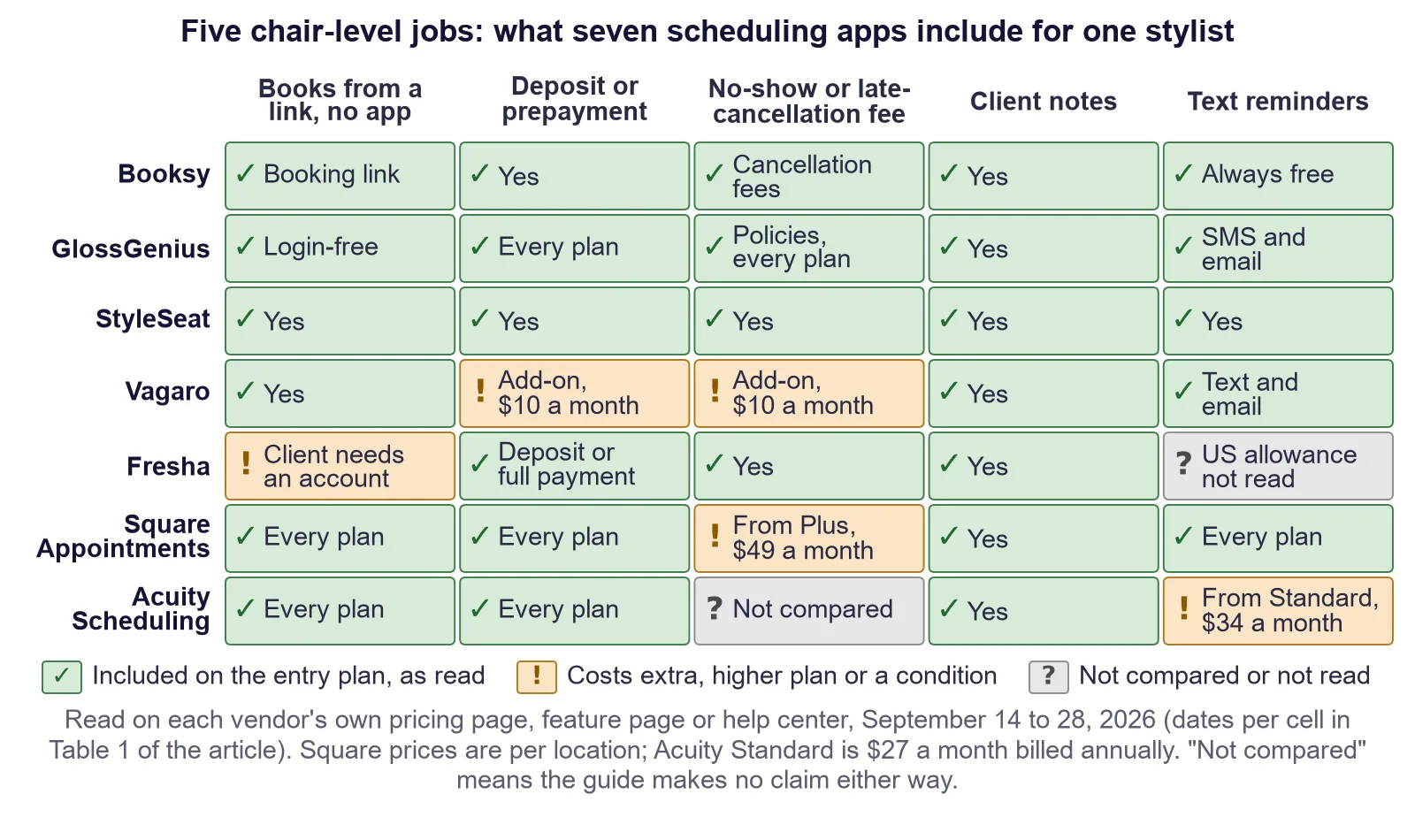
The best scheduling app for hair stylists depends less on features than on whose chair you work in and who keeps the client list. A commission stylist usually works in the salon's system. A booth renter, suite renter or mobile stylist runs the business and needs a booking link, reminders and a way to take payment at booking. This guide compares seven scheduling apps for hairstylists on those jobs, from each vendor's own pages read September 14 to 28, 2026. Of the six pages we read in the search results on September 14, 2026, one had a heading for booth renters.
Why does the best scheduling app for hair stylists depend on your chair arrangement?
The best scheduling app for hair stylists depends on your chair arrangement, because the person who controls the chair usually controls the software. Hair stylists typically work as commission employees, booth renters, suite renters or mobile stylists, and only the last three usually choose and pay for their own app, so each arrangement puts a different feature first.
Commission employee
The salon owns the subscription to its salon scheduling software, the calendar and, usually, the client record. You are unlikely to choose the software at all. What you can reasonably ask the owner for is narrow and worth asking for anyway: automatic reminders on your column, and a client notes field you are allowed to write in. Every app compared here lists client notes (read September 14 to 28, 2026), so ask the owner whether your role can see and write them.
Booth renter
You rent a chair, you usually run your own business, and whether the client list is yours depends on your rental agreement. That changes the shopping list completely. You need a booking link of your own, notes of your own, and a deposit rule of your own, because the salon's front desk is not going to enforce your cancellation policy for you. Sort out what the rental agreement actually says about client ownership before you pick software, because that is the part that bites later.
Setting your own prices as a renter? Our hair salon price list template works out what each service earns per chair hour.
Suite renter
A suite renter has everything a booth renter has, plus no shared front desk at all. There is nobody to answer the phone while you are mid-color, so the booking page is the front desk. Response speed and a clean mobile booking flow matter more here than any reporting feature.
Mobile and freelance stylists
Travel time is the constraint nobody else has. Buffer times between appointments stop being a nicety and become the thing that decides whether the day works. Booking pages that let you set a gap around each appointment, and that show a client a realistic next opening rather than a theoretical one, are worth more than a marketing module.
Which apps let a client book from a link without downloading anything?
All seven apps compared here let clients book from a browser, but not all let them finish without an account. GlossGenius advertises login-free booking with no app download (read September 27, 2026), while Fresha's help center said clients create or log in to a Fresha account to confirm a booking (read September 28, 2026).
Table 1. Scheduling apps for hairstylists: five chair-level jobs, from each vendor's own pricing page, feature page or help center, read September 14 to 28, 2026 (the last column gives the source and the read dates). "Not compared" means this guide makes no claim either way. The chart at the top of this page shows the same cells.
| App | Client books from a link, no app download | Deposit or prepayment at booking | No-show or late-cancellation fee | Client notes | Text reminders | Source, read |
|---|---|---|---|---|---|---|
| Booksy | Yes, from your booking link | Yes, deposits (No-Show Protection) | Yes, cancellation fees (No-Show Protection) | Yes | Yes, reminders "always free" | Pricing page, September 25; business site and help center, September 27; No-Show Protection terms, September 24; notes, September 14, 2026 |
| GlossGenius | Yes, login-free, no app download | Yes, built-in deposits on every plan | Yes, cancellation and no-show policies on every plan | Yes | Yes, by SMS and email | Pricing page, September 27; client management page, September 28, 2026 |
| StyleSeat | Yes | Yes, you can require a deposit | Yes, no-show or late-cancellation policies | Yes | Yes | Join page, September 27; booking link, notes and reminders, September 14, 2026 |
| Vagaro | Yes | Add-on: Online Shopping Cart, $10 a month, requires Vagaro card processing | Same $10-a-month add-on | Yes | Yes, text and email reminders in the base subscription | US help center, September 28; booking page, September 14, 2026 |
| Fresha | Yes, but the client needs a Fresha account to confirm | Yes, a deposit or full payment upfront | Yes | Yes | Not compared: US allowance not readable to us | Help center, September 28; business page, September 27; pricing page, September 14, 2026 |
| Square Appointments | Yes, booking website on every plan | Yes, deposits on every plan, Square Free included | From Plus, $49 a month per location | Yes | Yes, text and email reminders on every plan, Square Free included | Pricing page and plan grid, captured September 27; notes, September 14, 2026 |
| Acuity Scheduling | Yes, client self-scheduling on every plan | Yes, deposits and prepayment on every plan | Not compared | Yes, client profiles, notes and history | From Standard, $34 a month ($27 billed annually); Starter lists email reminders | Pricing page, September 25, 27 and 28, 2026 |
The wording differs by vendor. GlossGenius's pricing page describes "login-free client booking" with "no app downloads required" (read September 27, 2026). Booksy's business site tells stylists to share their booking link and set up booking buttons on Google and social media (read September 27, 2026). Square Appointments includes a booking website on every plan, Square Free included, and Acuity lists client self-scheduling around the clock on every plan (captured September 27 and 28, 2026). StyleSeat and Vagaro published browser booking pages when we read them on September 14, 2026.
Fresha's account step is the one to test before you switch. Its help center said clients "need to create or log in to a Fresha client account to book and confirm an appointment online" (read September 28, 2026). No app install is required, but an account is, and an account is where some clients give up.
For a stylist whose book skews older, this column decides the best scheduling app for hairstylist bookings from a phone. Whichever of the best apps for hairstylists or scheduling apps for hairdressers you shortlist, open your own booking link on a phone, logged out, and book a test appointment before you pay.
What does a new client's first visit cost you?
Beyond card processing, a new client's first visit costs you only what a marketplace charges for sending you that client. Read September 25 and 27, 2026, Booksy Boost took 30% of a Boost client's first visit ($10 minimum, $100 maximum), StyleSeat's New Client Connection took 30% of the first appointment up to $50, and Vagaro's Fill My Books took 20% of a new customer's first booking.
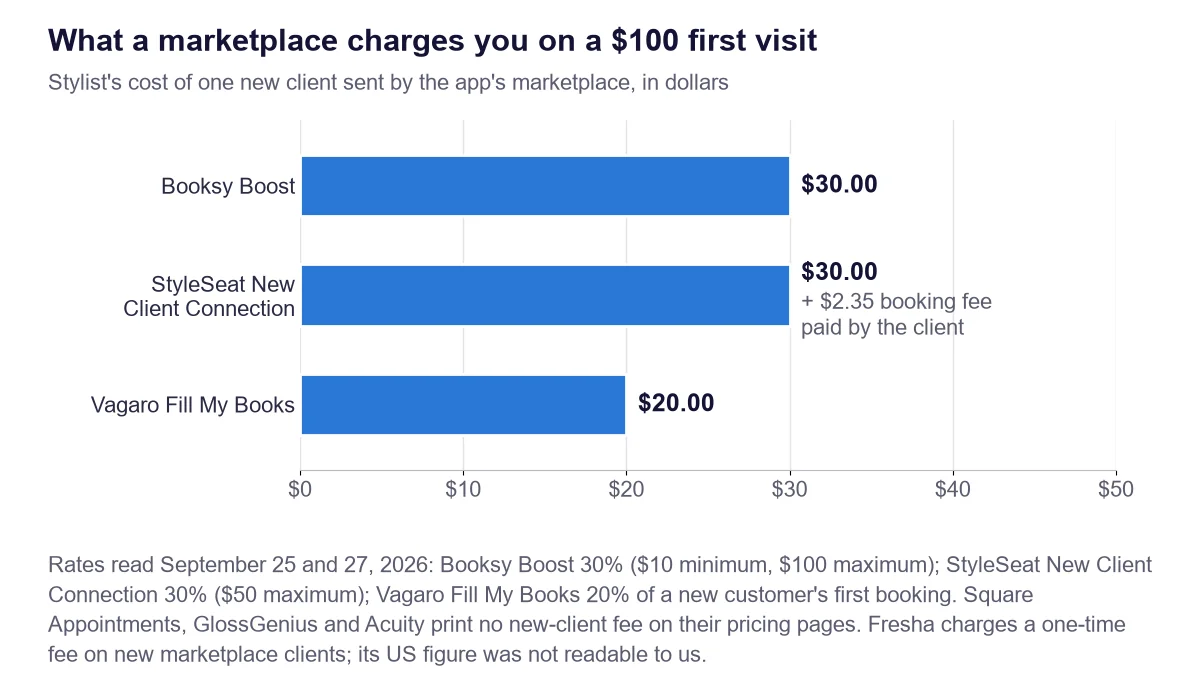
Figure 1. What three marketplace programs charge the stylist on a $100 first visit: Booksy Boost $30, StyleSeat New Client Connection $30 (the client also pays StyleSeat a $2.35 booking fee) and Vagaro Fill My Books $20, read September 25 and 27, 2026. Square Appointments, GlossGenius and Acuity print no new-client fee on their pricing pages; Fresha charges a one-time fee on new marketplace clients, and its US figure was not readable to us.
Table 2. What a new client costs on a $100 first visit, by marketplace program, from each vendor's pricing page or help center, read September 25 and 27, 2026. Figure 1 charts the same fees.
| Program | Fee | Limits | On a $100 first visit | Paid by the client | Source, read |
|---|---|---|---|---|---|
| Booksy Boost | 30% of the total cost of the first visit | $10 minimum, $100 maximum; optional, free to turn on | $30.00 | None printed | Pricing page, September 25; help center, September 27, 2026 |
| StyleSeat New Client Connection | 30% of the service cost of the first appointment | $50 maximum; optional | $30.00 | $2.35 booking fee | Help center, September 25, 2026 |
| Vagaro Fill My Books | 20% of a new customer's first booking | 5% for a returning customer when it fills gaps in your schedule | $20.00 | None printed | Help center, September 27, 2026 |
| Fresha marketplace | One-time fee on new marketplace clients | US figure not readable to us | Not printed | Not read | Pricing page, September 25, 2026 |
StyleSeat's help center puts New Client Connection at "30% ($50 max) of the service cost of the new client's first appointment," lists it as optional, and separately charges the client a $2.35 booking fee at the time of booking (read September 25, 2026). Our StyleSeat alternative comparison works through what that adds up to over a year.
Booksy's Boost has the same headline rate, a "one-time 30% fee" on a Boost client's first visit, and is free to turn on (read September 25, 2026). Booksy's help center sets a $10 minimum and a $100 maximum per first visit and tells you to share your Booksy Profile Link so existing clients stay separate from the clients Boost finds (read September 27, 2026). The subscription behind it is on our Booksy pricing page.
Vagaro's price list shows Fill My Books only as a "Booking Fee." Its help article sets the rate: 20% when a new customer books with you for the first time, or 5% for a returning customer when the campaign fills gaps in your schedule (read September 27, 2026). Square Appointments, GlossGenius and Acuity print no new-client fee on their pricing pages (read September 25 and 27, 2026). Square also runs a consumer app, Square Go, which it calls "our free marketplace app" (read September 27, 2026).
A marketplace is a trade, not a penalty. It is how a new booth renter in an unfamiliar neighborhood fills a Tuesday. If you already have a full book, you are paying a finder's fee for clients who found you anyway. At two new clients a month on a $100 service, a 30% rate costs $60 a month, more than Square Appointments Plus at $49 a month per location. At zero new clients, it costs nothing.
Which entry plans leave out text reminders?
Acuity Scheduling's Starter plan leaves out text reminders. It costs $20 a month ($16 billed annually) and lists email reminders; text reminders start on Standard at $34 ($27 billed annually), per plan cards captured September 27, 2026. Square Appointments lists text and email appointment reminders on every plan, Square Free included (grid captured September 27, 2026).
A stylist choosing Acuity on the $20 headline is choosing email-only reminders; our Acuity Scheduling pricing page sets out every plan.
The other five apps name reminders on their own pages. Booksy's pricing page says "Appointment confirmations and reminders are always free" (read September 25, 2026). Vagaro's help center lists notifications and reminders by text and email in its base subscription (read September 28, 2026). GlossGenius lists Unlimited Client Notifications on its Standard plan card (read September 27, 2026), and its client management page describes automated reminders and confirmations by SMS and email (read September 28, 2026). StyleSeat included text reminders when we read it on September 14, 2026. Fresha's pricing page showed only Canadian prices to our reader, so this guide prints no Fresha text allowance or price.
Text marketing is a separate product from text reminders. Square includes no text marketing on Free, 500 messages then 3 cents each on Plus, and 2,500 then 1.5 cents each on Premium (grid captured September 27, 2026). Booksy includes 2,000 free marketing texts a month (read September 25, 2026). Both vendors list appointment reminders separately from these allowances.
Where do deposits and no-show fees actually live?
Where deposits and no-show fees live depends on the plan. Read September 27 and 28, 2026, Square Appointments included deposits on every plan but started no-show fees on Plus at $49 a month per location, and Vagaro put deposits and no-show fees in its $10-a-month Online Shopping Cart add-on, which requires Vagaro card processing.
Square's pricing grid lists appointment deposits on Square Free, Plus and Premium, and cancellation policy and no-show fees only on Plus and Premium (captured September 27, 2026); the plans are compared on our Square Appointments pricing page. Vagaro's Online Shopping Cart article says the add-on lets you require a card, a deposit or the full amount at booking and charge a cancellation or no-show fee to the card (read September 28, 2026).
Booksy's No-Show Protection lets you set a cancellation policy and use deposits or cancellation fees, with standard mobile processing fees applying (read September 24 and 27, 2026). StyleSeat's join page lists no-show or late-cancellation policies and deposits (read September 27, 2026). GlossGenius lists built-in deposits and cancellation and no-show policies on every plan (read September 27, 2026). Acuity lists deposits and prepayment on every plan (captured September 28, 2026), and Table 1 marks its no-show column "not compared." Fresha's business page says you can collect full upfront payments or take a deposit at the time of booking (read September 27, 2026), and Fresha's pricing page listed no-show fees when we read it on September 14, 2026.
Whatever you pick, the policy matters more than the software. A fee the client never agreed to invites a dispute, and our guide to setting a fair no-show charge covers the wording and the notice period.
Which prices should you re-check before you sign up?
Re-check the promotional rates and the billing basis before you sign up. Read September 25, 2026, Vagaro's $23.99 a month was a limited-time rate, StyleSeat's pricing page offered $19 a month as a limited-time new-pro rate while its help center listed a $35 Premium Plan, and Acuity's $16 Starter price was its annual rate ($20 billed monthly).
- Vagaro: Vagaro's US help center labels $23.99 a month a limited-time rate and prints no regular price. Each added employee calendar is $10 a month for up to seven licenses, after which new employees are added at no charge (read September 25, 2026). The full ladder is on our Vagaro pricing page.
- StyleSeat: the pricing page offers $19 a month after the free trial as a limited-time rate for new pros, and the help center lists a $35-a-month Premium Plan (both read September 25, 2026). Neither page says the $35 is the price after the offer, so ask which applies to you.
- Acuity Scheduling: Starter is $20 a month billed monthly or $16 billed annually, and Standard is $34 or $27 (read September 25, 2026). Check which billing basis a quoted price uses.
- Plan names: one roundup we read on September 14, 2026, printed Acuity plan names that differ from those on Acuity's pricing page, which names them Starter, Standard and Premium (read September 25, 2026).
How do you move your book without losing clients?
Export your client list first, run the old and new systems side by side for about two weeks, and put the new booking link where clients already look before you announce the switch.
Check that the export opens before you cancel anything. Run both systems in parallel rather than cutting over on a Monday. Put the new booking link in your appointment confirmation texts and your social profiles before you announce anything, so the clients who book without reading find the right page anyway. Then tell people once, in plain words, at the chair. Block two quiet hours in the first week for the setup you will want to redo.
If you are weighing per-seat cost as a team rather than a single chair, the subscription math is a different question from the one this guide answers. It is worked through vendor by vendor in our salon suite CRM pricing comparison and in our roundup of the best salon software for teams.
Where does Twizzlo fit for hair stylists?
Twizzlo is web-based online booking and appointment scheduling software for appointment-based service businesses, including stylists who bring in their own clients. Free is $0 a month for up to 150 bookings, with no SMS; Business Pro is $29.99 a month per business, with unlimited bookings and 50 SMS a month, then $0.03 each. Both plans include unlimited staff and locations.
Clients book from a 24/7 online booking page in the browser, and each location gets its own booking link. Buffer times keep a mobile day realistic, and clients can reschedule themselves. Each client has one profile with notes, preferences and visit history. Confirmations and reminders go by email on both plans; text reminders come with Business Pro, within its SMS allowance, so a stylist who wants texts is on the paid plan from day one.
You can turn on prepaid bookings for any service. A prepaid booking is the full service price, paid when the client books, and if the client does not show, the business decides whether to keep or refund it. No-show fees are supported, applied at the business's discretion. Clients can add a tip at checkout. Payments run through Stripe. Online payments carry your Stripe processing rate plus a 1.5% Twizzlo platform fee. Business Pro comes with a 30-day money-back guarantee, and support is available 24/7.
Twizzlo does not run a consumer marketplace, so it fits businesses that already bring in their own clients. A new booth renter who needs a marketplace to fill empty hours is better served by Booksy or StyleSeat, whose new-client programs are priced in Table 2. The Free plan and Business Pro pricing page lists what each plan includes.
Frequently asked questions
What is the best scheduling app for hair stylists who rent a booth?
The best hair stylist scheduling app for a booth renter gives you your own booking link, client notes and payment at booking. Square Appointments, Booksy, StyleSeat and GlossGenius list deposits. Twizzlo supports prepaid bookings of the full service price. On marketplace apps, Booksy Boost and StyleSeat each take 30% of a new client's first visit (read September 25, 2026).
Can a commission stylist use their own booking app?
Usually not for bookings the salon takes. Whether you may run your own booking page alongside the salon's is set by your agreement, so read it first and ask a local professional if anything is unclear. What you can ask the owner for is reminders on your column and access to write client notes.
Which hair stylist scheduling apps are actually free?
Two. Square Free is $0 a month per location, with no-show fees starting on Plus at $49 (read September 25 and 27, 2026). Twizzlo Free is $0 a month for up to 150 bookings, with no SMS (pricing page, read September 28, 2026). Acuity, GlossGenius, Booksy, Vagaro, Fresha and StyleSeat offer trials, not free plans.
Do my clients have to download an app to book with me?
No, with any of the seven apps compared here: each publishes a booking page clients can open in a browser. GlossGenius advertises login-free booking with no app download (read September 27, 2026). One step to check: Fresha's help center said clients create or log in to a Fresha account to confirm a booking (read September 28, 2026).
How much does a new client cost me on a marketplace app?
On a $100 first visit, StyleSeat's New Client Connection takes $30 and the client pays a $2.35 booking fee; Booksy Boost takes $30, within its $10 minimum and $100 maximum; Vagaro's Fill My Books takes $20 (read September 25 and 27, 2026). Fresha charges a one-time fee on new marketplace clients; its US figure was not readable to us.
Which apps include text reminders on the cheapest plan?
Square Appointments lists text and email reminders on every plan, Free included (captured September 27, 2026). Booksy, Vagaro and GlossGenius list text reminders on their entry plans (read September 25 to 28, 2026). Acuity's Starter, $20 a month, is email only; texts start on Standard at $34 (read September 25, 2026). Twizzlo's Free plan includes no SMS.
Can I charge a no-show fee as a hair stylist?
Yes, with a policy the client accepts when booking. Booksy, StyleSeat and GlossGenius list no-show or cancellation policies, and Twizzlo supports no-show fees at the business's discretion. Vagaro puts them in its $10-a-month Online Shopping Cart add-on, and Square starts them on Plus at $49 a month per location (read September 25 to 28, 2026).
Is there a hair stylist booking app that charges no new-client fee?
Yes. Square Appointments, GlossGenius and Acuity print no new-client fee on their pricing pages (read September 25 and 27, 2026). Booksy Boost and StyleSeat's New Client Connection are optional programs that charge only on clients their marketplaces send you: 30% of the first visit, capped at $100 on Booksy and $50 on StyleSeat (read September 25 and 27, 2026).
What should a hairdresser look for in a scheduling app?
Six things, checked on the plan you will actually pay for: a booking link clients can use without an app or an account, payment at booking, a no-show or cancellation policy the app enforces, client notes you can write, text reminders, and the fee a marketplace charges when it sends you a new client.
Sources and methodology
Prices read
- StyleSeat help center: How much does StyleSeat cost? (opens in a new tab)Read . Supports: New Client Connection 30% ($50 maximum), optional; the client's $2.35 booking fee; the $35-a-month Premium Plan
- StyleSeat pricing page (opens in a new tab)Read . Supports: $19 a month after the free trial, a limited-time rate for new pros
- StyleSeat join page (opens in a new tab)Read . Supports: no-show or late-cancellation policies and deposits
- StyleSeat pricing page (feature read) (opens in a new tab)Read . Supports: browser booking link, client notes and text reminders
- Booksy pricing page (opens in a new tab)Read . Supports: Boost's one-time 30% fee, free to turn on; confirmations and reminders always free; 2,000 free marketing texts a month
- Booksy pricing page (feature list) (opens in a new tab)Read . Supports: No-Show Protection features, standard mobile processing fees apply
- Booksy pricing page (feature read) (opens in a new tab)Read . Supports: client notes
- Booksy business site (opens in a new tab)Read . Supports: booking link and booking buttons; deposits or cancellation fees under No-Show Protection; free SMS appointment reminders
- Booksy help center: How does Boost pricing work? (opens in a new tab)Read . Supports: Boost $10 minimum and $100 maximum per first visit
- Booksy help center: How do I prevent being charged for Boost? (opens in a new tab)Read . Supports: share your Booksy Profile Link to keep existing clients apart from Boost clients
- Square Appointments pricing page (US) (opens in a new tab)Read . Supports: Free $0, Plus $49 and Premium $149 a month per location
- Square Appointments pricing page (US), plan grid (opens in a new tab)Read . Supports: booking website, deposits and text and email reminders on every plan; cancellation policy and no-show fees from Plus; text marketing none on Free, 500 then 3 cents on Plus, 2,500 then 1.5 cents on Premium
- Square Go page (opens in a new tab)Read . Supports: Square's description of Square Go as its free marketplace app
- Square Appointments pricing page (feature read) (opens in a new tab)Read . Supports: client notes
- Acuity Scheduling pricing page (opens in a new tab)Read . Supports: Starter $20, Standard $34, Premium $61 a month billed monthly ($16, $27, $49 billed annually); no free plan; 7-day trial
- Acuity Scheduling pricing page, plan cards (opens in a new tab)Read . Supports: email reminders on Starter; text reminders from Standard
- Acuity Scheduling pricing page, feature table (opens in a new tab)Read . Supports: client self-scheduling, deposits and prepayment, and client profiles with notes on every plan
- GlossGenius pricing page (opens in a new tab)Read . Supports: login-free client booking with no app download; built-in deposits and cancellation and no-show policies on every plan; Unlimited Client Notifications on Standard; no free plan, 14-day trial; no new-client fee printed
- GlossGenius client management page (opens in a new tab)Read . Supports: client notes; automated reminders and confirmations by SMS and email
- Vagaro plans and pricing help article (US) (opens in a new tab)Read . Supports: the limited-time $23.99 rate; $10 per added employee calendar up to seven licenses, then no charge
- Vagaro help article: Grow Your Business with Vera Fill My Books (opens in a new tab)Read . Supports: 20% of a new customer's first booking; 5% for a returning customer when it fills gaps
- Vagaro help article: Activate the Online Shopping Cart (opens in a new tab)Read . Supports: $10 a month in the US; a card, a deposit or the full amount at booking; cancellation and no-show fees; requires Vagaro card processing
- Vagaro help article: Features Included in Your Base Subscription (opens in a new tab)Read . Supports: confirmations and reminders by text and email; customer notes
- Vagaro help center (feature read) (opens in a new tab)Read . Supports: browser booking page
- Fresha help center: Learn how clients book appointments online (opens in a new tab)Read . Supports: clients create or log in to a Fresha account to book and confirm online
- Fresha pricing page (feature read) (opens in a new tab)Read . Supports: no-show fees and client notes
- Fresha for business page (opens in a new tab)Read . Supports: full upfront payment or a deposit at the time of booking
- Fresha pricing page (opens in a new tab)Read . Supports: a one-time fee on new marketplace clients; US prices could not be read from our location
- Twizzlo pricing page (opens in a new tab)Read . Supports: Twizzlo plans, booking cap, SMS allowance, money-back guarantee and online payment fee
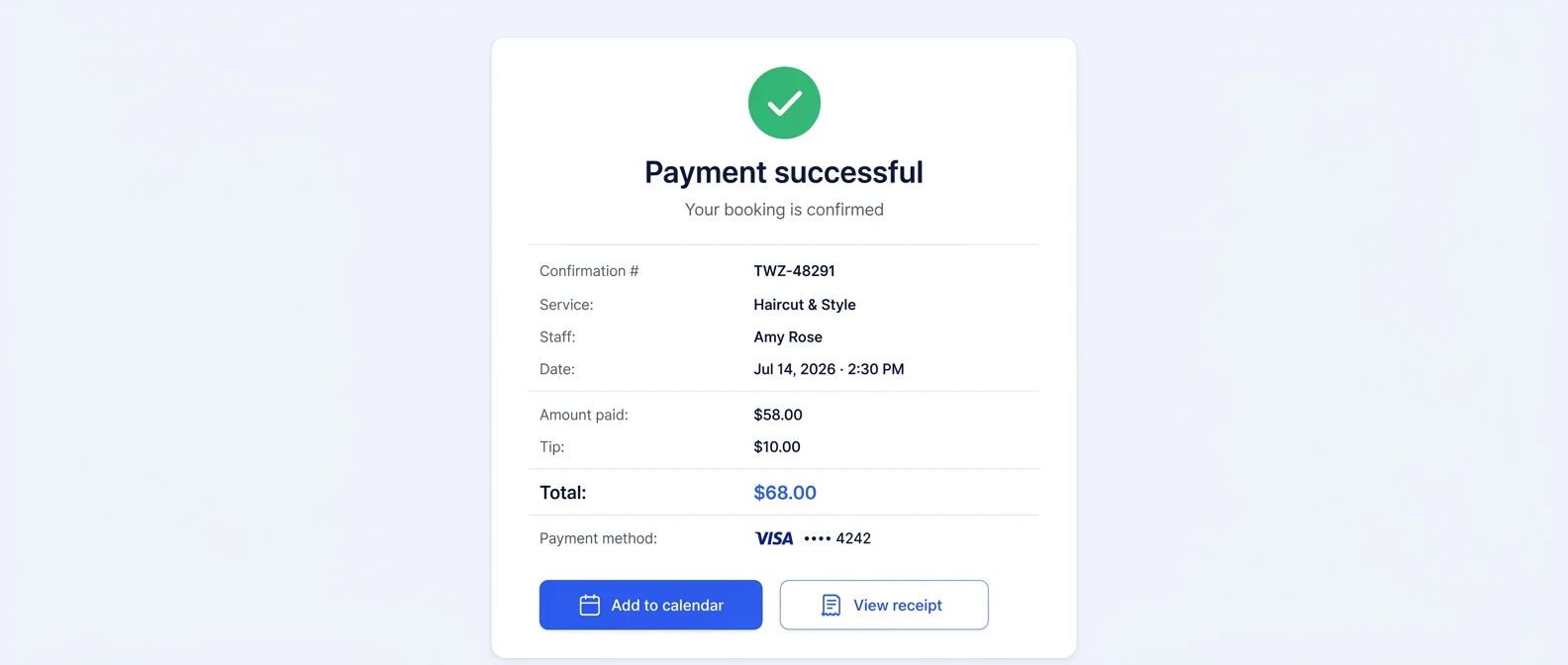
- Twizzlo features page (opens in a new tab)Read . Supports: booking page and per-location links, buffer times, self-rescheduling, client profiles, prepaid bookings, tips, no-show fees; the payment confirmation screenshot (same image)
From our editorial policy
- Twizzlo sells online booking and appointment scheduling software, the same category we write about. Twizzlo appears in our comparisons and roundups, and we have a commercial interest in you choosing it.
- We do not publish invented quotes, studies, statistics, customer stories or product tests, and we do not imply hands-on use of a product when the research came from the vendor's public documentation.
- To report an error, email support@twizzlo.com with the subject line "Correction: [page URL]". Tell us what is wrong and, if you can, link a source.
Update history
- : Moved Twizzlo into its own section, added tables of chair-level features and new-client fees, and re-read vendor facts, September 14 to 28, 2026.
Start free, upgrade when you grow
Flat-rate booking software. No per-seat, per-chair or per-location fees.
- Free plan up to 150 bookings a month, not a trial
- Business Pro is $29.99 a month per business for unlimited bookings, with a 30-day money-back guarantee
- 24/7 support by email