
Salon Iris Alternative: DaySmart Salon Pricing by Team Size

In short
A Salon Iris alternative makes sense when DaySmart Salon's user-based plans stop fitting your team. Salon Iris is now DaySmart Salon: Basic is $29 a month for one user and Deluxe $69 for three, with extra users at $9 a month on Deluxe and above (pricing page, read September 25, 2026). Square Appointments bills per location; Twizzlo, per business.
- DaySmart Salon plans include one, three or six users; extra users cost $9 a month each from Deluxe (pricing page, read September 25, 2026).
- Features matter as much as users: two-way texting is included from Deluxe Growth at $149 a month (pricing page, read September 25, 2026).
- Alternatives bill per location, per business, per staff member or per calendar, so compare them at your own team size.
In this article10 sections

Salon Iris is now sold as DaySmart Salon, so a salon looking for a Salon Iris alternative is weighing DaySmart Salon's plans against other booking software. This guide shows what each DaySmart Salon plan costs as a team grows, how seven alternatives bill and how to switch without losing client records. Twizzlo, which makes appointment scheduling software, publishes this comparison; competitor prices come from each vendor's own page, read September 25, 2026.
What happened to Salon Iris?
Salon Iris is now DaySmart Salon: saloniris.com redirects to daysmart.com, and the pricing page is DaySmart Salon's (checked September 25, 2026). The DaySmart Salon pricing page lists five plans, from Basic to Premium Growth, and no separate Salon Iris price.
For a salon still on Salon Iris, the plans to compare are DaySmart Salon's, and the questions are the ones any salon asks at renewal: how many users the team needs, which features it uses every week and what the plan that covers both costs. The next section answers the first and the last with DaySmart Salon's own figures, read on its US pricing page in dollars.
Salon Iris pricing: what DaySmart Salon costs from 1 to 10 users
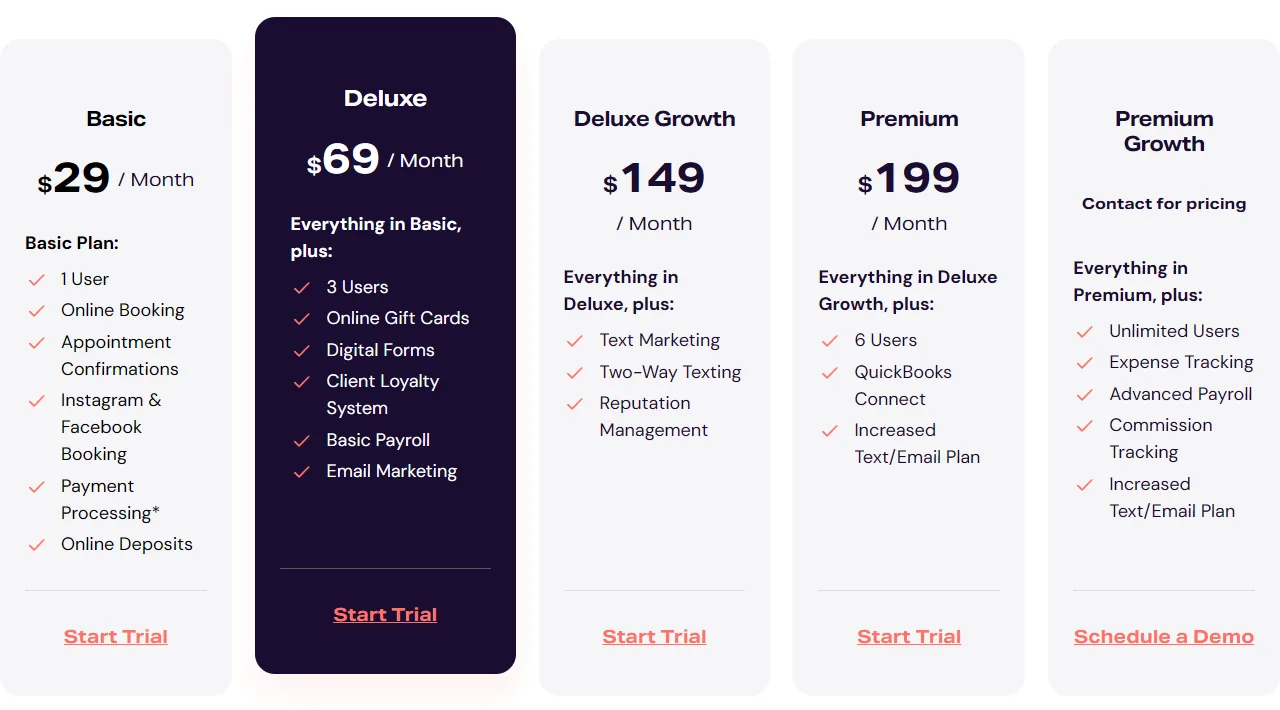
DaySmart Salon, formerly Salon Iris, lists Basic at $29 a month for one user, Deluxe at $69 and Deluxe Growth at $149 with three users each, and Premium at $199 with six users; extra users cost $9 a month each on Deluxe and above (pricing page, read September 25, 2026).
The five DaySmart Salon plans
Each plan includes everything in the plan before it, so the right plan depends on the features a salon needs as much as on its head count. Some features are also sold as add-ons on a lower plan, such as two-way texting and text marketing on Deluxe; the page prints no add-on prices (checked September 27, 2026).
DaySmart Salon plans as printed on its pricing page, read September 25, 2026. Prices in dollars; the page does not state the billing term behind "/ Month".
| Plan | Price as printed | Users included | Each extra user | Texts / emails a month | What the plan adds |
|---|---|---|---|---|---|
| Basic | $29 / Month | 1 | None listed | 500 / 1,000 | Online booking, appointment confirmations, Instagram and Facebook booking, payment processing, online deposits |
| Deluxe | $69 / Month | 3 | $9 a month | 1,000 / 5,000 | Online gift cards, digital forms, client loyalty system, basic payroll, email marketing |
| Deluxe Growth | $149 / Month | 3 | $9 a month | 1,000 / 10,000 | Text marketing, two-way texting, reputation management |
| Premium | $199 / Month | 6 | $9 a month | 2,500 / 10,000 | QuickBooks Connect, a larger text and email plan |
| Premium Growth | Contact for pricing | Unlimited | Not applicable | 5,000 / 20,000 | Expense tracking, advanced payroll, commission tracking |
Monthly cost by number of users
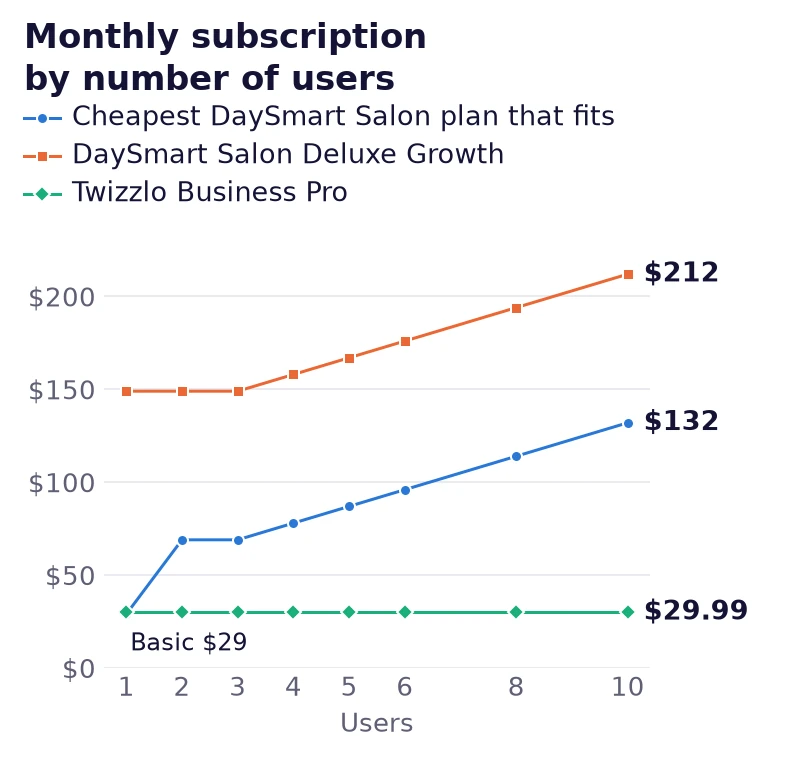
Adding DaySmart Salon's $9 extra-user price to each plan's included users gives the monthly subscription at every team size. At five users, Deluxe costs $87 and Deluxe Growth $167; at 10 users, Deluxe costs $132 and Premium $235.
Monthly subscription by number of users: the plan price plus $9 for each user above the plan's included users (our arithmetic from DaySmart Salon's pricing page, read September 25, 2026). Before tax, card processing and add-ons. Twizzlo column: twizzlo.com/pricing/, read September 27, 2026.
| Users | Basic | Deluxe | Deluxe Growth | Premium | Twizzlo Business Pro |
|---|---|---|---|---|---|
| 1 | $29 | $69 | $149 | $199 | $29.99 |
| 2 | One user only | $69 | $149 | $199 | $29.99 |
| 3 | One user only | $69 | $149 | $199 | $29.99 |
| 4 | One user only | $78 | $158 | $199 | $29.99 |
| 5 | One user only | $87 | $167 | $199 | $29.99 |
| 6 | One user only | $96 | $176 | $199 | $29.99 |
| 8 | One user only | $114 | $194 | $217 | $29.99 |
| 10 | One user only | $132 | $212 | $235 | $29.99 |
What the pricing page does not say
DaySmart Salon's pricing page, read September 25, 2026, leaves four things out: the billing term behind "/ Month", a card processing rate (Basic lists "Payment Processing*" with no rate), what counts as a user and any price per location. Ask for each in writing before you compare totals.
Stay with DaySmart Salon if your salon uses its gift cards, digital forms, client loyalty system or payroll every week and your team fits the users a plan includes.
Salon Iris alternatives compared by billing unit
The main difference between Salon Iris alternatives is what the bill counts: users, staff members, calendars, locations or the business. The table sets each vendor's billing unit and entry price next to what one more stylist changes, so a salon can see which bills grow with the team.
Billing units and entry prices from each vendor's own page, read September 25, 2026: DaySmart Salon, Square Appointments, GlossGenius, Vagaro (US help center), Booksy, Timely (USA view) and Phorest (US). Twizzlo: twizzlo.com/pricing/, read September 27, 2026. Monthly prices before tax and card processing, on monthly billing where the vendor states a term.
| Vendor | Billing unit as printed | Entry price | What adding a stylist changes |
|---|---|---|---|
| DaySmart Salon (formerly Salon Iris) | Plan with users included | Basic $29 / Month, 1 user | $9 a month for each user above the plan's included users, on Deluxe and above |
| Square Appointments | Per location | Free $0; Plus $49; Premium $149 a month | Nothing on the subscription: Free lists unlimited staff calendars |
| GlossGenius | Per business, by plan | Standard $28 a month billed monthly ($24 billed annually), no staff management | A team needs Gold ($56 a month billed monthly, up to 9 staff); the 10th person moves the salon to Platinum ($168 billed monthly, teams 10+) |
| Vagaro | Per location, one bookable calendar included | $23.99 a month, a limited-time rate; list price not printed | $10 a month per added calendar, up to seven licenses |
| Booksy | Per business, one team member included | $29.99 a month plus tax (published price) | $20 a month per added team member |
| Timely | Per bookable staff member | Build $26, Elevate $39, Innovate $47 per staff member a month | The plan's per-staff price for each added stylist |
| Phorest | Quote per plan | "Request a quote" on every plan | No per-staff price listed: every plan includes unlimited staff, as printed |
| Twizzlo | Per business | Free $0 for up to 150 bookings a month (no SMS); Business Pro $29.99 a month | Nothing: unlimited staff and locations on both plans |
Salons leaving Phorest can compare Phorest alternatives, salons on Timely can weigh Timely alternatives for salons, and owners who want a Booksy-style client app can read about apps like Booksy. For monthly totals at 1, 3, 5 and 10 stylists on the salon platforms that publish prices, see our guide to the best salon software.
Our Square Appointments pricing, Vagaro pricing, Booksy pricing and GlossGenius pricing pages show each plan in full.
Hidden costs to check before you leave DaySmart Salon
Before you leave DaySmart Salon, price the costs outside the subscription: card processing, text messages beyond the plan allowance and the time a switch takes.
Payment processing
The card processing rate is part of the monthly cost, and it is missing from DaySmart Salon's pricing page: every plan includes payment processing, but the page prints no rate (read September 25, 2026). Ask for the rate in writing and set it beside the rate each alternative publishes. When you compare systems, also check how integrated payment processing for appointment businesses affects checkout, reporting and closeout time, not only the card rate.
Text messages and no-shows
No-shows add another hidden operating cost. Software that handles reminders poorly creates empty book time, wasted payroll, and front-desk cleanup. DaySmart Salon includes 500 texts a month on Basic and 1,000 on Deluxe (pricing page, read September 25, 2026); count the texts your salon sends before you compare plans.
A five-step switching checklist
Work through these steps in order before you cancel a DaySmart Salon plan.
- Count every user. Include the front desk and any manager who logs in: DaySmart Salon prices by users, while other tools count staff members, calendars or locations.
- List the DaySmart Salon features you use each week. Online gift cards, digital forms, the client loyalty system and basic payroll start on Deluxe; confirm the new tool covers the ones you rely on.
- Export client records and visit history. Ask what the export contains and check it before you cancel, not after.
- Note what clients have on file. Write down open gift card balances, packages and deposits so none is lost in the move.
- Run both calendars for one week. Take new bookings in the new system while the old one still holds existing appointments, then close the old plan.
What a DaySmart Salon alternative should handle
A DaySmart Salon alternative should keep scheduling, client records, reminders and reporting in one place at a price that does not rise with each hire.
What features do multi-location salons actually need?
Growing operators need software that handles multi-location views, shared calendars and roaming staff without a price step for each person or site. That means your shortlist should include these must-haves:
- Predictable billing: Your monthly software cost shouldn’t change every time the business grows.
- Shared scheduling logic: Staff, rooms, and locations should work from one operational view.
- Access from any browser: Owners and managers need control away from the front desk.
- Unified client records: Notes, visits, service history, and communication should live in one place.
- Reliable reminders and follow-up: This protects booked time and cuts admin load.
A two-location salon is a good example. If one colorist splits time between sites and each location keeps separate scheduling logic, your front desk ends up doing manual conflict control all week. That’s not a software edge case. That’s a standard growth scenario, and tools built as multi-location scheduling software for growing salon teams keep one view of who works where.
How does scheduling software reduce no-shows?
It reduces no-shows by automating the communication work your staff won’t do consistently when the salon gets busy. Reminders, confirmations, follow-up prompts, and cancellation workflows keep the calendar cleaner because they remove manual chasing from the front desk.
What should reporting actually help you manage?
Reporting should help you make staffing, schedule, and service decisions without exporting data into spreadsheets every week. You need visibility into booked time, team utilization, repeat visits, and operational bottlenecks.
A strong reporting layer also keeps managers from arguing over anecdotes. If Saturdays are overloaded and Tuesdays are soft, your system should make that obvious. Tools built for this type of operational visibility, such as scheduling and sales reporting software, are far more useful than a long menu of reports nobody uses.
Where Twizzlo fits for a salon leaving DaySmart Salon
Twizzlo is web-based online booking and appointment scheduling software for appointment-based service businesses. Free is $0 a month for up to 150 bookings, with no SMS, and is free forever, not a trial; Business Pro is $29.99 a month per business, with unlimited bookings, 50 SMS a month then $0.03 each, and a 30-day money-back guarantee. Both plans include unlimited staff and locations.
Online payments carry your Stripe processing rate plus a 1.5% Twizzlo platform fee.
From two users up, the cheapest DaySmart Salon plan that fits the team (Deluxe, from $69 a month) costs more than Business Pro; at one user, DaySmart Basic ($29) costs less (figures from the monthly cost by number of users table).
Example: on Twizzlo Business Pro, 50 SMS are included and each extra SMS costs $0.03, so 500 texts a month cost $29.99 plus $13.50 for the 450 extra texts, or $43.49; DaySmart Salon includes 500 texts on Basic and 1,000 on Deluxe (pricing page, read September 25, 2026).
For a salon moving its team, the Twizzlo features that matter most at the switch are:
- Employee Shifts: each staff member's shifts, planned across one or several locations.
- Role-based access: decide what each person can see.
- Client profiles: visit history, notes and preferences, and total spend in one record.
- Prepaid bookings and tips: clients can prepay the full service price and add a tip, through Stripe.
- Reminders: email confirmations and reminders on both plans, SMS reminders on Business Pro.
- Insights: booking volume, revenue and staff utilization by day, week or month.
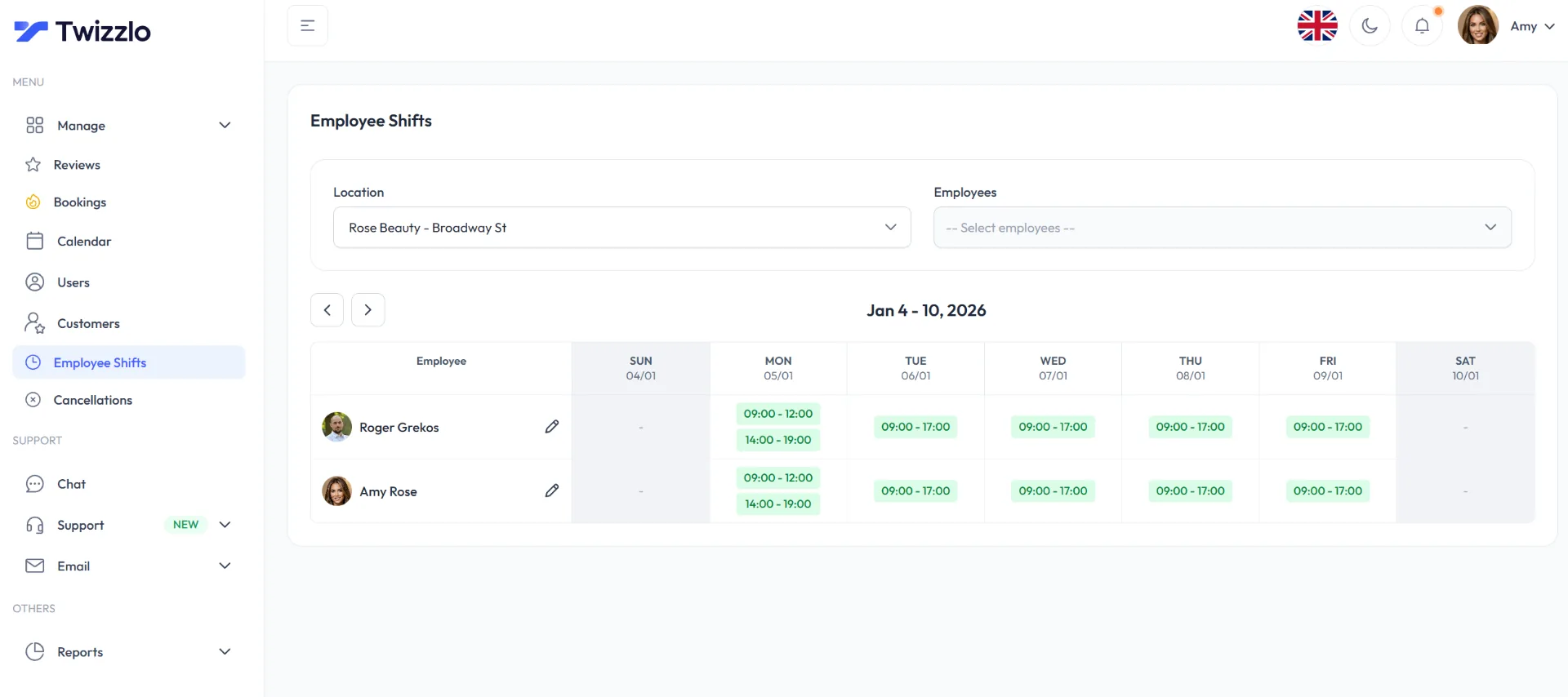
Twizzlo's two plans are set side by side on the pricing page, and the salon scheduling software page shows what Business Pro includes for a salon.
Should your salon use an all-in-one suite or separate tools?
Use separate tools while the salon is simple, and move to an all-in-one suite once a team shares clients, calendars and payments. A solo stylist can survive with a booking app, a payment tool, and text messaging on the side. A growing salon usually cannot.
Separate tools make sense only when the business is genuinely simple. One calendar. One operator. Few service variations. Minimal reporting needs. In that setup, keeping fixed software costs low is a reasonable decision.
The problem starts when owners confuse a starter setup with a growth setup. Add a front desk team, more providers, recurring clients, retail tracking, room scheduling, or a second location, and the “cheaper” stack starts charging you in labor instead of subscription fees.
That cost shows up in small, expensive ways. Staff re-enter client notes. Managers cross-check appointments against payment records. Receptionists answer avoidable questions because customer history lives in different systems. Every handoff creates another chance for missed details, bad reporting, or a poor client experience.
An all-in-one suite is the better choice once your team needs one source of truth. You get cleaner scheduling, cleaner records, and less admin work. More important, you stop building operations around software gaps.
This is also where total cost of ownership matters more than monthly sticker price. A stack of separate tools can look cheaper on paper, then cost more once you add training time, duplicate data entry, integration fixes, and the manager hours required to keep everything aligned.
For client records, communication history, and centralized profiles, a consolidated tool such as simple client management software is usually easier to run than a patchwork of disconnected apps.
Use the lighter stack only if you expect to stay operationally simple. If you plan to add staff, locations, or service complexity, choose the platform that removes coordination work early.
Frequently Asked Questions
Is Salon Iris still a viable salon software option
Yes. Salon Iris is sold today as DaySmart Salon: saloniris.com redirects to daysmart.com, and DaySmart Salon's pricing page lists five plans, from Basic at $29 a month for one user to Premium Growth by quote (checked September 25, 2026). Whether it fits depends on how many users your team needs and which features it uses each week.
How hard is it to switch from Salon Iris to another platform
The switch is usually more manageable than owners expect if they prepare properly. Start by auditing client records, staff permissions, active packages, recurring workflows, and reporting needs, then follow the order of the five-step switching checklist in this guide. The salons that struggle most are the ones that migrate data without first deciding which old processes should be retired instead of recreated.
What should I review before signing with a Salon Iris alternative
Check five things first: pricing logic, user limits, location limits, reporting access, and migration support. Then review daily operational friction. Can your staff learn it quickly? Can managers oversee multiple calendars without workarounds? Can you grow without hitting a paywall? Those answers matter more than a long feature list.
Does Windows-based legacy architecture still matter for salon operators
It matters if your salon still runs software installed on a front-desk computer: local installs need backups, updates and a working device at each station. Browser-based systems move most of that upkeep to the vendor. Before you switch, list the devices each location uses and ask each vendor which ones it supports.
Should small salons choose free tools instead of an all-in-one platform
Sometimes. If you’re solo and operationally simple, low-fixed-cost tools can be enough. But once you add staff, more services, or more than one location, fragmented tools usually create more admin work than they save. That’s when a single system starts paying off through coordination, consistency, and cleaner data.
What makes a software platform scalable for salons
Scalable salon software supports more staff, more appointments, and more locations without forcing repeated pricing jumps or complicated workarounds. It also needs strong shared scheduling logic, centralized client records, and straightforward reporting. If growth requires new modules, more licenses, or manual process patches, the platform isn’t scalable.
How much does Salon Iris (DaySmart Salon) cost per month?
DaySmart Salon's pricing page, read September 25, 2026, lists Basic at $29 a month with one user, Deluxe at $69 and Deluxe Growth at $149 with three users each, Premium at $199 with six users and Premium Growth by quote. Each extra user costs $9 a month on Deluxe and above, so five users on Deluxe cost $87 a month.
Can I get my client data out of Salon Iris?
Plan for it before you switch. Audit your client records, visit history, and any stored communication, confirm what the system lets you export, and check what your new platform’s migration support will import for you. Owners who verify the export path first avoid the most common switching headache: discovering gaps after the old subscription ends.
What does the lack of an API mean for my salon in practice?
DaySmart Salon's pricing page, read September 25, 2026, lists QuickBooks Connect on Premium and does not mention an API, so ask DaySmart directly what connects to its system. For any platform, check the integrations you need, such as accounting, payments and marketing tools, against your actual stack before you commit.
Is Salon Iris the same as DaySmart Salon?
Yes. The Salon Iris website, saloniris.com, redirects to daysmart.com, and the plans are sold under the DaySmart Salon name on DaySmart's pricing page (checked September 25, 2026).
Is there a free alternative to Salon Iris?
Yes. Square Appointments Free is $0 a month per location with unlimited staff calendars (Square's pricing page, read September 25, 2026), and Twizzlo Free is $0 a month for up to 150 bookings, without SMS (Twizzlo's pricing page, read September 27, 2026). DaySmart Salon itself offers a 14-day free trial of Deluxe with no card needed (DaySmart Salon's pricing page, read September 25, 2026).
Price your own team on DaySmart Salon and Twizzlo
To compare DaySmart Salon and Twizzlo for your own salon, check three numbers: users, texts a month and the features you use every week.
- Users: count everyone who logs in, front desk included, and read your row in the monthly cost by number of users table.
- Texts: count the texts you send in a month. DaySmart Salon includes 500 to 5,000 by plan; Twizzlo Business Pro includes 50, then $0.03 each.
- Features: list the features you use every week and check them against Twizzlo's booking and reminder features.
Then start on Twizzlo Free, which is $0 a month for up to 150 bookings and not a trial, or compare the two plans before you choose.
Sources and methodology
Prices read
- DaySmart Salon pricing page (opens in a new tab)Read . Supports: DaySmart Salon plans, included users, extra-user price, texts and emails, plan features and trial; captured again September 27, 2026 with the same figures
- DaySmart Salon homepage (opens in a new tab)Read . Supports: where saloniris.com now redirects (also checked September 25, 2026)
- Square Appointments pricing page (US) (opens in a new tab)Read . Supports: Square plans per location and unlimited staff calendars on Free
- GlossGenius pricing page (opens in a new tab)Read . Supports: GlossGenius plans and staff limits
- Vagaro plans and pricing help article (US) (opens in a new tab)Read . Supports: Vagaro limited-time base rate and calendar fees
- Booksy pricing page (opens in a new tab)Read . Supports: Booksy published price and extra team members
- Timely pricing page (USA view) (opens in a new tab)Read . Supports: Timely prices per staff member
- Phorest pricing page (US) (opens in a new tab)Read . Supports: Phorest quote-only plans and unlimited staff
- Twizzlo pricing page (opens in a new tab)Read . Supports: Twizzlo plans, booking cap, SMS allowance, money-back guarantee and online payment fee
- Twizzlo features page (opens in a new tab)Read . Supports: Twizzlo staff, client record, payment, reminder and insights features; Employee Shifts screenshot (same image)
From our editorial policy
- Twizzlo sells online booking and appointment scheduling software, the same category we write about. Twizzlo appears in our comparisons and roundups, and we have a commercial interest in you choosing it.
- We do not publish invented quotes, studies, statistics, customer stories or product tests, and we do not imply hands-on use of a product when the research came from the vendor's public documentation.
- To report an error, email support@twizzlo.com with the subject line "Correction: [page URL]". Tell us what is wrong and, if you can, link a source.
Update history
- : Rebuilt the guide on DaySmart Salon's own pricing page (read September 25, 2026): added plan and cost-by-user tables, a chart, seven alternatives by billing unit and a switching checklist; removed Fresha figures, claims from third-party sites and two illustrative images.
Start free, upgrade when you grow
Flat-rate booking software. No per-seat, per-chair or per-location fees.
- Free plan up to 150 bookings a month, not a trial
- Business Pro is $29.99 a month per business for unlimited bookings, with a 30-day money-back guarantee
- 24/7 support by email