
Best Square Appointments Alternatives for 2026

In short
Pick a Square Appointments alternative by the Square limit you hit. Square Free costs $0 a month per location and includes unlimited staff calendars, but cancellation and no-show fees and a waitlist start on Square Plus, $49 a month per location (Square's pricing page, read September 25, 2026). Tools billed per business, calendar or user change the math.
- Square charges per location, not per staff member: every plan lists unlimited staff calendars (Square's pricing grid, captured September 27, 2026).
- Five staff at one location cost $0 to $109.99 a month across the tools compared, on pricing pages read September 25, 2026.
- Map deposits and no-show fees first: Square lists deposits on every plan, no-show fees from Square Plus (grid captured September 27, 2026).
Source: Square Appointments pricing page (opens in a new tab), read
In this article10 sections

Owners start pricing a Square Appointments alternative when a second location, a no-show policy or a growing team would move them onto Square Plus at every location. This guide compares seven booking apps like Square Appointments on what each charges for five staff, 10 staff and a second location, from vendor pricing pages read September 25 and 27, 2026, and says when staying on Square beats any replacement.
Twizzlo publishes this guide and sells one of the tools compared; the six other alternatives to Square Appointments are listed alphabetically. For Square's own plans line by line, see our Square Appointments pricing page, and for the wider buying checklist, our guide to choosing appointment scheduling software.
The Square limits that send owners looking for alternatives
Square Appointments bills per location, not per staff member: Square Free is $0 a month per location with unlimited staff calendars, Square Plus $49 and Square Premium $149 (Square's pricing page, read September 25, 2026). No-show fees, a waitlist and multi-location management start on Plus, billed at every location (Square's feature grid, captured September 27, 2026).
How Square bills: per location, by plan
Square prices Appointments by plan and by location. Every plan lists unlimited staff calendars, and Square's own tooltip adds that there is no employee limit, so hiring a fifth or a 10th stylist leaves the plan fee where it was. With Square Plus and Square Premium, the monthly fee applies to each location you run, according to the Fees table on the same pricing page, captured September 27, 2026.
Card processing is charged on top and falls or holds as the plan fee rises. In person (tap, dip or swipe), Square prints 2.6% plus 15 cents on Free, 2.5% plus 15 cents on Plus and 2.4% plus 15 cents on Premium. Online card payments are 3.3% plus 30 cents on Free and 2.9% plus 30 cents on Plus and Premium. Plus and Premium come with a 30-day free trial, and a business that processes over $250,000 a year can ask about custom Square Pro pricing (Square's pricing page, read September 25, 2026).
What Square Plus adds
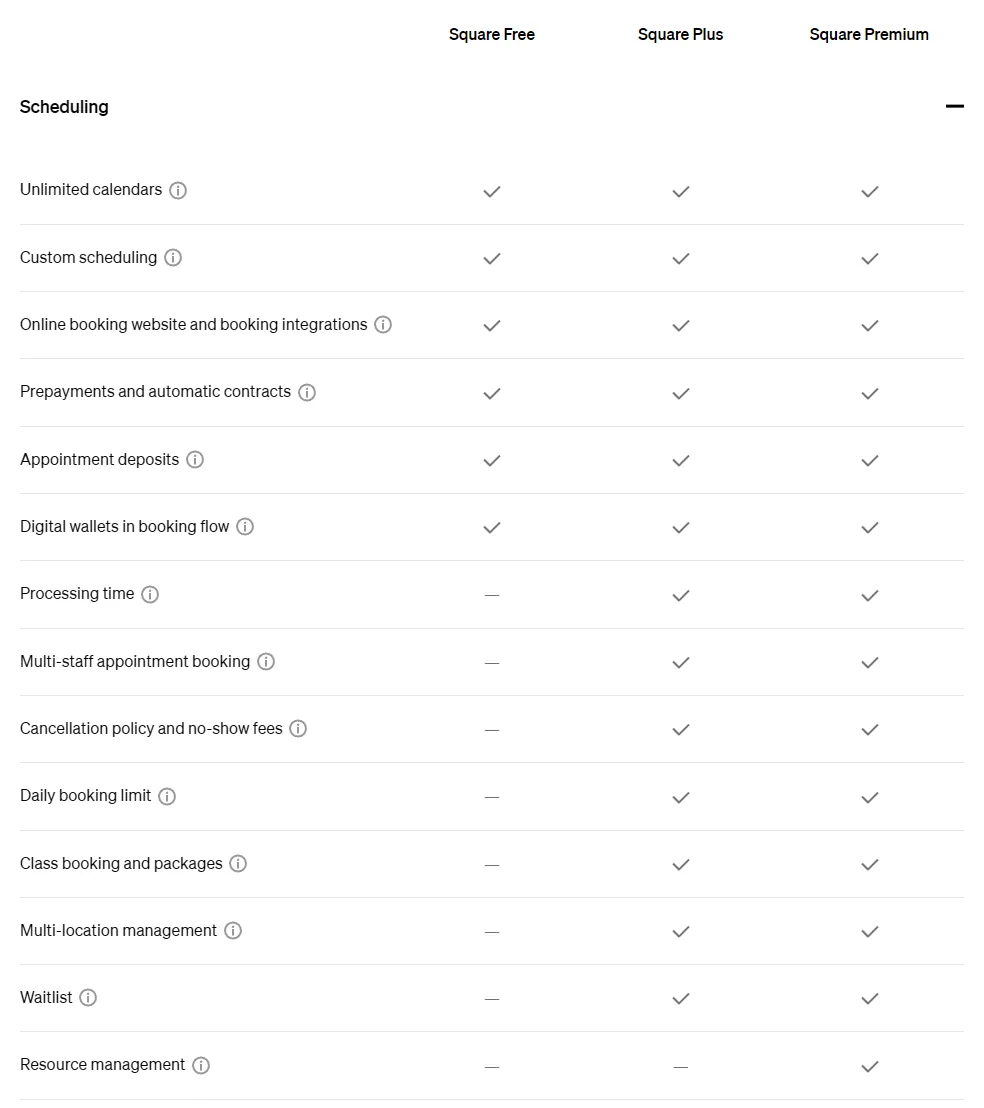
Square's plan cards list cancellation policy and no-show fees, multi-staff appointment booking and a waitlist as Square Plus features (pricing page, read September 25, 2026). The full feature grid, captured September 27, 2026, also shows multi-location management, Google Calendar sync, appointment confirmations, processing time and a daily booking limit starting on Plus.
Square Free's missing multi-staff appointment booking does not limit it to one staff member: Square's tooltip defines the feature as one appointment with multiple services assigned to different staff. Several features sit on all three plans: appointment deposits, prepayments, appointment reminders by text and email, and Tap to Pay on iPhone and Android.
Why leaving Square is an operations project
Square keeps scheduling, payments and daily admin in one system, and that convenience raises the cost of leaving. Once prepayments, checkout, client records and appointment workflows are tied together, replacing the booking tool becomes an operations project rather than a simple software change.
A gap between bookings and payments shows up at the front desk first, as prepayments that no longer match an appointment or a no-show fee no one can charge. Map those workflows before you compare prices; the migration section below lists them.
Square Appointments alternatives compared by staff and location cost
At five staff on one location, the tools below run from $0 on free plans to $109.99 a month. A second location is where billing units split: Square Plus charges its full plan fee again, GlossGenius the plan price less 15%, while Vagaro's help center prints no subscription price for an added location (vendor pages read September 25, 2026).
| Tool (plan) | Billing unit, as printed | 5 staff, 1 location | 10 staff, 1 location | Adding a second location |
|---|---|---|---|---|
| Square Appointments (Square Free) | Per location; unlimited staff calendars | $0 | $0 | Multi-location management starts on Square Plus |
| Square Appointments (Square Plus) | Per location | $49 | $49 | $98 (Square Plus at each location) |
| Twizzlo (Free) | Per business; up to 150 bookings a month, no SMS | $0 | $0 | $0 (unlimited locations) |
| Twizzlo (Business Pro) | Per business | $29.99 | $29.99 | $29.99 (unlimited locations) |
| Acuity Scheduling | Per account, by number of calendars | $34 (Standard, up to 6 calendars) | $61 (Premium, up to 36 calendars) | Not printed on the pricing page |
| Booksy | Per business with 1 team member, plus $20 per added member, plus tax; market not printed | $109.99 | $209.99 | Not printed on the pricing page |
| GlossGenius | Per business, by plan and staff limit | $56 (Gold, up to 9 staff) | $168 (Platinum, teams 10+) | $103.60 for two locations on Gold (added location at the plan price less 15%) |
| Koalendar | Per plan with included seats, plus a price per extra seat | $60 (Pro) or $68 (Business) | $120 (Pro) or $148 (Business) | Not printed on the pricing page |
| Setmore (Pro) | Per user | $60 | $120 | Not printed on the pricing page |
| Vagaro | Per location with 1 calendar; $10 per added calendar up to 7 licenses | $63.99 ($23.99 base, a limited-time rate) | $83.99 (7 or more calendars) | No added-location price printed |
Example: a five-staff business opening a second location would pay $98 a month on Square Plus, billed at each location, or $103.60 on GlossGenius Gold with the second location at 15% off. Vagaro's help center prints no subscription price for an added location and does not say how calendar licenses count across locations, so no two-location total is shown for it.
Square Appointments competitors, listed alphabetically
Six Square Appointments competitors are compared here: Acuity Scheduling, Booksy, GlossGenius, Koalendar, Setmore and Vagaro. Each adds cost by a unit Square does not charge for (calendars, team members, staff tiers, seats or users). Each entry gives the vendor's own price, its read date and the best fit, in alphabetical order, not a ranking; Twizzlo is covered separately below.
Acuity Scheduling
Acuity Scheduling charges by the number of calendars on the account: Starter is $20 a month for one calendar, Standard $34 for up to six and Premium $61 for up to 36, billed monthly ($16, $27 and $49 billed annually), according to Acuity's pricing page, read September 25, 2026. There is no free plan; Acuity offers a seven-day trial. A five-person team fits Standard, and a seventh calendar moves the account to Premium.
Acuity pricing sets out every plan, and our Square Appointments vs Acuity comparison puts the two side by side by team size. Choose Acuity Scheduling if you want one account price that changes only when you pass one, six or 36 calendars.
Booksy
Booksy charges $29.99 a month plus tax with one team member included, and $20 a month for each additional team member, according to Booksy's pricing page, read September 25, 2026; the page prints a dollar sign but no country or currency. Five team members come to $109.99 a month and 10 to $209.99, before tax. Its optional Boost marketplace feature charges a one-time 30% fee based on the total cost of a Boost client's first visit.
Booksy pricing covers the plan and its fees. Choose Booksy if you want new clients through its marketplace and accept a monthly price for each team member.
GlossGenius
GlossGenius sells three Beauty and Wellness plans per business: Standard at $28 a month without staff management, Gold at $56 for businesses of up to nine staff and Platinum at $168 for teams of 10 or more, billed monthly ($24, $48 and $148 billed annually), according to GlossGenius' pricing page, read September 25, 2026. Each additional location is charged the plan price at a 15% discount, so Gold at two locations is $103.60 a month. Card processing is printed as a flat 2.6% rate.
GlossGenius pricing lists every plan, and owners leaving GlossGenius itself can start with our GlossGenius alternative for scaling service teams guide. Choose GlossGenius if you run a beauty business of up to nine staff and want a single card rate.
Koalendar
Koalendar suits a lean scheduling setup, such as consultants, independent providers and businesses with straightforward appointment flows. Its Free forever plan is for personal use; Pro is $12 a month with one seat plus $12 per extra seat, and Business is $36 a month with three seats plus $16 per extra seat, billed monthly ($9 plus $9 per seat and $29 plus $12 per seat billed annually), according to Koalendar's pricing page, read September 25, 2026.
Five staff cost $60 a month on Pro or $68 on Business, and 10 staff cost $120 or $148. Choose Koalendar if your team is small and your appointment flow is simple.
Setmore
Setmore works for solo operators and small service teams that want online booking without committing to a heavier system early. Its Free plan covers up to four users; Pro is $12 per user a month billed monthly ($5 per user billed annually), and Enterprise is priced by quote, according to Setmore's pricing page, read September 25, 2026. A fifth user moves the team to Pro, which costs $60 a month for five users and $120 for 10 on monthly billing.
Setmore pricing covers each plan. Owners already on Setmore can compare each Setmore alternative before they move. Choose Setmore if you have four or fewer staff and want a free plan.
Vagaro
Vagaro's US help center lists a base subscription of $23.99 a month, a limited-time rate, for one location with one bookable calendar, plus $10 a month for each additional employee calendar up to seven licenses, and prints no subscription price for an added location (read September 25, 2026). Vagaro's pricing page showed Canadian prices from our location on that read, and the help center prints no list price for after the offer.
At one location, five staff come to $63.99 a month and seven or more to $83.99. Add-ons are priced separately, including Forms and an Online Shopping Cart for deposits and cancellation fees at $10 a month each. Vagaro pricing tracks the plan. Choose Vagaro if you want a per-calendar price that stops rising after seven licenses.
Where Twizzlo fits after Square Appointments
Twizzlo is web-based online booking and appointment scheduling software for appointment-based service businesses, with a public booking page, email and SMS reminders, client records, staff schedules and shifts, and Stripe payments and tips.
Free is $0 a month for up to 150 bookings, with no SMS. Business Pro is $29.99 a month per business, with unlimited bookings, 50 SMS a month then $0.03 each, and a 30-day money-back guarantee. Both plans include unlimited staff and locations, so adding staff or a location never raises the Business Pro price. Online payments carry your Stripe processing rate plus a 1.5% Twizzlo platform fee.
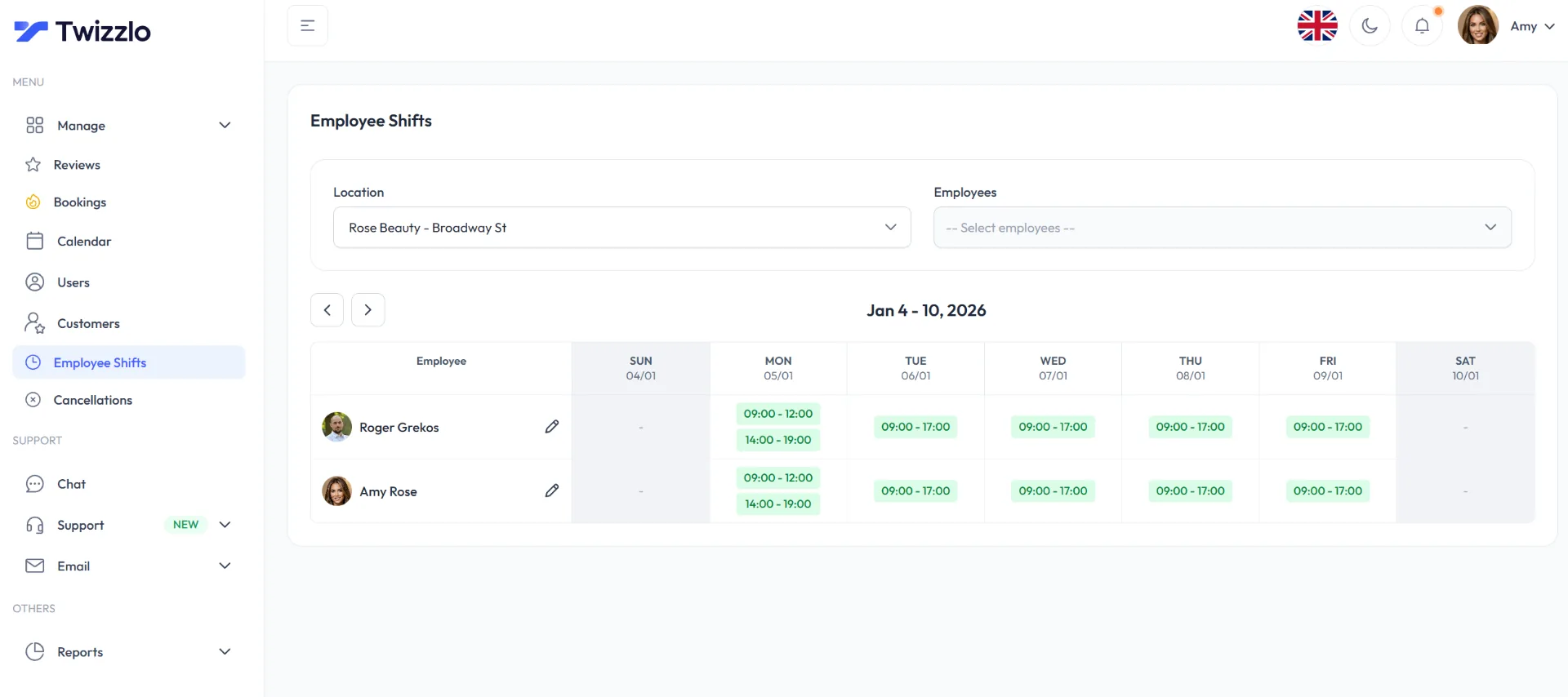
Twizzlo fits the owner who is adding staff or a second location: at two locations, Business Pro is still $29.99 a month per business. Each location gets its own booking link, and Employee Shifts plans staff shifts across locations. Clients can prepay the full service price when they book. The business decides whether to keep or refund money from a skipped or no-show booking, and whether to apply no-show fees. See the booking and reminder features and the Free plan and Business Pro pricing.
When staying on Square Appointments is the better call
Stay on Square Appointments if you work alone or sell mostly in person on Square: Square positions Square Free for solo professionals taking payments and managing schedules, at $0 a month per location (Square's pricing page, read September 25, 2026).
Staying makes the most sense at one location where booking and checkout already run through Square's payments stack. Square lists Tap to Pay on iPhone and Android on all three plans (feature grid, captured September 27, 2026), sells hardware with options starting at $59 and runs Square Payroll starting at $35 a month plus $6 per person paid (pricing page, read September 25, 2026). Moving only the booking calendar would split those workflows across two systems, and a solo provider who does not need no-show fees pays no plan fee on Square Free, only card processing.
How to choose by the Square limit you hit
Pick an alternative by the Square limit you hit: a second location, no-show fees, hiring, in-person payments or working solo each point to a different kind of tool, and for the last two, staying on Square can be the better call.
| Square limit you hit | What to compare | Where the tools in this guide stand |
|---|---|---|
| A second location | What a second location adds to the monthly bill | Square Plus is billed at each location ($98 for two). GlossGenius adds the plan price less 15%. Vagaro's help center prints no added-location price. Twizzlo includes unlimited locations on both plans. Acuity Scheduling, Booksy, Koalendar and Setmore: not printed. |
| Hiring | The billing unit: calendar, team member, seat, user or staff tier | Square and Twizzlo do not charge per staff member. Booksy adds $20 a month per team member; Setmore Pro and Koalendar charge per user or seat. Acuity Scheduling and GlossGenius step up by calendar count or staff tier. Vagaro adds $10 per calendar up to seven licenses. |
| No-show protection | Where cancellation and no-show fees sit, and whether a booking takes a deposit or the full price up front | Square: no-show fees from Square Plus; appointment deposits on every plan. Twizzlo: prepaid bookings at the full service price, with no-show fees at the business's discretion. Vagaro: an Online Shopping Cart add-on at $10 a month for deposits and cancellation fees. Others: check where no-show fees sit before you switch. |
| In-person payments | Card hardware, Tap to Pay and payroll in one system | Square lists Tap to Pay on every plan and hardware from $59; staying on Square keeps checkout and booking together. |
| Working solo | The free plan's limit | Square Free: $0 a month per location. Setmore Free: up to 4 users. Koalendar Free forever: personal use. Twizzlo Free: up to 150 bookings a month, no SMS. Acuity Scheduling: no free plan; Starter is $20 a month for 1 calendar. |
If you want a bill that stays level as you hire, flat-rate booking software that scales explains the model. Owners weighing larger multi-staff platforms such as Mindbody can start with our Mindbody alternative for multi-staff service businesses guide.
What should a multi-location salon look for
A multi-location salon needs one scheduling system that keeps provider calendars, front desk activity and manager oversight in sync across sites. When each location keeps its own calendar and rules, deposit policies drift apart and managers spend their time reconciling schedules. Check that the tool shows every location's calendar in one place and lets a manager plan staff across sites. Teams at that stage need multi-location scheduling software for service teams rather than a single-location booking tool stretched past its limits.
What do barbershops need from scheduling software
Barbershops need fast rebooking, accurate chair schedules and clear availability during peak hours. A busy shop with several barbers should check how an alternative handles walk-ins next to online bookings, and how its monthly price moves as barbers join, using the billing units in Table 1.
Planning your migration from Square Appointments
Plan the switch as a short operations project: list the workflows you run in Square, rebuild them in the new tool, test them with one manager and one provider, then move clients and staff.
Start with a workflow audit
Before moving anything, list what the business depends on. List workflows, not just features.
- Client history: which records the front desk must reach immediately
- Deposits and no-show rules: how you currently protect revenue
- Staff permissions: who needs admin access and who needs only scheduling access
- Payments: whether booking and in-person checkout must stay connected
- Reporting: what managers review each week to run labor and scheduling
Square's help article on cancellation and prepayment policies, read September 27, 2026, shows what to map. Addressed to Square Plus and Premium subscribers, it describes online bookings that require full prepayment for fixed-price services, or that hold a card the business can charge when a client breaks the cancellation policy. Rebuild the equivalent in the new tool and test it before clients see it.
Use a five-step migration process
A practical migration follows the same sequence:
- Audit your data and workflow dependencies
- List the client and appointment records you need to move
- Move those records into the new tool and spot-check them
- Set up services, staff, permissions and booking rules
- Train staff and announce the change to clients
A salon group, for example, should test booking flows with one manager and one provider before rolling the system out to every location. That catches permission issues and schedule logic problems early.
Migration rule: Don't go live until someone has tested the exact workflows your front desk handles every day.
For staff rollout, a simple training checklist and phased access help. This guide to user onboarding best practices for software rollout is a practical reference if staff adoption tends to lag behind system changes.
How should small teams think about migration risk
For a small team, the risk to weigh is staying on software that forces workarounds into daily operations. Watch for the pattern: the owner becomes the approval bottleneck, the front desk keeps a side process for exceptions, staff ask for permission changes the software should handle, and reporting lives in spreadsheets. When those signs appear, price the alternatives in Table 1 at your real team size.
Frequently Asked Questions
Is Square Appointments still good for solo operators
Yes. Square describes Square Free as “For solo professionals taking payments and managing schedules,” at $0 a month per location with unlimited staff calendars, on its pricing page read September 25, 2026. A solo provider who already takes cards with Square pays only card processing on that plan until it needs no-show fees, a waitlist or multi-location management, which start on Square Plus at $49 a month per location.
What makes operators search for Square Appointments alternatives
A Square limit that would move them onto Square Plus at every location. Square's pricing page and feature grid (read September 25 and captured September 27, 2026) put cancellation and no-show fees, multi-staff appointment booking, a waitlist and multi-location management on Square Plus, at $49 a month per location. Staff count is not the trigger: every Square plan lists unlimited staff calendars.
Should I choose based on features or pricing model
Choose based on business model first, then features. Every tool in this guide takes online bookings; what differs is the billing unit (location, calendar, team member, seat, user or business) and which features sit on paid plans. If your operation is adding staff or locations, price each tool at the team size and number of locations you expect next year, not only today's.
What should I check before switching away from Square
Check how the new platform handles deposits or prepayment, no-show protection, in-person payments, staff permissions and client records. Those are the areas where migration problems usually show up. Square's feature grid, captured September 27, 2026, lists appointment deposits on all three plans and cancellation policy and no-show fees from Square Plus, so note which of those you use before you rebuild them elsewhere.
Are free alternatives enough for a growing team
Sometimes, for a while; each free plan stops at a different point. Per pricing pages read September 25, 2026, Square Free is $0 a month per location without no-show fees, Setmore Free covers up to four users and Koalendar's Free forever plan is for personal use, while Acuity Scheduling has no free plan. Twizzlo Free is $0 a month for up to 150 bookings, with no SMS, per its pricing page read September 27, 2026.
Is Square Appointments actually free
There is a free plan, and card processing still applies. Square Free is $0 a month per location, with 2.6% plus 15 cents per in-person card payment and 3.3% plus 30 cents online, according to Square's pricing page, read September 25, 2026. Cancellation and no-show fees start on Square Plus, at $49 a month per location, so the real cost depends on your locations and card volume.
How much does Square Appointments cost per month
On Square's pricing page, read September 25, 2026, Square Free is $0 a month, Square Plus $49 and Square Premium $149, each per location, with card processing on top. Because the paid plans bill every location, Square Plus at two locations is $98 a month before processing. Our page on what Square Appointments costs per location goes line by line.
Does Square Appointments send appointment reminders
Yes. Square's feature grid, captured September 27, 2026, lists automatic appointment reminders by text and email on Square Free, Plus and Premium; appointment confirmations start on Square Plus. When you compare alternatives, check what surrounds reminders: prepayment, no-show fees and how each platform bills for text messages. This guide to appointment reminder software that cuts no-shows covers what reduces missed appointments.
Can you take deposits with Square Appointments
Deposits are supported. Square's feature grid, captured September 27, 2026, lists appointment deposits on Square Free, Plus and Premium, and cancellation policy and no-show fees on Square Plus and Premium only. Map your deposit and no-show workflows before switching, test the new tool's prepayment flow end to end, and set a clear no-show charge policy your front desk can enforce consistently.
What are the main Square Appointments competitors
Booking tools often compared with Square Appointments include Acuity Scheduling, Booksy, GlossGenius, Koalendar, Setmore and Vagaro. Unlike Square, they add cost by calendar, team member, staff tier, seat or user: Acuity from $20 a month, Setmore Pro $12 per user and GlossGenius from $28, per their pricing pages read September 25, 2026. Twizzlo's Business Pro is $29.99 a month per business, per Twizzlo's pricing page read September 27, 2026.
Try Twizzlo after Square Appointments
Start on the Free plan at Twizzlo: $0 a month for up to 150 bookings, with no SMS. Move to Business Pro, $29.99 a month per business, when you need unlimited bookings and SMS reminders; it carries a 30-day money-back guarantee. Online payments carry your Stripe processing rate plus a 1.5% Twizzlo platform fee.
Sources and methodology
Prices read
- Square Appointments pricing page (opens in a new tab)Read . Supports: plan fees per location, card rates, plan cards, trial, Square Pro threshold, Payroll and hardware prices (read September 25, 2026); feature grid and Fees table (captured September 27, 2026)
- Square help: booking cancellations and prepayment policies (opens in a new tab)Read . Supports: full prepayment for fixed-price services, card hold for no-shows, Plus and Premium audience
- Acuity Scheduling pricing page (opens in a new tab)Read . Supports: plan prices by calendar count, annual prices, no free plan, 7-day trial
- Booksy pricing page (opens in a new tab)Read . Supports: subscription price, price per added team member, tax note, Boost fee
- GlossGenius pricing page (opens in a new tab)Read . Supports: plan prices and staff limits, annual prices, added-location discount, card rate
- Koalendar pricing page (opens in a new tab)Read . Supports: Free forever plan, Pro and Business prices, included seats and per-seat prices
- Setmore pricing page (opens in a new tab)Read . Supports: Free plan user limit, Pro price per user, annual price, Enterprise quote
- Vagaro help center: plans, pricing and premium features (opens in a new tab)Read . Supports: US limited-time base rate, price per added calendar up to seven licenses, add-ons
- Twizzlo pricing page (opens in a new tab)Read . Supports: Twizzlo plans, SMS allowance, guarantee, unlimited staff and locations, online payment fee
- Twizzlo features page (opens in a new tab)Read . Supports: per-location booking links, Employee Shifts across locations, prepaid bookings, reminders; the Employee Shifts screenshot (same image)
From our editorial policy
- Twizzlo sells online booking and appointment scheduling software, the same category we write about. Twizzlo appears in our comparisons and roundups, and we have a commercial interest in you choosing it.
- We do not publish invented quotes, studies, statistics, customer stories or product tests, and we do not imply hands-on use of a product when the research came from the vendor's public documentation.
- To report an error, email support@twizzlo.com with the subject line "Correction: [page URL]". Tell us what is wrong and, if you can, link a source.
Update history
- : Rebuilt the guide around each vendor's own dated prices: a cost table for eight tools at five and ten staff and a second location, six competitor entries, Square's plan limits with a dated capture of its feature grid and a decision table, and removed claims about Square's staff pricing that its pricing page does not support.
Start free, upgrade when you grow
Flat-rate booking software. No per-seat, per-chair or per-location fees.
- Free plan up to 150 bookings a month, not a trial
- Business Pro is $29.99 a month per business for unlimited bookings, with a 30-day money-back guarantee
- 24/7 support by email