
GlossGenius Alternatives: 4 Options When You Outgrow a Plan

In short
GlossGenius bills by plan: Standard ($28 a month billed monthly) has no staff management, Gold ($56) covers up to 9 staff, Platinum costs $168 and added locations cost the plan price less 15% (read September 27, 2026). The GlossGenius alternatives compared here bill differently: Booksy per team member, Square Appointments per location, Vagaro per calendar and Twizzlo per business.
- Price the plan your headcount forces, not the entry plan: on GlossGenius, a second bookable team member already requires Gold.
- Compare billing units before features: per team member, per location, per calendar and per business pricing drift apart as you hire.
- Switch in stages: export client records and future appointments, configure the new system, tell clients, then check every booking channel.
Source: GlossGenius pricing page (opens in a new tab), read
In this article9 sections

A GlossGenius alternative is worth pricing when your team grows past what your plan covers: on GlossGenius, a second bookable team member, a tenth and a second location each change the monthly bill. This guide prices four alternatives at those same points and sets out a six-step switch.
Twizzlo, which publishes this guide, is one of the four alternatives. Competitor prices come from each vendor’s own pricing page or help center, read September 25, 2026 (GlossGenius September 27, 2026); our GlossGenius pricing page sets out every GlossGenius plan.
GlossGenius Alternative Quick Comparison
The four GlossGenius alternatives below bill in four different ways: Booksy per team member, Square Appointments per location, Vagaro per calendar and Twizzlo per business. The table prices each one at the points where GlossGenius changes plan: one person, a second staff member, a tenth, and a second location.
| Platform | How it bills | 1 person | 2 staff | 10 staff | A second location |
|---|---|---|---|---|---|
| GlossGenius | Per business, by plan | $28 on Standard ($24 billed annually) | $56 on Gold ($48); Standard has no team member profiles | $168 on Platinum ($148); Gold covers up to 9 staff | Each added location at the plan price less 15%: $103.60 for Gold at two |
| Booksy | Per business, plus each added team member (Booksy pricing) | $29.99 plus tax | $49.99 plus tax | $209.99 plus tax | Not printed on the pricing page |
| Square Appointments | Per location (Square Appointments pricing) | $0 on Free or $49 on Plus | $0 or $49 | $0 or $49 | $0 on Free or $98 on Plus; multi-location management starts on Plus |
| Vagaro | Base plan plus per calendar (Vagaro pricing) | $23.99, a limited-time rate | $33.99 | $83.99 (no charge past seven licenses) | Not printed: the help center prints no subscription price for an added location |
| Twizzlo | Per business, two plans | $0 on Free (up to 150 bookings a month, no SMS) or $29.99 on Business Pro | $0 or $29.99 | $0 or $29.99 | $0 or $29.99: both plans include unlimited locations |
Monthly subscriptions, billed monthly (annual billing in parentheses), before tax, card processing, texts and add-ons. Read on each vendor’s own page: GlossGenius pricing page, September 27, 2026; Booksy and Square Appointments pricing pages and Vagaro’s US help center, September 25, 2026; Square’s plan grid, September 27, 2026; Twizzlo pricing page, September 28, 2026. Vagaro’s $23.99 is a limited-time rate, and Vagaro prints no regular price.
On card payments, GlossGenius charges a flat 2.6% with no Tap to Pay, card-on-file or manual entry fees on every plan (pricing page, read September 27, 2026).
For a head-to-head on one rival, see our GlossGenius vs Vagaro guide; salons also weighing Phorest or Timely can use our Phorest alternatives and Timely alternatives for salons guides.
Analyzing the True Cost of Your Booking Software
The true cost of booking software is the plan your team size and locations force you onto, plus card processing, texts and add-ons, not the entry price.
Where GlossGenius Plans Change as You Hire
GlossGenius prices three Beauty & Wellness plans per business: Standard at $28 a month, Gold at $56 and Platinum at $168 billed monthly, or $24, $48 and $148 a month billed annually (GlossGenius’s own pricing page, read September 27, 2026). Standard has no team member profiles or staff management, so a business with a second bookable person starts on Gold, which covers businesses of up to 9 staff; a tenth moves it to Platinum. Each added location is charged the plan price at a 15% discount, so Gold at two locations is $103.60 a month, and payroll is a separate add-on at $40 a month plus $6 per seat.
What belongs in your TCO view
Review the full operating cost, not just the price on the sales page:
- Base subscription cost: The starting monthly fee before your business outgrows a simple setup.
- Feature access model: Whether standard operating tools are included or locked behind higher tiers.
- Scaling pressure: Whether growth in headcount, locations, or workflow complexity forces plan changes.
- Migration risk later: The cost of waiting until your team is too dependent on the system to switch cleanly.
Pricing per business is covered in our flat-rate booking software that scales guide, and two of the alternatives above meet head to head in Vagaro vs Booksy. If the hire or the second site belongs in a written plan, our salon business plan template prices software at 1, 4 and 10 stylists.
Essential Features for Multi-Location and Growing Teams
Once more than one person books the calendar, a team needs staff management, shared resources such as rooms and stations, and a way to refill canceled slots; on GlossGenius those start on Gold.
On GlossGenius’s own plan cards, read September 27, 2026, Gold adds forms and waivers, Google booking and reviews, an automated waitlist, time tracking and room and resource management to Standard, and Platinum adds customizable commissions and team goal setting and analytics.
The features that stop scheduling chaos
If you’re managing a solo chair, almost any decent platform can work. If you’re managing a team, these features stop expensive mistakes:
- Resource management: Prevents double-booking rooms, stations, and equipment.
- Synced staff calendars: Keeps providers from stepping on each other’s availability.
- Waitlists: Fills open time faster when cancellations hit.
- Commission tracking: Matters when compensation gets more complex.
- Embedded booking: Keeps customers inside your brand experience instead of pushing them elsewhere.
Why this matters at the second location
A second location exposes weak software fast. You can survive a basic calendar at one site. You can’t manage two sites well if your staff view, booking flow, and resource logic weren’t built for coordinated operations.
GlossGenius lists its own multi-location tools on its pricing page: a unified client list and history across locations, location-specific service menus, cross-location staff scheduling and permissions, a unified booking site with location selection, business-wide and per-location reports, and Google Reviews per location (read September 27, 2026). Our multi-location scheduling software guide compares how other platforms bill a second site.
An example with treatment rooms
Consider a salon that offers color services, esthetics, and treatment rooms. Front desk staff aren’t just assigning people. They’re assigning people, time, and physical capacity. Without resource-aware scheduling, the calendar can look full while the room you need is already occupied.
Your Checklist for Migrating from GlossGenius
Switching from GlossGenius takes six steps: audit what you use, export and back up your data, configure the new system, tell clients, train staff, and check every booking channel in the first days.
Six steps that keep the switch under control
-
Audit what you use
List your essential requirements: booking rules, staff permissions, reminders, deposits, reporting, resources and client history. -
Export and back up your data
Pull client records, future appointments, service lists, staff schedules, and anything tied to reporting. Keep a local backup before making any changes. -
Configure the new system before launch
Build services, durations, availability, staff access, and booking rules first. Don’t go live with a half-configured calendar.
A structured process like this mirrors strong user onboarding best practices. The difference is that here, your business is the user, and poor onboarding creates lost revenue instead of mild confusion.
The client communication piece
-
Tell clients early and clearly
Don’t over-explain. Tell them booking is moving to a new system, what they need to do next, and when the change takes effect. -
Train staff before the first live day
Front desk, managers, and providers should each run through common tasks. Booking, rescheduling, deposits, cancellation handling, and checking availability. -
Use a short verification window
For the first days after cutover, check every booking channel, reminder flow, and payment path. Catch small errors before they turn into missed appointments.
Finding the Right Fit for Your Specific Business Type
The right GlossGenius alternative depends on how your business books: salons need team scheduling and service timing, tattoo studios long sessions and custom pricing, barbershops fast rebooking, and treatment-led practices records that general booking tools may not hold.
Tattoo studios and treatment-led practices often need software logic that salon tools do not share.
If you run a traditional salon
A salon usually needs strong recurring scheduling, staff coordination, retail checkout, and service timing control. Your software should reduce front-desk cleanup work. If your current platform forces plan upgrades for normal team operations, that’s your signal to leave. For a wider list of salon platforms, see our best salon software guide.
If you run a tattoo studio
Tattoo scheduling is different. Long sessions, design consultation blocks, deposits, custom service values, and no-show risk change the calendar logic.
A standard salon booking flow often feels too rigid here. You need software that handles irregular appointment length and protects artist time. That’s why vertical fit matters more than broad brand awareness.
If you run a medspa or treatment-led practice
Medspas often need documentation, client forms, treatment detail, and process discipline that go beyond simple appointment booking.
If you run a barbershop or closely related grooming business
Barbershops often need speed, repeat visit simplicity, staff-based routing, and easy rebooking. The right answer is usually a system with low front-desk friction and stable team scheduling, not extra complexity. If your operation aligns more closely with that model, reviewing dedicated barbershop booking app options can clarify what matters.
Answering Your Top Operational Questions
Pricing per business with no staff or location charge keeps the subscription steady as a team grows, multi-location teams need shared scheduling, permissions and reporting, a planned switch is manageable, and the operating model should decide before the price does.
How does flat-rate software reduce overhead costs?
Software priced per business, with no staff or location charge, keeps the subscription the same when you add staff, locations or services, so a hiring decision does not also change the software bill. It does not remove other costs: card processing, texts and add-ons still grow with volume, so budget them separately.
What features do multi-location franchises need?
They need centralized scheduling, shared visibility across staff and locations, permission controls, resource-aware booking, and reporting that managers can effectively use. The key is consistency. If every location has to invent its own workaround, you don’t have a software system. You have several local habits stitched together.
Is it difficult to switch booking software?
It’s difficult only when owners wait too long and migrate during operational stress. A controlled switch is manageable if you export data, configure the new system fully, train staff, and communicate clearly with clients. Most migration problems come from rushing setup, not from the idea of switching itself.
Should I choose software by price or by features?
Choose by operating model first, then evaluate price structure. Cheap software that forces upgrades later often costs more in practice. Expensive software with capabilities you’ll never use is just a different waste. The right tool matches your workflow and keeps future decision points to a minimum.
Where Twizzlo Fits Among GlossGenius Alternatives
Twizzlo is web-based online booking and appointment scheduling software for appointment-based service businesses. It bills per business, with no staff or location charge, so hiring or opening a location never changes its price. Twizzlo has two plans. Free is $0 a month for up to 150 bookings, with no SMS; Business Pro is $29.99 a month per business with unlimited bookings, 50 SMS a month and then $0.03 per message, and a 30-day money-back guarantee. Both plans include unlimited staff and locations.
Online payments carry your Stripe processing rate plus a 1.5% Twizzlo platform fee. Support runs 24/7 by email at support@twizzlo.com.
Twizzlo does not run payroll, commission tracking or memberships. A salon that runs any of these inside GlossGenius should compare the other platforms in the table above before switching.
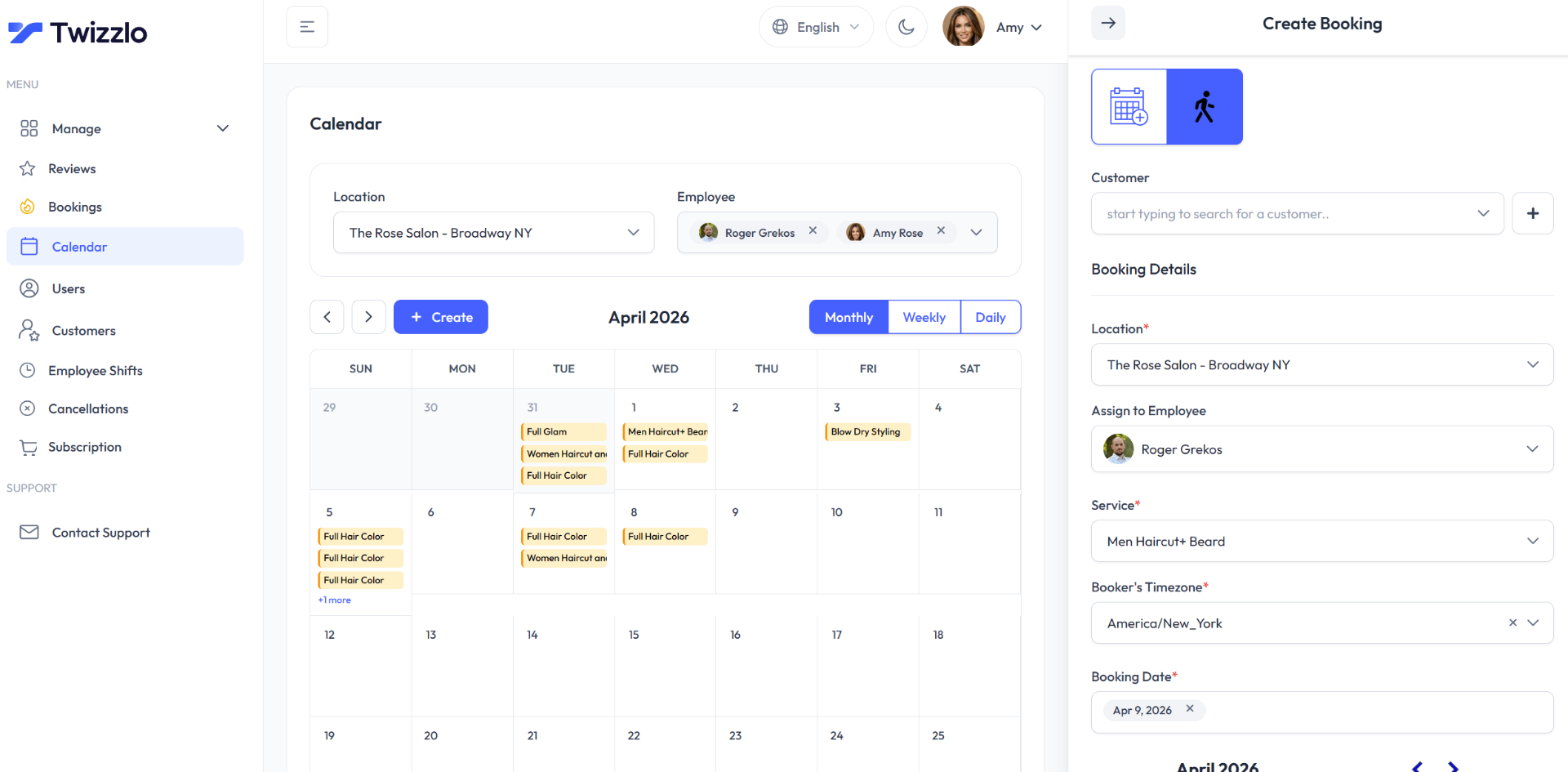
Salons can see the calendar on our salon appointment software page, compare Twizzlo’s Free and Business Pro plans, or start with Twizzlo.
Frequently Asked Questions
What makes a good GlossGenius alternative for a growing salon?
Check the billing unit first: per team member, per location, per calendar or per business. A good alternative gives you predictable costs, team scheduling controls, and room to grow without making you renegotiate the software every time operations become more complex. For most growing salons, that means looking closely at how the platform handles staff calendars, resource usage, waitlists, and multi-location workflows. If those tools are gated behind higher tiers, expect friction later.
Is GlossGenius still a reasonable option for solo professionals?
Yes. If you’re an independent provider or running a very small setup, GlossGenius can still make sense. Standard costs $28 a month billed monthly ($24 billed annually) and includes a flat 2.6% card rate with no Tap to Pay, card-on-file or manual entry fees (GlossGenius pricing page, read September 27, 2026); staff management starts on Gold, so the plan fits one person. The issue isn’t whether GlossGenius is bad. The issue is whether your business is already outgrowing the model it was built around.
How should I compare tiered pricing versus flat pricing?
Start with the operational features you need now, then add the ones you know you’ll need next. If reaching those needs forces an upgrade, your low entry price is misleading. Pricing per business, with no staff or location charge, is easier to forecast because your software cost doesn’t depend on crossing internal plan boundaries. For operators trying to control margin, that predictability matters more than a low starting number.
What should I verify before migrating away from GlossGenius?
Verify data export, staff permissions, service setup, calendar rules, automated reminders, payment flow, and reporting access. Also assign one person to own the migration. That prevents confusion and missed tasks. The biggest switching errors usually happen when nobody owns the timeline and everyone assumes someone else checked the details.
Can a GlossGenius alternative work better for non-salon businesses?
Yes. Adjacent businesses often need a different workflow than traditional salons. Tattoo studios may need better support for long sessions and booking protection. Medspas may need consent and treatment workflows. If your business sits near beauty but doesn’t operate like a standard salon, choose software around the work you do, not the category label a vendor uses.
What’s the simplest decision rule if I feel stuck?
If your software is forcing you to upgrade for features that feel basic to daily operations, stop trying to justify the current platform. That’s usually the moment to switch. Owners lose time when they keep adapting their business to fit the software instead of choosing software that fits how the business already runs.
How much does GlossGenius cost per month?
On its pricing page, read September 27, 2026, GlossGenius charges $28 a month for Standard, $56 for Gold (up to 9 staff) and $168 for Platinum (teams of 10 or more) billed monthly, or $24, $48 and $148 a month billed annually. Each added location is charged the plan price less 15%, card payments carry a flat 2.6% rate, and payroll is a $40 a month add-on plus $6 per seat.
Does GlossGenius have a free plan?
No. GlossGenius offers a free 14-day trial for new customers, with no credit card required, and no free plan (pricing page, read September 27, 2026). Among the alternatives in the table above, Square Appointments Free costs $0 a month per location (Square pricing page, read September 25, 2026), and Twizzlo Free is $0 a month for up to 150 bookings, with no SMS; check what each free plan leaves out before you commit.
What’s the difference between GlossGenius Standard and Gold?
Gold includes everything in Standard plus the team-oriented controls: forms and waivers, Google booking and reviews, automated waitlists, time tracking, room and resource management, and staff management for teams of up to 9, which Standard lacks. Standard is $28 a month and Gold $56 billed monthly ($24 and $48 billed annually; pricing page, read September 27, 2026). For a solo professional, Standard usually covers the basics. For a team sharing rooms, stations, or equipment, the Gold features are what stop double-bookings, which is why growing salons should treat Gold as the realistic starting price.
What is the best GlossGenius alternative for hairdressers?
It depends on team size, because each platform bills a growing salon differently. On vendors’ pages read September 25 and 27, 2026, a solo hairdresser pays $28 a month on GlossGenius Standard, $29.99 a month plus tax on Booksy, $23.99 a month, a limited-time rate, on Vagaro, or $0 on Square Appointments Free. A second stylist moves a GlossGenius salon to Gold at $56 a month, while Booksy adds $20 a month per extra team member. Twizzlo’s Free plan is $0 a month for up to 150 bookings, with no SMS, and Business Pro is $29.99 a month per business; both include unlimited staff.
What do you lose when you leave GlossGenius?
It depends on your plan. On its pricing page, read September 27, 2026, GlossGenius prints a flat 2.6% card rate with no Tap to Pay, card-on-file or manual entry fees on every plan, free same-day payouts Monday to Thursday, and payroll as a $40 a month add-on plus $6 per seat. Gold adds forms and waivers, Google booking and reviews, an automated waitlist, time tracking and room and resource management. List the ones you use and confirm each alternative covers them before you switch.
Sources and methodology
Prices read
- GlossGenius pricing page (opens in a new tab)Read . Supports: plan prices billed monthly and annually, staff limits, team member profiles, the 15% added-location discount, Gold and Platinum plan-card features, multi-location tools, the flat 2.6% card rate, payouts, the payroll add-on and the 14-day trial
- Booksy pricing page (opens in a new tab)Read . Supports: subscription with one team member and the price per added team member, plus tax
- Square Appointments pricing page (US) (opens in a new tab)Read . Supports: Free and Plus prices per location and unlimited staff calendars; multi-location management from Plus in the plan grid read September 27, 2026
- Vagaro plans, pricing and premium features (US help center) (opens in a new tab)Read . Supports: limited-time base rate, calendar licenses up to seven, and no subscription price printed for an added location
- Twizzlo pricing page (opens in a new tab)Read . Supports: Twizzlo Free and Business Pro, SMS allowance, guarantee, support and online payment fees
- Twizzlo features page (opens in a new tab)Read . Supports: the calendar screenshot in the Twizzlo section (same image)
From our editorial policy
- Twizzlo sells online booking and appointment scheduling software, the same category we write about. Twizzlo appears in our comparisons and roundups, and we have a commercial interest in you choosing it.
- We do not publish invented quotes, studies, statistics, customer stories or product tests, and we do not imply hands-on use of a product when the research came from the vendor's public documentation.
- To report an error, email support@twizzlo.com with the subject line "Correction: [page URL]". Tell us what is wrong and, if you can, link a source.
Update history
- : Rebuilt the comparison table with dated prices for four alternatives at GlossGenius’s plan limits, corrected GlossGenius’s added-location price, added two FAQs, and removed a third-party video, two unsourced images and an unverified market figure.
Start free, upgrade when you grow
Flat-rate booking software. No per-seat, per-chair or per-location fees.
- Free plan up to 150 bookings a month, not a trial
- Business Pro is $29.99 a month per business for unlimited bookings, with a 30-day money-back guarantee
- 24/7 support by email