
Flat Rate Booking Software That Scales

In short
Flat rate booking software charges one monthly price for the business, so hiring staff or opening a location does not raise the subscription. Many plans sold as flat still cap something: Boulevard's Essentials plan, for example, is $159 a month for up to five providers (pricing page, read September 25, 2026).
- Ask what the flat price covers: staff, calendar, location and booking limits decide when a flat plan starts costing more.
- Price the team you expect in a year, not today's team, before comparing per-seat and flat plans.
- Add the fees outside the subscription, such as card processing, extra texts and marketplace commissions, before calling any plan cheaper.
Source: Boulevard pricing page (opens in a new tab), read
In this article11 sections

Flat rate booking software charges one monthly price for the whole business instead of a charge for each staff member, calendar or location. This guide explains how the main billing models grow with a team, where plans sold as flat cap staff, calendars or bookings, and which fees sit outside the monthly price.
Twizzlo, which publishes this guide, sells booking software on two plans (Free plan and Business Pro pricing) and is one of the platforms compared. Competitor prices come from each vendor's own pricing page or help center, read September 25, 2026 (GlossGenius September 27, 2026).
What flat rate booking software actually means
Flat rate booking software bills the business, not the headcount: one monthly price covers every staff member and, on some plans, every location. The other common models charge per staff member or seat, per location, by tier with a staff or calendar limit, or pay-as-you-go, with a charge per booking or new client. Flat rate scheduling software works the same way.
The point is not just affordability. It is predictability.
That predictability changes how owners make decisions. If every new hire increases overhead before they even bring in revenue, you hesitate. If every added location means another admin system or a more expensive plan, expansion gets messy. A flat-rate model removes that friction and makes planning easier.
This is especially useful for businesses that are not static. Salons add stylists. Barbershops add chairs. Cleaning companies add crews. Tutors adjust schedules by season. Mobile service teams shift coverage based on demand. In all of those cases, seat-based software turns ordinary business changes into pricing problems.
Why seat-based pricing breaks down in real operations
Seat-based pricing adds a monthly charge for each staff member, user or calendar, so the bill rises with every hire. On vendors' own pages read September 25, 2026, Booksy pricing adds $20 a month for each team member after the first, Setmore pricing sets the Pro plan at $12 per user a month on monthly billing and Timely charges $26 to $47 per staff member a month, by plan.
Per-user pricing can look manageable when you are a solo operator. It often stops looking reasonable the moment you build a team. The base plan may feel affordable, but then reminders cost more, payments cost more, reporting is gated, and staff access gets billed separately.
There is also the budgeting issue. When software costs rise with every staffing change, your monthly expenses become harder to forecast. That is frustrating for a one-location shop and even more painful for businesses trying to manage payroll, rent, marketing, and seasonal swings.
Flat rate booking software fixes that by making software a stable operating cost instead of a moving target. Our guide to appointment software with no seat fees covers the per-seat side of this choice.
Where flat plans stop being flat: staff, calendar and booking limits
Most plans sold at one monthly price still set a limit, and the price changes when a business passes it. On vendors' own pages read September 25 and 27, 2026, GlossGenius Gold covers up to nine staff, Boulevard Essentials up to five providers, Acuity Scheduling Standard up to six calendars and StyleSeat's plan up to 15 chairs.
| Platform | Billing unit | What the monthly price covers | Past the limit | Source and read date |
|---|---|---|---|---|
| Twizzlo | Per business, two plans | Free: $0 a month for up to 150 bookings, with no SMS. Business Pro: $29.99 a month, unlimited bookings, 50 SMS a month, then $0.03 each | Past 150 bookings a month on Free: Business Pro, which removes the booking cap. Staff and locations never change the price on either plan | Twizzlo pricing page, September 28, 2026 |
| StyleSeat | One price per account | Up to 15 chairs, with “Staff calendars at no extra seat cost”; $19 a month after the free trial, a limited-time rate for new pros | Above 15 chairs: not printed. The help center lists a $35 Premium Plan | Pricing page and help center, September 25, 2026 |
| GlossGenius | Per business, by plan | GlossGenius pricing, monthly billing: Standard $28 a month (no staff management); Gold $56 (up to nine staff); Platinum $168 (teams of 10 or more) | Each added location: the plan price less 15% | Pricing page, September 27, 2026 |
| Boulevard | Essentials flat; Premier per location | Essentials $159 a month for up to five providers (bookable calendars) | Premier: $325 a month per location at list price, unlimited professionals | Pricing page, September 25, 2026 |
| Acuity Scheduling | Per account, by calendar count | Acuity Scheduling pricing, monthly billing: Starter $20 a month (one calendar); Standard $34 (up to six); Premium $61 (up to 36) | Enterprise, unlimited calendars: price not published | Pricing page, September 25, 2026 |
| DaySmart Salon | Per business, by plan, with included users | Basic $29 a month (one user); Deluxe $69 (three users); Premium $199 (six users) | $9 a month for each added user on Deluxe and Premium; Basic covers one user | Pricing page, September 25, 2026 |
| Square Appointments | Per location | Square Appointments pricing: Free $0, Plus $49 and Premium $149 a month per location; unlimited staff calendars | Each added location adds its plan price | Pricing page, September 25, 2026; plan grid, September 27, 2026 |
Monthly billing, before tax, card processing, texts and add-ons. StyleSeat prints a limited-time rate. DaySmart Salon was formerly Salon Iris. Twizzlo's row comes from its own pricing page.
The table compares billing limits only; for a ranking of scheduling tools by features, see our best appointment scheduling software guide.
What to look for in flat rate booking software
Check four jobs before the price: online booking with rules you control, automated reminders, payments at booking and client records, then whether any of them sit behind a higher tier or an add-on.
A flat monthly price only helps if the product can actually run day-to-day operations. Cheap software that forces you back into spreadsheets is not a bargain. The value comes from how much work the system removes from your week.
Start with online booking that is easy for clients to use and easy for your team to control. You should be able to set services, availability, buffers, durations, and booking rules without needing support every time you make a change. The system should also handle confirmations and automated reminders because no-shows and back-and-forth texting drain revenue quickly.
Payments matter too. If clients can book online but still have to settle up through a separate process, you are only solving half the problem. Good flat rate booking software should support online payments at booking, prepaid bookings and tips in a way that fits how service businesses actually get paid.
The next piece is customer management. You should be able to see appointment history, notes, contact details, and communication records in one place. That saves time at the front desk, gives staff better context, and makes follow-up easier.
For teams, staff scheduling and calendar visibility are non-negotiable. You need to know who is working, what is booked, where the gaps are, and how schedules look across the day or week. If you run more than one location, check how the plan bills each site; our guide to multi location scheduling software covers what a second site needs.
Finally, reporting has to be practical: a clear view of bookings, revenue, staff utilization, customer activity and trends you can act on.
When you compare booking software pricing, weigh each plan's limits (table above) and its outside fees (table below) as closely as the monthly figure.
The fees booking software charges outside the plan price
Most booking platforms charge something besides the subscription: card processing on online payments, texts beyond an allowance, marketplace commissions on new clients and paid add-ons. Vendors print these on their pricing pages or help centers, often away from the plan cards, so a quote that shows only the monthly price is incomplete.
| Platform | Fee outside the plan | Source and read date |
|---|---|---|
| Square Appointments | Online card payments 2.9% + 30¢ on Plus and Premium, 3.3% + 30¢ on Free | Pricing page, September 25, 2026 |
| GlossGenius | Card processing at a “Flat 2.6% rate”; instant payouts an added 1.8%; payroll add-on $40 a month plus $6 a seat | Pricing page, September 27, 2026 |
| Booksy | Boost marketplace: a one-time 30% fee on a Boost client's first visit; mobile and keyed-in payments 2.69% + $0.30 | Pricing page, September 25, 2026 |
| StyleSeat | New Client Connection (optional): 30% of a new client's first appointment, $50 maximum; clients pay a $2.35 booking fee | Help center, September 25, 2026 |
| Boulevard | Automated campaigns $2 per completed appointment; card processing “starting at 2.65%” | Pricing page, September 25, 2026 |
| Timely | Texts beyond the plan's monthly allowance: 12 cents each | Pricing page (USA region), September 25, 2026 |
| Setmore | Live Receptionist add-on: $99 a month | Pricing page, September 25, 2026 |
| Mangomint | Phone add-on: $70 a month per line | Pricing page, September 25, 2026 |
As printed on each vendor's page. Processing rates vary by payment method; add-ons are optional.
Ask each vendor for the full fee list in writing before you sign.
Flat rate booking software is not always the cheapest option upfront
At one or two staff members, a free plan or a one-calendar entry tier can cost less than a flat plan priced for a whole team. On vendors' pages read September 25, 2026, Setmore's Free plan costs $0 for up to four users and Acuity Scheduling Starter $20 a month for one calendar.
If you work alone with low booking volume, a free or stripped-down tool may cost less at the start. That can be fine while you test demand or keep things simple.
But the cheapest starting point is not always the cheapest operating model. Once the business grows, many low-entry tools become expensive in pieces. Add a second employee, then reminders, then better reporting, then another location, and the low-cost option is no longer low-cost.
That is why flat rate pricing tends to work best for businesses that want room to grow without renegotiating their software plan every few months.
Who benefits most from flat rate booking software
The strongest fit is any booking-driven business that expects change. That could mean more employees, more customers, more services, longer hours, or another location. It also fits businesses that are already tired of coordinating appointments through texts, spreadsheets, paper calendars, and separate payment tools.
A solo provider gains simplicity, but a small team usually gains more: once several calendars, shifts, reminders and client records are in play, separate tools lead to missed details, slower replies and more admin time.
Managers and front-desk staff benefit too: when scheduling, messages and client history sit in one system, fewer details get lost during the day.
For the operational side of adding staff and sites, see our guide on how to scale a service business.
How to compare flat rate booking software
Compare flat rate booking software on the team you expect in a year, not the team you have today.
- Price the team you plan to have in 12 months on every shortlisted plan.
- Read each plan's limit: staff, calendars, bookings and locations.
- Add the fees outside the plan: processing, extra texts, marketplace commissions and add-ons.
- Check the exit: trial length, refund terms and any annual contract.
Setup matters too: a platform that tries to do everything but takes weeks to configure can be the wrong fit for a small business that needs to stay moving.
How Twizzlo prices booking as a team grows
Twizzlo is web-based online booking and appointment scheduling software for appointment-based service businesses. It bills per business on both of its plans, so adding staff or locations never changes the price.
Free is $0 a month for up to 150 bookings, with no SMS, and is free forever, not a trial. Business Pro is $29.99 a month per business, with unlimited bookings and 50 SMS a month, then $0.03 per text, and a 30-day money-back guarantee. Both plans include unlimited staff and locations. Online payments carry your Stripe processing rate plus a 1.5% Twizzlo platform fee. Support runs 24/7 by email at support@twizzlo.com.
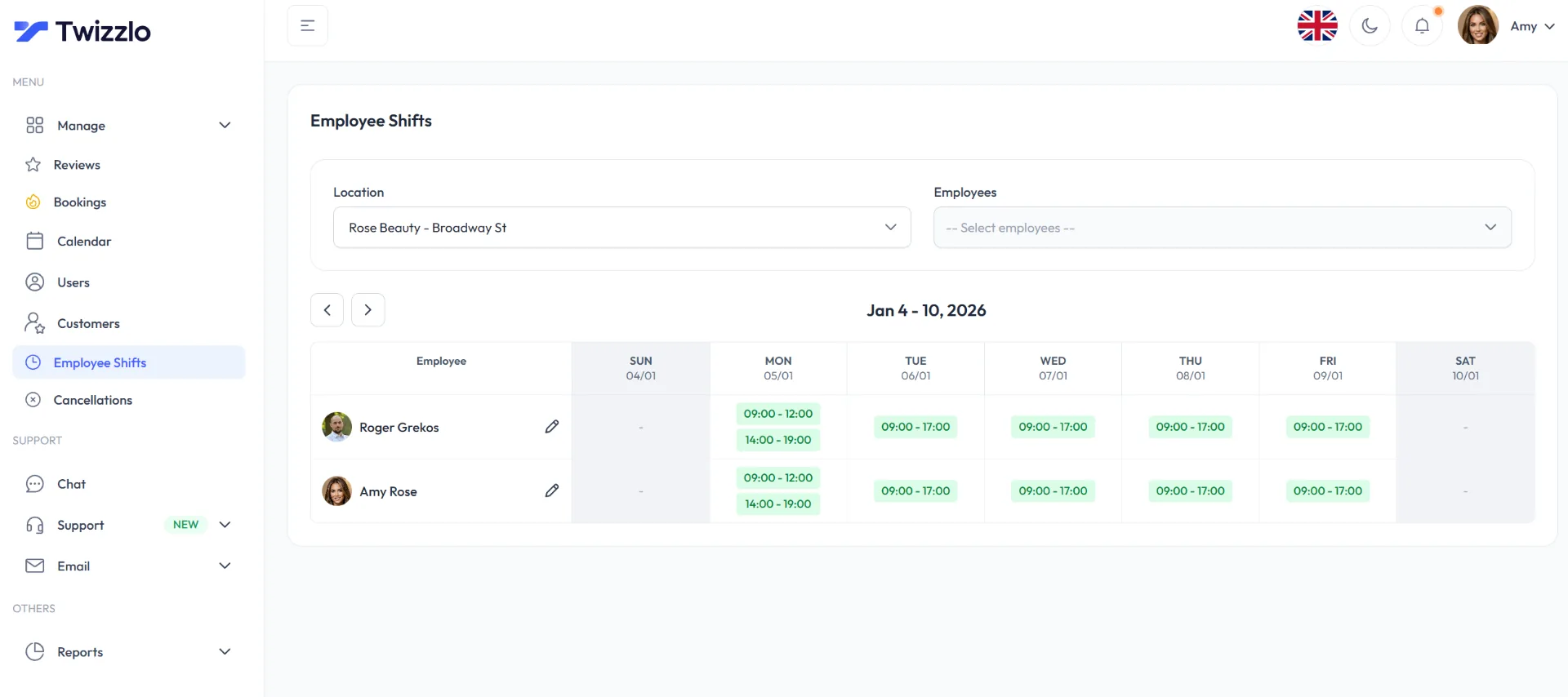
Twizzlo does not run payroll, commission tracking or memberships. A business that runs any of these inside its booking system should compare the platforms in the limits table above.
The booking and reminder features page describes each feature. Start with Twizzlo.
Frequently asked questions
Does booking software have hidden fees
Often there are fees outside the plan price, though vendors print them on their pricing pages or help centers. On pages read September 25, 2026, Booksy's Boost marketplace takes a one-time 30% fee on a Boost client's first visit, Timely charges 12 cents per text beyond each plan's allowance and Boulevard charges $2 per completed appointment for automated campaigns. Before signing up, ask what is included, what is limited and what starts costing more as you grow.
How much does booking software cost per month
It depends on the pricing model more than the sticker price. On vendors' own pages read September 25 and 27, 2026, entry plans on the six other platforms in this guide's limits table run from $0 (Square Appointments Free, per location) to $159 a month (Boulevard Essentials, up to five providers), and per-seat subscription charges run from $9 a month for each added DaySmart Salon user to $47 per staff member on Timely Innovate. Twizzlo's Free plan is $0 a month for up to 150 bookings, with no SMS, and Business Pro is $29.99 a month per business with unlimited staff and locations.
What should flat rate booking software include
Everything needed to run daily operations: online booking with rules you control, automated confirmations and reminders, online payments at booking (including prepaid bookings and tips), customer records with history and notes, staff scheduling with calendar visibility, and practical reporting on bookings, revenue, and utilization. If any of those sit behind an upgrade, the price is not really flat.
Is flat rate booking software worth it for a solo provider
Sometimes a free or stripped-down tool costs less while volume is low, and that is a reasonable starting point. The flat rate model pays off once a second employee, reminders, reporting, or another location enters the picture, because low-entry tools tend to get expensive in pieces. Solo providers planning to stay solo can start simple. Providers planning to grow should price the destination, not the starting point.
When should a business switch to flat rate software
Switch when ordinary business changes start triggering software costs: a new hire, a new location, higher reminder volume, or a report you need but cannot access. Those are signs the current model is taxing growth. Teams coordinating schedules through texts and spreadsheets are also good candidates, since one system removes that friction.
Is there booking software with pay-as-you-go pricing
Partly. A free plan that charges only card processing works like pay-as-you-go: on Square's pricing page, read September 25, 2026, Square Appointments Free costs $0 a month per location, with online card payments at 3.3% + 30¢. Other platforms add a charge per new client on top of a subscription; StyleSeat's help center, read the same day, lists its optional New Client Connection at 30% of a new client's first appointment, up to $50.
Do flat rate booking plans have staff or booking limits
Many do. The monthly price covers a set number of staff, calendars or bookings, and a higher plan or an added charge applies past it. On vendors' pages read September 25, 2026, DaySmart Salon's Deluxe plan covers three users, with $9 a month for each added user, and Acuity Scheduling's Premium plan covers up to 36 calendars. Twizzlo's two plans set no staff or location limit; Free is $0 a month for up to 150 bookings, with no SMS.
Sources and methodology
Prices read
- Boulevard pricing page (opens in a new tab)Read . Supports: Essentials $159 a month for up to five providers; Premier $325 a month per location at list price with unlimited professionals; automated campaigns $2 per completed appointment; card processing starting at 2.65%
- StyleSeat pricing page (opens in a new tab)Read . Supports: One price per account for up to 15 chairs, staff calendars at no extra seat cost, $19 a month after the free trial as a limited-time rate for new pros
- StyleSeat help center: How much does StyleSeat cost (opens in a new tab)Read . Supports: Premium Plan at $35 a month; New Client Connection at 30% of a new client's first appointment, $50 maximum; $2.35 client booking fee
- GlossGenius pricing page (opens in a new tab)Read . Supports: Standard $28, Gold $56 (up to nine staff) and Platinum $168 (teams of 10 or more) a month billed monthly; each added location at the plan price less 15%; flat 2.6% processing, 1.8% instant payouts, payroll add-on $40 a month plus $6 a seat
- Acuity Scheduling pricing page (opens in a new tab)Read . Supports: Starter $20 (one calendar), Standard $34 (up to six) and Premium $61 (up to 36) a month billed monthly; Enterprise price not published
- DaySmart Salon pricing page (opens in a new tab)Read . Supports: Basic $29 (one user), Deluxe $69 (three users) and Premium $199 (six users) a month; $9 a month for each added user
- Square Appointments pricing page (US) (opens in a new tab)Read . Supports: Free $0, Plus $49 and Premium $149 a month per location; unlimited staff calendars (plan grid captured September 27, 2026); online card payments 2.9% + 30 cents on Plus and Premium, 3.3% + 30 cents on Free
- Booksy pricing page (opens in a new tab)Read . Supports: $20 a month for each team member after the first; Boost one-time 30% fee on a Boost client's first visit; mobile and keyed-in payments 2.69% + $0.30
- Setmore pricing page (opens in a new tab)Read . Supports: Free $0 for up to four users; Pro $12 per user a month on monthly billing; Live Receptionist add-on $99 a month
- Timely pricing page (USA region) (opens in a new tab)Read . Supports: $26, $39 and $47 per staff member a month by plan; texts beyond the monthly allowance at 12 cents each
- Mangomint pricing page (opens in a new tab)Read . Supports: Phone add-on at $70 a month per line
- Twizzlo pricing page (opens in a new tab)Read . Supports: Twizzlo plans, booking cap, SMS allowance, unlimited staff and locations, money-back guarantee, 24/7 support and the online payment fee
- Twizzlo features page (opens in a new tab)Read . Supports: Multi-location staff shifts (Employee Shifts) and the Employee Shifts screenshot (same image)
From our editorial policy
- Twizzlo sells online booking and appointment scheduling software, the same category we write about. Twizzlo appears in our comparisons and roundups, and we have a commercial interest in you choosing it.
- We do not publish invented quotes, studies, statistics, customer stories or product tests, and we do not imply hands-on use of a product when the research came from the vendor's public documentation.
- To report an error, email support@twizzlo.com with the subject line "Correction: [page URL]". Tell us what is wrong and, if you can, link a source.
Update history
- : Added dated tables of plan limits on 7 platforms and of fees outside the plan price on 8, two FAQs and Twizzlo's plan and fee details; removed general claims without a source.
Start free, upgrade when you grow
Flat-rate booking software. No per-seat, per-chair or per-location fees.
- Free plan up to 150 bookings a month, not a trial
- Business Pro is $29.99 a month per business for unlimited bookings, with a 30-day money-back guarantee
- 24/7 support by email