
Appointment Reminders Software That Cuts No-Shows

In short
Appointment reminders software sends each client a confirmation when they book and automated appointment reminders before the visit, from the same calendar that holds the booking, so a reschedule updates every message. Choose one that times reminders by how far ahead clients book, shows who confirmed, and prices text messages in a way you can predict.
- Estimate monthly texts as appointments times texts per appointment: 150 appointments with a confirmation and one reminder each make 300 texts.
- Send at least one reminder before your cancellation cutoff, so a client who cannot come still cancels in time and the slot can be rebooked.
- In a trial, book a test appointment and move it: the client's reminder should show the new time without anyone editing it.
In this article9 sections
A missed appointment costs more than the empty slot: it throws off staffing, cuts into revenue and adds follow-up work for your team. This guide covers what reminder software should do, when reminders should go out and how many texts to plan for. Twizzlo publishes it, and its own booking and reminder features are covered in one section near the end.
What appointment reminders software should do
Appointment reminders software should send every confirmation and reminder from the booking record itself, change them when the booking changes, and show staff which clients have confirmed, so nobody keeps a separate reminder list.
If reminders live in a separate tool from your booking calendar, client records or staff schedules, someone has to keep them aligned by hand, and a reminder can go out late, to the wrong contact or not at all. For small businesses, reminders should work inside the small business booking software that already holds bookings, client details and schedule changes.
When a client books online, reschedules or cancels, the reminder flow should adjust automatically. If an appointment moves from Tuesday to Thursday, no one on your team should have to update a separate reminder list. If a staff member gets reassigned, the client should get the correct information without extra steps.
Connected reminders also show which appointments are confirmed, which clients need follow-up and where no-shows happen most often. Missed appointments are not always random: they can cluster around certain services, time windows or booking channels.
For a salon, tutoring business, studio, consulting practice or mobile service, one no-show can throw off the next few hours of the day. A tutoring business can remind parents before every session through its tutoring scheduling software. A mobile detailer who drives to an empty driveway loses the travel time too, which is why auto detailing booking software sends a reminder before every job.
What features are worth paying attention to
Six features decide whether reminder software removes work or adds it: text reminders, email reminders, timing controls, confirmation that feeds the calendar, a reschedule and cancel link, and message wording you can edit.
Text reminders reach clients on the phone they carry; email carries fuller details such as prep instructions, directions and policy reminders. Using both means a client who misses one message can still see the other. Timing controls let you match reminders to how far ahead clients book; the next section sets out a starting schedule.
Two-way confirmation helps only if it feeds the calendar: staff should see who confirmed without hunting through messages, and a client who needs to reschedule should land on an updated booking, not in a text thread. Dog trainers with weekly private sessions see this often, and dog trainer booking software lets clients move a session from the booking link.
Customization matters within reason: reminders should carry your business name, appointment time, location and the client’s instructions, and setting up the templates should not become a side project.
| Feature | What it should do for you |
|---|---|
| SMS reminders | Reach clients on the phone they carry |
| Email reminders | Carry fuller appointment details, prep instructions and policy reminders |
| Timing controls | Match your booking window: a reminder 24 hours ahead, or a confirmation request two days before plus a final reminder the morning of |
| Two-way confirmation | Feed confirmation status back into the calendar and route reschedules toward an updated booking |
| Reschedule and cancel link | Let the client move or cancel from the message, so the calendar updates without a phone call |
| Customization | Cover business name, appointment time, location and instructions without turning template setup into a side project |
For the wording of each message, see our appointment confirmation text guide and the copyable appointment confirmation text template set.
Reminder timing by booking lead time
Reminder timing should follow how far ahead clients book: a booking made weeks out needs an earlier check than one made yesterday, and at least one reminder should land before your cancellation cutoff so the slot can still be rebooked.
There is no single best timing. It depends on how far out clients book, the service and how much a no-show disrupts your day, so treat Table 2 as a starting point and adjust it against your own bookings.
| Booked | At booking | Before the visit | Why |
|---|---|---|---|
| Within 2 days of the visit | Confirmation | One reminder on the morning of the visit | A reminder a day out would land right after the confirmation |
| 3 to 14 days ahead | Confirmation | One reminder 24 hours ahead | Plans change within two weeks; a day’s notice still leaves time to rebook the slot |
| 15 days or more ahead | Confirmation | A confirmation request 48 hours ahead, then a reminder on the morning of the visit | Bookings made weeks out are the easiest to forget, and two days leaves time to fill a freed slot |
| Any lead time, travel or prep | Confirmation with the prep details | A reminder 48 hours ahead that repeats the prep | A no-show also wastes the travel or setup time |
If your policy asks for 24 hours’ notice, a reminder 48 hours ahead gives the client a full day to cancel in time. Put the notice period in writing too; our no-show charge guide covers how to set and publish one.
Photographers who book shoots weeks ahead fit the third row, and photographer booking software sends a confirmation at booking and a reminder before the session.
How many reminder texts you will send each month
Your monthly text count is appointments a month times the texts each booking triggers: a confirmation and one reminder make two texts, so 150 appointments a month make 300 texts before any reschedule.
Count every message that goes out as a text: the confirmation, each reminder and any message a reschedule or cancellation sends. Table 3 runs the arithmetic for three monthly volumes.
| Appointments a month | 1 text (reminder only) | 2 texts (confirmation and reminder) | 3 texts (confirmation and two reminders) |
|---|---|---|---|
| 60 | 60 | 120 | 180 |
| 150 | 150 | 300 | 450 |
| 300 | 300 | 600 | 900 |
Plans price those texts in three ways: included with the plan, a monthly allowance with a per-text rate after it, or credits bought separately. Confirmations and reminders can also sit on different tiers. Square Appointments lists automatic text and email appointment reminders on every plan, including Free, while appointment confirmations start on Plus (plan grid, read September 27, 2026). Setmore’s Free plan lists email reminders, and SMS reminders start on Pro (pricing page, read September 27, 2026).
Before you compare plans, ask two questions: does a confirmation count as a text against the allowance, and is a long message billed as more than one text?
Where businesses often choose the wrong tool
Most wrong picks come from treating reminders as a fix for a messy booking process, choosing on feature count instead of daily use, or missing where text reminders sit on the price list.
Reminders inherit the state of the booking process. Late schedule updates, duplicate records and inconsistent staff calendars all carry straight into the messages clients receive.
A long feature list is not the same as daily usability. A platform can advertise advanced workflows, custom triggers and layered automations, but if your team cannot set it up quickly or trust it daily, it will not help much.
Check where reminders sit on the price list: a plan can include email reminders and put text reminders one tier up, cap them, or bill per staff member, so the bill grows with the team. A pet grooming salon that adds a second or third groomer should check whether texts are billed per staff member before it picks pet grooming scheduling software.
How to evaluate appointment reminders software for your business
Evaluate appointment reminders software with your own bookings, not a vendor checklist: map how a booking moves from booked to arrived, then run one test appointment through booking, a reschedule and a cancellation during the trial.
- Map how a booking moves from booked to arrived, where no-shows cluster and who sends reminders today.
- Book a test appointment and read the confirmation as a client would.
- Move it to another day, then cancel it. The reminder should carry the new time with no manual edit, and the slot should reopen.
- Check that staff see confirmation status on the calendar without opening messages.
- Count your texts (Table 3) and price the plan at your monthly volume and next year’s headcount.
Reminders built into the booking system share one record with bookings, confirmations and schedule changes, so fewer details drift apart as the team grows. Send enough messages to prepare clients, not so many that they annoy them, and favor software that shows whether reminders work, not just whether they were sent.
Salon owners will find the policy and front-desk steps that sit beside reminders in our guide on how to reduce no-shows in a salon.
Appointment reminders in Twizzlo
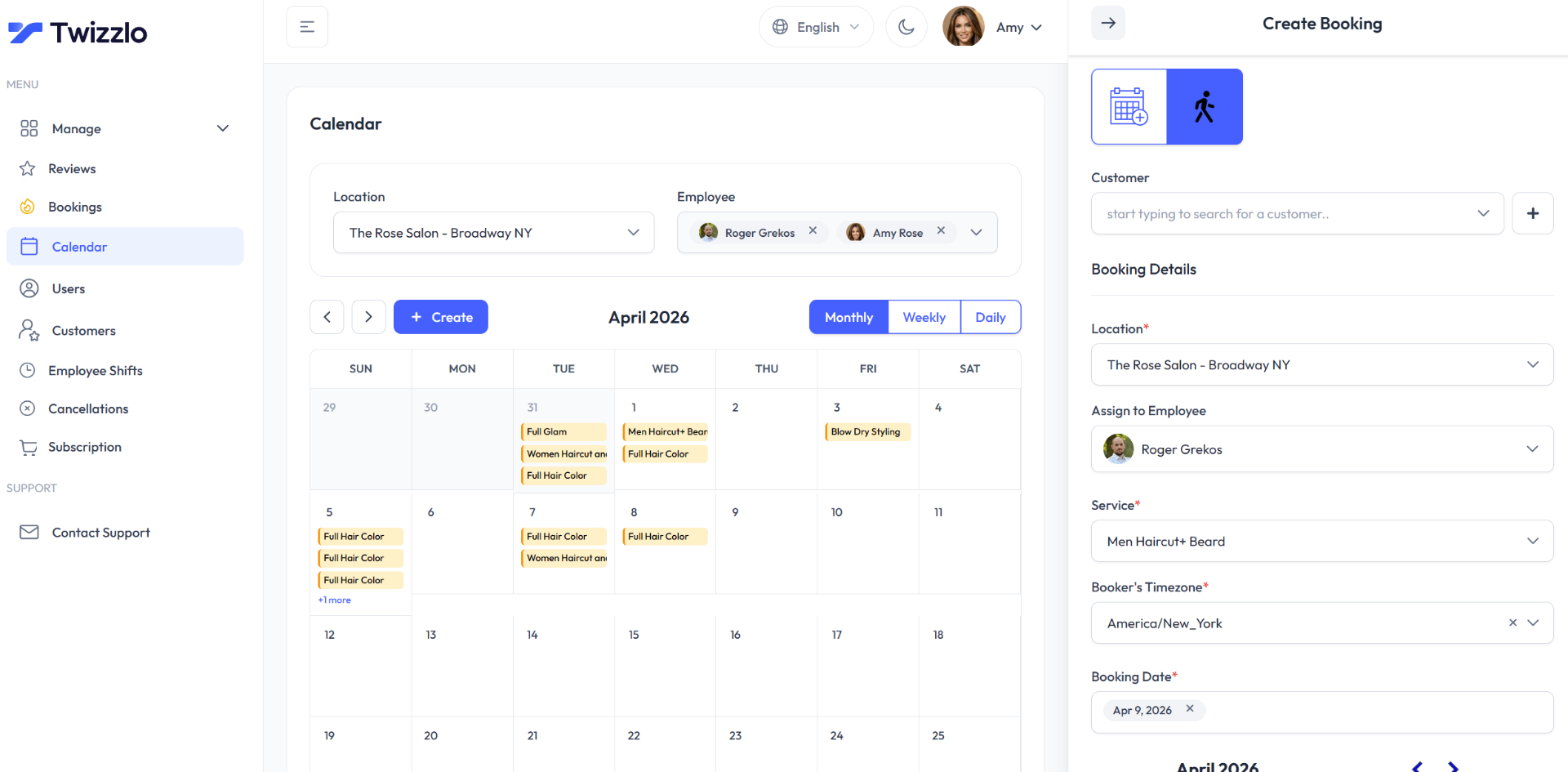
Twizzlo sends automated booking confirmations and appointment reminders from each booking. Email confirmations and reminders are included on both plans. Text messages (SMS) are on Business Pro only: 50 SMS a month are included, then $0.03 each. Free has no SMS. Clients can reschedule themselves from the booking link, and cancellation handling is built in.
Twizzlo is web-based online booking and appointment scheduling software for appointment-based service businesses. Free is $0 a month for up to 150 bookings, with no SMS. Business Pro is $29.99 a month per business, with unlimited bookings, 50 SMS a month and then $0.03 per message, and a 30-day money-back guarantee. Both plans include unlimited staff and locations. Support is available 24/7. Online payments carry your Stripe processing rate plus a 1.5% Twizzlo platform fee.
For example, at 300 SMS in a month, Business Pro’s 50 included SMS leave 250 at $0.03, or $7.50 on top of $29.99. A business that wants text reminders on a $0 plan is a better fit for a plan that lists them, such as Square Appointments Free (plan grid, read September 27, 2026). See the plan limits on the pricing page.
FAQ
What is the purpose of an appointment reminder system?
It helps clients show up on time, confirm when needed and stay aware of schedule changes, while cutting the calls and texts your team sends by hand. The test is practical: fewer no-shows, less staff time on confirmations and a calendar that stays accurate.
How do automated appointment reminders reduce no-shows?
They remove two common failure points: forgetting and stale information. Because automated reminders pull from live booking data, clients get the correct time even after a reschedule, and confirmations flow back into the calendar where staff can see them. Automation also surfaces patterns, like no-shows that cluster around certain services, time windows or booking channels, so you can fix causes instead of chasing individual misses.
How do you send appointment reminders by text?
Through your booking platform rather than a separate texting app, so texts go out automatically when appointments are created, moved or canceled. Keep them short: business name, service, time, location and a way to confirm or reschedule. Twizzlo sends email reminders on both plans; Business Pro adds SMS, with 50 SMS a month and then $0.03 per message, and the Free plan has no SMS, according to Twizzlo’s pricing page, read September 28, 2026.
When should appointment reminders be sent?
Start from how far ahead the client booked. For bookings made 3 to 14 days ahead, one reminder 24 hours before usually fits; for bookings made weeks out, send a confirmation request two days ahead and a reminder the morning of the visit. Send at least one reminder before your cancellation cutoff, then adjust once you see which appointments still slip.
Do reminders eliminate no-shows completely?
No. Reminders remove the misses caused by forgetting and outdated details. The rest comes down to booking quality and policy: clear cancellation terms, easy rescheduling and, where it fits your business, a published no-show charge. Treat reminders as one layer of a reliable schedule, not a standalone fix.
How do I estimate how many reminder texts I will send each month?
Multiply appointments a month by the texts each booking triggers. For example, a confirmation and one reminder make two texts, so 150 appointments make 300 texts, and a second reminder makes 450. Add a margin for reschedules, which send new messages, then compare the total with the plan’s included texts and its per-text rate.
What should I test before choosing appointment reminders software?
Book a test appointment, then move it and cancel it. The client’s messages should show each change without anyone editing them, staff should see confirmation status on the calendar, and your monthly text count should fit the plan’s included texts or credits.
Sources and methodology
- Twizzlo features page (opens in a new tab)Read . Supports: Twizzlo automated confirmations and reminders, SMS on Business Pro, client self-rescheduling and cancellation handling, and the calendar capture in Figure 1
- Twizzlo pricing page (opens in a new tab)Read . Supports: Twizzlo plans, booking cap, SMS allowance and rate, guarantee, support and the online payment fee
- Square Appointments pricing page (plan grid) (opens in a new tab)Read . Supports: Appointment reminders on every plan including Free; appointment confirmations from Plus
- Setmore pricing page (opens in a new tab)Read . Supports: Email reminders on Free; SMS reminders on Pro
From our editorial policy
- Twizzlo sells online booking and appointment scheduling software, the same category we write about. Twizzlo appears in our comparisons and roundups, and we have a commercial interest in you choosing it.
- We do not publish invented quotes, studies, statistics, customer stories or product tests, and we do not imply hands-on use of a product when the research came from the vendor's public documentation.
- To report an error, email support@twizzlo.com with the subject line "Correction: [page URL]". Tell us what is wrong and, if you can, link a source.
Update history
- : Added a reminder schedule by booking lead time, a monthly text-count table, a five-step trial and two FAQs, corrected Twizzlo's plan and SMS details, and replaced the cover image.
Start free, upgrade when you grow
Flat-rate booking software. No per-seat, per-chair or per-location fees.
- Free plan up to 150 bookings a month, not a trial
- Business Pro is $29.99 a month per business for unlimited bookings, with a 30-day money-back guarantee
- 24/7 support by email