
Schedulicity Alternative: Vagaro and 8 Options by Team Size

In short
A Schedulicity alternative is worth comparing because Schedulicity is part of Vagaro: its website led there when read on September 25, 2026. That day, Vagaro's US help center printed $23.99 a month, a limited-time rate, for one calendar, plus $10 per added calendar. Acuity Scheduling prices by calendar count, Setmore by user, Calendly by seat and Square Appointments by location.
- Schedulicity now redirects to Vagaro, so ask Vagaro what your account, future bookings and payment settings become before you choose.
- Compare billing units, not headline prices: per calendar, per user, per location and per business costs split apart as a team grows.
- Move future appointments and client details first, then run both systems for a short overlap before you switch the old one off.
In this article8 sections
Schedulicity's website now leads to Vagaro, so owners looking for a Schedulicity alternative are choosing between Vagaro and another booking system. This guide shows what Vagaro and eight alternatives charge at 1, 3 and 6 staff, how each one bills and how to switch without losing bookings.
Twizzlo, which publishes this guide, is one of the options compared; its booking and reminder features are listed on its own page. Competitor prices come from each vendor's own pricing page or help center, read September 25, 2026 (GlossGenius September 27, 2026).
Schedulicity Is Now Part of Vagaro
Schedulicity is now part of Vagaro. When checked on September 25, 2026, schedulicity.com redirected to a Vagaro page titled "From Schedulicity to Vagaro," which says "Schedulicity is now Vagaro," and Schedulicity's pricing page no longer existed. A second check on September 28, 2026, found the homepage still redirecting to Vagaro's Schedulicity page.
No Schedulicity plan can be priced today, so this guide prices Vagaro instead. Vagaro's US help center prints $23.99 a month, a limited-time rate, with one calendar, and $10 a month for each added employee calendar, up to seven licenses (read September 25, 2026). Our Vagaro pricing page lists its add-ons and card rates.
If your business still books through a Schedulicity account, ask Vagaro what your account, future bookings, client records and payment settings become before you compare anything else. Those answers decide whether staying is the simpler move.
Schedulicity Alternatives at a Glance: Cost at 1, 3 and 6 Staff
Schedulicity's competitors bill in different units, so the lowest monthly bill depends on how many people take bookings. At three staff, the lowest plan that fits runs from $0 on Square Appointments Free and Setmore Free to $69.99 on Booksy, with Vagaro at $43.99 on its limited-time rate and Mindbody by quote (read September 25 and 27, 2026).
| Platform | How it bills | 1 staff | 3 staff | 6 staff | Read |
|---|---|---|---|---|---|
| Vagaro | Base plan plus per calendar: $23.99 a month, a limited-time rate, with one calendar; $10 a month per added employee calendar, up to seven licenses | $23.99 | $43.99 | $73.99 | US help center, September 25, 2026 |
| Square Appointments | Square Appointments pricing is per location: Free $0, Plus $49 and Premium $149 a month; unlimited staff calendars on every plan, with no employee limit | $0, $49 or $149 | $0, $49 or $149 | $0, $49 or $149 | Pricing page, September 25, 2026; plan grid, September 27, 2026 |
| Acuity Scheduling | Acuity Scheduling pricing is by calendar count: Starter $20 (one calendar), Standard $34 (up to six) and Premium $61 (up to 36); $16, $27 and $49 billed annually; no free plan | $20 | $34 | $34 | Pricing page, September 25, 2026 |
| Setmore | Setmore pricing is per user: Free $0 for up to four users; Pro $12 per user a month ($5 billed annually) | $0 or $12 | $0 or $36 | $72 | Pricing page, September 25, 2026 |
| Calendly | Calendly pricing is per seat: Standard $12 and Teams $20 a month ($10 and $16 billed yearly); Free covers one event type | $12 | $36 | $72 | Pricing page, September 25, 2026 |
| Booksy | Booksy pricing is $29.99 a month plus tax with one team member, plus $20 a month for each added member | $29.99 | $69.99 | $129.99 | Pricing page, September 25, 2026 |
| GlossGenius | GlossGenius pricing is per business by plan: Standard $28 (no staff management), Gold $56 for up to nine staff and Platinum $168 for teams of 10 or more | $28 | $56 | $56 | Pricing page, September 27, 2026 |
| Mindbody | Mindbody pricing is per location: "Starting at $79" a month; plans by quote | Quote | Quote | Quote | Pricing page, September 25, 2026 |
| Twizzlo | Per business: Free is $0 a month for up to 150 bookings, with no SMS; Business Pro is $29.99 a month per business; unlimited staff and locations on both plans | $0 Free or $29.99 Business Pro | $0 Free or $29.99 Business Pro | $0 Free or $29.99 Business Pro | Twizzlo pricing page, September 28, 2026 |
Subscriptions before tax, card processing, texts and add-ons. Vagaro's $23.99 is a limited-time rate; its help center prints no regular price and no subscription price for an added location. Setmore's 1- and 3-staff cells show Free and Pro; Calendly's show Standard. Totals are our arithmetic: Vagaro adds $10 for each calendar after the first, Booksy $20 for each team member after the first, and Setmore Pro and Calendly Standard charge $12 per person.
The billing unit decides how fast a bill grows. Vagaro adds a price for each calendar, Acuity Scheduling sets plan tiers by calendar count, Setmore charges per user, Calendly per seat and Booksy per team member. Square Appointments and Mindbody bill per location, GlossGenius bills per business with staff limits by plan, and Twizzlo bills per business. Our guide to flat-rate booking software covers plans sold at one price, and our best appointment scheduling software guide ranks the wider field.
Which Schedulicity Alternative Fits Your Business
The right Schedulicity alternative depends on three things: how many people take bookings, how many locations you run and whether you sell appointments or classes. Each case below names the vendors whose own pricing fits it.
Staying with Vagaro
Staying suits an owner who values continuity with the system Schedulicity now points to. At the rates on Vagaro's US help center, read September 25, 2026, a three-person team pays $43.99 a month and a six-person team $73.99 on the limited-time rate, and after seven paid licenses, new employees carry no added charge. The same page prints no regular price after the offer and no subscription price for an added location, so ask Vagaro for both in writing.
Salons and spas adding staff
A salon that is hiring should price the next hire, not the first. Booksy adds $20 a month for each team member to its $29.99 plan, so three people pay $69.99 plus tax (read September 25, 2026). GlossGenius Gold covers up to nine staff for $56 a month (read September 27, 2026), and Square Appointments includes unlimited staff calendars on every plan, with no employee limit (plan grid, read September 27, 2026). Salons weighing more tools can compare phorest alternatives, Timely alternatives for salons and apps like booksy.
More than one location
Each vendor bills an added location in its own way. Square Appointments Plus costs $49 a month per location, and Mindbody prints "Starting at $79" a month per location (both read September 25, 2026). GlossGenius charges each added location its plan price less 15% (read September 27, 2026), and Vagaro's help center prints no subscription price for an added location. Our guide to multi location scheduling software compares location billing in detail, and how to scale a service business covers the staffing side of a second site.
Studios that sell classes or memberships
Mindbody fits businesses whose revenue runs on classes and memberships, such as studios and gyms; its homepage lists class check-in and membership management (read September 28, 2026). It sells each location's plan by quote (pricing page, read September 25, 2026).
Solo and appointment-only businesses
A one-person business can start at $0. Square Appointments Free costs $0 per location, Setmore Free covers up to four users and Calendly Free covers one event type; Acuity Scheduling starts at $20 a month for one calendar and has no free plan (all read September 25, 2026). Setmore Pro and Calendly Standard cost $12 a month for one person.
What a Schedulicity Replacement Must Handle
A replacement has to cover six jobs before you move any bookings into it: booking rules, staff schedules, reminders, payments, client records and reports. Check each one in a trial with your own services.
- Booking rules and availability: service lengths, buffer times, how far ahead clients can book and each person's working hours.
- Staff schedules and permissions: who works where and when, and who can see or change each calendar.
- Confirmations and reminders: which go by email and which by text, and whether texts cost extra or come from a monthly allowance.
- Online payments and prepayment: which processor the tool uses, what it charges and whether clients can pay when they book.
- Client records: contact details, visit history and notes, and how records get in and out of the system.
- Reports: bookings, revenue and staff use by day, week and month.
Your Migration Checklist Moving From Schedulicity
Move in six steps, starting with Vagaro and ending with a short overlap, so no future booking falls between systems.
- Ask Vagaro what your account becomes. Ask what happens to future appointments, client records, payment settings and any balances, and keep the answers in writing.
- Record what you need to move. List clients, upcoming appointments, services, prices and staff hours, then ask the new vendor how client records and future appointments get into its system.
- Set up payments early. Payment settings affect prepayment, checkout and reports, so connect them before launch week.
- Rebuild reminders and client messages. Match confirmations and reminders to how the business runs, and note which ones go out as texts.
- Test with real appointments. Create a few internal bookings, then move a small sample of real ones and check each against the original.
- Run both systems briefly. A short overlap lets the team check calendars, staff access and client messages before the old system is switched off.
Where Twizzlo Fits for a Former Schedulicity User
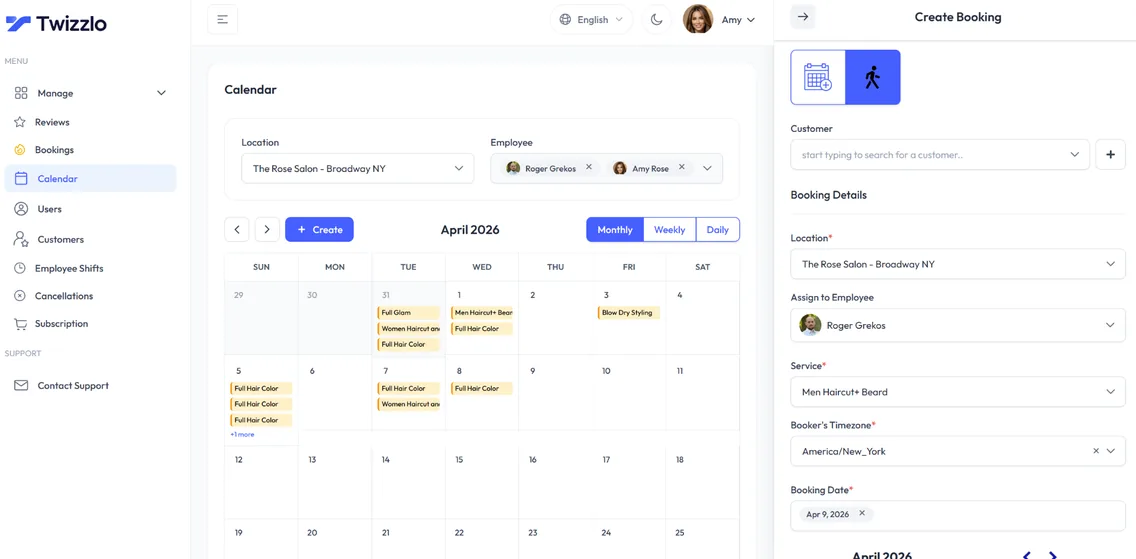
Short answer: Twizzlo fits an appointment-based team that wants a subscription priced per business, so adding staff or a location does not raise it. Free is $0 a month for up to 150 bookings, with no SMS, and is free forever. Business Pro is $29.99 a month per business, with unlimited bookings, 50 SMS a month and then $0.03 each, and a 30-day money-back guarantee. Both plans include unlimited staff and locations.
Twizzlo is web-based online booking and appointment scheduling software for appointment-based service businesses. For a team leaving Schedulicity, these features carry the daily work:
- A booking link per location, with real-time availability and 24/7 online booking.
- Employee Shifts, which sets where each team member works across locations.
- Automated email confirmations and reminders, plus SMS reminders on Business Pro within its allowance.
- Client records with visit history, notes and preferences.
- Online payments and tips at booking through Stripe, prepaid bookings at the full service price and manual payment records.
At three staff, Business Pro's $29.99 is below every paid plan priced in the table above; the closest are Acuity Scheduling Standard at $34 and Setmore Pro and Calendly Standard at $36. At one staff, several paid plans cost less: Setmore Pro and Calendly Standard at $12, Acuity Scheduling Starter at $20, Vagaro at $23.99 on its limited-time rate and GlossGenius Standard at $28, while Square Appointments Free and Setmore Free cost $0 at one or three staff (vendor pages read September 25 and 27, 2026; Twizzlo pricing page read September 28, 2026). The full detail of Twizzlo's two plans is on the pricing page.
Online payments carry your Stripe processing rate plus a 1.5% Twizzlo platform fee. Support runs 24/7 by email at support@twizzlo.com.
Twizzlo does not run payroll, commission tracking or memberships. A business that runs any of these inside its booking system should compare the other options in the table.
Frequently Asked Questions
Is Acuity the best Schedulicity alternative?
It can be for an appointment-only business that wants to pay by calendar count. Acuity Scheduling costs $20 a month for one calendar, $34 for up to six and $61 for up to 36 on monthly billing, with no free plan (Acuity pricing page, read September 25, 2026). A team that expects to grow past six staff or add locations should compare the per-member and per-location options in this guide's table.
What should I compare first when choosing a Schedulicity alternative?
Start with the workflows you cannot run without, then the billing unit. List what you use every week, such as booking rules, staff schedules, reminders and online payments, and drop any tool that misses one. Then price the rest at your staff and location count, adding texts and card processing. If a tool's cost at next year's team size is unclear, eliminate it early.
Are specialized platforms better than general scheduling tools?
Sometimes. A business that sells classes or memberships usually fits a class-based platform such as Mindbody. Salons, spas and other appointment-based teams can run on an appointment tool, whether salon-focused like Booksy and GlossGenius or general like Acuity Scheduling and Setmore. Fit with your weekly workflow matters more than brand recognition.
How hard is it to move off Schedulicity?
It is manageable if you start with Vagaro. Because Schedulicity's website led to Vagaro when read on September 25, 2026, first ask Vagaro what your account, future bookings, client records and payment settings become. Then record what you need to move, set up services, staff and booking rules in the new system, test with a few real bookings and run both systems for a short overlap.
Should I prioritize features or pricing?
Required features first, then price. A cheaper plan that lacks a workflow you run every week pushes that work back onto staff. Once two or three tools cover your required features, compare what each costs at your staff and location count, including texts and card processing, and choose the one whose cost you can predict for next year.
Will I lose client history when I leave Schedulicity?
Not if you plan the move. Ask Vagaro which client records and appointment history you can take with you before you change anything, and save what it provides. Then ask the new vendor how client records get into its system, move a small sample first and check it against the original before moving the rest.
How much should a Schedulicity alternative cost each month?
For a three-person team, the lowest plan that fits on each vendor's own page, read September 25 and 27, 2026, costs from $0 (Square Appointments Free, Setmore Free) to $69.99 (Booksy) a month before card fees; Vagaro's limited-time total is $43.99, and Mindbody quotes its plans. Twizzlo Free is $0 a month for up to 150 bookings, with no SMS, and Business Pro is $29.99 a month per business (Twizzlo pricing page, read September 28, 2026).
Can one Schedulicity alternative handle multiple locations?
Yes, but check how each one bills them. On pages read September 25, 2026, Square Appointments charges $49 a month per location on Plus and Mindbody prints "Starting at $79" a month per location; GlossGenius bills each added location at its plan price less 15% (read September 27, 2026), and Vagaro's help center prints no subscription price for an added location. Twizzlo includes unlimited locations on both plans.
Are Schedulicity reviews still useful when choosing software?
Partly. Reviews written before the change describe Schedulicity's own app, prices and support, and Schedulicity's website redirected to Vagaro when read on September 25, 2026. Check each review's date, read recent Vagaro reviews if you plan to stay, and test any alternative on a free plan or trial before you move client records.
To test a switch with your own services, start on the Free plan at Twizzlo.
Sources and methodology
Prices read
- Vagaro: From Schedulicity to Vagaro (opens in a new tab)Read . Supports: Schedulicity's homepage and pricing page redirect to Vagaro, and Vagaro's Schedulicity page says "Schedulicity is now Vagaro." (redirect rechecked September 28, 2026)
- Vagaro plans and pricing help article (US) (opens in a new tab)Read . Supports: Vagaro's limited-time US rate of $23.99 a month with one calendar, $10 a month for each added employee calendar up to seven licenses, and no printed subscription price for an added location
- Square Appointments pricing page (opens in a new tab)Read . Supports: Square Free, Plus and Premium prices per location; the plan grid read again on September 27, 2026, lists unlimited staff calendars on every plan with no employee limit
- Acuity Scheduling pricing page (opens in a new tab)Read . Supports: Acuity Starter, Standard and Premium prices on monthly and annual billing, the calendar limit of each plan and the absence of a free plan
- Setmore pricing page (opens in a new tab)Read . Supports: Setmore Free at $0 for up to four users and Pro at $12 per user a month on monthly billing, $5 on annual billing
- Calendly pricing page (opens in a new tab)Read . Supports: Calendly Standard and Teams prices per seat on monthly and yearly billing and the Free plan's one event type
- Booksy pricing page (opens in a new tab)Read . Supports: Booksy's $29.99 monthly price plus tax with one team member and $20 a month for each added team member
- GlossGenius pricing page (opens in a new tab)Read . Supports: GlossGenius Standard, Gold and Platinum monthly prices, staff limits by plan and the added-location price at a 15% discount
- Mindbody pricing page (opens in a new tab)Read . Supports: Mindbody's "Starting at $79" a month per location and plans sold by quote
- Mindbody homepage (opens in a new tab)Read . Supports: Mindbody's homepage lines on class check-in for studios and gyms and on managing memberships
- Twizzlo pricing page (opens in a new tab)Read . Supports: Twizzlo Free and Business Pro prices, booking cap, SMS allowance, unlimited staff and locations, money-back guarantee, 24/7 support and the online payment fee
From our editorial policy
- Twizzlo sells online booking and appointment scheduling software, the same category we write about. Twizzlo appears in our comparisons and roundups, and we have a commercial interest in you choosing it.
- We do not publish invented quotes, studies, statistics, customer stories or product tests, and we do not imply hands-on use of a product when the research came from the vendor's public documentation.
- To report an error, email support@twizzlo.com with the subject line "Correction: [page URL]". Tell us what is wrong and, if you can, link a source.
Update history
- : Rewrote the guide for Schedulicity's move to Vagaro: added dated costs for Vagaro and eight alternatives at 1, 3 and 6 staff and a review FAQ; removed an out-of-date price range, unsourced rankings, a video and AI images.
Start free, upgrade when you grow
Flat-rate booking software. No per-seat, per-chair or per-location fees.
- Free plan up to 150 bookings a month, not a trial
- Business Pro is $29.99 a month per business for unlimited bookings, with a 30-day money-back guarantee
- 24/7 support by email