
Appointment Software No Seat Fees Explained

In short
Appointment software with no seat fees charges one price per business or per location, however many staff members use it. Per-seat plans raise the bill for every added user instead: Booksy's pricing page, read September 25, 2026, adds $20 a month for each team member after the first. Other vendors move growing teams to a higher plan.
- Ask who counts as a seat: some vendors bill only bookable staff, others bill every login, including front desk and part-time staff.
- Staff-band plans stay flat until the team passes a limit, then the whole account moves up a plan.
- Price the team you expect next year, not today's headcount, before comparing entry prices.
Source: Booksy pricing page (opens in a new tab), read
In this article11 sections

Adding a stylist, barber or front-desk hire should help you book more clients, not raise your software bill. This guide explains what appointment software no seat fees means, what counts as a seat on 10 scheduling platforms, what one more staff member adds on each and which questions to ask before you buy.
Twizzlo, which publishes this guide, offers appointment software on two plans and is one of the platforms compared; you can compare the two plans on its pricing page. Competitor prices come from each vendor's own pricing page or help center, read September 25, 2026, except GlossGenius and Square's plan grid, read September 27, 2026.
What appointment software no seat fees actually means
Appointment software no seat fees means you are not charged extra every time you add another employee, scheduler, manager, or location admin to the platform. Instead of paying per user, you pay one business price or a usage-based rate that is not tied to headcount.
A seat is a login or bookable calendar the vendor bills for, and vendors draw that line differently, as the next section shows.
On paper, a per-seat platform can look affordable when you have one or two users. In practice, teams usually need more access than expected. A receptionist needs booking permissions. A manager needs reporting. Staff need calendars. Owners need oversight.
With a no-seat-fee model, your software cost is easier to predict. You can hire, cross-train, and give people the access they need without recalculating your subscription every month.
What counts as a seat on 10 scheduling platforms
Each vendor defines a seat differently. On vendors' own pages read September 25 and 27, 2026, Mangomint counts anyone with a profile as a user, Timely charges part-time staff at the same rate as full-time staff, Booksy includes one team member and Vagaro stops charging for new employees after seven licenses, while Square Appointments includes unlimited staff calendars on every plan.
| Platform | What you pay for | Who counts or the limit | One more staff member | Source and read date |
|---|---|---|---|---|
| Twizzlo | Per business | Unlimited staff and locations on both plans | $0 on either plan (Free is $0 a month for up to 150 bookings, with no SMS; Business Pro is $29.99 a month per business) | Twizzlo pricing page, September 28, 2026 |
| Square Appointments | Per location, by plan (Square Appointments pricing: Free $0, Plus $49, Premium $149 a month) | “Unlimited staff calendars” on Free, Plus and Premium | $0 (an added location adds its plan price) | Pricing page, September 25, 2026; plan grid, September 27, 2026 |
| Acuity Scheduling | Plan by calendar count (Acuity pricing: Starter $20, Standard $34, Premium $61 a month) | Starter one calendar; Standard up to six; Premium up to 36 | $0 inside a plan; the second calendar moves Starter $20 to Standard $34, and the seventh moves Standard to Premium $61 | Pricing page, September 25, 2026 |
| GlossGenius | Plan by team size (GlossGenius pricing: Standard $28, Gold $56, Platinum $168 a month) | Standard has no staff management; Gold covers up to nine staff; Platinum is for teams of 10 or more | $0 inside a plan; a second staff member moves Standard $28 to Gold $56, and a 10th moves Gold to Platinum $168 | Pricing page, September 27, 2026 |
| Boulevard | Essentials by provider count; Premier per location | Essentials “Up to 5 providers (bookable calendars)”; Premier unlimited professionals | $0 up to five providers; a sixth moves Essentials $159 to Premier $325 a month per location (list price) | Pricing page, September 25, 2026 |
| Vagaro | Base plan plus per calendar (Vagaro pricing: $23.99 a month, a limited-time rate) | One calendar included; no charge after seven licenses | $10 a month up to seven licenses, then $0 | US help center, September 25, 2026 |
| Booksy | Per team member after the first (Booksy pricing) | $29.99 a month plus tax with one team member | $20 a month | Pricing page, September 25, 2026 |
| Setmore | Per user (Setmore pricing) | Free up to four users; Pro unlimited users | $12 a month per user on Pro, billed monthly; past four users, the whole team moves from Free to Pro | Pricing page, September 25, 2026 |
| Calendly | Per seat (Calendly pricing) | A seat for each user who connects calendars and hosts meetings; invitees need no seat | $12 a month on Standard, billed monthly | Pricing page, September 25, 2026 |
| Mangomint | Per location plus per user | $120 a month per location; “Anyone with a profile in Mangomint counts as a user” | $10 a month, front desk included | Pricing page, September 25, 2026 |
Monthly billing, before tax, card processing, texts and add-ons, at one location. A staff member means one bookable person with one login; Mangomint also bills front-desk profiles. Vagaro's US help center prints no regular price after its limited-time rate. The Boulevard cells show list prices; Boulevard's limited-time offer for new customers is lower.
This table covers seat billing only; our best appointment scheduling software guide ranks the wider field.
Why per-seat pricing creates problems for service businesses
Per-seat pricing turns every hire, front-desk login and seasonal worker into a billing decision, which pushes owners to share logins or ration access. Scheduling touches nearly everyone.
A salon might have stylists, assistants, and a front-desk coordinator. A spa may need massage therapists, shift leads and an owner who checks performance across locations. A tutoring business might have multiple tutors, admin support, and seasonal staff. In each case, appointment management is not a side task. It is part of the business engine.
When software charges by seat, owners start making bad operational compromises to control cost. They share logins. They limit staff access. They keep parts of the process in texts, spreadsheets, or handwritten notes. They delay adding locations or avoid giving managers the visibility they need. Those workarounds save a little on software and cost much more in mistakes, missed bookings, and wasted time.
A system can offer useful features, but if the pricing model forces your team into awkward workflows, those features lose value.
The operational upside of no-seat-fee appointment software
No-seat-fee pricing protects margin, keeps the whole team in one system and makes delegation easier. The biggest benefit is margin protection. If your monthly cost stays flat while your team grows, each additional staff member has a clearer path to profitability. You are not paying a software tax every time you increase capacity.
The second benefit is cleaner operations. More people can use the same system without debate over who gets access. That means one calendar, one customer record, one source of truth for bookings, reminders, payments, and staff schedules.
The third benefit is better delegation. Owners often become the human bridge between disconnected tools because they are trying to avoid extra software costs. No-seat-fee pricing removes some of that pressure. Managers can manage. Front-desk staff can handle reschedules. Service providers can check their own calendars. The owner does not have to be the workaround.
Per-seat vs. no-seat-fee pricing at a glance
| Question | Per-seat pricing | No-seat-fee pricing |
|---|---|---|
| What happens when you hire? | Every new login raises the bill | Monthly cost stays flat as the team grows |
| How predictable is the cost? | Recalculated every time headcount changes | One business price that is easy to budget |
| Who gets access? | Owners ration logins, share passwords, and limit staff access | Receptionists, managers, and providers all get the access they need |
| Who handles day-to-day changes? | The owner often becomes the workaround | Front desk reschedules, managers manage, staff check their own calendars |
| Seasonal or high-turnover team? | A constant administrative nuisance | Staffing changes never touch the invoice |
What to look for in appointment software no seat fees
Beyond the seat model, check five things: scheduling reliability, reminders, payments, client records and reporting.
Start with scheduling reliability. The platform should handle online booking, calendar syncing, staff availability, service durations, buffer times, and recurring appointments without forcing manual cleanup. If scheduling is clunky, flat pricing will not save you much.
Next, look at reminders and client communication. Automated SMS and email reminders and clear booking confirmation emails can reduce no-shows and cut down on back-and-forth. This matters even more for businesses with multiple providers, where one missed appointment can throw off the entire day.
Payments are another major factor. If clients can book but cannot pay online or add a tip, you may end up stitching together extra tools. That is how software stacks get expensive and messy.
Then there is customer data. A useful platform should centralize visit history, notes, preferences, and communication records so your team can serve clients consistently. If customer information lives in a separate system, you lose speed and context.
Reporting also deserves attention. A flat price helps, but you still need visibility into bookings, revenue, staff performance, and location activity. Otherwise, growth becomes harder to manage even if the software bill is stable.
Where some no-seat-fee tools still fall short
Some vendors avoid seat fees but limit other parts of the platform so aggressively that the pricing advantage fades. They may cap locations, lock reminders behind higher plans, restrict integrations, or reserve reporting for premium tiers.
So the real question is not only whether the software has no seat fees. It is whether the platform stays useful as your business changes.
If you run a solo practice with a simple booking flow, almost any decent tool may feel fine at first. If you are growing a team, adding services, or managing calendars across several locations, the cracks show up quickly. A low monthly price is only a win if the system remains workable after month three, not just during the trial period.
That is why business owners should check what each plan caps before signing. You want a platform that gives you room to grow without forcing a pricing negotiation every time your operation gets more sophisticated.
Who benefits most from this pricing model
Appointment software no seat fees is especially useful for businesses where several people need access to scheduling, customer records, and daily operations.
That includes salons, barbershops, massage practices, tutoring centers, coaching businesses, pet groomers, photographers, auto detailers and home service teams. It also fits businesses that are small today but expect to add staff soon. Even if your headcount is low now, choosing a pricing model that does not punish growth can save you from a painful software switch later. Our small business booking software checklist covers the one-site basics.
It also makes sense for businesses with turnover or seasonal staffing. If your team changes throughout the year, per-seat billing becomes a constant administrative nuisance. Flat pricing keeps planning simpler.
A better way to evaluate software costs
Price a scheduling platform at the team size you expect next year, not at its entry price. Calculate the real operating cost once your business uses the platform the way it actually needs to.
Ask what happens when you add staff, need reminders, take payments, manage multiple calendars, or open another location. Check whether reporting, customer records, and staff scheduling are included or pushed into a higher tier. Look at the total cost of running the workflow, not just the cost of opening an account.
Five questions, drawn from the table above, settle most seat bills:
- Who counts as a seat: bookable staff only, or every login, front desk included?
- Is there a cap after which new staff are free, as Vagaro prints after seven licenses?
- Does the plan jump at a staff band, as GlossGenius does at 10 staff and Acuity Scheduling at seven calendars?
- Are part-time staff billed at the full rate?
- Does each location add its own subscription?
A plan that does not grow with headcount costs the same at 10 staff as at two, so compare it with per-seat plans at next year's team size. Our guide to how flat-rate booking software scales covers the limits such plans still set on bookings, locations and add-ons.
How Twizzlo prices staff and locations
Twizzlo is web-based online booking and appointment scheduling software for appointment-based service businesses. It charges per business, not per seat, on both of its plans. Free is $0 a month for up to 150 bookings, with no SMS. Business Pro is $29.99 a month per business, with unlimited bookings, 50 SMS a month and then $0.03 per text, and a 30-day money-back guarantee. Both plans include unlimited staff and locations, so hiring staff or opening a location never changes the plan price. Online payments carry your Stripe processing rate plus a 1.5% Twizzlo platform fee. Support runs 24/7 by email at support@twizzlo.com.
Staff can be bookable or non-bookable, and role-based access sets what each person can see and do, so a front-desk worker or a manager gets a login without a seat charge.
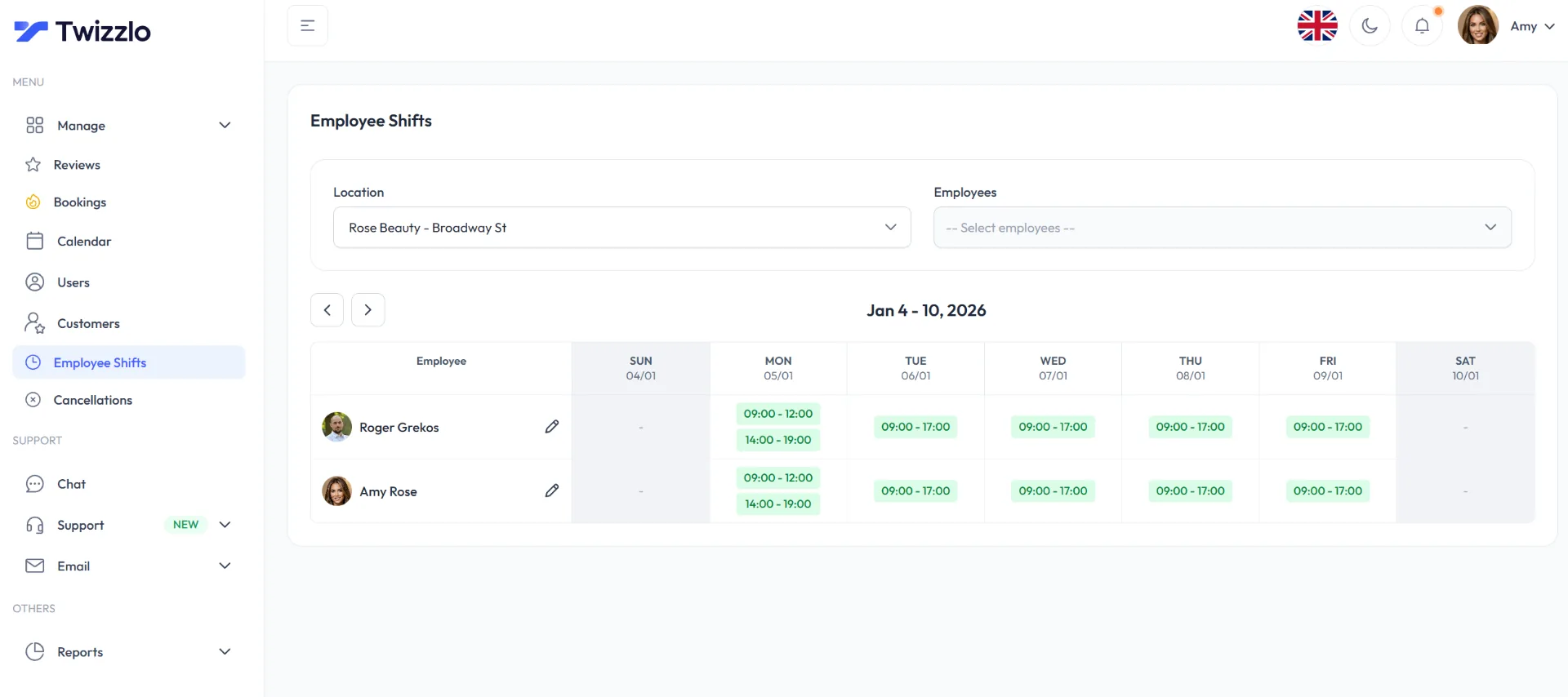
Twizzlo does not run payroll, commission tracking or memberships. A team that needs those inside its scheduling system should check which of the platforms above include them.
Start with Twizzlo.
FAQ: appointment software with no seat fees
The answers below cover what a seat is, what seats cost and which businesses gain most from no-seat-fee plans.
What does “no seat fees” mean in appointment software?
It means the platform does not charge extra for each employee, scheduler, manager, or location admin you add. You pay one business price, or a usage-based rate that is not tied to headcount, so giving a receptionist booking permissions or a manager reporting access never changes your bill.
Is flat-rate appointment software cheaper than per-user pricing?
It depends on team size. With one or two users, a per-seat plan can cost less. Once you add front-desk staff, managers and more providers, per-user charges stack up while a flat price stays put: at the rates on Booksy's pricing page, read September 25, 2026, five team members cost $109.99 a month plus tax and 10 cost $209.99. Twizzlo's pricing page, read September 28, 2026, lists Business Pro at $29.99 a month per business, and both of its plans include unlimited staff and locations.
Why do some scheduling tools charge per user?
Per-seat pricing is common in business software where only a small internal team needs access. Appointment-based businesses do not work that way. Scheduling touches stylists, assistants, front-desk coordinators, massage therapists, and owners, so when a vendor keeps the per-user model anyway, growing your team quietly becomes a software penalty.
Who benefits most from no-seat-fee booking software?
Any business where several people need access to scheduling and customer records: salons, barbershops, massage practices, tutoring centers, coaching businesses, pet groomers, photographers, auto detailers and home service teams. It also suits seasonal or high-turnover teams, and small operations that expect to hire, since booking software that fits a small business today should not punish growth later.
What should I check before choosing a no-seat-fee platform?
Confirm the flat price is not offset by other limits. Some vendors cap locations, lock reminders behind higher plans, restrict integrations, or reserve reporting for premium tiers. Verify that online booking, SMS and email reminders, payments, customer records, and reporting are all included at the price you were quoted, not parked in an upgrade tier.
How do I calculate the real cost of appointment scheduling software?
Price the platform the way your business will actually use it. Add the cost of staff logins, reminders, payment processing, multiple calendars, and a second location if one is coming. Check whether reporting, customer records, and staff scheduling are included or pushed into a higher tier. The real number is the total cost of running your workflow, not the advertised entry price.
What counts as a seat in scheduling software?
A seat is whatever the vendor bills for, and vendors draw the line differently. On their own pages read September 25 and 27, 2026, Mangomint counts anyone with a profile as a user, front desk included; Vagaro bills each added employee calendar up to seven licenses, then adds new employees at no charge; Acuity Scheduling prices plans by calendar count; and Square Appointments includes unlimited staff calendars on every plan. Ask each vendor whether staff who take no bookings need a seat.
Do part-time or seasonal staff need their own seat?
It depends on the vendor, and on some platforms the charge follows the person rather than the hours worked. Timely's pricing page, read September 25, 2026, says part-time staff members are currently charged at the same rate as full-time staff, and Mangomint's pricing page, read the same day, counts anyone with a profile as a user. Before a busy season, ask whether an inactive profile still counts toward the bill. On Twizzlo, both plans include unlimited staff, so seasonal hires do not change the price.
Sources and methodology
Prices read
- Square Appointments pricing page (US) (opens in a new tab)Read . Supports: Free $0, Plus $49 and Premium $149 a month per location; unlimited staff calendars on every plan (plan grid read 2026-09-27)
- Acuity Scheduling pricing page (opens in a new tab)Read . Supports: Starter $20 (1 calendar), Standard $34 (up to 6) and Premium $61 (up to 36) a month, billed monthly
- GlossGenius pricing page (opens in a new tab)Read . Supports: Standard $28 with no staff management, Gold $56 up to 9 staff and Platinum $168 for teams of 10 or more, billed monthly
- Boulevard pricing page (opens in a new tab)Read . Supports: Essentials $159 a month for up to 5 providers; Premier normally $325 a month per location with unlimited professionals
- Vagaro plans and premium features help article (US) (opens in a new tab)Read . Supports: $23.99 a month, a limited-time rate, with one calendar; $10 a month per added employee calendar up to seven licenses, then no charge
- Booksy pricing page (opens in a new tab)Read . Supports: $29.99 a month plus tax with one team member; $20 a month per added team member
- Setmore pricing page (opens in a new tab)Read . Supports: Free up to 4 users; Pro $12 per user a month, billed monthly, unlimited users
- Calendly pricing page (opens in a new tab)Read . Supports: Standard $12 per seat a month, billed monthly; seats are for users who connect calendars and host meetings
- Mangomint pricing page (opens in a new tab)Read . Supports: $120 a month per location plus $10 a month per user; anyone with a profile counts as a user
- Timely pricing page (USA) (opens in a new tab)Read . Supports: part-time staff members charged at the same rate as full-time staff
- Twizzlo pricing page (opens in a new tab)Read . Supports: Twizzlo plans, unlimited staff and locations, SMS allowance, guarantee, support and the online payment fee
- Twizzlo features page (opens in a new tab)Read . Supports: bookable and non-bookable staff types, role-based access and the Employee Shifts screen
From our editorial policy
- Twizzlo sells online booking and appointment scheduling software, the same category we write about. Twizzlo appears in our comparisons and roundups, and we have a commercial interest in you choosing it.
- We do not publish invented quotes, studies, statistics, customer stories or product tests, and we do not imply hands-on use of a product when the research came from the vendor's public documentation.
- To report an error, email support@twizzlo.com with the subject line "Correction: [page URL]". Tell us what is wrong and, if you can, link a source.
Update history
- : Added a dated table of how 10 scheduling platforms count and charge for staff seats, a vendor checklist, Twizzlo's plan and fee details and two FAQs; removed a one-plan pricing line and repeated sections.
Start free, upgrade when you grow
Flat-rate booking software. No per-seat, per-chair or per-location fees.
- Free plan up to 150 bookings a month, not a trial
- Business Pro is $29.99 a month per business for unlimited bookings, with a 30-day money-back guarantee
- 24/7 support by email