
Acuity Scheduling Alternative: Top Choices for 2026

In short
The right Acuity Scheduling alternative depends on your team and how each tool bills. Acuity charges by calendar tier, Calendly per seat, Setmore Pro per user, Square Appointments per location, Vagaro per calendar and Twizzlo per business. Price each one at your current staff count and at your next hire before you switch.
- Text reminders, a waitlist, memberships, packages and gift certificates start on Acuity Standard, $34 a month ($27 annually), read September 25, 2026.
- Acuity Standard covers up to six calendars; a seventh moves you to Premium at $61 a month ($49 billed annually), read September 25, 2026.
- At seven staff billed monthly, Calendly Standard and Setmore Pro each cost $84 and Vagaro $83.99 on its limited-time rate (read September 25, 2026).
In this article8 sections

An Acuity Scheduling alternative is worth pricing when your next hire, your next location or a feature you need would move you up an Acuity tier. Acuity bills one account by calendar count, from Starter with one calendar to Premium with up to 36, so compare what each tool costs for the team you will have, not only its entry price. The plan-by-plan detail, set against Twizzlo’s costs, is on our Acuity pricing page.
This guide compares five alternatives to Acuity Scheduling, each described from its own pages read September 25 to 28, 2026: Calendly, Square Appointments, Setmore, Vagaro and Google Calendar’s appointment schedules. It also covers Twizzlo, which publishes this guide.
Acuity Scheduling Alternatives at a Glance
Six tools replace Acuity Scheduling for different reasons: Calendly for meetings, Square Appointments for a free plan with payments, Setmore for a free start with up to four users, Vagaro for a salon and spa suite, Google Calendar’s appointment schedules for one free booking page, and Twizzlo for service businesses with staff. Table 1 lists how each one bills.
| Tool | Billing unit | Price billed monthly (annual in parentheses) | Free plan | Fits best |
|---|---|---|---|---|
| Acuity Scheduling | Per account, by calendar tier | Starter $20 for 1 calendar ($16); Standard $34 for up to 6 ($27); Premium $61 for up to 36 ($49) | No; 7-day trial, no credit card needed | Solo practitioners selling packages |
| Calendly | Per seat (each host) | Standard $12 a seat ($10); Teams $20 a seat ($16) | Yes: one event type, one calendar connection | Solo consultants and client meetings |
| Square Appointments | Per location | Square Plus $49 and Square Premium $149 a location | Yes: Square Free, $0 a month per location | Businesses already on Square |
| Setmore | Per user | Pro $12 a user ($5) | Yes: up to 4 users | Small teams on a budget |
| Vagaro | Per calendar | $23.99 a month, a limited-time rate, with 1 calendar; $10 a month per added employee calendar, up to seven licenses | No; free trial | Salons and spas that want an all-in-one suite |
| Google Calendar | Per Google account or Workspace plan | Not compared: paid Google plan prices not read | Yes: one booking page on a free personal account | One person taking bookings inside Google Calendar |
| Twizzlo | Per business | Business Pro $29.99 a month per business | Yes: $0 a month for up to 150 bookings, with no SMS | Service businesses with staff |
Table 1. Acuity Scheduling alternatives at a glance, with Acuity listed for reference, from each vendor’s own pages read September 25, 2026 (Acuity plan cards captured September 27, 2026; Google’s feature chart for appointment schedules and Twizzlo’s pricing page read September 28, 2026).
Only Acuity and Vagaro have no free plan among these tools; Acuity offers a 7-day trial and Vagaro a free trial.
For a wider shortlist that is not tied to Acuity, see our best appointment scheduling software guide.
Acuity’s calendar caps: what each alternative costs at 1, 2 and 7 staff
Acuity Scheduling prices one account by how many calendars it holds, and its plan cards say to use a separate calendar per employee or location. The price changes at two points: the second calendar moves you from Starter to Standard, and the seventh from Standard to Premium. Table 2 prices each alternative at those points.
On Acuity’s pricing page, read September 25, 2026, Acuity Scheduling costs $20 a month for Starter (1 calendar), $34 for Standard (up to 6 calendars) and $61 for Premium (up to 36 calendars), billed monthly, or $16, $27 and $49 a month billed annually. Enterprise pricing is not published, there is no free plan, and the 7-day trial needs no credit card; prices exclude applicable taxes. Each plan card carries the note “Use separate calendars per employee or location, depending on business needs” (plan cards captured September 27, 2026).
| Tool | 1 staff (Acuity Starter) | 2 staff (Acuity Standard) | 7 staff (Acuity Premium) |
|---|---|---|---|
| Acuity Scheduling (by calendars) | $20 Starter ($16) | $34 Standard ($27) | $61 Premium ($49) |
| Calendly Standard (per seat) | $12 ($10) | $24 ($20) | $84 ($70) |
| Setmore (per user) | $0 Free or $12 Pro ($5) | $0 Free or $24 Pro ($10) | $84 Pro ($35) |
| Square (per location) | $0 Free or $49 Plus | $0 Free or $49 Plus | $0 Free or $49 Plus |
| Vagaro (per calendar) | $23.99 | $33.99 | $83.99 |
| Twizzlo (per business) | $0 Free or $29.99 Business Pro | $0 Free or $29.99 Business Pro | $0 Free or $29.99 Business Pro |
Table 2. What each Acuity Scheduling alternative costs a month at Acuity’s plan limits: 1, 2 and 7 bookable staff at one location, one calendar per person, billed monthly with annual billing in parentheses where offered. Each vendor’s pricing page read September 25, 2026 (Vagaro: its US help center); Vagaro’s base is a limited-time rate. Setmore Free covers up to four users. Twizzlo Free is $0 a month for up to 150 bookings, with no SMS (Twizzlo’s pricing page, read September 28, 2026).
At seven staff, Calendly Standard and Setmore Pro each cost $84 a month and Vagaro $83.99 on its limited-time rate, against $61 on Acuity Premium; Square Appointments costs $0 on Free or $49 on Plus per location at any headcount.
Scheduling tools bill per seat or user, per calendar tier, per location or per business; our guide to flat rate booking software explains how each model grows with a team.
What each Acuity tier adds
Acuity’s plan cards, captured September 27, 2026, list these features by tier. Check each one you use against any alternative before you switch.
- Starter: payments through Stripe, Square, PayPal and Venmo, email reminders, custom client forms and automatic time zone conversion.
- Standard adds: text reminders (the card says “check global availability”), an appointment waitlist, memberships and packages, and gift certificates.
- Premium adds: an AI Booking Assistant, hiding the Acuity logo on the scheduling page, multiple time zones for staff and locations, and a custom API and CSS.
- Enterprise: unlimited calendars, with no published price.
The bill changes at four points (prices billed monthly, read September 25, 2026):
- A second calendar: Starter at $20 a month becomes Standard at $34.
- A Standard feature you need while on Starter, such as text reminders: $20 becomes $34.
- A seventh calendar or a Premium feature: $34 becomes $61.
- More than 36 calendars: Enterprise, with no published price.
A second location counts against the same caps, because Acuity’s cards say to use a calendar per employee or location. Teams that run several sites can compare their options in our guide to multi-location scheduling software.
Which Acuity Scheduling alternative fits your business
Start with what you book when you pick an Acuity alternative. Calendly prices its plans around hosts and event types, which suits meetings on a call or video link; Square Appointments, Vagaro and Twizzlo add staff calendars and payments at booking for service businesses. Then price the tool at your next hire, not only your current team, using Table 2.
If you are weighing salon management suites rather than schedulers, our Phorest alternatives and Timely alternatives for salons guides price those platforms.
Calendly: for client meetings on a call or video link
Calendly bills per seat, at $12 a seat a month on Standard ($10 billed annually) and $20 on Teams ($16 billed annually), according to Calendly’s pricing page, read September 25, 2026. The page says seats are required for users who connect calendars and host meetings, and invitees need no seat. The Free plan covers one event type and one calendar connection, and Enterprise starts at $15,000 a year at 50 seats.
Calendly suits solo consultants and client meetings. Its limitation for a team is the per-seat bill: seven hosts on Standard cost $84 a month ($70 billed annually). Our Calendly pricing page tracks each plan.
Square Appointments: for a free plan with payments built in
Square Appointments bills per location: Square Free is $0 a month per location, labeled “For solo professionals,” with unlimited staff calendars; Square Plus is $49 a month per location and adds a cancellation policy and no-show fees, multi-staff appointment booking and a waitlist; Square Premium is $149 a month per location (Square’s pricing page, read September 25, 2026). Appointment reminders come on every plan, Square Free included (plan grid captured September 27, 2026).
Its limitation is that each location is billed separately: two locations on Square Plus cost $98 a month. Square Appointments pricing covers the plans line by line, and our Square Appointments vs Acuity comparison prices the two side by side from 1 to 36 staff.
Setmore: for small teams that want a free start
Setmore bills per user: its Free plan covers up to four users, and Pro costs $12 a user a month ($5 billed annually) with unlimited users, according to Setmore’s pricing page, read September 25, 2026. Pro adds 2-way calendar sync, SMS reminders with 500 SMS credits a month (availability varies by country, the page notes), recurring appointments, deposits and API access.
Setmore suits small teams on a budget. Past four users you pay per user: seven users on Pro cost $84 a month ($35 billed annually). Setmore pricing tracks each plan, and teams already on Setmore that pass four users can compare their options in our Setmore alternatives guide. Our Setmore vs Acuity comparison sets the two plan by plan at one to 10 staff, billed monthly and annually.
Vagaro: for salons and spas that want an all-in-one suite
Vagaro bills per calendar: Vagaro’s help center, read September 25, 2026, lists $23.99 a month, a limited-time rate, with one bookable calendar, plus $10 a month for each added employee calendar up to seven licenses, after which new employees are added at no charge. Add-ons are priced separately, including Forms at $10 a month and MySite at $20 a month.
The base subscription also lists a waitlist, payroll reporting with custom commission tiers, and reports on sales, employees and inventory, according to Vagaro’s help article on base-subscription features, read September 28, 2026.
Seven staff come to $83.99 a month. Vagaro’s help center prints no subscription price for an added location, so ask Vagaro before you open a second shop. Vagaro pricing tracks the plan, and our Vagaro vs Acuity comparison sets the two side by side.
Google Calendar: for one free booking page
Appointment schedules are built into Google Calendar. On Google’s feature chart for appointment schedules, read September 28, 2026, a free personal account gets one booking page; Google One Premium or an eligible Workspace plan adds more pages, email reminders and multi-calendar checks, and payments need an eligible Workspace plan. Reminders are email only.
It fits one person taking bookings inside Google Calendar. Our Google appointment scheduler guide covers the setup and what each Google plan includes.
When staying on Acuity makes sense
Acuity still fits a solo practitioner on one calendar, or a team inside six calendars that sells memberships, packages or gift certificates, or relies on custom client forms and payments through Stripe, Square, PayPal or Venmo (plan cards captured September 27, 2026). At one calendar, Starter costs $20 a month ($16 billed annually), on the pricing page read September 25, 2026.
Where Twizzlo fits after Acuity Scheduling
Twizzlo, which publishes this guide, is web-based online booking and appointment scheduling software for appointment-based service businesses, with a public booking page, email and SMS reminders, client records, staff schedules and shifts, and Stripe payments and tips.
Twizzlo has two plans. Free is $0 a month for up to 150 bookings, with no SMS. Business Pro is $29.99 a month per business, with unlimited bookings, 50 SMS a month and $0.03 per message after that, and a 30-day money-back guarantee. Both plans include unlimited staff and locations, and support runs 24/7. Online payments carry your Stripe processing rate plus a 1.5% Twizzlo platform fee. Clients can prepay the full service price at booking, and no-show fees are supported, applied at the business’s discretion. The full list is on the features page.
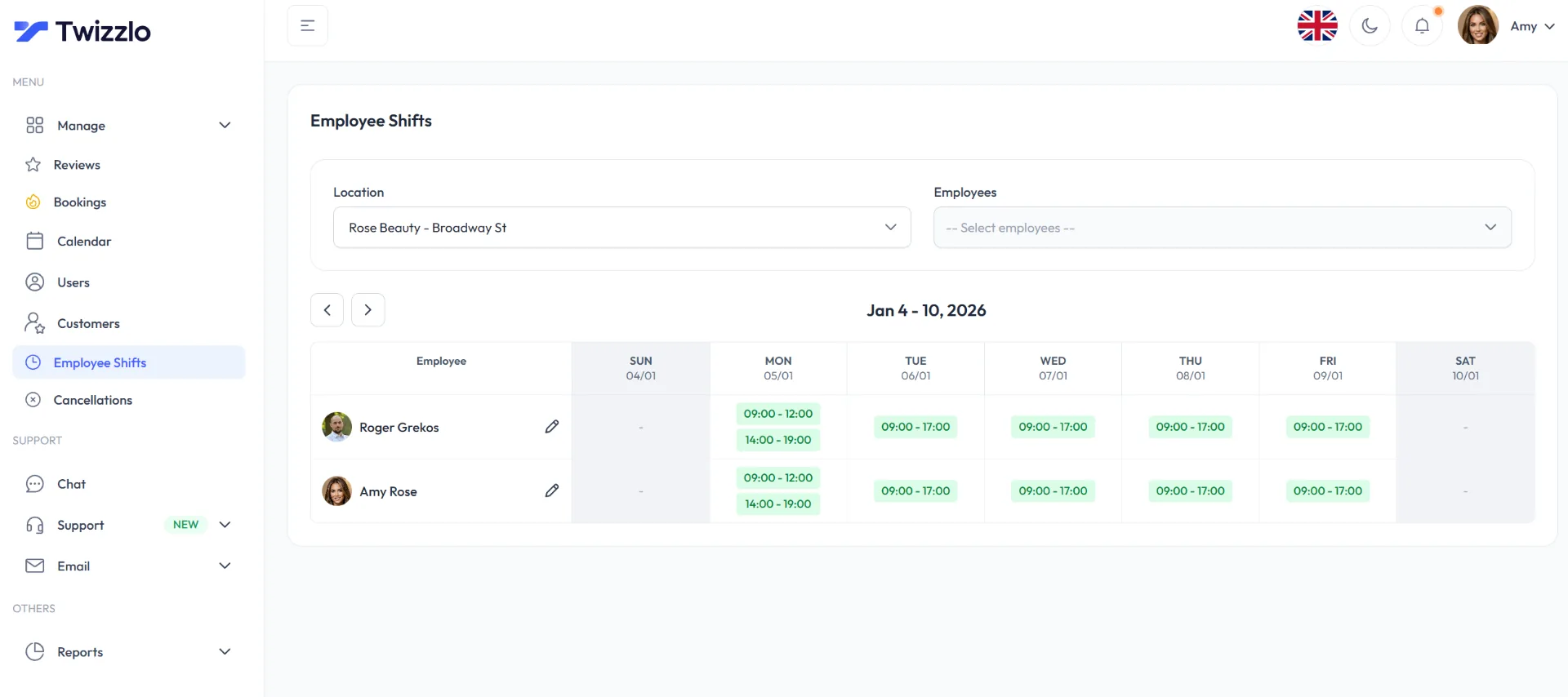
Twizzlo does not run payroll, commission tracking or memberships. If you sell packages or gift certificates through Acuity, or rely on its custom client forms, check each one against the features page before you switch.
Twizzlo fits service businesses with staff or more than one location that bring in clients through their own channels: the public booking page, a booking link for each location, and their website and social profiles. Our salon appointment software page shows how a salon runs it.
Planning Your Migration from Acuity Scheduling
Moving off Acuity takes four steps: list and export the data you rely on, rebuild services and staff in the new tool, tell clients about the new booking link, and switch over in a short, planned window. Run it as one project with one owner, and keep Acuity live until the new link works.
Step 1: Export what matters
Start with your client list, appointment history, staff settings, service menu, the questions on your client forms and notification templates. Audit what you use before you move it, and sort each item into one of three buckets:
- Must migrate now
- Nice to have later
- Retire entirely
Old service names, duplicate client records and abandoned appointment types do not need to come with you.
Step 2: Rebuild the workflow, not just the data
A straight copy of the old setup carries its workarounds into the new tool, so build around the way you want the business to run. Focus on:
- Service structure: clean names, realistic durations and correct staff assignments
- Location setup: separate availability where needed, central oversight where possible
- Permissions: owners, managers, front desk and providers should not all see the same controls
- Payments and reminders: booking, confirmation and checkout should work as one process
If your team needs a cleaner rollout process, review our user onboarding best practices for software adoption. Staff adoption matters as much as feature selection.
Step 3: Tell clients about the change
Clients need a clear next step, not a long explanation. Keep the message to three points:
- the new booking link and the date it starts
- what happens to appointments already booked
- who to contact with questions
Send the new link to repeat clients more than once: in text reminders, in email confirmations and in your Instagram bio if clients book from there.
Step 4: Run a short go-live window
Pick a date, train the team, test the live workflow, then close the old booking path. Keep one manager responsible for tracking issues.
Example: a salon sets up the new tool on Monday, rehearses with staff on Tuesday, soft-launches the new link on Wednesday and completes the cutover by the end of the week.
A Decision Framework for Your Next Scheduling Software
Score each shortlisted tool on the six criteria in Table 3, pass or fail, before you compare prices, then price the tools that pass at the staff count you expect in a year.
| Criteria | What to ask |
|---|---|
| Core features | Can it handle your actual service workflow, not just online booking? |
| Pricing transparency | Will cost rise when you add staff, locations or key features? |
| Scalability | Can the platform support growth without a restructure? |
| Ease of use | Can front desk staff learn it fast and use it confidently? |
| Integrations | Does it fit your payment and reporting workflow? |
| Support | Can you get real help when booking issues affect revenue? |
Table 3. Six questions to score any scheduling tool before you compare prices.
The most important question
Ask this before anything else: Will this platform’s price change when you hire or open a location? Table 2 answers it for staff at one location, and FAQ 5 answers it for a second location.
Frequently Asked Questions
Is Acuity still a good choice for solo operators
Often, yes. Acuity Starter covers one calendar for $20 a month ($16 billed annually) and lists payments through Stripe, Square, PayPal or Venmo, email reminders, custom client forms and automatic time zone conversion (pricing page read September 25, 2026; plan cards captured September 27, 2026). Costs rise when you need a second calendar or text reminders: both need Standard, at $34 a month ($27 billed annually).
What makes a better Acuity Scheduling alternative for salons
One that bills the way a salon grows and keeps staff calendars, client records, reminders and payments at booking in one place. Check the billing unit first: on pages read September 25, 2026, Vagaro listed $23.99 a month, a limited-time rate, plus $10 a month per added employee calendar; Square Appointments billed per location; and Calendly and Setmore Pro billed per seat or user.
Should I choose a free plan or a flat-rate paid plan
Use a free plan while its limit covers you, and plan the move before you reach it. On pages read September 25, 2026, Setmore Free covered up to four users and Calendly Free one event type. Twizzlo Free is $0 a month for up to 150 bookings, with no SMS, and a price per business, such as Twizzlo Business Pro at $29.99 a month, does not change as you add staff or locations (Twizzlo’s pricing page, read September 28, 2026).
How hard is it to migrate away from Acuity
It is a planned project rather than a hard one. List the data you rely on (clients, upcoming appointments, services and durations, staff hours and the questions on your client forms), rebuild services and staff in the new tool, tell clients about the new booking link, then switch over in a short window. The hard part isn’t the software switch. The hard part is cleaning up the workarounds that built up inside the old system.
Do salons really need multi-location capability before they open another branch
Only if you expect to open a second location, because the billing unit decides what it will cost. Acuity’s plan cards, captured September 27, 2026, say to use a separate calendar per employee or location, so a new location takes a calendar. On pages read September 25, 2026, Square listed Square Plus at $49 a month per location, and Vagaro’s help center printed no subscription price for an added location. Twizzlo includes unlimited locations on both plans, per its pricing page read September 28, 2026.
What if I need advanced features like compliance or API access
Find the plan that carries them before you compare prices. On pricing pages read September 25, 2026, Acuity listed a custom API and CSS on Premium, at $61 a month ($49 billed annually), and Setmore listed API access on Pro, at $12 a user a month. Compliance needs depend on your business and where you work, so confirm them with each vendor directly; this guide compares prices and published plan features only.
How much does Acuity Scheduling cost per month
On its pricing page read September 25, 2026, Acuity Scheduling costs $20 a month for Starter (1 calendar), $34 for Standard (up to 6 calendars) and $61 for Premium (up to 36 calendars), billed monthly, or $16, $27 and $49 a month billed annually. Enterprise pricing is not published, and prices exclude applicable taxes.
Is Acuity Scheduling free
No. On its pricing page read September 25, 2026, Acuity has no free plan; it offers a 7-day free trial with no credit card needed, and paid plans start at $20 a month ($16 billed annually). Free alternatives on pages read the same day include Square Free, at $0 a month per location, and Setmore Free, for up to four users.
Does Acuity charge more as you add staff or locations
Yes, at its calendar caps. Acuity’s plan cards, captured September 27, 2026, say to use a separate calendar per employee or location, and each plan caps calendars: 1 on Starter, 6 on Standard and 36 on Premium. A second calendar moves you from $20 to $34 a month and a seventh from $34 to $61, billed monthly (read September 25, 2026). Between the caps, the price stays the same.
What are Acuity Scheduling’s main competitors
The alternatives to Acuity Scheduling compared in this guide are Calendly, billed per seat from $12 a seat a month ($10 billed annually); Square Appointments, $0 on Free or $49 a month per location on Plus; Setmore, free for up to four users, then $12 a user a month on Pro ($5 billed annually); and Vagaro, $23.99 a month, a limited-time rate, plus $10 a month per added employee calendar (read September 25, 2026). Google Calendar gives a free personal account one booking page (read September 28, 2026). Twizzlo, which publishes this guide, bills per business.
When should I switch from Acuity Scheduling
Price an alternative when you need a seventh calendar, which moves Acuity from Standard at $34 a month to Premium at $61 ($27 and $49 billed annually); when you want text reminders on Starter, which start on Standard; or when a second location would use a calendar you need for staff (read September 25 and 27, 2026). If you are solo on one calendar and the Starter features cover you, Starter stays at $20 a month ($16 billed annually).
Sources and methodology
Prices read
- Acuity Scheduling pricing page (opens in a new tab)Read . Supports: Starter, Standard and Premium prices billed monthly and annually, calendar limits, no free plan, a 7-day trial with no credit card, taxes excluded; plan-card features by tier and the note to use a separate calendar per employee or location, captured September 27, 2026
- Calendly pricing page (opens in a new tab)Read . Supports: Free plan with one event type and one calendar connection, Standard and Teams prices per seat billed monthly and annually, seats for hosts only, Enterprise from $15,000 a year
- Square Appointments pricing page (opens in a new tab)Read . Supports: Square Free, Plus and Premium prices per location, unlimited staff calendars, Square Plus features; appointment reminders on every plan in the plan grid captured September 27, 2026
- Setmore pricing page (opens in a new tab)Read . Supports: Free plan for up to four users, Pro price per user billed monthly and annually, Pro features and 500 SMS credits a month
- Vagaro help center: plans, pricing and premium features (US) (opens in a new tab)Read . Supports: Limited-time base rate with one calendar, the price per added employee calendar up to seven licenses, add-on prices; no subscription price printed for an added location
- Vagaro help center: features included in the base subscription (opens in a new tab)Read . Supports: Waitlist, payroll reporting with custom commission tiers, and reports on sales, employees and inventory in the base subscription
- Google Calendar Help: Compare premium features for appointment schedules (opens in a new tab)Read . Supports: One booking page on a free personal account; more pages, email reminders, multi-calendar checks and payments on Google One Premium or eligible Workspace plans
- Twizzlo pricing page (opens in a new tab)Read . Supports: Twizzlo's two plans, SMS allowance, 30-day money-back guarantee, unlimited staff and locations, the online payment fee, 24/7 support
- Twizzlo features page (opens in a new tab)Read . Supports: Per-location booking links, employee shifts across locations, prepaid bookings at the full service price, no-show fees; the staff schedule screenshot (same image)
From our editorial policy
- Twizzlo sells online booking and appointment scheduling software, the same category we write about. Twizzlo appears in our comparisons and roundups, and we have a commercial interest in you choosing it.
- We do not publish invented quotes, studies, statistics, customer stories or product tests, and we do not imply hands-on use of a product when the research came from the vendor's public documentation.
- To report an error, email support@twizzlo.com with the subject line "Correction: [page URL]". Tell us what is wrong and, if you can, link a source.
Update history
- : Rebuilt as a list of five Acuity Scheduling alternatives with prices read on each vendor's own site in September 2026, added what each costs at 1, 2 and 7 staff, removed third-party price sources and an unsourced statistic, and added two FAQs.
Start free, upgrade when you grow
Flat-rate booking software. No per-seat, per-chair or per-location fees.
- Free plan up to 150 bookings a month, not a trial
- Business Pro is $29.99 a month per business for unlimited bookings, with a 30-day money-back guarantee
- 24/7 support by email