
Twizzlo Payment Processing Fees and Eligibility

In short
Online payments carry your Stripe processing rate plus a 1.5% Twizzlo platform fee. Stripe sets its rate and decides account eligibility, verification, payment methods and payouts in your country. Online payments, prepaid bookings and tips are available on both the Free and Business Pro plans.
- Refunds and disputes run through Stripe, under Stripe's rules and timelines, so check both in your Stripe account before you write a policy.
- A prepaid booking charges the full service price at booking; after a no-show, your business decides whether to keep or refund it.
- Check that Stripe supports your country and business type before you promise clients online payment at booking.
Source: Twizzlo pricing page (opens in a new tab), read
In this article7 sections
Twizzlo takes online payments and tips through Stripe when clients book, and those payments sit in the same account as its booking and reminder features.
Who sets each part of a Twizzlo online payment
Stripe, Twizzlo and your business each control part of every online payment taken through Twizzlo: Stripe sets the processing rate and runs the account, Twizzlo adds its platform fee, and your business sets the rules for its services.
Inside Twizzlo, online payments and tips run through Stripe. A prepaid booking charges the full service price when the client books, and if the client does not show, your business decides whether to keep or refund that payment.
| Part | Who sets it | Where to check |
|---|---|---|
| Processing rate | Stripe, for your account, country and payment method | Stripe’s pricing page |
| Platform fee | Twizzlo; the same on Free and Business Pro | Twizzlo pricing page |
| Account approval, verification, payment methods, currencies and payouts | Stripe | Your Stripe account |
| Refunds and disputes | Handled through Stripe, under Stripe’s rules and timelines | Your Stripe account |
| Prepaid booking (the full service price, paid when the client books) | Your business, per service | Your Twizzlo account |
| Keep or refund after a no-show | Your business | Your no-show policy |
| No-show fee | Your business | Your Twizzlo account |
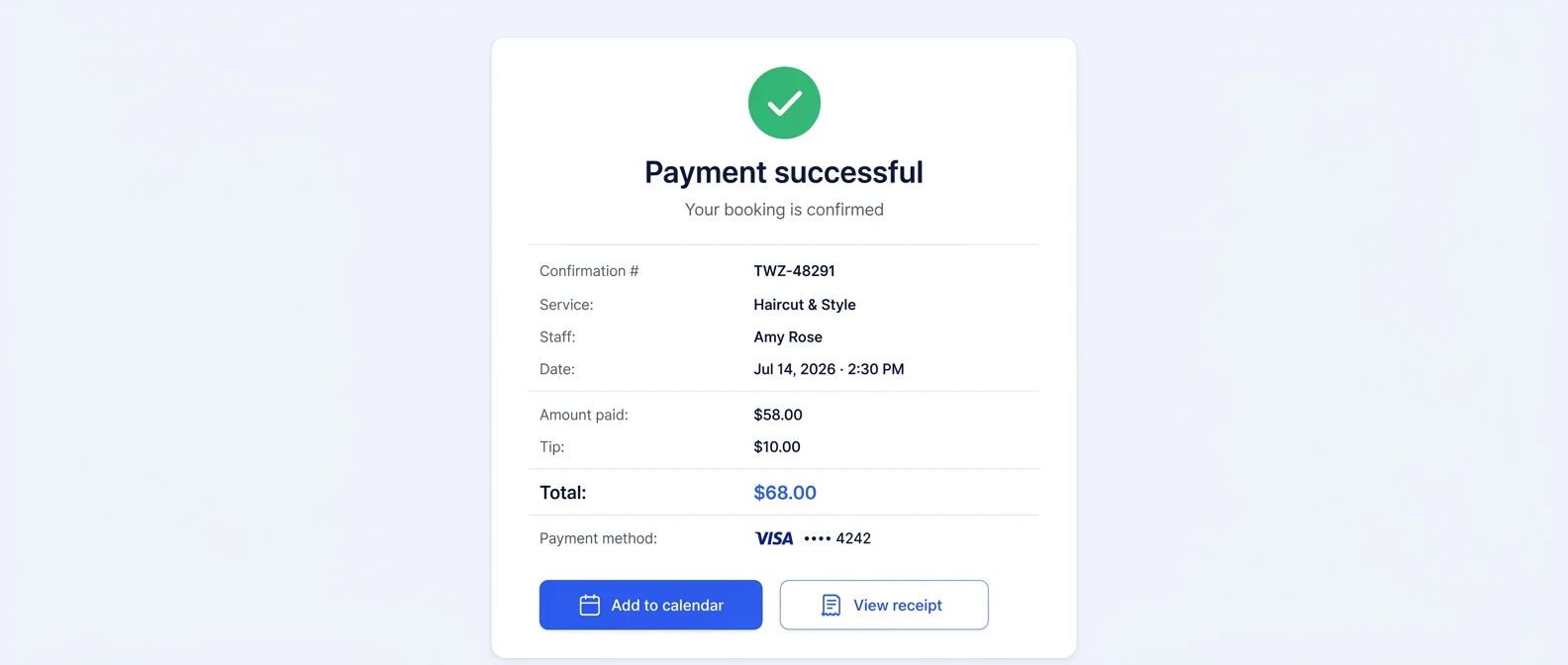
| Tip | The client, at online checkout | The client’s payment confirmation |
Sources: Twizzlo pricing and features pages, read September 28, 2026; Stripe’s pricing page. This page prints no Stripe rate, because Stripe sets it for each account and country.
The platform fee on three booking prices
The platform fee is a share of each online payment, so it rises with the booking price.
| Online booking payment | Twizzlo platform fee (1.5%) |
|---|---|
| $40 | $0.60 |
| $80 | $1.20 |
| $150 | $2.25 |
Platform fee only. Stripe’s part depends on the rate Stripe sets for your account.
How payment processing works for appointment businesses
Every card payment follows the same basic path. The client’s card is charged, the card networks and the bank that issued the card take their share (known as interchange), the payment processor adds its own margin, and the remainder is paid out to your business bank account. The processing fees on your statement are the combined cost of moving that money securely.
Processors package those costs in different ways. With interchange-plus pricing, the processor passes the actual interchange cost through and adds a fixed markup, so the effective rate changes with each card type. With flat-rate pricing, the processor charges one blended rate regardless of which card the client presents, which is easier to predict but hides the underlying cost. Neither model is automatically cheaper. It depends on your ticket sizes and the mix of cards your clients use. Whichever model you pay, budget card processing as its own cost line, as our salon business plan template does.
Appointment businesses may collect payment before, during or after a service. Those are different workflows, and a payment processor’s capability does not prove a booking platform implements each one. Confirm the supported payment amount, timing, refund handling and account eligibility before writing your customer policy.
If you are still choosing a booking tool, our best appointment scheduling software guide compares plans, the small business booking software checklist tests fit, and online booking and payments shows how taking payment at booking changes the front desk.
Payment collection approaches compared
Each way of collecting payment for an appointment needs its own checks before you promise it to clients: the amount charged, when it is charged and how the payment ties back to the booking.
| Approach to evaluate | Confirmation needed |
|---|---|
| Full payment at booking | Amount shown, payment confirmation and failed-payment behavior |
| Partial deposit | Whether the platform supports a partial amount and how the balance is collected |
| Saved card | Processor-hosted collection, supported later-charge workflow and customer agreement |
| In-person payment | Separate provider fees and reconciliation with the booking |
If a saved card is part of the workflow you are evaluating, read our guide to card-on-file authorization wording before you ask a client to agree to one.
If you plan to charge for missed appointments, our guide to no-show policy considerations covers what to weigh before you set a fee amount or a cancellation window.
Where online payments through Twizzlo are available
Online payments through Twizzlo work only where Stripe supports your country, business type and account; Stripe decides approval, payment methods, currencies and payouts. Twizzlo does not control that process, so some payment features can differ by business, location or Stripe account. The countries Stripe covers are on Stripe’s list of supported countries.
Features that may vary by region
| Feature | Availability note |
|---|---|
| Online payment collection | Subject to Stripe support and account eligibility. |
| Tip collection | May depend on region, payment method, currency, and Stripe account setup. |
| Certain payment methods | Availability may differ by country, customer location, and Stripe support. |
| Payouts | Subject to Stripe verification, local requirements, and supported payout options. |
| Currency support | Depends on Stripe-supported currencies for the business account and region. |
| Refunds and disputes | Managed through Stripe and subject to Stripe rules, timelines, and supported features. |
Where payments fit in Twizzlo’s plans
Twizzlo is web-based online booking and appointment scheduling software for appointment-based service businesses, and both of its plans include online payments, prepaid bookings and tips. Free is $0 a month for up to 150 bookings, with no SMS. Business Pro is $29.99 a month per business, with unlimited bookings, 50 SMS a month and then $0.03 per message, and a 30-day money-back guarantee. Both plans include unlimited staff and locations, and support is available 24/7 by email. See the plan limits on the pricing page.
FAQ
How do salons process card payments?
Through a payment processor that moves money from the client’s card to the salon’s bank account, either in person at the salon or online through booking software. With Twizzlo, online booking payments and tips run through Stripe, which handles the card processing and sets its own rate.
How much does payment processing cost for a salon?
It depends on the processor’s pricing model and on factors like card type and international card use, which affect the underlying cost of each charge. For online payments through Twizzlo, the cost is your Stripe processing rate plus the 1.5% Twizzlo platform fee, according to Twizzlo’s pricing page, read September 28, 2026. Stripe publishes its current rates on its pricing page, and they can change.
What is the Twizzlo platform fee for payments?
It is 1.5% of each online payment processed through Twizzlo, charged on top of the processing rate Stripe sets for your account, according to Twizzlo’s pricing page, read September 28, 2026. The same fee applies on the Free and Business Pro plans, separate from the plan price. A payment your staff record manually, such as cash, is not an online payment.
Can clients pay a deposit when they book online?
A deposit is a partial payment collected before the appointment. On Twizzlo, clients pay up front with a prepaid booking: the full service price, paid online when they book. If the client does not show, your business decides whether to keep or refund that payment. A saved card is a different arrangement.
Can a salon charge a card for a no-show?
Twizzlo supports a no-show fee that your business controls. Before using it, check how the fee is collected, the terms shown to the client and the rules that apply to your business. An agreement alone does not guarantee a fee is enforceable.
Why is online payment processing not available in my country?
Payment processing through Twizzlo depends on Stripe availability and eligibility in your country or region. Stripe determines which countries, currencies, payment methods, and business types it supports, and it controls account verification and payout requirements. If Stripe does not support your region or business type, online payment collection through Twizzlo is not available there.
Do tips go through payment processing too?
Yes, when the client adds a tip at online checkout: the tip is part of the online payment that Stripe processes, and it appears on the client’s payment confirmation. Before you quote a total to staff, check the fees on a tipped payment in your Stripe account.
How do I start taking online payments in Twizzlo?
To start, connect a Stripe account to Twizzlo. Clients can then pay online, prepay a booking and add a tip when they book, on the Free and Business Pro plans, once Stripe has verified your account and supports your country and business type.
Sources and methodology
- Twizzlo pricing page (opens in a new tab)Read . Supports: the platform fee on online payments and its plan scope, plan prices, SMS allowance, guarantee and 24/7 support
- Twizzlo features page (opens in a new tab)Read . Supports: online payments through Stripe, prepaid bookings at the full service price, tips at checkout, manual payment records and the payment confirmation screen
- Stripe pricing page (opens in a new tab)Read . Supports: where Stripe publishes its processing rates (no Stripe rate is printed on this page)
- Stripe global availability page (opens in a new tab)Read . Supports: the countries and regions where Stripe is supported
From our editorial policy
- Twizzlo sells online booking and appointment scheduling software, the same category we write about. Twizzlo appears in our comparisons and roundups, and we have a commercial interest in you choosing it.
- To report an error, email support@twizzlo.com with the subject line "Correction: [page URL]". Tell us what is wrong and, if you can, link a source.
Update history
- : Rewrote the fee explanation around one fee sentence, added a table of who sets each part of an online payment, a platform-fee example and a payment confirmation screen, and updated Twizzlo's plan details.
Start free, upgrade when you grow
Flat-rate booking software. No per-seat, per-chair or per-location fees.
- Free plan up to 150 bookings a month, not a trial
- Business Pro is $29.99 a month per business for unlimited bookings, with a 30-day money-back guarantee
- 24/7 support by email