
Your Guide to Simple Client Management Software

In short
Simple client management software keeps each client's contact details, visit history, notes and upcoming appointments in one record, tied to online booking and automated reminders. It suits appointment-based businesses such as salons, spas, tutors, trainers and home-service teams, which need a calendar and a client history more than the lead and deal pipeline of a sales CRM.
- Test before you pay: add a client, book them online, add a note and reschedule, all on your phone, within one trial hour.
- Read the pricing unit first: per user, per calendar tier, per location, or a flat price with a cap on providers or bookings.
- Add payment processing, text-message and add-on costs to the subscription before comparing, because a $0 plan can still carry fees.
In this article8 sections
This guide explains what simple client management software should hold for an appointment-based business, how it differs from a sales CRM, how to test one in a trial hour and how the four common pricing models charge you, with a dated example of each.
Twizzlo publishes this guide and makes online booking software with client records and booking and reminder features, so it competes with some of the products named here.
What Is Simple Client Management Software Anyway?
Simple client management software is a client database built around the appointment. Each record holds a client's contact details, past and upcoming visits, notes and preferences, and the calendar, the online booking page and the reminders all read from it.
Sales CRMs such as Salesforce and HubSpot organize records around leads, deals and pipeline stages, so a sales team can follow each deal through its sales cycle. A business that sells by the appointment needs the visit history more than a deal stage.
Built for services, not sales
The difference shows in daily use. Before an appointment, the provider opens the client's notes; after it, the front desk rebooks from the same screen; between visits, reminders go out on their own. For the wider category, see our guide to what CRM software is used for.
Client records compared: appointment software and a sales CRM
Field by field, the two kinds of client record differ in what they are built around, what they hold and who uses them.
| Record | Appointment-based client management | Sales CRM |
|---|---|---|
| Built around | The appointment and the visit | The lead and the deal |
| A client record holds | Contact details, visit history, notes and preferences, spend, upcoming bookings | Contact details, company, lead source, deal stage and value, calls and emails |
| Daily use | Read notes before a visit, rebook after it, see who is free | Move deals between stages, log calls, forecast sales |
| Automated messages | Booking confirmations and reminders | Sales email sequences |
| Main users | The front desk and the people who deliver the service | Sales and marketing teams |
Three core features to look for
Three features do most of the work in simple client management software: a client database, online booking that writes to it, and staff and location management.
The client database
A client database replaces paper cards, spreadsheets and memory. It should track:
- Contact details and the channel each client prefers.
- Full appointment history, past and upcoming.
- Notes on preferences and allergies.
- Spend and visit frequency, so you can see who is due to rebook.
Online booking tied to the client record
An online booking page lets clients see open times and book at any hour, and each booking should land on the client's record without retyping. Look for automatic confirmations and reminders, client self-rescheduling and buffer times between appointments. Our guide on how to schedule appointments walks through the workflow.
Staff and location management
Once you add staff or a second site, you need one calendar that shows who is free where, assigns bookings by service and staff member and blocks time off, with the client record following the client between staff members and locations.
What changes when bookings and client records share one system
Keeping bookings and client records in one system changes three things: how often clients return, how many appointments go unfilled and how much admin each new hire adds.
More repeat visits
With history and notes on screen, a provider can pick up where the last visit ended, and the front desk can see who has not rebooked.
Fewer no-shows and less admin
- Email and text reminders go out without anyone remembering to send them.
- A reminder with a reschedule link lets a client move the booking instead of simply not arriving.
- Day and week views show gaps early enough to fill them.
Room to add staff and locations
A shared system gives a new hire the same client notes and booking rules on day one, and a second location uses the same client list instead of starting a new one.
Who Truly Needs Simple Client Management Software?
Any business that sells time by appointment and sees the same clients again needs it, from a solo provider to a business with several locations.

From solo providers to multi-location businesses
- The solo provider: you are also the receptionist, so self-booking, automatic reminders and notes on your phone save the most time.
- The mobile service: a groomer, cleaner or detailer working at the client's address needs the address, access notes and job history on the phone at the door.
- The small team: one shared calendar, bookings assigned by who is free, and notes any colleague can read when a client switches providers.
- The multi-location business: one client list across sites, a booking link per location and staff who work at more than one site.
How to choose simple client management software
Choose in two steps: run the same one-hour test in each free trial, then price the plan at the head count and booking volume you expect a year from now.
Run a one-hour trial test
Do the tasks you do every day, on your phone as well as a computer, and count any task that needs more than a few taps or a trip to the help center against the product.
- Add a client by hand, then find them by name and by phone number.
- Book that client from your calendar, then book again as the client from the public booking page.
- Add a note and check that it shows on the next appointment.
- Reschedule as the client and check that the calendar updates.
- Send yourself a reminder and read it on your phone.
- Add a second staff member and, if you need one, a second location.
- Ask support how you would take your client list with you if you leave, and note how fast they answer.
If you would rather start from a shortlist of named products, our best appointment scheduling software guide compares them.
Four client management software pricing models
Client management software pricing follows four models, and the unit a vendor charges for decides what you pay as you grow.
| Model | How the bill grows | Example from the vendor's own pricing page, read September 25, 2026 | Check before you buy |
|---|---|---|---|
| Per user | With every person who needs a login or calendar | Setmore pricing: Pro is $12 per user a month on monthly billing; Free is $0 for up to 4 users | The cost at the team size you expect in a year |
| Tiered by calendars or features | In steps, when you pass a tier's limit | Acuity pricing: Starter $20 a month for 1 calendar, Standard $34 for up to 6, Premium $61 for up to 36, monthly billing | Which tier holds the features and head count you need |
| Flat within a limit | Not at all until you pass the cap on providers, bookings or messages | Boulevard Essentials: $159 a month on monthly billing for up to 5 providers (bookable calendars) | What the cap is and what the next step costs |
| $0 plan, paid through processing | With your card sales | Square Appointments pricing: Free is $0 a month per location; in-person card payments are 2.6% plus 15 cents per tap, dip or swipe | Processing rates, text-message fees and paid add-ons |
All four examples use monthly billing and the dollar prices printed on each vendor's own pricing page, read September 25, 2026. Annual billing lowers the Setmore, Acuity and Boulevard figures. Check the vendor's page before you buy.
Add payment processing, text-message and add-on costs to the subscription before you compare, because the lowest subscription is not always the lowest year.
Where Twizzlo fits for client records
Twizzlo is web-based online booking and appointment scheduling software for appointment-based service businesses, with client records built in: client profiles with visit history, notes and preferences, total spend per client, repeat-client tracking and client search. Bookings and payments add to the same record, and confirmations and reminders go out by email, with SMS on Business Pro.
Free is $0 a month for up to 150 bookings, with no SMS; it is free forever, not a trial, and includes unlimited staff and locations, client records and online payments. Business Pro is $29.99 a month per business, with unlimited bookings, 50 SMS a month then $0.03 each, a 30-day money-back guarantee and every Twizzlo feature. Staff and location counts never raise the Business Pro price.
Online payments carry your Stripe processing rate plus a 1.5% Twizzlo platform fee. Staff can also record manual payments.
Support is available 24/7, and the Twizzlo support page lists how to reach it.
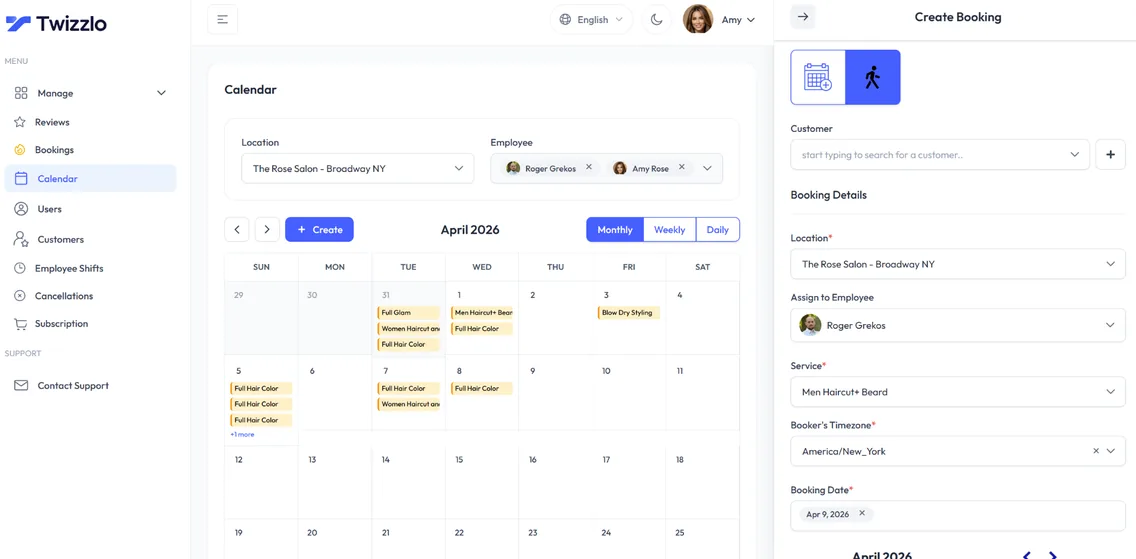
To run the one-hour test above on Twizzlo, start on the Free plan from the Twizzlo pricing page.
Frequently Asked Questions
What Is the Difference Between Client Management Software and a CRM?
A CRM in the usual sales sense organizes records around leads, deals and pipeline stages for a sales team. Simple client management software organizes them around the appointment: each record holds a client's contact details, visit history, notes and upcoming bookings, and it connects to the calendar and the reminders. For a business that sells by appointment, the second does the daily work.
What Features Should Simple Client Management Software Include?
Three features cover most appointment-based businesses: a client database with contact details, full appointment history and notes; online booking that clients can use at any hour and that writes to the same record; and staff and location management from one calendar. Automated email and text reminders belong in the package too. Treat anything that does not solve a daily task as optional.
How Much Does Simple Client Management Software Cost?
It depends on the pricing model. On vendor pricing pages read September 25, 2026, Setmore Pro was $12 per user a month on monthly billing, Acuity Scheduling ran from $20 a month for one calendar to $61 for up to 36 calendars on monthly billing, and Square Appointments Free was $0 a month per location, with card processing charged on each payment. On Twizzlo's pricing page, Free is $0 a month for up to 150 bookings, with no SMS, and Business Pro is $29.99 a month per business.
Do I Need Client Management Software If I Work Alone?
Often yes, because a solo provider is also the receptionist. A simple system lets clients book themselves online, sends reminders without you, and keeps each client's history and notes on your phone between appointments. If you see a few regular clients a week and they book by text, a calendar and a notes app may still be enough for now.
Can I Manage Clients in a Spreadsheet Instead?
You can at first. A spreadsheet holds contact details and notes, but it cannot take bookings, check availability or send reminders, so every appointment is entered twice and every reminder is sent by hand. Once more than one person books clients, or reminders slip in a busy week, the spreadsheet costs more time than it saves.
Do I Need a Separate CRM If My Booking Software Keeps Client Records?
Usually not. If your booking software keeps each client's history, notes, spend and upcoming appointments and sends the reminders, it already does the client-management job. A separate sales CRM earns its cost when you sell through quotes, proposals or a long sales cycle that needs deal stages, which most appointment-based businesses do not.
Sources and methodology
Prices read
- Setmore pricing page (opens in a new tab)Read . Supports: Per-user row of the pricing-models table (Free $0 for up to 4 users; Pro $12 per user a month on monthly billing, $5 on annual billing) and the Setmore figure in the cost FAQ
- Acuity Scheduling pricing page (opens in a new tab)Read . Supports: Tiered row of the pricing-models table (Starter $20 for 1 calendar, Standard $34 for up to 6, Premium $61 for up to 36, monthly billing; lower on annual billing) and the Acuity range in the cost FAQ
- Boulevard pricing page (opens in a new tab)Read . Supports: Flat-within-a-limit row of the pricing-models table (Essentials $159 a month billed monthly, $143 billed annually, up to 5 providers)
- Square Appointments pricing page (US) (opens in a new tab)Read . Supports: $0-plan row of the pricing-models table (Free $0 a month per location; tap, dip or swipe 2.6% plus 15 cents on Free) and the Square figure in the cost FAQ
- Twizzlo features page (opens in a new tab)Read . Supports: Twizzlo client profiles, visit history, notes, total spend, repeat-client tracking, client search and the calendar screenshot
- Twizzlo pricing page (opens in a new tab)Read . Supports: Twizzlo plans, SMS allowance, guarantee, support and the online payment fee
From our editorial policy
- Twizzlo sells online booking and appointment scheduling software, the same category we write about. Twizzlo appears in our comparisons and roundups, and we have a commercial interest in you choosing it.
- We do not publish invented quotes, studies, statistics, customer stories or product tests, and we do not imply hands-on use of a product when the research came from the vendor's public documentation.
- To report an error, email support@twizzlo.com with the subject line "Correction: [page URL]". Tell us what is wrong and, if you can, link a source.
Update history
- : Rewrote the guide around the client record, added a sales CRM comparison, a one-hour trial test and dated pricing examples, removed unverified market statistics and an off-topic video, and corrected Twizzlo's plan details.
Start free, upgrade when you grow
Flat-rate booking software. No per-seat, per-chair or per-location fees.
- Free plan up to 150 bookings a month, not a trial
- Business Pro is $29.99 a month per business for unlimited bookings, with a 30-day money-back guarantee
- 24/7 support by email