
Booking Confirmation Email Template: A Complete Guide [2026]

In short
A booking confirmation email template is a reusable message your system sends the moment an appointment is booked. It names the client and the business, states the service, date and time, gives the address or meeting link, summarizes the cancellation policy in one line with a link, and offers one contact path, so the client can act without calling.
- Send the confirmation automatically the moment a booking is made, and send a fresh one after every reschedule or cancellation.
- Put the service, date, time and location in the body, and summarize the cancellation policy in one line with a link.
- Keep a plain-text version and authenticate your sending domain so the details reach the inbox intact.
In this article9 sections
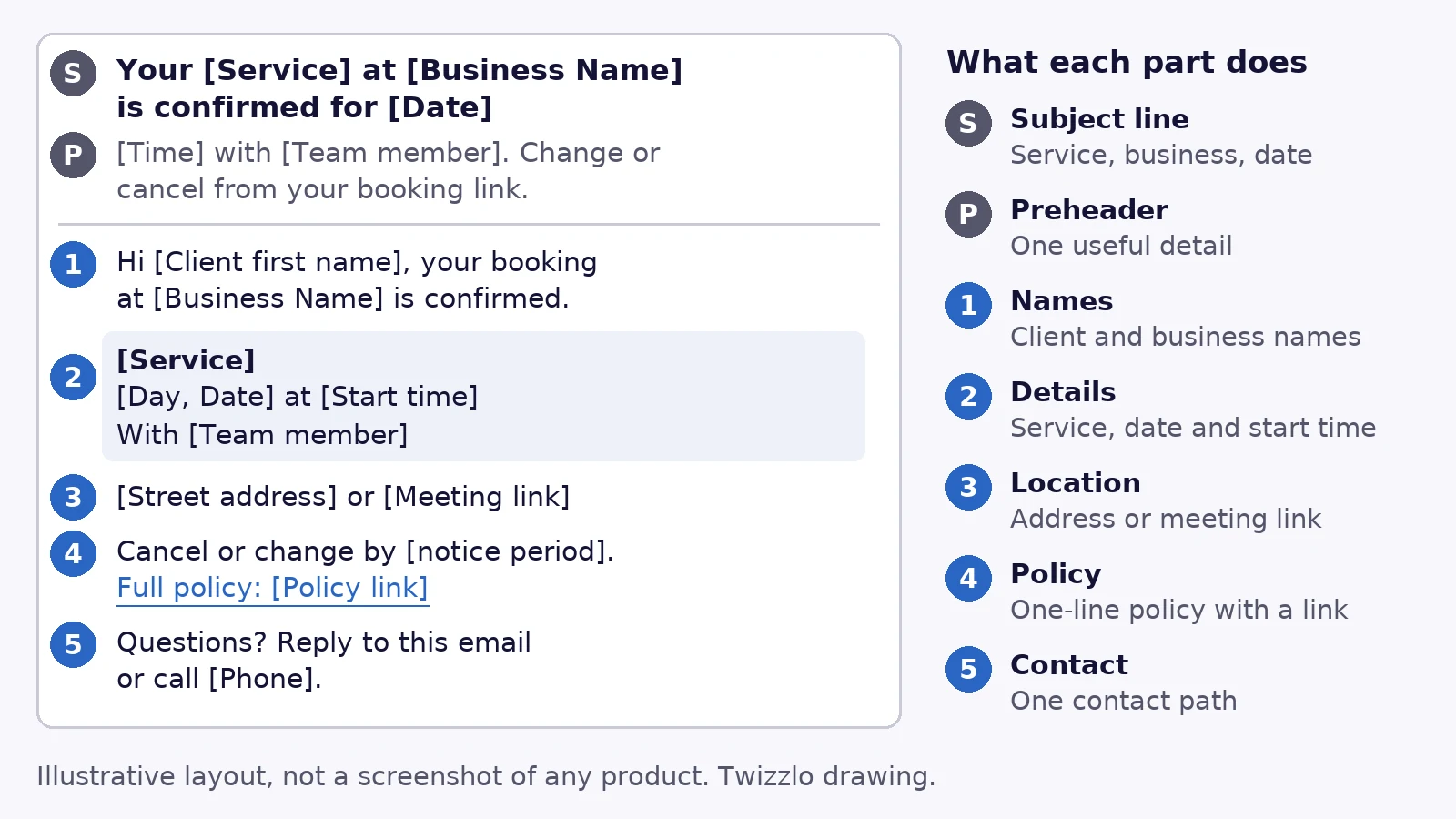
A booking confirmation email template looks simple on the surface, but operationally it’s one of the hardest-working messages in the business. It tells the client the booking went through, gives them what they need to show up on time, and cuts off a surprising amount of avoidable back-and-forth before it ever reaches the front desk.
In practice, the strongest templates do five things every time: confirm who the booking is for, what was booked, when it happens, where it happens, and what to do if plans change. If even one of those is missing, staff usually pay for it later in follow-up calls, reschedule confusion, or preventable no-shows.
Twizzlo, which publishes this guide, makes booking software with booking and reminder features; every template below works in any booking or email tool.
Why These Emails Are More Than Just a Confirmation
A booking confirmation email is the first operational checkpoint after a client commits. It proves the booking went through, gives the details needed to arrive on time and sets the cancellation terms before anyone needs them. When it leaves a detail out, the front desk supplies it later by phone.
Most owners treat the confirmation email like a receipt. That’s too narrow. Clients open a confirmation because they need the details in it, which makes it a working message, not a formality.
That changes how you should build the template. You’re not just acknowledging a transaction. You’re using a high-attention message to lock in attendance, answer predictable questions, and shape the next action.
Where the operational value shows up
When a salon guest books a color service, a weak confirmation says, “You’re booked for Friday at 2.” A strong one says what service was booked, how long to allow, which stylist they’re seeing, where to park, and how to cancel correctly. One creates confidence. The other creates calls.
A few practical wins show up over and over:
- Fewer “just checking” calls: Clients can see the date, time, and service without contacting staff.
- Better arrival quality: They know which location to visit, what to bring, and when to arrive.
- Cleaner schedule protection: The cancellation policy is presented early, not argued about later.
- Extra revenue opportunities: Add-ons feel relevant here because the client is already committed.
Practical rule: If the email doesn’t answer the five questions a nervous first-time client has, your staff will answer them manually.
This matters even more in multi-location businesses. If you run two salons, a spa and a barbershop, or a team that works across several locations, the email becomes part of standardization. It keeps every client touchpoint consistent even when different team members, service types, and locations are involved.
Why generic templates fail
Generic confirmation emails usually miss context. They confirm that something happened, but not enough for the client to act on it. That’s where no-shows and friction start. A booking that feels “kind of confirmed” is not operationally secure.
That’s also why confirmations belong inside a broader attendance workflow. If you’re tightening that workflow end to end, this guide on how to reduce no-shows in a salon with practical scheduling changes is the right companion read.
The best operators build confirmations as part of a system. The email confirms the booking. The calendar link secures the slot in the client’s day. The policy link sets the terms before they are needed. The support path catches exceptions before they become schedule damage.
What Every Booking Confirmation Email Must Include
Every booking confirmation email needs five details: the client and business names, the service with its date and start time, the address or meeting link, a one-line cancellation policy with a link to the full text, and one contact path your team actually monitors.
A good booking confirmation email template isn’t about clever copy. It’s about removing uncertainty. Every section in the email should do one job clearly.
The five non-negotiable elements
These should appear in every template, whether you run a barbershop, spa, massage practice or home service team.
-
Client and business names
Start by making it obvious who the booking belongs to and which business is hosting it. This sounds basic until you manage repeat clients who book across locations or family members who schedule on each other’s behalf. -
Appointment details
Include the service name, date, and start time. If the appointment has multiple services, list them in order. If a duration matters operationally, say so in plain language. -
Location or access details
A street address, room number, suite name, or virtual meeting link belongs in the main body, not buried in the footer. This is what prevents “I’m outside but I think I’m at the wrong place” calls. -
Cancellation policy link
Don’t paste a wall of policy text into the email. Link to the policy and summarize the key point in one line. If you need help setting the policy itself, this guide on how to structure a no-show charge without creating more friction is useful. -
Contact method
Give clients one clear way to reach you. Phone, reply-to email, or both. What matters is clarity. “Contact us if needed” is weaker than “Reply to this email or call the front desk.”
The sections that make the template work
A clear confirmation usually follows this sequence:
| Email section | What it does | What problem it prevents |
|---|---|---|
| Subject line | Signals the email matters | Low open priority |
| Header | Reassures the booking is confirmed | Client uncertainty |
| Details block | States service, date, time, staff, location | Wrong-day and wrong-service confusion |
| Action links | Add to calendar, manage booking, contact support | Last-minute scrambling |
| Policy line | Sets expectations early | Cancellation disputes |
| Footer | Confirms legitimacy and support path | Trust gaps |
What to keep out
Too many operators overload this email because it gets opened. That instinct is understandable, but it usually backfires.
Keep these out of the core confirmation:
- Too many promotional blocks: One relevant add-on can work. A full sales newsletter turns a transactional message into clutter.
- Dense policy paragraphs: Clients skim. Summarize, then link.
- Visual noise: If the design pulls attention away from the date, time, and location, it’s doing the opposite of its job.
- Multiple competing buttons: “Add to calendar” and “Manage booking” are useful. Seven buttons are not.
A practical build order
If you’re creating a template from scratch, write it in this order:
- Start with the facts: name, service, date, time, location.
- Add the operational safeguard: policy summary and link.
- Add the convenience layer: calendar link and contact path.
- Finish with branding: logo, colors, and footer details.
That order keeps the message useful even if design changes later.
Copy-and-Paste Booking Confirmation Email Templates
Use the salon, trainer, home-visit and coach versions below for new bookings, and the reschedule and cancellation versions whenever a booking changes. Each one is a working appointment confirmation email example: replace every bracketed field from the booking record and send one test booking before you switch it on.
Templates work best when they match the type of appointment. A spa booking needs a different tone from a home service visit. The structure stays stable, but the emphasis changes.
Salon and spa template
A salon or spa confirmation should feel polished and calming, but it still needs to handle prep and policy clearly.
Subject: Your appointment at [Business Name] is confirmed for [Date]
Hi [Client First Name],
Your appointment is confirmed.
Booking details
Service: [Service Name]
Date: [Day, Date]
Time: [Time]
Team member: [Staff Name]
Location: [Business Address]
Please arrive a few minutes early so we can start on time. If you need to update or cancel your appointment, review our policy here: [Cancellation Policy Link].
Questions before your visit? Reply to this email or call us at [Phone Number].
We look forward to seeing you,
[Business Name]
Why this works: salon and spa clients often care about the experience before they arrive. The email should feel reassuring, but not vague. If prep matters, add a short line such as “Please arrive with product-free hair” or “Avoid shaving before your facial.”
Personal training and wellness template
Personal trainers and wellness practitioners need a more preparation-focused confirmation.
Subject: Your [Service] with [Business Name] is confirmed
Hi [Client First Name],
You’re booked for [Service Name] on [Day, Date] at [Time].
Location
[Address or studio room]
What to bring
[Water bottle, comfortable clothing, or other item to bring]
If you can’t attend, please use this link to manage your booking: [Manage Booking Link]
Policy details: [Cancellation Policy Link]
Need help before your appointment? Contact us at [Phone Number] or reply to this message.
See you soon,
[Business Name]
This version works because it answers the practical question clients ask themselves right after booking: “What do I need to do before I show up?”
Home services template
For mobile dog groomers, cleaners, repair visits, or in-home wellness services, logistics matter more than ambience.
Subject: Your service visit is confirmed for [Date]
Hi [Client First Name],
Thanks for booking with [Business Name]. Your appointment is confirmed.
Visit details
Service: [Service Name]
Date: [Day, Date]
Arrival window: [Time Window]
Address: [Service Address]
Please make sure we have access to the property at the scheduled time. If there are parking instructions, gate codes, or pets to secure, reply to this email before the visit.
To reschedule or cancel, use this link: [Manage Booking Link]
Policy: [Cancellation Policy Link]
Thanks,
[Business Name]
This template reduces the classic home-service problems: no access, bad arrival assumptions, and last-minute direction messages.
Consultant or coach template
Professional services need a more formal confirmation because the appointment often includes agenda-setting.
Subject: Your meeting with [Business Name] is confirmed
Hi [Client First Name],
Your appointment has been confirmed.
Session details
Service: [Consultation Type]
Date: [Day, Date]
Time: [Time]
Location: [Office Address or Meeting Link]
If there are documents, questions, or discussion points you’d like to share in advance, reply to this email before the session. If you need to make changes, please review our cancellation terms here: [Cancellation Policy Link].
Best,
[Business Name]
The useful shift here is tone. You’re setting expectations for a professional meeting, not just confirming a slot.
Reschedule confirmation template
Send this the moment a booking moves, whoever moved it. Showing the old and new times together tells the client exactly what changed.
Subject: Your appointment at [Business Name] has moved to [New Date]
Hi [Client First Name],
Your appointment has been rescheduled. Here are the updated details.
Was: [Old Day, Date] at [Old Time]
Now: [New Day, Date] at [New Time]
Booking details
Service: [Service Name]
Team member: [Staff Name]
Location: [Business Address or Meeting Link]
Need a different time? Use this link: [Manage Booking Link]
Policy: [Cancellation Policy Link]
Questions? Reply to this email or call us at [Phone Number].
See you then,
[Business Name]
Why this works: a client who remembers the first slot sees at once which time now stands, and the full details block means they never need to dig out the original email.
Cancellation confirmation template
Send this whenever a booking is cancelled, by the client or by your team. It closes the loop in writing and makes rebooking one step.
Subject: Your [Service] on [Date] is cancelled
Hi [Client First Name],
Your appointment has been cancelled.
Cancelled booking
Service: [Service Name]
Date: [Day, Date]
Time: [Time]
Location: [Business Address]
[Fee or refund line under your policy, if any]
Want a new time? Book again here: [Booking Link]
Questions? Reply to this email or call us at [Phone Number].
Thanks,
[Business Name]
Why this works: it names the exact booking that ended, so a client with two appointments knows the other one still stands. Include the fee or refund line only when your policy applies one, and word it exactly as the policy does.
Plain-text version
Keep a plain-text copy of every template. If a client’s email app shows the text version of a message, each detail still has to read correctly without bold type or buttons, so links are written out in full. Here is the salon and spa template as plain text:
Subject: Your appointment at [Business Name] is confirmed for [Date]
Hi [Client First Name],
Your appointment is confirmed.
BOOKING DETAILS
Service: [Service Name]
Date: [Day, Date]
Time: [Time]
Team member: [Staff Name]
Location: [Business Address]
Please arrive a few minutes early so we can start on time. If you need to update or cancel your appointment, review our policy here: [full cancellation policy web address]
Questions before your visit? Reply to this email or call us at [Phone Number].
We look forward to seeing you,
[Business Name]
Templates are starting points, not legal advice. Have a qualified local professional review anything you rely on.
One template mistake to avoid
Don’t force every business into the same wording. A barbershop can be more direct. A skin-care appointment may need prep instructions. A tutor may need materials listed. The strongest booking confirmation email template is always adapted to how the appointment unfolds.
If you also use SMS for time-sensitive follow-up, this guide to appointment confirmation text examples for service businesses pairs well with your email workflow.
Subject Lines and Preheaders for Confirmation Emails
A confirmation subject line should name the appointment, the business and the date or status, for example “Your haircut at North Studio is confirmed for Thursday.” The preheader, the preview line shown after the subject, then carries one useful detail such as the time, the team member or the manage-booking link.
The body copy can be excellent and still fail if the subject line is lazy. That’s the first sorting decision in the inbox, so keep the subject line clear and matched to what the email contains.
What a strong subject line includes
For confirmations, the formula is simple:
[Your appointment or service] + [business name] + [date or status]
That tells the recipient what the message is, who it’s from, and why it matters. No guesswork.
Weak subject lines create friction because clients have to open the message to understand whether it’s important. Many won’t.
| Weak subject line | Strong subject line |
|---|---|
| Your appointment | Your haircut at North Studio is confirmed for Thursday |
| Booking update | Your massage at Oak Wellness is confirmed |
| Details inside | Your consultation with Smith Advisory is confirmed for 3 PM |
| Reservation | Your dog grooming visit is confirmed for Tuesday morning |
Preheader text should do the second job
The subject line gets the open. The preheader should reduce anxiety and reinforce usefulness.
Good preheaders often mention one of these:
- The essential detail: date, time, or location
- The next action: add to calendar or manage booking
- The practical reassurance: reply if you need to reschedule
A few useful combinations:
-
Subject: Your haircut at North Studio is confirmed for Thursday
Preheader: View your time, stylist, location, and cancellation link -
Subject: Your service visit is confirmed for Friday
Preheader: Review your arrival window and update access details if needed
What not to do
A few mistakes show up constantly in appointment businesses:
- Using vague labels: “Confirmation” tells the client almost nothing.
- Leaving out the business name: This hurts recognition, especially if the client books across several providers.
- Sounding promotional: “Great news inside” reads like marketing, not a transactional message.
- Stuffing too much in: If the subject line becomes hard to scan on mobile, it loses its value.
If your team is revising client emails more broadly, our guide to client communication best practices for appointment businesses is a helpful reference point.
Deliverability and Merge Fields: Getting the Details Right
A confirmation works only if it reaches the inbox and every detail in it comes from the booking record. Authenticate your sending domain as Google and Yahoo require, keep a plain-text version, and fill the template with merge fields so nobody retypes a date or an address (sender pages read September 28, 2026).
For deliverability, a confirmation needs a responsive layout (an open-source framework such as MJML is one option) and a sending domain authenticated with SPF, DKIM and DMARC. If an email service provider sends for you, Google’s sender guidelines say to verify that it authenticates your domain’s email with SPF and DKIM. Merge tags such as {{client.name}} and {{appointment.start}} pull live booking data into each message, so nobody edits it by hand.
Personalization that actually helps
Personalization isn’t adding “Hi Sarah” and calling it a day. Useful personalization fills in details that reduce mistakes.
The merge fields that matter most, and what each one prevents:
| Email field | Where it comes from in the booking | What goes wrong if it is wrong |
|---|---|---|
| Client name | The client record attached to the booking | The email greets the wrong person, or a relative who booked for someone else cannot tell who is going |
| Service | The service or services booked, in order | The client prepares for the wrong service or allows the wrong amount of time |
| Team member | The staff member assigned to the booking | The client expects someone else and calls to check |
| Date and start time | The booking’s start time | The client arrives on the wrong day or at the wrong time |
| Time zone | The location’s time zone, or the client’s for a video session | A remote client joins an hour early or an hour late |
| Location or meeting link | The location on the booking, or the session’s meeting link | The client goes to the wrong branch or cannot join |
| Manage-booking link | The booking’s own reschedule and cancel page | The client calls instead of changing the booking themselves |
| Policy link | Your published cancellation policy | The client disputes terms they never saw |
Placeholder syntax such as {{client.name}} varies by platform.
This works like a mail merge, but with operational data pulled directly from your scheduling system. That matters because manual edits create mismatches. A wrong service name or wrong location in a confirmation email creates more damage than no email at all.
Deliverability mistakes that hurt service businesses
Most appointment businesses don’t have a copy problem. They have a setup problem.
Watch for these issues:
- Image-heavy layouts: If the message looks like a promotional campaign, deliverability often suffers.
- Missing plain-text fallback: Some inboxes render stripped-down versions. The key details still need to survive.
- Weak mobile formatting: Clients often open confirmations on phones, often while moving.
- Reply-to confusion: If the client hits reply and no one sees it, the system breaks at the exact moment it should help.
- Times without a zone: For video sessions or traveling clients, state the time with its zone, for example 2:00 p.m. Eastern Time.
- Marketing and confirmations on one sender: Yahoo recommends sending bulk or marketing mail from different IP addresses or DKIM domains than transactional mail, because each carries its own reputation (read September 28, 2026).
Gmail and Yahoo set the floor for anyone who sends to their inboxes. Table 4 lists what each company’s sender page required when we read both on September 28, 2026.
| Rule | Gmail | Yahoo |
|---|---|---|
| Who it covers | Everyone sending to personal Gmail accounts, since February 1, 2024; stricter rules for senders of more than 5,000 messages a day | All senders, with stricter rules for bulk senders; enforcement began in February 2024 |
| Authentication, every sender | SPF or DKIM | SPF or DKIM at a minimum |
| Authentication, bulk senders | SPF and DKIM, plus DMARC (the policy can be set to none) | SPF and DKIM, plus a DMARC policy of at least p=none that passes |
| From address, bulk senders | The From: domain aligned with the SPF or DKIM domain | The From: domain aligned with the SPF or DKIM domain |
| Spam complaint rate | Below 0.3% in Postmaster Tools | Below 0.3% |
| DNS and format | Valid forward and reverse DNS (PTR) records; a TLS connection; RFC 5322 format | Valid forward and reverse DNS for sending IPs; RFC 5321 and 5322 |
| Unsubscribe, bulk senders | One-click unsubscribe and a visible unsubscribe link in marketing and subscribed messages | One-click unsubscribe for marketing and subscribed messages, a visible link, and requests honored within 2 days |
Both pages apply the unsubscribe rules to marketing and subscribed messages. Google defines its bulk tier as more than 5,000 messages a day to Gmail accounts; the Yahoo page we read prints no volume threshold.
Why this matters more at multiple locations
The larger the operation, the more expensive inconsistency becomes. A single-location barber may catch an error fast. A three-location salon group won’t always catch it before the client shows up at the wrong site.
That’s where integrated scheduling platforms become operationally useful. They can pull staff, location, and client data into one confirmation workflow instead of leaving the team to piece details together from separate tools.
How to send booking confirmation emails automatically
Manual confirmations break down the moment volume picks up. The reliable setup is to let your scheduling system trigger the email the instant a booking is created, from any source: online booking, a front-desk entry, or a rebooking at checkout. The template pulls the client, service, staff member, time, and location through merge fields, so nobody retypes details and nothing drifts out of sync.
Two rules keep the automation trustworthy. First, every change to the appointment should regenerate the confirmation, so the client’s newest email always matches the calendar. Second, the same system should own confirmations and reminders together, so the sequence stays consistent from booking to arrival. Our guide to appointment reminders software covers the reminder side.
Key Metrics to Track for Confirmation Email Success
Judge a confirmation email by what happens at the appointment: fewer confused arrivals, fewer missed bookings and fewer calls asking when the appointment is. Open and click rates diagnose the email itself, but the result that matters shows up in your booking and attendance records.
It’s common to stop at “it sent.” That’s not enough. A confirmation email should be measured against the operational result it’s supposed to produce.
Three metrics tell you most of what you need to know.
Open rate
This answers one question: did the client likely see the information? If opens are weak, review your subject line first. That’s usually the bottleneck, not the body copy.
Click-through rate
This tells you whether clients are taking the next useful action. For confirmations, the meaningful clicks are usually:
- Add to calendar
- Manage booking
- Policy review
- Location or meeting access link
Operational outcome
This is the true scorecard. Did fewer clients arrive confused? Did fewer people miss appointments? Did staff spend less time answering basic scheduling questions?
Those results usually show up in booking data and reporting tools, not in the email platform alone. If you’re reviewing this by location, service type, or staff member, a centralized dashboard like sales reports software for appointment businesses makes those patterns easier to spot.
Where Twizzlo Fits: Automatic Email Confirmations
Twizzlo is web-based online booking and appointment scheduling software for appointment-based service businesses. It sends booking confirmations and reminders by email automatically on both plans, and by SMS on Business Pro (Twizzlo features page, read September 28, 2026). Clients can reschedule themselves instead of calling, and cancellation handling is built in.
Free costs $0 a month, free forever, and covers up to 150 bookings each month, with email confirmations and reminders and no SMS. Business Pro is $29.99 a month per business for unlimited bookings, with 50 SMS a month included, then $0.03 each, and a 30-day money-back guarantee. Both plans include unlimited staff and locations, and support is available 24/7 by email. Plan details are on the pricing page.
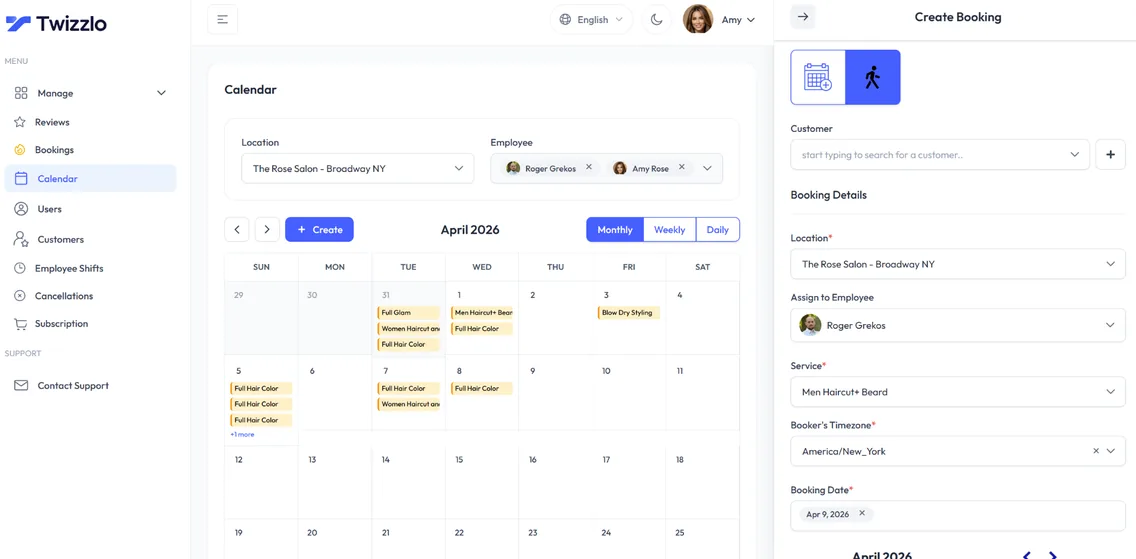
If you would rather have confirmations go out on their own the moment a client books, start on Twizzlo’s free plan and send yourself a test booking.
Frequently Asked Questions About Booking Confirmations
Should I send a new confirmation after a reschedule
Yes. Send a fresh confirmation immediately with the updated date, time, location, and policy link. Don’t rely on the original email plus a short follow-up note.
How do I confirm multi-service bookings
List each service in the order it will happen. If different staff members are involved, name them clearly so the client knows what to expect.
Should I include an add-to-calendar link
Yes, if your system supports it cleanly. It’s one of the easiest ways to move the appointment from inbox memory to calendar commitment.
What’s the best contact option in the email
Use the channel your team monitors. A reply-to inbox nobody checks creates more problems than it solves.
How do I write a booking confirmation email
Start with the facts: client name, service, date, time, and location. Add a one-line policy summary with a link to the full policy, then one clear contact path, and finish with branding. If it covers the five essentials and a client can act on it without calling, it is done.
When should a booking confirmation email be sent
Immediately after the booking is made, and automatically. Any delay creates doubt about whether the booking went through, and doubt turns into calls to the front desk. If the appointment changes later, send a fresh confirmation with the updated details rather than a short follow-up note.
Is a booking confirmation email the same as an appointment reminder
No. The confirmation goes out once, right after booking, and verifies the details. Appointment reminders go out closer to the appointment to protect attendance. They work best as a pair: the confirmation sets the record, the reminder defends the slot.
What is an example of an appointment confirmation email?
Subject: Your haircut at North Studio is confirmed for Thursday. Body: Hi Sam, your haircut with Alex is confirmed for Thursday, October 8, at 2:00 p.m. at 12 Main Street. To change it, use your manage-booking link. Our cancellation policy is here: [link]. Questions? Reply to this email or call [phone].
Do booking confirmation emails need an unsubscribe link?
Not for a pure confirmation, according to the Federal Trade Commission’s CAN-SPAM compliance guide, read September 28, 2026. The guide treats an email that only confirms a transaction the recipient already agreed to, such as a booking, as a transactional or relationship message: it may not contain false or misleading routing information but is otherwise exempt from most of the law’s provisions. When a confirmation also carries promotional content, the FTC treats it as commercial if the subject line reads like an advertisement or the booking details do not come first, and then all of the law’s requirements apply, including a clear way to opt out of marketing email. Have a qualified professional confirm how they apply to you.
Should a booking confirmation email include the time zone?
Yes, whenever the client could be in another time zone, such as a video session or a traveling client. Write the time with its zone, for example 2:00 p.m. Eastern Time, and use the same zone in any add-to-calendar file so the calendar entry matches the email.
Sources and methodology
- Google, Email sender guidelines (Gmail Help) (opens in a new tab)Read . Supports: Table 4 Gmail column: who the rules cover, SPF, DKIM and DMARC, From alignment, the 0.3% spam rate, DNS, TLS and RFC 5322, one-click unsubscribe; the advice to verify that an email provider authenticates your domain
- Yahoo Sender Hub, Sender Best Practices (opens in a new tab)Read . Supports: Table 4 Yahoo column and the recommendation to send marketing and transactional mail from different IP addresses or DKIM domains
- Federal Trade Commission, CAN-SPAM Act: A Compliance Guide for Business (opens in a new tab)Read . Supports: transactional or relationship messages and the primary-purpose test (FAQ 9)
- Twizzlo features page (opens in a new tab)Read . Supports: automated email confirmations and reminders on both plans, SMS on Business Pro, client self-rescheduling, cancellation handling, and the calendar screenshot (same image)
- Twizzlo pricing page (opens in a new tab)Read . Supports: Twizzlo plans, booking cap, SMS allowance, money-back guarantee and 24/7 support
From our editorial policy
- Our templates, such as consent forms, contracts and confirmation messages, are text to copy and adapt to your business. They are not legal advice. Have a qualified local professional review anything you rely on.
- To report an error, email support@twizzlo.com with the subject line "Correction: [page URL]". Tell us what is wrong and, if you can, link a source.
Update history
- : Added reschedule, cancellation and plain-text templates, a merge-field map and sourced sender rules; replaced unsourced statistics and AI images.
Start free, upgrade when you grow
Flat-rate booking software. No per-seat, per-chair or per-location fees.
- Free plan up to 150 bookings a month, not a trial
- Business Pro is $29.99 a month per business for unlimited bookings, with a 30-day money-back guarantee
- 24/7 support by email