
Top 10 Client Communication Best Practices for 2026

In short
Client communication best practices for appointment businesses work as one system: confirm every booking at once, remind clients before the visit, show your policies before they book, warn clients early about delays, answer inquiries within a set time and follow up after the service, all in one consistent voice on the channel each client prefers.
- Automate the routine messages first: confirmations, reminders and post-visit follow-ups, so staff time goes to delays, questions and complaints.
- Ask each client at booking which channel they prefer, and keep texts for time-sensitive updates and email for longer details.
- Write cancellation and late-arrival policies in plain words, show them before clients book and repeat a one-line summary in every confirmation.
In this article15 sections
This guide sets out ten client communication best practices for appointment businesses, from automated reminders to post-visit follow-ups, with the timing and wording to put each one in place.
Twizzlo publishes this guide and sells booking software; you can see every scheduling feature on its features page. Every practice below works with any booking system.
1. Automated Confirmations and Reminders
Send a confirmation the moment a client books and at least one reminder before the visit, automatically, from your booking system. One workable cadence is a first reminder about 48 hours ahead, which leaves time to reschedule, and a short final prompt 2 to 4 hours before. Each message should let the client confirm, cancel or reschedule.
Reminders keep the appointment in view and make changing it easy, which is one of the simplest ways to reduce no-shows in a salon or any appointment business. Send them from your scheduling system, so the details are accurate and nobody has to send them by hand.
How to Implement Effectively
To make your reminders work for you, not against you, follow a structured approach. Avoid sending too many messages, which can feel intrusive, or too few, which may be ineffective.
- Strategic Timing: Treat the 48-hour and 2-to-4-hour cadence above as a starting point, and adjust it against your own attendance records rather than adding more messages.
- Actionable Content: Always include links that allow clients to confirm, cancel, or reschedule with a single click. This convenience reduces friction and administrative work.
- Personalization is Key: Address clients by their first name and mention the specific service they booked (e.g., “Hi Jane, this is a reminder for your Deep Tissue Massage at 3 p.m. tomorrow.”).
- Channel Choice: Let clients opt in to their preferred channel (email or SMS) during the booking process. If your booking system does not send reminders on its own, this guide to appointment reminders software explains what to look for.
2. Personalized Client Communication Based on CRM Data
Personalize messages from the client record, not from memory. Note preferences, service history and anything the client shares after each visit, then use it: name the service they had, suggest the next one when it is due, and leave out offers for services they never book.
The benefit is that each message is about the client in front of you. For a beauty studio, this could mean remembering a client’s preferred hair color formula and sending a timely reminder when it’s time for a root touch-up. These small gestures depend on accurate client records.
How to Implement Effectively
Effective personalization relies on consistent data collection and thoughtful application. Your CRM should become the central source of truth for every client interaction.
- Consistent Data Capture: Train your staff to update the client’s CRM profile after every visit. Note what they liked, any special requests, or personal details they shared.
- Proactive Recommendations: Use service history to make smart suggestions. If a client regularly books a Swedish massage, you can send them a targeted offer for a Deep Tissue massage you think they might enjoy.
- Celebrate Milestones: Automate birthday or client anniversary messages with a special discount for clients who agreed to receive marketing. A small gesture on a date that matters to the client gives them a reason to book again.
- Segment Your Audience: Group clients based on their behavior, such as “First-Time Visitors” or “Regulars.” This allows you to send highly relevant marketing campaigns instead of one-size-fits-all promotions.
3. Multi-Channel Communication Strategy
Offer clients more than one way to reach you, but give each channel one job. Texts suit short, time-sensitive updates such as confirmations and delays; email suits longer details, receipts and newsletters; a phone call suits problems. Ask every client at booking which channel they prefer and record it.
For example, a spa can send appointment confirmations by text, share monthly care tips in an email newsletter and use Instagram direct messages to answer quick questions about services. A home service provider might send arrival estimates by text and call the client when a delay is serious.
How to Implement Effectively
A multi-channel setup needs organization, or conversations get lost between channels.
- Ask for Preferences: At booking, ask clients how they prefer to be contacted for each type of message, such as reminders, promotions and general updates.
- Assign Channels to Purposes: Define a clear purpose for each channel. Use SMS for time-sensitive, brief messages like confirmations. Reserve email for longer-form content like newsletters, invoices, and promotional offers. Use social media for community building and quick inquiries.
- Maintain Brand Consistency: Ensure your tone of voice, branding, and key information are consistent across all platforms. A client should feel they are talking to the same business whether on email or Facebook Messenger.
- Centralize and Respond Promptly: Use a customer relationship management (CRM) tool or a unified inbox to manage communications from all channels in one place. Prompt responses on every channel are critical for building trust.
4. Transparent and Clear Communication About Policies
Write your cancellation, late-arrival and payment policies in plain language, show them before a client books, and repeat a one-line summary in every confirmation. The rule is then never a surprise when it applies, and every staff member can point to the same wording.
A home service provider who details the exact scope of work and pricing upfront leaves less room for scope and payment disagreements later. Likewise, a salon that clearly states its 24-hour cancellation window and associated fee gives clients the rule before they commit.
How to Implement Effectively
Effective policy communication is about accessibility and consistency. The information should be easy to find and understand, reinforced at key points in the client journey.
- Prominent Placement: Display your policies directly within your online booking flow, requiring clients to acknowledge them before confirming an appointment. They should also be easy to find on your website’s FAQ or a dedicated policy page.
- Simple Language: Write your policies in plain, straightforward language. Avoid legal jargon or overly complex sentences that could confuse clients. The goal is clarity, not a legal treatise. Have a qualified local professional review any policy that charges a fee.
- Reinforce in Confirmations: Include a brief summary of key policies, like your cancellation window, in booking confirmation emails and messages. It works as a polite reminder, and these appointment confirmation text examples show how to fit a policy line into a short message.
- Staff Training: Ensure your entire team understands the policies and can explain them consistently and politely. Clients then hear the same rule from everyone.
5. Proactive Communication and Status Updates
Tell clients about a delay, a staff change or a moved appointment before they have to ask. Send the update as soon as you know, by text if it affects today, and pair the problem with a choice: wait, see another team member or rebook.
A home service company that texts 30 minutes before arrival gives the homeowner time to prepare. A salon that texts “Your stylist is ready for you” when a client checks in tells them they have been seen. When a stylist runs behind, an early message shows the client you respect their time.
How to Implement Effectively
Build updates into the working day so they go out on time and say something useful, without flooding the client with messages.
- Timely Notifications: Train staff to tell clients about any delay or issue as soon as they know. For urgent messages, like an ETA, use SMS. For less immediate but more detailed information, like a change in available staff, email is appropriate.
- Provide a Solution: When communicating a problem, always include a clear explanation and a solution. For example: “Hi Sam, we apologize, but Marco is running 15 minutes behind schedule. We can offer you a complimentary beverage while you wait, or we can reschedule you with Sarah, who is available now.”
- Automate Milestones: Set up automated notifications for key appointment milestones. This could be an “On my way” message for home services or a “Your room is ready” text for a spa.
- Apologize and Compensate: For significant delays or inconveniences, a sincere apology is crucial. Consider offering a small discount or a complimentary add-on for a future visit to show goodwill and retain the client.
6. Active Listening and Feedback Collection
Ask for feedback soon after each visit with one short question, read every answer, and reply to criticism privately and quickly, while the problem can still be fixed. Then tell clients what you changed because of their feedback, so the next request feels worth answering.
For example, a salon that sends a brief post-appointment survey can find and fix a client’s minor issue quickly. Similarly, a barbershop can ask regulars which new services they would book. The goal is to close the loop: collect feedback, act on it, and tell clients what changed.
How to Implement Effectively
Make giving feedback easy for clients, and make acting on it a priority for your team.
- Keep it Short and Simple: After a visit, ask one question: a 1 to 5 star rating or “What is one thing we could do better?” Save longer surveys, capped at 3 to 5 questions, for an occasional check-in.
- Use Multiple Channels: Offer various ways for clients to share their thoughts. This could include automated post-appointment email surveys, QR codes at your front desk linking to a feedback form, and actively monitoring online review sites. The follow-up is also the natural moment to ask every client, not only the happy ones, for a public review; the steps for getting Google reviews cover timing and wording.
- Respond to Everything: Acknowledge all feedback, both positive and negative. A prompt, professional response to a negative Google review shows future clients how you handle problems. For a complaint, own the problem and offer a choice: “Hi Jordan, thank you for telling us. You booked a trim and left with more taken off than you asked for, and that is on us. We would like to fix it: a free correction with Alex this week, or a refund of today’s service. Which would you prefer?”
- Show, Don’t Just Tell: Demonstrate that you’re acting on suggestions. If clients ask for weekend appointments and you add them, announce it in your newsletter or on social media, explicitly stating, “You asked, we listened!”
7. Prompt Response Time to Client Inquiries
Answer new inquiries within a set target, for example two hours during business hours, and use an after-hours auto-reply that says when you will respond. Assign each channel to a named person on every shift, and keep saved answers for common questions about prices, services and policies.
A home service company that answers a quote request the same day gives the client less reason to keep shopping, and a salon that watches its Instagram messages during opening hours can book a same-day request before the slot passes.
How to Implement Effectively
A fast response system doesn’t mean being tied to your phone 24/7. It’s about creating an efficient workflow that manages expectations and prioritizes urgent messages.
- Set Clear Expectations: Use an auto-responder for after-hours messages on email or social media. A simple, “Thanks for your message! Our business hours are 9 a.m. to 5 p.m., and we’ll reply as soon as we’re back,” tells the client when to expect an answer.
- Assign Ownership: Designate specific staff members to monitor channels like phone, email, and social media during their shifts. Give them access to your booking system on the device they carry so they can reply away from the front desk.
- Create Response Templates: Document answers to frequently asked questions (FAQs) about pricing, services, or policies. Having these templates ready allows for immediate, accurate replies, saving staff time and ensuring consistency.
- Track and Improve: Measure actual response times against your target each week to see which channel or shift is falling behind.
8. Segmented and Targeted Marketing Communication
Send marketing messages to groups of clients who share a need, not to everyone. Three or four segments built from booking data, such as new clients, regulars and clients who have not booked in 90 days, are enough to start, provided each client has agreed to receive marketing.
For example, a spa can send an upgrade offer for a hot stone massage to clients who often book deep tissue massages, and a massage studio might send a check-in to clients who have not booked in 60 days rather than to everyone on its list.
How to Implement Effectively
Effective segmentation doesn’t require dozens of complicated groups. Start small and build from there, focusing on data you already have.
- Start with Key Segments: Begin with a few simple segments, such as “New Clients,” “High-Value Clients” (based on spend or frequency), and “Inactive Clients” (for example, no booking in 90 days).
- Use Behavioral Triggers: Automate re-engagement campaigns. Set up a trigger to send a special offer to a client who hasn’t booked a follow-up appointment within their typical cycle, like a haircut client who passes the 8-week mark.
- Personalize the Offer: Tailor the message content. For your high-value segment, offer an exclusive first look at a new service. For new clients, a simple welcome discount on their second visit gives them a reason to return.
- Test and Refine: Send different offers to similar segments to see what works best. Does your inactive segment respond better to a discount or a complimentary add-on? Compare rebooking rates for each group in your booking records.
Marketing messages carry rules that booking reminders do not. The Federal Trade Commission’s CAN-SPAM compliance guide says commercial email must include a clear way to opt out and your valid physical postal address, and that opt-out requests must be honored within 10 business days (read September 28, 2026). Before you send offers by text, check the consent rules for marketing texts where you and your clients are, and have a qualified professional confirm how these rules apply to you.
9. Consistency in Brand Voice and Tone Across Communications
Every message should sound like the same business, whether it is an automated reminder, a text from the front desk or a reply to a review. Write down three or four voice traits, words to use and avoid, and approved templates, and train everyone who writes to clients on them.
For example, an upscale day spa might adopt a formal, calm tone in all its communications to match its services, while a neighborhood barbershop could use a casual, friendly one. The key is that every message, from automated reminders to personal follow-ups, sounds like the same business.
How to Implement Effectively
A consistent voice needs a written framework that the whole team can follow.
- Document Brand Voice Guidelines: Create a simple document that defines your brand’s personality. Outline key attributes (e.g., friendly, expert, reassuring), specify words to use and avoid, and provide examples of correct and incorrect phrasing.
- Create Message Templates: Develop a library of pre-written templates for common interactions like appointment confirmations, reminders, and thank-you messages; for text messages, start from these appointment confirmation text templates. Templates keep the core tone consistent, even when personalized.
- Train Your Team: Onboard new staff with your brand voice guidelines. Regularly review communications together to provide feedback and reinforce the standards. This is especially important for team members who handle social media or respond to client reviews.
- Conduct Quarterly Audits: Periodically review a sample of all client-facing communications, including emails, SMS messages, website copy, and social media responses. Check for consistency and identify any areas that have drifted from your established tone.
10. Follow-Up Communication Post-Service
Follow up within a day of the visit with a thank-you, one question about the experience and a reason to book again when the next service is due. Name the service the client had so the message reads as personal, and keep any offer small and relevant.
A salon that sends a “How do you love your new haircut?” message with a link to leave a review reads as personal and attentive. Similarly, a massage studio can email a client the day after a deep tissue massage to check in and offer a small discount on their next session.
How to Implement Effectively
A successful follow-up strategy is timely, personal, and provides value without feeling like a hard sales pitch. The goal is to continue the conversation, not just sell another service.
- Timely Thank You: Send a follow-up message within 24 hours of the appointment. The visit is then still fresh in the client’s mind.
- Request Feedback Simply: Ask for feedback with a one-click rating, such as stars. A simple “How was your experience?” is enough to start the conversation.
- Offer a Gentle Nudge: Include a soft recommendation for a complementary service or a special incentive for their next booking. For example, “We hope you enjoyed your facial! Consider adding an eye treatment next time for [add-on price].”
- Personalize the Message: Reference the specific service the client received and address them by name. This small detail makes the communication feel authentic rather than automated.
Client Communication Best Practices at a Glance: What to Send and When
The table below turns the ten practices into one timeline, from the moment a client books to the weeks after the visit. For each message it gives a suggested timing and channel, whether to automate it, and the details it must contain.
| Message | When to send | Suggested channel | Automate or staff | Must include |
|---|---|---|---|---|
| Booking confirmation | At booking | Email, or the client’s chosen channel | Automate | Service, date and time, location, one-line policy, change link |
| Reminder | About 48 hours before; optional final prompt 2 to 4 hours before | Text or email, by preference | Automate | Service, time, and an option to confirm, cancel or reschedule |
| Delay or change notice | As soon as you know | Text | Staff | New time, apology, a choice |
| Arrival update (home services) | When leaving for the client | Text | Staff | Arrival window, team member’s name |
| Inquiry reply | Within your response target; auto-reply after hours | The channel the client used | Staff | The answer, the next step |
| Post-visit follow-up | Within 24 hours | Email or text | Automate | Thanks, one feedback question, rebooking link |
| Rebooking or check-in note | When the client passes their usual rebooking interval | Email or text, with marketing consent on file | Automate | One relevant reminder or offer, opt-out |
| Policy change | Before it takes effect | Staff | What changes, from when, why |
Where to Start: A Four-Step Rollout
Start with the two practices that run on their own once set up, confirmations with reminders and post-visit follow-ups, then add one practice at a time and measure it against your booking records before adding the next.
-
Conduct a Communication Audit: Start by evaluating your current processes against the ten client communication best practices in this guide. Where are the gaps? Are your appointment reminders effective? Do you actively solicit feedback? Identifying your weakest link gives you a clear starting point.
-
Choose Your First Priority: Don’t try to fix everything at once. Select one or two key areas to focus on first. For many appointment-based businesses, a good place to start is with Automated Confirmations and Reminders (practice 1) and Follow-Up Communication Post-Service (practice 10), because both run on their own once set up.
-
Implement and Measure: Put the new practice into place and define how you will measure its success. This could be tracking your no-show rate, monitoring online reviews, or analyzing client survey responses. Concrete data will show you what’s working and what needs adjustment.
-
Iterate and Expand: Once the first practice is working, move on to the next priority on your list, one at a time.
Where Twizzlo Fits: Confirmations, Reminders and Client Records
Twizzlo is web-based online booking and appointment scheduling software for appointment-based service businesses. It sends booking confirmations and reminders automatically, by email on both plans and by SMS on Business Pro, and keeps each client’s visit history, notes and preferences in one profile (Twizzlo features page, read September 28, 2026). Clients can reschedule themselves, and cancellation handling is built in.
Free is $0 a month for up to 150 bookings, with no SMS. Business Pro is $29.99 a month per business for unlimited bookings, with 50 SMS a month included, then $0.03 each, and a 30-day money-back guarantee. Both plans include unlimited staff and locations, and support is available 24/7 by email. Online payments carry your Stripe processing rate plus a 1.5% Twizzlo platform fee. Plan details are on the pricing page.
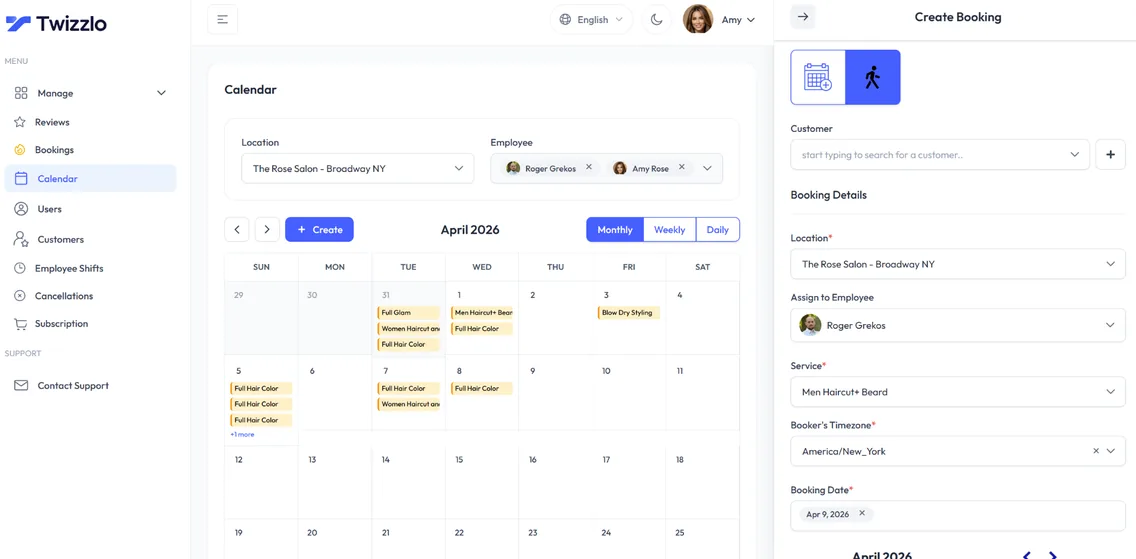
If you want confirmations and reminders to go out on their own, start on Twizzlo’s free plan, where they go by email, and send yourself a test booking.
Frequently Asked Questions About Client Communication
How Do You Communicate With Clients Effectively?
Treat communication as a system rather than a series of one-off messages. Automate reminders and follow-ups, keep client history in a CRM so every message can reference real preferences, use each channel for what it does best, and respond promptly. Then measure the results, such as no-show rates, reviews and survey scores, and adjust. Effectiveness comes from consistency across every touchpoint, not from any single perfectly written message.
How Do You Communicate With Clients in a Professional Manner?
Professionalism shows up as predictability. Define a brand voice and use it everywhere, from booking confirmations to review replies. Be transparent about policies before clients commit, flag delays proactively within minutes instead of hoping nobody notices, and pair every problem with a proposed solution. A courteous message that arrives quickly, says what happens next, and matches your brand’s tone reads as professional every time.
How Quickly Should You Respond to Client Inquiries?
Set a target, for example two hours during business hours. A fast reply can decide whether a client books with you or with someone else. After hours, use an auto-responder that states when you will reply, assign channel ownership to specific staff on each shift, and keep templates for common questions so accurate answers go out immediately.
When Should You Send Appointment Reminders?
One workable cadence is two touches: a first reminder 48 hours before the appointment, which leaves room to reschedule, and a final prompt 2 to 4 hours ahead. Include one-click confirm, cancel, and reschedule links, the client’s name, and the specific service booked.
How Do You Improve Communication With Clients?
Audit your current process against the ten practices above and find the weakest link. Fix one or two things first, such as automated reminders and post-service follow-ups, then measure no-show rates, reviews, and survey responses before expanding. Improvement compounds: each practice you systematize makes the next one easier to add.
What Should a Client Communication Plan Include?
A client communication plan lists every message a client receives, from the booking confirmation to the post-visit follow-up, with its timing, channel, owner and required details. It also records each client’s preferred channel and marketing consent, your written policies, a response-time target and the templates staff use.
How Do You Tell a Client You Are Running Late?
Message the client as soon as you know, not at the appointment time. Give the new start time, apologize once and offer a choice: wait, see another available team member or rebook. For example: “Hi Priya, Dana is running about 15 minutes late today. You can start at 3:15, see Lee at 3:00 or pick a new time. Reply 1, 2 or 3.”
Which Client Messages Should Be Automated?
Automate messages that follow a fixed trigger and use the same wording every time: booking confirmations, reminders, reschedule and cancellation notices, and post-visit thank-you notes. Keep delays, complaints, policy disputes and anything involving a refund in human hands, because those replies depend on the details of the situation.
Sources and methodology
- Federal Trade Commission, CAN-SPAM Act: A Compliance Guide for Business (opens in a new tab)Read . Supports: commercial email must include a clear way to opt out and a valid physical postal address, and opt-out requests must be honored within 10 business days (practice 8)
- Twizzlo features page (opens in a new tab)Read . Supports: automated email confirmations and reminders on both plans, SMS on Business Pro, client profiles with visit history, notes and preferences, client self-rescheduling, cancellation handling, and the calendar screenshot (same image)
- Twizzlo pricing page (opens in a new tab)Read . Supports: Twizzlo plans, booking cap, SMS allowance, money-back guarantee, 24/7 support and the online payment fee
From our editorial policy
- To report an error, email support@twizzlo.com with the subject line "Correction: [page URL]". Tell us what is wrong and, if you can, link a source.
Update history
- : Rebuilt the comparison table as a message timeline, added wording for delays and complaints and a sourced consent line, and removed unsourced claims, stock images and an off-topic video.
Start free, upgrade when you grow
Flat-rate booking software. No per-seat, per-chair or per-location fees.
- Free plan up to 150 bookings a month, not a trial
- Business Pro is $29.99 a month per business for unlimited bookings, with a 30-day money-back guarantee
- 24/7 support by email