
Appointment Confirmation Text Templates to Copy and Send

In short
An appointment confirmation text template is a prewritten SMS your booking system sends as soon as a client books. It names the client, service, team member, date, time and location, gives one clear next step such as a manage-booking link, and fits in one SMS segment of 160 standard characters.
- Fill every part of a template from the booking record, so no one retypes a date, time or address by hand.
- Curly apostrophes and emoji switch a text to Unicode encoding, which cuts one segment from 160 to 70 characters.
- Send a fresh confirmation after every reschedule or cancellation so the client’s latest text always matches the calendar.
Source: ETSI TS 123 038 (3GPP TS 23.038) (opens in a new tab), read
In this article15 sections
An appointment confirmation text template turns every new booking into the same short, correct SMS. Below are 11 templates you can copy, each with its measured length, the placeholders it uses and the situation it fits.
Twizzlo, which publishes this guide, makes appointment scheduling software that sends confirmations automatically; the templates below work in any booking or texting tool that lets you write your own message text.
A salon, a tattoo studio, a spa and a home-service team should not send the same confirmation text, because the financial risk, prep requirements and cancellation patterns differ.
The Parts of an Appointment Confirmation Text Template
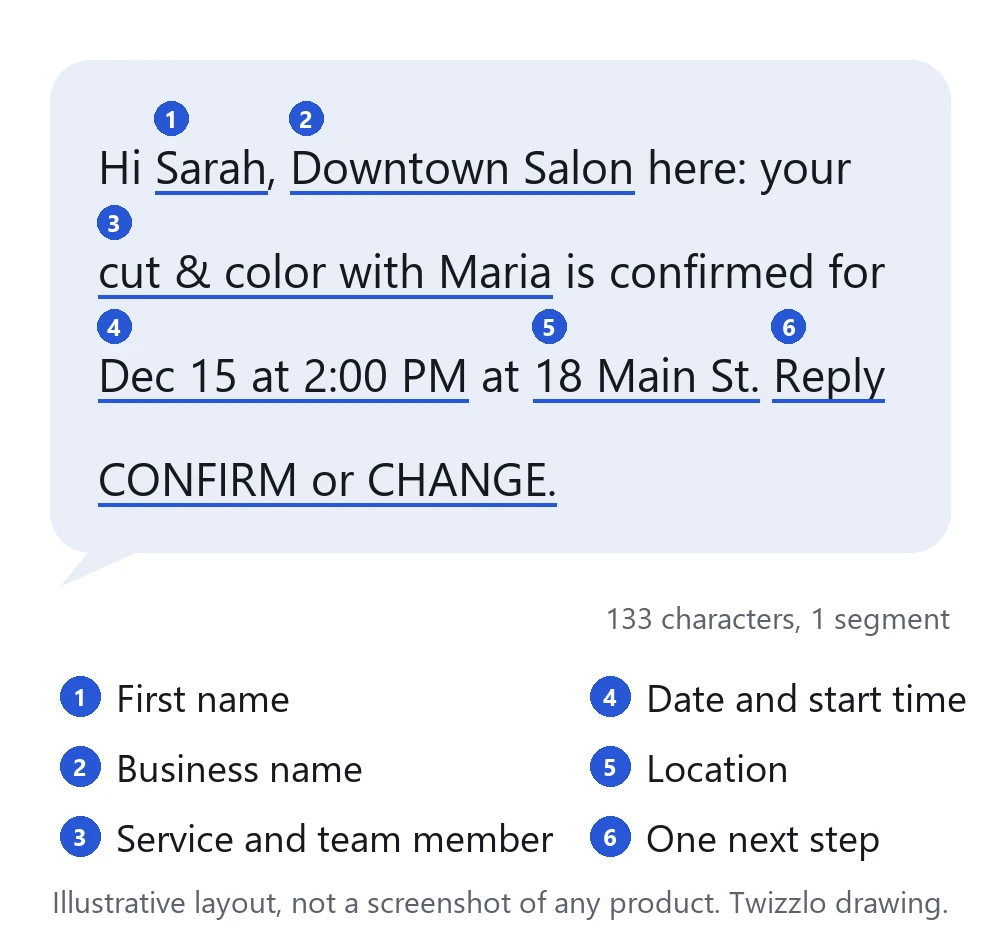
Every appointment confirmation text template needs six parts: the client’s first name, the business name, the service with the team member, the date and start time, the location or meeting link, and one next step. Fill each part from the booking record with a placeholder, and keep the whole text short enough to arrive as one SMS.
- First name: the client’s first name, so the text reads as personal and reaches the right person.
- Business name: who is texting, because the number may be new to the client.
- Service and team member: what was booked and with whom.
- Date and start time: written the way clients say it, such as “Dec 15 at 2:00 PM,” with a time zone for video sessions.
- Location or meeting link: the street address or site name, or the video link.
- One next step: a single reply word or one link to confirm, change or pay.
| Part | Example placeholder | Where it comes from | What goes wrong if it is wrong |
|---|---|---|---|
| First name | {first_name} | The client record | The text reads as spam or reaches the wrong person |
| Business name | {business_name} | Your account or location settings | The client does not know who is texting from an unfamiliar number |
| Service and team member | {service}, {staff_name} | The booked service and the assigned team member | The client prepares for the wrong service or asks for the wrong person |
| Date and start time | {date}, {start_time} | The calendar slot, in the location’s time zone | The client arrives on the wrong day or at the wrong hour |
| Location or meeting link | {location} or {meeting_link} | The location record or the video link on the booking | The client goes to the wrong site or cannot join |
| Action link | {manage_link} | The booking’s confirm, change or payment page | The client has to call to change anything |
Placeholder syntax such as {first_name} varies by platform, so check your tool’s field names before you paste a template.
Length, characters and SMS segments
One SMS segment holds up to 160 characters when every character belongs to the GSM 7-bit default alphabet, the basic character set defined in 3GPP TS 23.038 (ETSI TS 123 038 version 19.0.0, read September 28, 2026). A longer text is split into segments that usually hold 153 characters each, because each part carries a header that reassembles the message, according to Twilio’s guide “How long can a message be?” (read September 28, 2026). One character outside that alphabet, such as a curly apostrophe or quotation mark, an emoji or an accented letter like á, switches the whole text to UCS-2 (Unicode) encoding: one segment then holds 70 characters, and each part of a longer text holds 67. Square brackets and curly braces stay in the alphabet but count as two characters each.
Writing tools often turn straight quotes into curly ones as you type, so type straight apostrophes and quotes, skip emoji and test the final text with real names and links before you save it. Many texting services bill per segment, so length changes cost.
Template 1: Basic Confirmation with Date, Time and Location
A basic confirmation text carries more operational value than its simplicity suggests. If the first SMS records the right service, team member, time and place in one readable line, staff spend less time correcting avoidable errors later.
Use a format like this:
Hi Sarah, Downtown Salon here: your cut & color with Maria is confirmed for Dec 15 at 2:00 PM at 18 Main St. Reply CONFIRM or CHANGE.
Length: 133 characters, 1 SMS segment in plain characters.
This template works because it answers the three questions clients check first: what did I book, when is it, and where do I go? It also gives the business an immediate status signal. A reply confirms intent. No reply identifies appointments that may need follow-up.
Salons, spas, barbershops, home-service teams and personal trainers can use the same structure, then adjust tone and required fields by business type.
Why the basic format works
Fewer clarification calls reduce front-desk workload, and for multi-location operators one standardized template lowers training time because each team follows the same message logic.
A few rules improve performance without making the template longer:
- Put the location near the end: clients scan texts quickly, and the address or site name is often the last detail they need before deciding whether to reply.
- Include the team member: this lowers confusion for salons, spas and studios where clients book one person.
- Keep the call to action binary and visible: “Reply CONFIRM or CHANGE” creates a faster decision than open-ended language.
- Stay short enough to avoid message splitting: shorter confirmations are easier to read and usually cheaper to send at scale.
For examples organized by business type and send timing, see these appointment confirmation text examples.
Template 2: Day-Before Reminder with Confirm, Reschedule and Cancel Links
Reminders reduce no-shows only if they lower the effort required to respond. A client who can confirm, cancel, or rebook in one tap is less likely to disappear and more likely to free the slot early enough for staff to refill it.
Use a template like this:
Hi Rachel, reminder: your blowout with Emma at Downtown Salon is tomorrow at 3:00 PM. Confirm: example.com/c7 Reschedule: example.com/r7 Cancel: example.com/x7
Length: 159 characters, 1 SMS segment in plain characters.
For mobile businesses, home services, and field teams, add the service address so staff are not validating location details manually after the reminder goes out.
Why cancellation and rescheduling links improve schedule recovery
A passive reminder creates extra work. Clients have to call, wait, or type an open-ended reply. An interactive reminder shortens that path and gives your team structured data about intent. Confirmed appointments stay on the schedule. Reschedule requests can be routed into open inventory. Cancellations arrive early enough to reduce idle staff time.
Every no-show creates two costs: lost revenue from the missed appointment and unrecovered labor capacity. A reminder with direct links helps recover both by shifting behavior earlier in the booking cycle.
This template is especially useful in three cases:
- High-volume salons and spas: structured confirm, cancel, and rebook actions reduce inbound phone traffic and give the front desk cleaner status data
- Multi-location teams: link-based replies avoid ambiguity that comes with freeform texts like “can’t make it” or “maybe later”
- Service businesses with waiting lists: earlier cancellations create more time to refill premium slots
Format also affects cost. Long reminders can split into multiple SMS segments, which raises per-workflow expense on usage-based plans. A concise message with short labels and a branded scheduling link is usually enough. At 159 characters the sample above is one short word away from a second segment, so keep each link label to one word.
Industry timing should still reflect appointment type. In-person services often benefit from a reminder the day before, while shorter lead times make more sense for virtual sessions or same-day bookings. The stronger pattern is not the exact hour. It is giving the client a fast, low-friction path to act before the appointment becomes a no-show.
If you are choosing a tool to send these automatically, our guide to appointment reminders software compares timing and channel options. If no-shows are hitting salon revenue specifically, our playbook on how salons reduce no-shows is aligned with this workflow.
Template 3: Confirmation with a Prepayment or Deposit Request
Use a prepayment or deposit confirmation for bookings that are costly to lose, such as long tattoo sessions, premium spa blocks and event-day services. Confirm the appointment first, state the payment requirement in plain language, then give one payment link.
Try this structure:
Hi Marcus, your sleeve consultation with Alex at Eastside Tattoo is Dec 20 at 4:00 PM. A deposit secures your slot. See the policy and pay: example.com/p20
Length: 155 characters, 1 SMS segment in plain characters.
If you take the full price up front instead of a deposit, write: Payment of [amount] secures your slot.
Where this template protects the schedule
Deposit texts don’t just chase payment. They surface weak commitment early. That gives your staff time to re-open the slot or follow up before the schedule hardens.
For higher-ticket appointments, plain-language payment terms work best. “A deposit secures your slot” is stronger than legalistic phrasing. Businesses that charge no-show or late-cancellation fees should also align deposit messages with their policy page and payment workflow; our guide to a no-show charge policy covers that structure. Before the first payment text, check the consent points in the rollout section below.
Template 4: Three-Message Series for Booking, Payment and Reminder
Series bookings break in predictable places. A client books, delays payment, misses a reminder, or arrives unprepared for a long service block. A single confirmation text does not manage that chain well. A timed sequence does.
For services with deposits, staged prep, or long appointment durations, use three messages with three distinct jobs: confirm the booking immediately, collect payment or reconfirm commitment before the slot hardens, and send a short day-before or same-day attendance check.
Here is a practical version for hair extensions.
Message 1, at booking:
Hi Brittany, you're confirmed for 4-hour hair extensions with Jamie at Salon Luxe on Jan 15 at 10:00 AM. If a deposit is due, we'll text the link separately.
Length: 157 characters, 1 SMS segment in plain characters.
Message 2, when payment is due:
Hi Brittany, your Jan 15 appointment at 10:00 AM is held pending payment. Please pay your deposit today to keep the slot: example.com/p15 Reply to reschedule.
Length: 158 characters, 1 SMS segment in plain characters.
Message 3, the day before:
Hi Brittany, reminder that your appointment is tomorrow at 10:00 AM with Jamie. Please arrive 10 mins early with clean, dry hair. Reply YES to confirm.
Length: 151 characters, 1 SMS segment in plain characters.
The operational value is in task separation. The first text reduces post-booking uncertainty. The second text protects revenue by surfacing unpaid reservations before they turn into dead calendar space. The third text checks attendance and reinforces prep requirements in a format clients can answer quickly.
This template performs well in categories where each appointment consumes a large block of labor or room capacity:
- Hair extensions and other long salon services
- Lash, brow and skin services with payment or prep requirements
- Consultations tied to packages or future service plans
- Multi-location teams that need a standardized confirmation process
Tone should match the service and the risk level. A boutique salon can sound warmer. A high-ticket service should stay direct and procedural. The more money or chair time attached to the booking, the more useful plain language becomes. “Please pay your deposit today to keep the slot” is clearer than softer phrasing that leaves the reservation status ambiguous.
Template 5: Confirmation with Preparation Instructions
Preparation instructions protect schedule quality, not just customer experience. For longer or prep-sensitive services, one unclear arrival can shorten the appointment, create provider idle time, or force a lower-value substitute service.
A lash studio might send:
Hi Amber, your 2-hour lash extension appointment is confirmed for Jan 12 at 11:00 AM with Crystal at Lash Studio. PREP: (1) Come with clean, makeup-free eyelids. (2) Avoid caffeine beforehand. (3) Bring sunglasses post-appointment.
Length: 231 characters, 2 SMS segments in plain characters.
Two segments are a fair trade when three prep steps protect a two-hour booking. If you need one segment, cut a step, not the date or time.
A tattoo studio may need clothing guidance, hydration reminders, and a request to bring reference images. A massage therapist may need early-arrival timing and a note on what to wear. The template changes because the operating risk changes.
Why prep instructions belong inside the SMS workflow
Teams usually track no-shows because the loss is obvious. They track unprepared arrivals less consistently, even though the cost is often similar. A client who arrives without following basic instructions can delay the start, require extra staff explanation, or make part of the service impossible to deliver as booked.
That risk is higher in categories with long appointment blocks or limited daily capacity. A 15-minute haircut can sometimes absorb minor friction. A two-hour lash set, tattoo session, or specialty treatment usually cannot.
Keep a prep text to logistics: time, place, team member and the few steps that affect readiness. Anything longer belongs in a separate message.
Use a simple structure:
- Number the prep steps: Readers process short ordered lists faster than dense paragraphs.
- Limit the message to the few actions that affect readiness: More instructions usually reduce compliance.
- Match the template to the service category: Lash prep, tattoo prep, and massage prep should not share one generic script.
- Send aftercare separately: Confirmation texts should optimize attendance and readiness first.
“Bring, avoid, wear, arrive” is a useful framework because it maps to concrete actions instead of explanation-heavy copy.
Template 6: Confirmation That Mentions a Feedback Request
A confirmation can tell the client that a short feedback request will follow the visit, without asking for a review yet. At booking the job is to set the expectation; the review link belongs in a separate message after the service.
A salon version could read:
Hi Sarah, your cut & color with Emma is confirmed for Dec 15 at 2:00 PM at Downtown Salon. After your visit, we'll text a short link for your honest feedback.
Length: 158 characters, 1 SMS segment in plain characters.
That works better than stuffing multiple public review links into the first confirmation.
The operational case for combining confirmation and feedback intent
Review volume affects future booking efficiency, especially in local service categories where new clients compare operators quickly. But the bigger win is internal. A good feedback loop catches service issues before they become public complaints.
Use these rules:
- Ask for honest feedback, not a rating script
- Separate public review asks from private service recovery paths
- Tie each review request to the exact team member and location
- Monitor responses quickly so managers can intervene
If your team is actively building local reputation, our guide to getting Google reviews is a practical companion to this template.
Template 7: Confirmation with One Add-On Offer
An upsell inside a confirmation text works only when it respects the booking the client already made. The offer should match the scheduled service, fit the available time, and require almost no effort to accept.
A salon version could read:
Hi Sarah, your cut & color with Emma is confirmed for Dec 15 at 2:00 PM. Want to add a keratin treatment to help extend color results? Reply YES or NO thanks.
Length: 158 characters, 1 SMS segment in plain characters.
That structure does three jobs in one message. It confirms the appointment, frames the add-on around a clear benefit, and gives staff a simple response path they can process quickly.
A relevant add-on can raise revenue per appointment without increasing acquisition cost, but only if the offer does not create scheduling friction or extra back-and-forth. That makes service selection more important than price. The add-ons that work best are usually short, easy to attach to the existing booking, and closely related to the original reason for the visit.
Examples vary by business type:
- Salon: gloss, deep-conditioning, brow tint
- Massage: hot stone, aromatherapy, scalp treatment
- Skincare studio: LED upgrade, hydrating mask, eye treatment
- Pet groomer: nail buffing, teeth cleaning, conditioning treatment
Operations matter as much as copy. If an add-on changes appointment length, the scheduling system needs rules for staff availability, room capacity, and team member assignment. Without that logic, a text that looks profitable can create delays at the front desk and schedule compression later in the day.
A few guidelines improve performance and reduce operational risk:
- Offer one primary add-on
- State the practical benefit
- Use a simple reply path such as YES or NO
- Only promote services your team can slot into the current booking
- Exclude clients whose appointment type or team member cannot support the upgrade
Keep the offer tied to the booked visit. Promotional texts can fall under stricter consent rules; see the consent checklist below.
Character count matters too. Long confirmations with service details, directions, and an upsell can split into multiple SMS segments, which raises messaging cost on usage-based plans.
Template 8: Reschedule and Cancellation Confirmations
Send a new confirmation every time a booking changes. A reschedule text states the new date and time and says the old slot is released; a cancellation text states what was cancelled, any fee or refund under your policy, and how to rebook.
Reschedule confirmation
Hi Dana, your haircut with Leo at Downtown Salon has moved to Dec 18 at 11:00 AM. Your old time is released. Need a change? example.com/m/d18
Length: 141 characters, 1 SMS segment in plain characters.
Lead with the new date and time, not the old one, so a client who reads only the first line still has the right details. Keep the manage link so the client can change the booking again without calling.
Cancellation confirmation
Hi Dana, your haircut at Downtown Salon on Dec 18 at 11:00 AM is cancelled. No fee applies. Book again anytime: example.com/b/ds
Length: 128 characters, 1 SMS segment in plain characters.
If your policy charges a fee or issues a refund, replace “No fee applies” with one plain line that states the amount or the refund, and match the wording on your policy page. End with a way back to booking so the cancellation does not end the relationship.
Template 9: Home-Visit and Video Appointment Confirmations
Home visits and video sessions each need one extra detail: an arrival window and an access note for a home visit, and the meeting link with its time zone for a video session.
Home-visit confirmation
Hi Tom, Bright Home Cleaning is booked for Dec 19 at 12 Oak St. Arrival window: 9:00 to 11:00 AM. Please leave the side gate open. Changes: example.com/m/t19
Length: 157 characters, 1 SMS segment in plain characters.
State the arrival window as a range, name one access or parking detail, and give one way to change the visit. The window tells the client how long to be home.
Video session confirmation
Hi Priya, your 45-min coaching session with Jordan at Northpoint Coaching is Dec 21 at 2:00 PM ET. Join: example.com/v/p21 Please test your camera and mic.
Length: 155 characters, 1 SMS segment in plain characters.
Write the time with its time zone, such as “2:00 PM ET,” because clients and staff may be in different zones. Put the meeting link in the confirmation itself, and add one prep line at most.
Templates are starting points, not legal advice. Have a qualified local professional review anything you rely on.
How to Roll Out a Template Library Across Your Team
A template library works when one approved version exists for each appointment type, every send is triggered by a booking event instead of typed by staff, replies are routed back to the calendar, and someone reviews the results each month.
- Template governance: Keep one approved version for each appointment type so staff do not improvise inconsistent texts.
- Event-based triggers: Send confirmations from booking creation, payment status changes, and schedule updates rather than relying on manual staff action.
- Reply routing: If your tool accepts replies, route confirm, change and cancel replies into the calendar so the front desk handles exceptions instead of every message.
- Performance reporting: Track confirmation rate, cancellation lead time, rebooked slots, and manual follow-up volume. Those numbers show whether a template reduces labor.
If you also confirm by email, pair each text with a booking confirmation email template so both channels say the same thing. If you are still choosing a tool, our comparison of the best appointment scheduling software lists what each includes for texting.
Consent and opt-out rules to check before the first text
Agreement comes before the first text. The Federal Communications Commission’s consumer guide “Stop Unwanted Robocalls and Texts” (last reviewed February 27, 2026, read September 28, 2026) says FCC rules ban texts sent to a mobile phone with an autodialer unless the owner consented first or the message is for an emergency, that commercial texts require written consent while consent for informational texts may be oral, and that a person may opt out of any robotext at any time and in any reasonable manner. The CTIA Messaging Principles and Best Practices (May 2023 edition, read September 28, 2026) treat appointment reminders as informational messages that need the client’s express consent, expect express written consent before promotional texts, and note that adding a sales call to action, such as a coupon code, can make a text promotional.
- Record the agreement: note when and how each client agreed to texts, for example a checkbox at booking, before the first message goes out.
- Honor opt-outs: CTIA expects senders to act on STOP and on plain requests such as “unsubscribe” or “please opt me out.”
- Keep confirmations to the booking: an add-on offer or a discount can change which consent rule applies.
This is general information, not legal advice. Rules differ by country and state; have a qualified local professional review your consent process.
Appointment Confirmation Text Templates at a Glance
The table lists each template’s sample length, its SMS segment count in plain characters, the placeholders it uses and where it fits best. Counts are for the sample text as printed; real names and links change them.
| Template | Sample length (characters) | SMS segments (plain text) | Placeholders | Best for |
|---|---|---|---|---|
| 1. Basic confirmation | 133 | 1 | first name, business, service, team member, date, time, address | Any single booking |
| 2. Day-before reminder | 159 | 1 | first name, service, team member, business, time, three action links | Busy salons and spas with frequent changes |
| 3. Prepayment or deposit request | 155 | 1 | first name, service, team member, business, date, time, payment link | Long tattoo sessions, premium spa blocks |
| 4. Message 1, at booking | 157 | 1 | first name, service, team member, business, date, time | Long services with payment or prep steps |
| 4. Message 2, payment | 158 | 1 | first name, date, time, payment link | Bookings held until paid |
| 4. Message 3, day before | 151 | 1 | first name, time, team member, prep step | Services that need prep |
| 5. Preparation instructions | 231 | 2 | first name, service, date, time, team member, business, prep steps | Lash, brow and tattoo appointments |
| 6. Feedback heads-up | 158 | 1 | first name, service, team member, date, time, business | Businesses building reviews |
| 7. One add-on offer | 158 | 1 | first name, service, team member, date, time, add-on | Salons, spas and groomers with short add-ons |
| 8. Reschedule confirmation | 141 | 1 | first name, service, team member, business, new date, new time, manage link | Every moved booking |
| 8. Cancellation confirmation | 128 | 1 | first name, service, business, date, time, fee line, booking link | Every cancelled booking |
| 9. Home visit | 157 | 1 | first name, business, date, address, arrival window, access note, manage link | Cleaners and other home services |
| 9. Video session | 155 | 1 | first name, service, team member, business, date, time with time zone, meeting link | Coaches and consultants |
Character and segment counts were measured on the exact sample text shown, on September 28, 2026, with a script that checks each character against the GSM 7-bit default alphabet.
Where Twizzlo Fits: Automatic Confirmations and What Texting Costs
Twizzlo is web-based online booking and appointment scheduling software for appointment-based service businesses. It sends booking confirmations and reminders automatically: by email on both plans, and by SMS on Business Pro (Twizzlo features and pricing pages, read September 28, 2026).
Email confirmations and reminders are included on both plans. Text messages (SMS) are on Business Pro only: 50 SMS a month are included, then $0.03 each. Free has no SMS.
Free is $0 a month for up to 150 bookings, with no SMS. Business Pro is $29.99 a month per business for unlimited bookings, with 50 SMS a month included, then $0.03 per additional SMS, and a 30-day money-back guarantee. Both plans include unlimited staff and locations, so adding a team member or a location never changes the price. Support is available 24/7.
Worked example: if a month’s confirmations, reminders and same-day nudges come to 600 SMS, Business Pro includes 50, and the other 550 cost $16.50 at $0.03 each, so texting adds $16.50 to the $29.99 subscription that month.
Clients can reschedule themselves instead of calling, and cancellation handling is built in. If you take prepaid bookings, clients pay the full service price online. Online payments carry your Stripe processing rate plus a 1.5% Twizzlo platform fee.
Plan details are on the Twizzlo pricing page. To have confirmations go out on their own the moment a client books, start on Twizzlo’s free plan and add SMS with Business Pro when you need texts.
Frequently Asked Questions
How does an appointment confirmation text template reduce no-shows
It reduces no-shows by removing ambiguity and creating a simple action path. The operational win is earlier visibility into client intent.
Why do booking apps charge per staff member
Vendors choose different pricing models: some charge per staff member or seat, others by location, message volume or plan tier, and some charge one price per business. Per-seat pricing ties the bill to team size rather than to booking volume. For confirmation texts, compare the number of texts each booking triggers against each plan’s included SMS and its price per extra message.
What should every appointment confirmation text include
At minimum, include the client name, date, time, team member or business name, location or access method, and a clear next action like confirm, reschedule, or cancel. Keep the content focused on logistics. For high-touch services, add only the most important preparation step, not a full instruction manual.
How do I legally send appointment texts without getting sued
Get the client’s agreement before the first text and keep a record of it. The FCC’s consumer guide “Stop Unwanted Robocalls and Texts” (last reviewed February 27, 2026) says autodialed texts to a mobile phone need the owner’s prior consent, commercial texts need written consent, and people may opt out in any reasonable manner. CTIA’s Messaging Principles and Best Practices (May 2023) treat appointment reminders as informational texts that need express consent. This is general information, not legal advice; have a qualified local professional review your process.
When should businesses send appointment confirmation texts
The strongest structure depends on the service, but immediate confirmation after booking is consistently important. A reminder before the appointment is common, and some businesses benefit from a same-day nudge. In-person and video appointments can perform best on different timelines, so operators should test send timing by service type.
What is the difference between an appointment confirmation text and a reminder text?
A confirmation text goes out immediately after booking and records the service, team member, date, time, and location while details are fresh. A reminder text goes out closer to the appointment, often the day before for in-person services, and works best with confirm, reschedule, and cancel links so clients can act in one tap. Many businesses run both as stages in a multi-step sequence.
How long should an appointment confirmation text be?
Short enough to scan in seconds and, ideally, to arrive as one SMS segment: up to 160 characters from the GSM 7-bit alphabet, or 70 if the text contains one character outside it, such as a curly apostrophe or an emoji (3GPP TS 23.038 and Twilio’s segment guide, both read September 28, 2026). Longer texts split into segments of 153 or 67 characters, and many texting services bill per segment. Cover the service, team member, date, time, and location, put the action near the end, and send anything secondary, such as aftercare guidance, as a separate message.
Should an appointment confirmation text ask for a deposit?
For bookings with high opportunity cost, such as long tattoo sessions, premium spa blocks, and event-day services, yes. Confirm the appointment first, state the requirement in plain language, then give one direct payment link. Deposit texts surface weak commitment early, which gives staff time to re-open the slot.
What reply options should a confirmation text give clients?
Keep the reply path binary and visible. Prompts like Reply CONFIRM or CHANGE, or a simple YES to confirm, create a faster decision than open-ended language and give staff a clean status signal: a reply confirms intent, and no reply flags appointments that may need follow-up. Route replies such as YES, NO, and RESCHEDULE into the scheduling workflow so the front desk only handles exceptions.
What placeholders should an appointment confirmation text template use?
Use one placeholder for each of the six parts: first name, business name, service and team member, date and start time, location or meeting link, and one action link. Fill each from the booking record rather than typing it, so the text always matches the calendar. Placeholder syntax, such as {first_name}, varies by platform, so check your tool’s field list first.
Why does a template sometimes send as two text messages?
Because it is too long for one segment. A text in plain GSM 7-bit characters fits 160 characters in one segment; one character outside that alphabet, such as a curly apostrophe, switches the whole text to Unicode, where one segment holds 70 (3GPP TS 23.038 and Twilio’s segment guide, both read September 28, 2026). Paste the final text, with real names and links, into a segment counter before you save it.
Can an appointment confirmation text template include emoji?
It can, but one emoji switches the whole text to Unicode encoding, which cuts a single segment from 160 characters to 70 and each part of a longer text to 67 (Twilio’s segment guide, read September 28, 2026). A confirmation rarely needs one; a word such as “Confirmed” carries the same meaning in plain characters.
Sources and methodology
- ETSI TS 123 038 V19.0.0 (3GPP TS 23.038), Alphabets and language-specific information (opens in a new tab)Read . Supports: the GSM 7 bit default alphabet and its extension table; up to 160 characters in that alphabet, or 70 UCS2 characters, in one message (answer box, length H3, Table 2 method, FAQ 7 and 11)
- Twilio Docs, How long can a message be? (opens in a new tab)Read . Supports: 153 GSM-7 and 67 UCS-2 characters per segment when a text is split; a curly quotation mark or an emoji switches a text to UCS-2 (length H3, FAQ 7, 11 and 12)
- Twilio Docs, What is GSM-7 character encoding? (opens in a new tab)Read . Supports: the GSM-7 character map and escape characters such as { and ] counting as two characters (length H3)
- Federal Communications Commission, Stop Unwanted Robocalls and Texts (last reviewed February 27, 2026) (opens in a new tab)Read . Supports: consent before autodialed texts to a mobile phone, written consent for commercial texts, opting out in any reasonable manner (consent H3, FAQ 4)
- CTIA, Messaging Principles and Best Practices (May 2023) (opens in a new tab)Read . Supports: appointment reminders as informational messages needing express consent, express written consent for promotional texts, STOP and plain-language opt-outs (consent H3, FAQ 4)
- Twizzlo features page (opens in a new tab)Read . Supports: automated email confirmations and reminders on both plans, SMS on Business Pro, client self-rescheduling, cancellation handling, prepaid bookings at the full service price, the Stripe and 1.5% platform fee sentence
- Twizzlo pricing page (opens in a new tab)Read . Supports: Twizzlo plans, booking cap, SMS allowance and per-SMS price, money-back guarantee and 24/7 support
From our editorial policy
- Our templates, such as consent forms, contracts and confirmation messages, are text to copy and adapt to your business. They are not legal advice. Have a qualified local professional review anything you rely on.
- To report an error, email support@twizzlo.com with the subject line "Correction: [page URL]". Tell us what is wrong and, if you can, link a source.
Update history
- : Retitled; added measured lengths, a placeholder map, reschedule, cancellation, home-visit and video templates and sourced consent facts; removed unsourced claims and AI images.
Start free, upgrade when you grow
Flat-rate booking software. No per-seat, per-chair or per-location fees.
- Free plan up to 150 bookings a month, not a trial
- Business Pro is $29.99 a month per business for unlimited bookings, with a 30-day money-back guarantee
- 24/7 support by email