
How to Write an Appointment Confirmation Text

In short
To write an appointment confirmation text, start with the client’s name and your business name, then give the service, date, time and location. Add one next step, such as a reply to confirm or a link to reschedule, mention your cancellation policy, and keep the message short enough to arrive as a single text.
- Collect SMS consent at booking, record when and how it was given, and show clients how to opt out, such as replying STOP.
- Count the finished text with real names and links filled in; a link or an opt-out line can push it into a second segment.
- Reply codes such as C to confirm work only when your texting tool receives replies; a one-way sender should link to a reschedule page.
In this article8 sections
Learning how to write an appointment confirmation text is mostly about order: the booking details first, then one action for the client, then anything longer behind a link. Twizzlo publishes this guide and makes appointment scheduling software that sends confirmations automatically; a labeled section near the end shows where it fits. The steps work with any texting tool.
How to Write an Appointment Confirmation Text in Six Steps
An appointment confirmation text confirms one booking and asks for one action, carrying every detail the client needs to arrive and nothing that belongs on a linked page. Write it in this order:
- Give the text one job: confirm this booking and ask for one action.
- Open with the client’s first name and your business name.
- Give the service, the date and time, and the address or meeting link, with a time zone for virtual meetings.
- Add one next step: a reply code if your texting tool receives replies, or a reschedule link if it does not.
- Point to your cancellation policy, and put prep steps, directions and full terms behind a link.
- Add opt-out wording where your rules require it, then check the length before you send.
If you also confirm by email, our booking confirmation email template covers subject lines and layout.
How the Text Changes by Business Type
The pattern stays the same across businesses because it removes uncertainty fast: the client sees who you are, what was booked, when to show up and what to do next. Only one or two details change.
| Business type | Detail that changes | Example text |
|---|---|---|
| Salon | The stylist | Hi [Name], [Salon] confirms your [Service] with [Stylist] on [Date] at [Time]. Reply C to confirm or R to reschedule. |
| Pet grooming | The pet’s name | Hi [Name], [Business] confirms [Pet]'s [Service] on [Date] at [Time]. Reply C to confirm or R to reschedule. |
| Mobile service | The address the team travels to | Hi [Name], [Business] confirms your [Service] on [Date] at [Time]. We're coming to [Address]. Reply C to confirm or R to reschedule. |
| Consultant or coach | The time zone and the meeting link | Hi [Name], [Business] confirms your session on [Date] at [Time] [Time Zone]. Join here: [Link]. Reply C to confirm or R to rebook. |
| Tattoo studio | The artist, plus a deposit line | Hi [Name], [Studio] confirms your session with [Artist] on [Date] at [Time]. Your deposit holds the slot. Reply C to confirm or R to reschedule. |
Reply codes work only if your texting tool receives replies; with a one-way sender, end with "Reschedule: [link]" instead.
For ready-to-copy wording for other moments, such as reminders or prep notes, use these appointment confirmation text templates; for longer worked examples with policies and directions, see our appointment confirmation text guide.
Check the Length Before You Send
A text message in standard characters holds 160 characters; a longer one is split into segments of 153 characters, and many texting services bill per segment. One emoji switches the whole text to Unicode, where a single message holds 70 characters and each part of a longer one holds 67, according to Twilio’s messaging documentation (read September 28, 2026).
Count the finished text with the real name, date and link filled in, as in this example:
| Step | Text added | Characters added | Running total | Segments |
|---|---|---|---|---|
| 2 | Hi Maya, this is Blue Door Salon. | 33 | 33 | 1 |
| 3 | Your haircut with Jen is booked for Fri, Oct 9 at 2:30 PM, 14 King St. | 71 | 104 | 1 |
| 4 | Reply C to confirm or R to reschedule. | 39 | 143 | 1 |
| 5 | Policy: example.com/p | 22 | 165 | 2 |
| 6 | Reply STOP to opt out. | 23 | 188 | 2 |
| Trimmed | Hi Maya, Blue Door Salon: haircut with Jen, Fri Oct 9, 2:30 PM, 14 King St. Reply C to confirm, R to reschedule. Policy: example.com/p. Reply STOP to opt out. | 158 | 1 | |
| Emoji | The trimmed text with one emoji in place of the comma after "Maya" | 158 or more, in Unicode | 3 |
Step 1 adds no text; it decides what the other steps include. The policy link and the opt-out line push the draft to 188 characters and 2 segments. The trimmed version keeps every detail and cuts only words, which brings it back to 158 characters and 1 segment. Swap one comma for an emoji and the same text passes 134 characters, the most two Unicode parts of 67 can hold, so it needs 3 segments. Example.com stands in for your own short policy link.
The Five Booking Details Every Confirmation Needs
Every confirmation text needs five details: the client’s name, your business name, the service, the exact date and time, and the address or meeting link.
Use a structure that removes friction: "Hi [Name], [Business] here. Your [Service] is booked for [Date] at [Time] at [Location]. Reply C to confirm or R to reschedule by [X hours] before." That format works because it answers the client’s immediate questions and tells them exactly what to do.
The Required Fields
Each field answers a question the client would otherwise have to ask:
- Client name shows the message is meant for them.
- Business name tells the recipient who is texting, which matters when people book with several businesses.
- Service or appointment type prevents confusion and cuts down on clarification calls.
- Exact date and time removes avoidable scheduling mistakes.
- Location or meeting link tells the client where to go or where to join.
If one of those fields is missing, the text is incomplete.
Reply, Reschedule and Policy Lines
A clear call to action belongs in every message. "Reply C to confirm" works because it is specific; "Let us know if you need anything" leaves the client unsure what to do.
A reschedule path should be just as visible as the confirm option. It turns a likely no-show into a change your team can still fill.
A cancellation policy reference belongs in the text, or behind a short link if the policy is longer, so the client knows the terms before they matter.
Opt-out wording belongs in the text or the workflow; the consent section below covers it.
When to Use a Link
Use a link when the client needs more than the core booking details. Video sessions, prep instructions, parking details and full cancellation terms all justify a short text plus a destination page.
That approach keeps the text readable and the action clear. It also keeps the count down: every extra segment is another message on the bill wherever a texting service charges per segment.
Why Confirmation Texts Fail to Prevent No-Shows
A confirmation text fails when it gives the client no clear action, leaves out a detail they need, or arrives too late for the slot to go to someone else.
The Common Failure Points
- No action prompt: the client reads the text and does nothing.
- Missing logistics: the client calls at the last minute to ask.
- Wording that never names your business: the text can read like spam.
- One reminder only: too much room is left for forgetting.
- No reschedule path: a manageable conflict turns into a no-show.
A stronger system uses a cadence, not a one-off message: a confirmation, a reminder and an easy way to reschedule.
The Timing Mistake to Avoid
A confirmation text sent immediately after booking is useful. It is not enough by itself. Operators also need a reminder sequence close enough to the appointment to drive action, but not so late that the slot can’t be recovered.
In a salon, an empty chair still carries payroll; our guide on how to reduce no-shows in a salon covers the wider playbook.
The aim is a usable answer from the client while there is still time to fill the slot.
Manual vs. Automated Confirmation Texts
Automated confirmations go out from the booking system the moment a client books, so every client gets the same complete text without anyone typing it.
The difference in practice:
| Process | What happens |
|---|---|
| Manual texting | Staff types messages, misses details, and forgets follow-ups |
| Automated workflows | Confirmations go out consistently based on booking triggers |
| Manual reschedules | Front desk handles avoidable calls and voicemail |
| Automated reschedules | Clients confirm or change bookings without tying up staff |
What to Automate First
The minimum setup has four parts:
- A confirmation the moment a booking is made
- A reminder before the appointment
- A near-time reminder with a direct reschedule option
- Tracking of confirmations and changes
SMS Opt-In and Opt-Out: What to Put in Place
Before a business texts a client, it needs the client’s permission to receive texts, a record of when and how it was given, and a simple way for the client to stop. Texting rules differ by country and, in the United States, by state; this is general information, not legal advice, so check the rules that apply to you.

Records matter because without them your team cannot show who agreed to receive texts, what they agreed to or when they opted in.
Build consent capture into booking. If your process depends on staff memory, verbal approval or numbers copied from old paperwork, fix it before you text.
A Consent Checklist
Use this checklist:
- Add an unchecked SMS opt-in box on the booking form
- Explain the message purpose clearly, such as confirmations, reminders and reschedule updates
- Store the timestamp, source and consent language with the client record
- Include opt-out wording, such as "Reply STOP to opt out"
- Keep appointment texts off staff members’ personal phones
CTIA’s Messaging Principles and Best Practices (May 2023 edition, read September 28, 2026), a set of voluntary best practices from companies across the wireless messaging industry, says senders should state in the message how to opt out, use standard STOP wording for it and keep records of opt-in and opt-out requests.
Keep the Text Short and the Record Complete
SMS character limits do not excuse sloppy consent records. If a booking needs video-session instructions, arrival details, prep steps or policy terms, send a short confirmation text and place the full information behind a link or portal. That keeps the text readable while preserving the details your team may need later.
For the wider system, from reminders to follow-ups, see our guide to client communication best practices.
Where Twizzlo Fits: Sending Confirmations Automatically
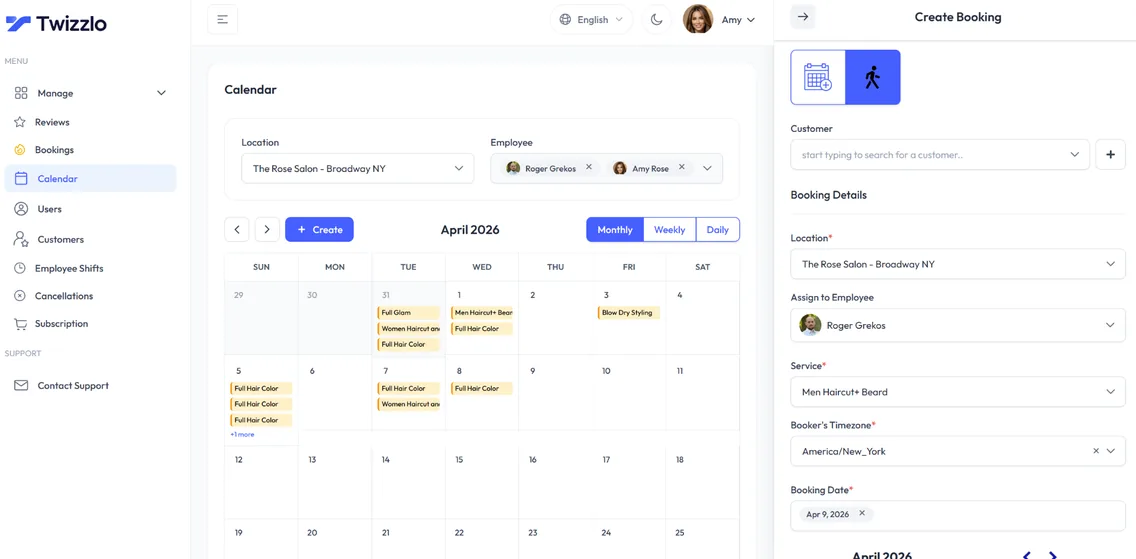
Twizzlo is web-based online booking and appointment scheduling software for appointment-based service businesses. It sends a confirmation automatically when a booking is made, and reminders before the visit, so no one on your team has to type them.
Email confirmations and reminders are included on both plans. Text messages (SMS) are on Business Pro only: 50 SMS a month are included, then $0.03 each. Free has no SMS. Clients can reschedule themselves, cancellations are handled in the same system, and each location can share its own booking link.
Twizzlo has two plans. Free is $0 a month for up to 150 bookings, with no SMS, and includes the core booking, CRM, staff, insights and online payment features. Business Pro is $29.99 a month per business with unlimited bookings, 50 SMS a month and then $0.03 each, and a 30-day money-back guarantee. Both plans include unlimited staff and locations. Support is available 24/7. Online payments carry your Stripe processing rate plus a 1.5% Twizzlo platform fee.
Any service can be set up as a prepaid booking, where the client pays the full service price when booking. If that client misses the appointment, you decide whether to keep or refund the payment, and any no-show fee is applied at your discretion.
To see which plan fits the texts you plan to send, compare the two plans.
Frequently Asked Questions
When should I send an appointment confirmation text?
Send the first confirmation right after booking, but only after valid opt-in is captured. Then schedule reminder touches closer to the appointment based on your service type and cancellation window. High-value or prep-heavy bookings need a tighter workflow than simple repeat visits. The key is to create enough lead time to recover the slot if the client can’t attend.
What should a client reply with?
Keep the reply options simple. Use one-letter or one-word responses such as C to confirm or R to reschedule. Short coded replies are also easier for the front desk to sort and track. Reply codes need a texting tool that receives replies; if yours sends one-way messages, give a reschedule link instead.
Should I include my cancellation policy in the text?
Yes, but don’t turn the text into a legal memo. Include a short version if it fits cleanly, or link to the full policy when the booking has more complex terms. The goal is to set expectations before conflict starts.
What if the appointment is virtual or mobile?
Use a hybrid format. Keep the SMS short, then include a link for the full details. That link can hold the meeting URL, service address confirmation, prep notes, parking instructions, or cancellation policy. This keeps the text readable while still giving clients everything they need to show up correctly and on time.
Should confirmation texts sound casual or formal?
They should sound clear and human. Most service businesses do better with concise, professional wording rather than stiff corporate language or slang. Your message should feel trustworthy, not scripted by a legal department and not written like a group chat. If the client instantly knows who you are and what to do next, the tone is right.
Do I need separate templates for each service line?
Yes. A salon color service, a video consultation, and a mobile cleaning appointment don’t have the same operational requirements. Use a shared structure, but tailor the fields and instructions by service type. That reduces confusion and avoids overloading every text with details that only apply to some bookings.
Can email replace SMS for confirmations?
Email helps, but it shouldn’t carry the whole load if your goal is fast action. Text suits short, time-sensitive details and quick replies; email suits longer details and policies. Use both channels on purpose instead of expecting one message type to do every job.
What should I say when confirming an appointment by text?
Answer who, what, when, where, and what next in one message: "Hi [Name], [Business] here. Your [Service] is booked for [Date] at [Time] at [Location]. Reply C to confirm or R to reschedule." Swap the bracketed fields for your service line, and push anything longer, such as prep steps or policy terms, to a link. For other moments, such as reminders, start from ready-made appointment confirmation text templates.
How long should an appointment confirmation text be?
Aim for a single text message. Count the finished text with the real name, date and link filled in before you send, check it against your texting service’s limit, and move prep steps, directions or full policy terms to a link, as the worked example above shows.
Do I need a client’s permission to send confirmation texts?
Yes. Capture an explicit SMS opt-in on the booking form, explain what the client will receive, and store the timestamp, source, and consent language with the client record. Include opt-out instructions in the messaging workflow, and keep appointment texts off personal staff phones. Rules differ by country and, in the United States, by state, so check the ones that apply to you; this is general information, not legal advice.
How do I write a meeting confirmation text?
Use the same pattern with what a meeting needs: the attendee’s name, your name or company, the topic, the date and time with the time zone, and the video link or address. For example: "Hi Sam, Alex from Northside Design here. Our project review is Tue, Nov 10 at 10:00 AM ET: example.com/meet. Reply C to confirm or R to reschedule."
How do I turn a confirmation text into a phone confirmation script?
Keep the text’s order and say it aloud: greet the client by name and say who is calling, read back the service, date, time and address, ask whether they can make it, and offer to reschedule if not. Mention the cancellation policy in one sentence, then note the answer on the booking so the team knows the slot is confirmed.
Sources and methodology
- Twilio, How long can a message be? (SMS character limits) (opens in a new tab)Read . Supports: 160 standard (GSM-7) characters in one text and 153 per segment of a longer one; 70 and 67 in Unicode (UCS-2); one emoji switches a text to Unicode; per-segment billing (the length section and Table 2)
- CTIA, Messaging Principles and Best Practices (May 2023 edition) (opens in a new tab)Read . Supports: senders state in the message how to opt out, use standard STOP wording and keep records of opt-in and opt-out requests (the consent checklist)
- Twizzlo features page (opens in a new tab)Read . Supports: automated email confirmations and reminders on both plans, SMS on Business Pro, client self-rescheduling, cancellation handling, per-location booking links, prepaid bookings at the full service price, no-show fees at the business's discretion, and the calendar screenshot (same image)
- Twizzlo pricing page (opens in a new tab)Read . Supports: Twizzlo plans, booking cap, SMS allowance, money-back guarantee, 24/7 support and the online payment fee
From our editorial policy
- To report an error, email support@twizzlo.com with the subject line "Correction: [page URL]". Tell us what is wrong and, if you can, link a source.
Update history
- : Rewrote the guide as six writing steps, added a character-count example and a business-type table, corrected Twizzlo's plan and SMS details, and removed unsourced statistics and an off-topic video.
Start free, upgrade when you grow
Flat-rate booking software. No per-seat, per-chair or per-location fees.
- Free plan up to 150 bookings a month, not a trial
- Business Pro is $29.99 a month per business for unlimited bookings, with a 30-day money-back guarantee
- 24/7 support by email