
How to Choose Booking Software for a Small Business

In short
To choose small business booking software, test it on your own appointment cycle: a client books on a phone, gets a reminder, pays and rebooks while staff calendars stay correct. Then check what it bills per (seat, location or business), what the free plan caps, and whether booking, reminders, payments and client records share one system.
- Run one full appointment in a free trial: book on a phone, reschedule from the reminder, take payment, then rebook the same client.
- On pricing pages read September 25, 2026, Calendly billed per seat, Square Appointments per location and Booksy per business plus each added team member.
- Switch from manual booking when missed slots, double bookings or confirmation calls recur weekly; earlier moves carry fewer records and habits.
In this article9 sections
Small business booking software lets clients book online, keeps staff calendars current, sends confirmations and reminders, and records payments and client history in one place. This guide is a fit checklist: six functions with a pass test for each, an eight-step free-trial script, the billing unit to read before the price, and the fit by operating model.
Twizzlo, which publishes this guide, makes a free appointment scheduling app with a paid Business Pro plan; its plan facts sit in one labeled section near the end, and the checklist applies to it as to any other tool.
What small business booking software should actually solve
A small business booking system should take appointments online, keep staff calendars correct, send confirmations and reminders, take payment and keep a record of each client, so the schedule stops living across calls, texts and inboxes.
When bookings are handled by hand, the costs are concrete: missed appointments go unfilled, double bookings need recovery work, and staff confirm appointments instead of serving clients. A booking system also keeps a record of each visit: who booked, which service, whether the client paid and confirmed, and what follow-up is due.
The six functions to check, with a pass test for each
Six functions cover most small service businesses: online booking, payments, reminders, client records, staff scheduling and reporting. Table 1 gives the pass test to run for each in a free trial and the question to ask before you pay.
| Function | Pass test in a free trial | Ask before you pay |
|---|---|---|
| Online booking | A test client books a real service from a phone, through your booking link, without calling | Which plan includes online booking, and is there a monthly booking cap? |
| Payments | Take payment at booking (a deposit or the full price), add a tip, then refund it; each step shows on the appointment | What does each online payment cost on top of the card processor’s rate? |
| Reminders | The confirmation arrives right after booking and the reminder goes out at the time you set, by email and by text | How many texts are included a month, and what does each extra text cost? |
| Client records | After the test visit, one client profile shows the visit, notes and what the client paid | Can you limit what each staff role can see? |
| Staff scheduling | Block one staff member’s afternoon; those times disappear from the booking page | Does adding a bookable staff member change the price? |
| Reporting | Find the test booking in the bookings, revenue and staff views without exporting anything | Do the reports cover every location on your plan? |
Table 1. Six functions to test in a free trial of small business booking software, and the question to ask each vendor before you pay.
If a client can reserve a time but cannot prepay, add a tip or pay a no-show charge under your own policy, the workflow is still incomplete.
Per seat, per location or per business: read the billing unit
Before comparing monthly prices, check what each price is charged per. A per-seat or per-member price grows with every bookable hire, a per-location price grows when you open a site, and a per-business price changes only if the plan itself limits staff or locations.
| Tool | Billed per | Monthly price (read September 25, 2026) |
|---|---|---|
| Calendly Standard | Seat (each host who takes bookings) | $12 a seat |
| Square Appointments | Location | $0 on Free, $49 on Plus, per location |
| Booksy | Business, with one team member included | $29.99 plus tax, then $20 for each added team member |
Table 2. What three booking tools charge per, from Calendly’s, Square’s and Booksy’s pricing pages, read September 25, 2026 (monthly billing).
At three bookable staff and one location, that is $36 a month on Calendly Standard, $0 on Square Free or $49 on Square Plus, and $69.99 plus tax on Booksy. Our Calendly pricing, Square Appointments pricing and Booksy pricing pages list each plan.
For each tool’s monthly cost at 1, 3, 6 and 10 staff, see our guide to the best appointment scheduling software; for how one-price plans compare with per-seat billing as a team grows, see flat rate booking software.
How to evaluate small business booking software
Run one real appointment cycle through the tool before you commit, from the client’s phone to the report. The eight steps below use the tool’s free plan or trial and cover each function in Table 1.
- Add three of your real services with their durations and prices, and two staff members with their real working hours.
- Book a test appointment from your phone through the booking link, as a new client would.
- Check that the confirmation arrives, and note when the reminder is scheduled to go out.
- Move the appointment to another day on the calendar and, where the tool allows it, as the client; check that the staff calendar and the reminder moved with it.
- Take a payment at booking, add a tip, then refund it; check that each step shows on the appointment and the client record.
- Mark a second test booking as a no-show and apply your cancellation or no-show policy the way you would in practice.
- Block one staff member’s afternoon, confirm those times disappear from the booking page, then find both test bookings in the reports.
- Price the plan for today’s team and for the team you expect in a year, on the vendor’s own pricing page.
Write down every step that needed a workaround or a support ticket; that list is the real comparison between tools.
The best fit depends on how you operate
The same six functions matter in a different order for a solo practice, a team at one location, a mobile service and a business with two or more locations. Table 3 shows what to test first and which billing unit to watch for each.
| Operating model | Test first | Billing unit to watch |
|---|---|---|
| Solo, by appointment | Booking from a phone, payment at booking, reminders | The price at one seat, and what a second bookable person would add |
| One location, 2 to 10 staff | Staff hours, services per staff member, time off | Per-seat or per-member charges on every hire |
| Mobile or on-site service | Buffer time between jobs, the service address on each booking, text reminders | The monthly text allowance and the price of extra texts |
| Two or more locations | A booking link per location, staff shared across sites, reports by location | A subscription per location for each site |
Table 3. Which checks come first for four ways of running a small service business.
A mobile service business, such as a car detailer who drives to each client, needs travel time between jobs on the calendar. A business with two or more locations needs online booking per location and one view across sites, covered in our guide to multi-location scheduling software. Where most revenue comes from repeat clients, reminders and client history carry more weight, and a business that plans to hire should choose a tool that absorbs more staff and locations without a migration later.
What to prioritize before you switch
Before you switch, gather what the new tool needs on day one: your services with durations and prices, each staff member’s hours, your client list with contact details, the bookings already on the calendar, and your cancellation and no-show policy.
Then publish the new booking link on your website and social profiles, and include it in the confirmations of the bookings you move.
Where Twizzlo fits a small service business
Twizzlo is web-based online booking and appointment scheduling software for appointment-based service businesses, with a public booking page, email and SMS reminders, client records, staff schedules and shifts, and Stripe payments and tips.
Twizzlo has two plans. Free is $0 a month for up to 150 bookings, with no SMS, and it is free forever, not a trial. Business Pro is $29.99 a month per business, with unlimited bookings, 50 SMS a month and then $0.03 per message, and a 30-day money-back guarantee. Both plans include unlimited staff and locations, and support runs 24/7 by email. The full feature list is on the features page. Online payments carry your Stripe processing rate plus a 1.5% Twizzlo platform fee.
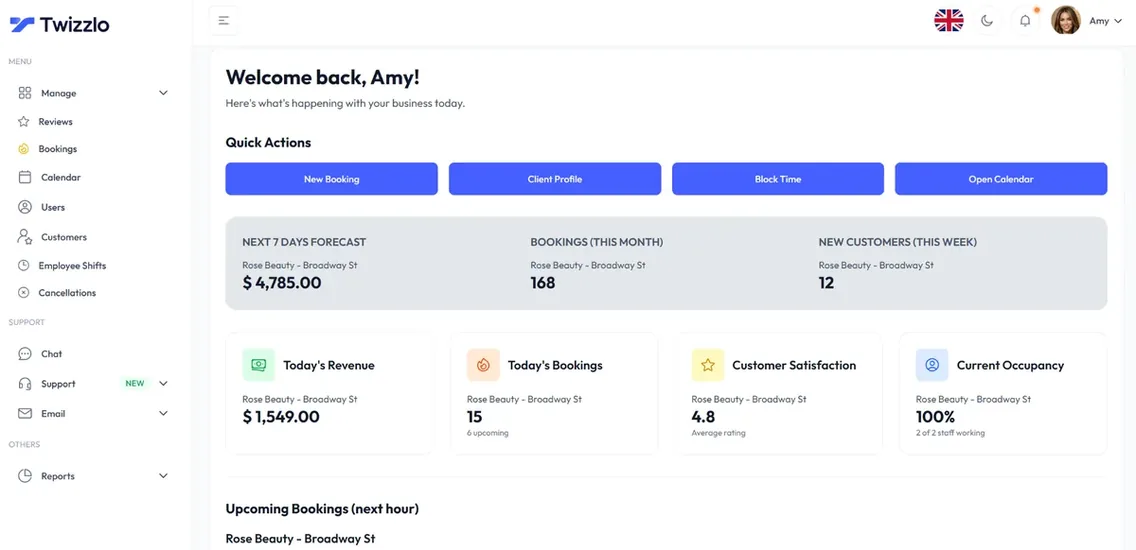
Against the six checks in Table 1: online booking runs 24/7 with real-time availability; confirmations and reminders go out by email, with SMS on Business Pro within its allowance; a prepaid booking takes the full service price, clients can add tips online, and no-show fees are supported at your discretion; client profiles keep visit history, notes and total spend; each staff member has a schedule, shifts and time off; and insights show bookings, revenue and staff utilization across locations.
For a trainer with weekly regulars, Twizzlo’s personal trainer scheduling software keeps each client’s session history, reminders and self-rescheduling in one account.
Twizzlo does not run payroll, commission tracking or memberships. Clients book through your own booking page and per-location links.
FAQ
What should small business booking software include?
Six functions cover most operations: online booking clients can use without calling, payments that handle deposits or full prepayment and tips, automated SMS and email reminders, a customer record with notes and history, staff scheduling that knows who works when and where, and reporting you can act on. Tools that cover only one or two of these leave the rest of the workflow manual, which is where errors and admin hours creep back in.
How do you choose booking software for a small business?
Walk a full appointment cycle through the tool before committing: a client discovers you, books, gets reminded, arrives, pays and rebooks, while your team manages calendars, availability rules and notes. Then test changes: add a service, adjust staff availability and manage several calendars from one dashboard. Software that is quick to set up but slow at everyday edits costs the team time every week. Weigh pricing at the team size you plan to reach, not where you are now.
Is free booking software good enough for a small business?
It can be, at low volume. Free plans usually cover basic scheduling and cap bookings, users or features, which makes them a reasonable way to test whether online booking changes your week; Setmore’s pricing page, read September 25, 2026, allowed up to four users on its Free plan. Twizzlo’s pricing page, read September 28, 2026, puts its Free plan at $0 a month for up to 150 bookings, with no SMS. The switch point comes when caps force workarounds, or when you need payments, reminders and customer records working as one system instead of three tools.
What pricing model should a small business look for in booking software?
Flat, transparent pricing is easier to plan around than seat-based tiers with feature gates, because hiring should improve your margins, not raise the software bill. Watch for base plans that cover one user or one location and then charge extra for reminders, payment tools, added staff and reporting. On Twizzlo’s pricing page, read September 28, 2026, Business Pro is $29.99 a month per business with unlimited staff and locations, and Free is $0 a month for up to 150 bookings, with no SMS.
When should a small business switch from manual scheduling to booking software?
When the hidden costs show up weekly: missed appointments that go unfilled, double bookings that need recovery work, staff spending afternoons confirming appointments, or an owner who cannot see the real schedule because it lives across calls, texts and inboxes. At that point, compare the weekly admin hours with the software’s monthly price. Switching earlier is also easier, because you move fewer records and fewer habits.
What is business booking technology?
Business booking technology is the software a service business uses to take appointments: an online booking page, staff calendars and availability, confirmations and reminders by email or text, payment at booking, and a client record with visit history. It runs in a browser or on a phone, so the schedule, payments and notes stay in one place instead of across calls, texts and a paper book.
What should small business booking and payment software handle?
Booking and payment software should take payment at booking, as a deposit or the full price, add tips, apply your cancellation or no-show policy, issue refunds and show who paid on each appointment and client record. Check what each payment costs on top of the card processor’s rate. Twizzlo takes online payments, tips and prepaid bookings (the full service price) through Stripe, and staff can record manual payments.
Sources and methodology
Prices read
- Calendly pricing page (opens in a new tab)Read . Supports: Calendly Standard at $12 a seat a month billed monthly; seats are needed to host meetings, and invitees need none
- Square Appointments pricing page (US) (opens in a new tab)Read . Supports: Square Free at $0 and Square Plus at $49 a month, each per location
- Booksy pricing page (opens in a new tab)Read . Supports: Booksy at $29.99 a month plus tax, with $20 a month for each additional team member
- Setmore pricing page (opens in a new tab)Read . Supports: Setmore Free for up to four users
- Twizzlo pricing page (opens in a new tab)Read . Supports: Twizzlo plans, booking cap, SMS allowance, unlimited staff and locations, money-back guarantee, 24/7 support and the online payment fee
- Twizzlo features page (opens in a new tab)Read . Supports: Online booking, reminders, prepaid bookings, tips, no-show fees, client profiles, staff schedules and shifts, per-location booking links and insights
From our editorial policy
- Twizzlo sells online booking and appointment scheduling software, the same category we write about. Twizzlo appears in our comparisons and roundups, and we have a commercial interest in you choosing it.
- We do not publish invented quotes, studies, statistics, customer stories or product tests, and we do not imply hands-on use of a product when the research came from the vendor's public documentation.
- To report an error, email support@twizzlo.com with the subject line "Correction: [page URL]". Tell us what is wrong and, if you can, link a source.
Update history
- : Rebuilt the guide as a fit checklist with a pass test for six functions, an eight-step trial script and dated examples of how vendors bill, corrected Twizzlo's plan wording, and added two FAQs.
Start free, upgrade when you grow
Flat-rate booking software. No per-seat, per-chair or per-location fees.
- Free plan up to 150 bookings a month, not a trial
- Business Pro is $29.99 a month per business for unlimited bookings, with a 30-day money-back guarantee
- 24/7 support by email