
Best Scheduling App for Cleaning Business

In short
The best scheduling app for a cleaning business depends on the work being scheduled. A solo cleaner with discrete appointments has different needs from a recurring maid team or a dispatcher moving crews between sites. For recurring crews, look at Launch27, ZenMaid or Maidily; for dispatch, Housecall Pro, Workiz or FieldPulse; for appointment-led cleans, Twizzlo.
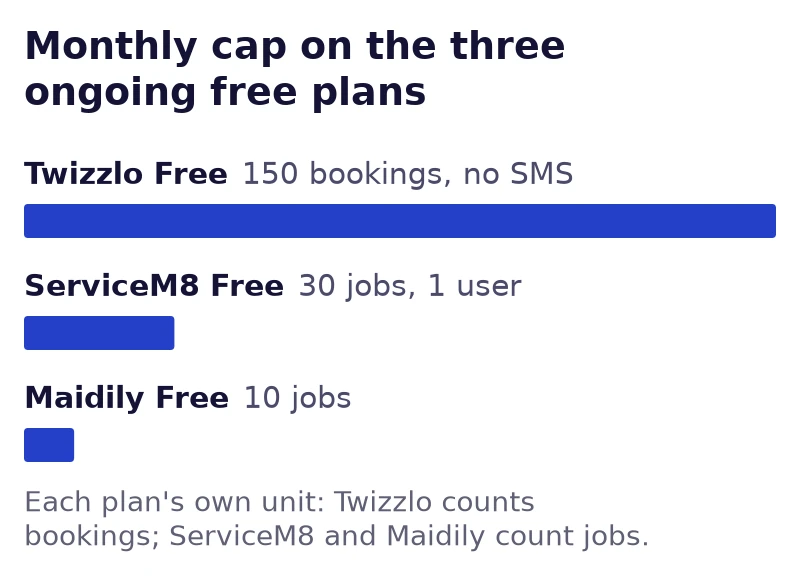
- Monthly free-plan caps: Twizzlo Free, 150 bookings; ServiceM8, one user and 30 jobs; Maidily, 10 jobs (ServiceM8 and Maidily pages read September 25, 2026).
- Check the billing unit before the price: the account or business, each team member, a team-size band, jobs per month, or a quote.
- Run one recurring clean with a skipped visit and a cleaner swap in your final two apps before moving your schedule.
In this article23 sections
This guide compares ten cleaning business apps on what each vendor’s own site describes, what each one bills for and whether “free” means a plan or a trial. They range from booking tools to maid-service and field-service scheduling apps for cleaning companies. Twizzlo, which publishes this guide, is listed first; the list is numbered for reference only, and we did not score or rank the apps. Each competitor’s pricing page was read on September 25, 2026, and Twizzlo’s prices come from its own pricing page.
1. Twizzlo: test appointment-led cleaning
Twizzlo
Our productBest for: Appointment-led cleans that clients book and can prepay online.
Starting price: Free: $0 for up to 150 bookings a month, no SMS. Business Pro: $29.99 a month per businessRead on the Twizzlo pricing page (opens in a new tab)
Pros
- Unlimited staff and locations on both plans
- 24/7 email support
- 30-day money-back guarantee on Business Pro
Cons
- Free is capped at 150 bookings a month, with no SMS
- SMS beyond 50 a month costs $0.03 each on Business Pro
Twizzlo fits appointment-led cleaning: one-off, deep and move-out cleans that clients book online. It is web-based online booking and appointment scheduling software for appointment-based service businesses. Twizzlo Free supports up to 150 bookings a month and does not include SMS. Business Pro costs $29.99 a month per business, includes 50 SMS a month, and charges $0.03 for each additional SMS. It carries a 30-day money-back guarantee, and both plans include unlimited staff and locations. Online payments carry your Stripe processing rate plus a 1.5% Twizzlo platform fee.
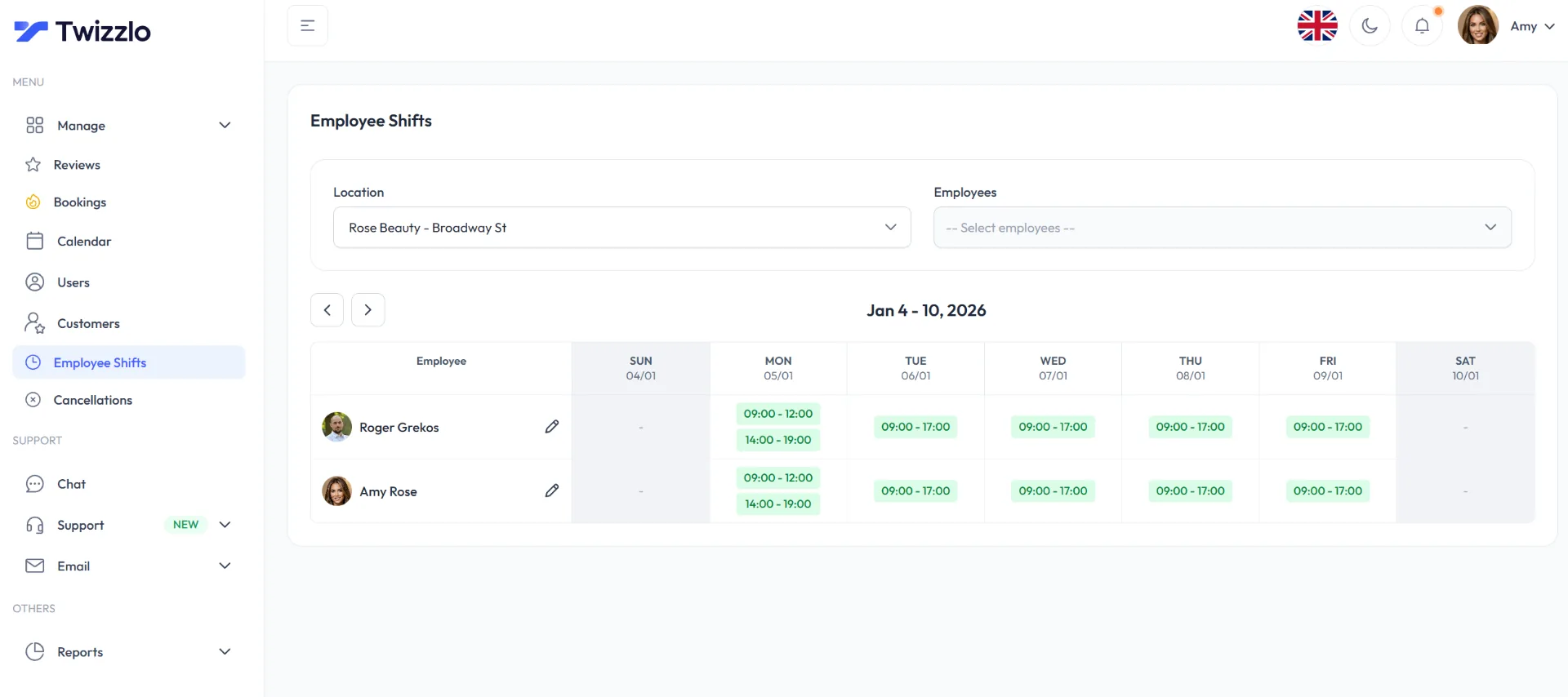
Twizzlo books each clean as its own appointment. It does not plan routes, and recurring bookings, quotes and dispatch are not on its features list; if your crews depend on them, email sales@twizzlo.com before you switch. Twizzlo’s cleaning service scheduling software page shows how the booking page, a calendar per cleaner and reminders are set up for a cleaning team.
How do booking apps charge per staff member?
Billing units differ: ZenMaid adds to its price for each team member, and its calculator counts office managers as well as cleaners (pricing page, read September 25, 2026). Launch27 charges one flat price per account and Twizzlo one price per business; ServiceM8 and Maidily price by monthly job volume; BookingKoala and Jobber sell bands of providers or people; Workiz and FieldPulse quote their prices, and Housecall Pro’s plan prices were not confirmed on screen.
Count the unit the vendor bills (bookable provider, login, crew, location or business) and ask which administrators are exempt. Each app’s entry plan and its source are in the comparison table below.
2. Launch27
Launch27
Best for: House cleaning businesses whose clients get an instant estimate, book online and move onto a recurring schedule.
Starting price: BASE $75 a month per account, unlimited usersRead on Launch27's pricing page (opens in a new tab)
Pros
- Unlimited users on every plan
- Annual billing takes 15% off
- Automatic card pre-authorization and charging on PLUS
Cons
- Calendars for multiple locations start on PLUS, $299 a month
Launch27 officially describes online estimates, booking and recurring appointment setup. Test skip-one-visit handling and the amount approved before charging. Choose Launch27 if you want one flat price per account with unlimited users; its pricing page, read September 25, 2026, lists every plan that way.
3. ZenMaid
ZenMaid
Best for: Residential maid services that schedule cleaning teams and keep clients informed automatically.
Starting price: Starter $19 a month plus an amount per team member ($23 with one)Read on ZenMaid's pricing page (opens in a new tab)
Pros
- Month-to-month terms, cancel anytime
- Free client import by the ZenMaid team
- On-my-way notifications to clients
Cons
- SMS charges not included
- Starter allows up to 40 appointments a month
ZenMaid officially describes maid-service scheduling, client/cleaner communications and mobile job notes. Test team replacement and a client/cleaner change notification. Choose ZenMaid if a base price plus an amount per team member suits a small maid team; its pricing page, read September 25, 2026, notes that SMS charges are not included.
Why do cleaning businesses outgrow simple calendars?
The trigger is an unmet workflow such as a recurring-series exception, travel gap or crew handoff, not a universal employee count. When one of those workflows repeats every week and the calendar needs a manual fix each time, compare a cleaning business scheduling app built for that operating model; the table under Separate three operating models lists what each model must pass.
4. Maidily
Maidily
Best for: Cleaning teams with part-timers or contractors who each need a login.
Starting price: Free: $0 for up to 10 jobs a monthRead on Maidily's pricing page (opens in a new tab)
Pros
- Unlimited users on every plan
- Free plan with no end date
- Stripe card storage and automatic invoices
Cons
- Each recurring clean counts as a separate job
Maidily officially describes one-time/recurring jobs, team assignment and Stripe invoicing. Test a recurring-series exception and the invoice approval step. Choose Maidily if you want to pay by monthly job volume with unlimited users; its pricing page, read September 25, 2026, lists a free plan for up to 10 jobs a month.
5. BookingKoala
BookingKoala
Best for: Cleaning businesses that also need a booking website and a portal for their providers.
Starting price: Starter 27 USD a month for up to 5 providersRead on BookingKoala's pricing page (opens in a new tab)
Pros
- Website builder or booking forms for your own site
- Customer and provider accounts
- Hiring features for recruiting providers
Cons
- Each team member counts as a provider
BookingKoala officially describes provider/customer accounts and configurable scheduling. Test service-area restrictions and what providers can see. Choose BookingKoala if your team fits one of its provider bands; its pricing page, read September 25, 2026, counts each team member as a provider.
6. Jobber
Jobber
Best for: Cleaning companies that quote before they schedule and invoice after the job.
Starting price: Core $49 a month for one user, billed monthly with no commitmentRead on Jobber's pricing page (opens in a new tab)
Pros
- 14 days of the Grow plan free, with no credit card
- Team plans include 5, 10 or 15 users
- Drag-and-drop calendar
Cons
- Core includes one user
- Marketing Suite is a $99-a-month add-on
Jobber officially describes a field-service quote, schedule and invoice workflow. Test a quote becoming a scheduled job and then an invoice. Choose Jobber if you want quotes, jobs and invoices in one workflow; its pricing page, read September 25, 2026, sells Core for one user and team plans in bands of people.
How does scheduling software reduce admin time?
Scheduling software saves admin time only where it removes a manual step you repeat today, such as re-typing a booking or texting a schedule change by hand. Measure scheduling minutes, corrections and missed messages before and during a pilot; no time-saving percentage is assumed.
7. Housecall Pro
Housecall Pro
Best for: Home-service companies with a dispatcher who assigns teams and sends estimates.
Pros
- Scheduling that assigns and dispatches teams
- Estimates and proposals
Cons
- Plan prices not confirmed on screen (behind a plan picker)
Housecall Pro officially describes scheduling/dispatch, estimates and customer communications. Test travel gaps and team access for a real service area. Housecall Pro’s plan prices sit behind a plan picker and were not confirmed on screen when we read its pricing page on September 25, 2026, and again on September 27, 2026, so confirm the selected plan, users, billing interval and optional modules before comparing a total.
8. Workiz
Workiz
Best for: Dispatch-led teams that want phone and service-plan tools with scheduling.
Pros
- Drag-and-drop dispatch calendar
- Online booking and payments
Cons
- Every plan priced by quote
Workiz officially describes a dispatch calendar with phone and service-plan tools. Check which phone and automation features require add-ons. Workiz prices its Standard, Pro and Ultimate plans by quote (pricing page, read September 25, 2026), so confirm the selected plan, crew size, billing interval and optional modules before comparing a total.
9. ServiceM8
ServiceM8
Best for: Small crews that work from job cards and invoice on site.
Starting price: Free: $0 for one user and 30 jobs a month; Starter $29 a monthRead on ServiceM8's US pricing page (opens in a new tab)
Pros
- Unlimited users on paid plans
- Recurring jobs on every plan
- Job cards with notes and photos
Cons
- The Free plan is for one user
- Full app on iPhone; Android gets ServiceM8 Lite
ServiceM8 officially describes job cards, notes/photos, scheduling and mobile invoices. Test the actual crew devices: iOS and Android Lite differ. Choose ServiceM8 if you want to pay by monthly job volume; its US pricing page, read September 25, 2026, lists a free plan for one user and 30 jobs a month and unlimited users on paid plans.
10. FieldPulse
FieldPulse
Best for: Commercial and field-service companies that dispatch crews against work orders.
Pros
- Estimates and invoices
- Custom workflows
Cons
- Seat-based, priced by quote
FieldPulse officially describes scheduling/dispatch, work orders, estimates and job management. Test crew assignment, required work-order fields and quote scope. FieldPulse is seat-based and prices every plan by quote (pricing page, read September 25, 2026), so confirm the seats, billing interval and optional modules before comparing a total.
Compare the ten apps by the job they need to do
Match each app to the job first, then check its entry plan: six of the nine other vendors publish an entry price, Workiz and FieldPulse quote theirs, and Housecall Pro’s could not be confirmed on screen.
Cleaning scheduling app comparison: what each of the ten apps officially describes, one trial check, and its entry plan. Sources: each vendor’s own site; prices read September 25, 2026; Twizzlo from twizzlo.com/pricing/.
If the table is wider than your screen, scroll sideways to see every column.
| App | Officially described workflow | Required trial check | Price handling (read September 25, 2026) |
|---|---|---|---|
| Twizzlo plans and pricing | Appointment booking; Free and Business Pro plans | Check that one appointment per clean fits your recurring work | Free 150 bookings/no SMS; Business Pro $29.99 a month per business + usage/payment fees |
| Launch27 | Online estimates, booking and recurring appointment setup | Test skip-one-visit handling and the amount approved before charging. | Flat per account, unlimited users: BASE $75 a month, before usage and optional modules |
| ZenMaid | Maid-service scheduling, client/cleaner communications and mobile job notes | Test team replacement and a client/cleaner change notification. | Base plus each team member: Starter $19 a month with no team members or $23 with one, up to 40 appointments a month, before SMS charges and optional modules |
| Maidily | One-time/recurring jobs, team assignment and Stripe invoicing | Test a recurring-series exception and the invoice approval step. | By monthly job volume, unlimited users: free up to 10 jobs a month, before extra jobs and optional modules |
| BookingKoala | Provider/customer accounts and configurable scheduling | Test service-area restrictions and what providers can see. | By provider band: Starter 27 USD a month for up to 5 providers, before usage and optional modules |
| Jobber | Field-service quote, schedule and invoice workflow | Test a quote becoming a scheduled job and then an invoice. | By plan and team band: Core $49 a month for one user, billed monthly with no commitment, before usage and optional modules |
| Housecall Pro | Scheduling/dispatch, estimates and customer communications | Test travel gaps and team access for a real service area. | Plan prices not confirmed on screen. Obtain the selected US plan/crew price, including usage and optional modules |
| Workiz | Dispatch calendar with phone and service-plan tools | Check which phone and automation features require add-ons. | Obtain the selected US plan/crew quote, including usage and optional modules |
| ServiceM8 | Job cards, notes/photos, scheduling and mobile invoices | Test the actual crew devices: iOS and Android Lite differ. | By monthly job volume: free for one user and 30 jobs; Starter $29 a month for 50 jobs, unlimited users, before usage and optional modules |
| FieldPulse | Scheduling/dispatch, work orders, estimates and job management | Test crew assignment, required work-order fields and quote scope. | Obtain the selected US plan/crew quote, including usage and optional modules |
Workflow descriptions were checked against the linked official documentation on September 27, 2026. The trial checks are proposed tasks, not completed tests. Vendor prices marked for quotation remain unknown. Twizzlo publishes this guide and sells one of the listed products.
Pilot and migrate with one active schedule
Move to a new app in one scheduled cutover, so only one schedule is ever live. Use dummy records first, then a permitted small migration sample. Check client fields, recurring-series dates, assigned crew, price and outstanding balances. Choose a cutover time, stop new bookings in the old system, reconcile the next week of work and tell clients which link is current. Keep the old record read-only where permitted.
If you are deciding which client fields to carry across, what CRM software is used for explains the record types involved.
Best scheduling software for cleaning business owners, by operating model
The best scheduling software for a cleaning business is the one built for how your jobs arrive: a booking tool for a solo cleaner taking one-off appointments, a maid-service scheduler for recurring residential crews, or a field-service platform for commercial work with quotes, dispatch and invoices. Use the ten apps above this way:
- Solo or appointment-led cleaning: Twizzlo. Clients book from a 24/7 online booking page and can pay online or prepay through Stripe, with email reminders on both plans and SMS on Business Pro. Every clean is booked as a single appointment.
- Recurring residential crews: Launch27, ZenMaid and Maidily, which officially describe recurring appointment setup, maid-service scheduling or team assignment. BookingKoala describes configurable scheduling with provider and customer accounts.
- Commercial and field operations: Jobber, Housecall Pro, Workiz, ServiceM8 and FieldPulse, which describe quotes, dispatch, work orders and invoicing.
If you want a free scheduling app for a cleaning business, check what free means. Twizzlo Free is an ongoing plan at $0 for up to 150 bookings a month, without SMS. ServiceM8 and Maidily also offer ongoing free plans with monthly job caps (their pricing pages, read September 25, 2026). ZenMaid’s verified free offer is a 14-day trial, according to ZenMaid’s pricing page, read September 25, 2026. For the apps in the free plan table, confirm whether free is a plan, a trial or a demo before you build your schedule on it.
FAQ: best scheduling app for cleaning business
Which cleaning operation is Twizzlo established for in this comparison?
Appointment-led cleaning, such as a one-off, deep or move-out clean that a client books online, each one a separate appointment on the cleaner’s calendar. Route planning is not a Twizzlo feature, and Twizzlo’s features list does not include recurring bookings, quotes or dispatch.
Is a recurring appointment the same as a recurring crew workflow?
No. Test skipped or moved visits, cleaner replacement, travel time, messages and invoice state.
Is a free trial an ongoing free plan?
No. Twizzlo Free is an ongoing 150-booking plan without SMS; ZenMaid’s verified free offer is a 14-day trial, according to ZenMaid’s pricing page, read September 25, 2026. ServiceM8 Free (one user, 30 jobs a month) and Maidily’s free plan (up to 10 jobs a month) are also ongoing plans, per their pricing pages, read September 25, 2026.
Is there a free scheduling app for a cleaning business?
Yes, with limits. Twizzlo Free is an ongoing $0 plan for up to 150 bookings a month, without SMS, suited to appointment-led cleaning. ServiceM8 Free covers one user and 30 jobs a month, and Maidily’s free plan covers up to 10 jobs a month, per their pricing pages, read September 25, 2026. ZenMaid’s verified free offer is a 14-day trial, not an ongoing plan, according to ZenMaid’s pricing page, read September 25, 2026. For the other apps in this guide, confirm whether free means a plan, a trial or a demo.
Which cleaning scheduling apps charge by job volume instead of by cleaner?
ServiceM8 and Maidily price by jobs per month, not by user. ServiceM8’s US pricing page, read September 25, 2026, starts with Free, for one user and 30 jobs a month; the first paid plan, Starter, is $29 a month for 50 jobs with unlimited users. Maidily’s pricing page lists a free plan for up to 10 jobs a month (read September 25, 2026) and says each recurring clean counts as a separate job (read September 27, 2026). Launch27’s plans are priced per account and Twizzlo’s per business, so adding a cleaner changes neither subscription.
How do I choose a janitorial or housekeeping scheduling app?
Match the app to how the work arrives. For janitorial and other commercial contract cleaning, shortlist apps whose own sites describe quotes, dispatch or work orders, such as Jobber, Housecall Pro, Workiz and FieldPulse. For housekeeping and recurring home cleans, look at housekeeping scheduling software that describes recurring or maid-service scheduling, such as Launch27, ZenMaid or Maidily. Then run the same recurring-clean test in your final two apps.
Run a recurring-clean test before buying
Create a fictional weekly clean assigned to two cleaners, with a two-hour service and travel time. Skip one visit, move one future visit and replace one cleaner without unintentionally changing the whole series. Inspect the client message, each cleaner’s schedule, service price and invoice status. Then test a one-off deep clean with extra scope. Record pass, workaround or unsupported after running each step. This is a proposed trial, not a completed product test.
Recurring-clean test checklist: the pass standard for each step of the trial above, with a column for your own result in each app.
| Test step | What a pass looks like | Your result (pass, workaround or unsupported) |
|---|---|---|
| 1. Create the weekly series | Every visit shows both cleaners, the two-hour length and the travel gap | |
| 2. Skip a single visit | Only that visit is removed; later visits keep their date, cleaners and price | |
| 3. Reschedule a future visit | The moved visit shows its new time on both cleaners’ schedules, and the rest of the series stays put | |
| 4. Swap a cleaner | The change applies only to the visits you choose, and both cleaners’ schedules update | |
| 5. Review what each person sees | The client gets one clear message, each cleaner sees the right visits, and the price and invoice status match the visit | |
| 6. Book a separate deep clean | It carries its extra scope and price without changing the weekly series |
Separate three operating models
Cleaning work falls into three operating models, and each has requirements a scheduling app must pass before its price matters.
If the table is wider than your screen, scroll sideways to see every column.
| Model | Must-pass requirement |
|---|---|
| Solo appointment cleaner | Clear service scope, availability and confirmation |
| Recurring residential crew | Series exceptions, team changes, job notes and travel gaps |
| Commercial/field operation | Quoting, dispatch, approved scope changes, invoicing and required reporting |
A simple calendar can be adequate for the first case and inadequate for the other two. Price only the products that pass the required case.
If the commercial/field row describes your work across more than one site, multi-location scheduling software covers that selection problem separately.
Free plan or time-limited trial
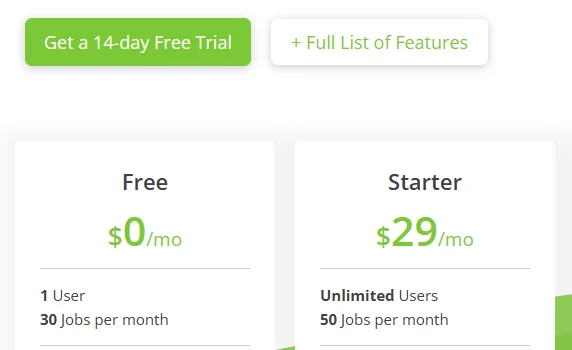
A free scheduling app for a cleaning business is either an ongoing plan with a usage cap or a time-limited trial, and three of the ten apps here offer the first kind. Twizzlo Free is an ongoing plan with a 150-booking monthly cap and no SMS. ServiceM8’s US pricing page lists a Free plan for one user and 30 jobs a month, and Maidily’s pricing page lists one for up to 10 jobs a month; both pages were read on September 25, 2026.
ZenMaid’s official site (read September 27, 2026) offers a 14-day trial; it is not an ongoing free business subscription. BookingKoala and Jobber (on its Grow plan) also advertise 14-day free trials, according to their pricing pages, read September 25, 2026. On September 27, 2026, Launch27’s homepage offered a 14-day trial, Workiz’s pricing page described a 7-day free trial, Housecall Pro’s pricing page offered a 14-day free trial, and FieldPulse’s homepage offered a demo.
Free plan or trial, by app: the cap on each ongoing free plan and the trial or demo each vendor advertises. Sources: each vendor’s pricing page or homepage on the dates shown; Twizzlo from twizzlo.com/pricing/.
| App | Ongoing free plan and its cap | Trial or demo | Source and read date |
|---|---|---|---|
| Twizzlo | Free: $0 a month, up to 150 bookings a month, no SMS; unlimited staff and locations | Not a trial: Free has no end date | Twizzlo pricing page, September 27, 2026 |
| Launch27 | No free plan on its pricing page | 14-day trial | Pricing page, September 25, 2026; homepage, September 27, 2026 |
| ZenMaid | No free plan on its pricing page | 14-day free trial | Pricing page, September 25, 2026 |
| Maidily | Free: $0 a month, up to 10 jobs a month, unlimited users | Free trial on each paid plan | Pricing page, September 25 and 27, 2026 |
| BookingKoala | No free plan on its pricing page | 14-day free trial | Pricing page, September 25, 2026 |
| Jobber | No free plan on its pricing page | 14 days of the Grow plan, no credit card | Pricing page, September 25, 2026 |
| Housecall Pro | Plan cards not shown on screen | 14-day free trial, no credit card | Pricing page, September 25 and 27, 2026 |
| Workiz | No free plan on its pricing page | 7-day free trial, no credit card | Pricing page, September 27, 2026 |
| ServiceM8 | Free: $0 a month, 1 user and 30 jobs a month | 14-day free trial, no credit card | US pricing page, September 25, 2026 (captured September 27, 2026) |
| FieldPulse | No free plan on its pricing page (quote only) | Demo | Pricing page, September 25, 2026; homepage, September 27, 2026 |
For any vendor, confirm whether “free” means a trial, a demo or an actual plan before choosing a plan.
Resolve specialist requirements explicitly
Routing, recurring-series behavior, crew checklists and commercial invoicing are the requirements that separate specialist tools. If one is essential, request a demonstration or continue with a specialist tool that has demonstrated it. Carpet cleaning adds its own requirement, room counts sold as fixed-length services, which our guide to carpet cleaning scheduling software sets up with a worked example.
Choose the app that passes your cleaning workflow
Use the operating-model table to choose two candidates, run the same trial script in each and compare the itemized bill. If appointment-led booking fits your business, review Twizzlo’s Free plan before upgrading.
For the next task, cleaning service software covers the wider operating system a cleaning company runs on. If you are shortlisting a booking product specifically, cleaning business scheduling software is the matching product page. Before the first recurring job starts, a cleaning service contract template sets the scope and payment terms the schedule depends on.
Sources and methodology
Prices read
- Twizzlo pricing page (opens in a new tab)Read . Supports: Twizzlo plans, SMS allowance, guarantee, unlimited staff and locations, online payment fee
- Twizzlo features page (opens in a new tab)Read . Supports: Twizzlo staff schedules and the Employee Shifts screenshot (same image)
- Launch27 pricing page (opens in a new tab)Read . Supports: flat price per account, unlimited users, annual discount (first read September 25, 2026); automatic card pre-authorization and charging on PLUS
- Launch27 homepage (opens in a new tab)Read . Supports: estimates, online booking, recurring appointments, trial length
- ZenMaid pricing page (opens in a new tab)Read . Supports: base price plus team members, appointment limit, SMS note, trial
- ZenMaid homepage (opens in a new tab)Read . Supports: maid-service scheduling, client and cleaner messages, job notes, month-to-month terms
- Maidily pricing page (opens in a new tab)Read . Supports: free plan capped at 10 jobs a month, unlimited users, billing by jobs (first read September 25, 2026; same plans in English on the re-read); recurring cleans counted as separate jobs; free trial on paid plans
- Maidily homepage (opens in a new tab)Read . Supports: one-time and recurring jobs, team assignment, Stripe invoicing
- BookingKoala pricing page (opens in a new tab)Read . Supports: provider bands, provider definition, trial
- BookingKoala homepage (opens in a new tab)Read . Supports: scheduling, provider and customer accounts, website builder, booking forms, hiring features
- Jobber pricing page (opens in a new tab)Read . Supports: list prices by plan and team band, add-ons, Grow trial
- Jobber homepage (opens in a new tab)Read . Supports: quote, schedule and invoice workflow; drag-and-drop calendar
- Housecall Pro pricing page (opens in a new tab)Read . Supports: plan cards behind a plan picker, not confirmed on screen (first read September 25, 2026); 14-day free trial with no credit card
- Housecall Pro homepage (opens in a new tab)Read . Supports: scheduling and dispatch, estimates, customer contact, trial offer
- Workiz pricing page (opens in a new tab)Read . Supports: Standard, Pro and Ultimate priced by quote (first read September 25, 2026); 7-day free trial with no credit card (page FAQ)
- Workiz homepage (opens in a new tab)Read . Supports: dispatch calendar, phone, service plans, online booking, payments
- ServiceM8 US pricing page (opens in a new tab)Read . Supports: plans by monthly job volume, users per plan, recurring jobs, 14-day trial (first read September 25, 2026, same figures); the dated screenshot of the Free and Starter plans
- ServiceM8 US homepage (opens in a new tab)Read . Supports: job cards, notes and photos, scheduling, on-site invoices; iOS app and ServiceM8 Lite for Android
- FieldPulse pricing page (opens in a new tab)Read . Supports: seat-based, quote-only pricing
- FieldPulse homepage (opens in a new tab)Read . Supports: scheduling and dispatching, work orders, estimates, custom workflows, demo
From our editorial policy
- Twizzlo sells online booking and appointment scheduling software, the same category we write about. Twizzlo appears in our comparisons and roundups, and we have a commercial interest in you choosing it.
- We do not publish invented quotes, studies, statistics, customer stories or product tests, and we do not imply hands-on use of a product when the research came from the vendor's public documentation.
- To report an error, email support@twizzlo.com with the subject line "Correction: [page URL]". Tell us what is wrong and, if you can, link a source.
Update history
- : Added each app's billing unit and entry plan where its own pricing page shows them, a free plan or trial table, a recurring-clean test checklist, and Twizzlo's current plan wording.
Start free, upgrade when you grow
Flat-rate booking software. No per-seat, per-chair or per-location fees.
- Free plan up to 150 bookings a month, not a trial
- Business Pro is $29.99 a month per business for unlimited bookings, with a 30-day money-back guarantee
- 24/7 support by email