
Carpet Cleaning Scheduling Software: Plans and Prices at 12 Tools

In short
Carpet cleaning scheduling software can cost $0: on October 4, 2026, five tools here had free plans with online booking, and Square Appointments Free also took deposits at booking. For jobs quoted after a walk-through, ServiceM8 Free covers quoting and invoicing for one user and 30 jobs a month, and Jobber Core costs $49 a month, month to month.
- Square Appointments, Setmore and Picktime cover two technicians on free plans; Housecall Pro's cheapest listed two-user plan was $189 a month ($149 billed annually).
- Jobber Core includes online booking, but automated client reminders start on the Connect plan, at $139 a month ($99 billed annually).
- Sell each room count as its own service with a fixed length, and add a travel buffer so arrival times stay honest.
In this article8 sections
A carpet cleaning job is easy to sell online if the customer can see what it costs and how long it takes. Two bedrooms and a hallway, a sectional sofa, a whole home before a move: each is a fixed amount of work for one technician and one truck. Carpet cleaning scheduling software turns that menu into a booking page, so customers pick a job and a start time without phoning you while you work.
This guide prices 12 tools that work as carpet cleaning booking software. Seven are the tools named by the roundup that ranked first in our search on October 4, 2026, written by SchedulingKit: SchedulingKit, Jobber, Housecall Pro, ServiceM8, ZenMaid, Markate and BookingKoala. We added Picktime and OctopusPro, which ranked second and fourth with their own carpet cleaning pages. We also added ServiceMonster, which markets itself to carpet cleaners, and Square Appointments and Setmore, two booking tools with free plans. We read each price on the vendor's own pricing page or help center on October 4, 2026, as listed and before tax. For 11 of the tools, the guide finds the cheapest plan on which a customer can book online and whether that plan also takes a payment or deposit. Twizzlo, which publishes this guide, also sells booking software, so it stays out of the price tables and has its own section below. We also read the Workiz pricing page, which asked visitors to request pricing for every plan on October 4, 2026, so Workiz is not priced here.
The guide then shows how to set up room-count jobs and when a carpet business needs a heavier field service suite instead. Our cleaning service scheduling software page shows how a cleaning business sets up each clean as a service with a price, a length and a buffer for travel between homes. This guide uses the same setup for room counts.
What does online booking cost for a carpet cleaner?
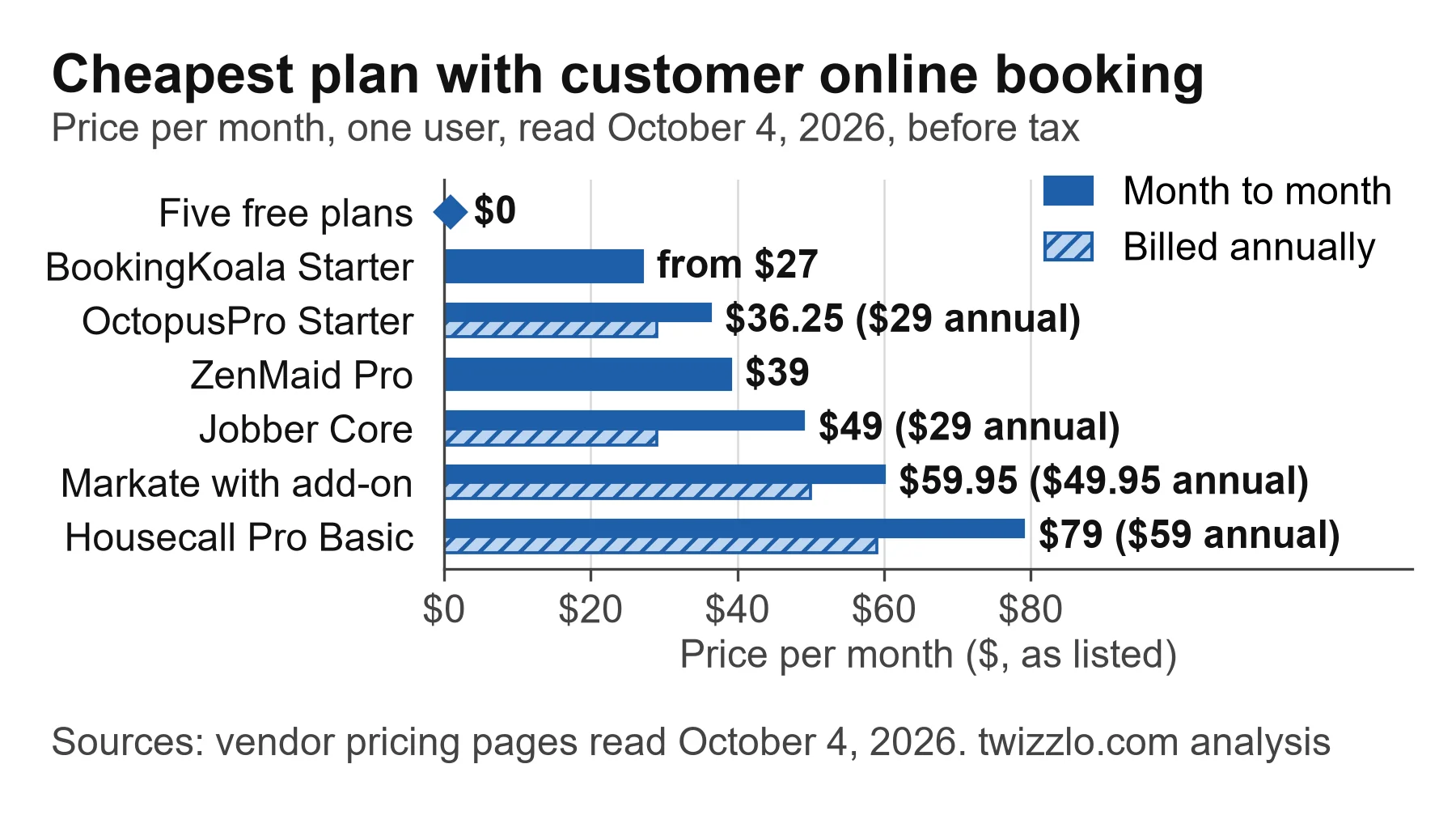
On October 4, 2026, five tools offered customer online booking on a $0 plan, and six charged from $27 a month at BookingKoala to $79 at Housecall Pro, month to month for one user. The free plans were at Square Appointments, Setmore, Picktime, ServiceM8 and SchedulingKit. Between the paid ends, OctopusPro cost $36.25, ZenMaid $39, Jobber $49 and Markate $59.95 with its booking add-on. The table lists each tool's cheapest plan with customer online booking as the vendor's own page lists it. Month-to-month and annual prices are shown separately because several vendors list the annual figure first.
| Tool | Cheapest plan with online booking | Price per month, 1 user | Pay or deposit at booking on that plan? | Card rate listed on the pricing page |
|---|---|---|---|---|
| Square Appointments | Free | $0 per location | Yes: prepayments and appointment deposits are on every plan | 3.3% plus 30 cents online on Free |
| Setmore | Free (up to 4 users) | $0 | Yes for online payments; deposits need Pro, $12 per user ($5 billed annually) | Not listed |
| Picktime | Free (3 users, unlimited appointments) | $0 | Not stated: payments through PayPal on Free; the page does not say customers pay a deposit | Not listed |
| ServiceM8 | Free (1 user, 30 jobs a month) | $0 | Not stated: deposits are listed on every plan, but the page does not say customers pay them when they book online | Not listed |
| SchedulingKit | Free (1 team member, 50 bookings a month) | $0 | No; payment processing starts on Standard, $12 per seat ($10 billed annually) | Not listed |
| BookingKoala | Starter (5 providers) | From $27 | Not stated at booking: card charges and cancellation fees are on Starter; partial payments are a Premium invoicing option | Not listed |
| OctopusPro | Starter (1 admin and 1 fieldworker seat) | $36.25 month to month; $29 billed annually ($348 a year) | Not stated: deposit management is on every plan, but the page does not say customers pay a deposit when they book | Not listed |
| ZenMaid | Pro (website booking forms) | $39 | Not stated: online payments (Stripe and Square) are on every plan, but the page does not say customers pay in the booking form | Not listed |
| Jobber | Core | $49 month to month; $39 with a 1-year commitment; $29 billed annually | Not stated: online payments are on invoices; the page does not say a customer pays when booking | 2.9% plus 30 cents on online invoice payments, every plan |
| Markate | Owner Operator plus the Online Booking add-on | $59.95 month to month ($49.95 plus $10); $49.95 billed annually ($39.95 plus the add-on at its listed $10 a month) | Not stated: online payments are on invoices; the page does not say customers pay when they book | Not listed |
| Housecall Pro | Basic | $79 month to month; $59 billed annually | Yes: customers "book and pay online 24/7" | From 2.59% |
| ServiceMonster | Not stated on the pricing page | Basic $99.99 billed monthly; $79.99 billed annually | Not stated; every plan requires an annual commitment | Not listed |
Source: each vendor's pricing page, plus the ZenMaid help center and Square's plan grid, read October 4, 2026. Prices are before tax and card processing. Jobber, Housecall Pro, BookingKoala, ZenMaid, Picktime, ServiceM8, Markate and OctopusPro state U.S. dollars, and Square's is its U.S. page; Setmore, SchedulingKit and ServiceMonster list $ without a currency code. Software prices and plan contents change, so open the vendor's page again before you buy.
The free plans differ on money and limits. Square Appointments Free takes deposits, Setmore Free takes payments without deposits, Picktime Free takes payments through PayPal, ServiceM8 Free stops at 30 jobs a month, and SchedulingKit Free takes no payments at all. A second technician changes the bill, as the next table shows.
| Tool | Cheapest listed option for 2 users | Price per month, billed monthly |
|---|---|---|
| Square Appointments | Free (no limit on staff calendars) | $0 per location |
| Setmore | Free (up to 4 users) | $0 |
| Picktime | Free (up to 3 users) | $0 |
| SchedulingKit | Standard, 2 seats (Free allows 1 team member) | $24 ($12 per seat) |
| BookingKoala | Starter (up to 5 providers) | From $27 |
| ServiceM8 | Starter (unlimited users, 50 jobs a month; Free allows 1 user) | $29 |
| OctopusPro | Starter (1 admin and 1 fieldworker seat) | $36.25 ($29 billed annually) |
| ZenMaid | Pro plus 1 added user | $53 ($39 + $14) |
| Markate | Owner Operator plus 1 employee and Online Booking | $64.95 ($49.95 + $5 + $10) |
| Jobber | Core plus 1 added user | $78 ($49 + $29) |
| Housecall Pro | Essentials, 5 users (Basic includes 1 user, and the page lists an added-user price only on Max) | $189 ($149 billed annually) |
| ServiceMonster | Grow, 5 user licenses (Basic includes 1) | $199.99 ($149.99 billed annually) |
Arithmetic from the same pages, read October 4, 2026. Before tax and card processing.
Card fees can cost more than the plan. At Square's online card rates read October 4, 2026, an example month of 40 jobs paid online at $200 each costs $276 in card fees on Square Free. On Square Plus, at 2.9% plus 30 cents, the same month costs $244 in fees plus the $49 plan, or $293. Plus pays for itself on card fees once online card payments pass $12,250 a month. Check each vendor's processing rate before you compare plan prices.
| Example month: 40 online card payments of $200 | Square Appointments Free | Square Appointments Plus |
|---|---|---|
| Plan price per month | $0 | $49 |
| Card fees (3.3% plus 30 cents on Free; 2.9% plus 30 cents on Plus) | $276 | $244 |
| Total | $276 | $293 |
Worked example from Square's online card rates, read October 4, 2026; the payment count and amount are examples. Plus costs less in total only when online card payments pass $12,250 a month ($49 divided by the 0.4-point rate gap).
The 12 tools, from free booking pages to field service suites
Six of the 12 tools are booking tools built around a public booking page, from Square Appointments to ZenMaid, and six are field service suites, from Jobber to OctopusPro.
Square Appointments: deposits on the free plan
Square Appointments Free costs $0 a month per location, and Plus is $49 and Premium $149 a month per location (Square Appointments pricing page, read October 4, 2026). Square's plan grid puts the online booking site, prepayments, appointment deposits, appointment reminders and unlimited staff calendars on all three plans. Cancellation policy and no-show fees start on Plus. Online card payments cost 3.3% plus 30 cents on Free and 2.9% plus 30 cents on Plus and Premium. Our Square Appointments pricing page sets out its plans in more detail. It suits a one-truck business that wants deposits for $0 a month; it is the only free plan here whose page says customers pay a deposit when they book.
Setmore: free payments, paid deposits
Setmore Free is $0 for up to four users, with online payments through Square, Stripe or PayPal, a branded booking page and email reminders (Setmore pricing page, read October 4, 2026). Deposits and text message (SMS) reminders are on Pro, at $12 per user a month, month to month, or $5 billed annually. Each Pro team member gets 500 SMS credits a month. Free sends one reminder per appointment, and Pro sends two. More detail is on our Setmore pricing page. It suits a team of up to four that wants free online payments and can wait for Pro to take deposits.
Picktime: three free users, PayPal payments
Picktime Free is $0 for three users with unlimited appointments, an online booking page and payments through PayPal, in U.S. dollars (Picktime pricing page, read October 4, 2026). It also includes iOS and Android apps. Starter, at $3 per user a month billed annually, adds Stripe and Square payments and SMS notifications and reminders. Its pricing page does not say whether customers can leave a deposit, so test that before you rely on it. It suits a team of up to three that takes payment through PayPal.
SchedulingKit: a free page for one service
SchedulingKit Free is $0 forever for one team member, one event type and 50 bookings a month, with email notifications (SchedulingKit pricing page, read October 4, 2026). One event type means one bookable service. Standard, at $12 per seat a month, month to month, or $10 billed annually, removes those limits. It adds payment processing through Stripe, PayPal, Apple Pay and Google Pay, plus SMS notifications with 100 credits a month. It suits a one-person business that sells a single standard job; a room-count menu needs Standard.
BookingKoala: pricing in the booking form
BookingKoala's Starter plan starts at $27 a month for up to five providers (BookingKoala pricing page, read October 4, 2026). Its booking forms let customers pick services and see the price you set before they book. SMS notifications are listed on Growing, which starts at $57 a month for 15 providers. Its plan table puts card charges, invoicing and cancellation fees on Starter. Partial payments appear among the extra invoicing options on Premium, which starts at $197 a month for 50 providers. It suits a business with several providers that wants card charges and cancellation fees on the entry plan.
ZenMaid: built for house cleaning, booking forms on Pro
ZenMaid Starter is $19 a month for up to 40 appointments a month, with online payments through Stripe and Square (ZenMaid pricing page, read October 4, 2026). Website booking forms start on Pro, at $39 a month with unlimited appointments, and forms with your own branding are on Pro Max at $49. The ZenMaid help center lists the owner profile as included and each other user at $4, $14 or $24 a month on those three plans. SMS is billed separately, from $14 for 125 messages. ZenMaid is built around house cleaning, so it suits a business that also does carpet jobs more than one that cleans only carpets.
Jobber: online booking on Core, reminders on Connect
Jobber Core costs $49 a month, month to month, for one user, in U.S. dollars (Jobber pricing page, read October 4, 2026). It is $39 a month with a one-year commitment or $29 a month billed annually. It includes online job booking and scheduling, quotes, invoices with online payments and a website. Automated client reminders and automatic payment collection start on Connect, at $139 a month, month to month, or $99 billed annually for one user. Each added user is $29 a month. It suits a carpet cleaner who quotes larger jobs, such as commercial carpet or water damage work, before booking them.
Housecall Pro: book and pay online on Basic
Housecall Pro Basic costs $79 a month, month to month, or $59 a month billed annually, for one user (Housecall Pro pricing page, read October 4, 2026). Prices are in U.S. dollars before sales tax. It includes online booking, through which customers book and pay from Google or your website, plus scheduling and dispatch, estimates and invoicing, and review management. Basic includes one user, and the page lists an added-user price, $35 a month, only for Max. Essentials, at $189 a month or $149 billed annually for five users, adds route grouping and employee tracking by global positioning system (GPS). A 14-day free trial runs on the top plan, and the page also showed a first-month offer. It suits a one-truck business that wants customers to book and pay in one step and to estimate and invoice from the same tool.
ServiceMonster: made for carpet and exterior cleaning
ServiceMonster markets itself to carpet cleaning and exterior cleaning businesses, with dispatch and route tools. Basic is $99.99 a month billed monthly on an annual commitment, or $79.99 billed annually, for one user license (ServiceMonster pricing page, read October 4, 2026). Grow is $199.99 or $149.99 for five user licenses, and Premier is $279.99 or $229.99 for 10. Its online booking page describes clients booking services or requesting estimates online, but the pricing page does not say which plan includes it. The pricing page also still showed a promotion dated January 2024. It suits a carpet business ready to sign for a year, once sales confirms which plan includes online booking and whether any offer applies.
ServiceM8: a free field service plan for 30 jobs a month
ServiceM8 Free is $0 a month for one user and 30 jobs a month, in U.S. dollars (ServiceM8 pricing page, read October 4, 2026). The same page lists scheduling, quoting and invoicing, online bookings, deposits, a dispatch map and automatic route planning on every plan, with iOS and Android apps for the team. Starter, at $29 a month, allows unlimited users and 50 jobs a month; Growing is $79 a month for 150 jobs. The page does not say whether customers pay a deposit when they book online. It suits a one-truck business that quotes some jobs and books fewer than 30 a month.
Markate: online booking as a $10 add-on
Markate's Owner Operator plan is $49.95 a month, month to month, or $39.95 a month billed annually, in U.S. dollars (Markate pricing page, read October 4, 2026). Each added employee is $5 a month. Online booking is a $10-a-month add-on that puts a booking form on your website, so its cheapest plan with online booking is $59.95 a month, month to month. It suits a one-person business that wants quotes and invoices and can add booking as an extra.
OctopusPro: a customer portal on the Starter plan
OctopusPro Starter, for owner-operators, costs $36.25 a month, month to month, or $348 a year, which works out to $29 a month, in U.S. dollars (OctopusPro pricing page, read October 4, 2026). It includes one admin seat and one fieldworker seat. The page lists a customer self-service portal where clients schedule appointments, plus estimates and quotes, deposit management and route planning, on every plan. Established costs $60 a month per admin seat plus $6 per fieldworker seat, with unlimited users, and a 14-day free trial covers every feature. The page does not say whether customers pay a deposit when they book. It suits an owner-operator who wants a customer booking portal and quoting in one tool for under $40 a month.
How to turn room counts into bookable jobs
Sell each room count as its own service with a fixed price and length, and set a buffer between jobs for driving, setup and loading the truck. Booking tools sell services, not square footage, so a short menu of fixed jobs keeps the calendar accurate. The table below is a worked example with hypothetical lengths, not measured times.
| Service on the booking page (example) | Length you block (example) | Buffer before the next job (example) | Note |
|---|---|---|---|
| 1 to 2 rooms | 1 hour | 30 minutes | Say in the description what counts as a room |
| 3 to 4 rooms | 2 hours | 30 minutes | Hallways and stairs: state whether they are included |
| Whole home, up to 6 rooms | 3.5 hours | 30 minutes | Larger homes: quote by phone or a walk-through |
| Sofa or sectional | 1 hour | 30 minutes | Separate service, so it can be booked alone |
| Pet odor treatment | 30 minutes | None | Book it next to a room job, as its own service |
Worked example with hypothetical lengths. Replace each one with the average of your own last 10 jobs of that type.
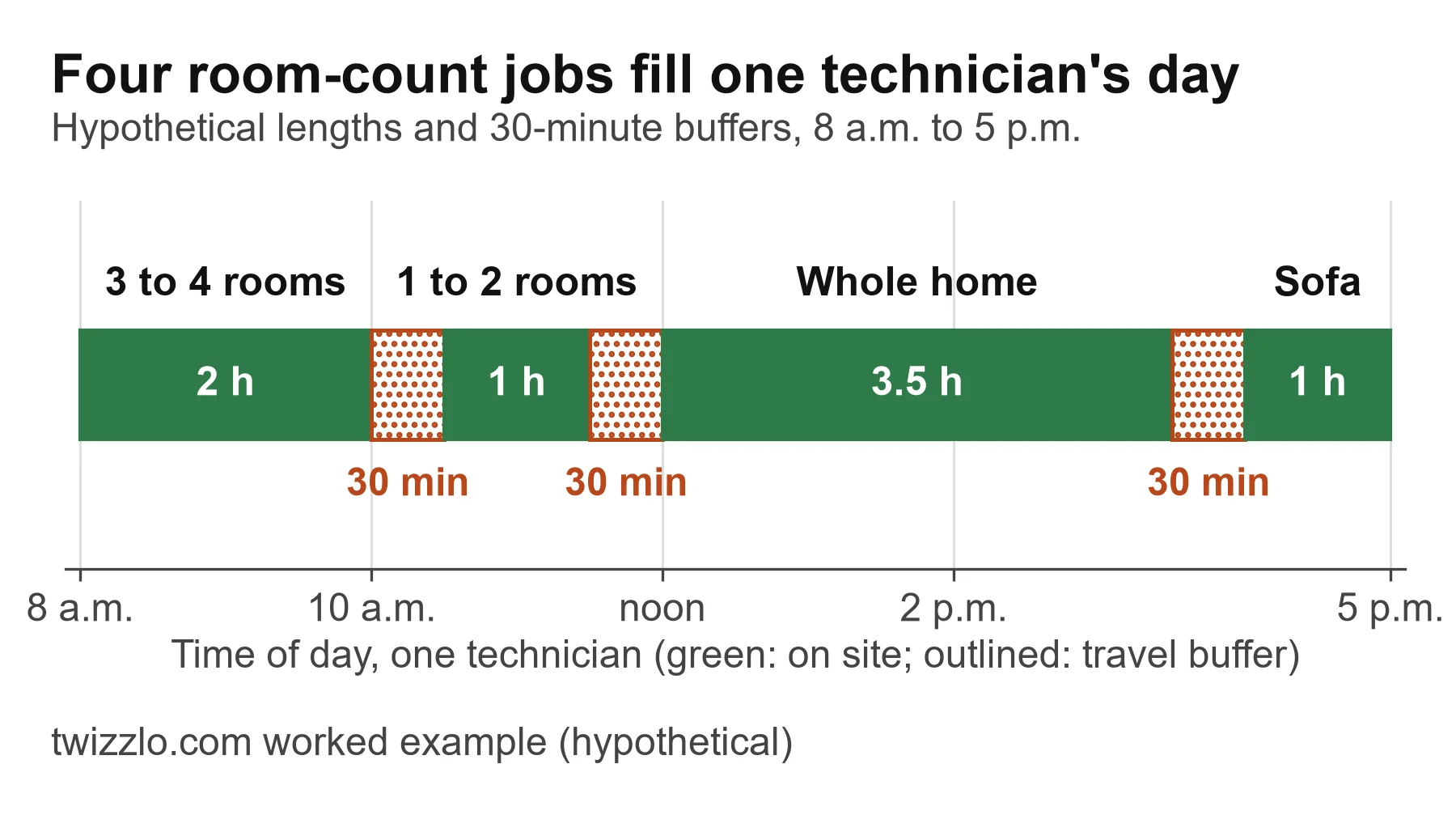
Arithmetic for the example day: 120 + 60 + 210 + 60 = 450 minutes of cleaning, and three 30-minute buffers = 90 minutes. The four jobs therefore fill an 8 a.m. to 5 p.m. day, 540 minutes, with nothing to spare. If your real buffer is 45 minutes, the same four jobs need 585 minutes (450 plus three 45-minute buffers) and run to 5:45 p.m. One of them then has to move.
Block the technician's time on site, not the drying time. Carpets dry after you leave, so drying belongs in the confirmation message, with instructions such as keeping people and furniture off the carpet. Put travel in the buffer rather than in the job length, so a short job across town does not look longer than it is. Keep add-ons as separate services: each one then blocks its own time, so the calendar stays accurate whatever the customer adds.
Booking tool or field service suite?
Choose a booking tool when most jobs are priced from a menu and one person runs the calendar. Choose a field service suite when the work needs quotes, dispatch or invoices sent after the job. A field service suite is software that adds quoting, invoicing or dispatch to scheduling, such as Jobber, Housecall Pro, ServiceM8 and OctopusPro. Square's plan grid, read October 4, 2026, also lists estimates and invoices on Square Appointments Free, so a booking tool can cover the occasional quote. A suite earns its higher price when the work itself needs it:
Quote first: if most revenue comes from jobs you price after a walk-through, such as commercial carpet, restoration or water damage, you need quotes the customer approves before a visit is booked.
Several trucks: two or more technicians driving separate routes need dispatch, job assignment and route planning, so check that the plan you price includes them.
Invoice after the job: if the final price changes on site, you need invoices sent from the job, not only payment at booking.
If none of these applies, and customers can choose a room count and a time, a booking page with prepayment or deposits does the job at a far lower monthly cost.
A carpet business can sit in both groups: residential work from a menu, commercial work by quote. In that case, price the suite at the number of users you have, then compare it with a booking tool plus a separate quoting habit. For crews that also do house cleaning, our comparison of cleaning service software works out the cost of seven tools for teams of one, three and eight cleaners. Our list of best scheduling apps for cleaning businesses sorts 10 apps by operating model.
Other things to check on the plan you pick
A technician app: check that the plan you pick includes the vendor's phone app, not only the web calendar.
Arrival windows: if customers expect a window rather than a start time, check whether the booking page can offer one.
Follow-ups for repeat cleans: if past customers rebook every year, check which plan sends follow-up messages.
Review requests: if you ask each customer for a review after the job, check which plan sends that request.
Customer records: check that each customer's record keeps past jobs and notes the technician can read before arriving.
Which plan fits which carpet business
Each row names the cheapest plan whose pricing page, read October 4, 2026, lists what that business needs.
| Your business | Cheapest plan that fits | Listed price per month |
|---|---|---|
| One truck, menu-priced jobs, deposits taken when the customer books | Square Appointments Free | $0 per location; 3.3% plus 30 cents per online card payment |
| Card payments through Stripe, PayPal or Square, up to four users | Setmore Free | $0 |
| Deposits plus a no-show fee policy | Square Appointments Plus | $49 per location |
| A field service app with quoting and invoicing for one user, under 30 jobs a month | ServiceM8 Free | $0 |
| A field service app for a team, up to 50 jobs a month | ServiceM8 Starter | $29, unlimited users |
| Quoting and a customer booking portal with no monthly job cap, two seats | OctopusPro Starter | $36.25 month to month ($29 billed annually) |
| Carpet plus house cleaning, in software built for house cleaning | ZenMaid Pro | $39 plus $14 per added user |
Listed prices read October 4, 2026, before tax and card processing.
Where Twizzlo fits
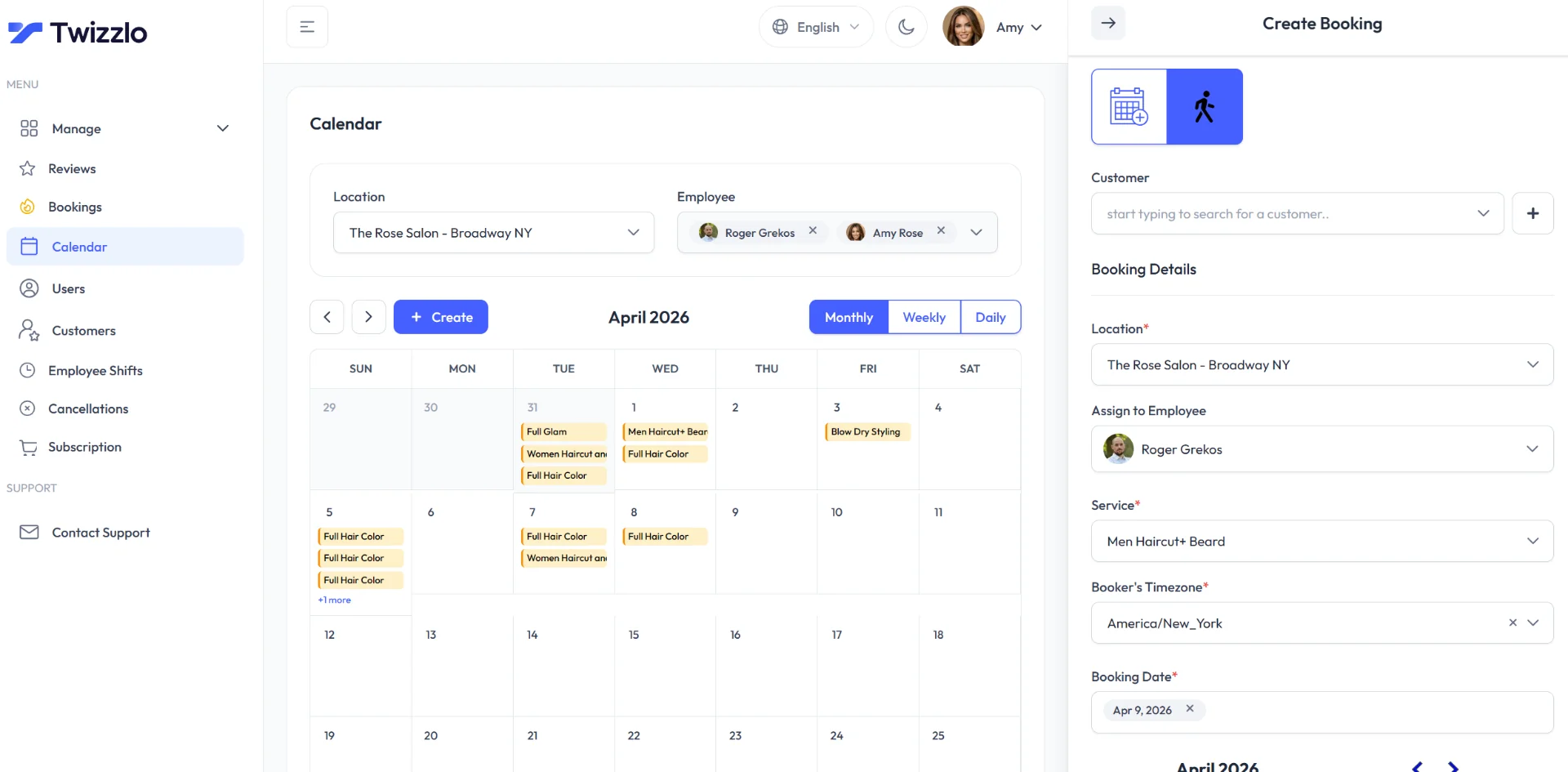
Twizzlo is web-based online booking and appointment scheduling software for appointment-based service businesses: a booking tool, so it fits the menu-priced side of a carpet business. Each room count, the sofa job and the pet treatment go into the services and pricing catalog with their own length and price. Buffer times between appointments hold the travel gap, and custom booking rules and blackout dates control which times customers can pick. Every location gets its own booking link.
Customers can prepay any service when they book: they pay the full service price through Stripe and can add a tip at checkout. Staff can record payments taken another way. No-show fees are a setting you control, and if a customer skips a prepaid booking, you decide whether to keep or refund the money. Client profiles hold notes such as gate codes, pets and problem stains, along with visit history and total spend. Each technician has a calendar, and Employee Shifts covers multi-location staff shifts and schedules.
Free is $0 a month for up to 150 bookings a month, with no SMS, and it is free forever, not a trial. Business Pro is $29.99 a month per business for unlimited bookings, with 50 SMS a month included and $0.03 for each one after that. Business Pro comes with a 30-day money-back guarantee. Both plans include unlimited staff and locations, and reminders go by email on Free and also by text on Business Pro. Online payments carry your Stripe processing rate plus a 1.5% Twizzlo platform fee. Details are on Twizzlo pricing and Twizzlo's features page.
The example day in Figure 2 is four jobs. At four jobs a day on 22 working days, a one-truck business books 88 jobs a month, inside Free's 150 if each job is one booking. Text reminders are what move it to Business Pro. Two trucks at the same pace book 176 jobs a month, above Free's cap, so they need Business Pro's unlimited bookings.
Twizzlo's features page does not list on-site quoting, dispatch or route planning. A carpet business that prices most jobs after a walk-through, or sends several trucks across a wide area, will get more from a field service suite. For menu-priced residential jobs, you can start on the Free plan and book a test job with your own services.
Test a tool in one afternoon before you pay
Before you pay, run each shortlisted tool through the same five steps with your own menu.
Write your menu first: five to eight services, each with a price and a length from your own recent jobs.
Open the free plan or free trial and enter the menu exactly, including the buffer between jobs.
Book a test job from your phone as a customer, pay or leave a deposit if the plan allows it, and read the confirmation and reminder the customer receives.
Write your rules into the service descriptions: what counts as a room, what you need cleared, and the cancellation terms. Our cleaning service contract template and our guide to setting a no-show charge help with the wording.
Count what the plan costs at your real number of users, then turn on appointment reminders before the first real booking.
Frequently asked questions
Is there free carpet cleaning scheduling software?
Yes. On October 4, 2026, Square Appointments Free was $0 per location with online booking, prepayments, deposits and reminders, and online card payments at 3.3% plus 30 cents. Setmore Free was $0 for up to four users with online payments but no deposits. Picktime Free was $0 for three users with unlimited appointments and payments through PayPal. ServiceM8 Free was $0 for one user and 30 jobs a month, with online bookings, quotes and invoices. SchedulingKit Free was $0 for a single team member and event type, up to 50 bookings a month, with no payment processing.
Which carpet cleaning software lets customers pay a deposit when they book?
On the pricing pages read October 4, 2026, Square Appointments listed appointment deposits on every plan, including Free. Setmore listed deposits only on Pro, which cost $12 per user a month, month to month ($5 billed annually). Housecall Pro's pricing page says customers can book and pay online on Basic. BookingKoala lists partial payments as an invoicing option on Premium. Picktime's, ServiceM8's and OctopusPro's pricing pages do not say whether customers pay a deposit when they book online.
Does Jobber's cheapest plan include online booking?
Yes. On October 4, 2026, Jobber's Core plan listed online job booking and scheduling for one user. It cost $49 a month, month to month, or $29 a month billed annually, with a $39 rate on a one-year commitment. Added users cost $29 a month each. Automated client reminders start on the Connect plan.
How much does Housecall Pro cost for a carpet cleaner?
On October 4, 2026, Housecall Pro Basic included online booking with online payment for one user. It cost $79 a month, month to month, before sales tax, or $59 a month billed annually. For a second technician, the cheapest option the pricing page lists is Essentials, with five users and route grouping, at $189 a month or $149 billed annually.
How long should I block for a carpet cleaning job?
Use your own numbers: average your last 10 jobs of each type and set that as the service length. Add a buffer between jobs for driving, setup and loading. Leave drying time out of the technician's calendar and put it in the customer's confirmation instead.
When does a carpet cleaner need field service software instead of a booking app?
When most work is priced after a walk-through, when two or more trucks need dispatch and routes, or when the final price changes on site and you invoice after the job. Menu-priced residential jobs that customers can book by room count usually need only a booking page with prepayment or deposits.
Sources and methodology
Prices read
- Square Appointments pricing (US) (opens in a new tab)Read . Supports: Free $0, Plus $49, Premium $149 per location; plan grid: online booking site, prepayments, appointment deposits, reminders, unlimited staff calendars, estimates and invoices on all plans; cancellation policy and no-show fees from Plus; online card rates 3.3% or 2.9% plus 30 cents
- Setmore pricing (opens in a new tab)Read . Supports: Free up to 4 users; Pro $12 per user month to month, $5 annual; online payments on Free; deposits and SMS reminders on Pro; 500 SMS credits
- Picktime pricing (opens in a new tab)Read . Supports: Free $0, 3 users, unlimited appointments, online booking page, PayPal, iOS and Android apps; Starter $3 per user billed annually with Stripe, Square and SMS; USD
- SchedulingKit pricing (opens in a new tab)Read . Supports: Free limits; Standard $12 per seat or $10 annual; payment processing and SMS from Standard
- BookingKoala pricing (opens in a new tab)Read . Supports: Starter from $27 for 5 providers; Growing from $57 with SMS; Premium from $197; booking forms; card charges and cancellation fees on Starter; partial payments on Premium; USD
- ZenMaid pricing (opens in a new tab)Read . Supports: Starter $19, Pro $39, Pro Max $49; booking forms from Pro; online payments on Starter
- ZenMaid Help Center: How Much Does ZenMaid Cost? (opens in a new tab)Read . Supports: USD billing; owner included; $4, $14, $24 per added user; SMS from $14 for 125
- Jobber pricing (opens in a new tab)Read . Supports: Core $49, $39, $29; Connect $139, $99; $29 per added user; Core and Connect features; online invoice card rate 2.9% plus 30 cents; USD
- Housecall Pro pricing (opens in a new tab)Read . Supports: Basic $79, $59; Essentials $189, $149; book and pay online on Basic; $35 added user on Max; card processing from 2.59%; USD before sales tax; 14-day trial
- ServiceMonster pricing (opens in a new tab)Read . Supports: Basic, Grow, Premier prices; user licenses; annual commitment; January 2024 promotion banner; dispatch and route tools
- ServiceMonster online booking (opens in a new tab)Read . Supports: clients can book services or request estimates online
- ServiceM8 pricing (opens in a new tab)Read . Supports: Free $0, 1 user, 30 jobs a month; Starter $29, unlimited users, 50 jobs; Growing $79, 150 jobs; scheduling, quoting and invoicing, online bookings, deposits, dispatch map, auto routing and iOS and Android apps on all plans; USD
- Markate pricing (opens in a new tab)Read . Supports: Owner Operator $49.95 monthly, $39.95 yearly; $5 per employee; Online Booking add-on $10 a month; estimates and online invoicing included; USD
- OctopusPro pricing (opens in a new tab)Read . Supports: Starter $36.25 a month or $348 a year, 1 admin and 1 fieldworker; Established $60 per admin seat and $6 per fieldworker seat; customer self-service portal, estimates and quotes, deposit management and route planning on all plans; 14-day trial; USD
- Workiz pricing (opens in a new tab)Read . Supports: every plan shows Request pricing; no plan price listed
- Twizzlo pricing page (opens in a new tab)Read . Supports: Free and Business Pro plans, SMS, guarantee, 1.5% platform fee
- Twizzlo features page (opens in a new tab)Read . Supports: services and pricing catalog, buffer times, booking rules, prepaid bookings, client profiles, Employee Shifts, calendar screenshot
From our editorial policy
- Twizzlo sells online booking and appointment scheduling software, the same category we write about. Twizzlo appears in our comparisons and roundups, and we have a commercial interest in you choosing it.
- We do not publish invented quotes, studies, statistics, customer stories or product tests, and we do not imply hands-on use of a product when the research came from the vendor's public documentation.
- To report an error, email support@twizzlo.com with the subject line "Correction: [page URL]". Tell us what is wrong and, if you can, link a source.
Update history
- : Added Picktime, ServiceM8, Markate and OctopusPro, a card-fee example and a plan-fit table, and re-read every vendor price on October 4, 2026.
Start free, upgrade when you grow
Flat-rate booking software. No per-seat, per-chair or per-location fees.
- Free plan up to 150 bookings a month, not a trial
- Business Pro is $29.99 a month per business for unlimited bookings, with a 30-day money-back guarantee
- 24/7 support by email