
Barber No-Show Policy: A Copy-and-Paste Template With Fee and Late Rules

In short
A barber no-show policy sets a cancellation window, a late-cancellation fee, a no-show fee, a late-arrival rule, how the fee is collected and when you waive it. SQUIRE's policy guide and Booksy's no-show tips, read October 7, 2026, put the window at 24 or 48 hours and the no-show fee at 50% to 100% of the service price.
- Scale the chair hold to the service: 15 minutes late leaves half of a 30-minute cut but three-quarters of an hour-long service.
- Read October 7, 2026: theCut and Square Appointments leave each charge to the barber; SQUIRE says it charges automatically, and Booksy offers both.
- A fee works only if you can collect it, so pair the policy with payment at booking or a card held for the booking.
In this article11 sections
A client who books a fade and never shows costs you the slot, the tip and sometimes a walk-in you turned away. A written barbershop no-show policy sets the rules before that happens: how much notice to give, what a missed appointment costs and what happens when someone runs late.
We read SQUIRE's barbershop guides, theCut's and Square's help pages and Booksy's no-show pages on October 7, 2026, from a Canadian connection. We did not use any of the products. SQUIRE and theCut published the pages that ranked for this search that day, Booksy's ranked on a closely related search, and we added Square Appointments, whose U.S. help center documents the same settings. Fresha and Timely appeared only through a U.K. trade article and a shop's booking page, so they are left out. Twizzlo, which publishes this guide, also sells booking software, so it stays out of the comparison table and has its own section. The fee and lateness figures use a hypothetical menu, and the template is not legal advice.
To run the policy through online booking, our barbershop booking software page shows clients booking 24/7, peak slots prepaid and reminders going out on their own.
What a barber no-show policy covers
A barber no-show policy sets the cancellation window, the late-cancellation and no-show fees, a late-arrival rule, how the fee is collected and the exceptions you allow. Table 1 sets out what each source suggests.
| Setting | What the sources suggest | Source |
|---|---|---|
| Cancellation window | 24 hours' notice is standard; 48 hours suits high-demand barbers or slots that are hard to refill | SQUIRE policy guide; Booksy no-show tips |
| Late-cancellation fee | 25% to 50% of the service price | SQUIRE policy guide |
| No-show fee | 50% to 100% of the service price | SQUIRE policy guide; Booksy no-show tips |
| How the fee is collected | A card held at booking, or payment taken at booking | SQUIRE policy guide; Booksy No-Show Protection page; Square help article |
| Late arrivals | No figure given; a late client may not get the full service | theCut client guide |
| Tips | Not counted when theCut works out a fee | theCut setup article |
| Exceptions | Waive case by case, such as a regular client's emergency | Booksy no-show tips; SQUIRE policy guide |
| Client agreement | Clients accept the policy when they book | SQUIRE policy guide; theCut client guide |
Table 1. Policy settings as each source states them, read October 7, 2026. The ranges are the sources' own suggestions, not measured benchmarks.
Barber no-show policy template to copy
Copy the policy below, fill in each bracketed value and keep one option wherever a clause offers two: a card held at booking, or payment in full at booking.
- Booking. By booking with [shop name], you agree to this policy. Card held: we ask for a card to hold your appointment. Paid at booking: you pay for your service in full when you book.
- Changes. Cancel or reschedule at least [24] hours before your appointment, through your booking link or by texting [number]. Paid at booking: if you do, we move your payment to the new time or refund it.
- Late cancellation. If you cancel with less than [24] hours' notice, we may charge [50]% of the service price. Paid at booking: we may keep [50]% of your payment.
- No-show. If you miss your appointment without telling us, we may charge [100]% of the service price. Paid at booking: we may keep your payment.
- Running late. We hold your chair for [10] minutes. After that, we may shorten your service to fit the time left or treat the visit as a no-show.
- Tips. A fee never includes a tip.
- Our changes. If we cancel or move your appointment, no fee applies to that booking.
- Emergencies. Tell us as soon as you can. We may waive a fee for a genuine emergency.
- Repeat no-shows. After [two] no-shows, we may ask you to pay in full when you book or to come in as a walk-in.
- Questions. Text [number] or email [address].
Use the same words on your booking page, in your confirmations and on a sign in the shop. This is a copy-and-paste template, not a download, and it is not legal advice. Square's cancellation policy page, read October 7, 2026, notes that requirements may vary by state, locality and business, so have a local professional check your final wording.
How much should a barber no-show fee be?
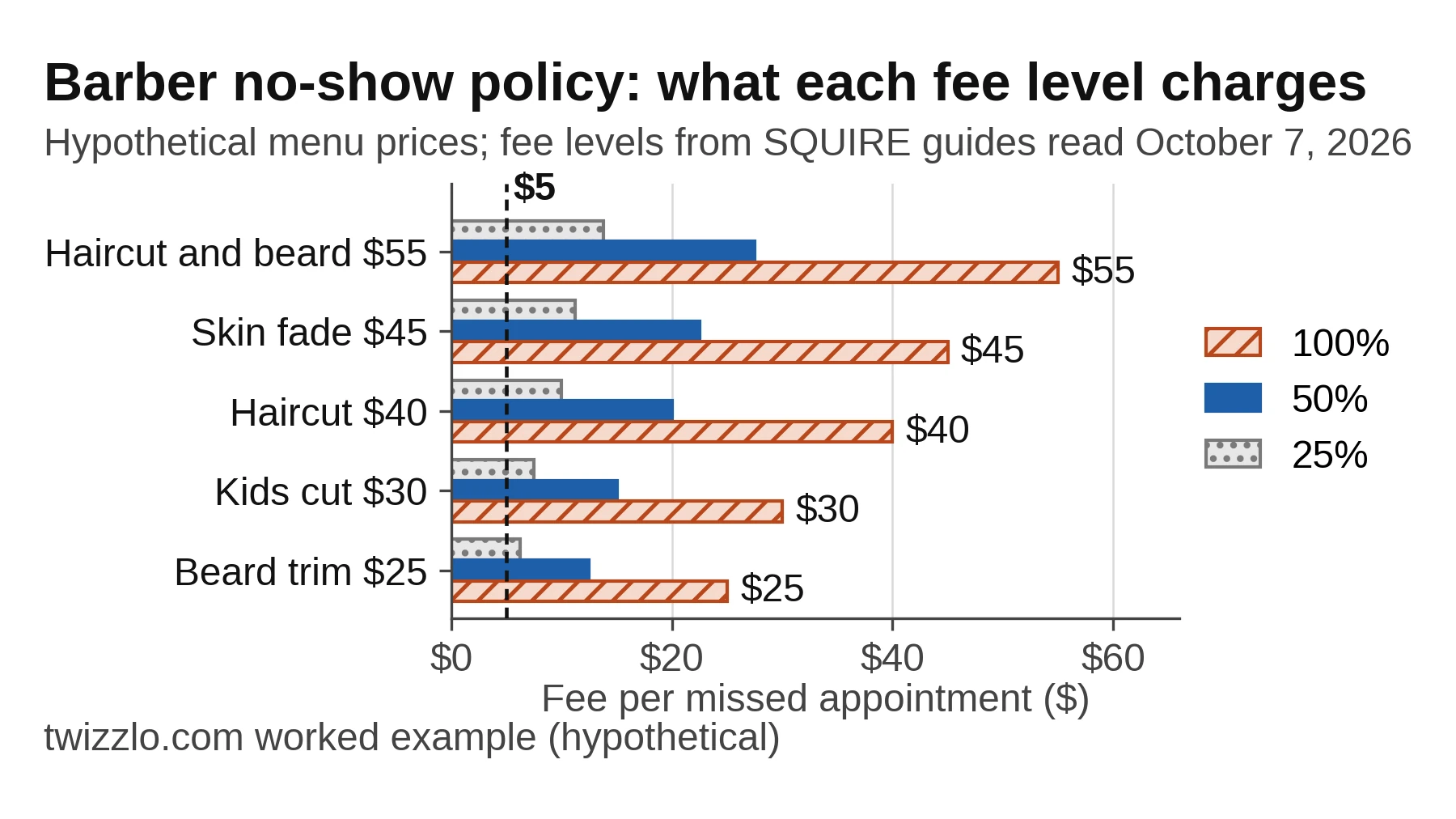
SQUIRE's policy guide and Booksy's no-show tips, read October 7, 2026, both put a no-show fee at 50% to 100% of the service price, though SQUIRE's cost guide gives 25% to 50%.
That cost guide, read the same day, says most barbershops charge 25% to 50% for no-shows or late cancellations. The policy guide adds that the fee must be high enough to change behavior, and that a $5 charge rarely does.
| Service (hypothetical) | Price | Length | 25% fee | 50% fee | 100% fee |
|---|---|---|---|---|---|
| Beard trim | $25 | 15 min | $6.25 | $12.50 | $25 |
| Kids cut | $30 | 30 min | $7.50 | $15 | $30 |
| Haircut | $40 | 30 min | $10 | $20 | $40 |
| Skin fade | $45 | 45 min | $11.25 | $22.50 | $45 |
| Haircut and beard | $55 | 60 min | $13.75 | $27.50 | $55 |
Table 2. Fee per missed appointment at three levels on a hypothetical barber menu. Prices and lengths are examples, not market data; the fee levels come from SQUIRE's two guides, read October 7, 2026.
Take a barber who loses eight $40 haircuts to no-shows in a month (hypothetical): that is $320 in booked services. A 50% fee collected on every one recovers $160, and a full fee or a kept payment recovers $320. Neither brings back the tip.
Vendor pages also quote no-show rates and recovered revenue for their own users, but the pages we read do not explain the method behind them, so this guide leaves those figures out. Count your own instead: divide a month's no-shows by its booked appointments. For a general guide to sizing a fee from your own costs and announcing it, see our no show charge guide.
How long should the cancellation window be?
Set the window by how fast you can refill a slot: SQUIRE's policy guide, read October 7, 2026, calls 24 hours standard and 48 hours better for busy barbers or hard-to-fill gaps.
Its rule of thumb: if you can reliably fill a slot on two hours' notice, a 24-hour window is enough. Booksy's no-show tips make the same call from the other side: a fully booked shop can use 24 hours, and a shop that needs more time to rebook can ask for 48.
Check your own book before you choose. Note how often a cancelled slot was filled again, and how much notice it had. If day-before cancellations usually stay empty, a 48-hour window protects more chair time.
Late arrivals: how long to hold the chair
Hold the chair about 10 minutes on services of 30 minutes or more and less on a 15-minute trim: 10 minutes late leaves two-thirds of a 30-minute cut but a third of a trim.
theCut's client guide, read October 7, 2026, tells clients that a barber with another booking straight after may not be able to give a late arrival the full service. Your policy should say what happens instead: a shorter service in the time left, or a no-show.
| Booked length | 5 minutes late | 10 minutes late | 15 minutes late |
|---|---|---|---|
| 15 minutes | 10 min left (67%) | 5 min left (33%) | 0 min left (0%) |
| 30 minutes | 25 min left (83%) | 20 min left (67%) | 15 min left (50%) |
| 45 minutes | 40 min left (89%) | 35 min left (78%) | 30 min left (67%) |
| 60 minutes | 55 min left (92%) | 50 min left (83%) | 45 min left (75%) |
Table 3. Booked time left after a late arrival, in minutes and as a share of the booking, for the service lengths on the hypothetical menu in Table 2. Shares are rounded to the nearest whole percent.
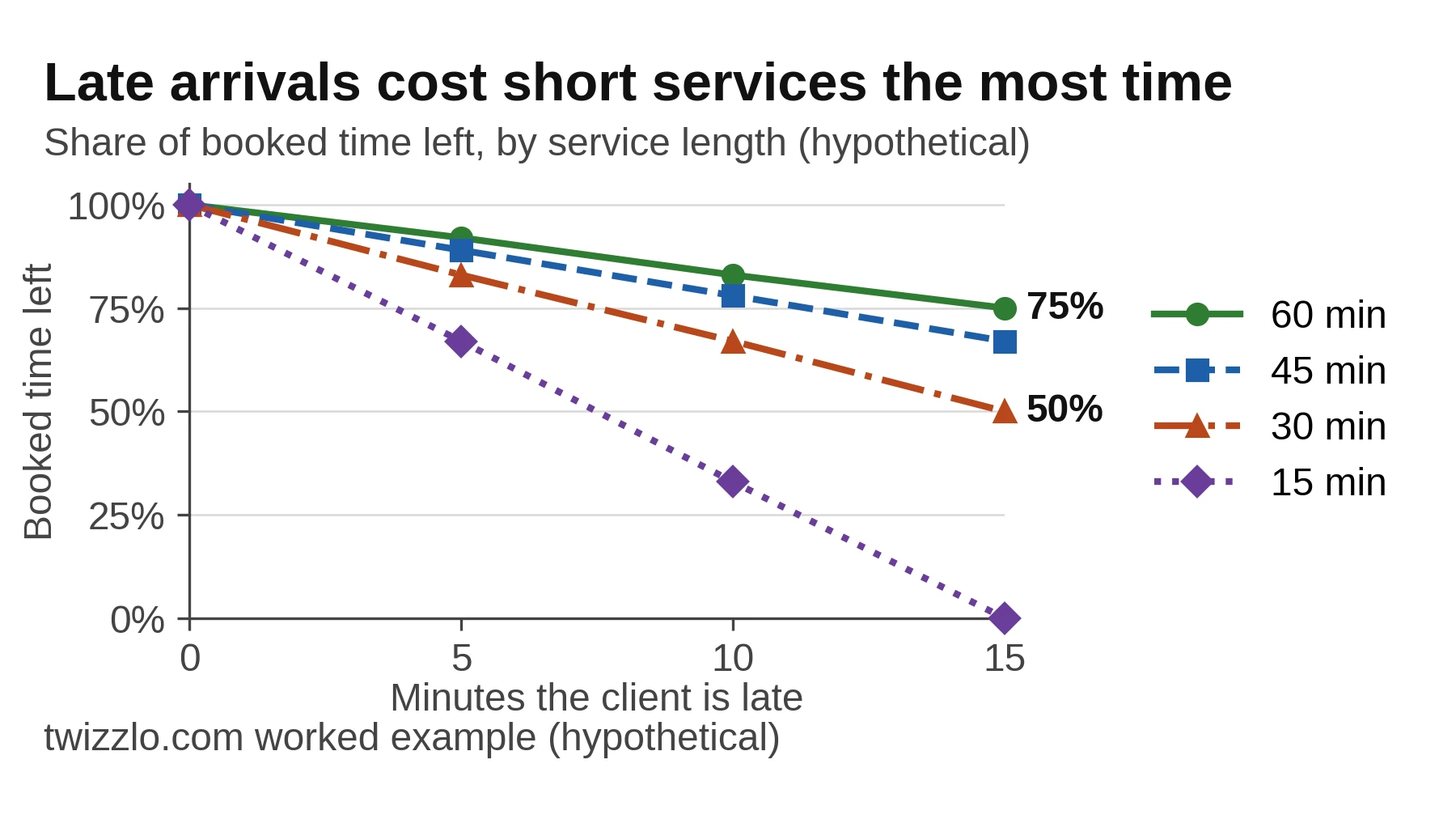
Longer services absorb the same delay better: 10 minutes late still leaves five-sixths of an hour-long haircut and beard. That is why the template's running-late clause lets you shorten the service rather than cancel it.
How booking apps enforce a no-show policy
On pages read October 7, 2026, theCut and Square Appointments leave each charge to the barber, SQUIRE says its protection charges automatically, and Booksy lets you choose.
| App | Fee type | Payment at booking | Card held at booking | Charged without a manual step | Terms per client |
|---|---|---|---|---|---|
| theCut | Percentage of the service amount; tips not counted | Not stated | Yes, a payment method on file for an eligible Mobile Pay appointment | No, you select Charge | Yes, custom terms or an exemption |
| SQUIRE | Not stated | Yes, Book & Pay | Yes, captured at booking | Yes, as SQUIRE's guides describe it | Yes, payment at booking for selected clients |
| Booksy | Percentage of the service cost | Yes, a deposit applied at checkout | Yes, a card on file for cancellation fees | Yes, if you set it; you can also process or waive each fee | Yes, trusted clients can be tagged |
| Square Appointments | Flat per appointment, flat per service or a percentage of each service price | Yes, full prepayment for fixed-price services | Yes, held for one appointment | No, you choose to enforce | Not stated |
Table 4. How each app's own pages describe its no-show settings, read October 7, 2026. "Not stated" describes the pages, not the product. Sources: theCut and Square help articles, SQUIRE's business guides, Booksy's No-Show Protection page and no-show tips.
If you are still choosing an app, our free barber booking app guide compares what each $0 plan includes for a barber.
theCut
theCut's setup article, dated August 30, 2026, and read October 7, 2026, applies a policy to eligible Mobile Pay appointments with a payment method on file. You set the notice window and the percentage for late cancellations and no-shows, and tips are not counted. Fees are not charged automatically: you select Charge for each one. If you cancel the appointment, the client cannot be charged, and if you reschedule it, the original policy no longer applies when the client cannot make the new time. A second help article, for iOS and dated March 13, 2025, adds custom terms or an exemption for individual clients. This setup suits a barber who wants to decide each charge by hand.
SQUIRE
SQUIRE's policy guide, read October 7, 2026, says its no-show protection captures a card at booking and enforces your fee automatically. Its no-show guide adds Book & Pay, where clients pay when they book: a client who cancels before your cut-off is refunded automatically, and a no-show or a cancellation past the cut-off keeps the payment. You can require payment at booking from every client or only from selected clients. These are business guides rather than help articles, and they do not state the fee type. This setup suits a shop that wants charges to happen without a manual step.
Booksy
Booksy's No-Show Protection page, read October 7, 2026, offers two tools: a deposit taken at booking and applied at checkout, or a card on file with a cancellation fee. You choose which services need either, the percentage of the service cost and the notice required. You can process or waive each fee, or have Booksy charge it automatically, and its no-show tips add that trusted clients can be tagged. Plan costs are on our Booksy pricing page. This setup suits a barber who wants deposits on some services and fees on others.
Square Appointments
Square's U.S. help article, read October 7, 2026, is written for Square Appointments Plus and Premium subscribers, among others. It offers full prepayment for fixed-price services booked online, or a card held for one appointment in case of a no-show. The fee can be a flat amount per appointment, a flat amount per service or a percentage of each service price. You choose whether to enforce the policy, up to 14 days after the appointment, and the cut-off can be set from one hour to two weeks. Plan costs are on our Square Appointments pricing page. This setup suits a shop that wants a flat fee on some services.
Where clients should see the policy and what to keep on record
Clients should see the policy before they book and again in every confirmation and reminder, the advice SQUIRE's policy guide and Square's cancellation policy page both gave on October 7, 2026.
- On the booking page, next to the services, so clients accept it when they book.
- In the booking confirmation, with the link to reschedule or cancel.
- In the reminder before the visit, with the time the fee starts to apply.
- On a sign at the front desk and on your website's policy page.
A reminder can carry the policy in two short sentences: "Reminder: your haircut with [barber] is at [2:30 p.m. Friday]. To change it without a fee, reschedule or cancel by [2:30 p.m. Thursday] at [link]." For reminder timing and tools, see our guide to reminder software that cuts no-shows.
Check what your app shows clients. Square's help article, read October 7, 2026, says that with no payment requirement set, clients do not see the cancellation policy during booking or in their notifications. Another step on the same page says the policy shows in the booking flow and confirmation emails, so test a booking yourself.
Keep records for disputes too. Square's cancellation policy page lists what to keep: the booking request, the client's acknowledgment, the cancellation time, the reminder history, the fee and your messages. For steps beyond the policy, such as online booking, see how to reduce no-shows in a salon.
Exceptions and repeat no-shows
Write the exceptions down so you apply them the same way each time: a waiver for a genuine emergency, no fee when you move the booking, and a firmer rule after repeat no-shows.
Booksy's no-show tips, read October 7, 2026, suggest waiving a fee case by case, such as for a regular client's emergency. They also suggest a limit, after which a repeat no-show can book only as a walk-in. SQUIRE's policy guide makes the same point about consistency: a long-time client with a genuine emergency is different from a repeat no-show. Table 4 shows which apps let you set terms per client.
Where Twizzlo fits
Twizzlo is web-based online booking and appointment scheduling software for appointment-based service businesses, and its prepaid bookings fit the template's paid-at-booking option.
A prepaid booking in Twizzlo takes the full service price when the client books. If the client does not show, you decide whether to keep or refund the payment. Twizzlo's features page also lists no-show fees, applied at your discretion. The same page does not list a late-cancellation fee, so check how you would apply the late-cancellation clause before you publish it.
Clients can reschedule themselves from your link, and the features page also lists cancellation handling and buffer times.
Email confirmations and reminders are included on both plans. Text messages (SMS) are on Business Pro only: 50 SMS a month are included, then $0.03 each. Free has no SMS.
Free is $0 a month for up to 150 bookings, free forever and not a trial. Business Pro is $29.99 a month per business for unlimited bookings, with a 30-day money-back guarantee. Both plans include unlimited staff and locations. Online payments carry your Stripe processing rate plus a 1.5% Twizzlo platform fee. Details are on the Twizzlo pricing page.
Take a solo barber with 22 working days in a month (hypothetical). At six bookings a day that is 132 bookings, inside Free's 150, with email reminders only. At 10 a day it is 220, so Business Pro applies. With one text per booking, the 170 texts beyond the 50 included add $5.10, for $35.09 a month before payment fees. The platform fee on a prepaid $40 haircut is $0.60, before your Stripe rate.
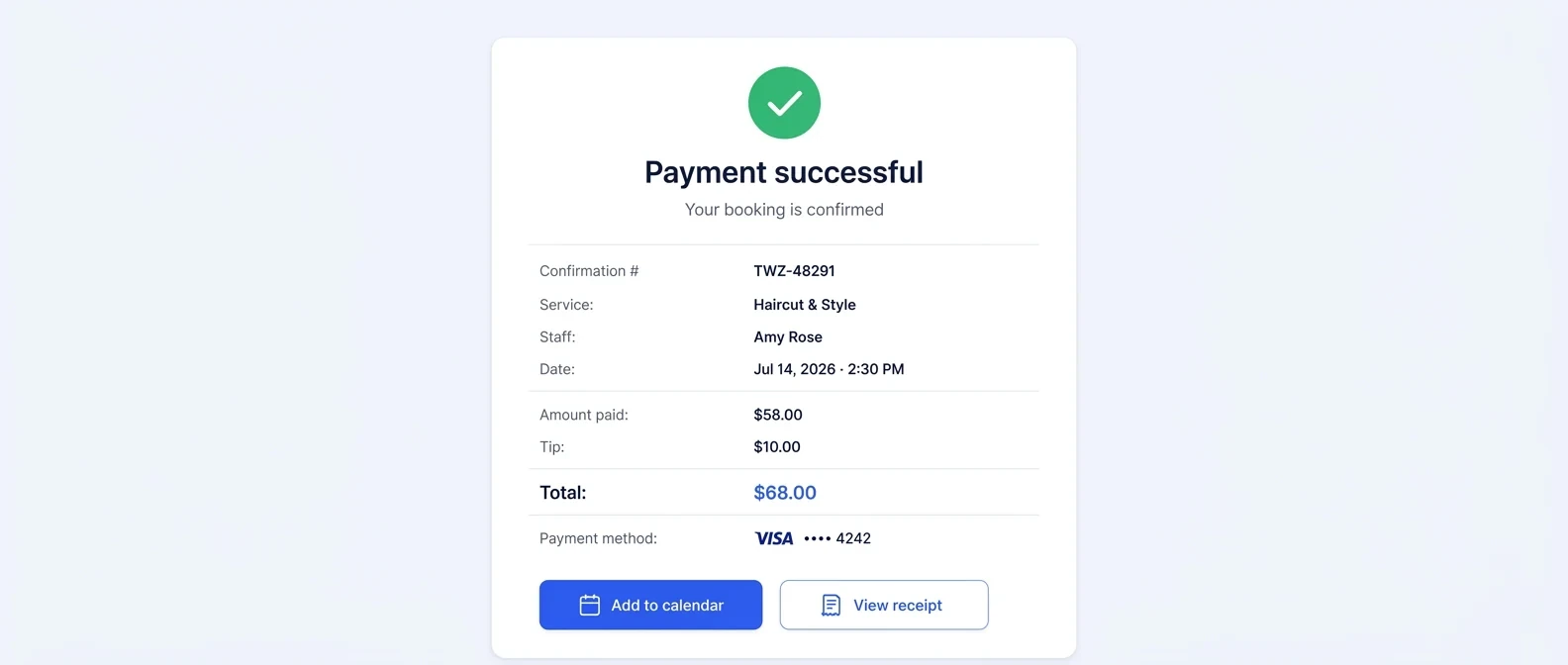
To try the paid-at-booking version with your own menu, you can start on the Free plan and move to Business Pro when you want text reminders or pass 150 bookings a month.
Frequently asked questions
How much should a barber charge for a no-show?
Half to all of the price, in SQUIRE's policy guide and Booksy's no-show tips as read October 7, 2026; SQUIRE's cost guide suggests a lower 25% to 50%. On a $40 haircut that is $20 to $40. SQUIRE adds that a fee as low as $5 rarely changes behavior.
Should a barber cancellation policy charge for late cancellations?
SQUIRE's policy guide, read October 7, 2026, suggests one at a lower rate than a no-show: 25% to 50% of the service price when a client cancels inside the notice window, which it calls standard at 24 hours. Charge it only if your booking setup can collect it.
How late can a client be before it counts as a no-show?
None of the pages we read on October 7, 2026, set a figure, so your policy sets it. A 10-minute hold leaves 20 minutes of a 30-minute cut, so the policy can offer a shorter service or treat a longer delay as a no-show. Scale the hold to the length of the service.
Is payment at booking better than a no-show fee?
It is easier to collect. When the client pays in full at booking, the money is already in, and your policy decides only what to keep. A separate no-show fee is charged after the missed visit. On theCut and Square Appointments, as read October 7, 2026, that takes a card held for the booking and a manual charge.
Should regular clients be exempt from the no-show fee?
You can exempt them, but write down when. On pages read October 7, 2026, theCut allows custom terms or an exemption per client, and Booksy lets you tag trusted clients. Apply the same rule to everyone in the same situation.
Is a barber no-show fee legal?
Square's cancellation policy page, read October 7, 2026, says it depends on applicable law and your business circumstances. It says you may be able to charge one if you clearly disclose the policy and get any required customer authorization. Requirements may vary by state and locality, so have a local professional review your wording.
Sources and methodology
- SQUIRE barbershop no-show and cancellation policy guide (opens in a new tab)Read . Supports: 24 or 48 hours' notice; 25% to 50% late cancellation; 50% to 100% no-show; $5 example; card captured at booking, fee enforced automatically; consistency on exceptions
- SQUIRE guide: how to reduce barbershop no-shows (opens in a new tab)Read . Supports: Book & Pay; automatic refund before the cut-off; payment kept on a no-show; prepayment for selected clients
- SQUIRE guide: how much no-shows cost a barbershop (opens in a new tab)Read . Supports: 25% to 50% of the service price for no-shows or late cancellations
- theCut help: setting up a cancellation and no-show policy (opens in a new tab)Read . Supports: Mobile Pay with a payment method on file; percentage fees; tips excluded; manual Charge; barber cancel or reschedule rules
- theCut help: custom cancellation and no-show policies (opens in a new tab)Read . Supports: custom terms or exemption per client
- theCut help: appointment policies and etiquette (opens in a new tab)Read . Supports: late arrivals may not get the full service; booking means agreeing to the policy
- Booksy No-Show Protection page (opens in a new tab)Read . Supports: deposits applied at checkout; card on file and cancellation fees; percentage per service; process, waive or automatic
- Booksy blog: no-show policy tips (opens in a new tab)Read . Supports: 24 or 48 hours; 50% or 100% fee; case-by-case waivers; no-show limit and walk-in only; trusted clients
- Square help: manage booking cancellations and prepayment policies (U.S.) (opens in a new tab)Read . Supports: Plus and Premium; full prepayment or card held for one appointment; flat or percentage fees; enforce at your discretion up to 14 days; one hour to two weeks; policy hidden without a payment requirement
- Square Appointments cancellation policy page (U.S.) (opens in a new tab)Read . Supports: requirements vary by state and locality; disclosure and authorization; records to keep
- Twizzlo pricing page (opens in a new tab)Read . Supports: Free and Business Pro plans, SMS, guarantee, 1.5% platform fee
- Twizzlo features page (opens in a new tab)Read . Supports: prepaid bookings at the full price; no-show fees at your discretion; self-rescheduling; cancellation handling; buffer times; screenshot source
From our editorial policy
- Our templates, such as consent forms, contracts and confirmation messages, are text to copy and adapt to your business. They are not legal advice. Have a qualified local professional review anything you rely on.
- We do not publish invented quotes, studies, statistics, customer stories or product tests, and we do not imply hands-on use of a product when the research came from the vendor's public documentation.
- To report an error, email support@twizzlo.com with the subject line "Correction: [page URL]". Tell us what is wrong and, if you can, link a source.
Start free, upgrade when you grow
Flat-rate booking software. No per-seat, per-chair or per-location fees.
- Free plan up to 150 bookings a month, not a trial
- Business Pro is $29.99 a month per business for unlimited bookings, with a 30-day money-back guarantee
- 24/7 support by email