
Setmore vs Calendly: Cost, Plans and Fit for Service Businesses

In short
Setmore's plans cover more of a service business's booking work for less. On pricing pages read October 21, 2026, Setmore Free takes payments at booking for up to four users, and Pro costs $12 a user monthly ($5 yearly) with text reminders where offered. Calendly Standard costs $12 a seat monthly ($10 yearly) and suits meeting-led teams.
- Setmore bills each staff calendar as a user, even one without a login; Calendly bills each person who hosts bookings.
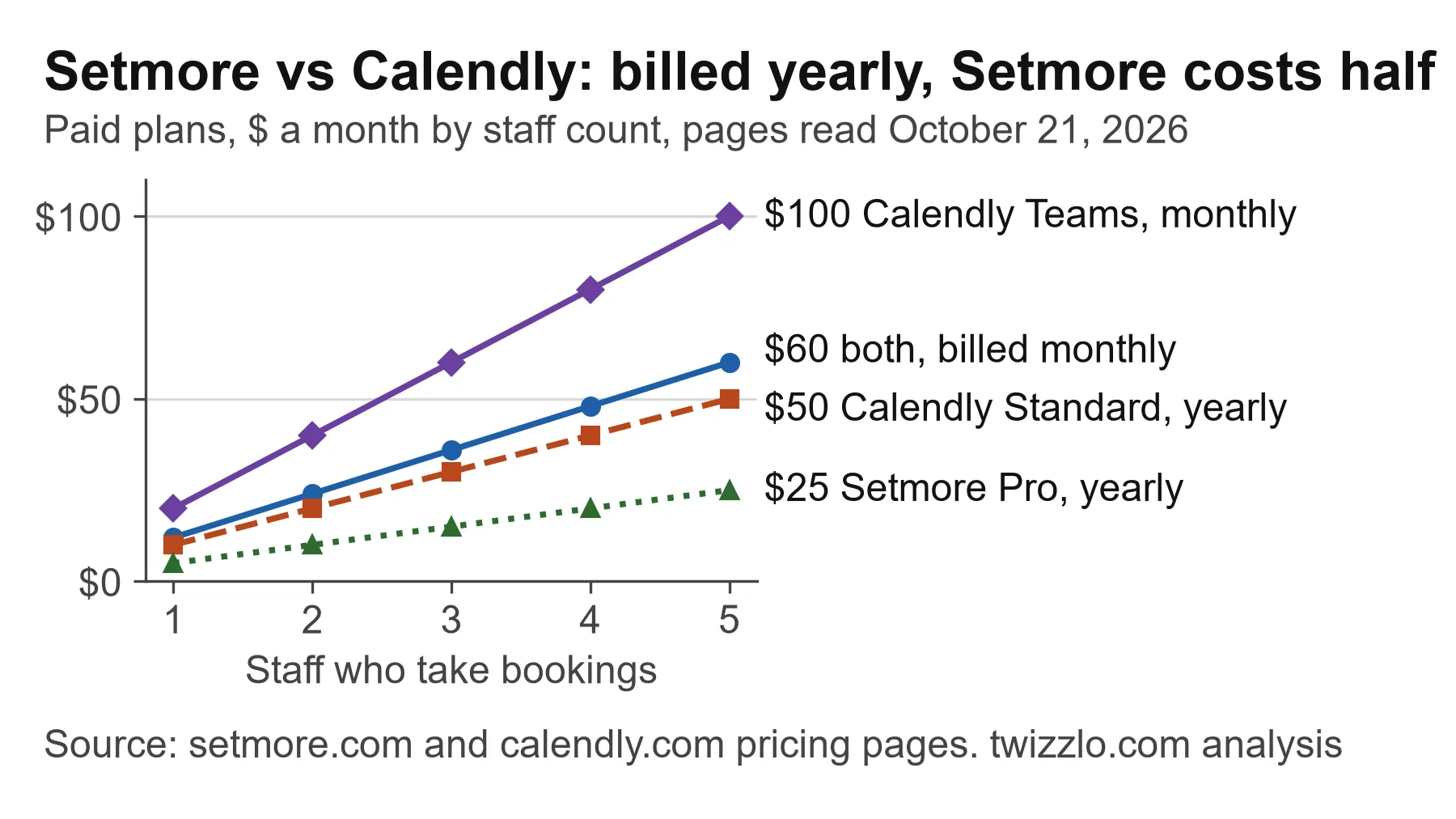
- At five staff, Setmore Pro and Calendly Standard both cost $60 a month billed monthly ($25 and $50 billed yearly).
- Calendly's pricing page does not say whether its reminders can go by text; Setmore Pro lists 500 SMS credits a month per team member.
In this article9 sections
Setmore vs Calendly is a choice between two booking tools sold for different working days. Setmore's site is built around appointment businesses, from barbershops and hair salons to personal trainers and tutors. Calendly's pricing page sells meeting scheduling, with lead routing and CRM connections on its paid plans and an AI notetaker as an add-on. For a service business, the questions that decide it are what each tool charges per staff member and which plan takes payment, sends reminders and holds a deposit.
Our method: on October 21, 2026, we read Setmore's and Calendly's own pricing pages from a Canadian connection, plus the comparisons that ranked for this search that day, from Jotform, SchedulingKit, Koalendar, Calendesk and Cal.com. Those comparisons disagreed on both tools' prices, so every price below comes from the vendors' own pages, which show a '$' sign. We did not test either tool, so we leave out ease-of-use scores and review ratings. Twizzlo, the publisher, sells booking software; it stays out of the comparison tables, and its plans appear only in the final section before the FAQ.
If Setmore is your front-runner, our Setmore pricing page sets out what its Free plan includes, where the four-user cap bites and what the Live Receptionist add-on costs.
Setmore vs Calendly at a glance
Setmore is priced per staff calendar for appointment businesses, while Calendly is priced per host seat for meetings, with sales tools on its higher plans. Table 1 sets the two side by side as each vendor's pricing page listed them on October 21, 2026.
| Setmore | Calendly | |
|---|---|---|
| Who the site is built for | Appointment businesses; industry pages from barbershops and salons to tutors | Meetings: sales routing, CRM connections, AI meeting notes |
| Free plan | Up to four users, unlimited appointments, payments at booking, email reminders | One event type, one calendar connection, one-on-one scheduling |
| Paid plan, billed monthly (yearly) | Pro: $12 a user a month ($5) | Standard: $12 a seat a month ($10); Teams: $20 ($16) |
| Who counts toward the bill | Each staff calendar, even one whose owner has no login | Each person who connects a calendar and hosts meetings |
| Text reminders | Pro: 500 SMS credits a month per team member | Not stated on the pricing page |
| Connections the page lists | Zoom, Google Calendar, Square, Stripe, PayPal, Zapier, HubSpot, Mailchimp | Zoom, Google Meet, Microsoft Teams, Stripe, PayPal, HubSpot, Zapier; Salesforce on Teams |
| Other priced line read that day | Live Receptionist, $99 a month, U.S. only | Enterprise from $15,000 a year, from 50 seats |
Table 1. Setmore and Calendly side by side, from each vendor's pricing page, read October 21, 2026; prices are a month before tax, with '$' as each page shows it.
What do Setmore and Calendly cost for one, three and five staff?
Billed monthly, one, three and five staff cost $12, $36 and $60 a month on both Setmore Pro and Calendly Standard, on Setmore's pricing page and Calendly's pricing page, read October 21, 2026.
Yearly billing splits them. Setmore Pro drops to $5 a user a month, 58% below its monthly price, while Calendly Standard drops to $10 a seat, 17% below. At five staff that is $25 against $50 a month, or $300 against $600 for the year.
Setmore's Free plan covers up to four users at $0, so a solo provider or a three-person team can stay on it if email reminders are enough; a fifth user needs Pro. Calendly's Free plan lists one event type and one calendar connection, which suits one person offering one service. Round-robin and team scheduling, where a client books whichever staff member is free, start on Calendly Teams at $20 a seat a month, or $16 billed yearly, read October 21, 2026. Our Calendly pricing page works the Calendly plans out at more seat counts.
| Plan and billing | 1 staff | 3 staff | 5 staff |
|---|---|---|---|
| Setmore Free | $0 | $0 | Not available (four-user cap) |
| Setmore Pro, billed monthly | $12 | $36 | $60 |
| Setmore Pro, billed yearly | $5 | $15 | $25 |
| Calendly Standard, billed monthly | $12 | $36 | $60 |
| Calendly Standard, billed yearly | $10 | $30 | $50 |
| Calendly Teams, billed monthly | $20 | $60 | $100 |
| Calendly Teams, billed yearly | $16 | $48 | $80 |
Table 2. Price a month before tax and card fees, by staff who take bookings: each plan's per-user or per-seat price times the staff count, from pricing pages read October 21, 2026.
Which plan does each booking job need?
Setmore's Free plan already takes payment at booking, sets a cancellation policy and sends an email reminder, while Calendly needs Standard for all three. Calendly's Free plan connects one outside calendar, while Setmore lists two-way calendar sync only on Pro. Table 3 names the cheapest plan whose listing includes each job, as both pricing pages showed on October 21, 2026.
| Booking job | Setmore | Calendly |
|---|---|---|
| Take payment at booking | Free | Standard |
| Set a cancellation policy | Free | Standard |
| Send automatic reminders | Free (email, one reminder) | Standard |
| Send text (SMS) reminders | Pro (500 credits a month per team member) | Not stated |
| Take a deposit | Pro | Standard (payment links) |
| Sync with an outside calendar | Pro (two-way sync) | Free (one calendar) |
Table 3. The cheapest plan that lists each job, from Setmore's and Calendly's pricing pages, read October 21, 2026.
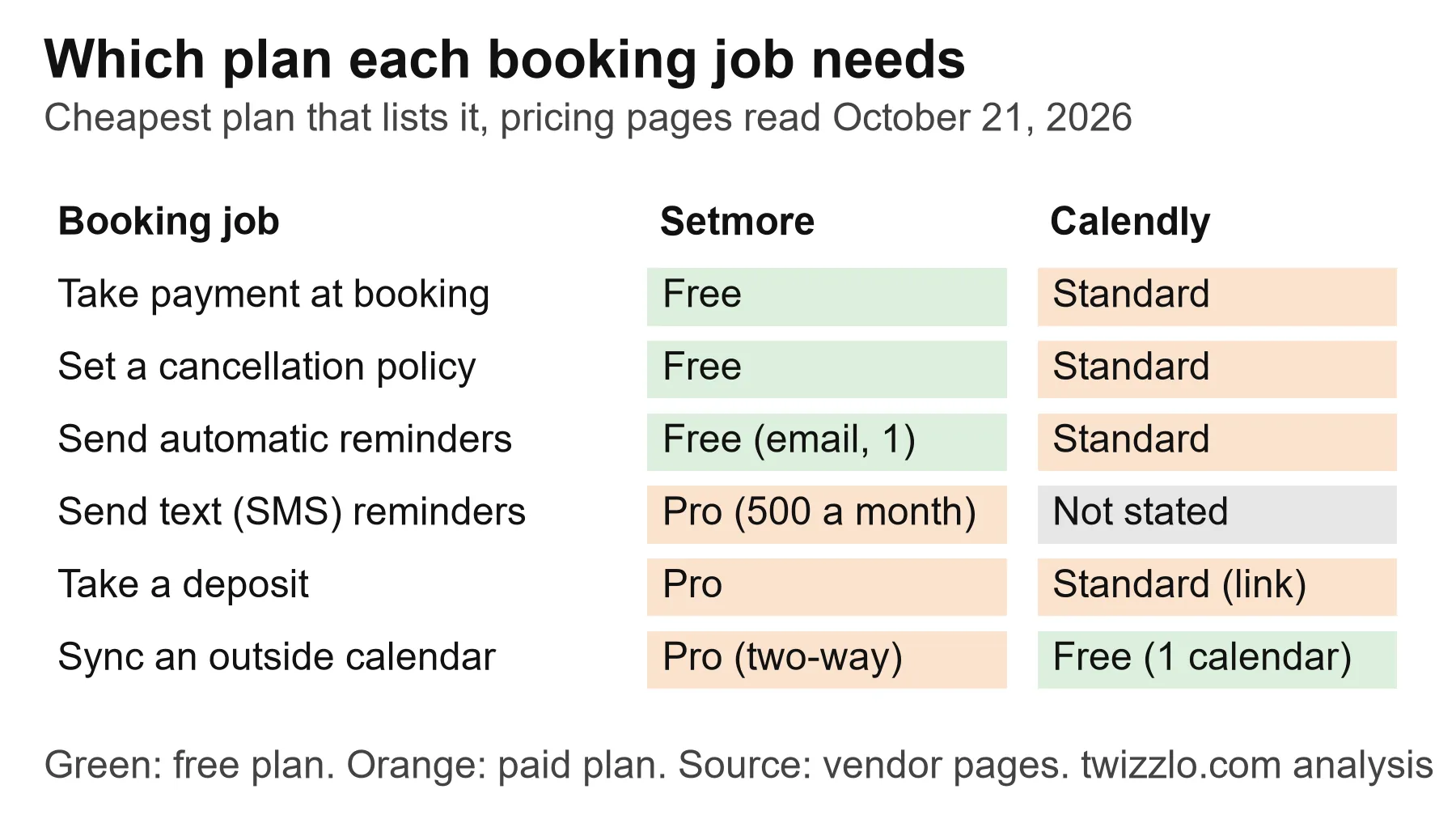
Text reminders are the clearest gap. Setmore's page lists 500 SMS credits a month for each Pro team member, with more for sale in the app, and notes that availability varies by country. Calendly's page lists automated reminders from Standard but does not say whether they can go by text, so a business that relies on texts should ask Calendly before paying.
Deposits differ in form. Setmore lists deposits as a Pro feature. Calendly lists custom payment links for "services, deposits, or other one-off charges" on its paid plans, alongside meeting packages for prepaid sessions and invoices.
Who counts as a Setmore user or a Calendly seat?
Setmore bills each staff calendar as a user, even one whose owner has no login, while Calendly bills a seat for each person who hosts meetings. Clients who book are not billed as users or seats on either.
Setmore's pricing page says "each staff calendar counts as a user" even when its owner has no login permission. So a shop with three stylists, plus an owner who keeps a calendar but never logs in, counts four users. That is the most Setmore Free allows. Calendly's page states that seats are required for users to connect calendars and host meetings, and that invitees do not need one.
For a team, the shared booking page matters as much as the count. Setmore lists a team booking page, a team calendar view and permission levels on Free. Calendly's Standard plan adds multi-person meeting types such as group and collective events, but round-robin, where the booking goes to whichever staff member is free, is a Teams feature.
How do payments at booking and card fees compare?
Setmore takes online payments on its Free plan, Calendly starts at Standard, and neither pricing page lists a card-processing rate of its own (read October 21, 2026).
Setmore's page lists Square, Stripe, PayPal and LawPay on both plans, plus Tap to Pay and a cash register for in-person sales. Calendly's page lists payment at booking through Stripe and PayPal on Standard and above. Neither page lists a card fee of its own, so the rate to check is the one on your own processor account: Stripe or PayPal on either tool, or Square on Setmore.
At a hypothetical $5,000 a month in card bookings, compare that account's rate alongside the plan prices in Table 2.
Which Setmore or Calendly plan fits your business?
Setmore's Free or Pro plan is the cheapest fit for most appointment businesses on pricing pages read October 21, 2026. Calendly's Free or Teams plan is cheapest for one synced calendar or for sales routing. Each row of Table 4 names the cheapest plan in this article that meets the profile.
| Reader profile | Cheapest plan that fits | Listed price | Read date |
|---|---|---|---|
| Solo provider who wants payment at booking and email reminders | Setmore Free | $0 | October 21, 2026 |
| Team of up to four sharing one booking page, no texts | Setmore Free | $0 | October 21, 2026 |
| Five staff who want text reminders | Setmore Pro | $12 a user a month ($5 yearly): $60 ($25) for five | October 21, 2026 |
| One person whose bookings must check an existing Google or Outlook calendar | Calendly Free | $0 | October 21, 2026 |
| Sales or consulting team that routes leads across hosts and sends meetings to Salesforce | Calendly Teams | $20 a seat a month ($16 yearly) | October 21, 2026 |
Table 4. Which plan fits which business, checked against every plan listed in Tables 1 to 3; prices from pricing pages read October 21, 2026.
If Setmore is on a shortlist with other tools, our Setmore alternatives guide sets its limits against eight more, and our Setmore vs Acuity comparison prices both tools at one to 10 staff.
Where Twizzlo fits
Twizzlo is web-based online booking and appointment scheduling software for appointment-based service businesses, and it prices by business rather than by staff member.
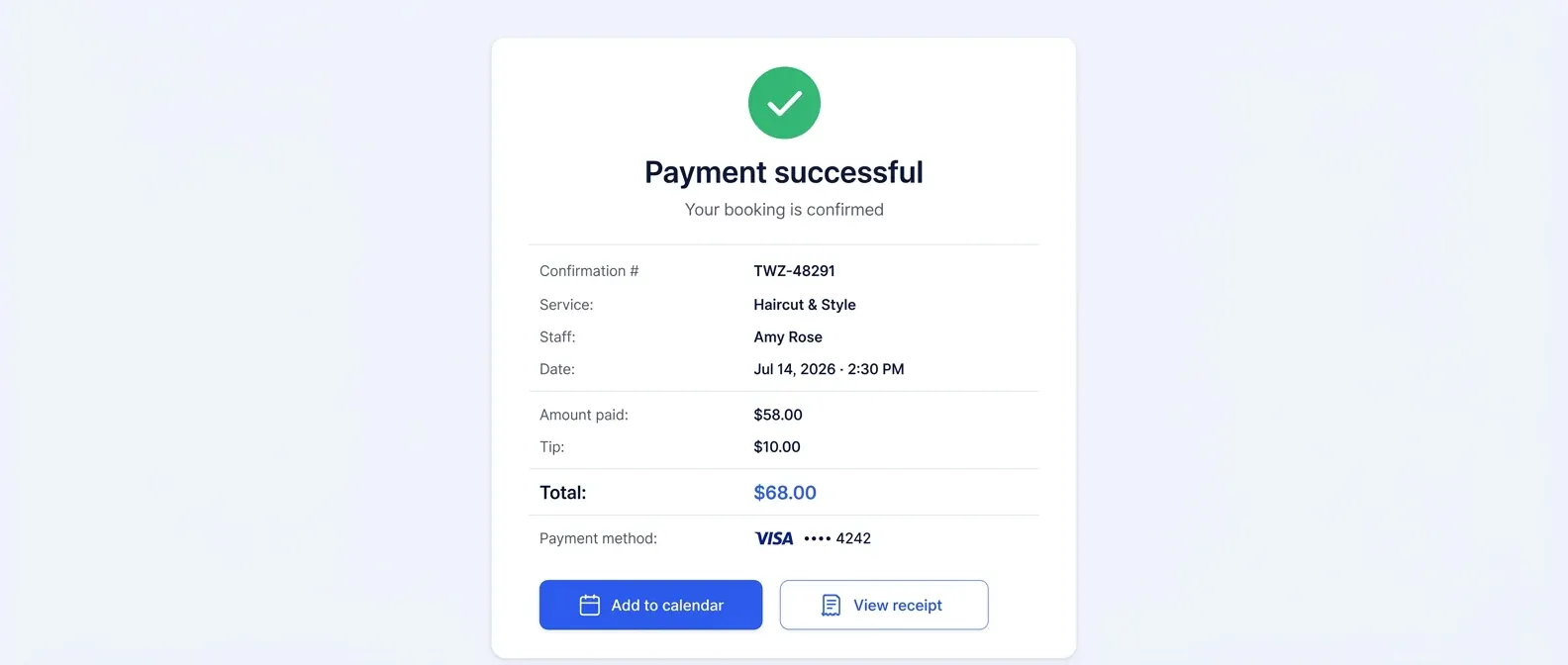
Clients book from a booking page that is open around the clock and shows real-time availability, and they can pay online through Stripe when they book, with tips at checkout. A prepaid booking takes the full service price. Email confirmations and reminders go out on both plans, with SMS reminders on Business Pro. Each staff member keeps an individual schedule, and Employee Shifts covers multi-location staff shifts and schedules.
Free is $0 a month for up to 150 bookings a month, free forever and not a trial, with no SMS. Business Pro is $29.99 a month per business for unlimited bookings, with 50 SMS a month included, then $0.03 each, and a 30-day money-back guarantee. Both plans include unlimited staff and locations. Online payments carry your Stripe processing rate plus a 1.5% Twizzlo platform fee. Details are on the Twizzlo pricing page.
At a hypothetical 40 bookings a month per staff member, a three-person team books 120 a month, within Free's 150. A five-person team at that pace books 200, so it belongs on Business Pro. Sending one text reminder per booking, those 200 bookings use the 50 included texts plus 150 more at $0.03, or $4.50, for $34.49 a month. If clients prepay $6,000 of those bookings online, the platform fee is $90 before Stripe's rate.
Twizzlo's /features/ page does not list lead routing for sales teams, so the plan table above shows which tool fits that job.
You can start on the Free plan with your services and staff, then move to Business Pro when bookings pass 150 a month or you want text reminders.
Frequently asked questions
Calendly vs Setmore: which is better for a service business?
For appointment work with staff, Setmore's plans cover more for less: on pricing pages read October 21, 2026, its Free plan takes payment at booking for up to four users, and Pro adds text reminders. Calendly fits teams whose bookings are meetings, with lead routing on its Teams plan.
Is Setmore cheaper than Calendly?
Billed monthly, no: Setmore Pro and Calendly Standard each cost $12 per staff member a month. Billed yearly, Setmore Pro is $5 a user a month against Calendly Standard's $10 a seat, on pricing pages read October 21, 2026.
Can Calendly take payments when a client books?
Yes, from the Standard plan. Calendly's pricing page, read October 21, 2026, lists payment at booking through Stripe and PayPal; its Free plan does not include it.
Does Setmore send text reminders?
Yes, on Pro. Setmore's pricing page, read October 21, 2026, lists 500 SMS credits a month for every Pro team member and sells extra credits in the app; the Free plan sends email reminders only.
Does Calendly's free plan work for a team?
Not for shared booking. Calendly's Free plan, read October 21, 2026, lists one event type and one calendar connection; round-robin and team scheduling start on Teams at $20 a seat a month, or $16 billed yearly.
Sources and methodology
Prices read
- Setmore pricing page (opens in a new tab)Read . Supports: Free and Pro plans, per-user prices monthly and yearly, user definition, SMS credits, deposits, payments, calendar sync, team features, Live Receptionist (Tables 1 to 4, Figures 1 and 2)
- Calendly pricing page (opens in a new tab)Read . Supports: Free, Standard, Teams and Enterprise plans, per-seat prices monthly and yearly, seat definition, payments, reminders, round-robin, connections (Tables 1 to 4, Figures 1 and 2)
- Twizzlo pricing page (opens in a new tab)Read . Supports: Free and Business Pro plans, SMS, guarantee, 1.5% platform fee
- Twizzlo features page (opens in a new tab)Read . Supports: Booking page, real-time availability, Stripe payments and tips, prepaid bookings, reminders, staff schedules, Employee Shifts; screenshot source
From our editorial policy
- Twizzlo sells online booking and appointment scheduling software, the same category we write about. Twizzlo appears in our comparisons and roundups, and we have a commercial interest in you choosing it.
- We do not publish invented quotes, studies, statistics, customer stories or product tests, and we do not imply hands-on use of a product when the research came from the vendor's public documentation.
- To report an error, email support@twizzlo.com with the subject line "Correction: [page URL]". Tell us what is wrong and, if you can, link a source.
Start free, upgrade when you grow
Flat-rate booking software. No per-seat, per-chair or per-location fees.
- Free plan up to 150 bookings a month, not a trial
- Business Pro is $29.99 a month per business for unlimited bookings, with a 30-day money-back guarantee
- 24/7 support by email