
Professional Services Scheduling Software: Booking Tools, Costs and Fit

In short
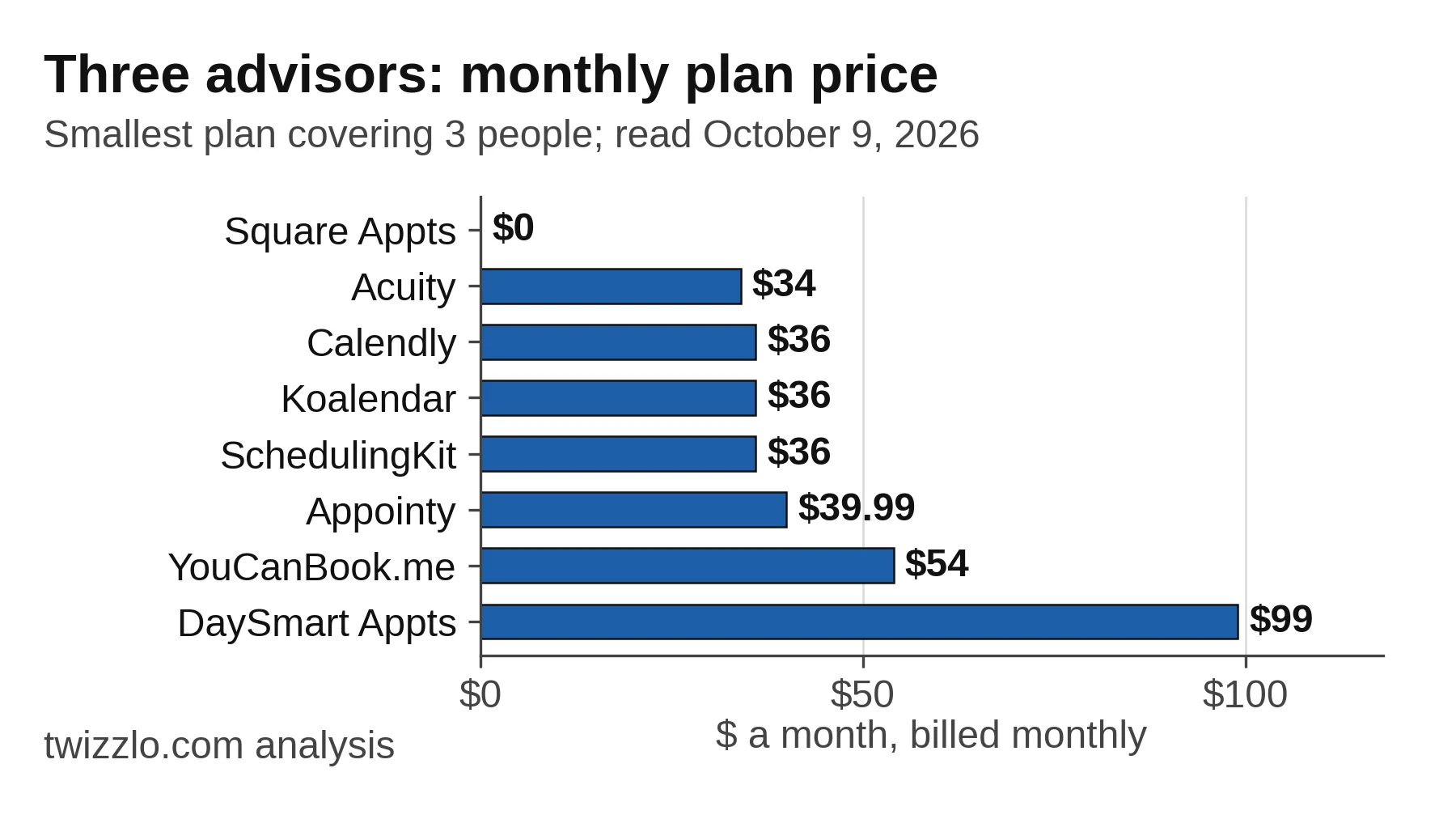
Professional services scheduling software usually means a client-booking tool for consultants, coaches and tutors, though the search also returns project and shift planners. For three advisors, the smallest plans, read October 9, 2026, run from $0 a month on Square Appointments Free to $99 on DaySmart Appointments Gold, and four of eight monthly prices are $34 or $36.
- Price the seats you need: the cheapest per-seat plans cost least for one or two advisors, and Acuity Scheduling's calendar tiers cost less from three.
- Square's Plus plan breaks even on its $49 monthly fee once online card sales pass about $12,250 a month.
- For hours per client project or shift rotas, look at project tools such as Scoro or workforce tools such as Shifton.
In this article9 sections
A business coach, a three-person consulting practice and a tutoring center can all search for professional services scheduling software. They land on three kinds of product: tools that let clients book a time, tools that plan staff hours across client projects, and tools that build shift rotas. This guide sorts them and prices the client-booking tools for a small firm.
We read the pages that ranked for this search on October 9, 2026, from a Canadian connection, and each tool's own pricing page the same day. The set is every product behind the top five results: Appointy, Zeeg, Shifton, DaySmart Appointments and SchedulingKit. We added Koalendar, which a second search returned and our keyword research lists as a rival for this term. We also added the 10 tools in The Digital Project Manager's roundup, which ranked for the same search. We did not use any of these tools. Zeeg showed prices only in euros and SimplyBook.me only in Canadian dollars to our connection, so both are named without a price. Prices appear as each page shows them, with a dollar sign. Twizzlo, which publishes this guide, also sells booking software, so it stays out of the tables and has its own section. The three-advisor firm in the examples is hypothetical.
If your practice books clients into one-to-one sessions, our appointment scheduling software page lists the features for that job: a 24/7 online booking page, client history, staff schedules and online payments at booking.
Three kinds of software share this name
Professional services scheduling software means one of three jobs: clients booking an advisor's time, managers planning staff hours across client projects, or managers building shift rotas.
Most consultants, coaches, tutors, photographers and trainers need the first job. A firm that bills project work by the hour needs the second, and a team that staffs an office or client sites in shifts needs the third. Vendors also call the first kind professional scheduling software or consulting scheduling software, so check which job a page covers before you compare prices.
| Job | What it schedules | Tools from this search | Signs you need it |
|---|---|---|---|
| Client booking | Clients pick an open time on an advisor's booking page and get reminders | Appointy, Acuity Scheduling, Calendly, Cal.com, Koalendar, SchedulingKit, YouCanBook.me, DaySmart Appointments, Square Appointments, Zeeg, SimplyBook.me | Clients email back and forth to find a time; sessions are one to one or small groups |
| Project and resource planning | Staff time on client projects | Scoro, Productive | You bill by the project and need to see who is free next week |
| Shifts and field work | Shift rotas, hours, overtime and time off; dispatch to job sites | Shifton; ServiceTitan for field service | Staff work set hours at an office or at client sites |
Table 1. Job types are this guide's grouping of the tools named by the pages that ranked on October 9, 2026.
Outside client booking, this guide prices only Shifton, the one shift tool in the search. Its pricing page, read October 9, 2026, lists Basic functions free for up to 10 employees, then $1.00 a month for each employee from the 11th. Turning on any paid module also starts that charge. ServiceTitan's pricing page shows no price and offers a demo. Scoro and Productive bill per user for project planning, a different job, so this guide does not price them against booking tools.
What should a professional services firm check before choosing?
Before you compare prices, check who counts as a paid seat, payment at booking, reminders, intake questions, calendar and video connections, routing, and how client records are handled.
- Seats. Some tools bill each person who hosts bookings; others sell a tier of calendars, a base plan plus added staff, or a flat price up to a user limit.
- Payment at booking. If clients pay before a session, find the cheapest plan that lists online payments, and note which payment provider sets the card rate.
- Reminders. Email reminders are common on free plans; text reminders often need a paid plan or bought credits.
- Intake questions. A short form at booking tells you the client's goal before the first call.
- Calendar and video. If sessions run on Zoom, Google Meet or Microsoft Teams from a Google or Outlook calendar, check that the plan lists those connections.
- Routing. If a new client can see any advisor, look for round robin, which sends each booking to the next free person.
- Client records. Law and accounting firms appear on several vendor pages in this search; any firm with confidential clients should read the vendor's data and security terms before moving client records.
The vendor pages also quote customer counts and productivity gains, such as more billable hours. None shows how those figures were measured, so this guide leaves them out. For a wider set of tools ranked by use case, see our pick of the best appointment scheduling software.
What do client-booking tools cost a three-advisor firm?
For three bookable advisors, the smallest plan on each pricing page, read October 9, 2026, runs from $0 a month on Square Appointments Free to $99 on DaySmart Appointments Gold, billed monthly. Four of the eight tools with a monthly price cost $34 or $36.
| Tool | Smallest plan for 3 advisors | Billed monthly | Billed annually | Billing unit | Online payment at booking |
|---|---|---|---|---|---|
| Square Appointments | Free | $0 | $0 | Per location; unlimited staff calendars | Yes, Free lists an online card rate of 3.3% plus 30 cents |
| Acuity Scheduling | Standard (up to 6 calendars) | $34 | $27 | Calendar tiers | Yes, every plan (Stripe, Square, PayPal, Venmo) |
| Calendly | Standard, 3 seats | $36 | $30 | Per seat | Yes, from Standard (Stripe, PayPal) |
| Koalendar | Pro, 3 seats | $36 | $27 | Per seat | Yes, from Pro (Stripe, PayPal) |
| SchedulingKit | Standard, 3 seats | $36 | $30 | Per seat | Yes, from Standard |
| Appointy | Growth, 1 staff plus 2 added | $39.99 | $29.99 | Base plan plus $5 a month per added staff | Yes, from Growth (Stripe, PayPal, Authorize.Net); Free lists Square |
| YouCanBook.me | Team, 3 members | $54 | $48.60 | Per member | Yes, every plan (Stripe; the page notes added fees) |
| DaySmart Appointments | Gold, up to 10 users | $99 | Not shown | Flat up to 10 users | Not stated on the plan card |
| Cal.com | Teams, 3 users | Not shown | $36 | Per user | Yes, Free lists Stripe and PayPal |
Table 2. Smallest plan covering three bookable advisors, from each vendor's pricing page, read October 9, 2026, from a Canadian connection; prices as shown, with a dollar sign. Appointy's annual figure is its $19.99 plan plus two added staff at the listed $5 a month. Koalendar's page code also carried a second plan line-up, so confirm the plan card you see. Cal.com shows only yearly billing.
Square Appointments
Square Appointments' U.S. pricing page, read October 9, 2026, lists Free at $0, Plus at $49 and Premium at $149 a month per location. Free lists unlimited staff calendars and appointment reminders; Plus adds cancellation and no-show fees, multi-staff booking and a waitlist. Online card payments cost 3.3% plus 30 cents on Free and 2.9% plus 30 cents on Plus and Premium. For a plan-by-plan view, see our Square Appointments pricing page. Square Appointments suits a firm that wants no plan fee and takes most payments by card through Square.
Acuity Scheduling
Acuity Scheduling's pricing page, read October 9, 2026, lists Starter at $20 a month for one calendar, Standard at $34 for up to six and Premium at $61 for up to 36. Billed annually, they are $16, $27 and $49. Every plan lists custom client forms, payments through Stripe, Square, PayPal or Venmo, and automatic time zone conversion. Text reminders start on Standard, and the page offers a seven-day trial rather than a free plan. Our Acuity pricing page sets out each plan. Acuity Scheduling suits a practice of three to six advisors that wants intake forms and payment at booking on one tier.
Calendly
Calendly's pricing page, read October 9, 2026, lists Standard at $12 a seat a month and Teams at $20, or $10 and $16 billed annually. Seats are for the people who host meetings; invitees need none. Standard adds Stripe and PayPal payments and multiple calendar connections. Round-robin and team scheduling start on Teams, so three advisors with routing pay $60 a month. Free covers one event type and one calendar connection. Our Calendly pricing page lists each plan side by side. Calendly suits consultants and coaches who book paid client calls across several connected calendars.
Koalendar
Koalendar's pricing page, read October 9, 2026, lists a free-forever plan, Pro at $12 a seat a month and Business at $36 a month with three seats, then $16 per added seat. Billed annually, Pro is $9 a seat, Business $29 and each added Business seat $12. Pro adds automated reminders, payment collection through Stripe or PayPal and custom forms. Business adds round-robin and collective team scheduling and 300 text credits a month. The page code also carried a second line-up with a Premium plan, so confirm the plan card you see. Koalendar suits a small team that wants routing in a three-seat bundle.
SchedulingKit
SchedulingKit's pricing page, read October 9, 2026, lists Free for one member and 50 bookings a month, then Standard at $12, Pro at $20 and Business at $36 a seat a month. Billed annually, they are $10, $16 and $30. Standard removes the booking limit and adds payment collection, invoicing and text notifications; Pro adds team scheduling. Three advisors pay $36 a month on Standard, or $60 with team scheduling on Pro. SchedulingKit suits a consultant who wants invoices for appointments on the same seat.
Appointy
Appointy's pricing page, read October 9, 2026, lists Free for one staff member and 100 appointments a month, Growth at $29.99 a month for one staff member and Professional at $59.99 for five. Billed annually, Growth is $19.99 and Professional $49.99. Growth adds staff at $5 a month each, so three advisors cost $39.99. Free lists Square payments; Growth adds prepayments through Stripe, PayPal and Authorize.Net, plus Google calendar sync. Appointy suits a firm that starts free with one advisor and adds staff one at a time.
YouCanBook.me
YouCanBook.me's pricing page, read October 9, 2026, lists Free, Individual at $9, Professional at $13 and Team at $18 a member a month billed monthly, with 10% off for yearly billing. Free already lists Stripe payments and Zoom, Microsoft Teams and Google Meet connections. Team adds round robin and central billing, so three advisors pay $54 a month. YouCanBook.me suits a professional who wants a free booking page that takes Stripe payments now and a team plan later.
Cal.com
Cal.com's pricing page, read October 9, 2026, lists a free plan for one user and Teams at $12 a user a month, a yearly price; it shows no monthly price. Free lists Stripe and PayPal payments and email and text notifications. Teams adds round-robin scheduling, routing forms and shared availability, so three advisors pay $36 a month billed yearly. Cal.com suits a solo professional who wants paid bookings on a free plan.
DaySmart Appointments
DaySmart Appointments' pricing page, read October 9, 2026, lists Gold at $99 a month for up to 10 users and 500 appointments a month. Platinum is $149 for up to 15 users and 750 appointments. Both list recurring appointments and text (SMS) reminders, and Enterprise is priced on request. The plan cards do not list online payments. DaySmart Appointments suits a firm of up to 10 people that wants one fixed price with text reminders included.
How the bill changes as the firm adds advisors
Among the paid plans in Table 3, $12 seats cost least for one or two advisors, and tiered, flat or base-plus-staff plans cost less as the firm grows. At 10 advisors, $12 seats cost $120 a month, against $61 on Acuity Scheduling Premium and $99 on DaySmart Appointments Gold, billed monthly as read October 9, 2026.
| Billing model (tools) | 1 advisor | 3 advisors | 5 advisors | 10 advisors |
|---|---|---|---|---|
| $12 a seat (Calendly Standard, SchedulingKit Standard, Koalendar Pro) | $12 | $36 | $60 | $120 |
| $18 a member (YouCanBook.me Team) | $18 | $54 | $90 | $180 |
| Base plus $5 per added staff (Appointy Growth) | $29.99 | $39.99 | $49.99 | $74.99 |
| Calendar tiers (Acuity Scheduling) | $20 | $34 | $34 | $61 |
| Flat to 10 users (DaySmart Appointments Gold) | $99 | $99 | $99 | $99 |
Table 3. Monthly plan price, billed monthly, by number of bookable advisors, from the pricing pages read October 9, 2026. Plan prices only; text credits, card fees and add-ons are extra.
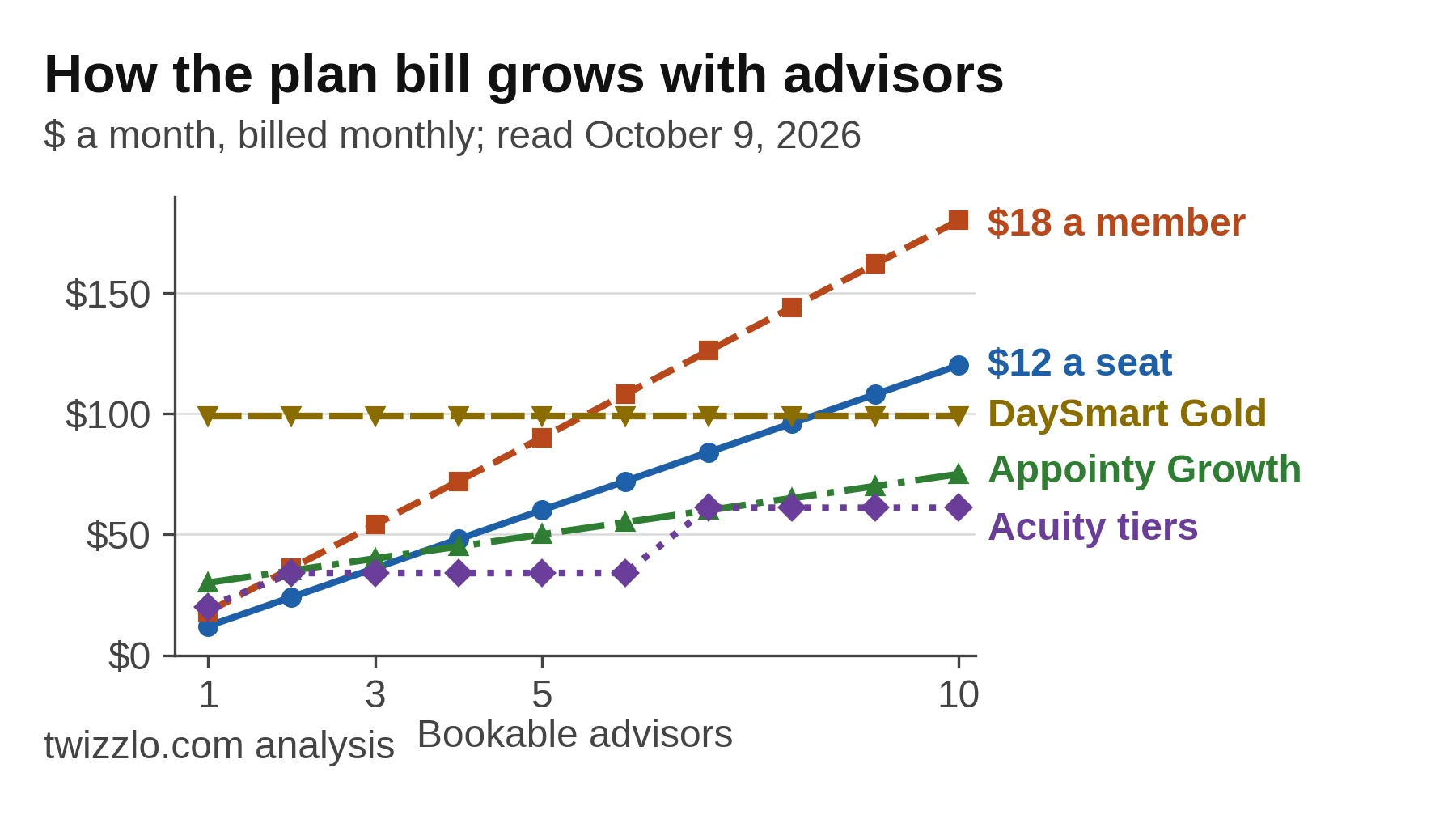
A $12 seat passes DaySmart's $99 Gold plan at nine advisors. Appointy's $5 added staff keeps Growth under $75 at 10, and Square Appointments Free stays at $0 at any size, with card fees on top.
Card fees on paid sessions
On paid sessions, card fees can cost more than the scheduling plan itself, so price both before you choose.
Take a hypothetical firm with 40 paid online sessions a month at $150 each, or $6,000. At Square's online rates, read October 9, 2026, it pays $210 in card fees on Free and $186 on Plus, or $235 once Plus's $49 fee is added. Plus breaks even from about $12,250 of online card sales a month, roughly 82 sessions at $150.
| Square Appointments plan | Plan fee a month | Online card rate | Card fees on $6,000 (40 payments) | Monthly total |
|---|---|---|---|---|
| Free | $0 | 3.3% plus 30 cents | $210 | $210 |
| Plus | $49 | 2.9% plus 30 cents | $186 | $235 |
Table 4. Worked example for a hypothetical firm; rates and plan fees from Square's U.S. pricing page, read October 9, 2026. Break-even for Plus: $49 divided by the 0.4-point rate gap is $12,250 of online card sales a month.
The other booking tools in Table 2 that list online payments pass them to Stripe, PayPal, Square, Venmo or Authorize.Net, and their pricing pages list no card rate. The rate is the payment provider's. Check that rate for your country before you compare totals. Our guide to online booking and payments covers prepayment rules and card rates in more detail.
Which plan fits which firm?
On the pricing pages read October 9, 2026, a solo professional who takes payment at booking can start free. A firm that needs intake forms fits an Acuity Scheduling tier, and three advisors who need routing fit Koalendar Business or Cal.com Teams.
| Firm profile | Cheapest qualifying plan | Listed price | Read |
|---|---|---|---|
| One professional, clients pay at booking | Square Appointments Free, Cal.com Free or YouCanBook.me Free | $0 | October 9, 2026 |
| Three to six advisors, intake forms and payment at booking | Acuity Scheduling Standard | $34 a month ($27 billed annually) | October 9, 2026 |
| Three advisors, new clients routed to whoever is free | Koalendar Business; Cal.com Teams | $36 a month ($29 billed annually); Cal.com $36 a month, billed yearly only | October 9, 2026 |
| Seven to 10 advisors, intake forms | Acuity Scheduling Premium | $61 a month ($49 billed annually) | October 9, 2026 |
| Staff shift rotas, not client booking | Shifton Basic functions | $0 up to 10 employees with no paid module on, then $1.00 an employee a month | October 9, 2026 |
Table 5. Cheapest plan in this guide, by monthly billing (Cal.com by its yearly price, the only one it shows), that lists each profile's needs, from the vendors' pricing pages, read October 9, 2026.
If your firm bills project hours and needs to see who is free next week, no plan in this table does that job; look at project planning tools instead.
Where Twizzlo fits
Twizzlo is web-based online booking and appointment scheduling software for appointment-based service businesses, and it fits the client-booking job for coaches, tutors, trainers and photographers who see clients one to one.
Our home page presents it as service scheduling software for a whole front desk. The scheduling software for service business hub groups it by trade, with pages for tutoring scheduling software and photographer booking software.
Clients book from a 24/7 online booking page and can reschedule themselves. Each advisor has a calendar and an individual schedule, and Employee Shifts covers multi-location staff shifts and schedules. Client profiles keep history, notes and preferences. Prepaid bookings take the full session price, with tips, through Stripe.
Twizzlo's features page does not list calendar sync, video-meeting links or intake forms. A consultant whose sessions run on Zoom from a Google or Outlook calendar is better served by a meeting scheduler that lists those connections.
Free is $0 a month for up to 150 bookings, free forever and not a trial, with no SMS. Business Pro is $29.99 a month per business for unlimited bookings, with 50 SMS a month included, then $0.03 each, and a 30-day money-back guarantee. Both plans include unlimited staff and locations. Online payments carry your Stripe processing rate plus a 1.5% Twizzlo platform fee. Details are on the Twizzlo pricing page.
A solo coach with 100 sessions a month stays within Free's 150 bookings, with email reminders. The three-advisor firm, at four sessions a day each over 20 days, books 240 sessions, so Business Pro applies. One text reminder per session uses the 50 included and 190 more at $0.03, or $5.70, for $35.69 a month. If 40 of those sessions are paid online at $150, the $6,000 carries $90 in platform fees, $2.25 a session, before Stripe's rate.
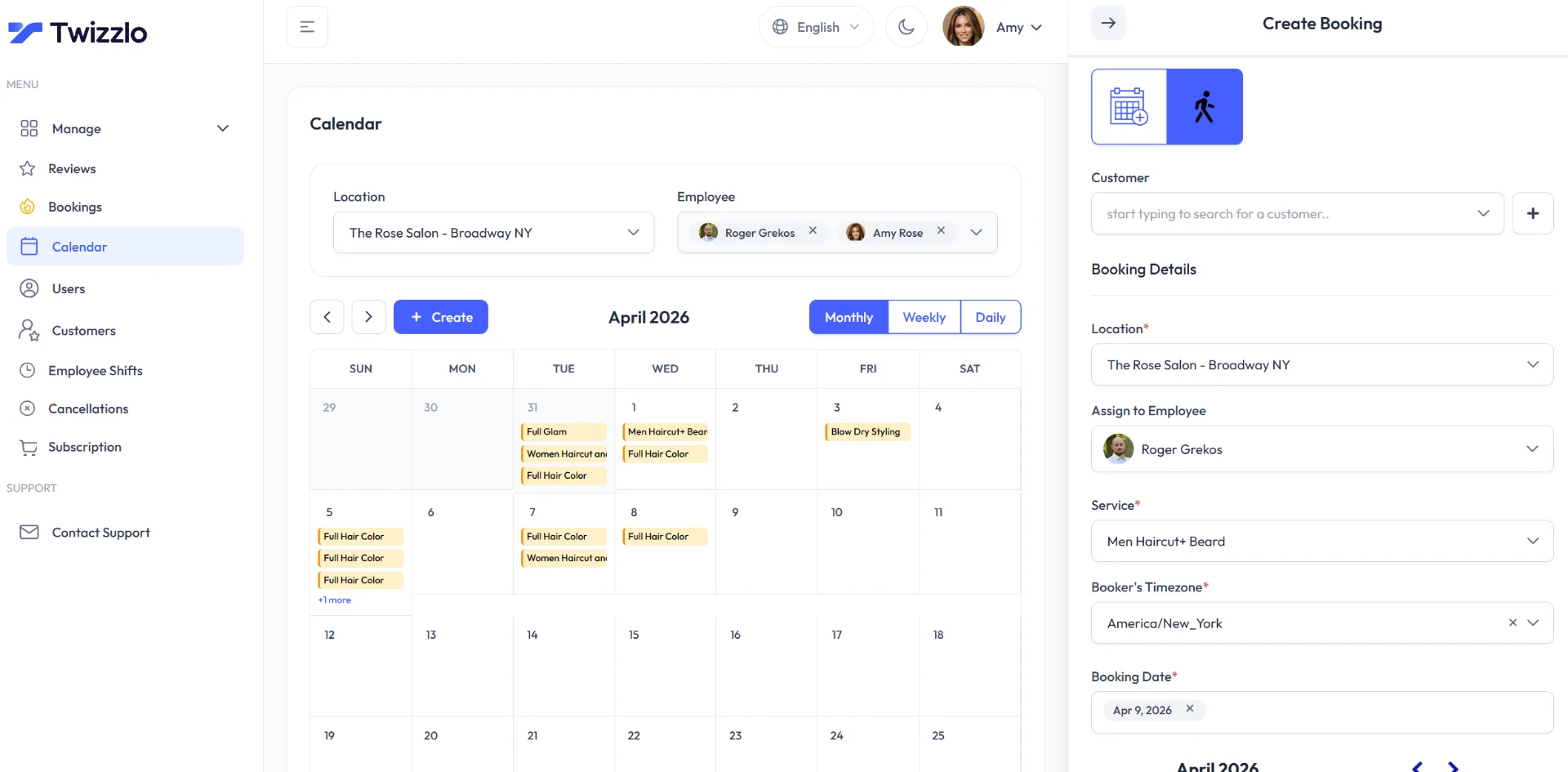
To try it with your own session count, you can start on the Free plan and move to Business Pro when you pass 150 bookings a month or want text reminders.
Frequently asked questions
What is professional services scheduling software?
It is software that organizes a professional firm's time. In this search the phrase covers three jobs: booking pages where clients pick a time, project planning tools that assign staff hours, and shift rota tools. Consultants, coaches and tutors who meet clients one to one usually need the booking kind.
Is Calendly enough for a consulting firm?
For booking client calls, it can be. On October 9, 2026, Calendly charged $12 a seat a month for Standard, which takes Stripe and PayPal payments, and $20 a seat for Teams, which adds round robin. Its pricing page lists meeting scheduling, not staff planning across client projects.
Which tools have a free plan for one professional?
Square Appointments, Appointy, Calendly, Cal.com, Koalendar, SchedulingKit and YouCanBook.me each list a free plan, read October 9, 2026. Limits differ: SchedulingKit Free allows 50 bookings a month, Appointy Free 100 appointments and Calendly Free one event type. Acuity Scheduling offers a seven-day trial instead.
Do I need round-robin scheduling?
Only if a new client can see any advisor. Round robin sends each booking to the next free person. On the pages read October 9, 2026, it is listed on Calendly Teams, Cal.com Teams, Koalendar Business and YouCanBook.me Team, and SchedulingKit lists team scheduling on Pro.
Does professional services scheduling software track hours for billing?
Booking tools record sessions, not billable hours. Workforce tools such as Shifton track hours worked, overtime and time off. On October 9, 2026, Shifton's Basic functions were free for up to 10 employees, but turning on any paid module, such as time-off requests, also starts the Basic charge. Project tools such as Scoro and Productive plan staff time on client projects.
Sources and methodology
Prices read
- Square Appointments pricing (U.S.) (opens in a new tab)Read . Supports: Free $0, Plus $49, Premium $149 a month per location; unlimited staff calendars on Free; Plus features; online card rates 3.3% + 30 cents (Free) and 2.9% + 30 cents (Plus, Premium)
- Acuity Scheduling pricing (opens in a new tab)Read . Supports: Starter $20, Standard $34, Premium $61 monthly ($16, $27, $49 annually); 1, 6 and 36 calendars; client forms, payments and time zones on every plan; text reminders from Standard; 7-day trial
- Calendly pricing (opens in a new tab)Read . Supports: Standard $12 and Teams $20 a seat monthly ($10, $16 yearly); seats for hosts; payments on Standard; round robin on Teams; Free limits
- Koalendar pricing (opens in a new tab)Read . Supports: Free forever; Pro $12 a seat ($9 annually); Business $36 with 3 seats, $16 per added seat ($29, $12); plan features; second line-up in page code; read from a non-US connection
- SchedulingKit pricing (opens in a new tab)Read . Supports: Free 1 member, 50 bookings; Standard $12, Pro $20, Business $36 a seat monthly ($10, $16, $30 annually); plan features; read from a non-US connection
- Appointy pricing (opens in a new tab)Read . Supports: Free 1 staff, 100 appointments; Growth $29.99, Professional $59.99 monthly ($19.99, $49.99 annually); $5 per added staff on Growth; payment options
- YouCanBook.me pricing (opens in a new tab)Read . Supports: Individual $9, Professional $13, Team $18 a member monthly (USD price list); Free features; Team round robin; read from a non-US connection
- Cal.com pricing (opens in a new tab)Read . Supports: Free 1 user with Stripe and PayPal; Teams $12 a user a month, yearly pricing; Teams features; read from a non-US connection
- DaySmart Appointments pricing (opens in a new tab)Read . Supports: Gold $99 up to 10 users, 500 appointments; Platinum $149 up to 15 users, 750 appointments; Enterprise on request; read from a non-US connection
- Shifton pricing (opens in a new tab)Read . Supports: Basic functions free up to 10 employees, $1.00 a month per employee from the 11th; paid modules; read from a non-US connection
- Twizzlo pricing page (opens in a new tab)Read . Supports: Free and Business Pro plans, SMS, guarantee, 1.5% platform fee
- Twizzlo features page (opens in a new tab)Read . Supports: 24/7 booking page; self-rescheduling; staff schedules and Employee Shifts; client profiles; prepaid bookings and tips through Stripe; screenshot source
From our editorial policy
- Twizzlo sells online booking and appointment scheduling software, the same category we write about. Twizzlo appears in our comparisons and roundups, and we have a commercial interest in you choosing it.
- We do not publish invented quotes, studies, statistics, customer stories or product tests, and we do not imply hands-on use of a product when the research came from the vendor's public documentation.
- To report an error, email support@twizzlo.com with the subject line "Correction: [page URL]". Tell us what is wrong and, if you can, link a source.
Start free, upgrade when you grow
Flat-rate booking software. No per-seat, per-chair or per-location fees.
- Free plan up to 150 bookings a month, not a trial
- Business Pro is $29.99 a month per business for unlimited bookings, with a 30-day money-back guarantee
- 24/7 support by email