
Online Booking and Payments That Actually Help

In short
Online booking and payments work best as one system: the client picks a real open slot and pays in the same step, so the payment, the reminder and the client record attach to the booking. Decide per service whether to take full prepayment, a deposit, a card on file or nothing, then check each tool's online card rate.
- Take full prepayment for fixed-price services, a deposit for long or high-priced ones and a card on file for regular clients.
- Processing on an $80 online payment, at printed rates: $2.94 on Square Free, $2.62 on Square Plus, $2.08 on GlossGenius (September 25 and 27, 2026).
- Check the plan: Setmore lists deposits on Pro only, and Vagaro sells them in a $10-a-month add-on (September 25 and 27, 2026).
In this article9 sections

Online booking lets clients choose an open time on your calendar without calling; online payments let them pay, leave a deposit or store a card during that same visit to your booking page. This guide covers the four payment rules you can set, what five booking tools list and charge on each plan, and a two-week check of your own setup. Twizzlo, which publishes this guide, makes appointment scheduling software; its facts sit in their own section near the end.
What online booking and payments should fix
A connected setup shows, for every appointment, who booked, what they booked, whether they paid, whether they were reminded, whether they came and what the visit earned.
A good system should reduce the daily back-and-forth: fewer appointment calls, fewer missed messages and fewer cases where a client thinks they are booked but nothing made it onto the calendar. It should also tighten the handoff between scheduling and money, so your team is not checking one tool for appointments and another for payments.
When booking and payment live in separate systems, small problems stack up fast. Deposits get missed. Staff spend time reconciling transactions. Refunds take longer. Tips may not be tracked cleanly. Reporting turns into guesswork because revenue, appointments and staff performance are split across different dashboards. A setup that starts as a calendar app, a card processor and text messages works until bookings grow; then someone has to copy information between them every day.
For clients the gain is booking outside business hours, an instant confirmation and one checkout; for staff it is fewer calls during appointments and no matching of payments to the calendar at closing time. All five booking tools compared below can take a payment when a client books; they differ in the payment rules each plan allows and in what each payment costs.
Four ways to take payment at booking
There are four ways to handle money when a client books: take the full price, take a deposit, store a card to charge only under your cancellation policy, or take nothing until the visit. The right rule depends on the service's price, its length and how often clients miss it.
| Payment rule | What the client pays when booking | Where it fits |
|---|---|---|
| Full prepayment | The whole service price; only a tip, if any, is left for the visit | Fixed-price services, first-time clients and times that are hard to refill |
| Deposit | Part of the price; the rest is due at the visit | Long or high-priced services |
| Card on file | Nothing yet; the card is charged only under your written cancellation or no-show policy | Regular clients and services whose final price is set on the day |
| Pay at the visit | Nothing | Low-priced services and clients who rarely miss |
Whichever rule you choose, state it on the booking page and in the confirmation: how much is paid now, when the rest is due and what happens after a late cancellation or no-show. The business's written policy decides whether a prepayment or deposit is kept or refunded. Before storing a card, get the client's written authorization; our credit card on file authorization form template is a starting point.
A mobile business loses the travel time as well as the slot when a client is not home, so full prepayment or a deposit carries more weight there; our guide to the best auto detailing software shows which plan of each tool takes payment at booking.
What to look for in online booking and payments
Look for four things working together: booking rules that stop impossible bookings, a payment flow that matches each service, reminders that go out without staff, and client records that keep booking and payment history in one place.
Start with booking rules. Your system should let you control availability based on staff, service type, location, duration, buffers and business hours. Without that, online scheduling can create more cleanup than it saves.
Then look at the payment flow. Can you take full payments, partial deposits or cards on file depending on the service? Can clients add tips without awkward workarounds? Can your team quickly see what has been paid and what is still outstanding?
Reminders are another major piece. Online booking works better when it is paired with automated SMS and email reminders that go out on time without staff involvement. The confirmation that goes out at booking matters as much as the reminder; our booking confirmation email template lists what it should say.
Customer records matter too. Booking and payment history should feed into a simple CRM so your team is not starting from scratch every time someone returns. When one system tracks appointments, notes, payment status and communication history, service gets faster and more consistent.
Condensed into a checklist:
| Area | What to check before you commit |
|---|---|
| Booking rules | Availability control by staff, service type, location, duration, buffers, and business hours |
| Payment flow | Full payments, partial deposits, or cards on file per service, plus easy tipping and a clear view of what is still outstanding |
| Reminders | Automated SMS and email that go out on time without staff involvement |
| Customer records | Booking and payment history feeding one simple CRM with notes and communication history |
Deposits, prepayments and card rates in five booking tools
All five tools checked here can take money when a client books, but they list different payment rules by plan and charge different card rates. On Setmore, deposits need the Pro plan, and on Vagaro the $10-a-month Online Shopping Cart add-on, while Square Appointments prints 3.3% plus 30 cents per online payment on its Free plan (read September 25 and 27, 2026).
| Tool | Payment rules listed on the plan | Card rate on an online payment |
|---|---|---|
| Acuity Scheduling | Payments and deposits through Stripe, Square, PayPal or Venmo on every plan, from $20 a month billed monthly (Starter, one calendar) | The rate of the processor you connect |
| GlossGenius | Built-in deposits, cancellation and no-show policies and card-on-file policies on every plan, from $28 a month billed monthly (Standard) | Flat 2.6%, with no card-on-file or manual entry fee |
| Setmore | Online payments on Free and Pro; deposits on Pro only, $12 per user a month billed monthly | The rate of the processor you connect (Square, Stripe, PayPal or LawPay) |
| Square Appointments | Prepayments and appointment deposits from the Free plan; cancellation and no-show fees charged to a card on file on Plus ($49 a month per location) and Premium | 3.3% + 30¢ on Free; 2.9% + 30¢ on Plus and Premium |
| Vagaro | Deposits and cancellation fees through the Online Shopping Cart add-on, $10 a month | Not compared: the US help center lists in-person, keyed-in and tap-to-phone rates |
Plan features as each vendor lists them; rates as printed, before tax or add-ons. Sources: Acuity Scheduling's pricing page (prices September 25, 2026; plan table September 27, 2026), GlossGenius's pricing page (prices and rate September 27; plan rows September 28, 2026), Setmore's pricing page (prices September 25; payment rows September 27, 2026), Square Appointments' pricing page (prices and rates September 25; features September 27, 2026) and Vagaro's US help center (September 25, 2026).
Worked example with the printed rates, not a quote: an $80 service paid in full online costs $2.94 in processing on Square Free, $2.62 on Square Plus or Premium and $2.08 on GlossGenius. On Acuity Scheduling and Setmore the charge depends on the processor you connect. Our guide to the best appointment scheduling software compares calendars, reminders and prices beyond payments. Our Acuity Scheduling pricing, GlossGenius pricing, Setmore pricing, Square Appointments pricing and Vagaro pricing pages break each bill down further.
The trade-offs: flexibility, payment rules and team pricing
The right setup depends on the business: a solo provider, a multi-chair team and a mobile service weigh flexibility, payment rules and subscription price differently.
A solo esthetician has different needs than a tutoring center or a multi-chair salon, so a long feature list is a weak way to choose. For some businesses, flexibility matters most: they need to manage multiple staff schedules, room or resource availability and different service lengths. For others, payment controls come first because no-shows and last-minute cancellations cost them the most; for them, deposits and card-on-file policies carry more weight than marketing extras.
Subscription pricing is the third trade-off. Acuity Scheduling prices by the number of calendars, Setmore Pro by user, Square Appointments by location and tier, and Vagaro by calendar, while GlossGenius sells plans by team size and charges each added location its plan price at a 15% discount (pricing pages and Vagaro's US help center, read September 25 and 27, 2026). Under each of those models the bill rises as calendars, users, locations or staff are added; our guide to flat-rate models covers the alternative.
A practical way to evaluate your current setup
Two weeks of counts show whether your current setup works: how many bookings needed manual follow-up, how many appointments had no payment or card attached, how many no-shows went uncovered and how often staff checked a second tool.
Keep a tally of five things for two weeks:
- Bookings that needed a call or message before they were confirmed.
- Appointments with no payment, deposit or card attached.
- No-shows and late cancellations, and how many your policy covered.
- Times staff checked a second tool to answer a client.
- Time spent on reminders and on matching payments at closing.
If most counts come from payment steps, change the payment rule for those services first; if they come from confirmations and reminders, fix those before you change software.
How Twizzlo handles online booking and payments
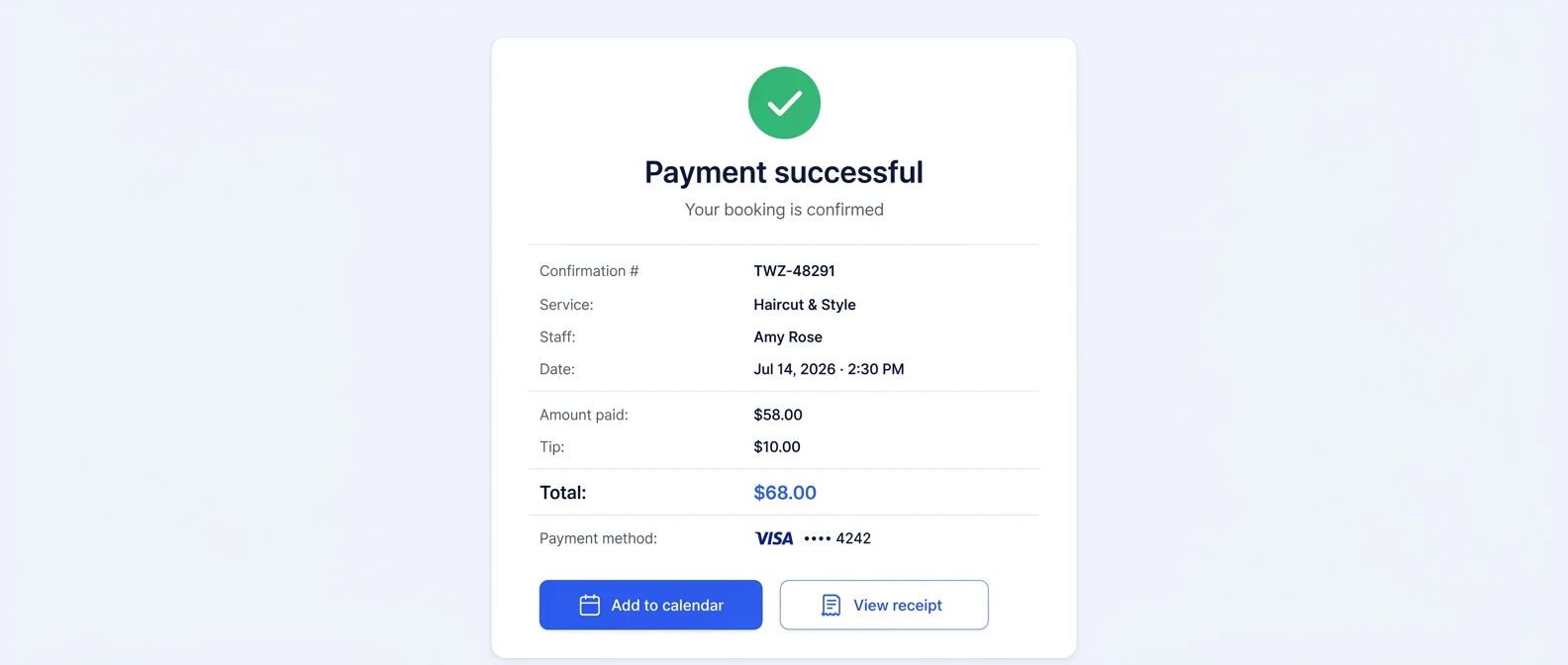
Twizzlo is web-based online booking and appointment scheduling software for appointment-based service businesses. It takes online payments at booking through Stripe: a business can turn on prepaid bookings at the full service price for any service, clients can add a tip at checkout, and staff can record manual payments. If a client does not show, the business decides whether to keep or refund a prepayment, and no-show fees are applied at the business's discretion. Confirmations and reminders go out by email on both plans and by SMS on Business Pro within its allowance, and each client profile keeps visit history and total spend, tips included.
Twizzlo has two plans. Free is $0 a month for up to 150 bookings, with no SMS, and includes the core booking, CRM, staff, insights and online payment features. Business Pro is $29.99 a month per business with unlimited bookings, 50 SMS a month and then $0.03 each, and a 30-day money-back guarantee. Both plans include unlimited staff and locations, and support is available 24/7.
Online payments carry your Stripe processing rate plus a 1.5% Twizzlo platform fee. The details of that fee are on our page about Twizzlo payment processing fees and eligibility, or you can compare the two plans.
FAQ
These answers cover what the system is, how it works, what it costs, tipping, setup and deposits.
What is an online booking and payments system?
It is one system where clients see real availability, book a slot, and pay, whether in full, as a deposit, or by card on file, while the business gets the calendar, payment status, reminders, and client records in a single operational view. The point is the connection: who booked, what they booked, whether they paid, whether they were reminded, and what the appointment produced in revenue, all in one place.
How does an online booking system work?
You define the rules once: which staff perform which services, how long each service takes, what buffers apply, and when the business is open. The system then shows clients only slots that genuinely work. Booking triggers the rest automatically, meaning payment or deposit collection, confirmation, SMS and email reminders, and an updated client record, so nothing depends on someone remembering to follow up.
How much does an online booking system cost?
It has two parts: the subscription and the processing on each online payment. On pricing pages read September 25 and 27, 2026, Acuity Scheduling starts at $20 a month billed monthly and GlossGenius at $28, Setmore Pro costs $12 per user a month billed monthly and Square Appointments Plus $49 a month per location, while Setmore and Square Appointments also offer $0 plans. Processing comes on top, for example 2.9% plus 30 cents per online payment on Square Plus, as printed on September 25, 2026. Judge the cost at the team size you plan to reach.
Can clients pay and tip when they book online?
Yes, when the booking tool takes payment at booking. The client pays in full, pays a deposit or leaves a card on file while booking, and a tip can be added at online checkout where the tool offers it. Before choosing, check that the tip prompt appears in the online checkout and not only on a card reader, and that payment status shows next to the booking rather than in a separate processor dashboard.
How do you set up online booking and payments for a small business?
Start with booking rules: staff, service types, durations, buffers, and hours, so the calendar cannot be booked into a mess. Connect the payment flow next and decide per service whether you want full payment, a deposit, or a card on file. Turn on automated reminders before you publish the booking link, then review the friction points after two weeks: manual follow-ups, missing payment information, and preventable scheduling errors.
What is the difference between a deposit and a full prepayment?
A deposit is part of the service price, paid when the client books, with the rest due at the appointment. A full prepayment is the whole price, paid at booking, so only a tip is left to collect on the day. Either way, the business's written policy decides what is kept or refunded after a late cancellation or no-show.
Sources and methodology
Prices read
- Acuity Scheduling pricing page (opens in a new tab)Read . Supports: Starter $20, Standard $34 and Premium $61 a month billed monthly by number of calendars; plan table row on accepting payments and deposits through Stripe, Square, PayPal or Venmo, read 2026-09-27 and re-read 2026-09-28
- GlossGenius pricing page (opens in a new tab)Read . Supports: Standard $28 a month billed monthly, the flat 2.6% processing rate and each added location at the plan price less 15%; compare rows for built-in deposits, cancellation and no-show policies and card-on-file policies, read 2026-09-28
- Setmore pricing page (opens in a new tab)Read . Supports: Free $0 for up to 4 users and Pro $12 per user a month billed monthly; payment rows (online payments on both plans, deposits on Pro only, Square and Stripe) read 2026-09-27
- Square Appointments pricing page (US) (opens in a new tab)Read . Supports: Free, Plus $49 and Premium plans per location; online rates 3.3% + 30 cents on Free and 2.9% + 30 cents on Plus and Premium; plan grid (prepayments and appointment deposits on every plan, cancellation and no-show fees on Plus and Premium) read 2026-09-27
- Vagaro plans and premium features help article (US) (opens in a new tab)Read . Supports: Online Shopping Cart add-on for deposits and cancellation fees at $10 a month; billing per calendar; US card rates by payment channel
- Twizzlo features page (opens in a new tab)Read . Supports: online payments at booking through Stripe, tips at checkout, prepaid bookings at the full service price, manual payments, no-show fees at the business's discretion, reminders and client profiles
- Twizzlo pricing page (opens in a new tab)Read . Supports: Twizzlo plans, SMS allowance, guarantee, support and the online payment fee
From our editorial policy
- Twizzlo sells online booking and appointment scheduling software, the same category we write about. Twizzlo appears in our comparisons and roundups, and we have a commercial interest in you choosing it.
- We do not publish invented quotes, studies, statistics, customer stories or product tests, and we do not imply hands-on use of a product when the research came from the vendor's public documentation.
- To report an error, email support@twizzlo.com with the subject line "Correction: [page URL]". Tell us what is wrong and, if you can, link a source.
Update history
- : Removed claims we could not source, added a table of the payment rules and online card rates five booking tools list (read September 25 to 28, 2026), and updated Twizzlo's plan and fee details.
Start free, upgrade when you grow
Flat-rate booking software. No per-seat, per-chair or per-location fees.
- Free plan up to 150 bookings a month, not a trial
- Business Pro is $29.99 a month per business for unlimited bookings, with a 30-day money-back guarantee
- 24/7 support by email