
Cloud-Based Scheduling Software: Five Checks Before You Pay

In short
Cloud-based scheduling software runs on a vendor's servers, so staff open it in a browser and clients book on a web page. Before paying, check staff access, client self-rescheduling, time zones, where payments settle and how reminders are sent. The five plans we compared for four staff ran $0 to $92 a month on October 30, 2026.
- Square Plus undercuts Square Free only above $12,250 a month in online card sales, as listed October 30, 2026.
- Per-seat plans rise with every hire, while Acuity Standard covers up to six calendars for one price.
- Online rescheduling depends on your settings on several tools, so book and move a test appointment from a phone before launch.
In this article9 sections
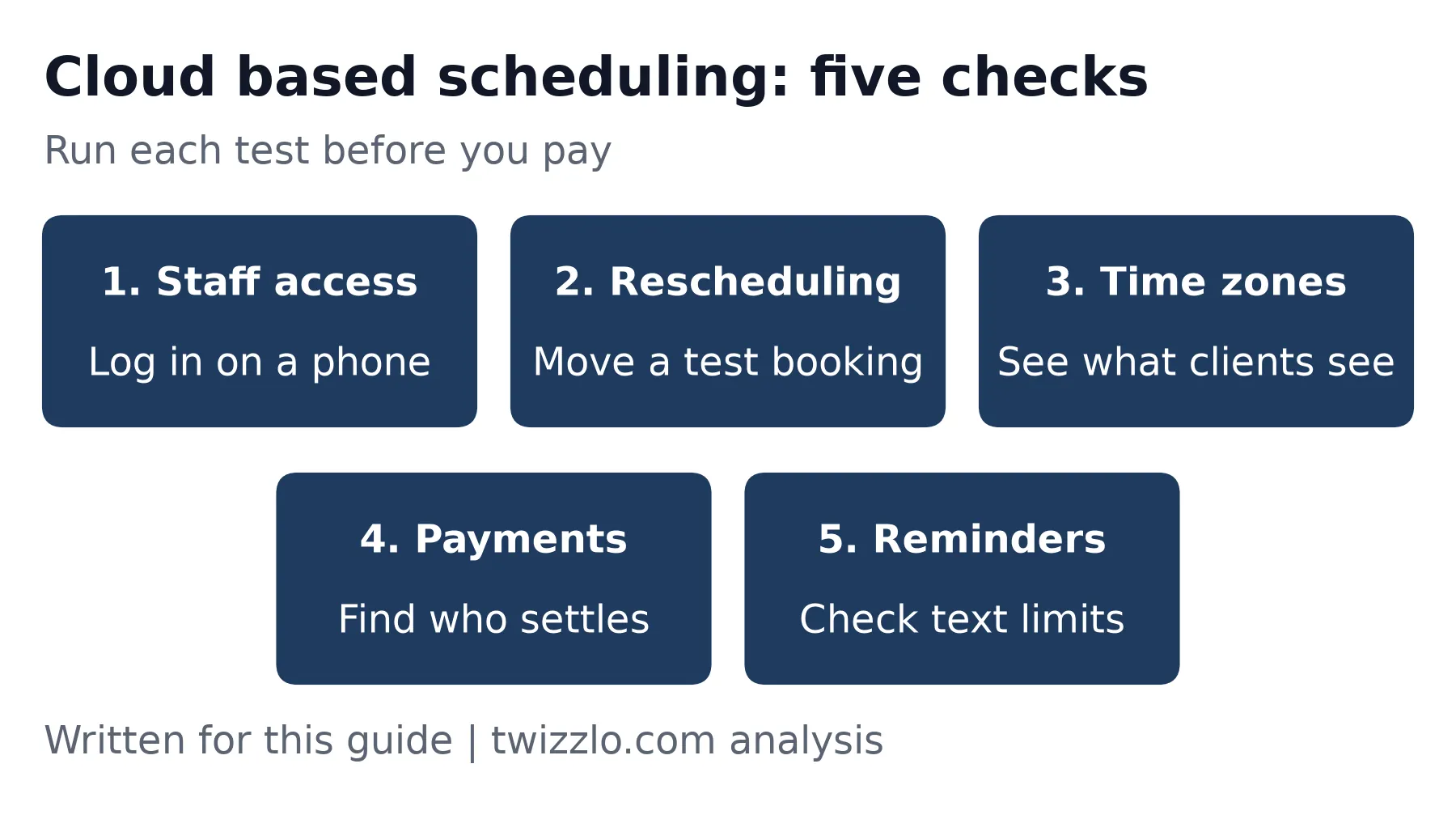
Buying cloud based scheduling software comes down to what you test before you pay, because two hosted tools can treat staff, clients and card payments very differently.
This guide gives an appointment business five checks and answers them for five tools from each vendor's own pages. To see the same questions answered for one product, our page on appointment scheduling software lists booking, reminder, staff and payment features, with the plan each one sits on.
What does cloud-based scheduling software mean?
Cloud-based scheduling software is a booking or rostering tool that a vendor hosts and you reach over the internet, instead of a program installed on one machine. The U.S. National Institute of Standards and Technology, the federal agency that wrote the standard definition, describes cloud computing in its 2011 publication as "on-demand network access to a shared pool of configurable computing resources."
For a shop or studio, that means nothing to install, updates that arrive on the vendor's side and a booking that shows for everyone at once. OnceHub's guide adds a practical point: your booking page stays online after you shut down your computer. Growth also looks different, since a new hire usually means another seat or a higher plan, not another server.
The label alone settles little. AppointmentQuest says it is hard to find an appointment app that is not cloud-based, so the useful questions are about how a tool behaves on a busy Tuesday. There are real tradeoffs as well: you pay a subscription, you need a connection, and your client records sit with a vendor.
Which kind of cloud scheduling do you need?
Most appointment businesses need a client booking tool first, even though results for this phrase also show staff rosters, which do different work.
| Kind | What it schedules | Examples | Who it suits |
|---|---|---|---|
| Client booking | Appointments that clients pick themselves | Acuity Scheduling, Calendly, Square Appointments, Setmore, OnceHub | Salons, trainers, groomers, consultants and other businesses that sell time |
| Staff rostering | Employee shifts and time off | Homebase, Shyft, Schedule Cloud | Teams that work shifts and take no client bookings |
Table 1. Two kinds of tool sorted by what they schedule, from pages read October 30, 2026.
If you only need a booking link on a calendar you already have, our guide to the Google appointment scheduler covers where that free option stops. Rostering across branches is a separate job, and our guide to multi-location scheduling software covers it.
What should an appointment business check before paying?
Run five checks on any hosted tool before you pay: staff access in a browser, client self-rescheduling, time zones, where payments settle and how reminders go out. All five tools here listed a free plan or trial on October 30, 2026, but not every check runs there: Setmore's text reminders sit on Pro, which carries a 30-day refund offer.
1. Can staff work from a browser?
Log in on the front-desk computer and on a staff member's phone before you sign anything. Acuity's FAQ, read October 30, 2026, says its tool is web-based and needs only a connection and a browser, with an optional mobile app. Then check what each person can see, because a part-timer rarely needs your revenue figures.
2. Can clients reschedule without calling?
Book a test appointment, then move it from the link in the confirmation email, on a phone, without logging in. Limits matter more than the feature. Acuity's help page, read October 30, 2026, says you can stop changes close to the start time. On Plus and Premium, Square's help page, read the same day, lists a cut-off from one hour to two weeks.
3. How does it handle time zones?
Ask what time a client sees and whether each staff member or location can keep its own zone. For a video call, converting to the client's local time helps. For a haircut, it can confuse someone who books from out of town, so look for a lock. Square's settings, read October 30, 2026, let you fix the booking page to your location's time zone.
4. Where do payments settle?
Find out who processes the card, who sets the rate and when money reaches your bank. Square processes its own payments, and its pricing page, read October 30, 2026, lists free transfers the next business day. The other four tools connect to a processor you sign up with, so you get a second account, a second statement and a rate the scheduling vendor does not set.
5. How are reminders sent?
Check which plan sends texts, whether credits run out and whether a text can carry a reschedule link. Calendly's help page, read October 30, 2026, says a text can hold up to 180 characters and leaves out reschedule or cancel links by default. Confirm texts reach your country too: Acuity and Setmore say availability varies, and Calendly warns some carriers outside the U.S. may block them. Send marketing texts only to clients who opted in, and keep them apart from appointment reminders.
How do five tools answer the five checks?
On October 30, 2026, all five listed client rescheduling on at least some plans, plus time-zone handling, an online payment route and automatic reminders, and the differences sat in plans and settings.
OnceHub ranked first in our search that day. We added Calendly, Acuity Scheduling, Square Appointments and Setmore from the top of Guideflow's list of 15 tools, the first roundup in a related search for appointment tools. SimplyBook.me was fifth on that list, but its pricing page showed only Canadian dollars to our Canadian connection on October 30, 2026, so it is not priced here. Shyft also ranked near the top, but its site refused our request that day, and it is a staff rostering tool in any case. We read each vendor's pricing and help pages and tested nothing ourselves, so check the live page before you buy. Twizzlo publishes this guide, stays out of the tables and has its own section.
| Tool | Staff access | Client rescheduling | Time zones | Payments connect to | Reminders |
|---|---|---|---|---|---|
| Acuity Scheduling | Yes, web-based, with an optional mobile app | Yes, from the confirmation email, within limits you set | Yes, converts to the client's zone; separate zones per staff or location on Premium | Stripe, Square, PayPal or Venmo | Email on every plan; text from Standard |
| Calendly | Yes, its page says you can access Calendly while you work in your browser; also a mobile app and browser extension | Yes, from links in the confirmation email, no login | Yes, detected automatically | Stripe or PayPal | Email and text through Automations on paid plans |
| Square Appointments | Yes, web-based, plus an app | Yes on Plus and Premium, if you switch it on, before your cut-off; not stated for Free | Yes, client's choice or locked to your location | Square's own processing | Text and email reminders listed; reminders on every plan |
| Setmore | Yes, web portal, plus iOS and Android apps | Yes, if you switch it on; cancelling follows your policy | Yes, shows the client's local time by default | Square, Stripe or PayPal | Email on Free; text on Pro with 500 credits per user a month |
| OnceHub | Yes, in a web browser, including on a phone | Yes, from notifications and the calendar event, within limits you set | Yes, shows the guest's own zone by default; you can fix a zone on the link | Stripe | Email on every plan; text from Schedule, needs credits |
Table 2. Five checks from each vendor's own pricing and help pages, read October 30, 2026. 'Not stated' means not found on the pages read.
What does cloud-based scheduling cost for four staff?
For four staff at one location, the plans compared here ran from $0 on Square Free to $92 a month on OnceHub Route on October 30, 2026, on monthly billing and before card processing.
| Tool and plan | Priced by | List price, monthly billing (annual) | Four staff a month, monthly billing (annual) | Online card rate on its pricing page |
|---|---|---|---|---|
| Square Free | Location | $0 | $0 | 3.3% + 30 cents |
| Acuity Standard | Plan, up to 6 calendars | $34 ($27) | $34 ($27) | Not listed |
| Setmore Pro | User | $12 ($5) | $48 ($20) | Not listed |
| Calendly Teams | Seat | $20 ($16) | $80 ($64) | Not listed |
| OnceHub Route | Seat | $23 ($19) | $92 ($76) | Not listed |
Table 3. Plan chosen for four staff: the cheapest that lists text reminders, or on Calendly and OnceHub the cheapest that lists round-robin booking, read October 30, 2026. Square is its U.S. page; Acuity states USD; other prices are '$' as shown to a Canadian connection. 'Not listed' means the pricing page names no rate, because your connected processor sets it. OnceHub text needs credits, from $15 for 100 on its help page.
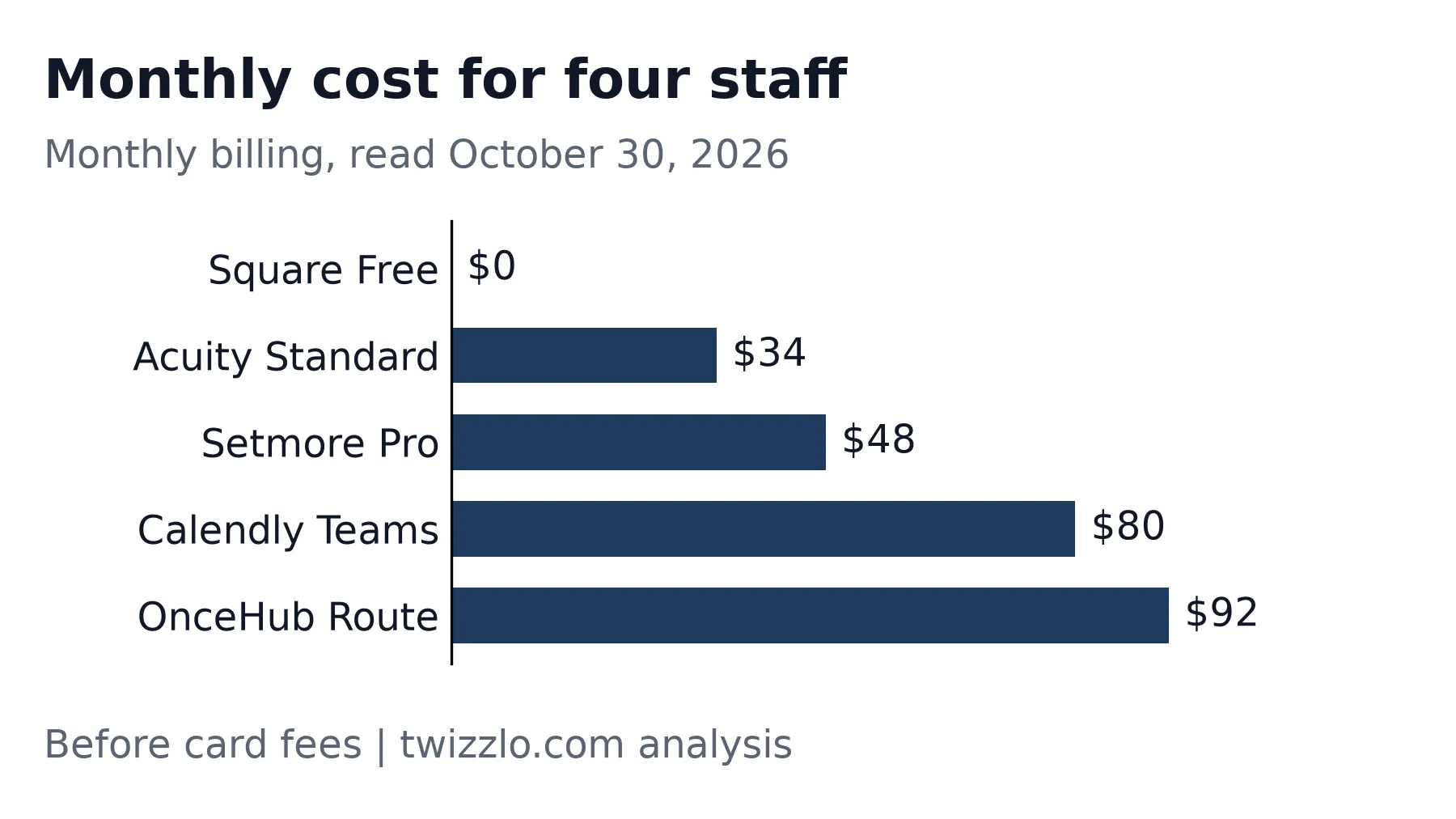
Those plans are not equal. Calendly lists round-robin booking from Teams, and OnceHub from Route, so both cost more here than their cheaper paid plans. Setmore Free covers up to four users at $0 with email reminders only. Square's pricing page, read October 30, 2026, pitches Free at solo professionals but lists unlimited staff calendars on it. Cancellation policy, no-show fees and assigning several staff to one appointment start on Square Plus at $49 a month per location.
Card fees can outweigh the plan price. The same Square page listed online rates of 3.3% plus 30 cents on Free and 2.9% plus 30 cents on Plus. Take a worked example of $8,000 a month in online payments across 100 bookings. Square Free costs $294 in fees ($264 plus $30), while Square Plus costs $262 ($232 plus $30), or $311 once you add its $49 plan fee. Plus costs less overall above $12,250 a month in online card sales, the point where its 0.4-point lower rate covers the $49. The other four tools add whatever your processor charges, so ask for that rate before you compare totals.
For more detail, see Acuity Scheduling pricing, Calendly pricing, Square Appointments pricing and Setmore pricing. Our roundup of the best appointment scheduling software compares more tools for service businesses.
| Your business | Cheapest listed plan that fits | Listed price | Read |
|---|---|---|---|
| One provider, email reminders are enough | Square Free, Setmore Free or OnceHub Basic (one user, one booking link) | $0 | October 30, 2026 |
| One consultant who wants text reminders and Stripe payments | Setmore Pro; Calendly Standard matches it on monthly billing; OnceHub Schedule is also $12, but text needs credits | $12 a month ($5 billed annually) | October 30, 2026 |
| Four staff, reminders, happy to process with Square | Square Free (its help page lists the reschedule cut-off on Plus and Premium only), or Setmore Free (up to four users, email reminders only) | $0, plus card fees | October 30, 2026 |
| Four staff, text reminders, your own processor | Acuity Standard on monthly billing; Setmore Pro on annual billing | $34 a month; $20 a month billed annually | October 30, 2026 |
Table 4. Which plan fits which business, checked against each vendor's pricing page. Not a ranking of the tools.
What else should you ask a cloud vendor?
Ask about security, outages, connections to your other tools and how you leave, because those answers rarely appear on a feature list.
- Security: Ask for two-factor login and a SOC 2 (System and Organization Controls 2) report. OnceHub's pricing page listed both on October 30, 2026.
- Outages: Ask how the vendor reports downtime, and keep tomorrow's list somewhere you can reach without a connection.
- Connections: Confirm the booking button works on your website, and test any calendar or email tool you rely on.
- Leaving: Ask how you get your client list out before you enter it.
- Support: Check the hours for your plan. On October 30, 2026, Square's page listed phone support from 6 a.m. to 6 p.m. Pacific on weekdays, for the first 90 days on Free.
Where Twizzlo fits
Twizzlo is web-based online booking and appointment scheduling software for appointment-based service businesses, and here is how it answers the five checks.
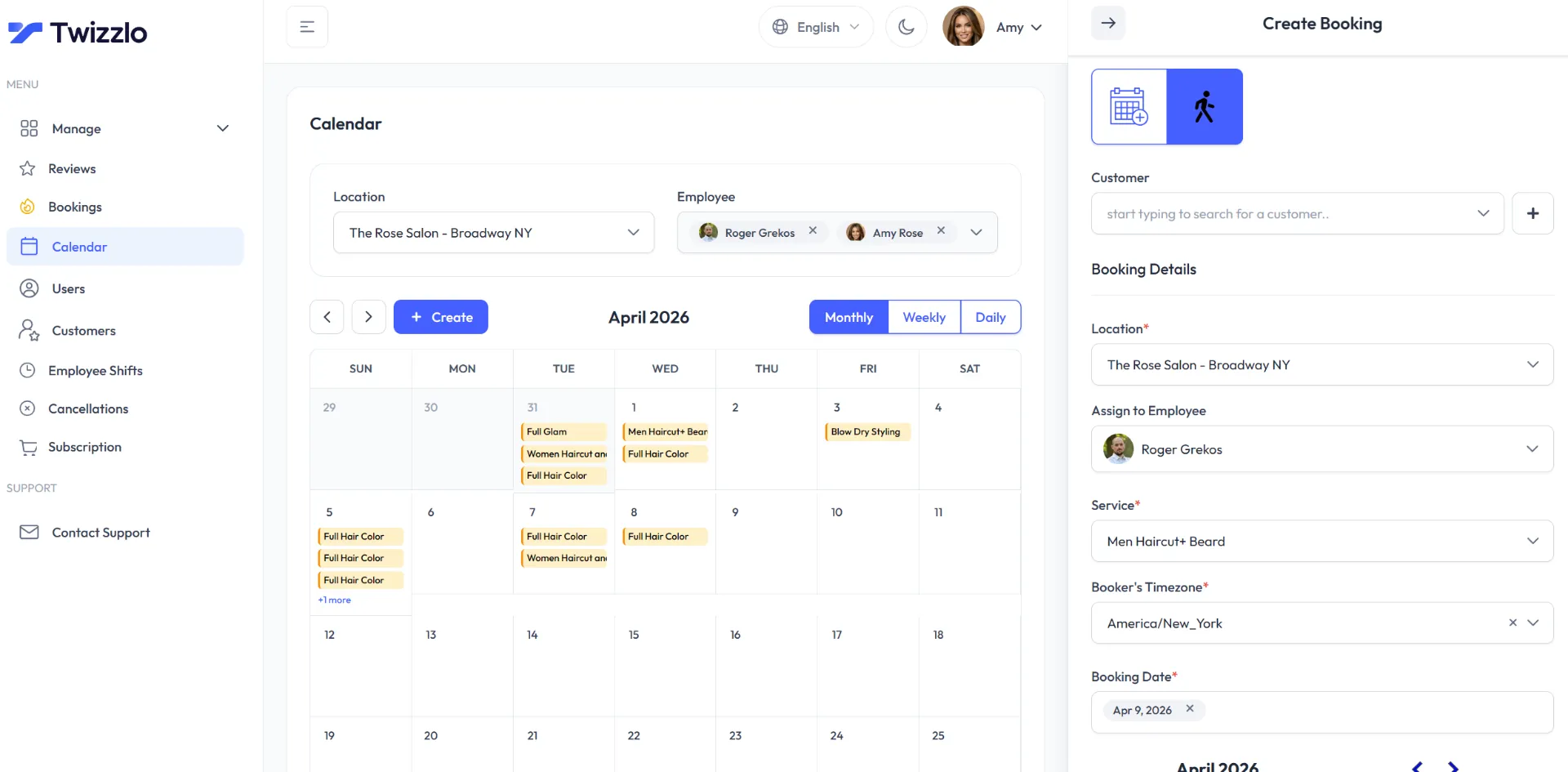
- Staff access: Staff get Twizzlo access with role-based permissions and a calendar view for each person.
- Rescheduling: Clients can reschedule themselves, and your team can drag a booking to a new time on the calendar.
- Time zones: The /features/ page lists multiple time zones and working hours per location. It does not say how times appear to a client booking from another zone.
- Payments: Clients pay online at booking through Stripe and can add a tip. A prepaid booking is the full service price. Online payments carry your Stripe processing rate plus a 1.5% Twizzlo platform fee.
- Reminders: Email confirmations and reminders are included on both plans. Text messages (SMS) are on Business Pro only: 50 SMS a month are included, then $0.03 each. Free has no SMS.
Worked example: four staff taking five bookings a day for 22 days make 440 bookings a month (4 x 5 x 22 = 440). That is past the Free limit of 150 bookings, so this team needs Business Pro at $29.99 a month per business. At 200 SMS in a month, the 150 past the allowance add $4.50 (150 x $0.03), for $34.49, before Stripe processing and the 1.5% platform fee. Staff and locations are unlimited on both plans, so hiring does not change the plan price.
A solo provider at three bookings a day has 66 bookings (3 x 22 = 66), inside Free at $0 a month. On a $100 prepaid booking, the platform fee adds $1.50 before Stripe's own charge. Business Pro comes with a 30-day money-back guarantee, and support is available 24/7 at support@twizzlo.com.
The /features/ page does not list a native mobile app, calendar sync or an API, so test those needs first if you rely on them. See Twizzlo pricing for the current plans, and if the checks come out right, you can start on the Free plan.
Frequently asked questions
What is cloud based scheduling software?
It is booking or staff scheduling software that a vendor hosts online, so you reach it through a browser or app instead of installing it on one computer. Bookings update for everyone at once, and clients can book while your own computer is off.
How much does cloud-based scheduling software cost?
On October 30, 2026, listed prices for a four-person team were $0 on Square Free, $34 a month on Acuity Standard and $92 a month on OnceHub Route, all on monthly billing. Card processing comes on top, and Square's online rate on its Free plan was 3.3% plus 30 cents.
Is cloud scheduling safe for client data?
It can be, but check before you enter client records. Ask whether staff logins support two-factor sign-in, whether the vendor shares a SOC 2 report and where data is stored. Limit what each staff member can see, and keep health details out of any tool not built for them.
Can clients reschedule their own appointments?
Usually, yes, through a link in the confirmation email. Some tools need you to switch that on, and some, such as Acuity and OnceHub, let you set a cut-off so a client cannot move a booking at the last minute. Test it on a phone before you share your booking link.
What happens if the internet goes down?
You lose access to a hosted calendar until you reconnect, and clients can still reach your booking page as long as the vendor's servers stay up. Keep the next day's appointments somewhere you can read offline, and a phone with mobile data helps as a backup.
Sources and methodology
Prices read
- NIST SP 800-145, The NIST Definition of Cloud Computing (federal) (opens in a new tab)Read . Supports: definition of cloud computing, published September 2011
- OnceHub cloud based scheduling guide (opens in a new tab)Read . Supports: booking page stays online; web browser access
- AppointmentQuest on cloud schedulers (opens in a new tab)Read . Supports: most appointment apps are cloud-based
- Homebase employee scheduling (opens in a new tab)Read . Supports: staff rostering example
- Schedule Cloud (opens in a new tab)Read . Supports: staff rostering example
- Shyft on the App Store (opens in a new tab)Read . Supports: staff rostering example
- SimplyBook.me pricing (opens in a new tab)Read . Supports: prices shown in Canadian dollars to a Canadian connection
- Acuity Scheduling FAQ (opens in a new tab)Read . Supports: web-based, optional mobile app
- Acuity Scheduling: how clients book (opens in a new tab)Read . Supports: client rescheduling and limits
- Acuity Scheduling pricing (opens in a new tab)Read . Supports: plan prices, calendars, payments, reminders, time zones
- Calendly pricing (opens in a new tab)Read . Supports: plan prices, seats, payments, round-robin on Teams
- Calendly scheduling FAQ (opens in a new tab)Read . Supports: time zones, rescheduling, reminders
- Calendly text messages help (opens in a new tab)Read . Supports: text length, links, plans
- Square Appointments pricing (U.S.) (opens in a new tab)Read . Supports: plans, processing fees, reminders, transfers, support
- Square cancellation policy help (opens in a new tab)Read . Supports: cut-off window and online changes
- Square Appointments settings help (opens in a new tab)Read . Supports: booking time zone setting
- Square Appointments features (U.S.) (opens in a new tab)Read . Supports: web-based software and app
- Setmore pricing (opens in a new tab)Read . Supports: plan prices, users, payments, reminders
- Setmore local time zone help (opens in a new tab)Read . Supports: customer time zone display, web portal
- Setmore notifications help (opens in a new tab)Read . Supports: online rescheduling setting
- Setmore cancellation policy help (opens in a new tab)Read . Supports: customer cancellation notice
- OnceHub pricing (opens in a new tab)Read . Supports: plan prices, seats, Stripe, SMS credits, guest rescheduling, SOC 2, two-factor login
- OnceHub mobile help (opens in a new tab)Read . Supports: use in a mobile browser
- OnceHub cancellation and rescheduling policies help (opens in a new tab)Read . Supports: guest reschedule limits
- OnceHub guest time zone help (opens in a new tab)Read . Supports: guest time zone default and override
- OnceHub SMS credits help (opens in a new tab)Read . Supports: SMS credit prices
From our editorial policy
- We do not publish invented quotes, studies, statistics, customer stories or product tests, and we do not imply hands-on use of a product when the research came from the vendor's public documentation.
- To report an error, email support@twizzlo.com with the subject line "Correction: [page URL]". Tell us what is wrong and, if you can, link a source.
Start free, upgrade when you grow
Flat-rate booking software. No per-seat, per-chair or per-location fees.
- Free plan up to 150 bookings a month, not a trial
- Business Pro is $29.99 a month per business for unlimited bookings, with a 30-day money-back guarantee
- 24/7 support by email