
Barber Booking Website: Four Ways to Get One and What Each Costs

In short
A barber booking website rarely needs a custom build. A hosted booking page gives you one link for Google, Instagram and any site you have, from $0 a month on Square Appointments Free. A marketplace profile adds discovery, with an optional one-time 30% fee on each new client it finds, and a WordPress plugin suits shops that run a site.
In this article11 sections
By Roger Grekos, Co-Founder & Editor. Prices read on each vendor's own pages on October 2, 2026, as printed, before tax.
A barber booking website does one job: It lets a client pick a service, a barber and a time without calling the shop. There are four ways to get one, and they differ less in features than in three things: what they cost each month, what they charge when a new client books, and whose page the client books on. This guide prices each route for a one-chair and a three-chair shop from the vendors' own pages, then shows where to put the link so clients find it.
If you already know you want a hosted booking page from Twizzlo, our barbershop booking software page shows how it handles barber calendars and walk-ins. This guide covers every route, including the ones that do not involve Twizzlo.
How we built it: On October 2, 2026, we read each vendor's pricing page, and its help center where the pricing page left a gap, plus Google's and Instagram's help centers. We did not test these products hands-on, so every capability below is what the vendor states on its own pages, and each source is linked at the end. Prices are shown as each vendor prints them, before tax, and they change, so check the linked page before you sign up.
Four ways to get a barber booking website
Each route below ends in the same thing for the client: a page with your services and open times and a button to book. What changes is who builds that page, who hosts it and who pays for the clients it brings.
| Route | What you get | What you pay for | Where the client books | Read for this guide |
|---|---|---|---|---|
| 1. Your website plus a booking plugin | A booking form inside a WordPress site you run | A plugin license, plus hosting, a domain and upkeep | Your own site | BookingPress |
| 2. Marketplace profile | A profile and booking page inside a directory clients browse | A monthly subscription, plus an optional fee on new clients the marketplace finds | The marketplace's site or app | Booksy, StyleSeat |
| 3. Hosted booking page | A booking page and link that the software company hosts for your shop; no website needed | A monthly plan, from $0 | The booking software's page | Square Appointments, Twizzlo |
| 4. Custom build | A site a developer designs around your brand | A quote for design and build, plus a booking engine behind it | Your own site | No published price list |
The four routes. Website builders such as Squarespace and Wix also sell scheduling tools; their pricing pages showed non-US prices to our readers on October 2, 2026, so they are named here but not priced.
Most barbers can skip building a website. A hosted booking page or a marketplace profile already works as a booking site: The client opens a link, sees your services and times, and books. A full website earns its cost when you want pages a booking tool does not give you, such as a gallery, a long price menu or a team page, and even then the booking itself usually comes from route 2 or 3. Square Appointments, for example, lists a Book Now button for an existing website among its booking-site features (Square Appointments pricing page). Google Calendar's own booking page is another hosted option for a solo barber; our guide to Google Appointment Scheduler explains where it stops.
What each route costs a one-chair and a three-chair shop
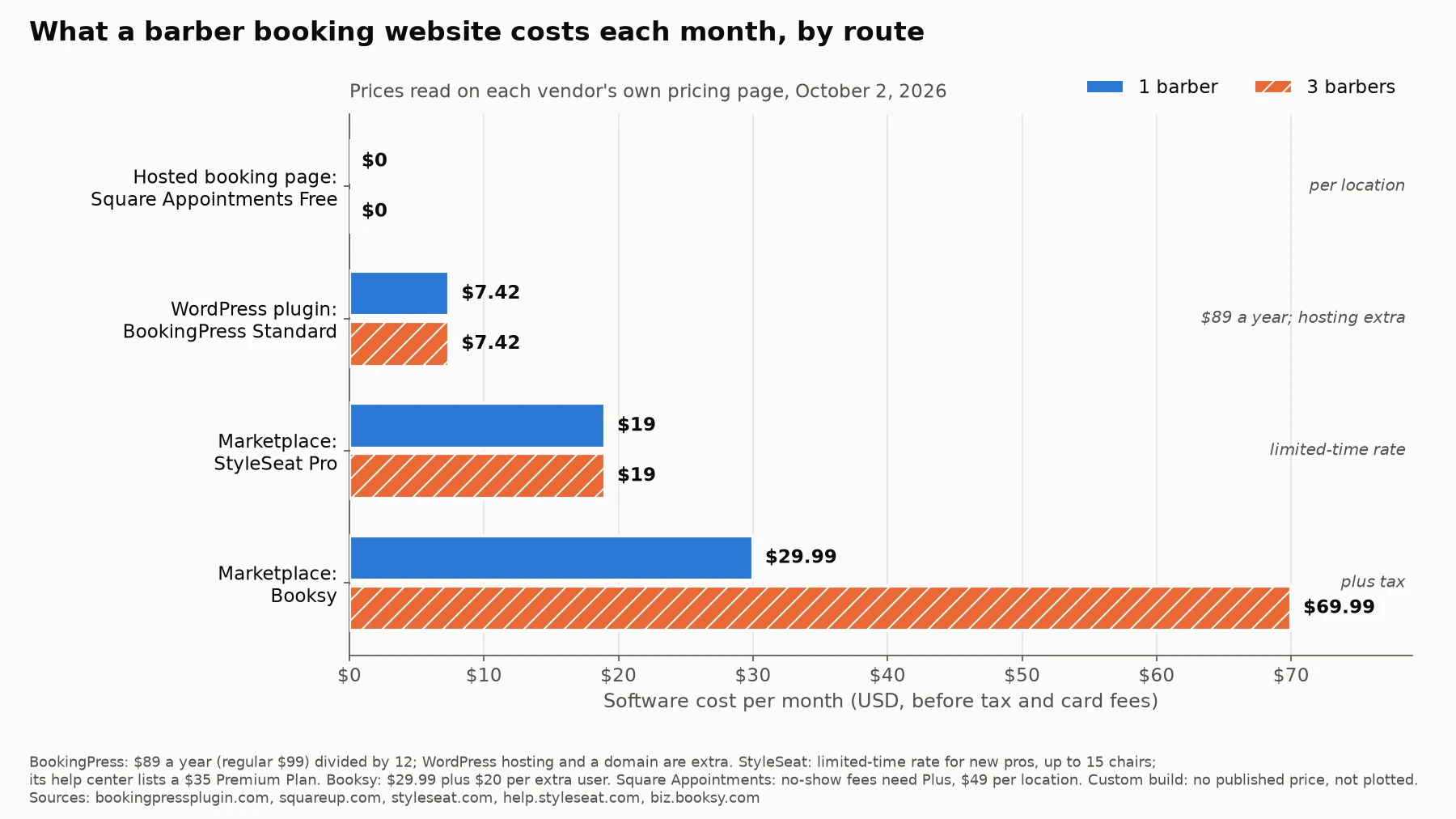
Figure 1 and the table below show the monthly software cost of each route for one barber and for three, read on October 2, 2026. Card processing is extra on every route and is covered after the table.
| Route and plan | 1 barber, a month | 3 barbers, a month | What the price covers |
|---|---|---|---|
| WordPress with BookingPress Standard | $7.42 ($89 a year) | $7.42 ($89 a year) | One site, with staff management; $89 is shown against a regular price of $99 a year. Hosting and a domain are extra. |
| Square Appointments Free | $0 | $0 | Per location: a booking website, text and email reminders and unlimited staff calendars. |
| StyleSeat Pro | $19 | $19 | A limited-time rate for new pros, for up to 15 chairs. |
| Booksy | $29.99 plus tax | $69.99 plus tax | $29.99 a month, plus $20 a month for each extra user. |
| Custom build | No published price | No published price | A developer's quote, plus the booking tool it runs on. |
Monthly software cost before tax and card processing, read October 2, 2026, on the BookingPress pricing page, the Square Appointments pricing page, the StyleSeat pricing page and StyleSeat's help center, and the Booksy pricing page. BookingPress bills yearly; $7.42 is $89 divided by 12. Plan detail: Booksy pricing and Square Appointments pricing.
Square Appointments Free is the only plan in the table that costs $0 at both team sizes. Its limit for barbers is no-show protection: Cancellation policies and no-show fees start on Plus, at $49 a month per location.
StyleSeat's pricing page says new pros who join while the $19 rate is live keep it. Its help center still lists a $35 Premium Plan, so confirm which price your account shows before you rely on either.
Booksy is the only route here whose price rises with each barber you add.
The plugin route's $7.42 is the license alone. BookingPress's own barber website guide starts with picking a domain and hosting (BookingPress guide), and someone has to keep WordPress and the plugin updated. The Standard license is a yearly plan with one year of updates and support, so budget for it every year; BookingPress also sells a one-time Standard license for $229.
Card fees sit on top of every route. Booksy lists 2.69% plus 30 cents for mobile payments and keyed-in cards, and Square Appointments lists 3.3% plus 30 cents on Free and 2.9% plus 30 cents on Plus for card payments made online. StyleSeat's pricing page says payments are free during the trial and then 1.9% for six months; its help center lists 2.6% plus 30 cents for card-not-present payments. BookingPress connects to outside payment gateways, PayPal on its free version and more than 20 on paid plans, and their rates are not on BookingPress's page.
What a marketplace charges for the clients it brings
A marketplace profile is the only route that finds clients for you, and both marketplaces read for this guide price that discovery per client, not per month. The fee applies once, to a new client the marketplace introduces, on that client's first visit.
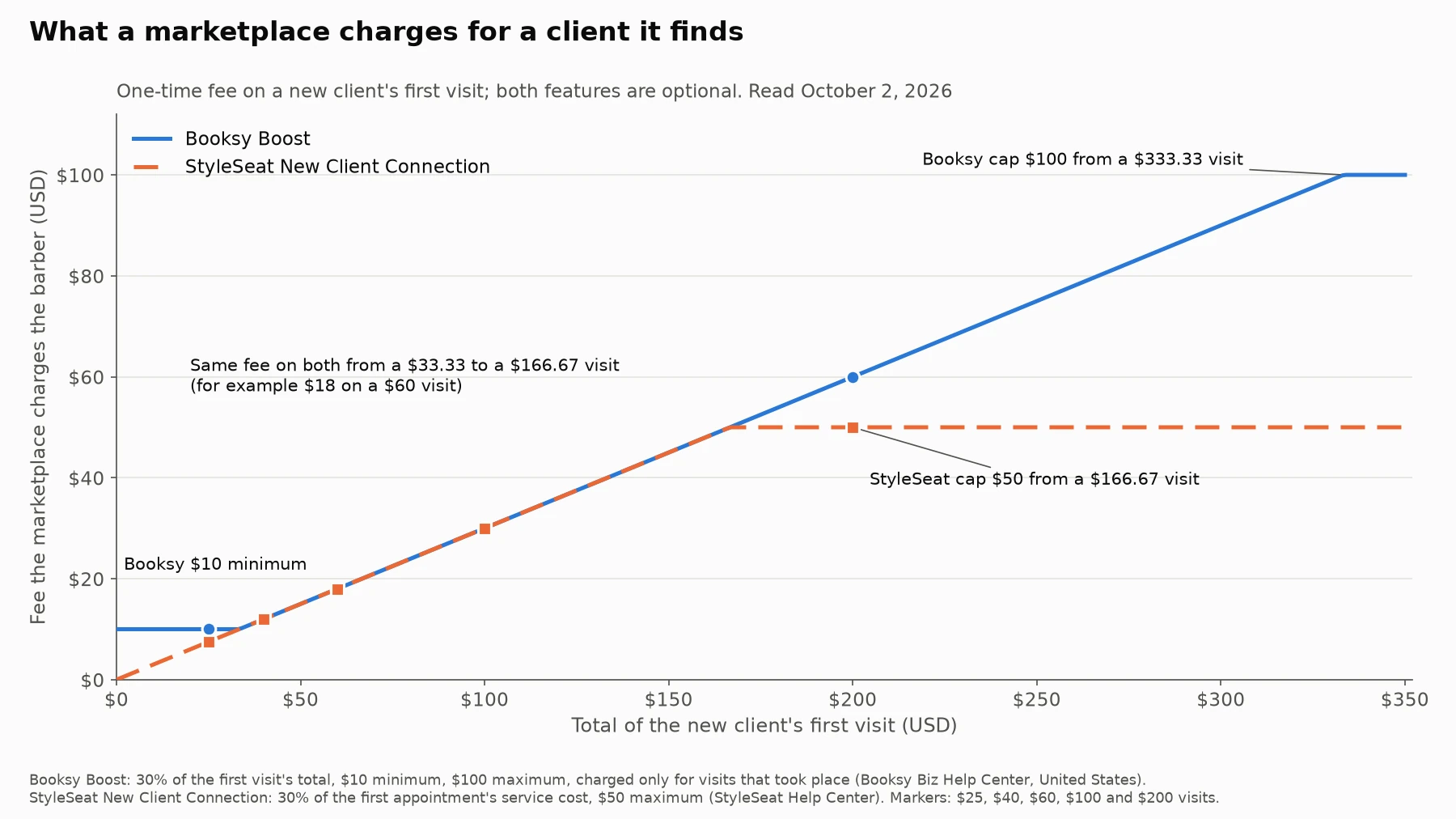
| First-visit total | Booksy Boost fee | StyleSeat New Client Connection fee |
|---|---|---|
| $25 | $10.00 (minimum) | $7.50 |
| $40 | $12.00 | $12.00 |
| $60 | $18.00 | $18.00 |
| $100 | $30.00 | $30.00 |
| $200 | $60.00 | $50.00 (cap) |
| $400 | $100.00 (cap) | $50.00 (cap) |
Fee on one new client's first visit, from the Booksy Help Center (United States) and StyleSeat's help center, read October 2, 2026. Both features are optional.
The two rules differ at the edges. Booksy's Boost takes 30% of the total cost of a Boost client's first visit, with a $10 minimum and a $100 maximum; it charges only for visits that took place, so Booksy tells barbers to mark a no-show the same day, and it takes nothing on that client's later visits. StyleSeat's New Client Connection takes 30% of the service cost of a new client's first appointment, up to $50. Below a $33.33 visit, Booksy's $10 floor costs more than StyleSeat's 30%; above $166.67, StyleSeat's $50 cap costs less than Booksy's 30%.
Clients you bring yourself are a different case on Booksy. Its pricing page says it charges no commission for new clients who find you through your own marketing, and it advises sharing your own Booksy profile link with them so you are not charged one while Boost is on (Booksy pricing page).
A worked example shows why the per-client fee can outweigh the subscription. A barber who gets 10 new marketplace clients a month at a $40 first visit pays $120 a month in new-client fees on either marketplace, on top of the subscription. That is more than six times StyleSeat's $19 rate and about four times Booksy's $29.99. Whether it is worth it depends on how many of those 10 come back, because their later visits carry no new-client fee.
StyleSeat also charges clients: Its help center lists a $2.35 booking fee at the time of booking. For the full side by side of the two marketplaces, including team pricing, see Booksy vs StyleSeat.
What the booking page needs to show
Whichever route you pick, check the page your clients will see against this list before you share the link:
- Every service with its price and length, including add-ons such as a beard trim or hot towel, so the calendar holds the right amount of time.
- Each barber, with only the services that barber does and that barber's own hours.
- Real open times, with buffer time after long services, so the page never offers a slot the chair cannot keep.
- Your payment rule before the client confirms: pay at the shop or pay in full when booking, and, for a prepaid booking, what happens to that money if the client does not show.
- Your cancellation and no-show policy in plain words, with the notice period. If you are writing one for the first time, see how to set a no-show charge.
- Address, entrance or parking notes, and whether you also take walk-ins.
- A confirmation that tells the client how to reschedule or cancel without calling.
- A page that loads and books cleanly on a phone, because that is where a link from Instagram or Google opens.
Where to put the booking link
Use one booking link everywhere, so every booking lands on one calendar. Three places do most of the work.
Google Business Profile
Google lets a business add its own booking links. Open your Business Profile, choose Booking on Google Search (or Edit profile and the booking type on Google Maps), select Add link, enter the URL and save. You can add up to 10 links per category and mark one as the business-preferred link (Google Business Profile Help). Google also works with booking providers through Reserve with Google; their links can appear on a profile automatically, and Google notes that your provider might charge you for bookings made through Google (Google Business Profile Help). Booksy's pricing page lists Reserve with Google among the things it does not charge extra for.
One limit to know: Google says performance data is not available for custom links, so count those bookings in your booking software instead. Before you add the link, our guide to getting Google reviews lists the profile basics to check.
Instagram allows up to five links on a profile, and anyone on or off Instagram can see them. In the app, go to your profile, tap Edit profile, then Links, then Add external link, paste the booking URL and tap Done. To put the booking link first, tap Links, then Options, then Reorder links, and drag it to the top (Instagram Help Center). Instagram's help page says adding links works in the app, not on a computer.
Your website and the shop itself
If you keep a website, make Book the most visible button on every page and point it at the same link. In the shop, a printed link or QR code at the front desk lets a client book the next visit from their own phone.
Set it up in an afternoon: seven steps
- Pick the route from the table above, starting with one question: Do you need the marketplace to find clients, or do you already have them?
- Enter your real service menu with prices and lengths, plus buffer time after long services.
- Add each barber, assign their services and set their hours and days off.
- Set your payment and no-show rule, and write it on the booking page.
- Book a test appointment on your own phone as a client. Pay for it, then reschedule and cancel it, and read every confirmation and reminder that arrives.
- Put the link on your Google Business Profile, your Instagram profile and your website, using the steps above.
- Text the link to your regulars, and have each barber book the client's next visit before the client leaves the chair.
After a month, check where your bookings came from. If a marketplace sends most of your new clients, its fee is buying growth; if most bookings come from regulars, keep sending them your direct link. To choose which marketing to pay for next, our barbershop marketing ideas guide works out the break-even for postcards and paid ads.
Where Twizzlo fits
Twizzlo gives you a hosted booking page, route 3 in the table. Each location gets its own booking link, and clients book 24/7 from a page that shows only the times your barbers can take, based on real-time availability. Buffer times, custom booking rules, walk-in bookings and client self-rescheduling are listed on Twizzlo's features page, and your team can drag a booking to a new time on the calendar.
Clients can pay online through Stripe when they book and add a tip at checkout. With prepaid bookings turned on, the client pays the full service price at booking, and if they do not show, you decide whether to keep or refund it. No-show fees are supported, at the business's discretion. Confirmations and reminders go out by email on both plans and by SMS on Business Pro.
Free is $0 a month, with up to 150 bookings a month and no SMS, and it is free forever, not a trial. Business Pro is $29.99 a month per business for unlimited bookings, with 50 SMS a month included and $0.03 for each one after that, and it comes with a 30-day money-back guarantee. Both plans include unlimited staff and locations, so adding a barber never changes the price. Online payments carry your Stripe processing rate plus a 1.5% Twizzlo platform fee. Support is available 24/7 at support@twizzlo.com. Plan details are on the Twizzlo pricing page.
Twizzlo does not run a consumer marketplace, so it fits shops that already bring in their own clients through Google, Instagram and word of mouth. You can start on the Free plan and move to Business Pro when you need text reminders or more than 150 bookings a month.
Which route fits which barber
- A new barber who needs clients: a marketplace profile, priced on both the subscription and the new-client fee at your average first-visit total.
- A barber with a full book of regulars: a hosted booking page, because its price does not depend on who found the client.
- A shop that already runs a WordPress site: a booking plugin, if someone will keep the site, the plugin and its yearly license up to date.
- A shop adding barbers: compare per-user prices with plans that do not charge per user; at three barbers, Figure 1 runs from $0 to $69.99 a month.
- A group that wants its own branded system: a custom build, with the booking engine priced as a separate line in the quote.
If the choice comes down to the app itself, our ranking of the best booking app for barbers compares the main options by shop size.
Frequently asked questions
Do barbers need a website to take online bookings?
No. A hosted booking page or a marketplace profile gives you a link clients can open from Google, Instagram or a text message, and Square Appointments Free, read on October 2, 2026, includes a booking website at $0 per location. A full website is worth building when you want pages that a booking tool does not offer.
How much does a barber booking website cost?
On vendor pages read on October 2, 2026, a one-barber shop pays $0 a month on Square Appointments Free, $19 on StyleSeat's limited-time rate, $29.99 plus tax on Booksy, or $89 a year for the BookingPress Standard plugin plus hosting and a domain. Card processing is extra on every route.
Can I add my booking link to Google?
Yes. In your Google Business Profile, choose Booking, select Add link, enter your booking URL and save. Google allows up to 10 links per category, lets you mark one as the business-preferred link and shows no performance data for custom links.
How many links can I put on my Instagram profile?
Up to five. In the Instagram app, tap Edit profile, then Links, then Add external link. You can reorder the links so the booking link comes first. Instagram's help page says this works in the app, not on a computer.
Do booking marketplaces charge barbers for new clients?
Booksy and StyleSeat do if you turn the feature on. In help centers read on October 2, 2026, Booksy Boost takes 30% of a Boost client's first visit, with a $10 minimum and a $100 maximum, and StyleSeat's New Client Connection takes 30% of the first appointment's service cost, up to $50.
Should a barbershop pay for a custom booking website?
Only if you need a design or a feature that no booking page, marketplace profile or plugin offers. A custom site still needs a booking engine behind it, and there is no published price list for the build, so get a written quote that names the booking tool and its monthly cost.
Sources
- Square Appointments pricing page: plan prices per location, booking website, reminders, no-show fees from Plus, card rates.
- Booksy pricing page: subscription, extra users, Boost summary, no commission on clients from your own marketing, card rates, Reserve with Google.
- Booksy Help Center, How does Boost pricing work?: the 30% fee, its $10 minimum and $100 maximum.
- StyleSeat pricing page: the $19 limited-time rate, chair limit, custom website and payment rate.
- StyleSeat Help Center, How Much Does StyleSeat Cost?: the $35 Premium Plan, card rates, New Client Connection and the client booking fee.
- BookingPress pricing page: Free and Standard plans and what each license covers.
- BookingPress barber booking website guide: domain and hosting as the first step.
- Google Business Profile Help, local business links: adding booking links, the 10-link limit and the preferred link.
- Google Business Profile Help, bookings through a provider: provider charges and custom-link data.
- Instagram Help Center, add a website: the five-link limit and the steps in the app.
Vendor prices and offers change. Every price above was read on the vendor's own page on October 2, 2026; check the linked pages before you sign up or switch.
Editorial standards
Prices read
From our editorial policy
- To report an error, email support@twizzlo.com with the subject line "Correction: [page URL]". Tell us what is wrong and, if you can, link a source.
Start free, upgrade when you grow
Flat-rate booking software. No per-seat, per-chair or per-location fees.
- Free plan up to 150 bookings a month, not a trial
- Business Pro is $29.99 a month per business for unlimited bookings, with a 30-day money-back guarantee
- 24/7 support by email