
Credit Card on File Authorization Form Template to Copy

In short
A credit card on file authorization form template is a consent record that names the business and the cardholder, identifies the card by its last four digits, states what may be charged and when, and is signed and dated. Copy the form below, add your charge-type clause, never write the CVV on it and have it reviewed locally.
- The form records consent: it names the business, the card by its last four digits, what may be charged and when, and is signed.
- Never write the CVV on the form: PCI DSS bars keeping it once a payment is authorized (PCI SSC FAQ 1280, read September 28, 2026).
- Use the clause that matches the charge: a one-time amount or deposit, a no-show fee, a balance after service or recurring charges.
In this article9 sections
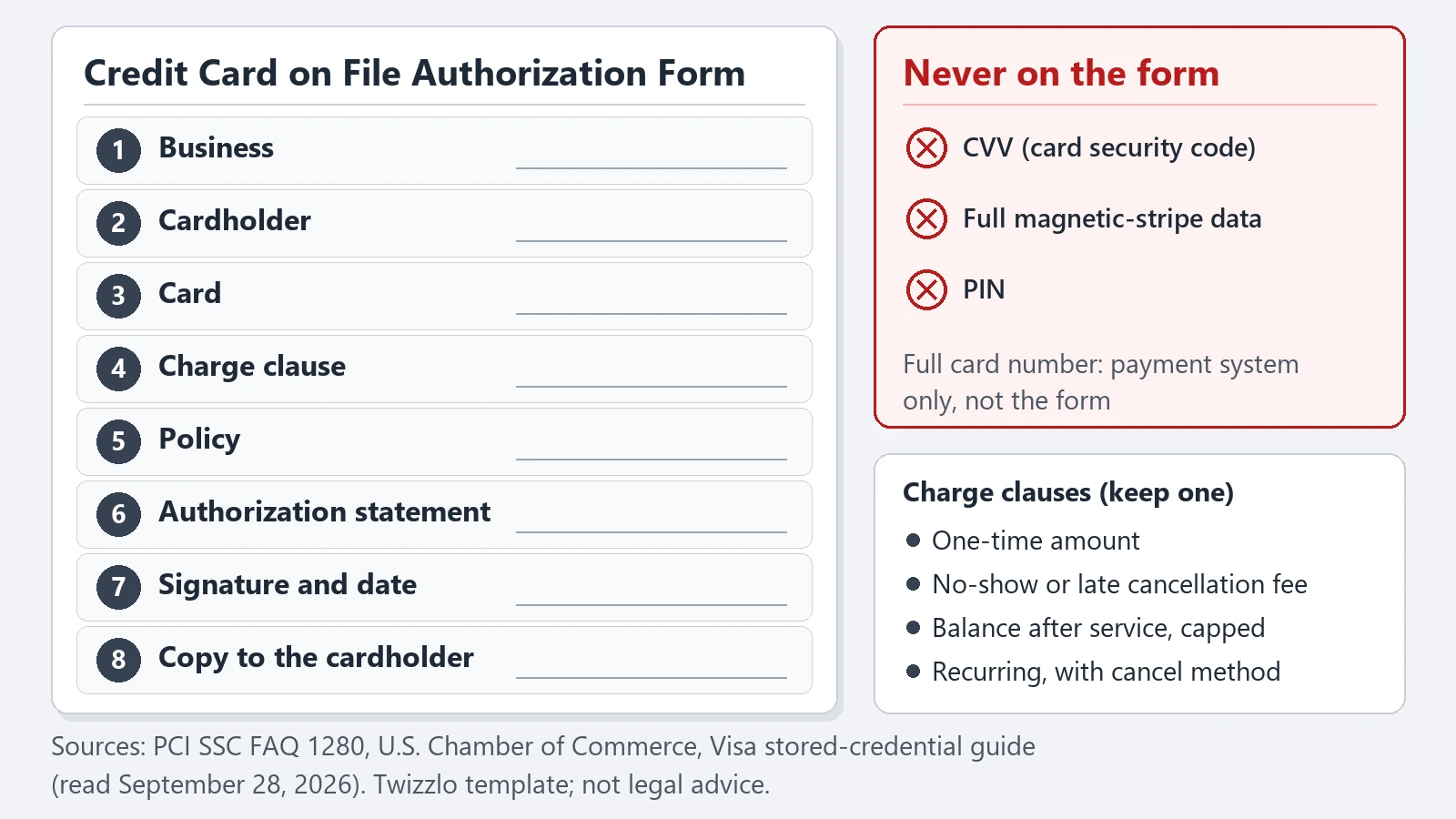
This credit card on file authorization form template gives salons, barbershops, spas, tattoo studios and other appointment businesses a form to copy or print, clause wording for each type of charge and the card details that never belong on paper. Twizzlo publishes this template and makes online booking software with booking and reminder features; the form works with any booking or payment system. It is a template, not legal advice.
Copy or print the credit card on file authorization form template
Copy the form below into your own document, fill in the bracketed fields, keep the clause that matches the charge and delete the others. It collects the last four digits of the card rather than the full number, and it has no CVV line.
The Copy template button copies the whole form as text, ready to paste into a document or a booking email, and Print form prints the form on its own. There is no file to download.
Credit Card on File Authorization Form
Template only, not legal advice. Have a local professional review it before use. Do not write the card security code (CVV) on this form.
Business name: [Business name]
Business address: [Business address]
Business phone: [Phone number]
Business email: [Email address]
Cardholder full name: [Full name]
Billing address: [Billing address]
Phone number: [Phone number]
Email address: [Email address]
Card brand: [Visa / Mastercard / American Express / Discover]
Last four digits: [____]
Expiration date: [MM/YY]
The full card number is entered only in [Business name]’s secure payment system, not on this form.
Charge type (keep one clause, delete the others)
One-time charge: I authorize [Business name] to charge the card above a one-time amount of [amount] for [service description] on [date].
No-show or late cancellation fee: I authorize [Business name] to charge the card above the fee of [amount] described in its cancellation and no-show policy dated [policy date] if I cancel less than [hours] hours before a booked appointment or do not attend it.
Balance after service: I authorize [Business name] to charge the card above for the final balance due for services rendered, including approved add-ons or upgrades selected during the appointment, up to [maximum amount] per visit, as described in the service agreement.
Recurring charge: I authorize [Business name] to charge the card above [amount] every [frequency], starting [date], for [service], until I cancel by [cancellation method] at least [days] days before the next charge.
Policy: I received [Business name]’s cancellation, no-show and refund policy dated [policy date].
Authorization statement: I authorize [Business name] to charge the payment method identified above for the services described in this form according to the billing terms stated here. I confirm that I am the authorized cardholder and that I understand the applicable billing, cancellation and refund policies provided by the business. [Business name] will tell me about any change to these terms by [email or phone] before the change applies. This authorization stays in effect until [end date, or until I cancel it as described above].
Cardholder signature: ____________________
Date: ____________________
Copy given to the cardholder on: [date], by [email or paper]
Office use: stored in [system or location]; booking or client reference [____]; staff initials [__]
Keep one signed form per client and charge type, and give the client a copy when they sign. If you plan a charge that none of the four clauses describes, write a clause for it in the same pattern rather than stretching one that almost fits.
What is a credit card on file authorization form?
A credit card on file authorization form is the signed record that lets a business keep a client’s card on file and charge it later, for a no-show fee, a balance after service or a recurring charge, on terms the client saw and accepted before the charge.
It isn’t just a place to collect card details. The authorization statement is what makes the document useful if the business ever needs to show that the cardholder approved future charges. A form that gathers card details but never says what may be charged is a card information sheet, not an authorization record.
For appointment businesses, that distinction matters. A salon may need to charge a no-show fee. A tattoo or bridal artist may take a retainer at booking and charge the balance on the day. A cleaning company may bill the same card every month. In each case, the form’s job is to connect the cardholder, the billing terms and the client’s signed permission.
The form matters most when the card is not present: a deposit taken by phone, a charge after the appointment or a monthly bill. In those cases, the signed form is the record that the cardholder agreed to the charge before it was made.
What each field does, and what never goes on the form
Each field identifies who agreed, what they agreed to or when, and three card details never belong on the form at all: the CVV, the full magnetic-stripe data and the PIN (PCI Security Standards Council and U.S. Chamber of Commerce, read September 28, 2026).
Table 1. What goes on the form, and what never does. “Template design” marks a rule this template adds.
| Field | Why it is there | Rule | Source |
|---|---|---|---|
| Business name, contact details | Names the merchant the cardholder is authorizing | Required | Square; U.S. Chamber |
| Cardholder name, billing address | Shows who gave consent and matches the form to the client record | Required | Square; U.S. Chamber |
| Cardholder phone and email | Lets the business reach the client about a charge | Recommended | U.S. Chamber |
| Card brand, last four, expiry | Identifies the card without exposing the full number | Required; the full number goes only into a secure payment system | Visa (last four digits); template design |
| Charge clause | States what the card may be charged for | One clause per form | Visa (how the card will be used); U.S. Chamber (reason for the charge) |
| Amount, frequency and start date | Tells the cardholder how much and when | Required for recurring and variable charges | Visa; U.S. Chamber |
| Policy name and date | Ties a fee to the cancellation, no-show and refund terms the client received | Required for no-show and cancellation fees | Template design; Visa lists cancellation and refund policies |
| Changes, cancellation, end date | Says how the terms change and how the authorization ends | Required for recurring charges | Visa; U.S. Chamber (cancellation method) |
| Signature and date | Records that the cardholder agreed, and when | Required | Square; U.S. Chamber |
| Copy to the cardholder | Gives the client a record of what they signed | Required for recurring debit card charges from a personal account | 12 CFR 1005.10(b); Visa |
| CVV (card security code) | Not needed for card-on-file or recurring charges | Never | PCI SSC FAQ 1280 |
| Full magnetic-stripe data, PIN | Sensitive authentication data | Never | U.S. Chamber |
Sources, all read September 28, 2026: Square’s credit card authorization form templates (published June 11, 2021); the U.S. Chamber of Commerce guide to credit card authorization (published April 28, 2026); Visa’s stored-credential merchant guide (2017); the PCI Security Standards Council FAQ 1280 (October 2023); and Regulation E, 12 CFR 1005.10(b) (Consumer Financial Protection Bureau).
Square’s guide describes the form as a document, signed by the cardholder, that gives a merchant ongoing authority to charge the card on a recurring basis, “whether that’s monthly, quarterly, or more sporadically.” Its field list includes the full card number; this template keeps only the last four digits on paper, the truncated form Visa’s guide lists for a stored-card agreement.
Name the charge in plain words. “Services rendered” is weaker than “late cancellation fee,” “no-show fee” or “remaining balance after appointment,” which is why each clause in the form names its charge.
Why can’t the CVV go on the form?
The CVV cannot go on the form because PCI DSS does not allow a card verification code to be kept once the payment it was collected for is authorized, and card-on-file and recurring charges do not need it (PCI Security Standards Council FAQ 1280, read September 28, 2026).
The council treats the code as sensitive authentication data under PCI DSS Requirement 3 and says every copy must be removed from a business’s systems. Square’s template leaves no space for it, and staff who key in a card by hand ask the client for the code each time. If an old paper form ever captured it, the U.S. Chamber of Commerce says to destroy that information once the transaction is processed (both read September 28, 2026).
The form exists to document consent. It is not supposed to become a storage vault for sensitive authentication data. Use a workflow where staff:
- Collect the card through a secure payment environment
- Request the CVV directly at the time of manual entry
- Keep the authorization form separate from prohibited storage practices
Which authorization wording fits each charge type?
Match the clause to the charge: a fixed amount for a one-time charge, the fee and cancellation window for a no-show, and the add-on rule for a balance after service. For recurring charges, state the amount, frequency and cancellation method, as the U.S. Chamber of Commerce advises (read September 28, 2026).
The four clauses are in the form above; Table 2 lists what each one must state. The U.S. Chamber’s guide, published April 28, 2026, says the form should give the reason for the charge, the amount and, when the arrangement recurs, the frequency, and should put the billing amount, billing date and cancellation method “in the clearest language possible.”
That matters because of how disputes run. The client rarely argues about whether they ever visited your business. They argue about whether they agreed to this charge, on this date, under these circumstances.
Table 2. Authorization wording by charge type. The per-visit cap and the notice period are this template’s design.
| Charge type | What the clause states | Also state | Typical use |
|---|---|---|---|
| One-time charge | The fixed amount and the service | The service date | Single services, retainers and deposits |
| No-show or late cancellation fee | The fee and the cancellation window | The policy date and the window in hours | Backing a written no-show policy |
| Balance after service | That the final amount may include approved add-ons or upgrades | How add-ons are approved and a cap per visit | End-of-visit balances |
| Recurring charges | The amount and how often it is charged | Start date, cancellation method, notice period and how changes are announced | Monthly service plans |
| Recurring debit card charges | The amount and how often it is charged | A signed or similarly authenticated authorization, with a copy to the cardholder (12 CFR 1005.10(b)) | Regular charges to the debit card of a personal checking account |
Sources, read September 28, 2026: U.S. Chamber of Commerce (amount, frequency, billing date, cancellation method); Visa’s stored-credential guide (amount or how it is calculated, frequency, cancellation and refund policies, change notice, end date); Regulation E, 12 CFR 1005.10(b), for recurring debit card charges.
Different service models need different wording:
- Deposits and retainers: Tie the charge to the booking and say when it is refundable, forfeited or applied to the service.
- Recurring charges: State the amount, the billing frequency, the start date and how the client cancels.
- Variable tickets: Set expectations for add-ons, product add-ins or end-of-visit balances, with a cap per visit.
- Artists and specialty providers: Make custom-work deposits and session rules unmistakable, especially if your workflow resembles a tattoo deposit authorization process.
Event work often splits the payment into a retainer at booking and a balance on the day. A bridal hair and makeup contract template sets those terms out; use the one-time clause for the retainer and the balance clause for the rest.
If the form backs a no-show fee, match the fee, window and policy date to a written no-show charge policy. The form supports the policy; it does not replace it. If the form is part of a wider no-show plan, see how to reduce no shows in a salon.
How should you keep authorization records for disputes?
Keep each signed form with the booking it covers, in one access-controlled place, for as long as the authorization runs and long enough to answer a dispute. Visa’s stored-credential guide tells merchants to keep the agreement for the duration of the consent and give it to the card issuer on request (read September 28, 2026).
A usable record is:
- Legible: typed or clearly written, so staff can read the terms later
- Dated: it shows when the client signed and which policy version they saw
- Stored with restricted access: Square suggests a secure room or filing cabinet open only to employees who need it, and the U.S. Chamber describes locked, access-controlled filing for paper forms
- Linked to the booking: filed with the booking or client record it covers
Paper doesn’t just slow the team down. It fragments the story. The appointment lives in one system, the signed form sits in a folder, and the payment detail may be somewhere else entirely.
If your front desk still keeps card details in notes, inboxes or ad hoc client files, fix that before polishing the form: collect cards securely first, then tighten client record controls in scheduling workflows. Your booking confirmation email template can point clients to the policy the form references, so they see the terms before the appointment.
Where Twizzlo fits: prepaid bookings and no-show fees
Twizzlo is web-based online booking and appointment scheduling software for appointment-based service businesses. With a prepaid booking, which a business can turn on for any service, the client pays the full service price online when they book, so the service is paid before they arrive.
If a client skips a prepaid booking, your business decides whether to keep or refund the payment, and Twizzlo’s no-show fee setting is one your business controls.
Twizzlo has two plans. Free costs $0 a month and covers up to 150 bookings a month without SMS; it is free forever, not a trial. Business Pro costs $29.99 a month per business, with unlimited bookings, 50 SMS included each month and $0.03 for each extra message, backed by a 30-day money-back guarantee. Both plans include unlimited staff and locations, and email support runs 24/7. Online payments carry your Stripe processing rate plus a 1.5% Twizzlo platform fee.
Our payment processing article explains that fee, and you can compare the two plans on the pricing page.
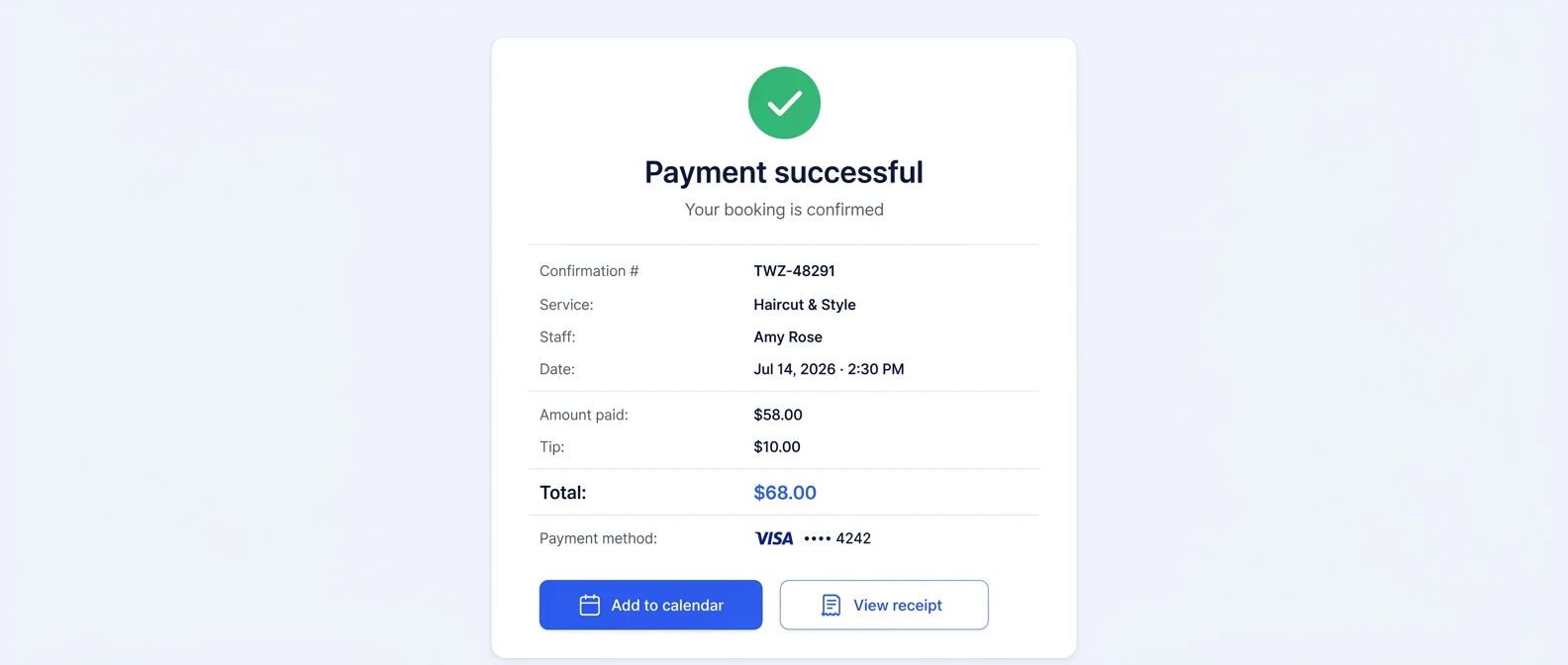
If taking the full price when clients book suits your services, start on the Free plan and run a real booking and payment through it.
Frequently Asked Questions
Can I email a credit card authorization form to a client
You can send an authorization request electronically, but emailing raw card details back and forth is a weak process. The safer approach is to send clients to a secure payment collection flow and keep the authorization form focused on consent. Email tends to create copies, forwarding risk, and poor record control if staff start storing responses in inboxes.
Should the form include the full card number
Only if your workflow requires it and you can handle that data securely. In most appointment businesses, the better process is to collect the card through a secure payment page or terminal and have the authorization form reference the stored method, often by the last four digits. That keeps sensitive data out of routine staff handling.
Is a card authorization form the same as a deposit policy
No. The form records consent to charge a card. The deposit policy explains when the charge is earned, refundable, forfeited, or applied to a service. Businesses get into trouble when they assume a signature alone covers unclear policies. You need both: a documented policy and an authorization that reflects it.
What should I do when a stored card expires
Don’t try to patch around it with old paperwork. Update the payment method through your secure payment workflow and capture a fresh authorization if your billing terms have changed. If the original consent still applies and only the card has changed, tie the updated payment method to the client’s current record and document the update cleanly.
How long should I keep authorization records
Keep them according to your processor requirements, internal recordkeeping policy, and any legal guidance that applies to your business. The practical rule is to retain them long enough to support dispute handling for the billing activity they cover. What matters operationally is having a consistent retention policy, controlled access, and a reliable retrieval process.
Can I use one template for all services
You can use one core structure, but the authorization language should change based on the billing scenario. A recurring charge, no-show fee, package redemption, and variable end-of-visit balance don’t carry the same risk. Reusing the same vague wording across all of them is one of the fastest ways to create avoidable billing conflicts.
What’s the biggest mistake businesses make with these forms
They treat the form like a box to check instead of part of a controlled billing system. The weak points usually aren’t the signature block. They’re vague service descriptions, missing policy references, inconsistent staff usage, and insecure card handling outside a proper payment environment.
Are credit card authorization forms legal
A signed authorization form is a common way to record a cardholder’s consent to later charges, and card network rules on stored cards describe what that consent should cover (Visa’s stored-credential guide, 2017, read September 28, 2026). Whether a particular charge holds up depends on your terms, your payment provider and local law, so have a local professional review your form before you use it.
Are credit card authorization forms safe
They’re safe when the process around them is safe. The form should never hold sensitive authentication data like the CVV (PCI DSS Requirement 3, per PCI Security Standards Council FAQ 1280, read September 28, 2026), and full card details belong in a secure payment environment rather than in drawers, notes, or inboxes. Treat the form as the consent record, restrict who can access stored copies, and let a proper payment system handle the card data itself.
Is a credit card on file agreement the same as an authorization form?
In practice, yes: both names describe the cardholder’s signed permission for a business to keep a card on file and charge it later on stated terms. Some businesses put the same clauses inside a service agreement instead. Either way, the wording should name the charge, the amount or how it is set, and carry the cardholder’s signature and date.
Do recurring debit card charges need a different authorization?
Under Regulation E, a debit card charge set to recur at regular intervals from a consumer’s personal account may be authorized only in a writing the consumer signs or similarly authenticates, and whoever obtains it must give the consumer a copy (12 CFR 1005.10(b), read September 28, 2026). The copy line on this form covers that step; have a local professional confirm how it applies to your business.
Sources and methodology
- PCI Security Standards Council FAQ 1280: Can card verification codes be stored for card-on-file or recurring transactions? (opens in a new tab)Read . Supports: the CVV rule: not kept after authorization, not needed for card-on-file or recurring charges, sensitive authentication data under PCI DSS Requirement 3 (FAQ dated October 2023)
- Visa: Improving Authorization Management for Transactions with Stored Credentials (2017) (opens in a new tab)Read . Supports: what a stored-credential agreement covers: last four digits, how the card will be used, amount or how it is calculated, frequency, cancellation and refund policies, change notice, end date, keeping the agreement
- Consumer Financial Protection Bureau: Regulation E, 12 CFR 1005.10(b) (opens in a new tab)Read . Supports: written authorization and a copy to the consumer for preauthorized transfers from a consumer's account
- Consumer Financial Protection Bureau: Regulation E, 12 CFR 1005.2 (definitions) (opens in a new tab)Read . Supports: consumer account and preauthorized electronic fund transfer (recurring at substantially regular intervals)
- Consumer Financial Protection Bureau: Regulation E, 12 CFR 1005.3 (coverage) (opens in a new tab)Read . Supports: debit card transactions are electronic fund transfers
- Square: Credit Card Authorization Form Templates (opens in a new tab)Read . Supports: the definition, the field list, no CVV space, secure storage with restricted access (published June 11, 2021)
- U.S. Chamber of Commerce: What Is a Credit Card Authorization, and Who Needs a Form? (opens in a new tab)Read . Supports: required fields, phone and email as best practice, amount, frequency, billing date and cancellation method, CVV, PIN and stripe data never stored, locked filing (published April 28, 2026)
- Twizzlo pricing page (opens in a new tab)Read . Supports: Twizzlo plans, booking cap, SMS allowance, money-back guarantee, support and the online payment fee
- Twizzlo features page (opens in a new tab)Read . Supports: prepaid bookings at the full service price, keep or refund after a no-show, no-show fees at the business's discretion, and the payment confirmation screenshot (same image)
From our editorial policy
- Our templates, such as consent forms, contracts and confirmation messages, are text to copy and adapt to your business. They are not legal advice. Have a qualified local professional review anything you rely on.
- To report an error, email support@twizzlo.com with the subject line "Correction: [page URL]". Tell us what is wrong and, if you can, link a source.
Update history
- : Moved the form to the top, added clauses for four charge types, a field-by-field table and dated sources, and corrected the Twizzlo plan facts.
Start free, upgrade when you grow
Flat-rate booking software. No per-seat, per-chair or per-location fees.
- Free plan up to 150 bookings a month, not a trial
- Business Pro is $29.99 a month per business for unlimited bookings, with a 30-day money-back guarantee
- 24/7 support by email