Choosing Software for Massage Therapists in 2026

Massage therapist booking software guide 2026 cover illustration

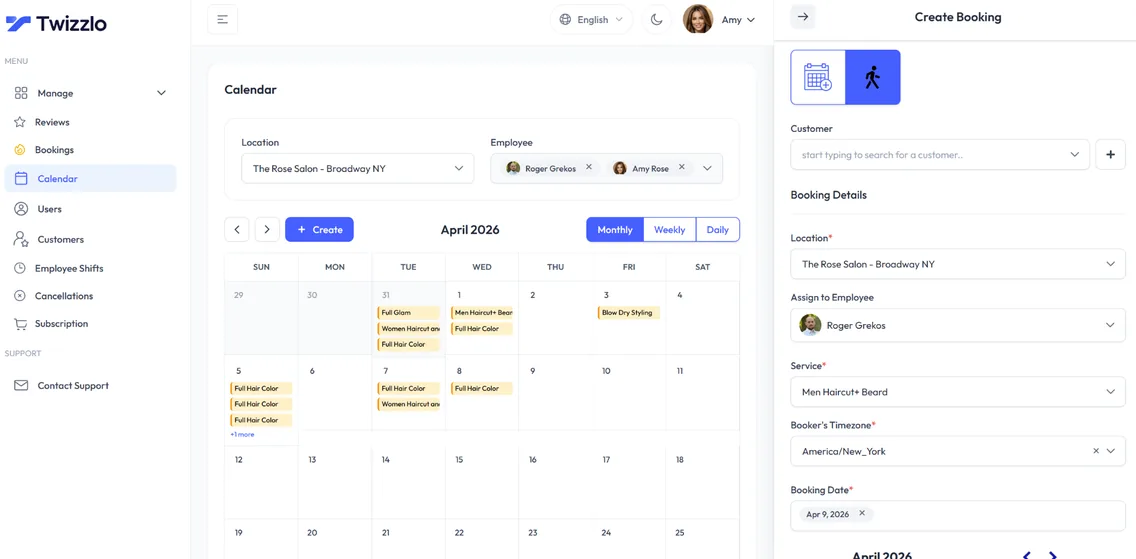
Think of software for massage therapists as your digital front desk. It’s a specialized tool built to handle the day-to-day administrative grind—things like online booking, managing client files, and processing payments—so you don’t have to. The whole point is to free you up to focus on your clients, not on paperwork.

From Paper Chaos to Practice Calm

A tablet displays a scheduling app and a clipboard on a wooden desk in a clinic.


Remember the early days? Or maybe this is your reality right now: a paper calendar filled with scribbles and arrows, accidental double-bookings, missed calls from potential clients, and stacks of intake forms threatening to take over your desk. It’s a scene many of us know all too well.

Trying to run a growing practice with these old-school methods is like trying to direct traffic with a notepad and pen. It’s a constant juggle that pulls you away from what you do best—caring for your clients.

The right software for massage therapists isn’t just another piece of tech to learn. It’s your digital co-pilot, designed specifically to bring a sense of calm and order back to your practice.

Your Digital Co-Pilot for a Thriving Practice

This “co-pilot” works quietly in the background, managing the logistics so you can pour your energy into your hands-on work. Think of it like a chef’s mise en place—everything is prepped, organized, and ready to go, allowing them to create amazing food without scrambling for ingredients. Your software provides that same essential structure.

This move from manual to automated isn’t just a convenience; it’s quickly becoming the industry standard. The global market for this kind of software is expected to explode, growing from about USD 0.16 billion in 2025 to a massive USD 1.2 billion by 2033. This massive jump shows just how many therapists are trading in their paper calendars for digital tools that can handle everything from bookings to SOAP notes. You can dig into the numbers and trends in this market growth report from Strategic Revenue Insights.

Adopting the right software is more than an upgrade—it’s a fundamental shift in how you run your business. It transforms administrative burdens into streamlined processes, giving you back your most valuable asset: time.

This guide will walk you through everything you need to know about choosing the right system, getting it set up, and using it to help your practice not just survive, but truly thrive.

Your Essential Massage Software Feature Checklist

A hand taps a tablet displaying a software menu with 'Online Booking', 'Reminders', and 'Payments' options.

Picking the right software for your massage practice is like choosing the right tools for your treatment room. The right set of features won’t just make your life easier; they’ll make your business run smoother, look more professional, and ultimately, become more profitable.

Let’s move past the marketing buzzwords and dig into the features that truly matter for massage therapists on the ground. These are the non-negotiables that solve the real, everyday headaches of running a practice.

Online Booking: Your 24/7 Receptionist

Think about when your clients decide they need a massage. It’s often late at night after a stressful day or during a quick lunch break—times you’re likely with another client or unavailable. An online booking system acts as your always-on receptionist, ready to capture that business the second a client is ready to commit.

Without it, you’re stuck playing phone tag, and potential clients might just move on to the next therapist they find on Google. This one feature turns your website and social media pages from static brochures into active, money-making tools.

Digital Intake Forms and Reminders: Perfecting the Client Experience

Once an appointment is on the books, your next job is to make sure the client shows up prepared. No-shows are a massive, silent drain on revenue. This is where automated reminders are an absolute game-changer.

Automated reminders are more than a nicety; they’re a powerful defense against lost income. A simple text or email reminder can slash your no-show rate, directly protecting your time and money.

The client experience starts long before they arrive. Sending digital intake and consent forms automatically after they book is a huge upgrade. It gets rid of that awkward, rushed clipboard moment in your waiting area and lets you review their needs before the session. You can walk into the treatment room fully prepared, leading to a more focused and effective session from the very first minute.

Payments and Client Management: The Brains of Your Business

Fumbling with cash or a clunky card reader feels outdated. A modern system with integrated payment processing lets you securely take credit cards, require booking deposits to prevent last-minute cancellations, and even sell packages or gift cards online. It’s a simple shift that instantly elevates the professionalism of your practice.

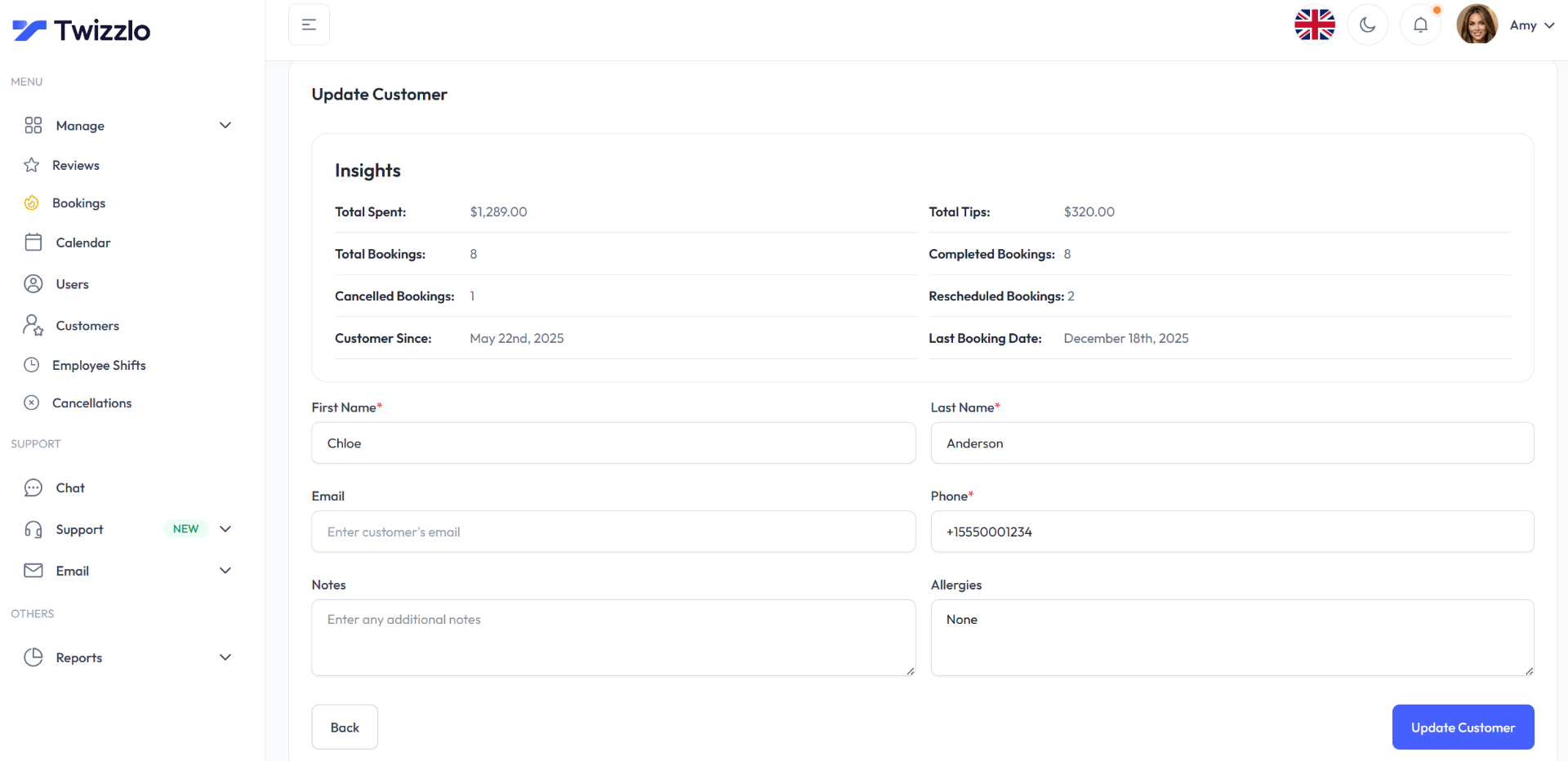
At the heart of it all is a solid client management system (CRM). Think of it as your digital filing cabinet with a perfect memory. This is where you store the details that build loyal, long-term relationships:

  • SOAP Notes: Easily track session details, progress, and treatment plans.
  • Contact Info & History: See a client’s entire journey with you at a glance.
  • Personal Notes: Remember their preference for pressure, their favorite essential oil, or a conversation you had last time. It’s these little touches that make clients feel truly cared for.

If you’re looking for more on this, we’ve covered the ins and outs of finding simple client management software that doesn’t overcomplicate things.

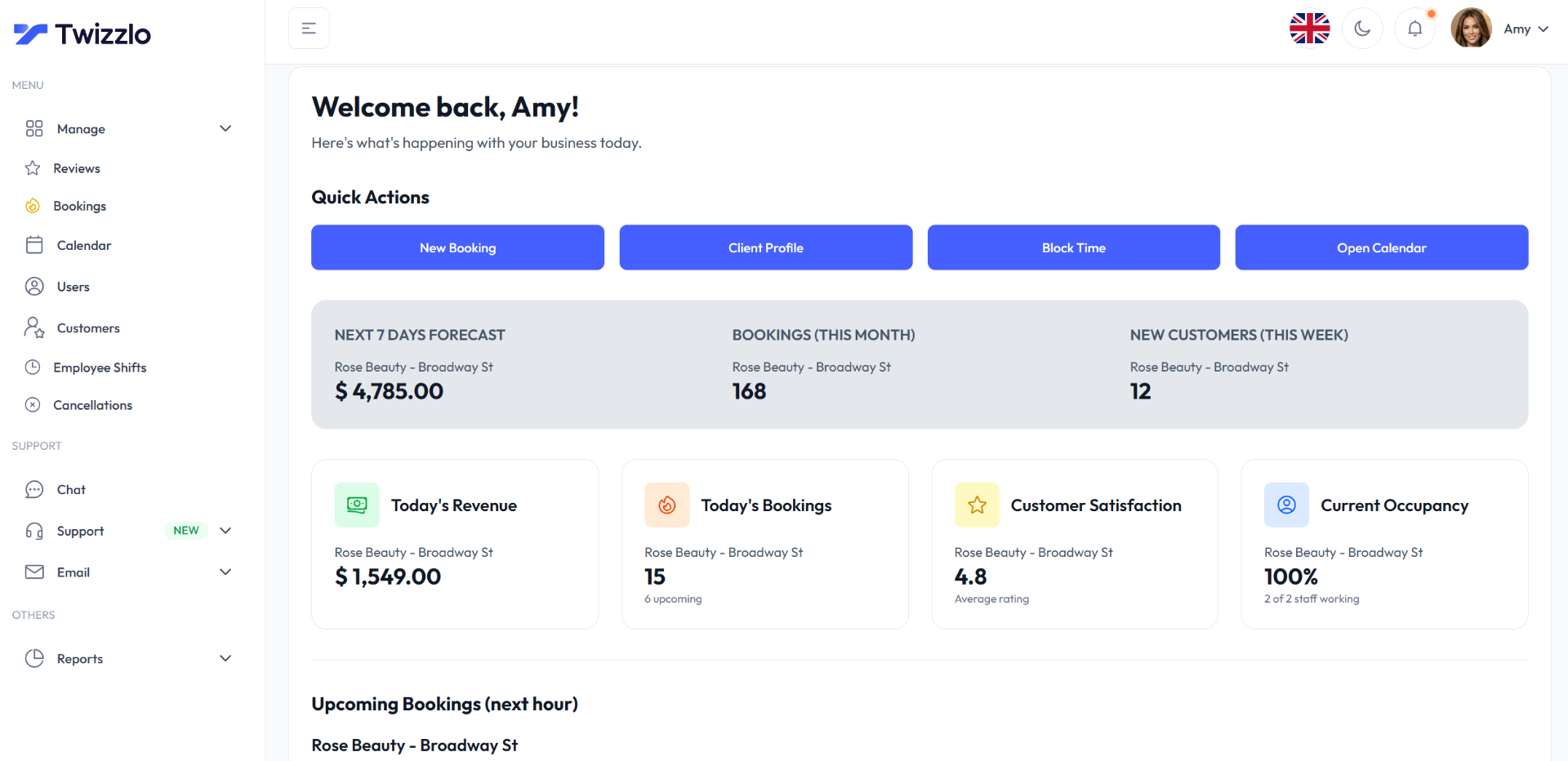
Finally, any software worth its salt gives you clear, simple reporting. You need to know which services are your best sellers, who your most loyal clients are, and what your busiest days are. This data is gold, helping you make smart business decisions based on facts, not guesswork.

Essential Software Features for Massage Therapists

To help you size up your options, here’s a quick-reference table breaking down the must-have features and what they really do for your practice.

Feature Primary Benefit Impact on Your Practice
Online Scheduling Captures bookings 24/7 Reduces phone tag and administrative work. Fills your calendar even when you’re busy or closed.
Automated Reminders Reduces no-shows Protects your income and ensures your schedule stays full.
Digital Intake Forms Professionalizes the client experience Saves time during appointments and allows you to prepare for sessions in advance, leading to better client outcomes.
Client Management (CRM) Centralizes all client information Helps you build stronger client relationships by tracking progress, history, and personal preferences.
Integrated Payments Simplifies checkout & secures revenue Allows you to take deposits, enforce cancellation policies, and offer a seamless, professional payment experience.
Reporting & Analytics Provides key business insights Helps you make informed decisions about marketing, services, and pricing by showing you what’s working and what’s not.
Mobile Accessibility Manage your business from anywhere Gives you the freedom to check your schedule, manage appointments, and view client notes on your phone or tablet.

Looking at features through this lens—how they solve a problem or improve your day-to-day—is the best way to find a system that truly supports your practice’s growth.

Building Stronger Client Relationships

A female massage therapist in scrubs works on a laptop showing client records and a birthday reminder.

Let’s be honest: a successful massage practice isn’t built on one-off appointments. It’s built on trust, repeat business, and the kind of loyalty that turns clients into walking billboards for your work. This is where your software for massage therapists really shines, going way beyond simple scheduling to become a core part of how you build those lasting relationships.

Think of the software’s Customer Relationship Management (CRM) system as your practice’s memory. Instead of trying to recall small but crucial details from last month’s session or digging through a filing cabinet, you have every client’s complete history right in front of you. This is what allows you to make every single session feel personal and connected to the last one, building a powerful foundation of trust.

From Digital Notes to Deeper Connections

At its heart, a good CRM is all about organizing the client information that truly matters—and I’m not just talking about their phone number. It’s about capturing the specific details that elevate your service from good to unforgettable.

  • Detailed SOAP Notes: Quickly and professionally log a client’s subjective feedback, your objective findings, your assessment, and the treatment plan for each visit. This creates a rock-solid history of their wellness journey with you.
  • Treatment Progress Tracking: You can easily see how a client is progressing over time, noting improvements or changes in their condition. This is gold when it comes to fine-tuning your approach and showing them the real value of your work.
  • Personal Preferences: This is where you really stand out. Remember the little things—their favorite essential oil, preferred pressure level, or even that their birthday is next week.

This level of detail is what separates a decent practice from a thriving one. In fact, client management features now represent 25% of the entire massage therapy software market. With 62% of clients seeking massage for health and wellness reasons, a solid CRM is your key to providing the consistent, personalized care they’re looking for. You can find more details in these market insights on Business Research Insights.

A CRM transforms client data from a simple record into a roadmap for exceptional care. It’s the difference between asking, “How have you been?” and saying, “Last time, we worked on that tension in your right shoulder. How has it felt this past month?”

Turning Information into Action

Of course, having all this information is only half the battle. The real magic happens when your software helps you use it. Modern platforms allow you to set up automated, personal touchpoints that keep you on your clients’ radar and show them you’re genuinely invested in their well-being.

For example, imagine sending an automated email the day after a session with a simple thank you and a couple of relevant stretches. Or what about a friendly, targeted offer to clients who haven’t booked in over three months? These small, thoughtful actions build a powerful sense of connection. For more ideas on how to do this effectively, review these top client communication best practices.

By letting your software handle these details, you free yourself up to do what you do best—all while turning first-time visitors into loyal clients who can’t wait to tell their friends about you.

How to Choose the Right Software for Your Practice

Alright, you’ve got your checklist of must-have features. Now comes the hard part: sifting through the dozens of software options out there to find the one that actually feels right for your massage practice. It can feel like a huge task, but if you approach it systematically, you can cut through the noise and find the perfect fit.

Think of it like test-driving a car. You wouldn’t buy one without getting behind the wheel, right? The same logic applies here. Just about every solid software company offers a free trial or a live demo—make sure you take them up on it.

Put Usability to the Test

When you start that trial, don’t just poke around. Get in there and try to do the things you do every single day. Can you book a brand-new client in under a minute? How easy is it to pull up their history and add to their SOAP notes? The whole point is to find a system that feels natural and intuitive to you. If the dashboard is clunky or the menus are confusing, it’s just going to add frustration to your day, not take it away.

A powerful tool is useless if it’s too complicated to use. The best software for massage therapists should simplify your workflow from day one, not add another layer of complexity to your busy schedule.

Once you have a feel for the software itself, it’s time to look at the company behind it. What happens when you get stuck or something isn’t working right?

  • Customer Support: Look at their support channels. Do they have phone support, email, or a live chat option? During your trial, send them a question and see how long it takes to get a helpful response. Good support is an absolute lifesaver when you’re in the middle of a packed day.
  • Pricing Transparency: Really dig into the pricing. Some platforms charge you per therapist, while others have tiered plans where the features you need are locked behind a pricey upgrade. You want simple, predictable pricing that won’t punish you for growing your practice.

Verify Security and Scalability

As a healthcare provider, protecting your clients’ data is not optional. You absolutely must ensure that any software you’re considering is HIPAA compliant. This is the gold standard for guaranteeing that sensitive client information is encrypted and stored securely, protecting both your clients and your business from serious liability.

Finally, think about where you want your practice to be in a few years. You might be a solo practitioner now, but what if you want to bring on two more therapists next year? Does the software easily support multiple staff members and calendars? Can it handle more than one location? Choosing a scalable solution from the start saves you the massive headache of having to switch systems down the road.

For a deeper dive into what to look for, explore our guide on finding the right appointment scheduling software for small business. This will help ensure the platform you pick can grow right alongside your ambitions.

Making a Smooth Transition to Your New Software

Professional importing client data on a laptop while cross-referencing details with a physical document.


The idea of moving your whole practice to a new software system can feel pretty daunting, especially when your schedule is already packed. But here’s the good news: switching from an outdated program, or even from good old-fashioned paper files, doesn’t have to be a nightmare. A little bit of planning makes all the difference.

I like to think of it like setting up a new treatment room. You wouldn’t just toss your equipment in and hope it works out. You’d carefully organize your linens, set up your table just right, and make sure every last detail is in place before the first client walks through the door. We’re going to apply that same thoughtful approach here.

Prepare Your Client Data for the Move

First things first, let’s get your client information ready for its new home. This is probably the most important step for a smooth switch. Right now, your data might be all over the place—spreadsheets, an old clunky software, or a stack of manila folders.

The goal is to get all that information into one clean, simple format that your new software can understand. That’s almost always a CSV (Comma-Separated Values) file, which is just a universal type of spreadsheet.

  • Gather Everything: Pull together all your client files, no matter where they live.
  • Organize the Essentials: In a spreadsheet, create columns for the key details: First Name, Last Name, Email, and Phone Number. Most software for massage therapists will even give you a pre-made template to follow.
  • Export or Enter the Data: If you’re using another system, look for an “Export to CSV” button. If you’re working with paper files, you’ll need to set aside some time for data entry. It’s a one-and-done task, and trust me, it’s worth the effort.

Getting your client list organized and imported cleanly is the bedrock of a successful software switch. Taking the time to do it right now saves you from a world of frustration later and lets you hit the ground running with all the new features.

Configure Your New System and Announce the Change

Once your client data is prepped and ready to go, it’s time to set up the basics in your new system. This is where you’ll define all your services, making sure the names, durations, and prices are spot on. You’ll also want to add your staff members and block out their schedules, including work hours and breaks, so your availability is always accurate.

With the behind-the-scenes work done, you can finally share the exciting news with your clients. A simple, friendly email or social media post is all it takes. Let them know you’re launching a new, improved booking system and be sure to point out how it benefits them—like being able to book an appointment at 10 PM or getting helpful text reminders. A little heads-up goes a long way in making everyone feel great about the change.

Where Twizzlo Fits In

We’ve walked through everything from 24/7 online booking and digital intake forms to the absolute necessity of a solid client CRM. It’s a lot to take in, and the thought of juggling different tools can be overwhelming. This is exactly why we built Twizzlo.

We brought all those essential features—the must-haves we’ve covered in this guide—under one roof. The goal was to create a single, intuitive platform that just works for massage therapists.

Think about what your day-to-day could look like. A client finds you online and books their own appointment. They automatically receive and complete their intake form before they even walk through your door. A reminder text goes out without you lifting a finger. After their session, payment is simple, and all their notes are neatly stored in their profile for next time.

That’s not a fantasy; it’s just a normal day for practices running on Twizzlo. It’s about creating a smooth, professional experience for your clients and a calm, organized workflow for you.

Finally, Simple Pricing That Grows With You

Let’s talk about cost, because it’s a major sticking point with most software. We got tired of seeing platforms penalize therapists for their own success with confusing tiers and surprise fees.

We decided to do things differently. Twizzlo has one flat-rate plan. That’s it. You get unlimited appointments, unlimited staff, and unlimited locations for one predictable price.

Whether you’re a solo practitioner or growing into a multi-therapist clinic, your software bill doesn’t change. We want to be a partner in your growth, not a tax on it.

If you’re ready to stop patching together different systems and want to see what an all-in-one platform can do for your business (and your sanity), we’re here to help.

Take a look at all of Twizzlo’s features and start your free trial today. See for yourself what a difference it makes.

Frequently Asked Questions

Jumping into new software always brings up a few questions. Let’s tackle some of the most common ones we hear from massage therapists so you can feel confident moving forward.

Is Massage Therapy Software Secure and HIPAA Compliant?

This is a big one, and the short answer is yes—if you choose the right provider. You absolutely must pick a platform that is explicitly HIPAA compliant. This isn’t just a buzzword; it’s a legal standard that ensures your clients’ sensitive information is protected with powerful data encryption, both when it’s just sitting on a server and when it’s being sent across the internet.

Think of it as a digital, Fort Knox-style vault for your client’s health records. A reputable software vendor will make sure all your SOAP notes, intake forms, and personal details are locked down tight, meeting the same strict privacy rules you’d find in a hospital. It’s about protecting your clients, and ultimately, protecting your practice.

How Much Does Software for Massage Therapists Typically Cost?

Pricing is all over the map, but you’ll almost always find a subscription model. Most of the time, you’re looking at monthly or annual fees that can be anywhere from $25 to over $100 per month.

Where it gets tricky is how they charge. Some providers bill per therapist, so your costs automatically climb as you hire more people. Others use tiered plans, hiding the most useful features behind more expensive packages. My advice? Look for simple, transparent, flat-rate pricing. It saves you from nasty surprises down the road.

The best value often comes from a simple, all-inclusive plan. This eliminates the guesswork and ensures you get all the tools you need without being penalized for your success.

Can I Integrate This Software with My Existing Website?

You bet, and it’s usually a breeze. Good software for massage therapists will give you a little snippet of code—sometimes called a booking widget or a booking button.

You (or your web person) can just copy and paste that code right onto your website. Once it’s there, clients can see your real-time availability and book their appointments without ever having to leave your site. It creates a smooth, professional experience that turns website visitors into booked clients.


Ready to see how an all-in-one platform can simplify your practice management? Twizzlo provides all the essential tools with one simple, flat-rate plan. Start your free trial today and see the difference.

author avatar
Roger Grekos Founder - Editor
Roger Grekos is the founder of Twizzlo, a flat-rate appointment booking platform built for salons, barbershops, spas, and service businesses. With over a decade in product management — including senior roles at Find.co and PayEm — he writes about the real operational challenges service business owners face every day.

2 thoughts on “Choosing Software for Massage Therapists in 2026

Comments are closed.

Discover more from Twizzlo

Subscribe now to keep reading and get access to the full archive.

Continue reading