
The 12 Best Salon Booking Software Options for 2026

In short
The best salon software depends on team size. Solo stylists can start on a free or low-cost plan like Square Appointments' free tier, GlossGenius Standard or Twizzlo Free. Growing salons should favor pricing that does not rise with each hire, like Twizzlo Business Pro. Automation-focused salons lean toward Mangomint or Boulevard; multi-location groups toward Meevo or Zenoti.
- Count the whole bill: card processing, add-ons and per-staff fees change what each platform really costs.
- Multi-location salons should check whether a plan bills per location or per staff member before comparing prices.
- At one location, five stylists cost $0 to $170 a month in published subscription fees, read September 25, 2026, before processing and add-ons.
In this article18 sections

This guide compares 12 salon booking platforms for hair and beauty salons: how each one bills, what its published plans cost, which fees sit on top of the subscription and which salons each one fits. Prices were read on each vendor's own pricing page or help center on September 25, 2026, and each one links to its source. The list is numbered for reference only; we did not score or rank the platforms. For the costs first, jump to monthly costs for 1 to 10 stylists.
Twizzlo, which publishes this guide, makes salon appointment software and is listed first. Our disclosure and method are at the end of the page.
1. Twizzlo
Twizzlo
Our productBest for: Salons that want one price per business as they add stylists or locations.
Starting price: Free: $0 a month up to 150 bookings; Business Pro: $29.99 a month per businessRead on the Twizzlo pricing page (opens in a new tab)
Pros
- Unlimited staff and locations on both plans
- Free plan for up to 150 bookings a month, not a trial
- 24/7 email support
Cons
- Free is capped at 150 bookings a month
- No SMS on the Free plan
- Business Pro includes 50 SMS a month, then $0.03 per message
Twizzlo fits salons that want one price per business, however many stylists or locations they add. It is web-based online booking and appointment scheduling software for appointment-based service businesses, with a public booking page, email and SMS reminders, client records, staff schedules and shifts, and Stripe payments and tips.
From one dashboard, owners manage bookings, staff shifts and schedules across locations. Clients book on a 24/7 online booking page and can reschedule themselves, and staff can drag a booking to a new time on the calendar. Client records keep visit history, notes, preferences and each client's total spend, and real-time insights show booking volume, revenue, staff availability and utilization, new customers and forecasts.
How Twizzlo bills
Twizzlo has two plans:
- Free: $0 a month, free forever and not a trial. It includes the core booking, CRM, staff, insights and online payment features for up to 150 bookings a month, without SMS.
- Business Pro: $29.99 a month per business, with unlimited bookings, 50 SMS a month (then $0.03 per additional SMS), every Twizzlo feature and a 30-day money-back guarantee.
Both plans include unlimited staff, locations and client records, email confirmations and reminders, and 24/7 email support. On both plans, online payments carry your Stripe processing rate plus a 1.5% Twizzlo platform fee. Business Pro, Twizzlo's one paid plan, includes every Twizzlo feature with no paid add-ons or modules, and staff and location counts never raise its price.
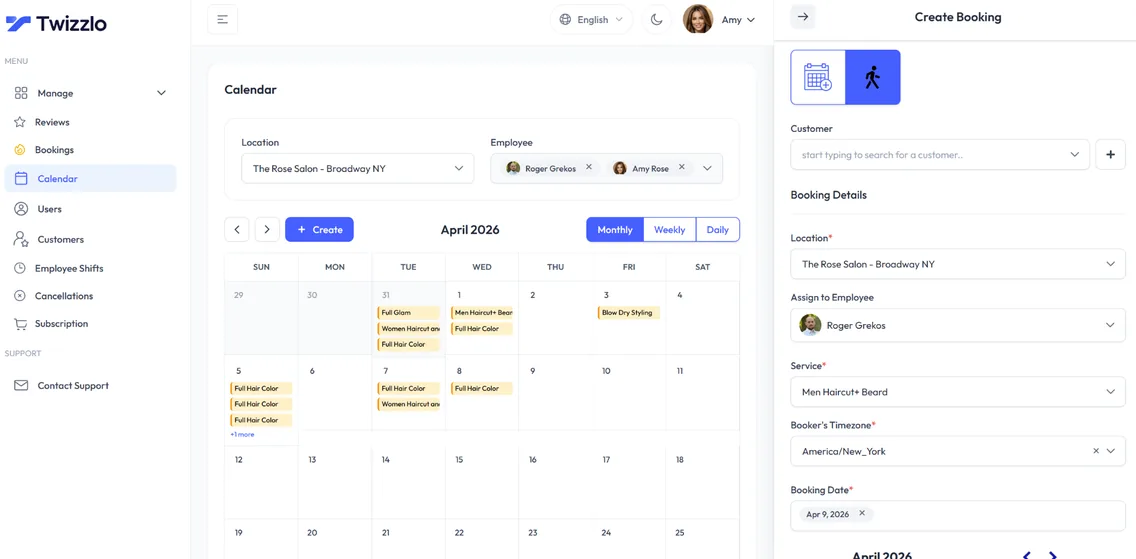
Example: per Twizzlo's pricing page, a salon with 10 stylists and two locations pays $29.99 a month on Business Pro. If it takes $10,000 a month in online payments, the 1.5% platform fee on those payments is $150, on top of its Stripe processing rate.
Choose Twizzlo if you want the subscription to stay the same as you add stylists or locations.
2. Vagaro
Vagaro
Best for: Salons that want a low base price and add paid modules as they grow.
Starting price: $23.99 a month, a limited-time rate (list price not printed), with 1 calendar; $10 a month per extra calendarRead on Vagaro's help center (opens in a new tab)
Pros
- One calendar included in the base subscription
- Calendar fees stop after seven licenses
- Premium features priced one by one, from $10 a month
Cons
- Card rates set by monthly volume; FANF and Mastercard location fees not priced
- Price after the limited-time rate not printed
- Deposits and cancellation fees need a $10-a-month add-on
Vagaro fits salons that want a low starting price and are ready to pay for extra modules one at a time. Its US help center, read September 25, 2026, prices each premium feature separately, such as Forms at $10 a month and Vagaro Payroll at $34 a month plus $5 a month per employee.
Deposits and cancellation fees for online appointments come with the Online Shopping Cart add-on at $10 a month. A branded client app is $100 a month, a price Vagaro marks "Limited Time", plus a $100 one-time development fee, and Vagaro MySite is $20 a month. Text marketing starts at $20 a month for 1,000 credits, and the first 1,000 email marketing credits are free, according to the same help article.
How Vagaro bills
Vagaro's US base subscription is $23.99 a month, a rate its help center marks "Only for a limited time" without printing the price that follows. The base includes one bookable calendar. Each additional employee calendar is $10 a month for up to seven licenses, after which new employees are added at no additional charge. The help center prints no subscription price for an added location. Vagaro's US card rates are 2.6% + $0.10 per in-person payment under $4,000 a month in card sales; 2.29% + $0.19 above it, with a $10 monthly Large Merchant fee; keyed-in 3.5% + $0.19; FANF and Mastercard location fees apply, amounts not printed (US help center, read September 27, 2026). Figures from Vagaro's plans and pricing help article, read September 25, 2026. For calendar-by-calendar totals, see Vagaro pricing.
Example: a five-stylist salon pays $63.99 a month on the limited-time base rate: $23.99 plus four extra calendars at $10. Adding the Online Shopping Cart for deposits and cancellation fees brings it to $73.99. Because calendar fees stop at seven licenses, a salon with seven or more stylists pays $83.99 a month before add-ons.
Choose Vagaro if you want to start on a base plan and pay only for the modules you switch on, such as forms or payroll.
3. Fresha
Fresha
Best for: Salons that want marketplace clients and accept a one-time fee on each new one.
Pros
- A client marketplace that can send new bookings
- No fee on returning clients
Cons
- One-time fee on new clients from its marketplace
Fresha fits salons that want its client marketplace to bring in new bookings and accept a one-time fee on the new clients it sends. Its pricing page lists paid Independent and Team plans and a one-time fee on brand new clients who find the business through the Fresha marketplace, with no fee on returning clients.
How Fresha bills
We could not read Fresha's US prices for this update: our reader was served Fresha's Canadian pricing page, so this guide shows no Fresha figure. Confirm the current US subscription, new-client marketplace fee and card rates on Fresha's pricing page before you compare, and see Fresha pricing for our side-by-side page.
Ask before you sign: the US monthly price for your number of team members, the new-client marketplace fee and any minimum per client, the card rates for in-person and online payments, and how many texts the plan includes.
Choose Fresha if marketplace discovery is how you plan to fill new chairs and the one-time fee on each new client is worth the clients it brings.
4. Square Appointments
Square Appointments
Best for: Solo stylists and salons that take most payments in person.
Starting price: $0 a month per location (Square Free); Plus $49, Premium $149Read on Square's pricing page (opens in a new tab)
Pros
- $0 plan with unlimited staff calendars
- Card rates fall on higher plans
- 30-day free trial on Plus and Premium
Cons
- Paid plans bill per location
- No-show fees and the waitlist start on Plus
- Online card rate is 3.3% plus 30 cents on Free
Square Appointments fits solo stylists and salons that want booking and in-person card payments from the same company. Its pricing page lists an online booking site, appointment reminders and unlimited staff calendars on the Free plan; a cancellation policy with no-show fees, multi-staff appointment booking and a waitlist on Plus; and a future bookings report, service cost tracking and resource management on Premium.
How Square Appointments bills
Square bills per location: Square Free is $0 a month, Square Plus $49 and Square Premium $149, with a 30-day free trial on Plus and Premium. Square Pro has custom pricing: according to Square, businesses that process more than $250,000 a year can ask whether they qualify. Card rates fall as the plan rises: tap, dip or swipe costs 2.6% plus 15 cents on Free, 2.5% plus 15 cents on Plus and 2.4% plus 15 cents on Premium, and online payments cost 3.3% plus 30 cents on Free and 2.9% plus 30 cents on Plus and Premium. Hardware starts at $59, and Square Payroll at $35 a month plus $6 per person paid. Figures from Square's Appointments pricing page, read September 25, 2026, and unchanged when we captured it on September 26, 2026. For a plan-by-plan comparison, see Square Appointments pricing.
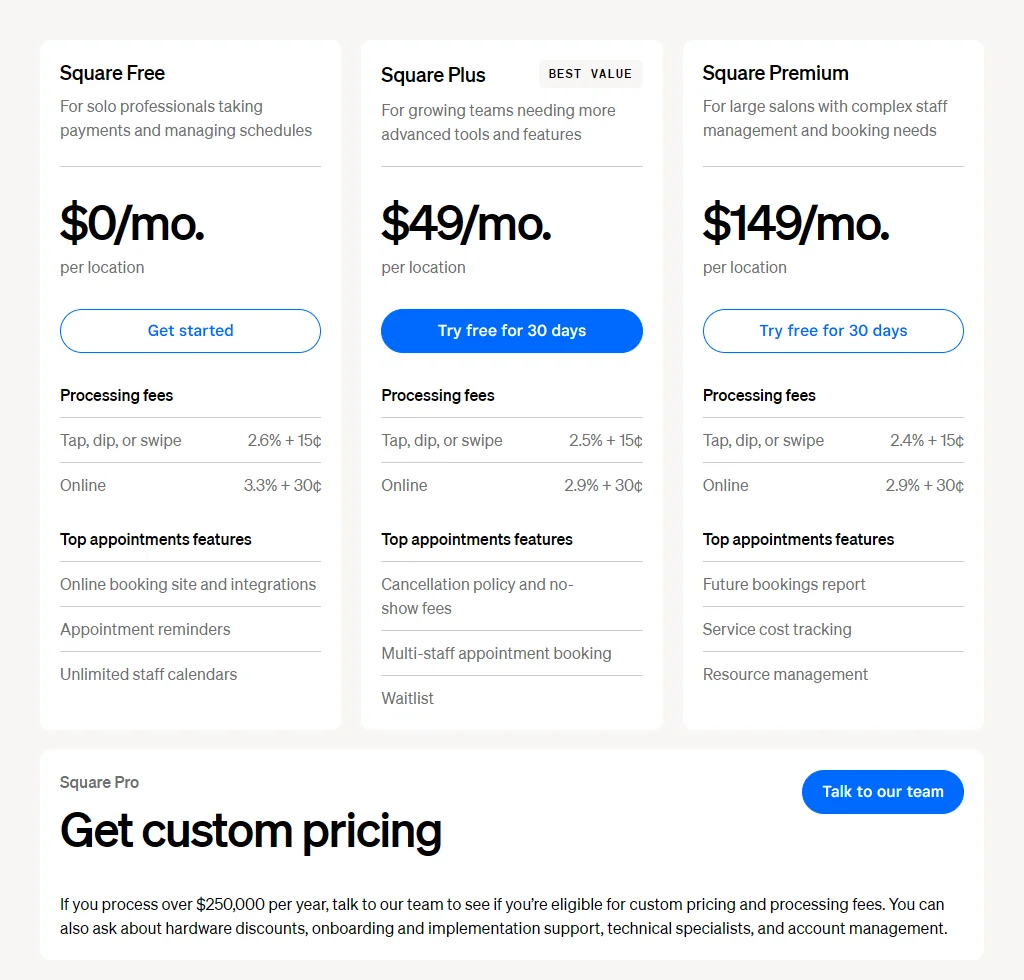
Example: a salon that takes 200 in-person card payments of $50 in a month ($10,000) pays $290 in processing on Free, $280 on Plus and $270 on Premium. Per Square's published rates, Plus earns back its $49 fee on card rates alone only above about $49,000 a month in in-person card volume, or about $12,250 a month if every payment is taken online, so the case for Plus rests on its features, such as no-show fees and a waitlist.
Choose Square Appointments if you want a $0 plan with unlimited staff calendars and you take most payments in person.
5. Boulevard
Boulevard
Best for: Salons and spas that want marketing and memberships in the same system.
Starting price: $159 a month billed monthly (Essentials, up to 5 providers)Read on Boulevard's pricing page (opens in a new tab)
Pros
- Unlimited professionals on Premier and Prestige
- 250 free texts on Essentials
- Forms and charts included on Prestige
Cons
- Premier and Prestige bill per location
- Forms and charts cost extra on Essentials and Premier
- Automated campaigns cost $2 per completed appointment
Boulevard fits salons and spas that want marketing, memberships and loyalty programs in the same system as the calendar and can budget a higher monthly price. Boulevard's site, read September 26, 2026, describes client self-booking on its Precision Scheduling calendar, a point of sale built for beauty and wellness businesses, and built-in marketing, memberships and loyalty programs.
How Boulevard bills
Boulevard's Essentials plan is $159 a month billed monthly, or $143 a month billed annually, for up to five providers, with 250 free texts. Premier is "Normally $325" a month per location with unlimited professionals, and Prestige is "Normally $455" a month per location; both carry a limited-time fall offer for new customers, $260 and $364. Forms and charts are an add-on on Essentials and Premier and included on Prestige, automated campaigns cost $2 per completed appointment, and card processing starts at 2.65%. Multi-location support is listed on Premier and Prestige only. Figures from Boulevard's pricing page, read September 25, 2026.
Example: Essentials covers up to five providers at $159 a month. A sixth provider means moving to Premier, which is $325 a month per location at its normal price, or $260 on the fall offer for new customers: a jump of $166, or $101, for one hire.
Choose Boulevard if you have up to five providers and want campaigns and memberships in one system, or you run several locations and want unlimited professionals on a per-location plan.
6. GlossGenius
GlossGenius
Best for: Solo stylists and teams under 10 that want one card rate.
Starting price: $28 a month billed monthly (Standard)Read on the GlossGenius pricing page (opens in a new tab)
Pros
- Flat 2.6% card rate
- No fees for Tap to Pay, cards on file or manual entry
- Annual billing lowers every plan
Cons
- No staff management on Standard
- Teams of 10 or more need Platinum at $168 a month
- Instant payouts cost 1.8%
GlossGenius fits solo stylists and small teams that want one card rate for every kind of payment. It charges a flat 2.6% with no extra fee for Tap to Pay, cards on file or manual entry, and its Gold plan adds staff management for businesses of up to nine staff, according to the GlossGenius pricing page, read September 25, 2026.
How GlossGenius bills
GlossGenius bills per business by plan. On monthly billing, Standard is $28 a month, Gold $56 and Platinum $168; annual billing lowers them to $24, $48 and $148 a month. Standard has no staff management, Gold covers businesses of up to nine staff with 500 text credits, and Platinum is for teams of 10 or more with 2,500 text credits. Each additional location costs the plan price at a 15% discount, instant payouts add a 1.8% fee, and a payroll add-on is $40 a month plus $6 per seat. Figures from the GlossGenius pricing page, read September 25, 2026. For more detail, see GlossGenius pricing.
Example: per GlossGenius' published rates, a salon that takes $10,000 a month by card pays $260 in processing at the flat 2.6%, whether clients tap to pay, use a card on file or have the card keyed in. Taking all of it as instant payouts would add $180. Paying annually for Gold saves $96 a year: $48 a month instead of $56.
Choose GlossGenius if you work alone or with a team of fewer than 10 and want the same 2.6% on every card payment.
7. Mangomint
Mangomint
Best for: Salons and spas that want automated front-desk flows.
Starting price: $120 a month per location plus $10 a month per userRead on Mangomint's pricing page (opens in a new tab)
Pros
- Free onboarding and data transfer
- No contracts
- No fee on appointments booked in the platform
Cons
- Every profile, front desk included, is a paid user
- Phone, marketing and payroll are paid add-ons
Mangomint fits salons and spas that want more of the front desk to run on automation. Its site, read September 26, 2026, lists Express Booking, Automated Flows and a Virtual Waiting Room among its features, and its pricing page lists free onboarding, free data transfer and no contracts.
How Mangomint bills
Mangomint charges $120 a month per location plus $10 a month per user, and anyone with a profile counts as a user, front-desk staff included, so one location with one user is $130 a month. Add-ons are Phone at $70 a month per line, Marketing from $30 a month and Payroll at $50 a month plus $8 per worker. Card processing is 2.45% plus 15 cents in person and 2.90% plus 30 cents for virtual payments, and Mangomint says it never takes a fee for appointments booked in the platform. Figures from Mangomint's pricing page, read September 25, 2026.
Example: a salon with five stylists and one front-desk profile has six users, so it pays $180 a month: $120 for the location plus six users at $10. Adding one phone line brings it to $250.
Choose Mangomint if you want a virtual waiting room and automated client flows, and your team is small enough that the per-user fee stays in budget.
8. Phorest
Phorest
Best for: Salons with three or more staff that price through a quote.
Pros
- Unlimited staff and devices on every plan
- Automated rebooking prompts and review requests
- Full product demo before you buy
Cons
- No published subscription price
- No free trial
Phorest fits salons with three or more staff that want client-retention tools and are comfortable pricing through a quote. Its US site, read September 26, 2026, lists automated confirmations, reminders, rebooking prompts, no-show follow-ups and review requests, plus unlimited devices and users.
How Phorest bills
Phorest publishes no subscription price: its Starter, Grow, Complete Advantage and Elite plans all say "Request a quote", and every plan includes unlimited staff and unlimited devices. Phorest does not offer a free trial and offers a full product demo instead. Its messaging prices are printed: 2-way SMS messaging includes 7,500 texts for $99, and texts cost 5 cents each. Figures from Phorest's US pricing page, read September 25, 2026.
Ask before you sign: the monthly price at your staff count, the card processing rate, and which free monthly text allowance your plan includes. According to Phorest's US pricing page, its plans carry free allowances of 1,000, 5,000 and 27,000 texts a month.
Choose Phorest if you want unlimited staff on every plan and are comfortable pricing through a quote.
9. Booksy
Booksy
Best for: Barbers and small salons that want every feature in one plan.
Starting price: Published price $29.99 a month plus tax with one team member; $20 a month per extra memberRead on Booksy's pricing page (opens in a new tab)
Pros
- All features included, no commitment
- 2,000 free marketing texts a month
- 14-day free trial, no credit card
Cons
- $20 a month for each extra team member
- Boost takes a one-time 30% of a Boost client's first visit
- 30-minute payouts cost 1.5%
Booksy fits barbers, solo stylists and small salons that want every feature in one subscription and an optional way to reach new clients. Its pricing page says all features are included with no commitment, and Booksy offers a 14-day free trial with no credit card.
How Booksy bills
According to Booksy's pricing page, read September 25, 2026, Booksy's published price is $29.99 a month plus tax with one team member, plus $20 a month for each additional team member; the page prints no country or currency code. Per the same page, Boost, Booksy's optional new-client program, is free to turn on and charges a one-time 30% of the total cost of a Boost client's first visit, and plans include 2,000 free marketing texts a month, with appointment confirmations and reminders free.
Card processing, per the same page, is 2.69% plus 30 cents for mobile and keyed-in payments, 2.49% plus 10 cents on the Booksy card reader and 2.49% plus 20 cents for Tap to Pay; next-business-day payouts are free and 30-minute payouts cost 1.5%. For a team-size comparison, see Booksy pricing.
Example: a five-person team pays $109.99 a month plus tax: $29.99 plus four extra members at $20. If Boost brings in a new client whose first visit totals $100, Booksy charges a one-time $30 on that visit.
Choose Booksy if you work alone or with one or two others and want every feature and 2,000 free marketing texts a month in one subscription, per Booksy's pricing page, with Boost as an optional, paid way to reach new clients.
10. DaySmart Salon (formerly Salon Iris)
DaySmart Salon
Best for: Salons that want a plan ladder with users included.
Starting price: $29 / Month (Basic, 1 user)Read on DaySmart Salon's pricing page (opens in a new tab)
Pros
- Online deposits on the Basic plan
- Three users included on Deluxe
- 14-day free Deluxe trial, no card
Cons
- $9 a month for each extra user
- Billing term behind "/ Month" not printed
- Card processing rate not printed
DaySmart Salon fits salons that want a plan ladder with a set number of users included and features added at each step. The Salon Iris site now redirects to DaySmart, and the DaySmart Salon pricing page lists online booking, appointment confirmations, Instagram and Facebook booking and online deposits on Basic; online gift cards, digital forms, a client loyalty system, basic payroll and email marketing on Deluxe; and text marketing, two-way texting and reputation management on Deluxe Growth.
How DaySmart Salon bills
DaySmart Salon lists Basic at $29 / Month with one user, Deluxe at $69 with three users, Deluxe Growth at $149 with three users and Premium at $199 with six users; Premium Growth, with unlimited users, is priced on request. Extra users are $9 a month each on Deluxe and above. The page does not say whether "/ Month" means monthly billing or a monthly rate on a longer term, and it does not print a card processing rate. Monthly text allowances run from 500 to 5,000 by plan, and Deluxe can be tried free for 14 days with no card. Figures from DaySmart Salon's pricing page, read September 25, 2026.
Example: five users on Deluxe cost $87 a month: $69 plus two extra users at $9. The same team on Deluxe Growth, which adds text marketing and two-way texting, costs $167: $149 plus $18.
Choose DaySmart Salon if you want gift cards, digital forms and a loyalty program on a mid-priced plan with three users included.
11. Meevo (by Millennium)
Meevo
Best for: Multi-location salon and spa groups.
Pros
- Central Office hub across locations
- Onboarding specialist and a Customer Success Manager
- Built-in payment processing with point-of-sale terminals
Cons
- No published price; pricing by demo request
Meevo fits multi-location salon and spa groups that want central reporting and hands-on onboarding. Its multi-location page describes a Central Office hub for businesses with "two locations, 200 or more", its MeevoPay page describes payment processing built into the software, with point-of-sale terminals, and its homepage describes an onboarding specialist followed by a dedicated Customer Success Manager, all read September 26, 2026.
How Meevo bills
Meevo does not publish plan prices. Its pricing page names Lite, Essentials, Premier and Enterprise plans for salons and spas, says subscriptions are based on an annual contract and sends every plan to a "Request a Quote" demo form, read September 26, 2026. Meevo's homepage also offers "Summer Promotional Pricing" only through a demo request, so this guide shows no Meevo figure.
Ask before you sign: the monthly price per location, whether the summer promotional price has an end date and what it becomes afterward, the MeevoPay card rates, and whether onboarding carries a separate fee.
Choose Meevo if you run several salons or spas, want one reporting hub across them and are ready to price the system through a demo.
12. Zenoti
Zenoti
Best for: Multi-location groups that want one system from booking to payroll.
Pros
- Booking to payroll in one system
- Multi-location pricing built around your footprint
Cons
- Quote only
- Texts and calls billed by consumption
- AI agents need the AI Plus package
Zenoti fits multi-location groups that want one system from booking to payroll. Its homepage, read September 26, 2026, describes "every workflow from booking to payroll in one system" for salon, spa and fitness businesses.
How Zenoti bills
Zenoti prints no price. Every plan, for salon and spa, fitness and barbershop businesses, says "Get a Quote", and its pricing FAQ says multi-location pricing is customized to each business. Voice, SMS and messaging tools come with the subscription but are billed by consumption with optional base packs, and its AI agents require the AI Plus package. Figures from Zenoti's pricing page, read September 25, 2026.
Ask before you sign: the monthly price per location, the rate for texts and calls once any base pack runs out, whether the AI features you want need the AI Plus package, and the card processing rate.
Choose Zenoti if you run many locations and want a quote built around your footprint rather than a published plan.
Best salon management software compared: how each platform bills
The best salon management software for your team depends first on the billing unit: per business, per location, per user or per calendar. The table sets each platform's unit next to the card rates and other fees its own pages print.
Salon software comparison: billing unit, card rates and other fees for 12 platforms. Sources: each vendor's pricing page or help center, read September 25, 2026 (Meevo and Square re-read September 26, 2026); Twizzlo from twizzlo.com/pricing/.
| Platform | Best for | How it bills | Card processing, as published | Other published fees |
|---|---|---|---|---|
| Twizzlo | Salons adding stylists or locations on one price | Per business: Free up to 150 bookings a month; Business Pro $29.99 a month; unlimited staff and locations on both | Stripe rate plus 1.5% platform fee on online payments | $0.03 per SMS beyond 50 a month on Business Pro |
| Vagaro | Salons that add paid modules as they grow | Per calendar: $23.99 a month base (limited-time rate) with 1 calendar; $10 per extra calendar up to seven licenses; no price printed for an added location | Not printed | Forms $10, Online Shopping Cart $10, MySite $20, Payroll $34 plus $5 per employee, a month |
| Fresha | Salons that want marketplace clients | Paid Independent and Team plans; US price not read | US rates not read | One-time fee on new marketplace clients (US rate not read) |
| Square Appointments | Solo pros and teams paying in person | Per location: Free $0, Plus $49, Premium $149 a month; Pro custom | In person 2.6%, 2.5% or 2.4% plus 15 cents by plan; online 3.3% plus 30 cents (Free), 2.9% plus 30 cents (Plus, Premium) | Hardware from $59; Payroll from $35 a month plus $6 per person paid |
| Boulevard | Salons that want marketing and memberships built in | Essentials $159 a month (up to 5 providers); Premier "Normally $325" per location (fall offer $260) | From 2.65% | Automated campaigns $2 per completed appointment; forms and charts an add-on below Prestige |
| GlossGenius | Solo stylists and teams under 10 | Per business by plan: Standard $28, Gold $56 (up to 9 staff), Platinum $168 (10 or more), billed monthly | Flat 2.6% | Instant payouts 1.8%; payroll $40 a month plus $6 per seat; extra location at plan price less 15% |
| Mangomint | Salons that want automated front-desk flows | $120 a month per location plus $10 a month per user | 2.45% plus 15 cents in person; 2.90% plus 30 cents virtual | Phone $70 a line; Marketing from $30; Payroll $50 plus $8 per worker, a month |
| Phorest | Salons with 3 or more staff | Quote only; unlimited staff and devices on every plan | Not printed | 7,500 texts for $99; 5 cents per text |
| Booksy | Barbers and small salons | $29.99 a month plus tax with 1 team member; $20 per extra member | 2.69% plus 30 cents mobile and keyed; 2.49% plus 10 cents card reader; 2.49% plus 20 cents Tap to Pay | Boost: one-time 30% of a Boost client's first visit; 30-minute payouts 1.5% |
| DaySmart Salon | Salons that want users included in the plan | Basic $29 (1 user), Deluxe $69 (3), Deluxe Growth $149 (3), Premium $199 (6); $9 per extra user | Not printed | Premium Growth by quote |
| Meevo | Multi-location salon and spa groups | Not published; demo request | Not printed | Not published |
| Zenoti | Multi-location groups | Quote only; multi-location pricing customized | Not printed | Messaging billed by consumption, with optional base packs |
What the best salon scheduling software costs for 1 to 10 stylists
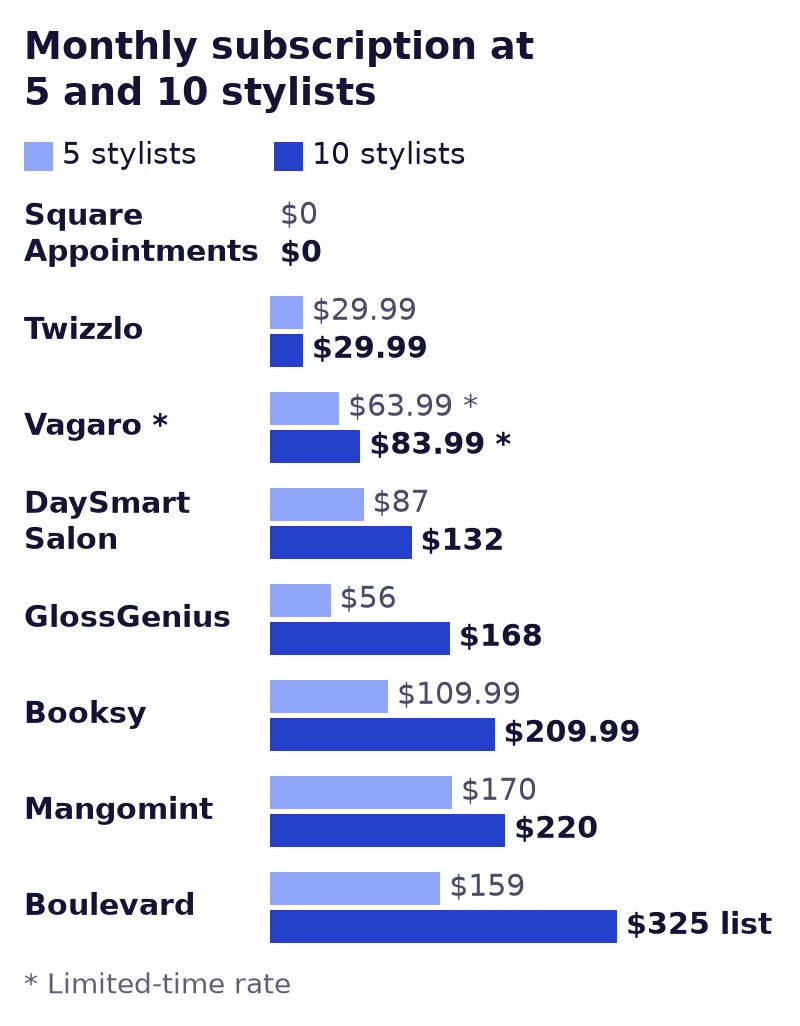
Among the platforms that publish prices, a five-stylist salon at one location would pay between $0 and $170 a month in subscription fees, on prices read September 25, 2026, with limited-time rates labeled. Price is where the best software for salons differs most, because vendors bill by different units.
How we counted. We used the prices on each vendor's own pricing page or help center on September 25, 2026, for one location, on monthly billing where the page offers it. A stylist is whatever unit the vendor charges for: team member, calendar, user or provider. Totals are before tax, card processing, texts and add-ons, and limited-time rates are marked with an asterisk, not treated as list prices.
Monthly subscription for 1, 3, 5 and 10 stylists at one location, sorted by the 10-stylist cost. Sources: each vendor's pricing page or help center, read September 25, 2026; Twizzlo from twizzlo.com/pricing/. * Limited-time rate.
| Platform | Plan used | 1 stylist | 3 stylists | 5 stylists | 10 stylists | Billing unit |
|---|---|---|---|---|---|---|
| Square Appointments | Free, or Plus | $0 or $49 | $0 or $49 | $0 or $49 | $0 or $49 | Per location; unlimited staff calendars on Free |
| Twizzlo | Business Pro (Free is $0 for up to 150 bookings a month, without SMS) | $29.99 | $29.99 | $29.99 | $29.99 | Per business; unlimited staff and locations |
| Vagaro | Base plus calendars | $23.99* | $43.99* | $63.99* | $83.99* | Per calendar; $10 per extra calendar up to seven licenses, then no charge; no price printed for an added location |
| DaySmart Salon | Basic (1), Deluxe (3 and up) | $29 | $69 | $87 | $132 | Users included by plan; $9 per extra user |
| GlossGenius | Standard (1), Gold (3, 5), Platinum (10) | $28 | $56 | $56 | $168 | Per business; staff limit by plan |
| Booksy | Subscription plus team members, before tax | $29.99 | $69.99 | $109.99 | $209.99 | 1 member included; $20 per extra member |
| Mangomint | One location plus users | $130 | $150 | $170 | $220 | $120 per location plus $10 per user; front-desk profiles count |
| Boulevard | Essentials (1 to 5), Premier (10) | $159 | $159 | $159 | $325 list ($260* fall offer) | Essentials up to 5 providers; Premier per location |
| Fresha | Independent or Team | US price not read | Not stated here | |||
| Phorest | Starter to Elite | Quote only | Quote; unlimited staff | |||
| Zenoti | All plans | Quote only | Quote | |||
| Meevo | All plans | Not published | Demo request | |||
Per-member and per-user billing rises with every hire: Booksy adds $20 a month for each team member after the first, and Mangomint adds $10 a month for every user, front-desk staff included. Vagaro adds $10 a month per calendar but stops charging after seven licenses. GlossGenius and Boulevard price in plan bands, so the cost jumps when a team passes a staff limit: GlossGenius Gold covers up to nine staff and Boulevard Essentials up to five providers. DaySmart Salon includes users in each plan and charges $9 a month for each extra one. Square Appointments, Boulevard Premier and Twizzlo Business Pro do not charge per stylist: the first two bill per location and Twizzlo bills per business.
The order changes with team size. For one stylist, Vagaro ($23.99 on its limited-time rate), GlossGenius Standard ($28) and DaySmart Salon Basic ($29) cost less than Twizzlo Business Pro ($29.99), and Square Appointments Free and Twizzlo Free (up to 150 bookings a month) cost nothing. From three stylists up, Twizzlo Business Pro costs less than every other vendor's published subscription in the table except Square Appointments Free, which stays at $0 a month per location.
Best salon software for a hair salon: quick picks by team size
The best salon software for a hair salon is the one whose pricing still fits after your next hire, so start with team size and with how new clients find you. The best salon programs for a solo stylist and for a 10-chair salon are rarely the same, so the picks below are grouped by situation, with prices read September 25, 2026:
- Solo stylist or suite renter: Square Appointments Free ($0 a month per location), GlossGenius Standard ($28 a month), DaySmart Salon Basic ($29 a month) or Twizzlo Free ($0 for up to 150 bookings a month, without SMS). Suite renters can compare client-record tools in our salon suite CRM guide, and stylists who book from a phone can start with the best scheduling app for hair stylists.
- Growing salon with 2 to 10 stylists: favor pricing that does not rise with each hire. At 10 stylists, Square Appointments Free stays at $0 a month per location and Twizzlo Business Pro at $29.99 a month per business, while Booksy reaches $209.99 plus tax and Vagaro $83.99 on its limited-time base rate.
- Salon that wants marketplace clients: Fresha charges a one-time fee on new marketplace clients, and Booksy's optional Boost charges a one-time 30% of a Boost client's first visit, per Booksy's pricing page, so weigh the clients they send against those fees.
- Salon or spa that wants automation: Boulevard Essentials ($159 a month for up to five providers), whose pricing page lists automated campaigns at $2 per completed appointment, and Mangomint (from $130 a month for one location and one user), whose site lists Automated Flows.
- Multi-location group: Meevo (priced through a demo) and Zenoti (quote only), which both describe multi-location tools on their own sites. For a smaller group, check each plan's billing unit in the comparison table above before you add a location.
To find the best salon scheduling software among your final two, test the calendar itself: set one stylist's hours and time off, book a color service with the time it really takes, and reschedule it as a client would. See how Twizzlo handles stylist calendars on the salon scheduling software page.
How to choose the best salon appointment software: a three-step trial
The best salon appointment software is the one that handles your real day: a stylist's hours, a long color booking and a client reschedule. Test your final two with the three steps below.
What to check before you choose
- Look past the feature list: almost every platform offers online booking and reminders, so check how they work. Is staff scheduling quick to set up? Do client records hold the history your stylists use? Our salon CRM software guide covers what to look for, and our list of the features salon owners look for in salon management software works as a checklist.
- Check the pricing model: look past the monthly fee to card processing, per-staff charges and booking caps. The cost table in this guide shows how fast each billing unit grows.
- Match the software to your salon: a solo stylist and a multi-location group need different things. Start from your biggest problem, whether that is no-shows, front-desk time or reporting.
The three-step trial
Start a free trial or free plan on your top two or three platforms and run a normal day on each.
- Onboard a test stylist: create a stylist profile, set hours, block vacation time and assign services. Note how long it takes.
- Book as a client: open your own booking page, book a color service, then reschedule it. Count the steps a client takes.
- Run a day-end report: after a few test bookings, check whether you can see sales, new and returning clients and booking volume. Our guide to sales reports software explains which numbers matter.
This test shows how each system handles the work you do every day, not only what its feature page promises. You can run all three steps in Twizzlo's salon booking software on the Free plan, which is free forever, not a trial, for up to 150 bookings a month, without SMS.
Best salon software FAQ
What is the best booking software for salons?
It depends on your team size and how you want to pay. Solo stylists get the most from free or low-cost entry plans like Square Appointments' free tier or GlossGenius Standard. Growing multi-staff salons should prioritize flat-rate pricing that doesn't rise with every hire. Salons that want more automation and can pay more each month lean toward Boulevard or Mangomint, and multi-location groups gravitate to Meevo or Zenoti.
What is the best hair salon software for a small team?
Choose software whose price does not climb with every stylist you add, then test it on a real day of bookings. Flat plans keep the subscription the same as the team grows, while per-staff plans cost more with each chair. Square Appointments Free is $0 a month per location, according to Square's pricing page, read September 25, 2026, and Twizzlo Business Pro is $29.99 a month per business with unlimited staff, according to Twizzlo's pricing page. If marketplace discovery fills your book, compare Booksy and Fresha, including their new-client fees.
Which salon software includes both booking and POS?
Several platforms in this roundup pair online booking with in-person card payments. Square Appointments prints an in-person rate on every plan (2.6% plus 15 cents on Free, per its pricing page, read September 25, 2026), Booksy sells card readers with a 2.49% plus 10 cents reader rate (Booksy pricing page, read September 25, 2026), and Boulevard and Meevo describe point-of-sale systems on their own sites. For a closer look at checkout, compare the options in our salon POS software guide.
How do deposits work in salon booking software?
You set a deposit rule, usually a fixed amount or a percentage, that the client pays when booking online. How the booking is confirmed and whether the deposit is kept or refunded depend on the platform's settings and your own policy. On their pricing pages or help center, read September 25, 2026, DaySmart Salon lists online deposits on Basic, Vagaro sells deposits and cancellation fees as a $10-a-month add-on, and Square Appointments lists no-show fees on Plus. Whichever platform you pick, pair deposits with a written cancellation policy so clients know up front what a no-show will cost them.
Is free salon booking software really free?
Rarely, once you count the whole bill. Square's free plan still charges 2.6% plus 15 cents on in-person card payments and 3.3% plus 30 cents online, according to Square's pricing page, read September 25, 2026. Fresha sells paid plans and charges a one-time fee on new marketplace clients, and Booksy's optional Boost takes a one-time 30% of a Boost client's first visit, according to Booksy's pricing page, read September 25, 2026. The headline price matters less than the pricing model, so total up processing, add-ons and per-staff fees first.
What should a multi-location salon look for in booking software?
One dashboard that shows every location's calendar, staff and revenue without forcing an enterprise contract. Watch the billing unit: Square Appointments and Mangomint bill per location, and per-staff fees multiply across sites. Meevo's multi-location page describes a central hub for groups with two to 200 or more locations (read September 26, 2026), and Zenoti quotes multi-location pricing case by case. Twizzlo includes unlimited locations on both plans, Free and Business Pro. Our multi-location scheduling software guide breaks down what centralized control should include.
What is the best salon scheduling app?
The best salon scheduling app is the phone side of the platform you choose, so pick the platform first on its monthly cost and billing unit, then test its app on your stylists' own phones: booking, rescheduling and checking the day's schedule. Solo stylists who book mostly from a phone should read our guide to the best scheduling app for hair stylists.
Which salon software is cheapest for a growing team?
At 10 stylists and one location, the lowest published subscriptions we read on September 25, 2026, were Square Appointments Free at $0 a month per location, Twizzlo Business Pro at $29.99 a month per business and Vagaro at $83.99 a month on its limited-time base rate, each from the vendor's own pricing page or help center. Those figures leave out card processing, texts and add-ons, and the plans differ in features, so compare the whole bill before you choose.
Sources and methodology
Prices read
- Twizzlo pricing page (opens in a new tab)Read . Supports: Twizzlo plans, SMS allowance and online payment fee
- Twizzlo features page (opens in a new tab)Read . Supports: Twizzlo calendar screenshot (same image)
- Vagaro plans and pricing help article (US) (opens in a new tab)Read . Supports: Vagaro base rate, calendar fees, add-ons and US card rates
- Square Appointments pricing page (US) (opens in a new tab)Read . Supports: Square plans, card rates and plan features; page capture
- Boulevard pricing page (opens in a new tab)Read . Supports: Boulevard plans, fall offer, add-ons and card rate
- Boulevard homepage (opens in a new tab)Read . Supports: Boulevard features
- GlossGenius pricing page (opens in a new tab)Read . Supports: GlossGenius plans, staff limits, card rate and add-ons
- Mangomint pricing page (opens in a new tab)Read . Supports: Mangomint location and user fees, add-ons and card rates
- Mangomint homepage (opens in a new tab)Read . Supports: Mangomint features
- Phorest pricing page (US) (opens in a new tab)Read . Supports: Phorest quote-only plans, unlimited staff, SMS prices, no trial
- Phorest homepage (US) (opens in a new tab)Read . Supports: Phorest client communication features
- Booksy pricing page (opens in a new tab)Read . Supports: Booksy published price, Boost fee, texts and card rates
- DaySmart Salon pricing page (opens in a new tab)Read . Supports: DaySmart Salon plans, users, features and trial
- Meevo homepage (opens in a new tab)Read . Supports: Meevo pricing by demo request; onboarding
- Meevo multi-location page (opens in a new tab)Read . Supports: Meevo multi-location hub
- Meevo pricing page (opens in a new tab)Read . Supports: Meevo plan names, annual contract and quote-only pricing
- MeevoPay page (opens in a new tab)Read . Supports: Meevo payment processing and point-of-sale terminals
- Zenoti pricing page (opens in a new tab)Read . Supports: Zenoti quote-only plans and usage billing
- Zenoti homepage (opens in a new tab)Read . Supports: Zenoti scope, booking to payroll
From our editorial policy
- Twizzlo sells online booking and appointment scheduling software, the same category we write about. Twizzlo appears in our comparisons and roundups, and we have a commercial interest in you choosing it.
- We do not publish invented quotes, studies, statistics, customer stories or product tests, and we do not imply hands-on use of a product when the research came from the vendor's public documentation.
- To report an error, email support@twizzlo.com with the subject line "Correction: [page URL]". Tell us what is wrong and, if you can, link a source.
Update history
- : Re-read each vendor's prices on its own site, added monthly costs for 1 to 10 stylists, removed a Meevo price the vendor does not publish, and removed a Fresha new-client fee we could not confirm for the US.
- : Removed star ratings that had no published scoring method, and an illustrative dashboard image.
Start free, upgrade when you grow
Flat-rate booking software. No per-seat, per-chair or per-location fees.
- Free plan up to 150 bookings a month, not a trial
- Business Pro is $29.99 a month per business for unlimited bookings, with a 30-day money-back guarantee
- 24/7 support by email