
The Best Appointment Scheduling Software of 2026

In short
The best appointment scheduling software depends on what you book. Calendly suits meetings on a call or video link; Square Appointments, Vagaro, Booksy and Twizzlo handle staff calendars, reminders and payments for service businesses. Then check the billing unit: per seat on Calendly and Setmore Pro, per calendar on Vagaro, per location on Square and per business on Twizzlo.
- Meeting schedulers such as Calendly bill per seat; service-business platforms bill per calendar, team member, location or business, which changes the bill as you hire.
- At six staff billed monthly, Booksy costs $129.99 plus tax, Vagaro $73.99 on a limited-time rate and Square Plus $49 (read September 25, 2026).
- Booksy Boost takes a one-time 30% of a new marketplace client's first visit, with a $10 minimum and $100 maximum (captured September 27, 2026).
In this article14 sections

The best appointment scheduling software is not the same product for every business. A consultant who books video calls needs a different tool than a six-chair salon juggling walk-ins, tips, and staff schedules. For this guide, we compared nine widely used scheduling platforms and read every price on the vendor’s own pricing page between September 25 and 28, 2026. Here are our picks, by use case:
- Best for service businesses with staff: Twizzlo, with Business Pro at $29.99 a month per business for unlimited staff, locations and bookings, and a Free plan for up to 150 bookings a month, with no SMS
- Best for solo consultants and client meetings: Calendly, with a workable free plan and paid seats from $12 a month ($10 billed annually)
- Best free plan with payments built in: Square Appointments, with Square Free at $0 a month per location
- Best for solo practitioners selling packages: Acuity Scheduling, from $20 a month ($16 billed annually)
- Best free plan for small teams: Setmore, free for up to four users
- Cheapest paid per-user plan: Zoho Bookings, from $8 per user a month ($6 billed annually)
- Best client-discovery marketplaces: Fresha for salons and spas, Booksy for barbershops
- Best add-on ecosystem: Vagaro, from $23.99 a month, a limited-time rate
Every price in this guide comes from the vendor’s own published pricing, read between September 25 and 28, 2026, with a source link in each review. Pricing changes fast, so we also flag limited-time rates and the costs that don’t appear in headline prices: per-user fees, marketplace commissions, and paid add-ons. Twizzlo, which publishes this guide, makes appointment scheduling software for service businesses and appears in the lineup with its own dated prices and a named limitation.

How we evaluated
We judged each platform on six criteria, the ones that most affect what you will actually pay and whether the tool fits how a service business runs:
- Pricing transparency. Is the real monthly cost published in one place, or spread across add-ons and promotional rates? We verified every figure on official pricing pages or vendor documentation between September 25 and 28, 2026.
- Per-user fees. Whether the bill grows with every stylist, therapist, or technician you hire.
- Industry fit. Meeting schedulers and service-business platforms solve different problems; we note which job each product is built for.
- Reminders. Whether email and SMS reminders are included, capped, tier-locked, or sold separately.
- Payments. Support for taking payments and deposits, and what processing actually costs.
- Multi-location support. Whether you can run several locations from one account, and whether doing so multiplies the price.
One disclosure: this guide is published by Twizzlo, which appears in the lineup. We have held our own product to the same standard as every competitor (verified pricing, a named limitation, and a source you can check), and the per-seat math later in this article is plain arithmetic you can redo yourself.
The best appointment scheduling software compared
Entry prices hide the billing unit. Calendly, Setmore Pro and Zoho Bookings bill per seat or user, Acuity by calendar tier, Vagaro per calendar, Square per location and Booksy per team member. A per-seat price costs ten times as much at ten people as at one, so Table 2 prices each tool at 1, 3, 6 and 10 staff.
| Software | Entry prices, billed monthly | Free tier? | Per-user fees? | Best for |
|---|---|---|---|---|
| Twizzlo | Free $0; Business Pro $29.99 a month per business | Yes, 150 bookings a month, no SMS | No, unlimited staff and locations | Service businesses with staff |
| Calendly | Free $0; Standard $12 a seat a month ($10 billed annually) | Yes, one event type | Yes, per seat | Consultants, sales, professional services |
| Square Appointments | Free $0; Plus $49 and Premium $149 a month per location | Yes | No, priced per location | Businesses already on Square |
| Acuity Scheduling | Starter $20 a month ($16 billed annually) | No, 7-day trial | Calendars capped by plan (six on Standard) | Solo practitioners selling packages |
| Setmore | Free $0; Pro $12 a user a month ($5 billed annually) | Yes, up to 4 users | Yes, per user on Pro | Small teams on a budget |
| Zoho Bookings | Free $0; Basic $8 a user a month ($6 billed annually) | Yes, one user | Yes, per user | Zoho-ecosystem businesses |
| Fresha | No figure printed (see the Fresha section) | No, paid Independent and Team plans | Yes, the Team plan bills per bookable team member | Salons and spas that want marketplace clients |
| Vagaro | $23.99 a month, a limited-time rate | No, free trial | Yes, $10 a month per added calendar, up to seven | Salons, spas, and fitness studios |
| Booksy | $29.99 a month plus tax, one team member included | No, 14-day trial | Yes, $20 a month per added team member | Barbershops |
Table 1. Entry prices billed monthly, with annual billing in parentheses where offered, from each vendor’s own pricing page read September 25, 2026 (Zoho Bookings: September 28, 2026). Fresha’s page served Canadian prices from our reading location, so its row prints no figure.
| Tool (billing unit) | 1 staff | 3 staff | 6 staff | 10 staff |
|---|---|---|---|---|
| Calendly Standard (per seat) | $12 ($10) | $36 ($30) | $72 ($60) | $120 ($100) |
| Setmore (per user) | $0 Free or $12 Pro ($5) | $0 Free or $36 Pro ($15) | $72 Pro ($30) | $120 Pro ($50) |
| Zoho Bookings Basic (per user) | $0 Free or $8 Basic ($6) | $24 ($18) | $48 ($36) | $80 ($60) |
| Acuity Scheduling (by calendars) | $20 Starter ($16) | $34 Standard ($27) | $34 Standard ($27) | $61 Premium ($49) |
| Square (per location) | $0 Free or $49 Plus | $0 Free or $49 Plus | $0 Free or $49 Plus | $0 Free or $49 Plus |
| Vagaro (per calendar) | $23.99 | $43.99 | $73.99 | $83.99 |
| Booksy (per team member) | $29.99 | $69.99 | $129.99 | $209.99 |
| Twizzlo (per business) | $0 Free or $29.99 Business Pro | $0 Free or $29.99 Business Pro | $0 Free or $29.99 Business Pro | $0 Free or $29.99 Business Pro |
Table 2. What scheduling software costs a month at 1, 3, 6 and 10 bookable staff, one location, billed monthly with annual billing in parentheses where offered. Each vendor’s pricing page read September 25, 2026 (Zoho Bookings: September 28, 2026); Vagaro’s base is a limited-time rate and Booksy adds tax. Setmore Free covers up to four users, Zoho Bookings Free one user and Twizzlo Free any headcount up to 150 bookings a month, with no SMS. Fresha’s page served Canadian prices from our reading location, so it has no row.
At 10 staff, the monthly bill runs from $0 on the free plans that allow unlimited staff to $209.99 plus tax on Booksy, and Calendly Standard, Setmore Pro, Vagaro and Booksy each pass $70 a month by six staff.
Twizzlo: best for service businesses with staff
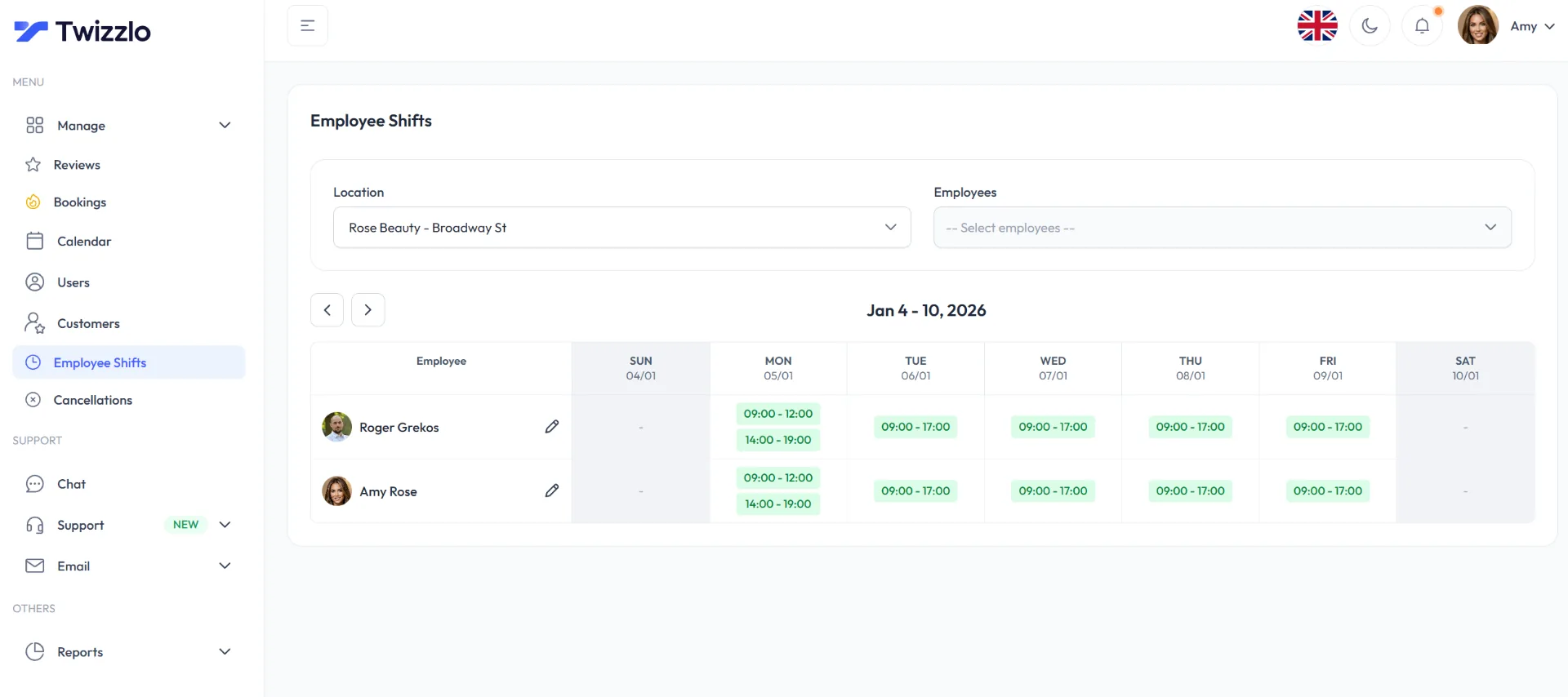
Twizzlo is web-based online booking and appointment scheduling software for appointment-based service businesses (salons, barbershops, spas, tattoo studios, pet groomers, cleaning companies) that puts online booking, SMS and email reminders, staff scheduling, a client CRM, and multi-location reporting into one paid plan.
Twizzlo has two plans. Business Pro costs $29.99 a month per business and includes unlimited bookings, unlimited staff, unlimited locations, and unlimited clients, with 50 SMS messages included each month and $0.03 per message after that. The Free plan is $0 a month and includes the core features up to 150 bookings a month, with no SMS. There are no per-seat charges: the client CRM, business insights, and multi-location dashboard are on both plans, and the full list is on the features page. Online payments carry your Stripe processing rate plus a 1.5% Twizzlo platform fee. Business Pro carries a 30-day money-back guarantee, clients can prepay the full service price at booking, and no-show fees are supported.
The limitation: Twizzlo does not run a consumer marketplace, so it fits businesses that already bring in their own clients. Fresha and Booksy can put your business in front of people browsing for an appointment; with Twizzlo, clients book through your own booking page, per-location links, website, and social profiles.
Who it fits: Appointment businesses with two or more providers, or plans to get there. One flat price for Business Pro does the work: a ten-person, two-location salon pays the same $29.99 a month as a solo operator on that plan. On pricing pages read between September 25 and 28, 2026, Booksy ($49.99 plus tax), Acuity Scheduling ($34) and Vagaro ($33.99) already cost more at two staff, Calendly Standard and Setmore Pro pass $29.99 at three seats ($36 each), and Zoho Bookings Basic passes it at four users ($32), all billed monthly.
Calendly: best for solo consultants and client meetings
Calendly is a meeting scheduler for professional services, with booking pages, two-way calendar syncing, and integrations with Zoom, Google Meet, Microsoft Teams, and CRMs such as HubSpot and Salesforce.
The free plan is limited to one event type and one calendar connection. The Standard plan is $12 per seat per month ($10 billed annually), and Teams is $20 per seat per month ($16 billed annually); seats are for the people who host meetings, and invitees need none (Calendly’s pricing page, read September 25, 2026). For a plan-by-plan view, see our Calendly pricing comparison.
The limitation: Per-seat pricing plus a meeting-first design. Ten bookable employees means ten seats: $120 a month on Standard ($100 billed annually), and its plans are priced around hosts, event types and calendar connections. Calendly books meetings; it does not run a front desk.
Who it fits: Consultants, coaches, recruiters, agencies, and sales teams whose appointments happen in a meeting room or on a video call.
Square Appointments: best free plan with built-in payments
Square Appointments has a free plan for a storefront business: Square Free is $0 a month per location, with appointment reminders, unlimited staff calendars and Square’s payment processing built in, so you pay only when you take a card.
The Plus tier is $49 a month per location and adds a cancellation policy and no-show fees, multi-staff booking and a waitlist; Premium is $149 a month per location. Appointment reminders come on every plan; text marketing on Plus includes 500 messages a month, then 3 cents each, and in-person card processing on Plus runs 2.5% + 15 cents per transaction (Square’s pricing page, read September 25, 2026; plan grid captured September 27, 2026). For a plan-by-plan view, see our Square Appointments pricing comparison.
The limitation: Paid tiers are priced per location, so three locations on Plus cost $147 a month, and the whole system assumes you process payments through Square.
Who it fits: Single-location shops that already use Square hardware, and solo operators who want free software with payments handled.
Acuity Scheduling: best for solo practitioners selling packages
Acuity, owned by Squarespace, is a mature scheduler that can sell packages, memberships, and gift certificates straight from your booking page.
The Starter plan is $20 a month ($16 billed annually) for one calendar. Standard, at $34 a month ($27 billed annually), adds text reminders, a waitlist, memberships and packages, and gift certificates, and supports up to six calendars; Premium, at $61 a month ($49 billed annually), scales to 36. There is no free plan, only a 7-day trial with no card needed (Acuity’s pricing page, read September 25, 2026). For a plan-by-plan view, see our Acuity pricing comparison.
The limitation: Text reminders are locked to the $34 Standard tier ($27 billed annually), and tiered calendar caps mean the price steps up as you hire: the seventh calendar forces the $61 plan ($49 billed annually).
Who it fits: Therapists, trainers, tutors, and estheticians, especially Squarespace site owners, who sell packages or memberships and don’t need a marketplace.
Setmore: best free plan for small teams
Setmore’s free plan covers up to four users, with email confirmations and a branded booking page included.
The Pro plan is $12 per user per month ($5 billed annually) and covers unlimited users while adding SMS reminders with 500 SMS credits a month, two-way calendar sync, recurring appointments, and deposits (Setmore’s pricing page, read September 25, 2026). For a plan-by-plan view, see our Setmore pricing comparison.
The limitation: The free plan stops at four users, SMS reminders require Pro, and reporting and front-desk depth trail the dedicated salon platforms.
Who it fits: Teams of two to four on a tight budget (tutors, small studios, local services) that want multiple staff calendars without paying per seat from day one.
Zoho Bookings: cheapest paid per-user plan
Zoho Bookings is the scheduling piece of Zoho’s software suite, with workspaces for departments or locations, four appointment-distribution algorithms for teams (including round-robin and load-balancing), and tight integrations with Zoho CRM and Zoho Flow.
It is free for one user. The Basic plan is $8 per user per month and Premium is $12 per user per month on monthly billing ($6 and $9 on annual billing, which the page says saves over 25%); Premium, which the page pitches at organizations that need online payments, includes three workspaces and is included with Zoho One subscriptions, and resource booking is a paid add-on (Zoho’s pricing page, read September 28, 2026).
The limitation: Booking pages are more utilitarian than the salon platforms’, and the product clearly assumes you live in the Zoho ecosystem.
Who it fits: Businesses already running Zoho apps, and appointment teams that want the lowest per-seat price in this guide on monthly billing.
Fresha: best marketplace for salons and spas
Fresha pairs full salon software (calendar, point of sale, inventory, marketing) with a consumer marketplace for beauty and wellness.
Fresha lists a single-calendar Independent plan and a Team plan billed per bookable team member. New clients who find you through the Fresha marketplace incur a one-time commission; returning clients are free. Several capabilities are paid add-ons: Insights reporting is billed per bookable team member per month, and Google Rating Boost per location per month. Fresha’s pricing page served Canadian prices from our reading location on September 25, 2026, so this guide prints no Fresha figure.
The limitation: Costs scale on three axes at once: per team member, per new marketplace client, and per add-on. If that math is why you’re reading this, we’ve compared the field in our guide to the best Fresha alternatives.
Who it fits: Salons and spas in dense markets where Fresha’s marketplace fills chairs, and teams that want POS and inventory in the same system.
Vagaro: best add-on ecosystem for salons, spas, and fitness
Vagaro covers a wide range: booking, POS, memberships, a consumer marketplace, payroll and QuickBooks integrations, and even a website builder.
The U.S. base subscription is $23.99 a month, a limited-time rate (Vagaro’s own documentation labels it “only for a limited time”), and includes one bookable calendar; each additional employee calendar is $10 a month up to seven licenses, after which further employees are free. Much of the catalog is à la carte: Forms are $10 a month, the MySite website builder is $20 a month, text-message plans start at $20 a month for 1,000 credits, and a branded app runs $100 a month for a limited time plus a $100 one-time fee (Vagaro’s plans and pricing help article, read September 25, 2026). For a plan-by-plan view, see our Vagaro pricing comparison.
The limitation: The sticker price is a limited-time rate, and add-ons raise the bill: Forms, text marketing and MySite add $50 a month before counting staff calendars.
Who it fits: Established salons, spas, and fitness studios that want maximum functionality under one roof and don’t mind assembling, and paying for, the pieces.
Booksy: best for barbershops that want new-client discovery
Booksy’s consumer app is built around barbering: clients browse local shops, read reviews, and book directly, which makes it as much a client-acquisition channel as a scheduler.
Pricing is $29.99 a month for the first team member plus $20 a month for each additional one, plus tax, with a 14-day trial and no card needed (Booksy’s pricing page, read September 25, 2026). The optional Boost marketing program charges a one-time 30% commission on a new client’s first visit, with a $10 minimum and a $100 maximum (Booksy’s Boost help article, captured September 27, 2026). For a plan-by-plan view, see our Booksy pricing comparison.
The limitation: Staff fees compound quickly: a five-person shop pays $109.99 a month plus tax before payment processing, and Boost takes 30% of a new client’s first visit.
Who it fits: Barbershops and independent stylists in markets where the Booksy app has real consumer traffic. We compare it with other options in our roundup of the best booking apps for barbers.
How to choose: per-seat vs. flat rate, scheduler vs. platform
Two questions settle most choices: does the price grow with each person you add, and is the tool built for meetings or for a service business’s working day? The per-seat math below answers the first, and the scheduler-or-platform test answers the second.
Run the per-seat math for the team you’ll have next year
Per-seat and per-calendar pricing looks cheap for one person and gets expensive with a team. Here is the verified monthly cost of each platform for a six-person service business, at rates read between September 25 and 28, 2026, billed monthly:
- Acuity Standard: $34 ($27 billed annually), but capped at six calendars; the next hire forces the $61 tier ($49 billed annually)
- Twizzlo Business Pro: $29.99 a month per business, the same at 2 staff or 40
- Square Appointments Plus: $49 for one location, but $98 for two locations
- Zoho Bookings Basic: 6 × $8 = $48 ($36 billed annually)
- Calendly Standard: 6 × $12 = $72 ($60 billed annually)
- Setmore Pro: 6 × $12 = $72 ($30 billed annually)
- Vagaro: $23.99 limited-time rate + 5 × $10 = $73.99, before add-ons
- Booksy: $29.99 + 5 × $20 = $129.99, plus tax
The pattern is consistent: seat-based tools undercut flat-rate pricing for solos and micro-teams, and flat rate wins as headcount grows.
General-purpose scheduler or service-business platform?
Calendly and Zoho Bookings are meeting schedulers: excellent at calendar syncing, time zones, and routing, and built for appointments that happen on a call. If your appointment is a haircut, a massage, a grooming session, a portrait session, a mobile car detail, or a house cleaning, you need front-desk capabilities those tools are not built around: walk-ins, tips, prepayment, service menus, staff rotas, and client visit histories.
Square Appointments, Fresha, Vagaro, Booksy, and Twizzlo are service-business platforms. Choosing among them comes down to two questions: do you want a marketplace to bring you clients (Fresha, Booksy, Vagaro), or do you already have demand? And how does the price scale with your staff count? For industry-specific breakdowns, see our guides to the best salon booking software and the best scheduling apps for cleaning businesses.
Frequently asked questions
What is the best free appointment scheduling software?
It depends on the constraint you can live with. On pricing pages read September 25 and 28, 2026, Square Appointments Free is $0 a month per location with payments built in, Setmore’s free plan allows four users, and Zoho Bookings and Calendly are free for basic solo use: one user on Zoho, and one event type and one calendar connection on Calendly. Twizzlo’s free plan includes the core features (unlimited staff and locations) up to 150 bookings a month, with no SMS. Fresha lists paid Independent and Team plans.
How much does appointment scheduling software cost?
At prices read between September 25 and 28, 2026, meeting schedulers run $8 to $20 a month for one user, billed monthly (Zoho Bookings, Calendly, Acuity’s entry tier), and service-business platforms run roughly $23.99 to $49 a month as a base on paid plans, plus $10 to $20 a month per additional staff member on Vagaro and Booksy, so a five-person team pays $49 on Square Plus, $63.99 on Vagaro’s limited-time rate and $109.99 plus tax on Booksy. Twizzlo’s Business Pro is $29.99 a month per business regardless of headcount, and its Free plan is $0 for up to 150 bookings a month, with no SMS.
What is the difference between per-user and flat-rate pricing?
Per-user (also called per-seat or per-calendar) pricing charges for every bookable staff member, so your bill tracks your headcount. Flat-rate pricing is one subscription regardless of team size. If you’re solo, per-user is usually cheaper. From roughly three bookable staff upward, flat rate is usually cheaper, and hiring never raises the software bill.
Which appointment scheduling software is best for salons and barbershops?
If new-client discovery matters most, Fresha (salons and spas) and Booksy (barbershops) run consumer marketplaces, priced per team member, plus a one-time fee on new marketplace clients; Booksy Boost takes 30% of a new client’s first visit (Booksy’s help center, captured September 27, 2026). If you already have a client base, a per-business plan like Twizzlo’s Business Pro, or Vagaro’s per-calendar model, usually costs less; run both against your actual staff count before deciding.
Does appointment scheduling software reduce no-shows?
The two mechanisms that work are automated reminders and financial commitment. On pages read between September 25 and 28, 2026, SMS varies: included with caps (Twizzlo includes 50 a month on Business Pro, then $0.03 each; Setmore Pro includes 500 SMS credits a month), tier-locked (Acuity Standard), or included on every plan (Square Appointments sends text and email appointment reminders on all plans), and Booksy says its confirmations and reminders are always free. For financial commitment, Square Plus, Vagaro (its Online Shopping Cart add-on), and Booksy support cancellation or no-show fees, and Twizzlo takes online payments through Stripe, including prepaid bookings that charge the full service price at booking; no-show fees are supported too.
Can I just use Google Calendar’s appointment scheduling?
For occasional meetings, yes. Google Calendar’s appointment schedules produce a simple booking page at no extra cost with a Google account. But it lacks SMS reminders, staff scheduling and multi-location management. We break down where it stops being enough in our comparison of Google’s appointment scheduler vs. real booking software.
What is appointment scheduling software?
Appointment scheduling software lets clients book time with you online instead of calling. Beyond the shared calendar, service-business platforms add automated email and SMS reminders, staff schedules, client records, and payment or deposit collection, while meeting schedulers concentrate on calendar syncing, time zones, and video-call links. The right category depends on whether your appointments happen in a chair or on a call.
How do I choose appointment scheduling software for my business?
Start with the two questions this guide is built around: how does the price scale with your staff count, and is the tool built for your kind of appointment? Run the per-seat math for the team you expect to have next year, then check what reminders, payments, and multi-location support actually cost on each platform. If per-user fees are your sticking point, see our guide to appointment software without seat fees.
What is the best appointment scheduling app for a business with staff?
It depends on how the bill grows as you hire. On pricing pages read September 25, 2026, Booksy charged $29.99 a month for one team member plus $20 per added member, plus tax, Vagaro $23.99 a month on a limited-time rate plus $10 per added calendar, and Square Appointments Plus $49 a month per location. Twizzlo’s Business Pro is $29.99 a month per business with unlimited staff, and its Free plan covers unlimited staff up to 150 bookings a month, with no SMS.
Is scheduling software cheaper if you pay annually?
Often, when the vendor sells annual plans. On pricing pages read between September 25 and 28, 2026, Calendly Standard cost $12 a seat a month or $10 billed annually, Acuity Scheduling Starter $20 or $16, Setmore Pro $12 or $5 per user, and Zoho Bookings Basic $8 or $6 per user. Square Appointments, Vagaro and Booksy printed monthly prices.
The bottom line: match the pricing model to the team you’re building, not just the team you have today. If you run an appointment-based business with staff, Twizzlo has two plans: Free is $0 a month for up to 150 bookings, with no SMS, and Business Pro is $29.99 a month per business with unlimited bookings, 50 SMS a month then $0.03 each, and a 30-day money-back guarantee. Both plans include unlimited staff and locations, email reminders and client records.
Sources and methodology
Prices read
- Calendly pricing page (opens in a new tab)Read . Supports: Free, Standard and Teams prices per seat, billed monthly and annually (read September 25, 2026); the Free plan's one event type and one calendar connection; seats are for hosts, invitees need none; calendar, video (Zoom, Google Meet, Microsoft Teams) and CRM (HubSpot, Salesforce) integrations
- Square Appointments pricing page (US) (opens in a new tab)Read . Supports: Free, Plus and Premium per location and card rates (read September 25, 2026); appointment reminders on every plan, text marketing on Plus, and Plus cancellation policy, no-show fees, multi-staff booking and waitlist (plan grid)
- Acuity Scheduling pricing page (opens in a new tab)Read . Supports: Starter, Standard and Premium by calendar count, billed monthly and annually; Standard features; no free plan and the 7-day trial
- Setmore pricing page (opens in a new tab)Read . Supports: Free up to 4 users and Pro per user, billed monthly and annually (read September 25, 2026); Pro features and 500 SMS credits; email confirmations and branded booking page
- Zoho Bookings pricing page (opens in a new tab)Read . Supports: Free for one user, Basic and Premium per user in US dollars, billed monthly and annually; Premium workspaces, Zoho One access, resource add-ons and distribution algorithms
- Vagaro plans and pricing help article (US) (opens in a new tab)Read . Supports: The limited-time base rate, one calendar included, $10 per added employee calendar up to seven licenses, and add-on prices
- Vagaro Online Shopping Cart help article (opens in a new tab)Read . Supports: Deposits and cancellation fees for online appointments through the Online Shopping Cart add-on
- Booksy pricing page (opens in a new tab)Read . Supports: Subscription per business with one team member, the added-member fee, tax and the 14-day trial (read September 25, 2026); confirmations and reminders; No-Show Protection features
- Booksy Boost pricing help article (opens in a new tab)Read . Supports: Boost's one-time 30% fee on a new client's first visit, $10 minimum and $100 maximum
- Twizzlo pricing page (opens in a new tab)Read . Supports: Twizzlo plans, the 150-booking Free cap, SMS allowance, money-back guarantee and online payment fee
- Twizzlo features page (opens in a new tab)Read . Supports: Twizzlo features and the staff shifts screenshot shown on this page (same image)
From our editorial policy
- Twizzlo sells online booking and appointment scheduling software, the same category we write about. Twizzlo appears in our comparisons and roundups, and we have a commercial interest in you choosing it.
- We do not publish invented quotes, studies, statistics, customer stories or product tests, and we do not imply hands-on use of a product when the research came from the vendor's public documentation.
- To report an error, email support@twizzlo.com with the subject line "Correction: [page URL]". Tell us what is wrong and, if you can, link a source.
Update history
- : Re-read every vendor's price on its own site in September 2026, put monthly prices first, removed Fresha figures we could not confirm for the US, added monthly costs at 1, 3, 6 and 10 staff, and added two FAQs.
Start free, upgrade when you grow
Flat-rate booking software. No per-seat, per-chair or per-location fees.
- Free plan up to 150 bookings a month, not a trial
- Business Pro is $29.99 a month per business for unlimited bookings, with a 30-day money-back guarantee
- 24/7 support by email